How to Build a Company Profile That Wins B2B Deals
A company profile is not an about page. It is a working data record your sales, marketing, and RevOps teams query every day. Here is how to build one that holds up.
TL;DR
- A company profile has two meanings in B2B: the marketing document you publish about your own business, and the structured data record you keep about a target account. This guide covers both, because the second one is what actually drives pipeline.
- The sales-ready version needs roughly 12 core fields: legal name, domain, industry, headcount, revenue band, HQ and offices, tech stack, funding, org chart, key contacts, verified email pattern, and a last-verified timestamp.
- Manual research takes 15-25 minutes per account. Automated enrichment gets the same fields in seconds and adds the one thing manual research usually skips — a verified contact route.
- Data decays at roughly 2-3% per month. A profile without a
last_verifieddate is a liability, not an asset. - Build the template once, script the sourcing, verify the contact layer, then review quarterly. That order matters.
Most "how to build a company profile" advice hands you a Word template and calls it a day. That works if you are writing an About page for your own website. It fails completely if you are building account records that a sales team has to act on.
This post covers both jobs. First the internal document — the one you publish, send in RFPs, and paste into partner directories. Then the operational one — the account record your SDRs, AEs, and RevOps team query before every outbound touch. The second is where most teams lose money, so that is where most of this guide lives.
What is a company profile, exactly?#
A company profile is a structured summary of an organisation's identity, size, market position, and reachability. The format changes depending on who reads it.
The two variants:
- Outward-facing profile — what you write about your own company. Lives on your About page, in pitch decks, on Crunchbase and G2, in procurement documents. Audience: prospects, partners, investors, journalists. Optimised for persuasion and credibility.
- Inward-facing account profile — what you record about a target company. Lives in your CRM, your data warehouse, or a spreadsheet before it grows up. Audience: your own reps and marketers. Optimised for accuracy and actionability.
- Hybrid firmographic record — a normalised profile used by RevOps for scoring, routing, and territory design. Same fields as #2 but standardised so they can be filtered, not just read.
- Enrichment payload — the machine-readable version returned by an API, merged into your CRM on a schedule. No prose, just typed fields.
If you confuse these, you end up with an account record full of marketing adjectives ("innovative leader in cloud transformation") and zero usable data. Your reps cannot filter on "innovative."
Why does a badly built company profile cost you deals?#
Three failure modes, in order of how much revenue they burn.
Wrong contact route. You have a beautiful 400-word profile on an ideal-fit account and no verified email for the decision maker. The profile is decoration. According to HubSpot's sales research, data quality is consistently ranked among the top blockers to sales productivity — and the contact layer is the part that rots fastest.
Stale firmographics. Headcount from 18 months ago puts a Series C company in your SMB segment. It gets routed to a rep who does not handle enterprise, gets a self-serve sequence, and churns out of your funnel silently.
Unstructured fields. "About 200-ish employees, maybe more after the acquisition" cannot be scored, filtered, or fed to a model. Free text belongs in a notes field, never in a firmographic field.

The fix for all three is the same: define the schema first, then fill it.
What fields belong in a company profile template?#
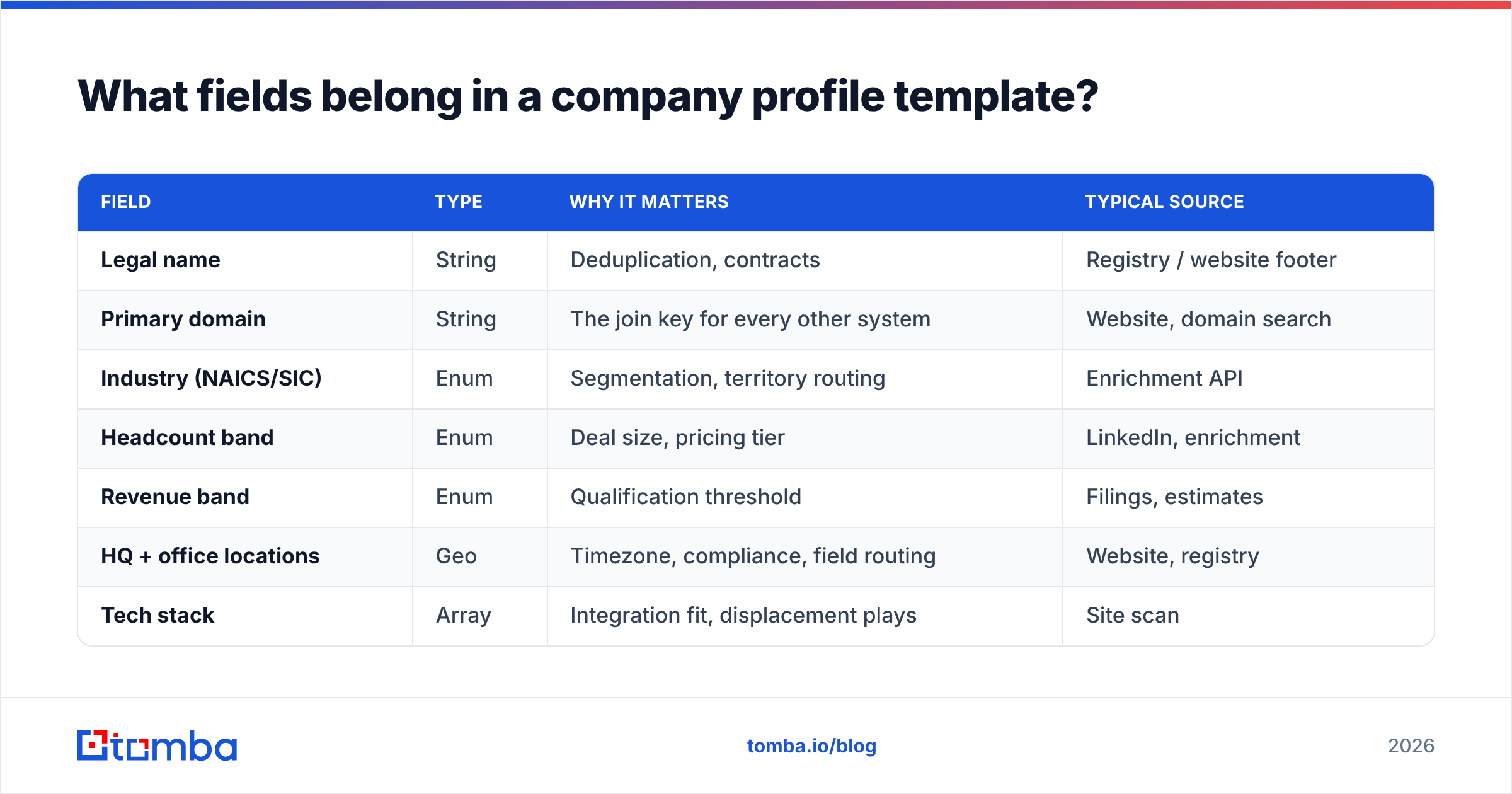
Here is the field set that survives contact with an actual sales team. Anything beyond this is nice-to-have; anything missing from this is a gap you will feel.
| Field | Type | Why it matters | Typical source |
|---|---|---|---|
| Legal name | String | Deduplication, contracts | Registry / website footer |
| Primary domain | String | The join key for every other system | Website, domain search |
| Industry (NAICS/SIC) | Enum | Segmentation, territory routing | Enrichment API |
| Headcount band | Enum | Deal size, pricing tier | LinkedIn, enrichment |
| Revenue band | Enum | Qualification threshold | Filings, estimates |
| HQ + office locations | Geo | Timezone, compliance, field routing | Website, registry |
| Tech stack | Array | Integration fit, displacement plays | Site scan |
| Funding stage + last round | Enum + date | Budget timing signal | Crunchbase, press |
| Key contacts (3-5) | Object array | Who you actually email | Email finder |
| Verified email pattern | String | Scales to the whole org | Pattern detection |
| Parent / subsidiary links | Relation | Avoid double-selling | Registry |
| Last verified | Timestamp | Trust score for everything above | Your pipeline |
Two notes on this table. First, every enum field should have a fixed vocabulary — "51-200" not "about 100." Second, last_verified is not optional. A profile without it forces every rep to re-research from scratch because nobody knows if the data is six days or six years old.
How do you build a company profile step by step?#
Seven steps. Do them in order — skipping step 1 is why most teams end up with three incompatible spreadsheets.
1. Define the schema before you research anything. Write the field list, the type of each field, and the allowed values for enums. Put it in a shared doc. This takes 30 minutes and saves weeks of reconciliation.
2. Establish the domain as your primary key. Not company name — names change, get abbreviated, and collide. acme.com is unambiguous. Every enrichment call, every dedupe pass, every CRM merge keys off the domain.
3. Pull firmographics from a single source of truth. Mixing LinkedIn headcount with Crunchbase revenue with a scraped industry code produces a Frankenstein record. Pick one primary provider, use others only to fill nulls, and record which source filled which field.
4. Map the org before you hunt for contacts. Identify the three roles you need: economic buyer, champion, blocker. Named roles beat named people, because people leave and roles persist.
5. Find and verify the contact layer. This is the step that converts a research artefact into a sellable asset. Use an email finder to resolve name + domain into an address, then push every result through an email verifier before it touches a sequence. Unverified addresses damage your sending domain, and that damage is slow to undo.
6. Add the signal layer. Funding rounds, job postings, tech-stack changes, leadership hires. These are the fields that tell a rep when to reach out, not just who to reach.
7. Stamp it and schedule the refresh. Write last_verified. Set a re-check cadence — 30 days for contacts, 90 days for firmographics, on-event for funding and leadership.
How does manual research compare to automated enrichment?#
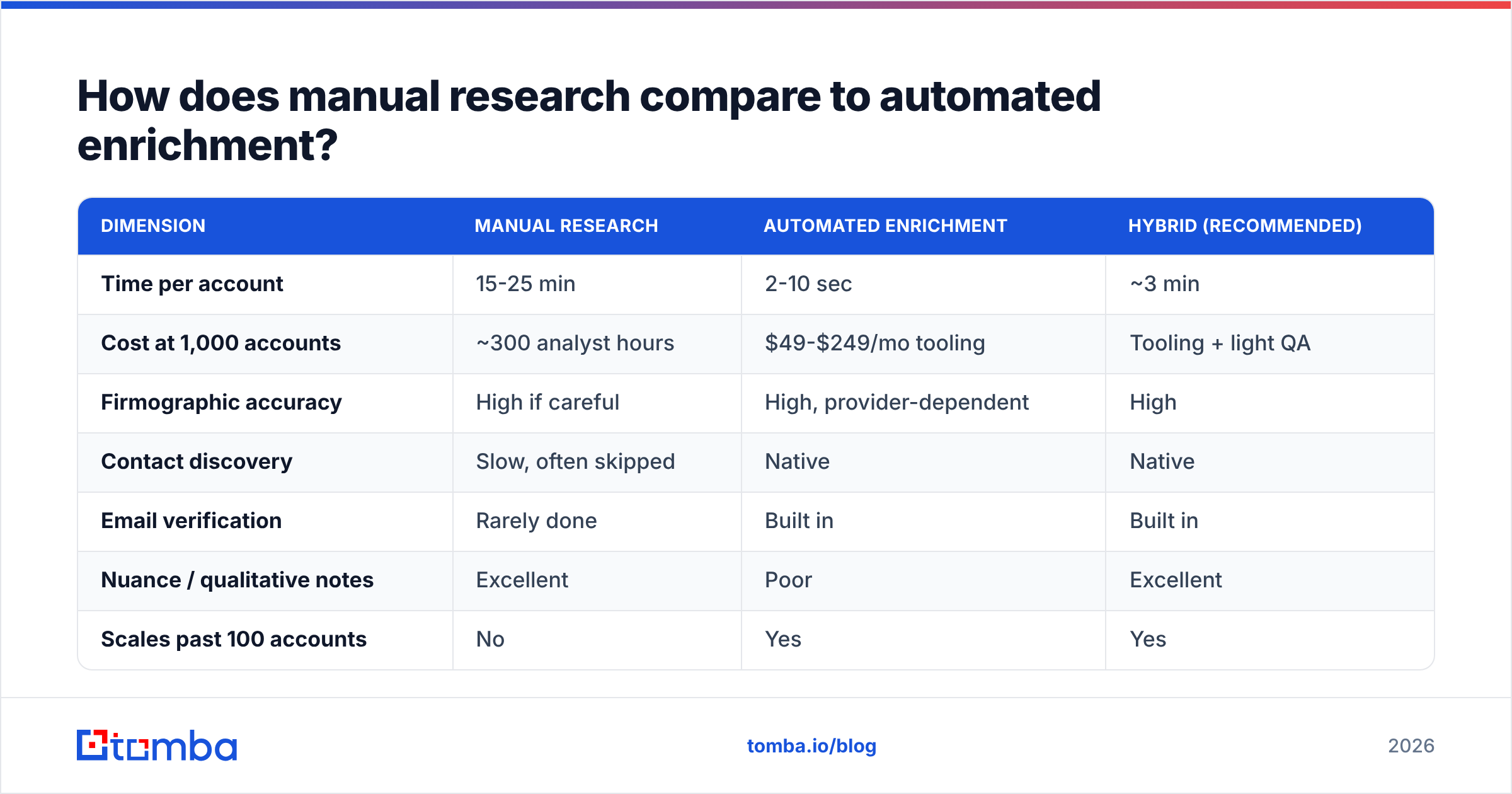
Both work. They cost radically different amounts of time, and they fail in different places.
| Dimension | Manual research | Automated enrichment | Hybrid (recommended) |
|---|---|---|---|
| Time per account | 15-25 min | 2-10 sec | ~3 min |
| Cost at 1,000 accounts | ~300 analyst hours | $49-$249/mo tooling | Tooling + light QA |
| Firmographic accuracy | High if careful | High, provider-dependent | High |
| Contact discovery | Slow, often skipped | Native | Native |
| Email verification | Rarely done | Built in | Built in |
| Nuance / qualitative notes | Excellent | Poor | Excellent |
| Scales past 100 accounts | No | Yes | Yes |
| Refresh cost | Full re-research | Re-run the job | Re-run + spot check |
The honest read: automation wins on everything structured, humans win on everything qualitative. A 1,000-account list built entirely by hand is a budget fire. A 1,000-account list built entirely by API has no strategic colour on the 20 accounts that actually matter.
Run the machine over the whole list, then have a human write 200 words of context on the top decile. That is where hybrid earns its name.
Which tools should you use to build company profiles?#
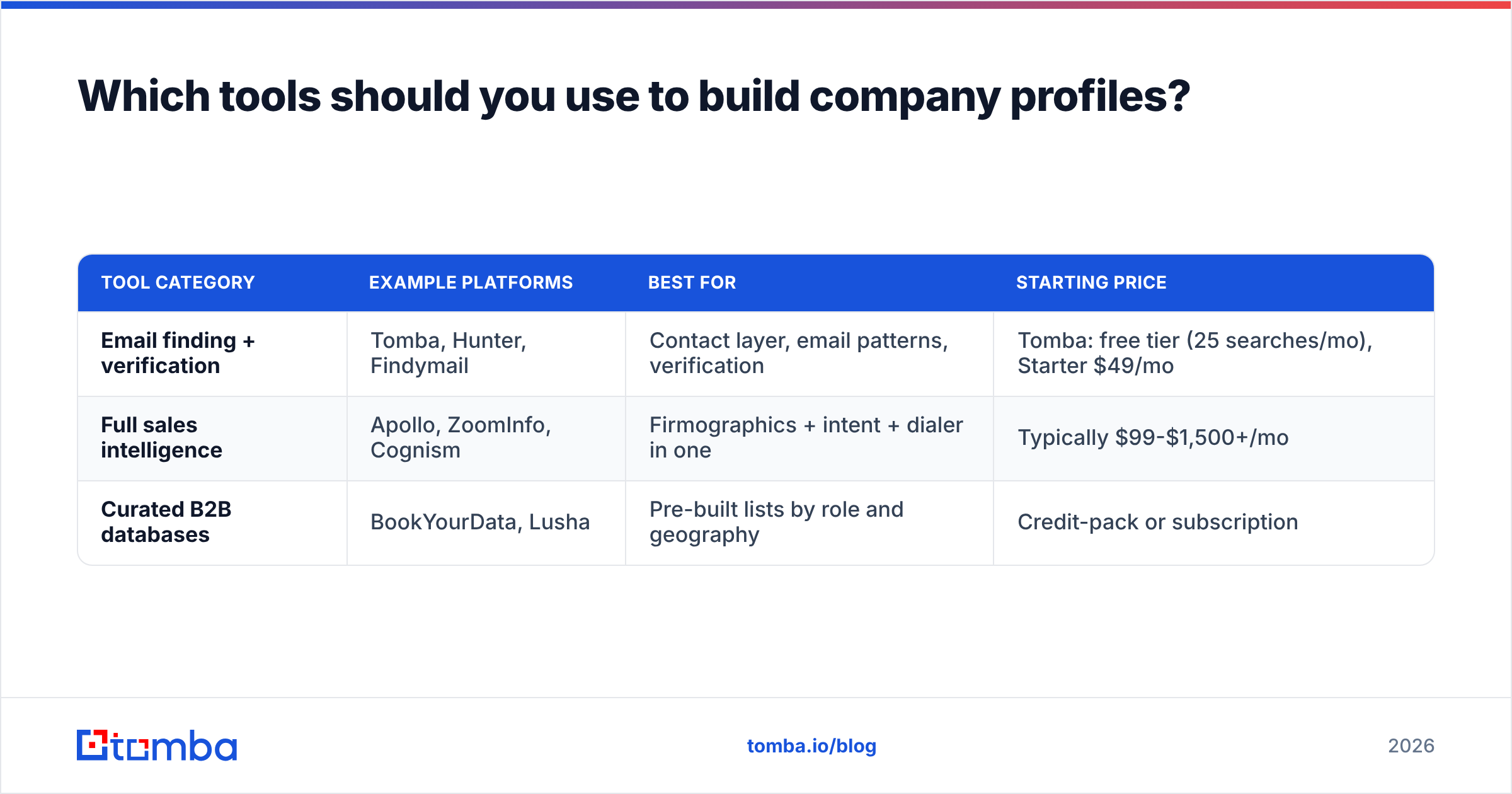
The market splits into three groups, and most teams need one from at least two of them.
| Tool category | Example platforms | Best for | Starting price |
|---|---|---|---|
| Email finding + verification | Tomba, Hunter, Findymail | Contact layer, email patterns, verification | Tomba: free tier (25 searches/mo), Starter $49/mo |
| Full sales intelligence | Apollo, ZoomInfo, Cognism | Firmographics + intent + dialer in one | Typically $99-$1,500+/mo |
| Curated B2B databases | BookYourData, Lusha | Pre-built lists by role and geography | Credit-pack or subscription |
A few practical notes on choosing.
If your gap is reachability, start with an email-finding platform. You already know which companies you want; you cannot reach anyone inside them. Tomba's Tomba pricing runs Free (25 searches/mo), Starter $49/mo, Growth $99/mo, Pro $249/mo, and Enterprise custom — and the domain search endpoint returns every discoverable address on a domain plus the detected email pattern, which is often the single most reusable field in the whole profile.
If your gap is target selection, a full sales-intelligence platform earns its cost. You are paying for intent signals and filtering, not for email addresses.
If your gap is volume of a very specific persona, a curated database like BookYourData is often faster than building the list yourself. Buying a well-maintained list of, say, 5,000 dental practice owners in Texas beats scraping for three weeks.
Check independent reviews on G2 before committing to an annual contract. Vendor-published accuracy figures are marketing; buyer reviews at least reflect real usage.

How do you keep a company profile from going stale?#
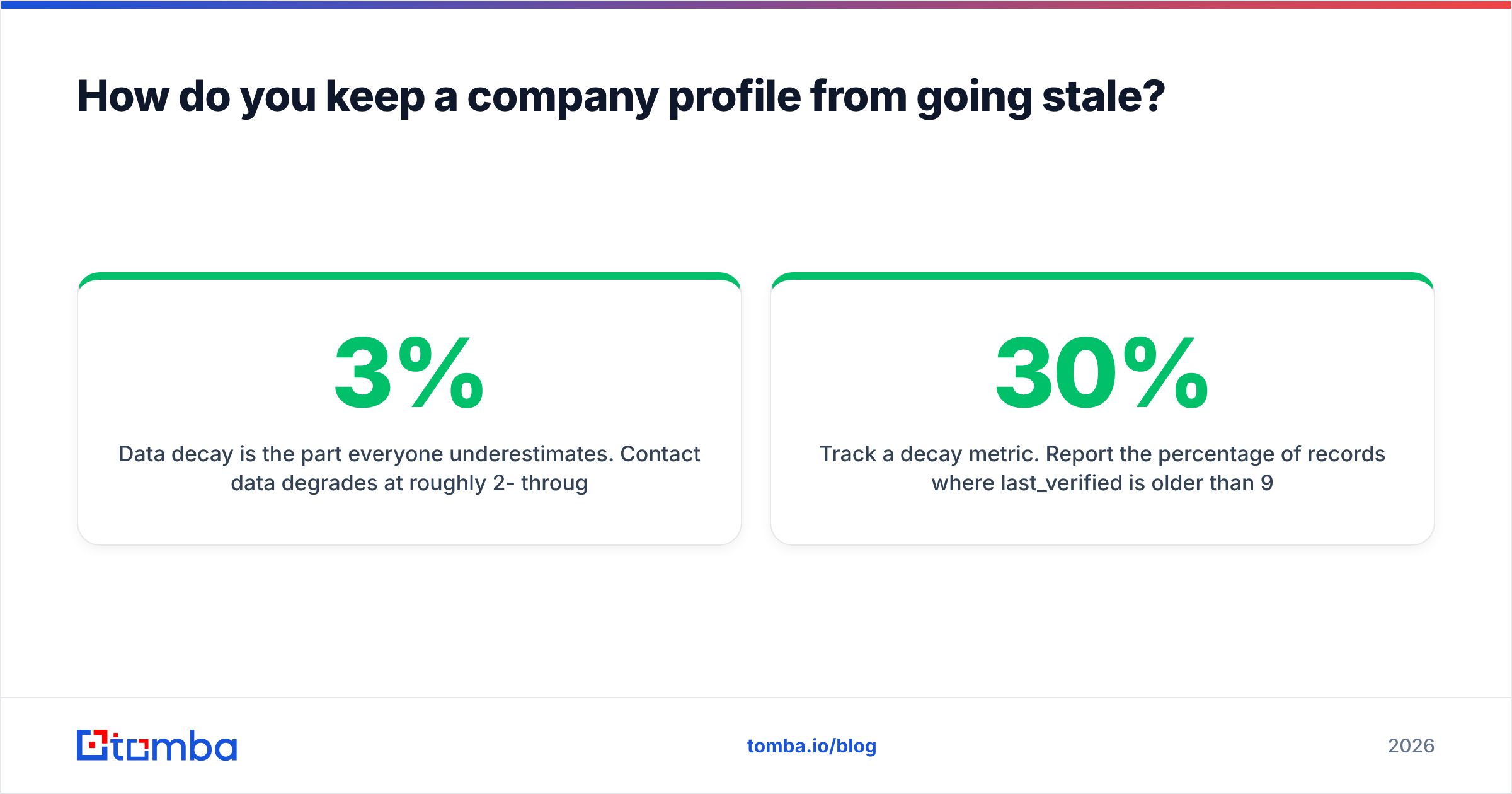
Data decay is the part everyone underestimates. Contact data degrades at roughly 2-3% per month through job changes alone — that is 25-30% annually before you count company-level changes like acquisitions, rebrands, and domain migrations.
Build a three-tier refresh cadence:
- Event-driven (immediate). Funding announcement, acquisition, leadership change, domain migration. These invalidate multiple fields at once and should trigger a full re-enrichment of that account.
- Contact-layer (30 days). Re-verify every email on active accounts monthly. A bulk verify run over your active sequence list is cheap insurance against a deliverability hit.
- Firmographic (90 days). Headcount, revenue band, tech stack. These move slowly enough that quarterly is fine.
Automate the plumbing. If your profiles live in a CRM, connect enrichment directly rather than exporting CSVs. A HubSpot integration or a scheduled call against the Tomba API keeps records current without a human in the loop. Manual CSV round-trips are where refresh processes go to die — someone owns it for two months, then they get promoted, and the file goes stale.
Track a decay metric. Report the percentage of records where last_verified is older than 90 days. If that number climbs above 30%, your refresh process is broken regardless of what the runbook says.
What does a good company profile actually look like?#
Here is the compressed shape of a finished account record. Prose kept to a minimum, structure kept strict.
domain:            northwind-logistics.com
legal_name:        Northwind Logistics Group Ltd
industry_naics:    488510 (Freight Transportation Arrangement)
headcount_band:    201-500
revenue_band:      $50M-$100M
hq:                Rotterdam, NL
offices:           Rotterdam, Hamburg, Singapore
tech_stack:        [SAP, Salesforce, Snowflake, Segment]
funding_stage:     Series C (Mar 2025, $42M)
email_pattern:     {first}.{last}@northwind-logistics.com  [confidence: high]
contacts:
  - VP Operations   | verified | primary target
  - Head of IT      | verified | technical blocker
  - CFO             | catch-all| economic buyer
last_verified:     2026-08-19
notes:             Migrating off legacy TMS in Q1 2026. Job posting for
                   "Integration Engineer (TMS)" posted 3 weeks ago.
Notice what is doing the work here. The email pattern generalises to every employee. The catch-all flag on the CFO tells the rep to route differently — catch-all domains accept everything at the SMTP layer, so a "valid" result means less than it does elsewhere, and a catch-all verifier is the only way to grade those addresses honestly. And the notes field carries the one thing no API returns: a reason to send an email this week rather than next quarter.
What about your own company profile — the one you publish?#
Different job, shorter checklist. If you are writing the outward-facing version:
- Lead with the specific problem you solve, not your founding year. "We reduce freight settlement disputes by 40%" beats "Founded in 2011, we are a leading provider of logistics solutions."
- Include hard numbers — customers served, years operating, geographic coverage, certifications. Vague scale claims read as weakness.
- Name your customers if you have permission. Three recognisable logos outperform three paragraphs of positioning.
- Keep a short and long version. 100 words for directories and partner pages, 400-600 for your About page and RFP responses.
- Publish your firmographics deliberately. Headcount, HQ, and industry on your own site is how enrichment providers get you right. If you leave it ambiguous, third-party databases will guess — and they will guess wrong.
That last point is underrated. Your own company profile is training data for every B2B database your prospects use. Making it machine-readable is a cheap way to control how you appear in other people's CRMs.
Common mistakes to avoid#
- Free text where enums belong. "Around 300 staff" is unusable.
201-500is filterable. - Company name as the primary key. Domains are stable, names are not.
- Skipping verification because the finder said "found." Found is not the same as deliverable. Run the email verifier anyway.
- One giant profile per account with no field structure. If it cannot be queried, it is a document, not a record.
- No owner. Every profile schema needs a named person responsible for the refresh cadence. Shared ownership means no ownership.
Build the contact layer first#
Everything in this guide is downstream of one question: can you actually reach someone at this company? Firmographics tell you whether an account is worth pursuing. The contact layer tells you whether pursuit is even possible.
Start there. Run your target domains through the Tomba Email Finder to resolve names into verified addresses and surface each company's email pattern in one pass — the free tier gives you 25 searches a month to test the fit before committing to Starter at $49/mo. Then layer firmographics on top of records you can already act on, rather than researching 400 accounts you have no route into.
Related guides#
Ready to find emails that actually work?
Join 150,000+ professionals who stopped guessing and started sending. Free credits on signup — no credit card required.
Get the Tomba newsletter
Practical outbound tactics and product updates — once every two weeks.
About the author