How to Build a Mailing List in 2026: A Practical Guide
Most mailing lists die from bad data and worse consent, not weak copy. Here are the seven steps that actually build a list that opens, clicks, and buys in 2026.
TL;DR
- A mailing list is only worth what its data is worth. A 5,000-contact list with 12% invalid addresses will hurt you more than a 900-contact list that is fully verified.
- Build from sources you control first: website capture, product signups, events, and content downloads. Sourced B2B contacts belong in a separate track with different rules.
- Verify every address before it enters your sending tool, then re-verify every 90 days. Bounce rate above 2% is where Gmail and Microsoft start throttling you.
- Segment on day one — role, company size, and acquisition source — because you cannot retroactively segment a list you never tagged.
- Growth rate matters less than net active subscribers. Track that number weekly and you will make better decisions than 90% of marketers.
Building a mailing list in 2026 is a data-quality problem wearing a marketing costume. The tactics that filled lists in 2018 — pop-up everything, buy a list, blast it — now trigger spam complaints, Gmail's bulk-sender enforcement, and in the EU, actual fines. What still works is narrower and more boring: earn the address, prove it exists, tag it properly, and mail it consistently.
This guide walks through the whole sequence, with the numbers you should be measuring at each step.
What is a mailing list, and what makes one valuable?#
A mailing list is a permission asset. It is a set of contacts who have given you a legitimate basis to email them, stored with enough context that you can send something relevant rather than something generic.
The value of that asset is not the row count. It is:
- Deliverability health — what share of your list actually reaches an inbox. A list with 3% hard bounces gets throttled; one under 0.5% gets delivered.
- Consent quality — did they type their address into your form, or did you find it in a scraped export? This determines what you can legally send and how they react when you do.
- Segmentation depth — how many attributes you hold per contact. Role, company size, industry, and acquisition source are the minimum useful set.
- Recency — an address collected 14 months ago that has never opened anything is functionally dead weight. B2B email data decays at roughly 22–30% per year as people change jobs.
- Reply potential — the share of the list that could plausibly become a customer. 500 ICP-fit contacts beat 50,000 random ones.

The practical takeaway: measure your list by net active subscribers — people who opened or clicked in the last 90 days and are still verified — not total contacts. That single metric change reframes every decision below.
How do you build a mailing list from scratch?#
Start with the sources you fully control, then layer on the rest. Here is the order that produces the cleanest list fastest.
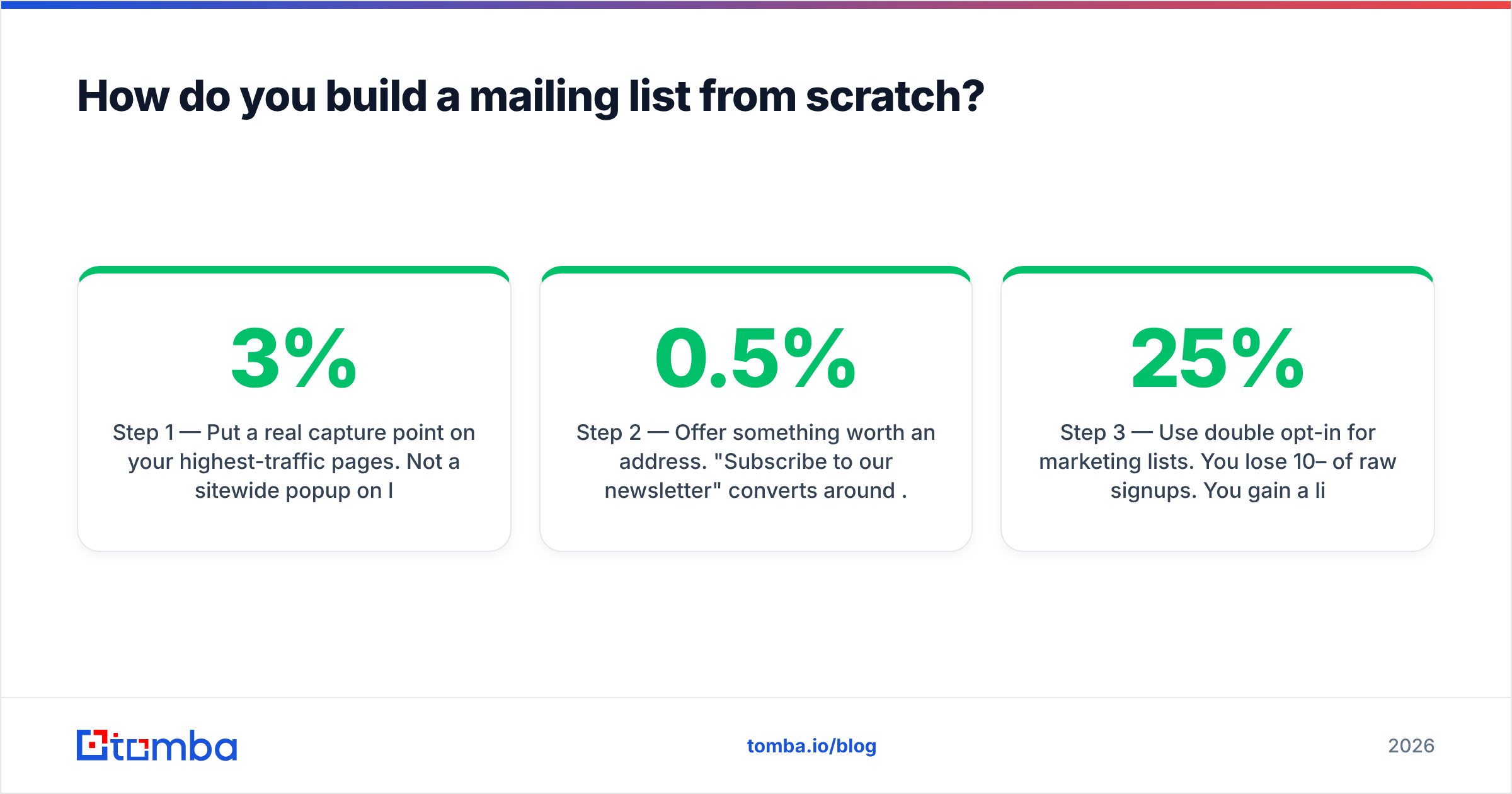
Step 1 — Put a real capture point on your highest-traffic pages. Not a sitewide popup on load. An inline form under your best-performing blog posts, plus an exit-intent modal on pricing and product pages. Blog-embedded forms typically convert 1–3% of readers; exit-intent adds 2–4% on commercial pages.
Step 2 — Offer something worth an address. "Subscribe to our newsletter" converts around 0.5%. A specific, immediately usable asset — a pricing benchmark, a template pack, a calculator — converts 5–10x better. The asset should pre-qualify: if your product serves RevOps teams, gate a RevOps spreadsheet, not a generic ebook.
Step 3 — Use double opt-in for marketing lists. You lose 10–25% of raw signups. You gain a list where every address is provably real and provably consenting, which shows up immediately in bounce and complaint rates. For transactional or product signups, single opt-in plus verification is fine.
Step 4 — Capture context at the point of entry. Two extra fields (company and role) cost you a few percentage points of conversion and buy you segmentation forever. Or skip the fields and use data enrichment to fill company, size, and industry from the domain automatically.
Step 5 — Verify before the address touches your ESP. Run every new signup through an email verifier at the form level. Catching a typo like @gmial.com at submission time is worth more than any cleanup campaign.
Step 6 — Add sourced B2B contacts as a separate track. For outbound prospecting, you find addresses rather than collect them. Use a domain search to pull verified contacts at target accounts, keep them in a distinct list, and never mix them with your opt-in newsletter audience. Different consent basis, different sending domain, different metrics.
Step 7 — Set a re-verification cadence. Quarterly for active lists, monthly if you send daily. Suppress anything that hard-bounces once, and sunset contacts with zero engagement after 6 months.
What's the difference between opt-in list building and sourced B2B contacts?#
These are two different motions that people constantly conflate, which is how you end up with a suspended sending domain.
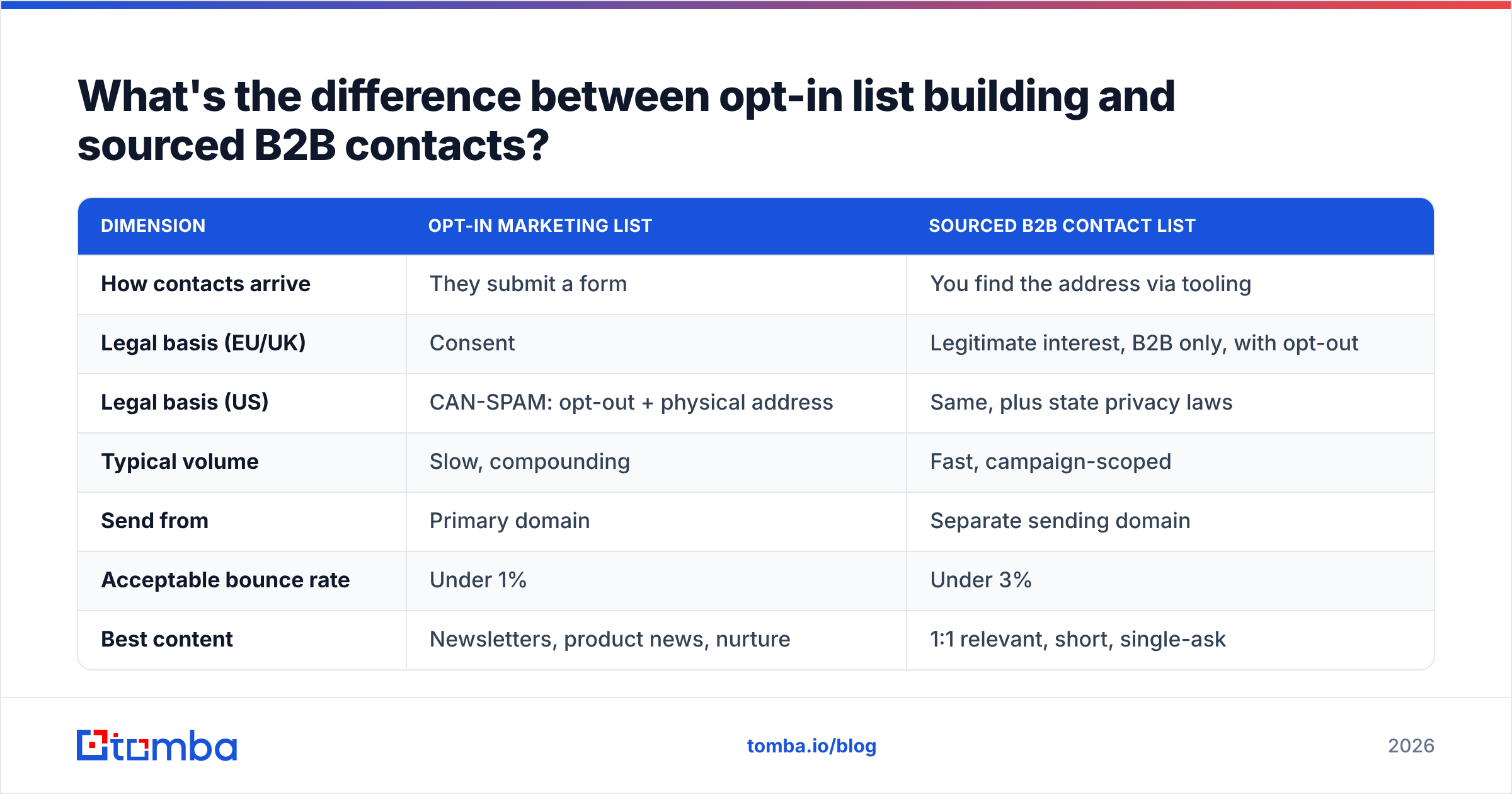
| Dimension | Opt-in marketing list | Sourced B2B contact list |
|---|---|---|
| How contacts arrive | They submit a form | You find the address via tooling |
| Legal basis (EU/UK) | Consent | Legitimate interest, B2B only, with opt-out |
| Legal basis (US) | CAN-SPAM: opt-out + physical address | Same, plus state privacy laws |
| Typical volume | Slow, compounding | Fast, campaign-scoped |
| Send from | Primary domain | Separate sending domain |
| Acceptable bounce rate | Under 1% | Under 3% |
| Best content | Newsletters, product news, nurture | 1:1 relevant, short, single-ask |
| Unsubscribe handling | One-click, honored in 24h | Same, honored immediately |
Mixing them is the single most common way good senders wreck their sender reputation. Cold outbound generates higher complaint rates by nature. If those complaints land on the same domain that sends your newsletter, your newsletter starts going to spam — and the newsletter is the asset you spent two years building.
Google's bulk sender requirements make this concrete: keep spam complaints under 0.30%, ideally under 0.10%, and authenticate with SPF, DKIM, and DMARC. Those thresholds are per-domain. Separating your streams is not paranoia; it is arithmetic.
Which list-building channels actually convert in 2026?#
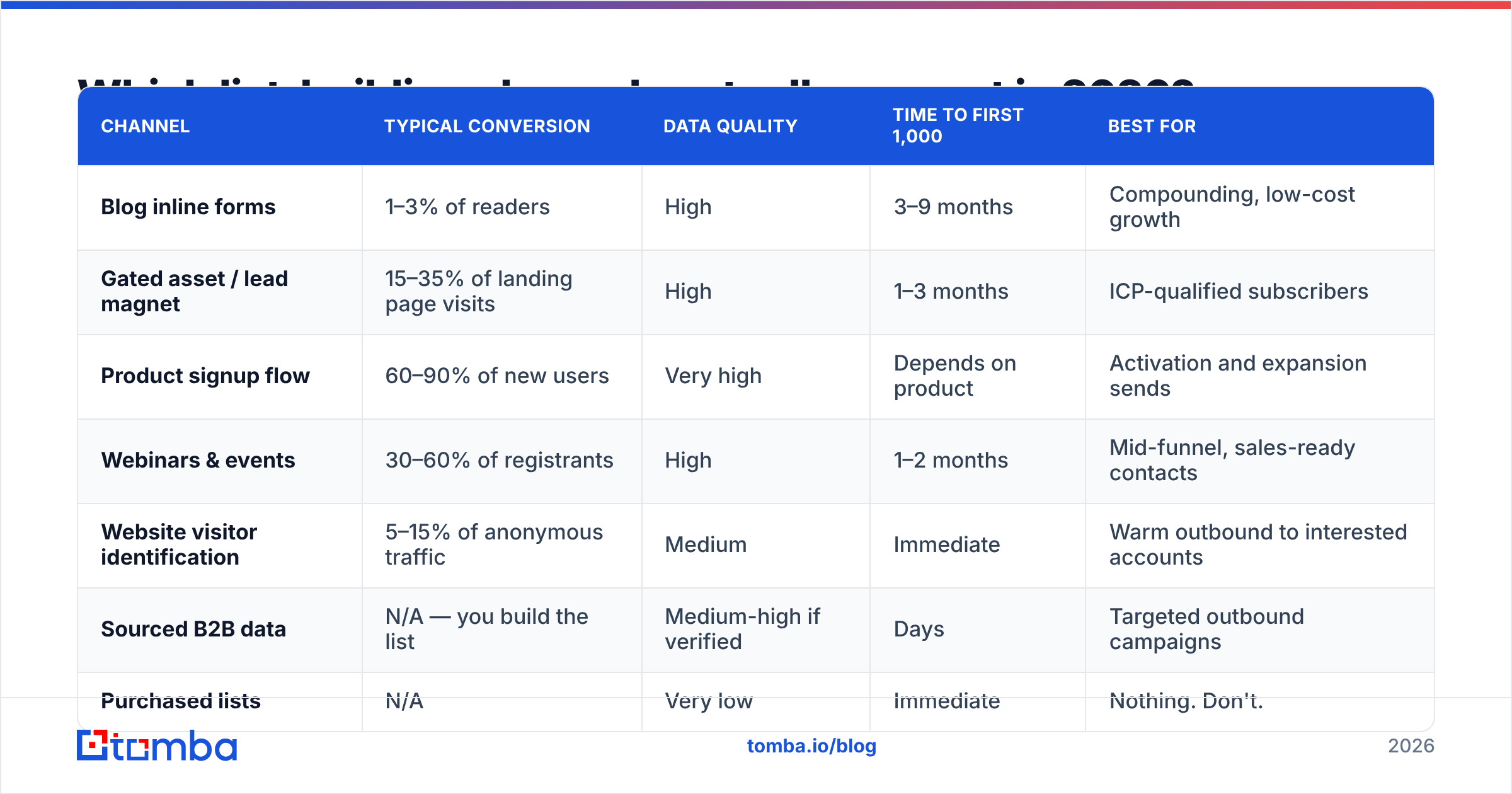
Not all sources produce equal contacts. Here is how the main channels compare on the metrics that matter.
| Channel | Typical conversion | Data quality | Time to first 1,000 | Best for |
|---|---|---|---|---|
| Blog inline forms | 1–3% of readers | High | 3–9 months | Compounding, low-cost growth |
| Gated asset / lead magnet | 15–35% of landing page visits | High | 1–3 months | ICP-qualified subscribers |
| Product signup flow | 60–90% of new users | Very high | Depends on product | Activation and expansion sends |
| Webinars & events | 30–60% of registrants | High | 1–2 months | Mid-funnel, sales-ready contacts |
| Website visitor identification | 5–15% of anonymous traffic | Medium | Immediate | Warm outbound to interested accounts |
| Sourced B2B data | N/A — you build the list | Medium-high if verified | Days | Targeted outbound campaigns |
| Purchased lists | N/A | Very low | Immediate | Nothing. Don't. |
Two channels deserve extra comment.
Website visitor identification turns anonymous traffic into named accounts. Tools like visitor identification surface which companies are reading your pricing page, which you then pair with contact discovery. This is not opt-in list building — those contacts go in the outbound track — but it is the highest-intent source available outside of demo requests.
Sourced B2B data is legitimate when done properly: verified addresses, real people at real companies who plausibly need what you sell, with immediate opt-out. Providers here include Tomba, BookYourData, Apollo, and Cognism, and they differ mainly on coverage, verification method, and price model. A quick sanity check for any provider: ask what happens on a catch-all domain, and whether you pay for unverified results.
How do you keep a mailing list clean and deliverable?#
Cleaning is not an annual chore. It is a standing process with four moving parts.
Verification at entry. Every address gets checked at the moment of capture — syntax, domain, MX record, and mailbox existence. This catches typos and disposable addresses before they ever count as a subscriber.
Catch-all handling. Roughly 15–20% of B2B domains accept all mail, so standard SMTP verification returns "unknown." Don't discard these — many are your best accounts. Use a catch-all verifier to score them by pattern confidence and send to the high-confidence tier only.
Engagement sunsetting. After 90 days of no opens and no clicks, move contacts to a re-permission sequence. Two emails, one clear ask: "Still want these?" Non-responders get suppressed. You will shrink your list by 10–20% and your open rate will climb by more than that, because mailbox providers weight engagement heavily.
Bounce and complaint discipline. Hard bounce means immediate permanent suppression, no exceptions. Soft bounces get three attempts, then suppression. Any complaint means suppression plus a look at how that contact entered your list. If one source produces disproportionate complaints, fix the source.
For a broader picture of what mailbox providers are actually measuring, the email deliverability fundamentals are worth reviewing before you scale volume. And if you are standing up a new sending domain, warm it slowly — 20 to 50 emails per day for the first week, roughly doubling weekly, is a reasonable curve.
What should you measure, and what are realistic benchmarks?#
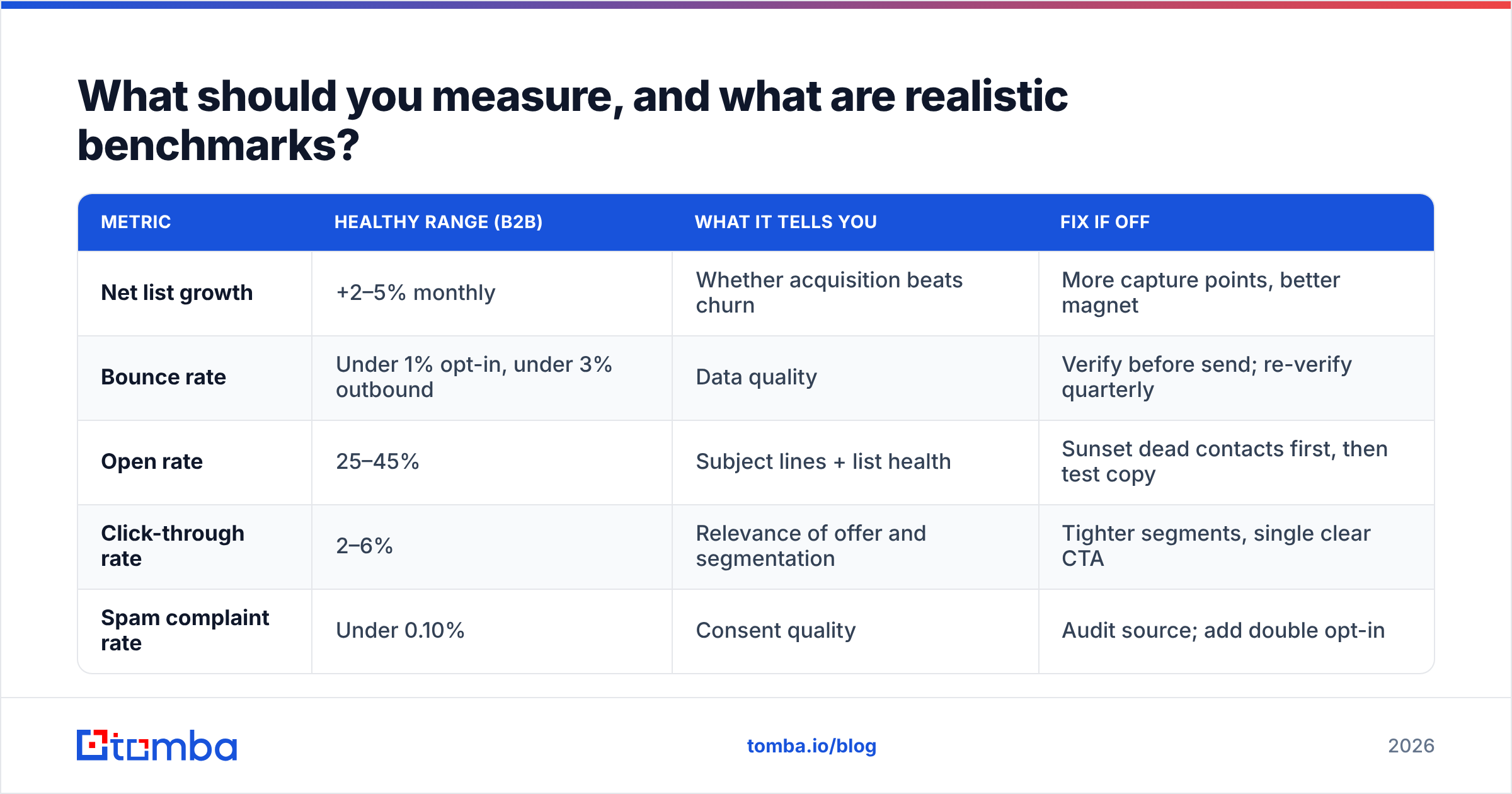
Track five numbers weekly. Anything more and you will stop looking.
| Metric | Healthy range (B2B) | What it tells you | Fix if off |
|---|---|---|---|
| Net list growth | +2–5% monthly | Whether acquisition beats churn | More capture points, better magnet |
| Bounce rate | Under 1% opt-in, under 3% outbound | Data quality | Verify before send; re-verify quarterly |
| Open rate | 25–45% | Subject lines + list health | Sunset dead contacts first, then test copy |
| Click-through rate | 2–6% | Relevance of offer and segmentation | Tighter segments, single clear CTA |
| Spam complaint rate | Under 0.10% | Consent quality | Audit source; add double opt-in |
Note the ordering of fixes. If your open rate is 12%, the instinct is to rewrite subject lines. Usually the real cause is that 40% of the list has not engaged in a year and is dragging your inbox placement down. Clean first, then optimize copy. HubSpot's email marketing benchmarks are a reasonable external reference point if you want to compare against industry medians.
One more: measure list value in revenue per subscriber per month. Total email-attributed revenue divided by active subscribers. When that number goes up while your list shrinks, you are doing this correctly.
What are the most common mailing list mistakes?#
- Buying a list. The addresses are stale, the consent does not exist, and the complaint rate will damage your domain in a single send. This is different from sourcing verified contacts for targeted outbound — the distinction is whether someone verified those addresses recently and whether the targeting is real.
- Skipping segmentation at capture. You cannot go back and ask 8,000 subscribers what their role is. Tag on entry, always, even if you only have one tag.
- Running outbound from your main domain. Covered above. Use a subdomain or a separate domain for cold sends.
- Treating unsubscribes as failure. An unsubscribe protects your deliverability. A spam complaint damages it. Make unsubscribing easy and visible — you want the former, not the latter.
- Mailing infrequently. Sending once a quarter means recipients forget who you are, which raises complaints. Monthly is the practical minimum for staying recognized.
- Never re-verifying. A list verified 12 months ago is roughly 25% wrong today. Re-verification is cheap; a throttled domain is not.
How do you scale list building without wrecking quality?#
Scale by adding sources, not by loosening standards. Each new source gets the same treatment: verified at entry, tagged with its origin, and measured separately on bounce and complaint rate. If a source underperforms on either, you turn it off — and you can only do that if you tagged the origin in the first place.
Practically, the sequence that works:
- Get one channel to 100 signups/month before adding a second. Usually blog forms plus one strong lead magnet.
- Add a second capture surface — webinar, tool, or free calculator — once the first is stable.
- Layer in enrichment so every new contact arrives with company, size, and industry attached, without extra form fields.
- Automate verification via API. Hook the email verification API into your form handler so nothing unverified reaches your ESP.
- Add an outbound track on a separate domain once your inbound list is healthy and you have proof of what messaging resonates.
For bulk work — cleaning an existing list of 50,000 or enriching an export from your CRM — use a bulk verify run rather than one-by-one lookups. Cost per address drops significantly at volume, and you get a single suppression file back.
Budget-wise, list hygiene tooling runs from free tiers for small lists up to a few hundred dollars monthly at scale. Tomba pricing starts free at 25 searches per month, with Starter at $49/mo, Growth at $99/mo, and Pro at $249/mo — enough to cover verification and enrichment for most lists under 100,000 contacts. Compare on cost per verified result, not cost per credit; a cheap provider that returns unverified addresses is more expensive once bounces cost you inbox placement.
Ready to build a list that actually delivers?#
The hard part of list building was never collecting addresses — it is keeping them accurate and reaching real inboxes. Start with verification at the point of entry and re-verification every quarter, and most of the other problems solve themselves.
If you also need to source contacts for a targeted outbound track, Tomba Email Finder finds verified professional addresses by domain, name, or company, with verification built into the same workflow. The free tier gives you 25 searches a month to test coverage on your own target accounts before paying for anything.
Related guides#
Ready to find emails that actually work?
Join 150,000+ professionals who stopped guessing and started sending. Free credits on signup — no credit card required.
Get the Tomba newsletter
Practical outbound tactics and product updates — once every two weeks.
About the author