How to Build a Martech Stack in 2026: A Practical Guide
Most martech stacks fail because teams buy tools before defining data flows. Here is the layer-by-layer build order, a real budget breakdown, and the consolidation math that decides what to cut.
TL;DR
- Build your martech stack in layers, not in shopping carts: system of record first, then data quality, then activation, then measurement. Buying activation tools before you have clean records is why 60-tool stacks still miss pipeline targets.
- A functional B2B stack for a 20-person go-to-market team costs roughly $1,500–$4,000/month. Anything past that needs a written justification per tool.
- The four decisions that matter: which system is the source of truth, how records get created, how records get verified, and who owns the schema. Everything else is replaceable.
- Audit quarterly using seat utilization and last-90-day API calls. Most teams find 25–40% of licensed tools are effectively dormant.
- Data quality is the cheapest layer to fix and the most expensive to ignore — a 12% bounce rate poisons every downstream metric in the stack.
What is a martech stack, and why do most of them fail?#
A martech stack is the set of software your marketing and revenue teams use to attract, capture, enrich, engage, and measure buyers. That definition is boring on purpose, because the failure mode is not conceptual — it is architectural.
Think of it like plumbing in a house. Nobody admires the pipes. But if you install six beautiful faucets before you run the supply line, you get six expensive decorations. Most martech stacks are exactly that: activation tools bolted onto a data layer that was never designed.
Scott Brinker's martech landscape has tracked the vendor explosion for over a decade — the chiefmartec landscape crossed 14,000 products, and the number keeps climbing. Meanwhile, Gartner's CMO Spend Survey has repeatedly found that marketers use only about a third of their stack's capability. The gap is not a discipline problem. It is a sequencing problem.
Three symptoms that your stack was assembled instead of designed:
- Nobody can answer "where does a contact record originate?" without a whiteboard and three people.
- Two tools report different pipeline numbers and the standing fix is a monthly spreadsheet reconciliation.
- You pay for enrichment in two places — usually a CRM add-on plus a standalone provider — and neither owns the schema.
What are the layers of a martech stack?#
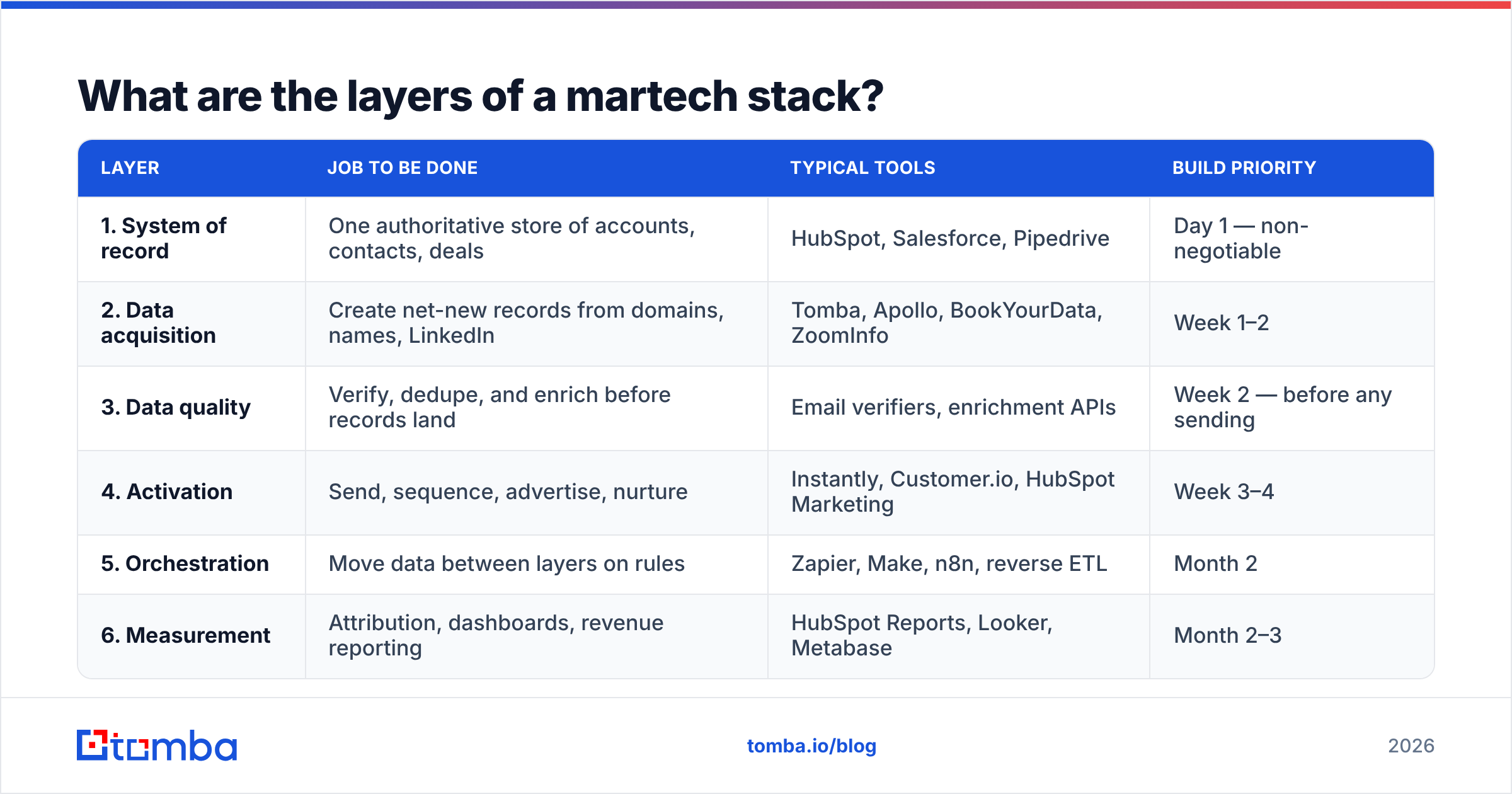
Build in this order. Each layer depends on the one above it, and skipping down the list is how you end up with a $9,000/month stack producing dirty dashboards.
| Layer | Job to be done | Typical tools | Build priority |
|---|---|---|---|
| 1. System of record | One authoritative store of accounts, contacts, deals | HubSpot, Salesforce, Pipedrive | Day 1 — non-negotiable |
| 2. Data acquisition | Create net-new records from domains, names, LinkedIn | Tomba, Apollo, BookYourData, ZoomInfo | Week 1–2 |
| 3. Data quality | Verify, dedupe, and enrich before records land | Email verifiers, enrichment APIs | Week 2 — before any sending |
| 4. Activation | Send, sequence, advertise, nurture | Instantly, Customer.io, HubSpot Marketing | Week 3–4 |
| 5. Orchestration | Move data between layers on rules | Zapier, Make, n8n, reverse ETL | Month 2 |
| 6. Measurement | Attribution, dashboards, revenue reporting | HubSpot Reports, Looker, Metabase | Month 2–3 |
The order matters more than the vendor choice inside any given row. You can swap a sequencer in a week. You cannot swap a system of record in a week, and you cannot un-send 40,000 emails to unverified addresses.
The four decisions to make before you buy anything#
- Source of truth. Pick one system. If it is your CRM, then no dashboard, no spreadsheet, and no sales tool may hold a field that contradicts it. This single rule prevents most reconciliation work later.
- Record creation path. Define exactly how a contact gets created: inbound form, domain search on a target account, list import, or partner referral. Each path needs an owner and a required-fields contract.
- Verification gate. Nothing enters the activation layer unverified. This is a technical rule enforced by workflow, not a policy in a Notion doc.
- Schema ownership. One person — usually RevOps — approves new fields. Without this, you get
industry,Industry, andindustry_v2inside a year.
How do you choose the system of record?#
Start with where your revenue data already lives, not with a feature matrix.
If your sales team already works deals in a CRM and your marketing team runs campaigns somewhere else, the CRM wins. Marketing automation platforms are easier to replace than deal history. Salesforce and HubSpot both publish detailed object-model docs; read them before you commit, because their contact-versus-lead handling differs enough to change how you design every downstream workflow.
Practical selection criteria, ranked by how much regret they prevent:
- Object model fit. Does the platform model accounts, contacts, and deals the way your business actually sells? B2B with multi-threaded buying committees needs proper account-contact relationships, not a flat contact list.
- API quality and rate limits. You will integrate. Check the documented per-day call ceiling on your tier, not the top tier.
- Cost curve at 3x your current contact volume. Contact-tier pricing is where budgets quietly break. Model it now.
- Export path. If you can't get your data out cleanly in CSV plus relationship IDs, you are renting your customer data, not owning it.
- Native integration depth with whatever activation tool you expect to use. Native beats Zapier for anything high-volume.
Resist the urge to buy the enterprise tier "for the roadmap." Buy for the next 12 months. Tier upgrades are always available; refunds are not.
How do you build the data acquisition and quality layers?#
This is the layer teams underinvest in and then blame on copywriting.
Your acquisition layer answers one question: given a target account, how do you get a verified, reachable contact record into the system of record? The workflow that survives contact with reality looks like this:
- Define the account list. Firmographic filters from your ICP — headcount, geography, tech stack, funding stage.
- Find the people. Use an email finder against domain plus first/last name, or pull an entire department with domain search when you're mapping a buying committee.
- Verify before storing. Run every address through an email verifier. Store the verification status and the date as fields on the record — future-you needs to know that a "valid" verdict is eight months stale.
- Handle catch-all domains explicitly. Roughly a fifth of B2B domains accept everything at the SMTP layer. A catch-all verifier gives you a confidence score instead of a false green light.
- Enrich, then dedupe. Add firmographics and role data via data enrichment, then merge duplicates before the record is visible to sales.
- Set a refresh cadence. B2B contact data decays roughly 2–3% per month as people change jobs. Quarterly re-verification of your active segments is the minimum.
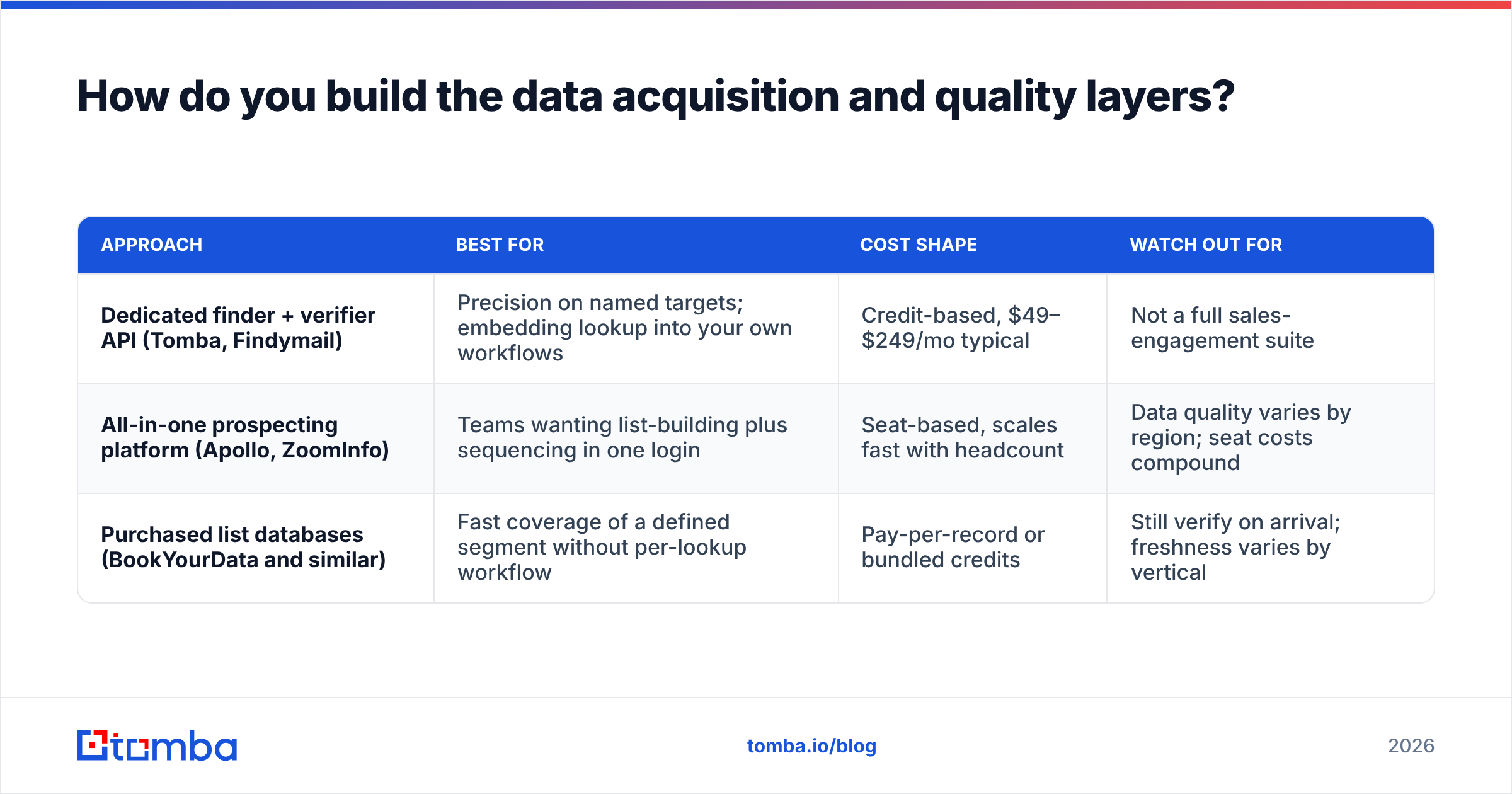
Tooling for this layer splits into three shapes, and the honest comparison looks like this:
| Approach | Best for | Cost shape | Watch out for |
|---|---|---|---|
| Dedicated finder + verifier API (Tomba, Findymail) | Precision on named targets; embedding lookup into your own workflows | Credit-based, $49–$249/mo typical | Not a full sales-engagement suite |
| All-in-one prospecting platform (Apollo, ZoomInfo) | Teams wanting list-building plus sequencing in one login | Seat-based, scales fast with headcount | Data quality varies by region; seat costs compound |
| Purchased list databases (BookYourData and similar) | Fast coverage of a defined segment without per-lookup workflow | Pay-per-record or bundled credits | Still verify on arrival; freshness varies by vertical |
None of these is universally correct. A 3-person team hand-picking 200 accounts per quarter wants an API and a spreadsheet. A 30-rep outbound org wants a platform with seat management. Buying the platform when you needed the API is the single most common overspend in this layer.
On price: Tomba pricing starts with a free tier of 25 searches/month, then Starter at $49/mo, Growth at $99/mo, and Pro at $249/mo, with Enterprise custom. That range is representative of the finder-plus-verifier category — the useful comparison across vendors is cost per verified, deliverable contact, not cost per credit. A cheaper credit that returns a bounce costs you sender reputation, which has no line item on the invoice.
What does the activation layer look like, and when should you buy it?#
Buy activation only after layers 1–3 are running. The rule: you should be able to produce a clean, verified, deduplicated list of 500 target contacts by hand before you automate sending to 5,000.
Activation splits into three lanes:
- Outbound sending — sequencers and cold email platforms. Multi-inbox rotation, throttling, and reply detection are the features that matter. Everything else is UI.
- Lifecycle and nurture — behavior-triggered emails to people already in your database. This usually lives inside your marketing automation platform, and it should, because it needs full behavioral data.
- Paid and social — ad platforms plus audience sync. The integration that matters is pushing CRM segments out as custom audiences, and pulling conversions back in.
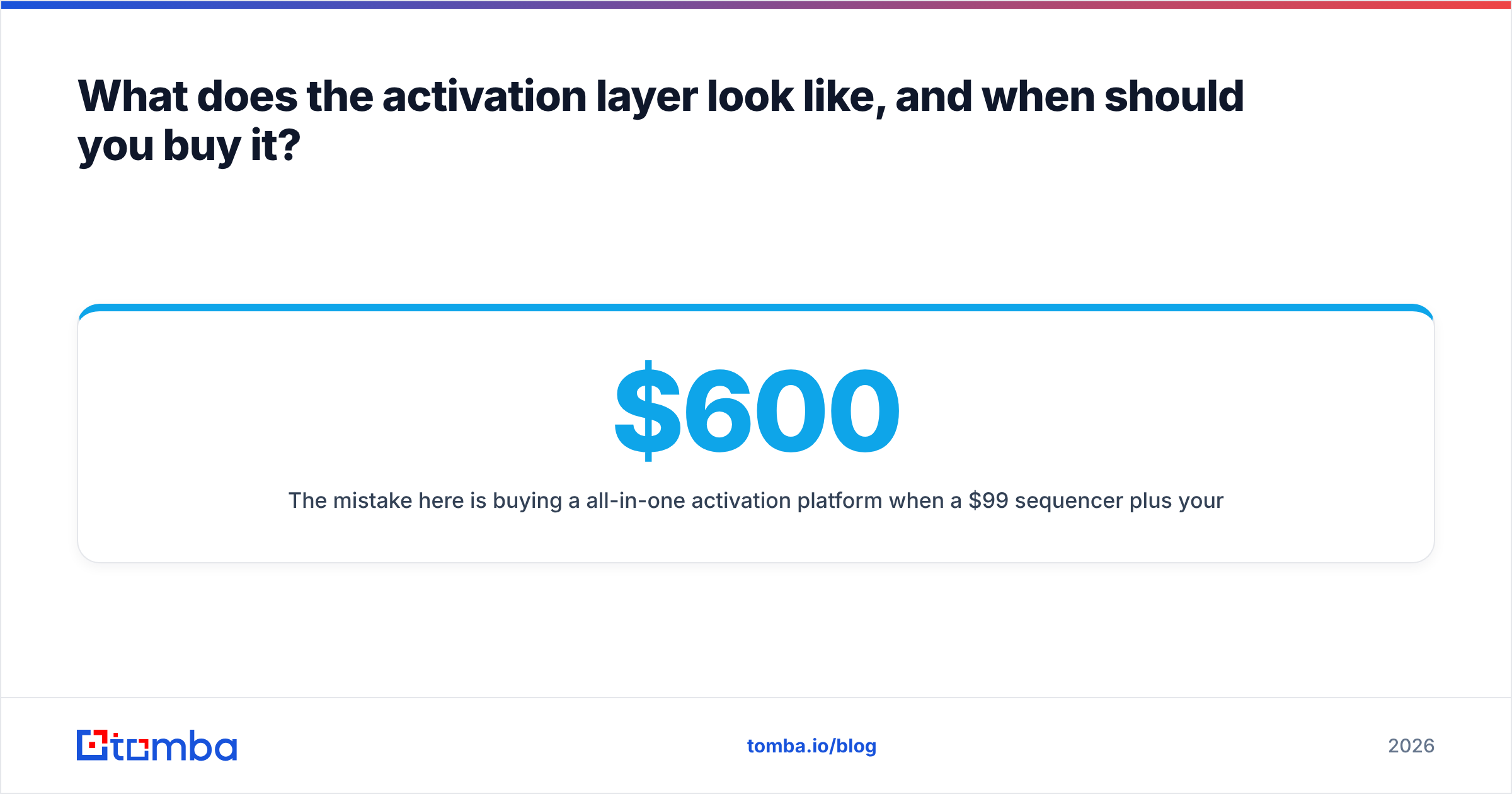
The mistake here is buying a $600/month all-in-one activation platform when a $99 sequencer plus your existing CRM covers 90% of the requirement. Write down the specific workflow you cannot execute today, then buy the smallest tool that executes it.

Deliverability deserves its own note. Your stack can be architecturally perfect and still land in spam if your authentication is wrong. Before your first send, confirm SPF, DKIM, and DMARC are correct — a quick SPF record check plus a spam checker pass takes fifteen minutes and prevents a month of debugging low reply rates. Treat email deliverability as an infrastructure property of your stack, not a copywriting outcome.
How much should a martech stack cost?#
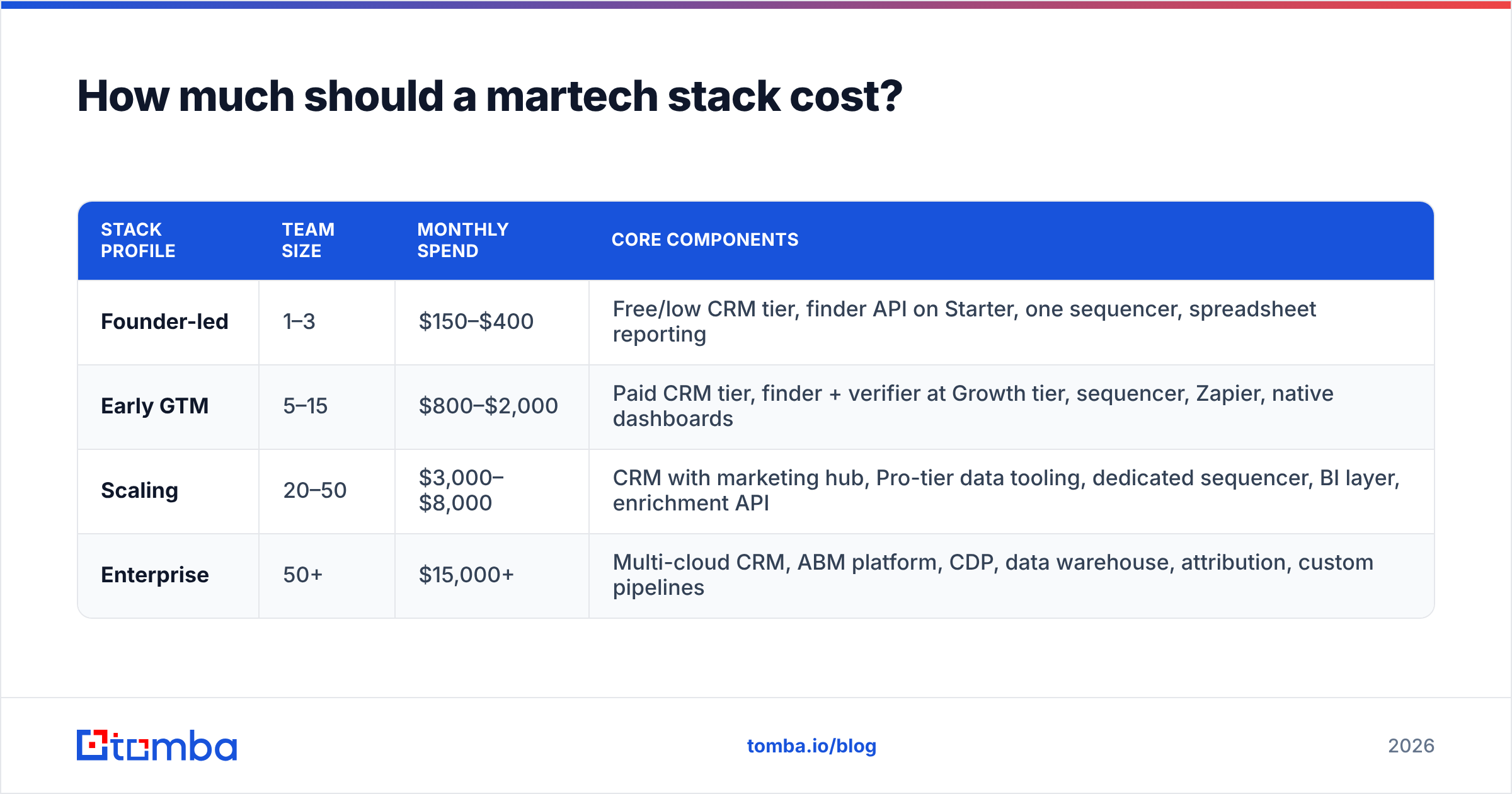
Budget by revenue-team size, not by ambition. Here's a realistic set of build profiles:
| Stack profile | Team size | Monthly spend | Core components |
|---|---|---|---|
| Founder-led | 1–3 | $150–$400 | Free/low CRM tier, finder API on Starter, one sequencer, spreadsheet reporting |
| Early GTM | 5–15 | $800–$2,000 | Paid CRM tier, finder + verifier at Growth tier, sequencer, Zapier, native dashboards |
| Scaling | 20–50 | $3,000–$8,000 | CRM with marketing hub, Pro-tier data tooling, dedicated sequencer, BI layer, enrichment API |
| Enterprise | 50+ | $15,000+ | Multi-cloud CRM, ABM platform, CDP, data warehouse, attribution, custom pipelines |
Two budgeting rules that hold across profiles:
Rule one: data tooling should be 10–20% of stack spend. Below 10% and you are almost certainly sending to unverified records. Above 20% and you likely bought overlapping providers.
Rule two: no tool gets renewed without a named owner and a last-90-days usage number. Pull seat logins and API call counts before every renewal. G2 reviews are useful for shortlisting, but your own usage logs are the only honest evidence about whether a tool earned its renewal.
How do you connect and audit the stack?#
Connection is where "stack" becomes real. Three patterns, in increasing order of engineering cost:
- Native integrations first. If your CRM and your finder have a first-party connector, use it. Fewer moving parts, fewer sync failures. Check the integrations list of any tool before you buy it, not after.
- iPaaS for the gaps. Zapier, Make, or n8n handle the long tail. Keep these workflows documented in one place with an owner. Undocumented Zaps are the technical debt of RevOps.
- API and warehouse for volume. Past a few thousand records a day, iPaaS costs and latency stop making sense. Move to direct API calls — most data vendors, including via the Tomba API, expose bulk endpoints designed exactly for this.
For the audit itself, run this quarterly and keep it to one page per tool:
- Utilization: active seats ÷ licensed seats. Under 60% is a downgrade signal.
- API activity: calls in the last 90 days. Zero calls on an integration-only tool means cancel.
- Overlap map: list every capability twice-covered. Enrichment and verification are the usual duplicates.
- Data flow diagram: one arrow per integration. If you cannot draw it in ten minutes, the stack is too complex for its team size.
- Cost per opportunity: total stack spend ÷ opportunities created. Track the trend, not the absolute number.
Teams running this audit for the first time typically cut 25–40% of tools with no measurable drop in output. That is not a sign of bad buying — it is the normal entropy of a stack that grew faster than its documentation.
What should you build first if you're starting from zero?#
A 30-day sequence that produces a working stack:
Week 1 — Choose and configure the system of record. Define your object model, required fields, and lifecycle stages. Assign schema ownership to one person.
Week 2 — Stand up acquisition and verification. Connect a finder and verifier, build the ICP filter, and manually run 100 target accounts end to end. Fix the workflow before you scale it.
Week 3 — Add one activation channel. One. Configure authentication, warm the sending domain, and launch a 200-contact pilot. Measure bounce rate first, reply rate second.
Week 4 — Wire reporting. Build three dashboards: contacts created by source, verification pass rate, and pipeline by campaign. Three is enough. Add more only when someone asks a question these cannot answer.
Then stop buying for a quarter. Let the stack run, collect usage data, and let the gaps declare themselves. Gaps you can name from real friction are worth buying for. Gaps you infer from a vendor's feature comparison chart usually are not.
Where should you start?#
Fix the data layer first, because it is the layer every other tool inherits. If your records are verified, deduplicated, and enriched at creation, a modest activation stack outperforms an expensive one running on decayed lists.
Start with the Tomba Email Finder to build the acquisition step of your stack: find contacts by domain or name, verify them before they hit your CRM, and pipe the results in through the API or a native integration. The free tier gives you 25 searches a month to test the workflow against real target accounts before you commit budget — which is exactly the order every layer of your stack should be built in.
Related guides#
Ready to find emails that actually work?
Join 150,000+ professionals who stopped guessing and started sending. Free credits on signup — no credit card required.
Get the Tomba newsletter
Practical outbound tactics and product updates — once every two weeks.
About the author