How to Build a Sales Cadence That Books Meetings in 2026
A sales cadence is not a list of send dates. It is a testable system of touches, channels, and timing. Here is the exact 6-step build, with a template you can copy today.
TL;DR
- A sales cadence is a fixed sequence of touches across email, phone, and LinkedIn, run over a defined window with defined exit rules. It is not "follow up when you remember."
- Most teams over-index on email volume. The cadences that book meetings run 8-12 touches over 14-21 business days across at least two channels, not 15 emails from one inbox.
- Timing beats copy at the margin. Spacing touches 2-3 business days apart outperforms daily blasts and weekly drips in nearly every team test we have seen reported.
- Your cadence dies at the data layer, not the copy layer. A 22% bounce rate makes the best sequence in the world look broken.
- Build one cadence per segment, not per rep. Then test one variable at a time and let the sequence run 200+ contacts before you judge it.
Cold outbound in 2026 is harder than it was three years ago. Inbox filters got smarter, buyers got more suspicious, and the "just send more" playbook stopped scaling. What still works is structure — a repeatable sequence you can measure and improve. That structure is a cadence, and this post walks through exactly how to build one from scratch.
What is a sales cadence, exactly?#
A sales cadence is a predefined schedule of outreach touches aimed at a single prospect, spanning multiple channels, with rules for when it starts, when it stops, and what happens at each step.
The everyday analogy: a cadence is a recipe, not a mood. A cook who "adds salt until it tastes right" cannot hand that dish to five other cooks and get the same result. A recipe with grams and minutes can be handed off, repeated, and improved. Your cadence is the recipe your whole team runs.
Technically, a cadence has five components:
- Entry criteria — the exact conditions a contact must meet to enter (ICP fit, trigger event, verified email, job title match).
- Touch sequence — the ordered list of actions with channel, day offset, and asset attached to each.
- Channel mix — how email, phone, LinkedIn, and video are distributed across the touches.
- Timing and spacing — business-day gaps between touches and the total window length.
- Exit rules — what removes a contact (reply, meeting booked, hard bounce, opt-out, sequence completion) and where they go next.
People confuse cadences with sequences and with campaigns. A sequence is usually the tool-level object that executes the cadence. A campaign is the broader go-to-market effort a cadence sits inside. The cadence is the design; the sequence is the implementation.
Why do most sales cadences fail before the first send?#
Because the list is wrong. This is the least glamorous answer and the most common cause.
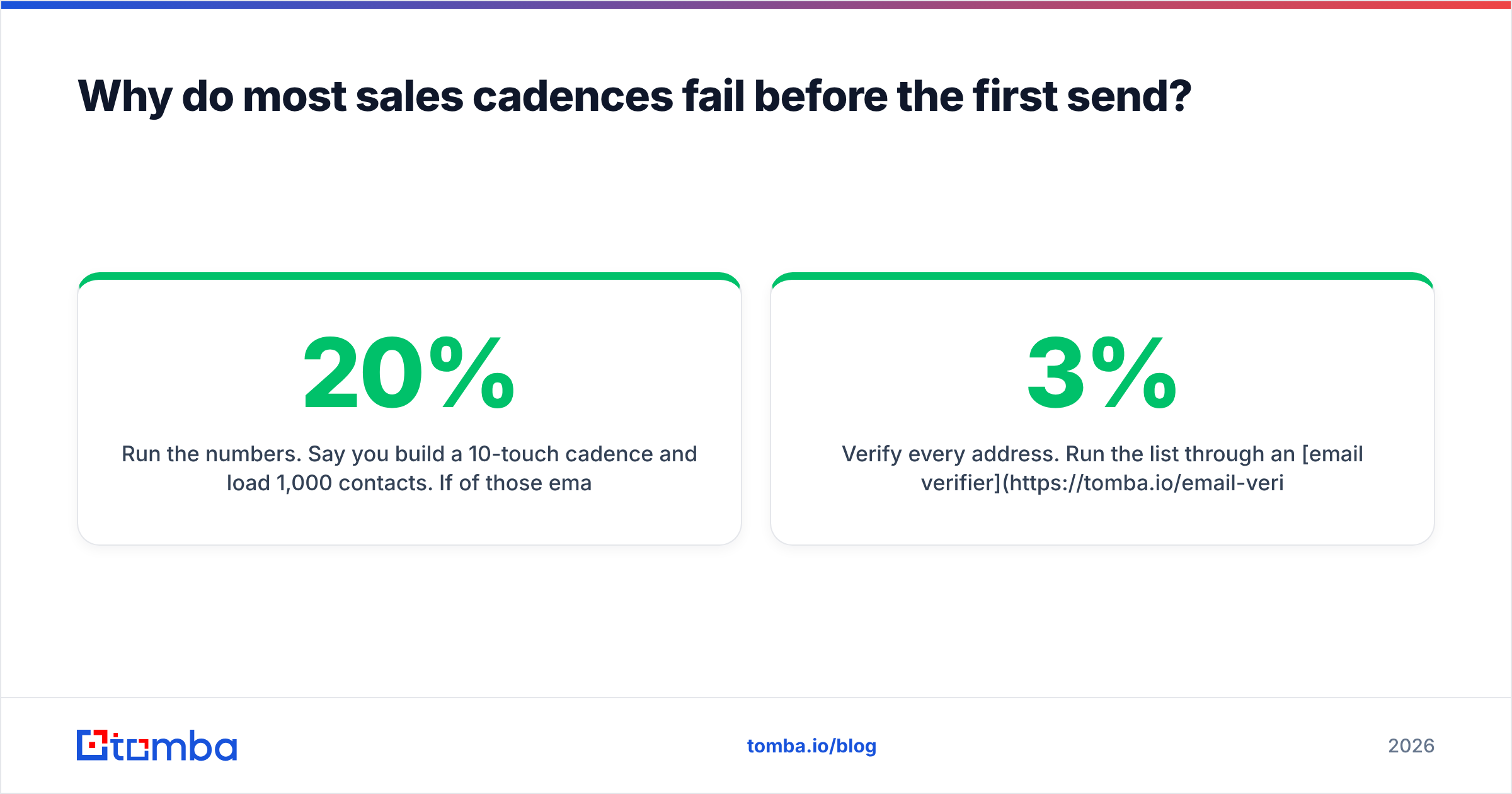
Run the numbers. Say you build a 10-touch cadence and load 1,000 contacts. If 20% of those emails bounce, you lose 200 prospects immediately, and worse, you damage your sender reputation enough that the remaining 800 land in spam at a higher rate. Your cadence didn't underperform. Your data did.
Three pre-flight checks before any cadence goes live:
- Verify every address. Run the list through an email verifier and drop anything that isn't deliverable. Aim for a bounce rate under 3%. Above 5%, mailbox providers start treating you as a list-buyer.
- Handle catch-all domains separately. Catch-all servers accept everything, so standard verification returns "unknown." Route those through a catch-all verifier and put them in a lower-priority cadence rather than your main one.
- Confirm role relevance. A verified email for the wrong persona is still a wasted touch. Filter on title and department before enrichment, not after.
The second failure mode is channel monoculture. A cadence that is nine emails from one domain is a deliverability liability. Mailbox providers score sending patterns, and a single-channel high-volume pattern from a cold domain is exactly what the filters were built to catch. Spreading touches across phone and LinkedIn lowers your email volume per prospect without lowering your total contact attempts.
How many touches should a sales cadence have?#
Somewhere between 8 and 12, spread over 14-21 business days, for most B2B mid-market outbound. Here is the reasoning, not just the number.
Fewer than 6 touches and you are quitting before the compound effect kicks in — a meaningful share of positive replies in published outbound benchmarks arrive on touch 4 or later. More than 14 touches and you cross from persistent into irritating, and your unsubscribe and spam-complaint rates start doing real damage to the domain you need for the next 500 prospects.
The right number also depends on deal size:
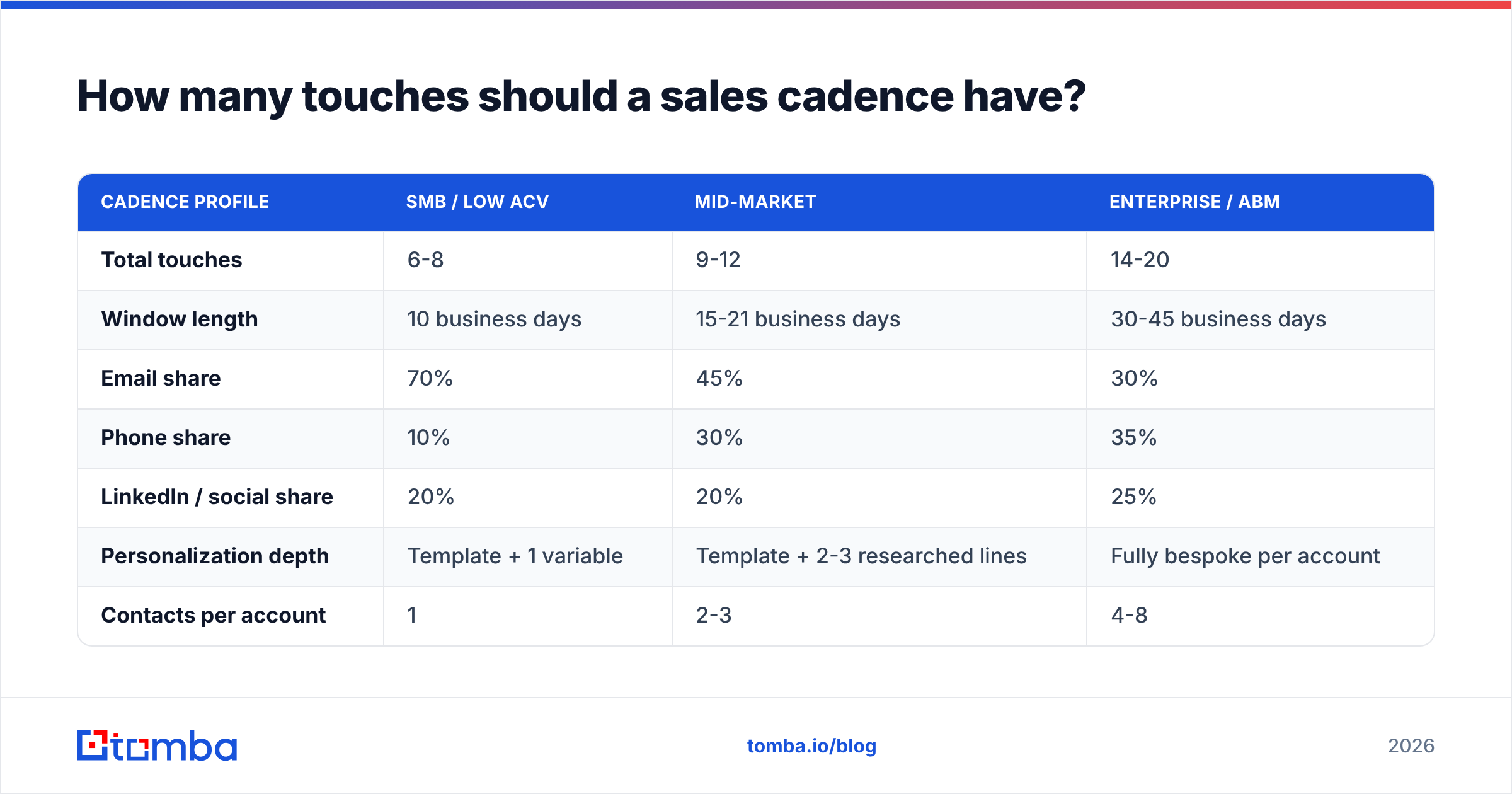
| Cadence profile | SMB / low ACV | Mid-market | Enterprise / ABM |
|---|---|---|---|
| Total touches | 6-8 | 9-12 | 14-20 |
| Window length | 10 business days | 15-21 business days | 30-45 business days |
| Email share | 70% | 45% | 30% |
| Phone share | 10% | 30% | 35% |
| LinkedIn / social share | 20% | 20% | 25% |
| Personalization depth | Template + 1 variable | Template + 2-3 researched lines | Fully bespoke per account |
| Contacts per account | 1 | 2-3 | 4-8 |
| Realistic reply-rate target | 3-6% | 5-9% | 10-18% |
Notice what shifts as ACV rises: email share drops and phone share rises. That is not a stylistic preference. At enterprise ACV the cost of a 12-minute research block per prospect is trivially justified; at $400 ACV it destroys your unit economics. Match effort to contract value.
How do you build a sales cadence step by step?#
Six steps. Do them in order — skipping step 1 is why most cadences get rebuilt three times.
Step 1 — Define the segment and entry trigger. One cadence serves one segment. "Series A fintech founders who just posted a sales-hire job" is a segment. "US companies" is not. Write the entry criteria as a filter you could hand to an analyst.
Step 2 — Build and verify the contact list. Pull the accounts, then find the people. A domain search gets you every discoverable address at a target company in one call, which is faster than hunting person by person. Verify, dedupe, and enrich before anything enters the sequence.
Step 3 — Map touches to a calendar, not a vibe. Write the actual day offsets. Day 1 email, Day 2 LinkedIn view, Day 4 call, Day 6 email, and so on. Use business days. A cadence that fires touch 3 on a Sunday is leaking conversions.
Step 4 — Assign an angle to every touch. Each touch needs its own reason to exist. Touch 1 is the problem hypothesis. Touch 3 is social proof from a lookalike company. Touch 5 is a resource with no ask. Touch 8 is the breakup. If two touches make the same argument, delete one.
Step 5 — Write exit rules explicitly. Reply of any kind, meeting booked, hard bounce, opt-out, and "completed all touches" each need a defined destination. Contacts who complete without replying should go to a nurture list with a 90-day re-entry rule, not back into the same cadence next month.
Step 6 — Instrument it. Track per-touch reply rate, per-channel meeting rate, and bounce rate at minimum. If you cannot see which touch produced the meeting, you cannot improve anything.
What does a working 15-day cadence look like?#
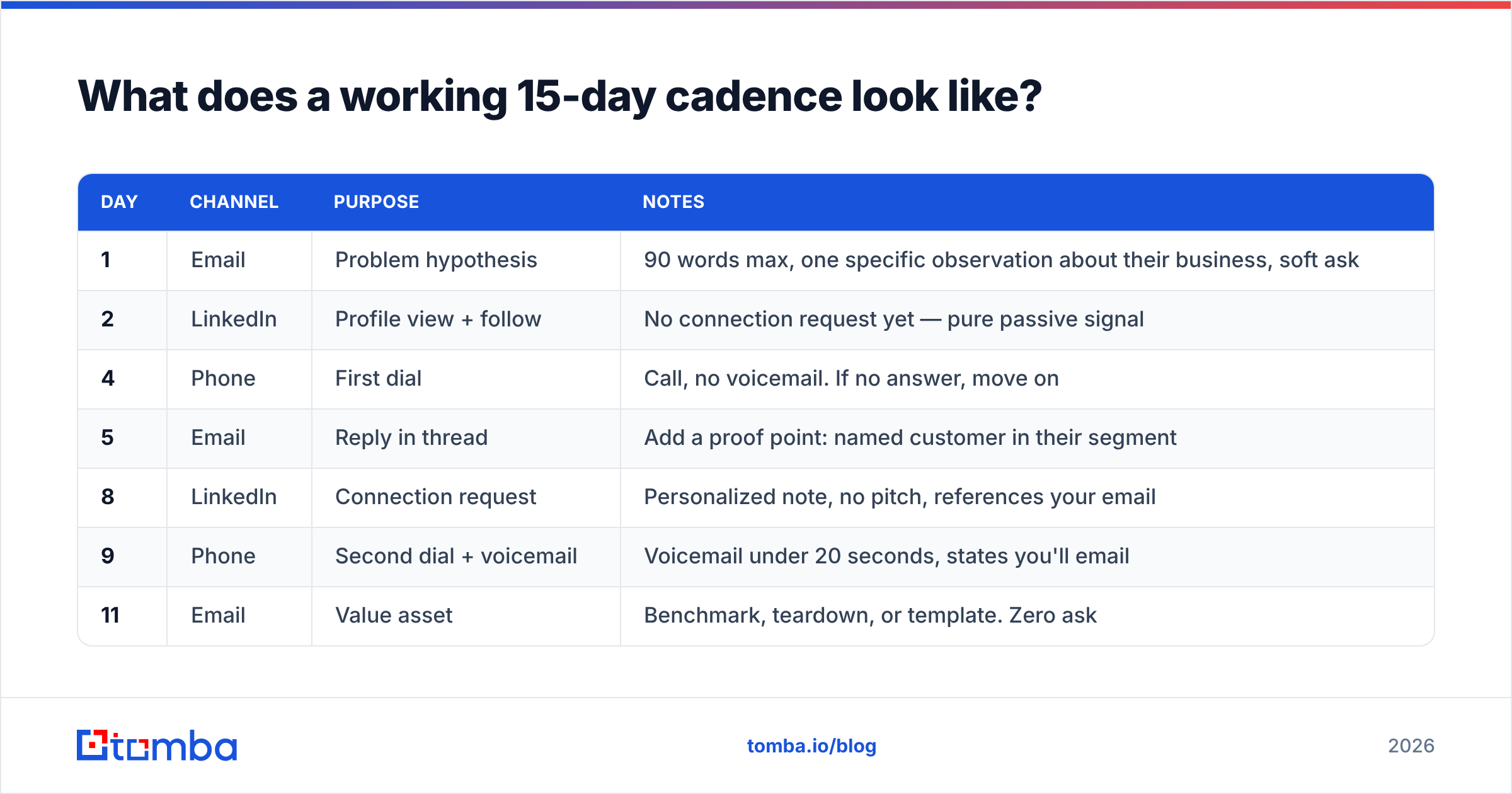
Here is a concrete mid-market template you can copy and adapt. It runs 10 touches over 15 business days.
| Day | Channel | Purpose | Notes |
|---|---|---|---|
| 1 | Problem hypothesis | 90 words max, one specific observation about their business, soft ask | |
| 2 | Profile view + follow | No connection request yet — pure passive signal | |
| 4 | Phone | First dial | Call, no voicemail. If no answer, move on |
| 5 | Reply in thread | Add a proof point: named customer in their segment | |
| 8 | Connection request | Personalized note, no pitch, references your email | |
| 9 | Phone | Second dial + voicemail | Voicemail under 20 seconds, states you'll email |
| 11 | Value asset | Benchmark, teardown, or template. Zero ask | |
| 13 | Phone | Third dial | Try a different time block than dials 1 and 2 |
| 14 | Message | One line referencing the asset you sent | |
| 15 | Breakup | "Closing the loop" — highest reply rate of any touch in most teams' data |
Two details in that template matter more than they look. First, the Day 5 email is a reply in the same thread, not a fresh message — threading keeps context and generally performs better than restarting. Second, the Day 13 dial deliberately targets a different time-of-day block. If your first two dials were both at 10am and both missed, a third at 10am is a coin flip you already lost twice.
Which channels belong in your cadence mix?#
All of them, weighted by where your buyer actually pays attention.
Email is your volume channel and your only truly async one. It scales, it's measurable, and it's where the deal ultimately gets scheduled. It's also the channel most vulnerable to your own mistakes — a bad list poisons the domain you need for everything else. Guard email deliverability like the finite resource it is.
Phone has the highest reply-to-touch ratio of any channel and the worst scale. Connect rates in most B2B segments sit in the low single digits per dial, but the connects convert far better than email replies. Load real direct numbers — a phone finder that returns direct dials rather than switchboards changes the math on this channel completely.
LinkedIn works as a credibility layer more than a conversion layer. Profile views and thoughtful comments make your emails feel like they came from a person who exists. Treat it as support, not as a replacement — and read the guidance on LinkedIn outreach limits before you automate anything there, since aggressive automation gets accounts restricted.
Video is the differentiator touch. A 40-second Loom referencing something specific on their site is expensive per unit and disproportionately effective at touch 5-7, once you've earned a sliver of recognition.
Vendor research supports the multichannel case broadly. HubSpot's sales statistics roundup has consistently found that follow-up persistence and channel variety correlate with higher connect rates, and peer reviews on G2's sales engagement category repeatedly cite multichannel orchestration as the top-rated capability buyers evaluate.
How do you test and improve a cadence over time?#
Change one variable, run enough volume, and judge on meetings — not opens.
Volume threshold. Do not draw conclusions under 200 contacts per variant. At 50 contacts, a two-reply difference looks like a 4-point swing and means nothing. Statistical noise is the single most common cause of teams "optimizing" their cadence into the ground.
Test order that pays fastest:
- List quality — tighten the segment definition. Biggest lever, always. A cadence that flops on a broad list often works untouched on a narrow one.
- Subject line and first line — cheap to test, immediate signal on open and reply.
- Touch spacing — try 2-day vs 3-day gaps on the same copy. Often worth 1-2 reply points.
- Channel order — call-before-email vs email-before-call changes connect rates measurably.
- Touch count — extend from 8 to 11 and see whether the added touches produce meetings or just unsubscribes.
- Copy length — usually the smallest lever, despite getting the most attention in team meetings.
Metrics that matter, in order: meetings booked per 100 contacts, reply rate, positive-reply rate, bounce rate, unsubscribe rate. Open rate has been unreliable since Apple Mail Privacy Protection started pre-fetching images — treat it as directional at best and never optimize against it.
One trap to avoid: attributing a cadence's success to its final touch. If the meeting came on the breakup email, the breakup email did not earn it alone — the nine touches before it built the recognition that made the tenth land. Judge the sequence as a unit.
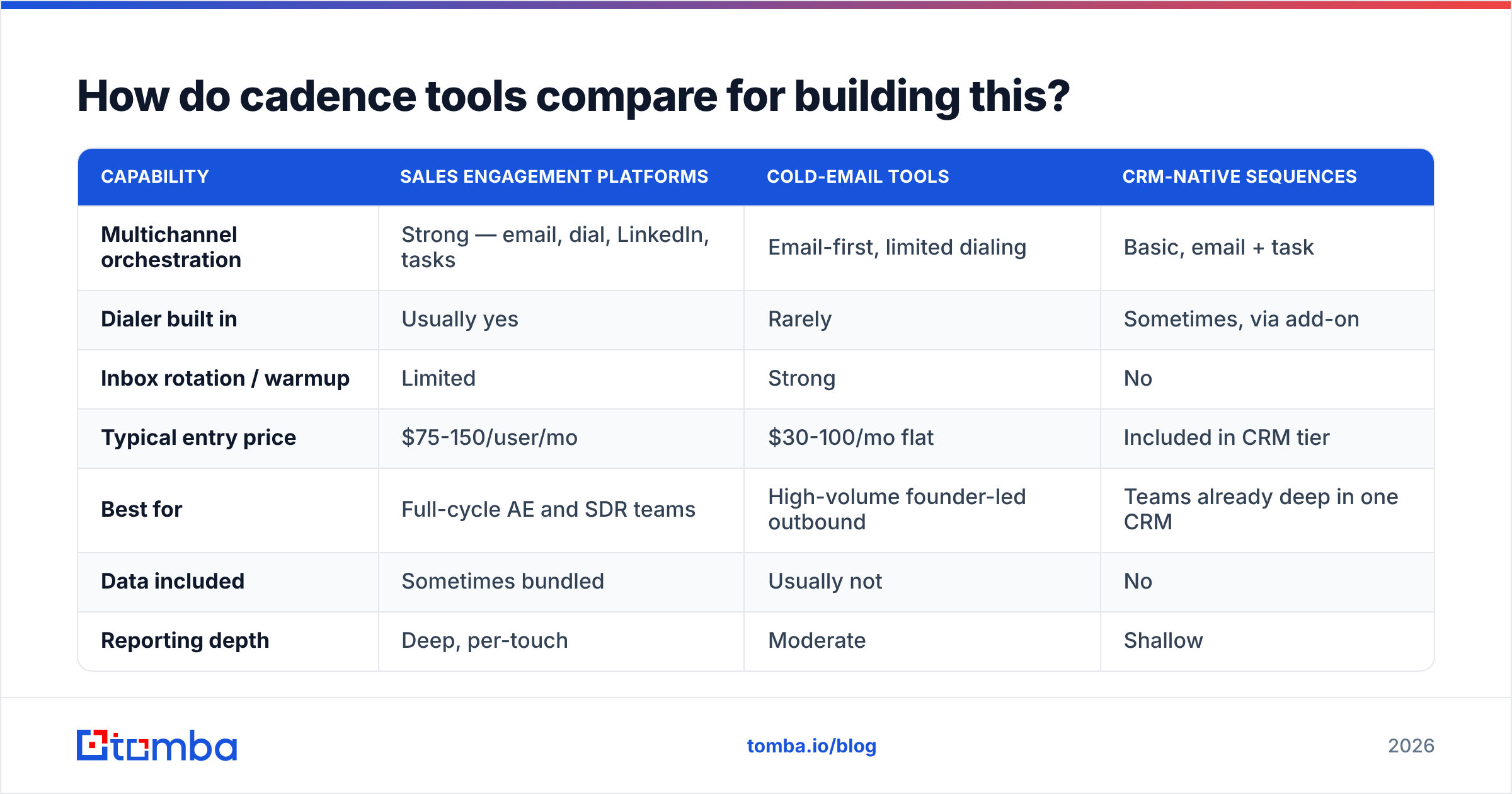
How do cadence tools compare for building this?#
Your cadence design is tool-agnostic, but execution quality varies. Here is how the main categories stack up.
| Capability | Sales engagement platforms | Cold-email tools | CRM-native sequences |
|---|---|---|---|
| Multichannel orchestration | Strong — email, dial, LinkedIn, tasks | Email-first, limited dialing | Basic, email + task |
| Dialer built in | Usually yes | Rarely | Sometimes, via add-on |
| Inbox rotation / warmup | Limited | Strong | No |
| Typical entry price | $75-150/user/mo | $30-100/mo flat | Included in CRM tier |
| Best for | Full-cycle AE and SDR teams | High-volume founder-led outbound | Teams already deep in one CRM |
| Data included | Sometimes bundled | Usually not | No |
| Reporting depth | Deep, per-touch | Moderate | Shallow |
Whichever category you pick, the data layer stays separate. Sequencing tools execute touches; they generally do not find or verify contacts well. That is why most teams pair a sequencer with a dedicated finder and verifier, and push clean records in via a HubSpot integration or Zapier integration rather than exporting CSVs by hand every Monday.
If you're evaluating specific platforms, the vendor-neutral comparison grids on Capterra's sales engagement listings are a reasonable starting point for narrowing a shortlist before demos.
What are the most common cadence mistakes?#
- Starting before the list is verified. Covered above, and still the number one killer.
- Identical asks in every touch. If touches 2, 4, and 6 all say "do you have 15 minutes Thursday," you have one touch repeated three times.
- No breakup email. It reliably outperforms most mid-sequence touches and costs one message to add.
- Running the same cadence for every segment. Founders, VPs, and practitioners do not respond to the same framing or the same channel weight.
- Judging on opens. Pixel-based open tracking is unreliable now. Reply and meeting rates are the only honest numbers.
- Never retiring cadences. A cadence that worked for eight months is being sent to prospects who have seen it from three competitors. Refresh angles quarterly.
Ready to build a cadence on data that actually lands?#
A cadence is only as good as the contacts entering it. Before you write a single subject line, get the list right: find verified professional addresses by domain, name, or company, confirm they're deliverable, and enrich the record so your personalization has something to work with.
Start with the Tomba Email Finder — the free tier gives you 25 searches a month to sanity-check a segment before you commit, and paid plans start at $49/mo on Tomba pricing when you're ready to build lists at cadence volume. Clean data in, real meetings out.
Related guides#
Ready to find emails that actually work?
Join 150,000+ professionals who stopped guessing and started sending. Free credits on signup — no credit card required.
Get the Tomba newsletter
Practical outbound tactics and product updates — once every two weeks.
About the author