How to Build an Email List in 2026: A B2B Playbook
Buying a list is not building one. Here is the practical, permission-first way to build an email list that actually converts in 2026 — channels, capture math, verification, and the tools worth paying for.
TL;DR
- Building an email list means two different jobs: inbound capture (people who opt in) and outbound sourcing (contacts you research and verify). Most teams need both, and they follow different legal and technical rules.
- Your list size matters less than your deliverable list size. A 40,000-contact list with a 12% bounce rate performs worse than 6,000 verified addresses.
- Website capture converts at roughly 1–3% of visitors with a generic form and 5–15% with a contextual, high-intent offer. Placement and specificity beat design polish.
- For outbound, source contacts one company at a time using domain-level research and pattern matching, then verify before any send. Never import a purchased CSV directly into your sending domain.
- Budget for verification permanently, not once. B2B contact data decays around 25–30% per year as people change jobs.
What does "building an email list" actually mean in 2026?#
It means assembling a set of addresses you can legally and reliably email — and keeping it clean. Everything else is detail.
The confusion starts because two very different activities share the same phrase. A newsletter operator building an email list is collecting explicit opt-ins through forms, lead magnets, and referrals. A B2B SDR building an email list is researching accounts, identifying the right role, finding that person's work address, and verifying it before outreach. Both are legitimate. They are not interchangeable, and the tactics that work for one will actively damage the other.
The 2024 Google and Yahoo bulk-sender requirements changed the economics permanently. Authentication (SPF, DKIM, DMARC) is now table stakes, one-click unsubscribe is mandatory for bulk senders, and spam complaint rates above 0.3% get you throttled or blocked. That means the sloppy volume playbook — scrape everything, blast everyone, hope 0.2% reply — now costs you your sending domain. You can read Google's own bulk sender guidelines for the current thresholds.
So the working definition for this guide: building an email list is the repeatable process of acquiring addresses you have a defensible reason to contact, verifying they exist, and maintaining them as they decay.
Should you build an inbound list or an outbound list?#
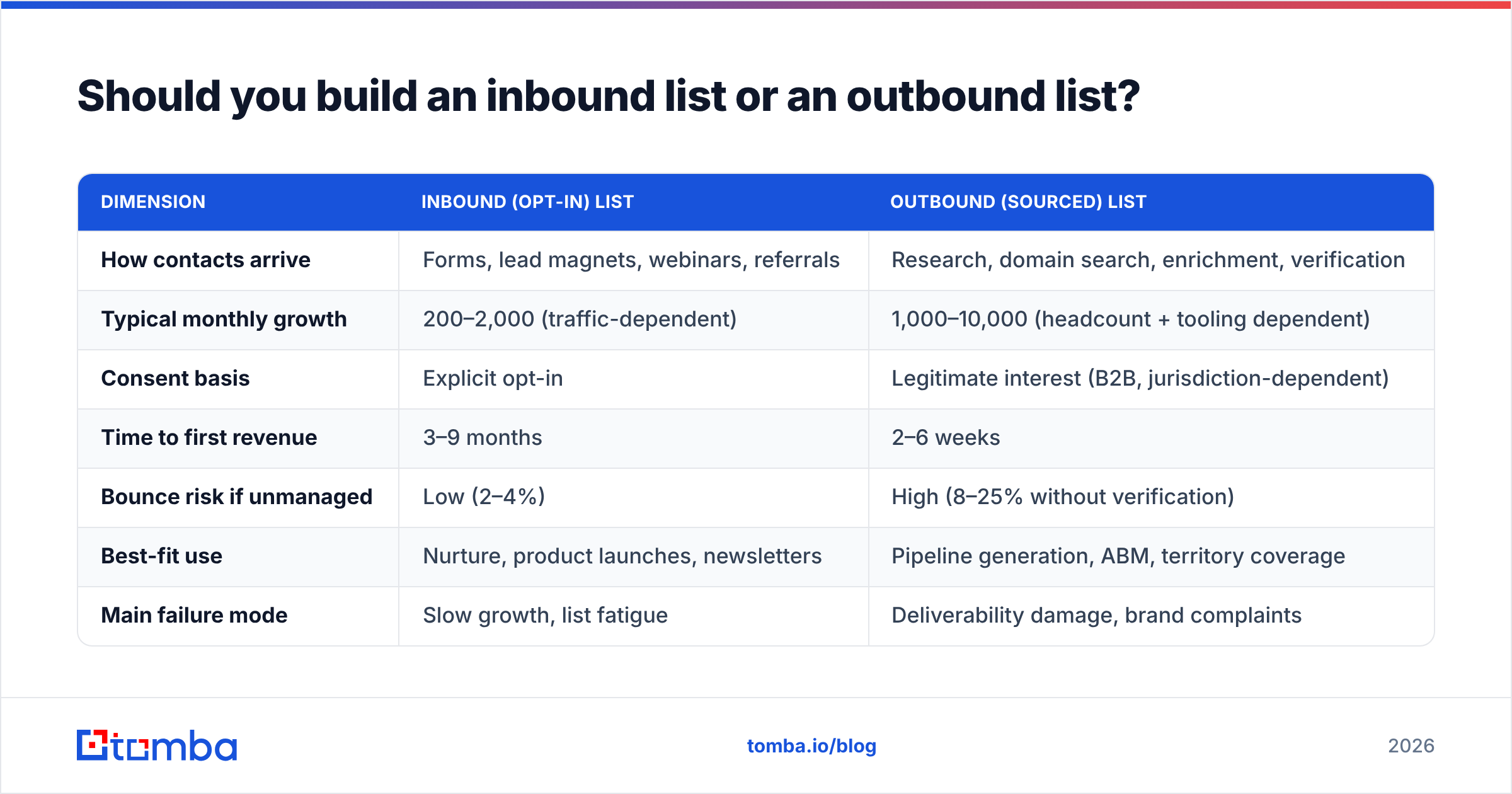
Both, but stage them. Here is how the two models differ on the dimensions that matter operationally.
| Dimension | Inbound (opt-in) list | Outbound (sourced) list |
|---|---|---|
| How contacts arrive | Forms, lead magnets, webinars, referrals | Research, domain search, enrichment, verification |
| Typical monthly growth | 200–2,000 (traffic-dependent) | 1,000–10,000 (headcount + tooling dependent) |
| Consent basis | Explicit opt-in | Legitimate interest (B2B, jurisdiction-dependent) |
| Time to first revenue | 3–9 months | 2–6 weeks |
| Bounce risk if unmanaged | Low (2–4%) | High (8–25% without verification) |
| Best-fit use | Nurture, product launches, newsletters | Pipeline generation, ABM, territory coverage |
| Main failure mode | Slow growth, list fatigue | Deliverability damage, brand complaints |
| Cost profile | Content + traffic investment | Per-credit data + verification |
The practical read: outbound funds the quarter, inbound funds the year. If you are pre-revenue and need meetings this month, source and verify a tight outbound list. If you already have traffic, the cheapest list growth you will ever get is converting the visitors you already pay for.
How do you build an email list from your website traffic?#
Start with the math, because it tells you where to spend effort.
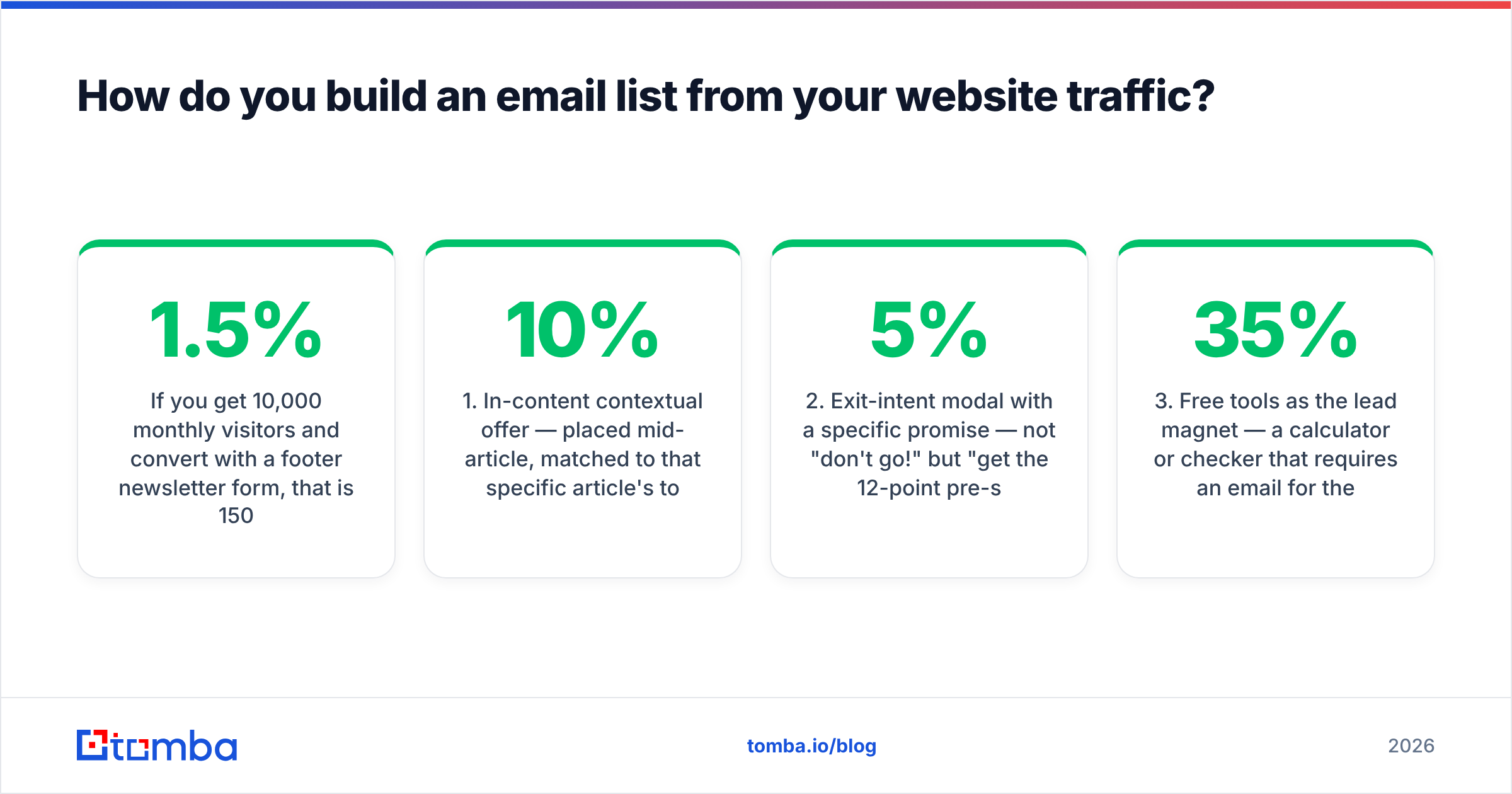
If you get 10,000 monthly visitors and convert 1.5% with a footer newsletter form, that is 150 subscribers a month. Move to contextual, in-content offers at 6% and the same traffic yields 600. You did not buy more traffic. You changed the offer's relevance to what the reader was already doing.
The five capture placements that actually earn their space:
- In-content contextual offer — placed mid-article, matched to that specific article's topic. A post about SPF records offers an SPF audit checklist, not "subscribe to our newsletter." Converts 4–10% of readers who scroll past it.
- Exit-intent modal with a specific promise — not "don't go!" but "get the 12-point pre-send checklist." Converts 2–5% of exiting visitors. Use it on blog pages, never on checkout.
- Free tools as the lead magnet — a calculator or checker that requires an email for the full result. This is the highest-intent capture available and converts 15–35% of tool users. A free email checker or subject line tester is the pattern: give real utility, ask for the address at the value moment.
- Webinar and live-session registration — 20–40% of registrants are genuinely new contacts, and they arrive with stated topical interest you can segment on immediately.
- Post-conversion asks — after a demo request, trial signup, or support resolution, offer the list as a separate opt-in. Cheap, uncontested, and these subscribers have the lowest unsubscribe rates on your file.
- Sidebar and footer forms — include them, expect 0.5–1.5%, and do not spend design cycles arguing about them.
One rule that overrides all placement advice: the offer beats the form. A mediocre form with a genuinely useful asset outperforms a beautifully animated modal offering "insights delivered weekly."
How do you build a B2B outbound list without buying junk data?#
You source it per-account instead of per-database. That is the whole trick.
The failure pattern is familiar: someone buys a 50,000-row CSV of "SaaS decision makers," imports it, sends, and watches 19% bounce and 0.8% complain. The domain reputation takes six weeks to recover, if it recovers. Purchased bulk lists fail because they are stale by the time they are packaged, unsegmented by definition, and shared with everyone else who bought them.
The per-account method:
- Define the account list first. Firmographics, tech stack, hiring signals, funding — whatever your ICP actually predicts. 300 correct accounts beat 30,000 approximate ones.
- Map roles, not names. Decide you need the VP of Demand Gen and the Head of RevOps at each account before you look anyone up.
- Run domain-level discovery. A domain search returns the addresses and the dominant email pattern for a company in one pass, which is faster than looking up people individually and tells you the format for anyone you find later.
- Fill gaps with pattern inference. Once you know a company uses
first.last@, you can construct and then verify candidates for named people you could not find directly. - Verify everything before it touches a sequence. Non-negotiable. Syntax, MX, SMTP, catch-all classification, role-address flagging.
- Enrich for personalization inputs. Title, seniority, location, and company signals turn a list into something you can write to.
On legality: in the US, CAN-SPAM permits unsolicited commercial email to business addresses with accurate headers, a physical address, and a working opt-out. In the EU and UK, GDPR and PECR are stricter — B2B outreach to corporate addresses is generally defensible under legitimate interest, but you owe a documented balancing test and immediate opt-out honoring. Canada's CASL is stricter still and largely consent-based. Check your jurisdiction and your prospects' before you scale. The GDPR overview is a reasonable starting point, though it is not legal advice and neither is this.
Which tools do you need to build and maintain the list?#
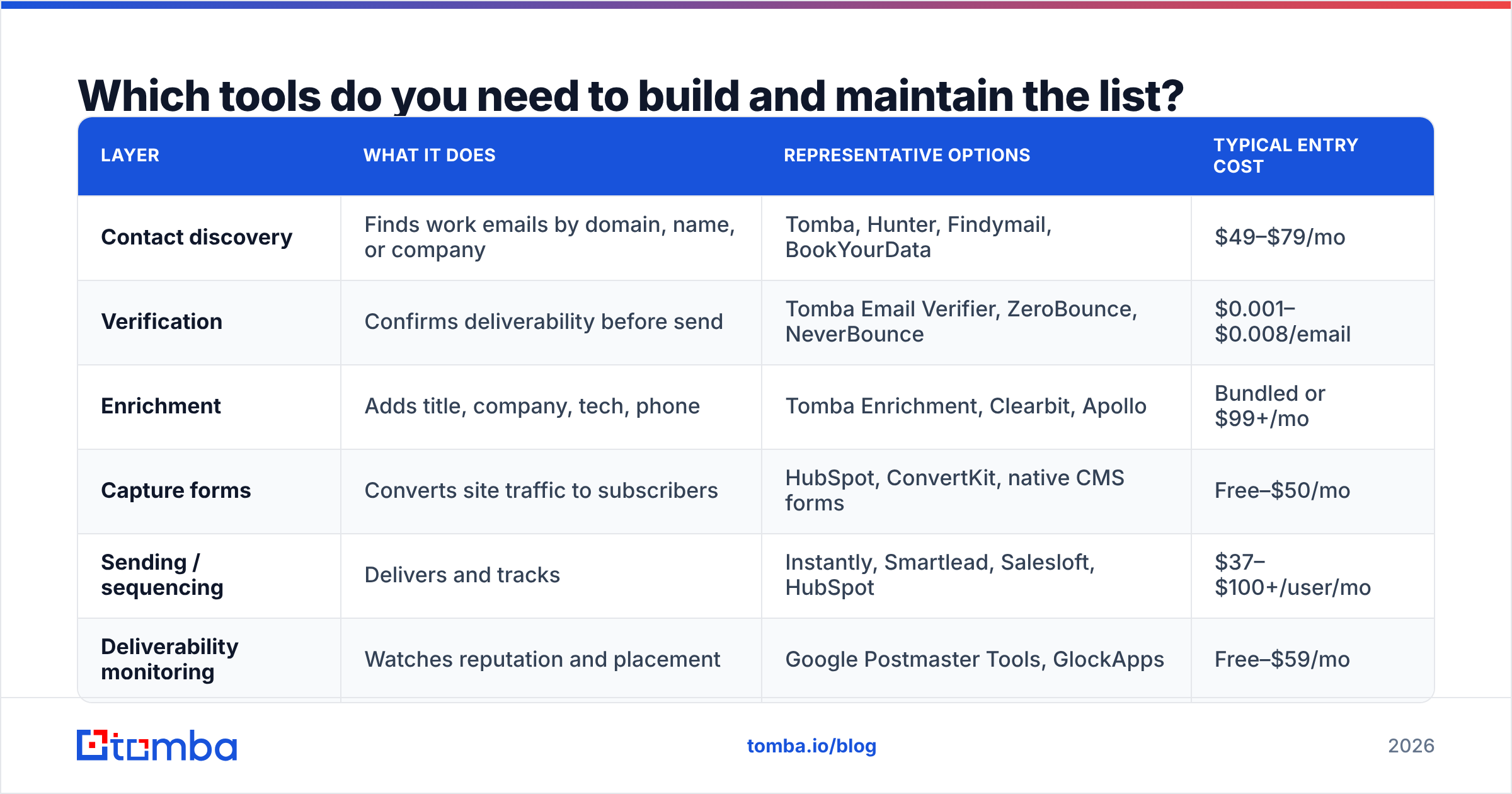
Fewer than vendors would like you to believe. You need discovery, verification, and a place to send from. Everything else is optimization.
| Layer | What it does | Representative options | Typical entry cost |
|---|---|---|---|
| Contact discovery | Finds work emails by domain, name, or company | Tomba, Hunter, Findymail, BookYourData | $49–$79/mo |
| Verification | Confirms deliverability before send | Tomba Email Verifier, ZeroBounce, NeverBounce | $0.001–$0.008/email |
| Enrichment | Adds title, company, tech, phone | Tomba Enrichment, Clearbit, Apollo | Bundled or $99+/mo |
| Capture forms | Converts site traffic to subscribers | HubSpot, ConvertKit, native CMS forms | Free–$50/mo |
| Sending / sequencing | Delivers and tracks | Instantly, Smartlead, Salesloft, HubSpot | $37–$100+/user/mo |
| Deliverability monitoring | Watches reputation and placement | Google Postmaster Tools, GlockApps | Free–$59/mo |
A few honest notes on this table. Discovery and verification from the same vendor saves you a reconciliation step and usually money — you are not paying twice for the same lookup. BookYourData is a solid choice if you want pre-built, pay-as-you-go lists with a bounce guarantee rather than running discovery yourself; it is a different buying model, not a worse one. Apollo bundles discovery, sequencing, and a CRM, which is convenient until you want to swap any single layer.
On the Tomba side specifically: Tomba pricing starts with a free tier at 25 searches/month, then Starter at $49/mo, Growth at $99/mo, and Pro at $249/mo, with Enterprise custom. The free tier is genuinely enough to test whether the coverage works for your ICP before you commit, which is the only test that matters. Compare on your accounts, not on someone's published benchmark.

Accuracy claims across this category are mostly unfalsifiable marketing until you run them against a domain list you already know the answers for. Take 50 companies in your ICP, run them through two tools, and count verified hits and bounces. That twenty-minute test is worth more than every G2 grid — though G2's email marketing category is still useful for shortlisting who to test.

Why does verification matter more than list size?#
Because mailbox providers judge you on outcomes, not intent. Every hard bounce is a signal that you do not know who you are emailing.
The threshold math is unforgiving. Most ESPs start warning around a 3% bounce rate and will suspend accounts sustained above 5%. Gmail throttles when complaint rates cross 0.3%. A single unverified 5,000-contact import at a 15% bounce rate can consume your entire monthly error budget in one send.
Verification is not one check, it is a stack:
- Syntax and domain validation — catches typos and dead domains for free.
- MX record lookup — confirms the domain can receive mail at all.
- SMTP handshake — asks the receiving server whether the mailbox exists, without delivering anything.
- Catch-all detection — flags domains that accept everything, where SMTP cannot give a straight answer. A dedicated catch-all verifier resolves a meaningful share of these instead of forcing you to guess.
- Role and disposable filtering — strips
info@,sales@, and temporary-mailbox providers that inflate counts and depress engagement.
Run a full email verification pass at three moments: at capture (real-time, on the form), before every campaign, and quarterly across the whole file. Contact data decays roughly 25–30% annually as people change roles, so a list you verified last January is meaningfully wrong by now.
How do you keep the list healthy after you build it?#
Treat it like inventory with a shelf life, not an asset that appreciates.
Segment on arrival. Tag every contact with source, date, and the offer that brought them in. Six months later, when one segment shows a 4% complaint rate, you will know which channel to fix instead of blaming "the list."
Sunset the disengaged. If someone has not opened or clicked in 180 days across at least eight sends, run one re-permission email and then suppress. Keeping cold addresses on the file lowers your aggregate engagement, which is exactly the metric Gmail and Outlook use to decide where you land. Removing 20% of your list can raise inbox placement across the remaining 80%.
Watch the leading indicators, not the vanity ones. List size is vanity. Track deliverable-list size, 30-day engagement rate, complaint rate by segment, and bounce rate by acquisition source. If you send at volume, Google Postmaster Tools gives you domain reputation and spam-rate data directly from the largest inbox provider, free.
Deduplicate ruthlessly. Multi-source lists accumulate the same person under j.smith@, john.smith@, and jsmith@. Duplicates mean the same human gets your email three times, which converts curiosity into complaints faster than anything else.
Keep authentication current. SPF, DKIM, and DMARC need to stay aligned as you add sending tools. Every new platform you connect is a chance to break alignment. Check sender reputation and your SPF record after any change to your sending stack.
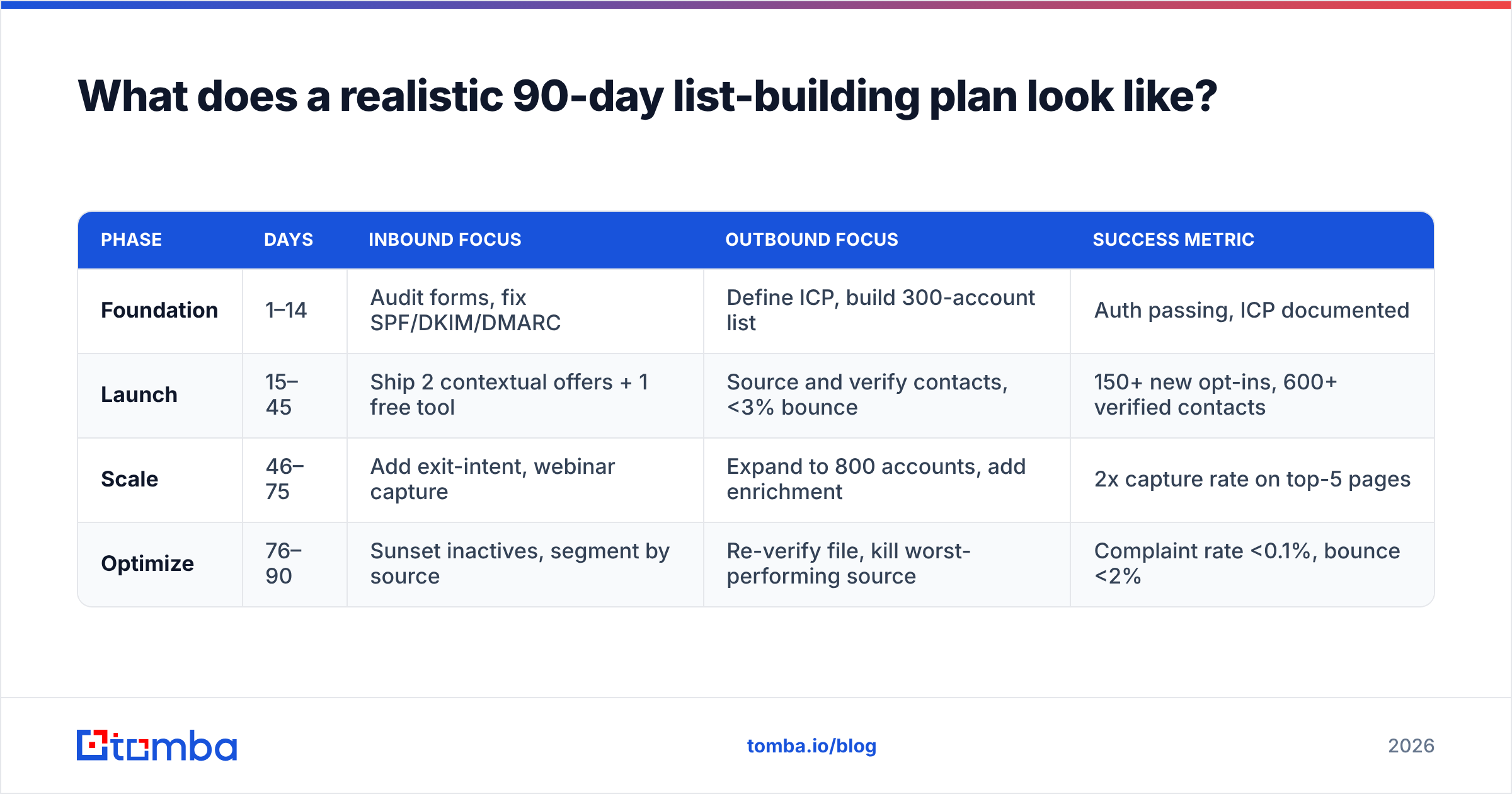
What does a realistic 90-day list-building plan look like?#
| Phase | Days | Inbound focus | Outbound focus | Success metric |
|---|---|---|---|---|
| Foundation | 1–14 | Audit forms, fix SPF/DKIM/DMARC | Define ICP, build 300-account list | Auth passing, ICP documented |
| Launch | 15–45 | Ship 2 contextual offers + 1 free tool | Source and verify contacts, <3% bounce | 150+ new opt-ins, 600+ verified contacts |
| Scale | 46–75 | Add exit-intent, webinar capture | Expand to 800 accounts, add enrichment | 2x capture rate on top-5 pages |
| Optimize | 76–90 | Sunset inactives, segment by source | Re-verify file, kill worst-performing source | Complaint rate <0.1%, bounce <2% |
Two things people get wrong about this timeline. First, they skip the foundation phase because authentication is boring — and then spend month three diagnosing why nothing lands. Second, they scale outbound volume before their reply rate is above 3%, which just makes a bad message reach more people.
What are the mistakes that quietly kill a list?#
- Buying a bulk list and importing it directly. The bounce spike is immediate and the reputation damage lasts weeks. If you buy data, verify it independently and warm into it slowly.
- Using your primary domain for cold outbound. Send from a separate but related domain. Protect the domain your invoices and support replies come from.
- Treating verification as a one-time purchase. It is a recurring cost because decay is a recurring event.
- Skipping the double opt-in decision. Single opt-in grows faster; double opt-in produces a cleaner file and stronger consent evidence. For EU-heavy audiences, double opt-in is usually worth the ~20–30% volume loss.
- No suppression list. Unsubscribes, complaints, and hard bounces must be permanently suppressed across every tool you send from — not just the one where they unsubscribed.
- Optimizing form design instead of offer relevance. The button color is not why the form converts at 1%.
Where should you start this week?#
Pick the constraint that is actually binding. If you have traffic but no list, build one contextual in-content offer on your highest-traffic page and measure it for two weeks. If you have no traffic and need pipeline, define 300 accounts and source verified contacts for them.
For the second path, start with the Tomba Email Finder. Search by domain, name, or company, get the email pattern for each account alongside the individual addresses, and verify every result before it enters a sequence. The free tier gives you 25 searches a month — enough to run the 50-company accuracy test on your own ICP and see the hit rate for yourself before spending anything. If the coverage holds up on your accounts, Starter at $49/mo is where most small outbound teams land.
Build the list you can actually reach. Everything else is a number in a dashboard.
Related guides#
Ready to find emails that actually work?
Join 150,000+ professionals who stopped guessing and started sending. Free credits on signup — no credit card required.
Get the Tomba newsletter
Practical outbound tactics and product updates — once every two weeks.
About the author