How To Calculate Email Bounce Rate (Formula + Benchmarks)
Your ESP's bounce number hides more than it shows. Here's the exact formula, how hard and soft bounces skew it, and the 2026 benchmarks that decide whether you pause a campaign.
TL;DR
- Email bounce rate = (bounced emails ÷ emails delivered attempts) × 100. Use sent, not delivered, as the denominator — using delivered inflates your numbers and breaks benchmark comparisons.
- A healthy B2B cold outbound bounce rate in 2026 is under 2%. Above 3% you're already burning sender reputation; above 5% most ESPs will throttle or suspend you.
- Hard bounces are the only ones that matter for reputation math. Track them as a separate rate — a 4% total bounce rate that's 90% soft is a very different problem from one that's 90% hard.
- Your ESP's dashboard number is not comparable across tools. Some exclude blocks, some count deferrals, some suppress known-bad addresses before sending.
- The only durable fix is upstream: verify addresses before they enter the sequence, not after the bounce report lands.
What is email bounce rate, exactly?#
Email bounce rate is the percentage of the emails you attempted to send that the receiving mail server refused to accept.
Think of it like undeliverable postal mail. You drop 1,000 letters in the box. 40 come back stamped "no such address" or "recipient moved." Your bounce rate is 4%. The post office doesn't care much about one returned letter — but if 40 come back every week, they start wondering whether you're actually mailing real people.
Mailbox providers work the same way, only faster and less forgivingly. Google, Microsoft, and the big filtering vendors treat a rising bounce rate as the clearest available signal that a sender is working from purchased, scraped, or stale data. That signal feeds directly into your sender reputation, which in turn decides whether your accepted mail lands in the inbox or the spam folder.
That's the part most teams miss. Bounce rate isn't a vanity metric measuring wasted sends. It's a leading indicator of whether the 96% that did get delivered will ever be seen.
How do you calculate email bounce rate?#
The formula is one line:
Bounce rate = (Total bounced emails ÷ Total emails sent) × 100
Worked example. You send a campaign to 5,000 contacts. 187 bounce.
187 ÷ 5,000 = 0.0374 → 3.74% bounce rate
That's it. The arithmetic is trivial. Everything that goes wrong goes wrong in the definitions.
The four numbers you need to get right#
- Total emails sent — every send attempt, including ones your ESP suppressed at the door. If your platform silently drops 300 addresses it already knows are dead, and you use its "sent" figure, your reported bounce rate is fiction.
- Total bounced — every message returned with a permanent or temporary failure. Some platforms fold "blocked by recipient policy" into bounces; others report it separately as a rejection.
- Hard bounces — permanent failures. The address doesn't exist, the domain doesn't resolve, or the mailbox is closed. These are the reputation killers.
- Soft bounces — temporary failures. Full mailbox, server down, message too large, greylisting. These usually resolve on retry and carry far less reputation weight.
- Deferrals — a message the receiving server asked you to retry later. Not a bounce at all, but several tools count them in the total until the retry window closes.
- Delivered — sent minus bounced. Use this only as a sanity check, never as the denominator.
Calculate three rates, not one:
- Total bounce rate = all bounces ÷ sent
- Hard bounce rate = hard bounces ÷ sent ← the one that predicts trouble
- Soft bounce rate = soft bounces ÷ sent

Should you use "sent" or "delivered" as the denominator?#
Use sent. Always.
This sounds like pedantry until you run the numbers. Take 10,000 attempts with 500 bounces:
- Sent as denominator: 500 ÷ 10,000 = 5.00%
- Delivered as denominator: 500 ÷ 9,500 = 5.26%
At 5% the gap is small. At 20% bounces on a badly sourced list, sent-based gives you 20.0% and delivered-based gives you 25.0% — a five-point swing on the exact same campaign. Since every published benchmark, every ESP acceptable-use policy, and every deliverability consultant assumes the sent denominator, mixing methods means you can't compare your number to anything.
Mailchimp's own reporting documentation and most major platforms use attempted sends. Match them.
What counts as a good email bounce rate in 2026?#
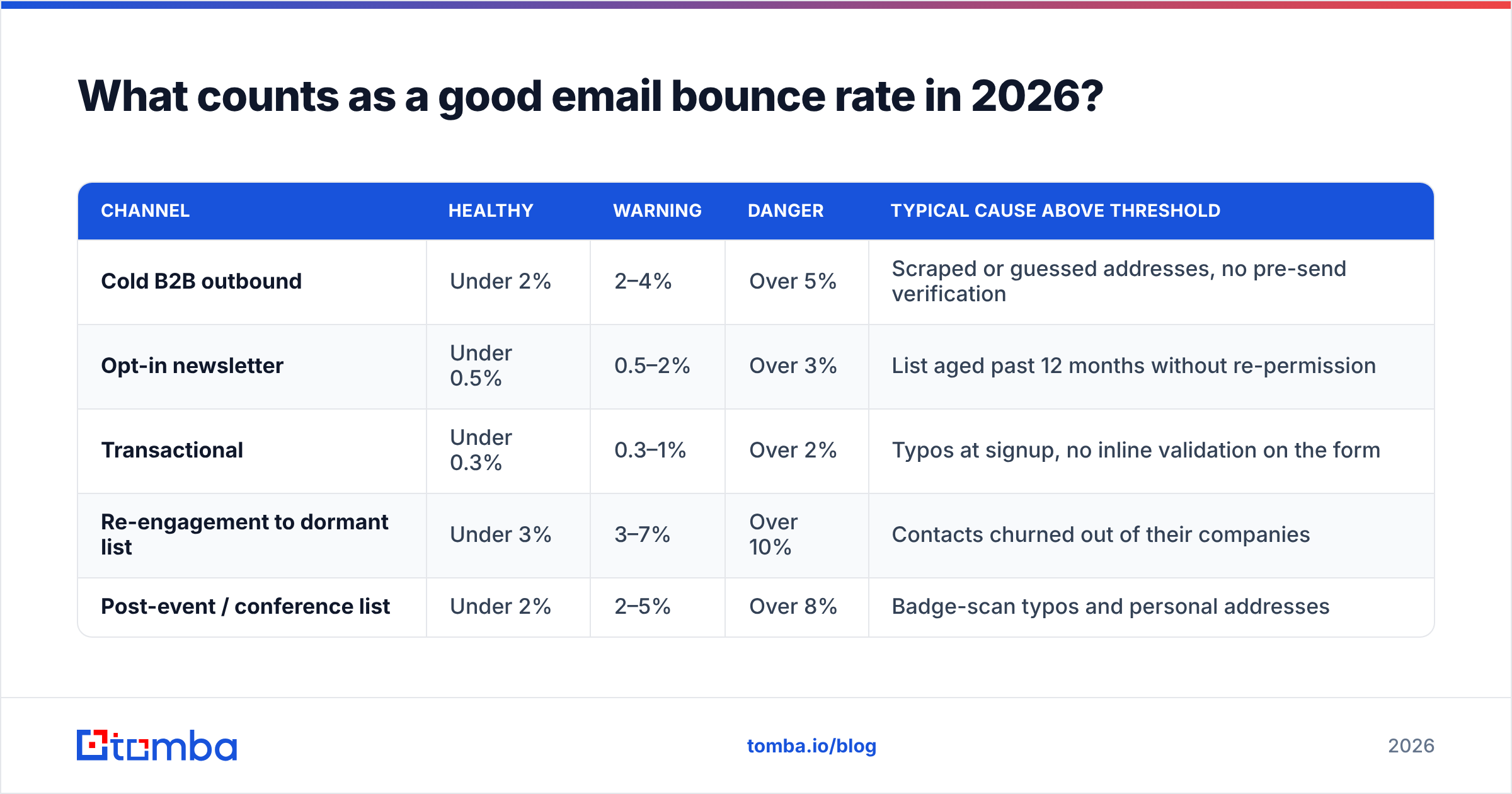
Benchmarks vary by channel more than by industry. Here's how the thresholds break down.
| Channel | Healthy | Warning | Danger | Typical cause above threshold |
|---|---|---|---|---|
| Cold B2B outbound | Under 2% | 2–4% | Over 5% | Scraped or guessed addresses, no pre-send verification |
| Opt-in newsletter | Under 0.5% | 0.5–2% | Over 3% | List aged past 12 months without re-permission |
| Transactional | Under 0.3% | 0.3–1% | Over 2% | Typos at signup, no inline validation on the form |
| Re-engagement to dormant list | Under 3% | 3–7% | Over 10% | Contacts churned out of their companies |
| Post-event / conference list | Under 2% | 2–5% | Over 8% | Badge-scan typos and personal addresses |
Two numbers to memorize. 2% is where cold outbound should sit if your data pipeline is doing its job. 5% is roughly where Google's and Microsoft's filters start treating you as a suspect sender, and where most ESPs invoke their acceptable-use clause. Between those two, you're spending reputation you'll need later.
One important nuance for B2B: your bounce rate ceiling is partly set by workforce churn, not by your tooling. Roughly 25–30% of B2B contact records decay per year as people change jobs. A list you verified in January is measurably worse in July. That's why bounce rate needs a recurring process, not a one-time cleanup.
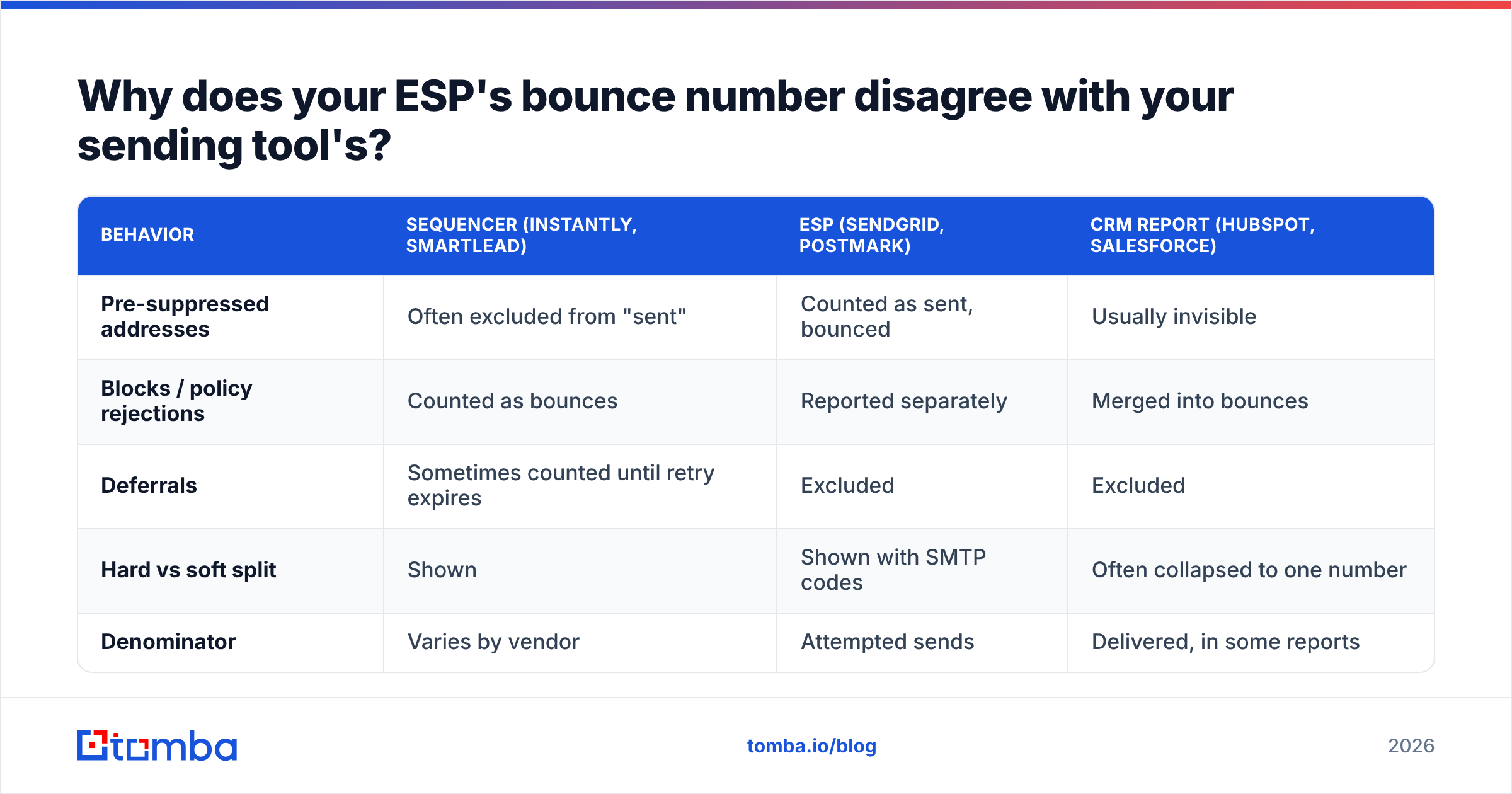
Why does your ESP's bounce number disagree with your sending tool's?#
Because they're measuring different things, and none of them tell you which.
| Behavior | Sequencer (Instantly, Smartlead) | ESP (SendGrid, Postmark) | CRM report (HubSpot, Salesforce) |
|---|---|---|---|
| Pre-suppressed addresses | Often excluded from "sent" | Counted as sent, bounced | Usually invisible |
| Blocks / policy rejections | Counted as bounces | Reported separately | Merged into bounces |
| Deferrals | Sometimes counted until retry expires | Excluded | Excluded |
| Hard vs soft split | Shown | Shown with SMTP codes | Often collapsed to one number |
| Denominator | Varies by vendor | Attempted sends | Delivered, in some reports |
The practical consequence: do not compare a bounce rate from one tool to a benchmark computed on another. Pull the raw event log, classify the bounces yourself using SMTP response codes, and compute all three rates from the same denominator. It takes ten minutes in a spreadsheet and it's the only version of the number you should act on.
Codes worth knowing: 550 5.1.1 (mailbox doesn't exist — hard), 550 5.7.1 (blocked by policy — reputation issue, not a data issue), 452 4.2.2 (mailbox full — soft), 421 (service unavailable, retry — deferral).
How do you calculate bounce rate in a spreadsheet?#
Three methods, fastest first.
Method 1 — Single campaign, 30 seconds. Export the campaign report. In a blank cell: =bounced_count / sent_count, format as percentage. Done.
Method 2 — Rolling 30-day rate. This is the number that actually maps to how mailbox providers evaluate you, since reputation is computed on a trailing window, not per campaign.
=SUMIFS(Bounces, Date, ">="&TODAY()-30) / SUMIFS(Sent, Date, ">="&TODAY()-30)Method 3 — Hard bounce rate by domain. The diagnostic version. Pivot your bounce log by recipient domain, then compute hard bounces ÷ sent per domain. A 4% overall rate that's concentrated entirely in three enterprise domains is a catch-all or policy-block problem. A 4% rate spread evenly across hundreds of domains is a data-sourcing problem. Those need opposite fixes.
If you're pulling lists in and out of a sheet regularly, the Google Sheets email finder add-on lets you verify addresses in the same tab where you're doing this math, which removes the export-verify-reimport loop.
What actually drives bounce rate down?#
Measuring is the easy half. Here's the fix list, ordered by impact per hour spent.
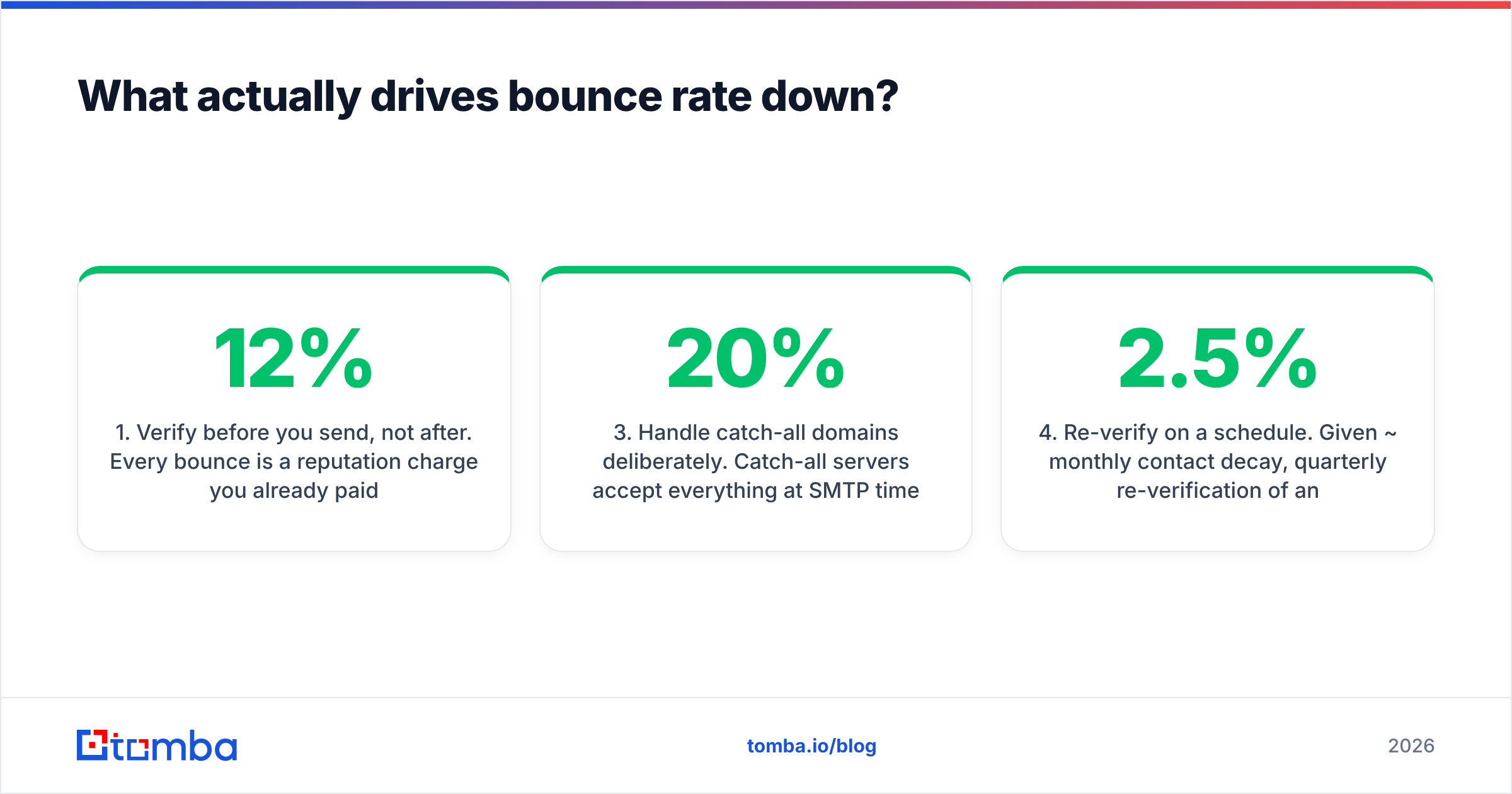
- Verify before you send, not after. Every bounce is a reputation charge you already paid. Running the list through an email verifier before it enters the sequence converts a reputation cost into a data cost, which is orders of magnitude cheaper. This single change typically takes a cold list from 8–12% down to under 2%.
- Stop guessing patterns. Permutating
first.last@domain.comand hoping is the single largest source of hard bounces in B2B outbound. Use verified sourcing — a real email finder that returns confidence scores and sources — instead of pattern generation. - Handle catch-all domains deliberately. Catch-all servers accept everything at SMTP time, so standard verification returns "unknown" rather than valid or invalid. Roughly 15–20% of enterprise B2B domains are catch-all. Either route them through a catch-all verifier or segment them into a separate low-volume campaign so they can't drag your main sending domain's reputation down.
- Re-verify on a schedule. Given ~2.5% monthly contact decay, quarterly re-verification of any list you mail regularly is the minimum. Monthly if you're sending high volume.
- Suppress hard bounces permanently, immediately. Never retry a
550 5.1.1. Push it to a global suppression list that applies across every sending tool you own, not just the one that caught it. - Validate at the point of capture. Inline validation on signup forms kills the typo class of bounces (
gmial.com,@compnay.com) before they ever enter the database. A free email checker wired into the form is a one-afternoon job with permanent returns.
How do bounces damage deliverability, exactly?#
Mailbox providers don't publish their scoring, but the mechanism is well documented in aggregate.
Every hard bounce is evidence that you mailed an address that doesn't exist. One is noise. A pattern of them is the signature of a list you didn't earn — purchased, scraped, or guessed. Filters weight that heavily because it correlates strongly with spam behavior across their entire corpus.
The damage compounds in three ways:
- Domain-level reputation. Your sending domain accumulates the history. Once degraded, recovery takes weeks of clean sending — you can't buy your way out.
- IP-level reputation. On shared IPs, your bounces affect other senders and theirs affect you. This is why deliverability consultants push dedicated IPs above a certain volume.
- Spam trap risk. Recycled traps are old abandoned addresses that mailbox providers reactivate specifically to catch senders who never clean their lists. If you're bouncing heavily, you're statistically likely to be hitting traps too — and trap hits carry far heavier penalties than bounces. Google's bulk sender guidelines make the expectations explicit.
There's a compounding effect worth naming. High bounce rates suppress open rates (fewer people see the mail), which suppresses positive engagement signals, which further degrades reputation, which suppresses delivery further. Teams often diagnose this as "our copy stopped working." It usually isn't the copy.
For the full mechanics of how these signals interact, the email deliverability entry in the glossary covers the underlying model.
What should you do when your bounce rate spikes?#
A triage order that works:
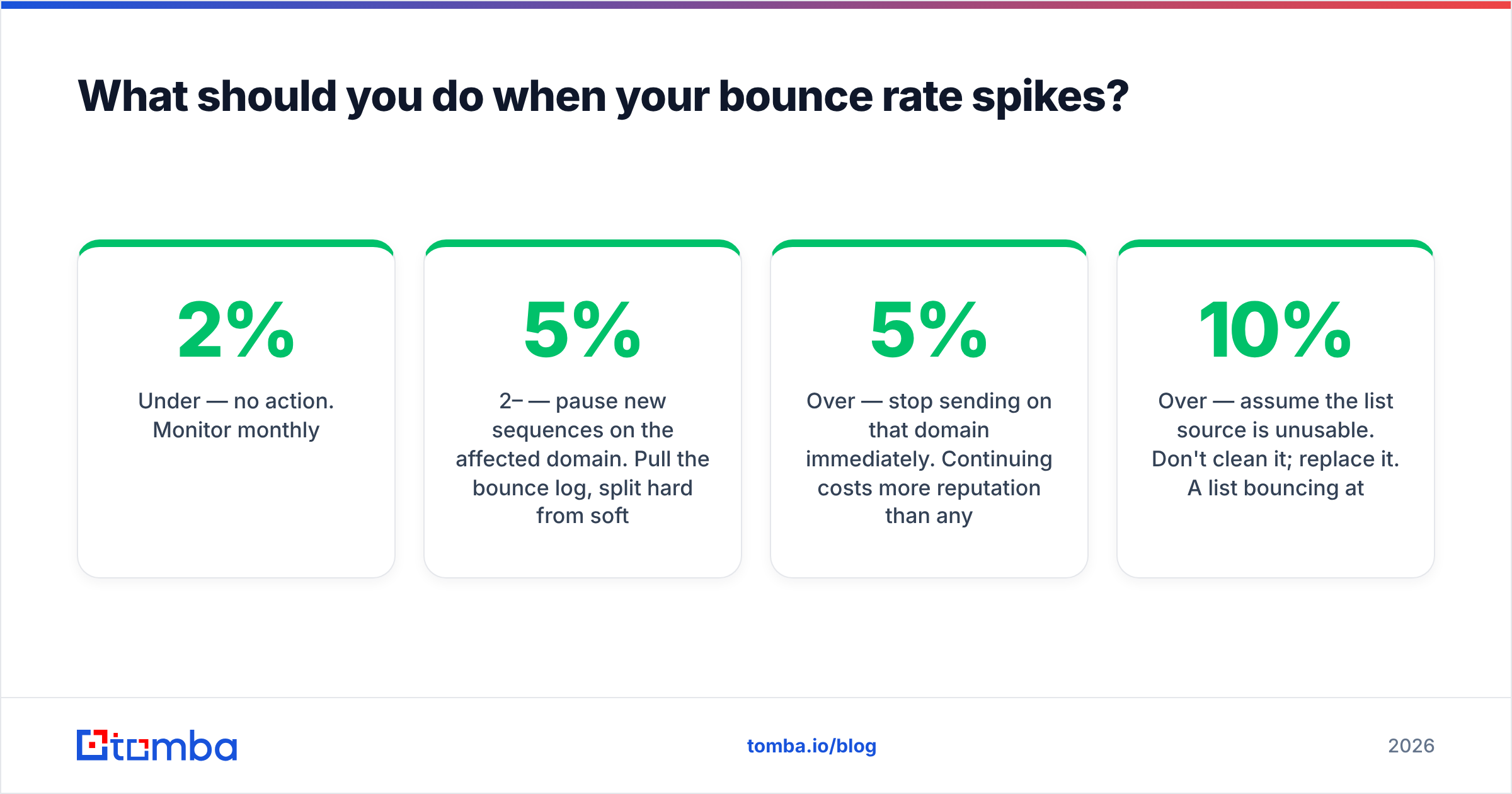
Under 2% — no action. Monitor monthly.
2–5% — pause new sequences on the affected domain. Pull the bounce log, split hard from soft, pivot by recipient domain. If it's concentrated, you have a specific list segment or a policy-block problem. If it's diffuse, your sourcing is the issue.
Over 5% — stop sending on that domain immediately. Continuing costs more reputation than any campaign is worth. Re-verify the entire remaining list, suppress every hard bounce globally, and resume at reduced volume with a two-week ramp. Expect four to eight weeks to recover full inbox placement.
Over 10% — assume the list source is unusable. Don't clean it; replace it. A list bouncing at 10%+ was almost certainly generated by pattern-guessing or bought from a reseller, and the addresses that do resolve are frequently role accounts and traps rather than real prospects.
While you're in triage, run your sending domain through a blacklist checker and confirm your SPF record is intact. Authentication failures produce bounce patterns that look identical to bad data but need a completely different fix — and you don't want to spend two weeks cleaning a list when the actual problem was a DNS change.
Frequently asked questions#
Is a 0% bounce rate suspicious? Not suspicious, but usually not real. It typically means your tool suppresses known-bad addresses before counting them as sent. Check the denominator.
Do soft bounces count toward the number I report? Include them in total bounce rate, but track hard bounce rate separately and use that to make go/no-go decisions. A soft bounce that resolves on retry costs you almost nothing.
How often should I recalculate? Per campaign for tactical decisions, and on a rolling 30-day window for reputation monitoring. The rolling number is what mailbox providers approximate.
Does bounce rate differ by company size? Yes. Enterprise domains bounce less at SMTP time (more catch-all servers accept everything) but convert worse, because acceptance doesn't mean the mailbox exists. SMB domains bounce more honestly. Don't read a low enterprise bounce rate as clean data.
Fix the input, not the report#
Calculating email bounce rate takes one division. Keeping it under 2% takes a data pipeline that verifies addresses before they reach your sequencer.
That's the whole game. Every hour spent building better bounce dashboards is an hour not spent on the upstream problem — and the dashboard never improves the number by itself.
Start with the source. Tomba's Email Finder returns verified professional addresses with confidence scores and source attribution, so the contacts entering your sequences have already been checked against live mail servers rather than generated from a pattern and hoped for. The free tier gives you 25 searches a month to benchmark it against your current list quality; paid plans start at $49/mo, with full Tomba pricing available if you're running higher volume. Run one campaign's worth of contacts through it, recalculate your bounce rate with the formula above, and compare.
Related guides#
Ready to find emails that actually work?
Join 150,000+ professionals who stopped guessing and started sending. Free credits on signup — no credit card required.
Get the Tomba newsletter
Practical outbound tactics and product updates — once every two weeks.
About the author