How To Calculate Lead Score: A Practical 2026 Framework
Most lead scoring models are guesswork dressed up as math. Here is the exact formula, the point weights, the negative signals, and the data hygiene step that decides whether your score means anything.
TL;DR
- A lead score is a weighted sum:
Score = (Fit points x fit weight) + (Behavior points x behavior weight) - (Negative points). Everything else is bookkeeping. - Start with 100 points total, split roughly 40 fit / 60 behavior for inbound, and flip it to 60 fit / 40 behavior for outbound where behavior data is thin.
- Negative scoring matters more than positive scoring. Competitors, students, personal Gmail addresses, and unsubscribes should actively push scores down.
- Calibrate against closed-won deals from the last 12 months — not against opinions in a planning meeting.
- A score built on stale or unverified contact data is a confident number about a person who does not exist. Clean the data first.
What Is a Lead Score, Really?#
A lead score is a single number that estimates how likely a lead is to buy, and how soon. Think of it like a credit score: nobody claims it predicts the future perfectly, but it ranks a pile of applicants well enough that you can decide who gets a phone call today and who gets a nurture email.
Two inputs feed it:
- Fit (explicit data) — who they are. Job title, company size, industry, geography, tech stack, budget signals. This data is mostly static and comes from forms, enrichment, or your CRM.
- Intent (implicit data) — what they did. Pricing page visits, demo requests, email replies, webinar attendance, repeat sessions, doc downloads.
A lead with perfect fit and zero behavior is a cold prospect. A lead with heavy behavior and terrible fit is usually a student, a competitor, or a job seeker. You need both axes, which is why the calculation is a weighted sum rather than a single tally.
What Is the Formula for Calculating a Lead Score?#
Here is the whole thing:
Lead Score = (Σ Fit points × W_fit) + (Σ Behavior points × W_behavior) − (Σ Negative points)Where W_fit + W_behavior = 1.0, and the final result is capped at 100.
Worked example. Your weights are 0.4 fit / 0.6 behavior. A lead is a VP of Sales (fit 25) at a 200-person SaaS company (fit 20) in your target region (fit 15), so raw fit = 60. She visited pricing twice (behavior 20), opened three emails (behavior 9), and booked a demo (behavior 30), so raw behavior = 59. She also used a personal email domain (−10).
(60 × 0.4) + (59 × 0.6) − 10
= 24 + 35.4 − 10
= 49.4  →  Score: 49
That 49 lands in "nurture," not "call now" — which is the point. The demo booking alone would have looked like a hot lead in a naive additive model. The personal domain and the mediocre fit total pull it back into reality.

How Do You Assign Points to Each Attribute?#
Do not invent the numbers. Derive them. Pull your last 12 months of closed-won deals, then compute the lift for each attribute:
Lift = (% of closed-won leads with attribute) ÷ (% of all leads with attribute)
If 48% of your closed-won deals had a Director+ title but only 16% of all leads did, the lift is 3.0 — that attribute earns high points. If pricing-page visits appear in 70% of won deals and 65% of all leads, lift is 1.08 and the attribute is nearly worthless as a signal, no matter how intuitive it feels.
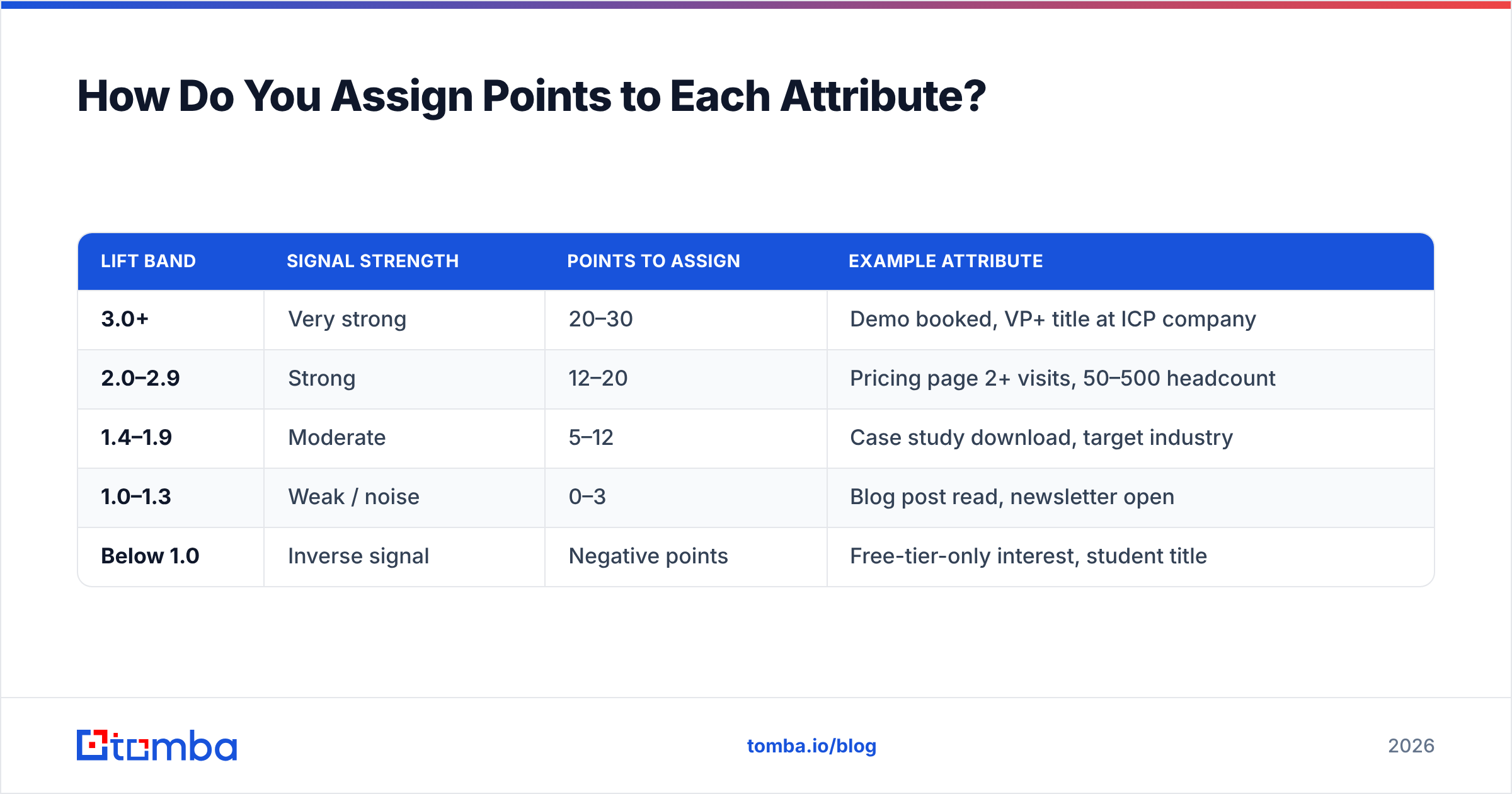
Then map lift bands to point values:
| Lift band | Signal strength | Points to assign | Example attribute |
|---|---|---|---|
| 3.0+ | Very strong | 20–30 | Demo booked, VP+ title at ICP company |
| 2.0–2.9 | Strong | 12–20 | Pricing page 2+ visits, 50–500 headcount |
| 1.4–1.9 | Moderate | 5–12 | Case study download, target industry |
| 1.0–1.3 | Weak / noise | 0–3 | Blog post read, newsletter open |
| Below 1.0 | Inverse signal | Negative points | Free-tier-only interest, student title |
The bottom two rows are where most models fall apart. Teams keep assigning +5 for newsletter opens because it feels like engagement, and the score slowly fills with noise until every lead scores 60 and nothing is actionable.
What Does a Complete Scoring Model Look Like?#
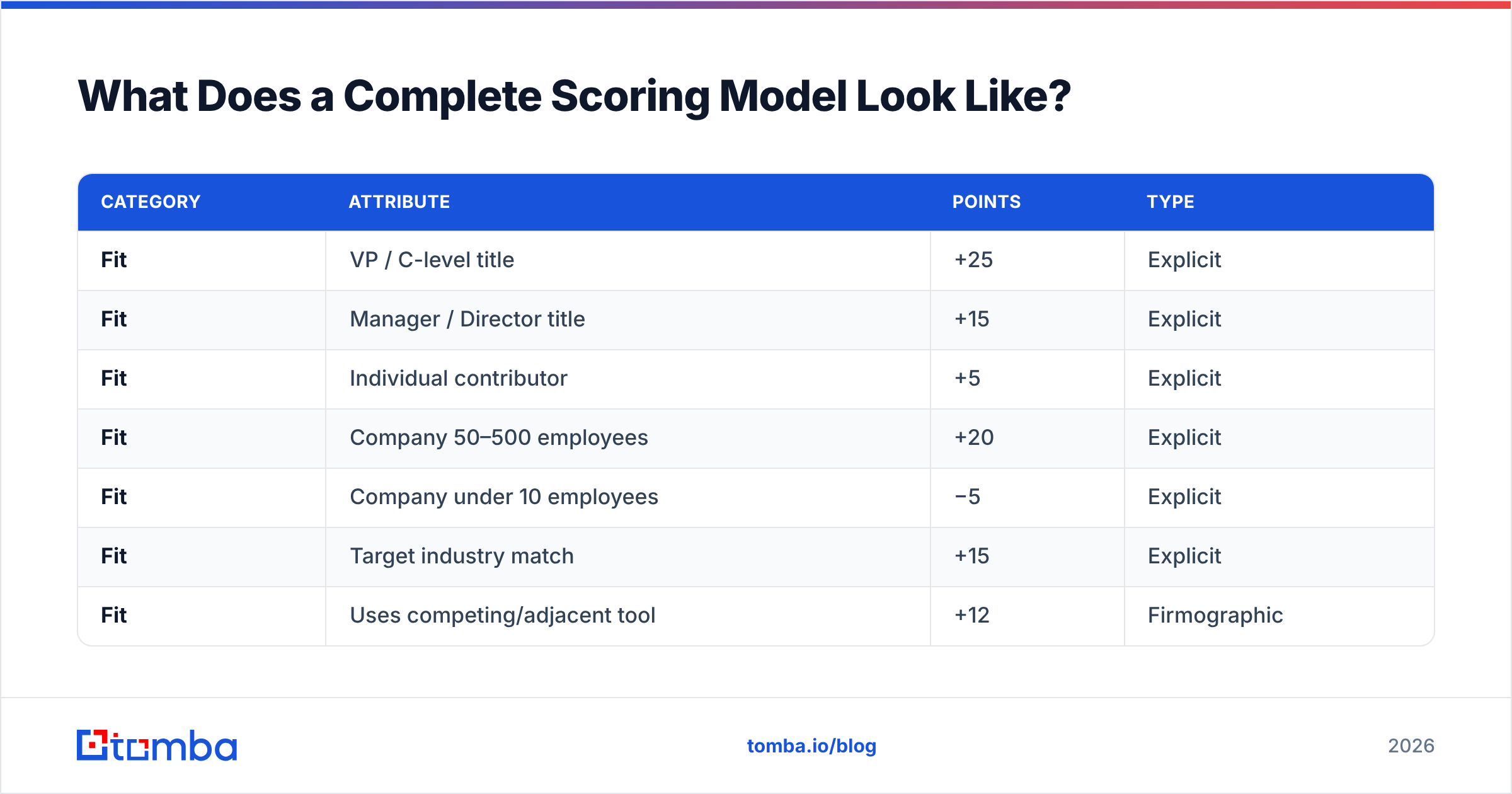
Below is a working starter model for a mid-market B2B SaaS selling to sales and marketing leaders. Adjust the point values to your own lift math, but the structure transfers.
| Category | Attribute | Points | Type |
|---|---|---|---|
| Fit | VP / C-level title | +25 | Explicit |
| Fit | Manager / Director title | +15 | Explicit |
| Fit | Individual contributor | +5 | Explicit |
| Fit | Company 50–500 employees | +20 | Explicit |
| Fit | Company under 10 employees | −5 | Explicit |
| Fit | Target industry match | +15 | Explicit |
| Fit | Uses competing/adjacent tool | +12 | Firmographic |
| Behavior | Demo or trial request | +30 | Implicit |
| Behavior | Pricing page, 2+ visits in 14 days | +20 | Implicit |
| Behavior | Replied to a cold email | +18 | Implicit |
| Behavior | Attended webinar | +12 | Implicit |
| Behavior | Downloaded case study | +8 | Implicit |
| Behavior | Opened email (per open, max 9) | +3 | Implicit |
| Negative | Personal email domain (gmail, yahoo) | −10 | Disqualifier |
| Negative | Competitor domain | −50 | Disqualifier |
| Negative | Student / intern / job seeker title | −20 | Disqualifier |
| Negative | Unsubscribed | −25 | Disqualifier |
| Negative | No activity in 60 days | −15 | Decay |
Two rules that make this model behave:
- Cap repeatable behaviors. Email opens max out at 9 points. Otherwise one enthusiastic reader outranks a VP who booked a demo.
- Decay everything. Behavior points should lose 50% of their value after 30 days and expire at 90. A pricing visit from March tells you nothing in September.
How Do You Set the Score Thresholds?#
Thresholds are a routing decision, not a math decision. Set them against your sales capacity, not against a round number.
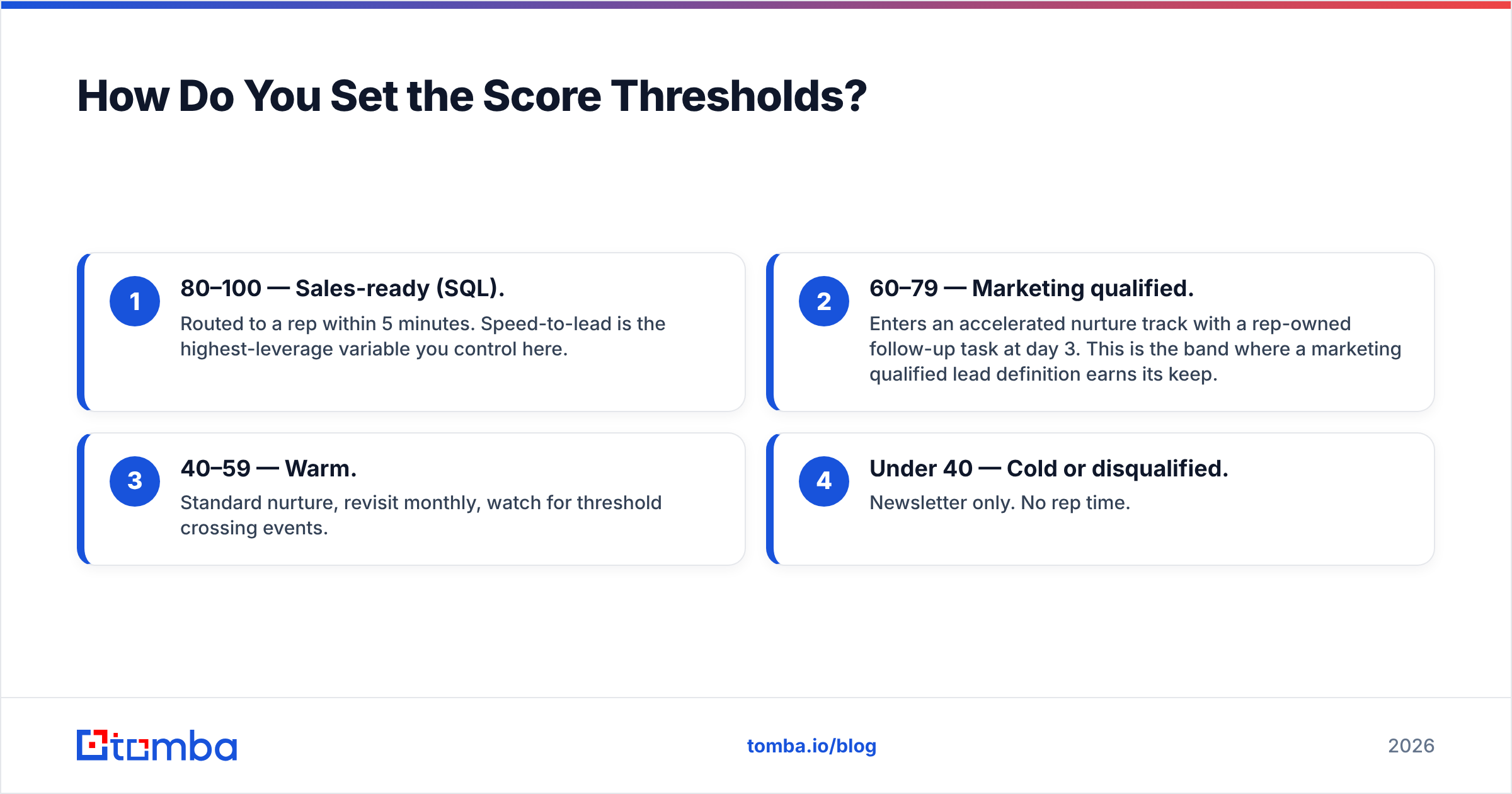
Count how many leads your reps can genuinely work per week. If two SDRs can handle 60 leads weekly and you generate 400, your MQL threshold has to sit at roughly the 85th percentile of your score distribution — wherever that lands. Then label the bands:
- 80–100 — Sales-ready (SQL). Routed to a rep within 5 minutes. Speed-to-lead is the highest-leverage variable you control here.
- 60–79 — Marketing qualified. Enters an accelerated nurture track with a rep-owned follow-up task at day 3. This is the band where a marketing qualified lead definition earns its keep.
- 40–59 — Warm. Standard nurture, revisit monthly, watch for threshold crossing events.
- Under 40 — Cold or disqualified. Newsletter only. No rep time.
Review the distribution monthly. If more than 20% of leads sit above your SQL threshold, the threshold is too low — you are just handing reps the same pile with a nicer label on it.
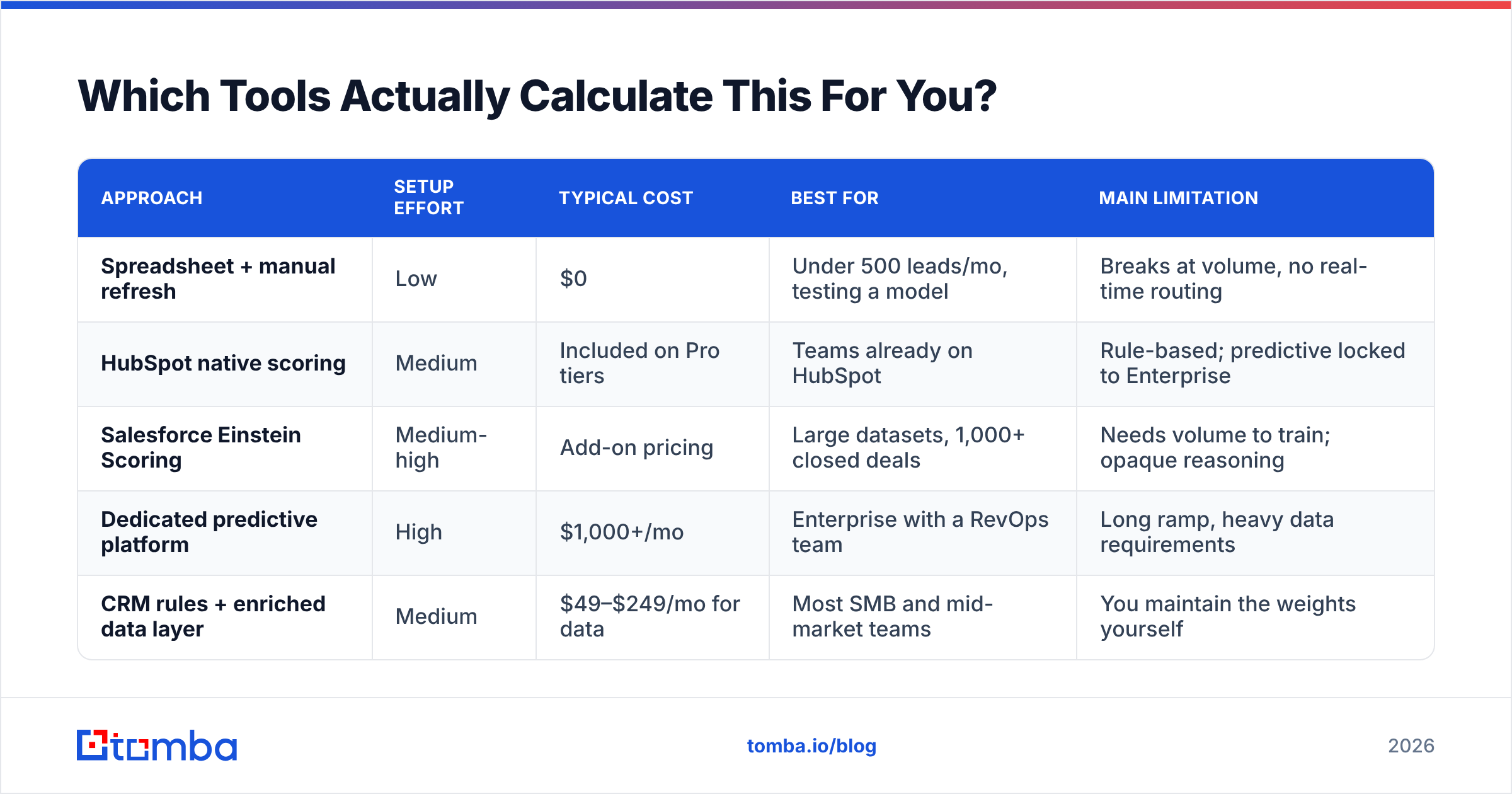
Which Tools Actually Calculate This For You?#
You can build the model in a spreadsheet, in your CRM's native scoring engine, or in a dedicated platform. The trade-off is control versus maintenance.
| Approach | Setup effort | Typical cost | Best for | Main limitation |
|---|---|---|---|---|
| Spreadsheet + manual refresh | Low | $0 | Under 500 leads/mo, testing a model | Breaks at volume, no real-time routing |
| HubSpot native scoring | Medium | Included on Pro tiers | Teams already on HubSpot | Rule-based; predictive locked to Enterprise |
| Salesforce Einstein Scoring | Medium-high | Add-on pricing | Large datasets, 1,000+ closed deals | Needs volume to train; opaque reasoning |
| Dedicated predictive platform | High | $1,000+/mo | Enterprise with a RevOps team | Long ramp, heavy data requirements |
| CRM rules + enriched data layer | Medium | $49–$249/mo for data | Most SMB and mid-market teams | You maintain the weights yourself |
For most teams under 50 people, the last row wins. Your CRM already computes weighted sums fine. What it cannot do is tell you the lead's real job title, company headcount, or whether the email address on the form is even deliverable. That gap is where scores quietly rot.
HubSpot's own documentation on scoring properties is a reasonable reference for how rule-based engines structure criteria, and G2's lead scoring category is useful for checking whether a vendor's claims survive contact with actual reviews.
Why Does Bad Data Break Lead Scoring?#
Because every point you assign is a claim about a person, and unverified data makes those claims fiction.
Consider what happens with a form fill from "j.smith@acmecorp.com" who typed "Director of Operations." Your model awards +15 for title, +20 for headcount pulled from an enrichment lookup, +15 for industry. That is 50 fit points resting entirely on whether the enrichment matched the right Acme Corp, and whether the address even accepts mail. If the email bounces, you have a 78-point lead that cannot be contacted at all — and a rep who burns 20 minutes finding that out.
Three hygiene steps before scoring runs:
- Verify deliverability. Run new contacts through an email verifier so bounced and invalid addresses never enter the scored pool. Catch-all domains need their own handling — a catch-all verifier tells you whether "valid" actually means anything on that domain.
- Enrich before you score, not after. Firmographic points are meaningless if 60% of records have a null headcount field. Contact enrichment fills title, company size, and industry so the fit half of your formula has something to work with.
- Deduplicate. Two records for the same person split behavior points across both, and neither crosses the threshold. Merge first.

How Do You Validate and Tune the Model?#
Run these four checks 90 days after launch, then quarterly.
- Conversion by band. Your 80–100 band should convert to opportunity at 3x or better the rate of the 40–59 band. If the bands convert similarly, your weights are not separating anything.
- False negative audit. Pull every closed-won deal and look up its score at the time it entered the pipeline. Any won deal that scored under 40 is a missing attribute — find what the model failed to see.
- Rep override rate. Track how often reps work low-scored leads anyway and win. A high override rate means the reps know something the model does not. Interview them and encode it.
- Score inflation drift. Plot the median score monthly. If it climbs steadily without a matching rise in win rate, your behavior points are accumulating faster than they decay. Tighten the decay curve.
One tuning rule: change one weight category at a time and wait a full sales cycle. Changing fit weights, behavior weights, and thresholds simultaneously makes the result uninterpretable.
What Are the Most Common Lead Scoring Mistakes?#
- Scoring the person but ignoring the account. In committee-driven B2B purchases, three mid-level people from the same company beat one VP acting alone. Roll individual scores up to an account score.
- Treating all pageviews equally. Pricing, integrations, and security pages predict purchase. Blog and careers pages do not. Score URLs, not sessions.
- No decay. A lead who was hot in January is not hot in September, but an additive-only model will keep insisting otherwise.
- Ignoring negative scoring entirely. This is the single most common gap. Without it, competitors researching you look identical to buyers.
- Building the model without sales. If reps do not believe the score, they will not use the routing. Have them review the point table before launch and again after the first quarter.
- Never revisiting it. Your ICP shifts. A model built for last year's segment misroutes this year's leads.
Getting the Data Layer Right#
The formula is straightforward. The weights come from your own closed-won data. The thresholds come from rep capacity. What almost nobody gets right is the input layer — the verified, enriched contact records that make every point value a statement about a real, reachable buyer instead of a guess.
If your fit scoring depends on titles and company data you do not actually have, start there. The Tomba Email Finder locates verified professional addresses by name and domain, and pairs with enrichment so your CRM has real titles, headcounts, and industries to score against. The free tier covers 25 searches a month for testing your model on a sample; paid plans start at $49/mo, with full Tomba pricing laid out per tier. Fix the data, and the arithmetic takes care of itself.
Related guides#
Ready to find emails that actually work?
Join 150,000+ professionals who stopped guessing and started sending. Free credits on signup — no credit card required.
Get the Tomba newsletter
Practical outbound tactics and product updates — once every two weeks.
About the author