How To Capture Leads On Your Website: A 2026 Playbook
Most B2B sites convert under 2% of traffic and lose the rest forever. Here are the seven capture methods that actually work in 2026, ranked by effort, cost, and lead quality.
TL;DR — here is how to capture leads on your website in 2026, in five lines.
- Only 1-3% of B2B visitors ever fill out a form. The other 97% leave no trace. You have to build capture around them on purpose.
- Seven methods work in 2026: exit-intent offers, gated depth content, interactive tools, live chat, newsletter capture, progressive profiling, and anonymous visitor identification.
- Form length is the biggest lever you control. Cutting from 11 fields to 4 usually lifts completion by 40-60%.
- Captured leads are worthless if the email bounces. Verify at the moment of submission, not the night before your campaign.
- Visitor de-anonymization plus enrichment wins back a slice of the 97%. But it gives you company-level intent, not consent to email a person.
Why do most website lead capture setups fail?#
Because they treat capture as one form on one page. Then they wonder why traffic climbs while pipeline stays flat.
Here is the math that kills most B2B sites. You get 10,000 visitors a month. Your contact form converts at 1.4%. That is 140 leads. Maybe 35 are real buyers. Maybe 12 fit your ICP. You paid for content and ads to move all 10,000 people, and you ended up with twelve conversations.
The form is not the problem. The problem is that you built one door into a building with nine thousand people walking past. Visitors arrive at different stages. Some are ready to talk to sales. Some just want a price. Some are researching a project six months out. Some are competitors. A single "Request a Demo" button serves the first group and ignores everyone else.
So the real answer to how to capture leads on your website is layering. Offer a range of commitments, from "give me your email for a newsletter" to "book 30 minutes with an AE." Let the visitor pick. Then enrich what they gave you, so a thin signup becomes a usable record.
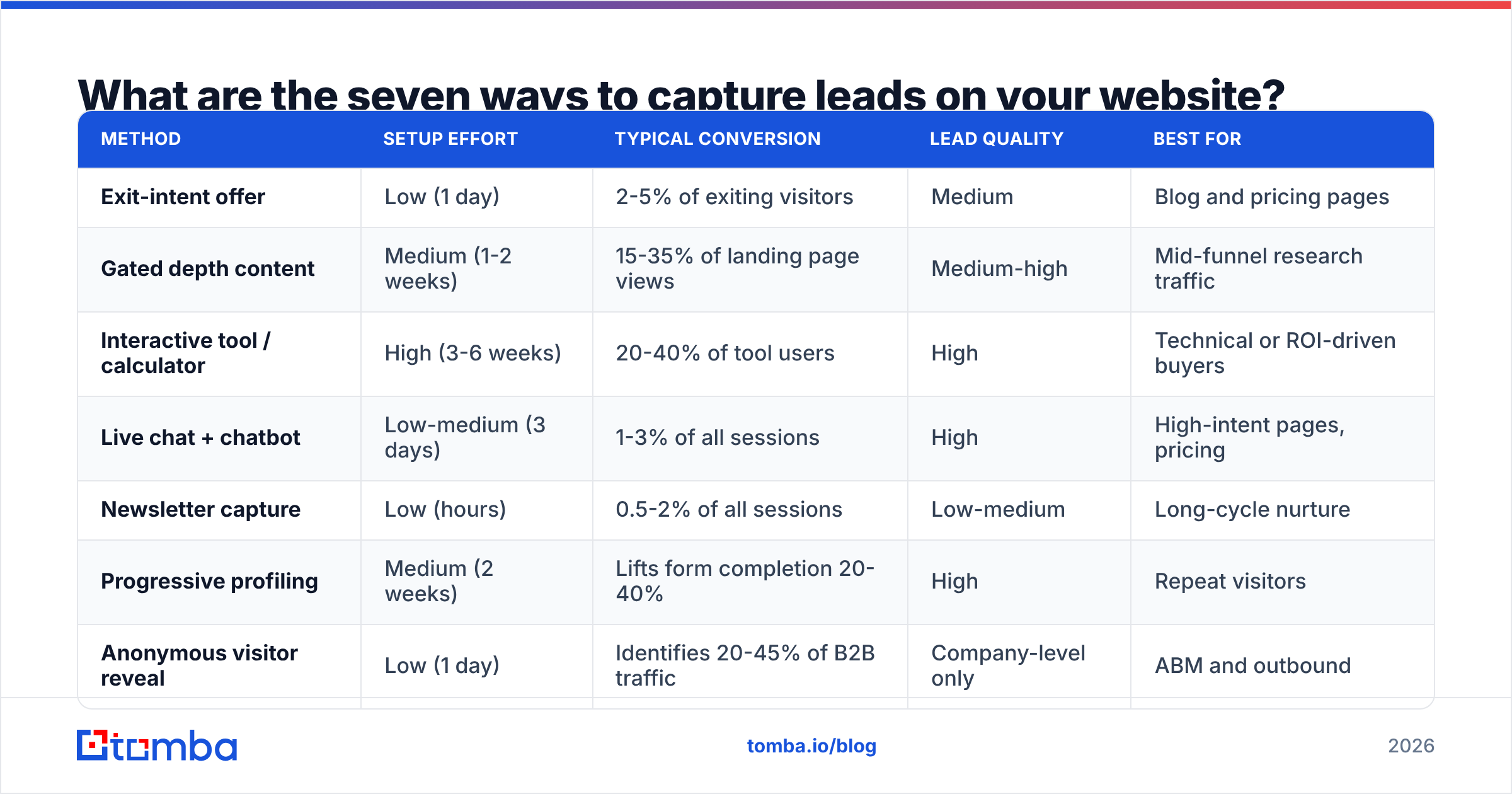
How to capture leads on your website: the seven methods that work#
Each of these works. They differ a lot in effort, cost, and the quality of what lands in your CRM.
| Method | Setup effort | Typical conversion | Lead quality | Best for |
|---|---|---|---|---|
| Exit-intent offer | Low (1 day) | 2-5% of exiting visitors | Medium | Blog and pricing pages |
| Gated depth content | Medium (1-2 weeks) | 15-35% of landing page views | Medium-high | Mid-funnel research traffic |
| Interactive tool / calculator | High (3-6 weeks) | 20-40% of tool users | High | Technical or ROI-driven buyers |
| Live chat + chatbot | Low-medium (3 days) | 1-3% of all sessions | High | High-intent pages, pricing |
| Newsletter capture | Low (hours) | 0.5-2% of all sessions | Low-medium | Long-cycle nurture |
| Progressive profiling | Medium (2 weeks) | Lifts form completion 20-40% | High | Repeat visitors |
| Anonymous visitor reveal | Low (1 day) | Identifies 20-45% of B2B traffic | Company-level only | ABM and outbound |
Notice the shape of this. The cheapest methods produce the weakest leads. The best leads come from methods that need real engineering, like interactive tools, or that return company records instead of named people, like visitor reveal. There is no free lunch. There is only a portfolio.
How do you build a form people actually finish?#
Cut fields until it hurts. Then cut one more.
Field count is the most reliable variable in conversion optimization. HubSpot's form research and years of independent A/B tests point the same way. Every extra required field costs you completions. The drop gets steepest past field five. A four-field form — name, work email, company, one qualifier — routinely beats an eleven-field form by 40-60% on completion.
The obvious objection: "But sales needs job title, company size, budget, and timeline." They do. You just do not need to ask the visitor for them.
- Ask for the work email and almost nothing else. A business email is a foreign key into every enrichment database on the market.
- Enrich server-side on submit. Company name, size, industry, tech stack, and often job title can be added automatically via data enrichment before the record hits your CRM.
- Verify before you accept. Run the address through an email verifier at submission time. Typos and throwaway addresses get caught while the visitor is still on the page.
Those three cover the basics. The next three are about not wasting the fields you keep.
- Use progressive profiling on return visits. If someone already gave you their email, ask a new question next time. Team size, use case, timeline — not the thing you already know.
- Kill the phone field unless a human calls within the hour. Phone fields hurt completion more than any other input. Most teams never dial the numbers they collect.
- Default country and company from enrichment, never from the visitor. Let them correct it. Do not make them type it.
The net effect: your visitor answers four questions, and your sales team gets fifteen data points. That gap is the whole game.
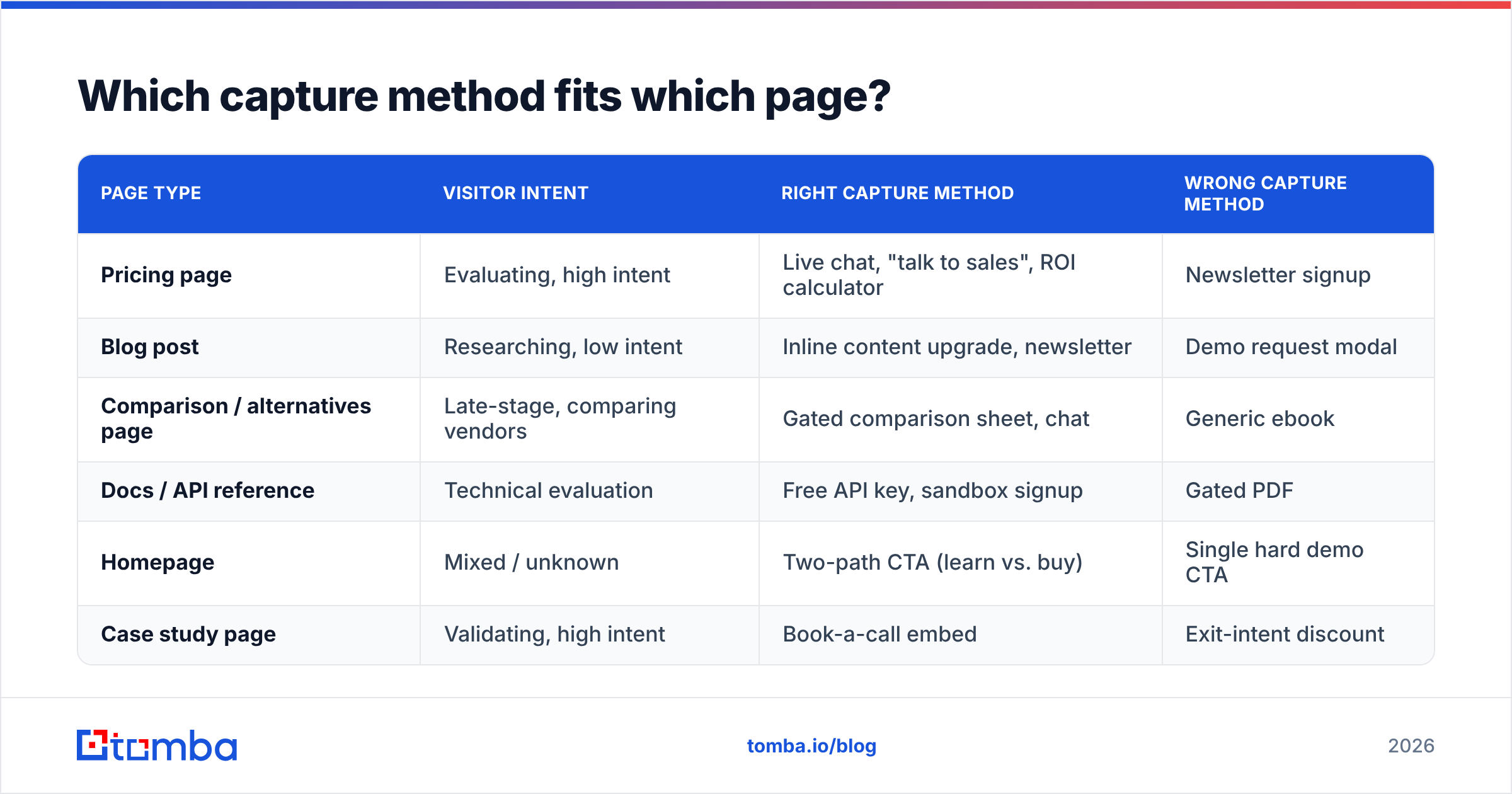
Which capture method fits which page?#
Match the offer to the intent of the page. A pricing page visitor and a top-of-funnel blog reader want very different things. Show them the same modal and you waste both.
| Page type | Visitor intent | Right capture method | Wrong capture method |
|---|---|---|---|
| Pricing page | Evaluating, high intent | Live chat, "talk to sales", ROI calculator | Newsletter signup |
| Blog post | Researching, low intent | Inline content upgrade, newsletter | Demo request modal |
| Comparison / alternatives page | Late-stage, comparing vendors | Gated comparison sheet, chat | Generic ebook |
| Docs / API reference | Technical evaluation | Free API key, sandbox signup | Gated PDF |
| Homepage | Mixed / unknown | Two-path CTA (learn vs. buy) | Single hard demo CTA |
| Case study page | Validating, high intent | Book-a-call embed | Exit-intent discount |
The wrong-method column is where the damage happens. A demo modal on a top-of-funnel blog post will not convert cold readers. Worse, it trains them to dismiss your overlays on sight. That kills conversion on the pages where a modal would have worked.
Should you gate your content in 2026?#
Gate depth, not information.
The old gating debate assumed a binary choice: everything free, or everything behind a form. Both extremes are wrong now. Search engines and AI answer engines will summarize your ungated content anyway. Buyers expect the basics for free. What still converts is content that took real work and that a reader cannot rebuild from a summary.
Gate these:
- Original benchmark data or survey results with methodology
- Templates, spreadsheets, calculators, and Notion boards
- Full recorded workshops and multi-hour courses
- Vendor comparison sheets with pricing you actually verified
Do not gate:
- Blog posts, glossaries, and definitions
- Product documentation and API references
- Pricing (gating pricing is the fastest way to lose a technical buyer)
- Anything that competes for a keyword you want to rank for
A useful middle path is the content upgrade. Publish the article free. Offer the matching spreadsheet or checklist for an email, inline, about 60% down the page. Inline upgrades tend to convert 3-9% of the readers who scroll that far. That beats a sitewide popup by a wide margin, because the offer is earned in context.
How do you capture the 97% who never fill anything out?#
You identify their company, not the person. And you stay honest with yourself about that gap.
Reverse-IP and visitor identification tools match an anonymous session to a database of corporate IP ranges and firmographic signals. When it works, you learn that someone from a 400-person logistics company in Rotterdam read your integrations page three times last week. You do not learn who. That difference matters, legally and practically.
What you can do with a company-level signal:
- Trigger outbound. Send the account to your SDRs. Then use domain search to pull the right contacts at that company and build a sequence that references the pages they viewed.
- Prioritize ABM ads. Push identified accounts into a retargeting audience, so paid spend follows real interest instead of lookalikes.
- Alert the owning rep. An open opportunity browsing your competitor comparison page is a call worth making today.
- Score existing leads. Someone whose company is suddenly reading pricing has changed stage without telling you.
What you should not do is treat an IP match as consent to email a named person. Company-level identification is often defensible under GDPR for legitimate-interest B2B outreach. Identifying a specific human from browsing behavior is a different question. Ask counsel about your markets. Do not treat a vendor's marketing copy as a legal opinion. The ICO's guidance on legitimate interests is a reasonable place to start for EU and UK work.
Match rates deserve scrutiny too. Vendors advertise 40-70% identification. Real-world B2B rates in 2026 run closer to 20-45%. Remote work, VPNs, and mobile traffic have eroded the corporate-IP signal the whole category depends on. Test tools like website visitor reveal on your own traffic first. Do not build a program around a number from a sales deck.

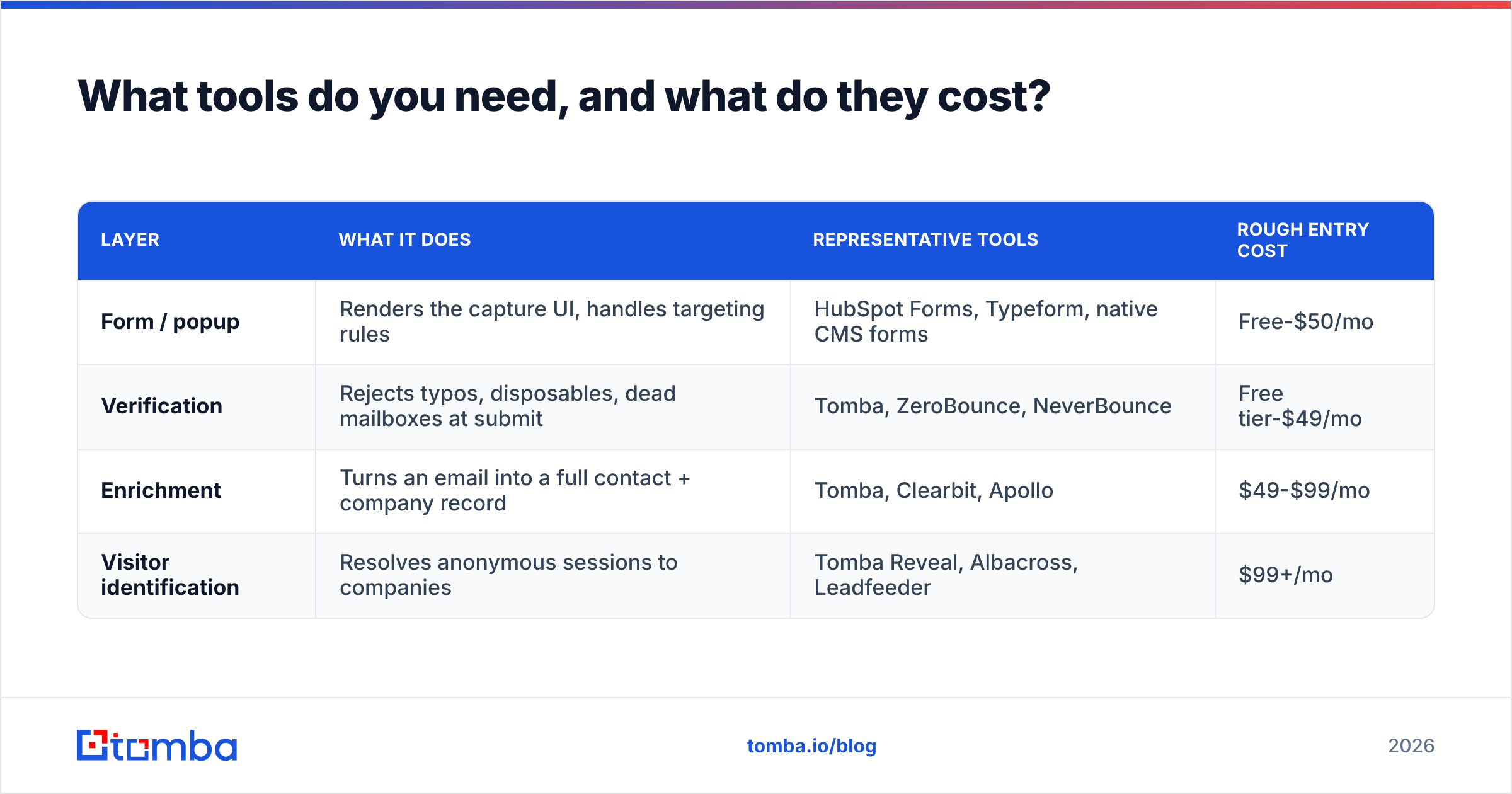
What tools do you need, and what do they cost?#
You need four capability layers. Some vendors sell two or three of them together.
| Layer | What it does | Representative tools | Rough entry cost |
|---|---|---|---|
| Form / popup | Renders the capture UI, handles targeting rules | HubSpot Forms, Typeform, native CMS forms | Free-$50/mo |
| Verification | Rejects typos, disposables, dead mailboxes at submit | Tomba, ZeroBounce, NeverBounce | Free tier-$49/mo |
| Enrichment | Turns an email into a full contact + company record | Tomba, Clearbit, Apollo | $49-$99/mo |
| Visitor identification | Resolves anonymous sessions to companies | Tomba Reveal, Albacross, Leadfeeder | $99+/mo |
On verification and enrichment, Tomba pricing starts with a free tier at 25 searches a month. Then Starter at $49/mo, Growth at $99/mo, and Pro at $249/mo, with enterprise contracts negotiated. That structure matters here because verification and enrichment fire on every submission. You want per-credit economics that do not punish you for a good traffic month.
Buying data is a different job from capturing it. Purchased-list vendors like BookYourData give you volume and coverage in segments where your inbound traffic is thin. That complements on-site capture; it does not replace it. Inbound leads carry intent that a purchased record does not. Purchased data reaches accounts that have never heard of you. Most teams running serious outbound do both.
One practical note on tooling. Whatever you choose has to fit your stack without a six-week integration project. Check the integrations list for your CRM before you commit. Prefer vendors with a documented API, so your form handler can call verification and enrichment on submit.
How do you measure whether any of this is working?#
Stop reporting raw lead count. It is the easiest number to inflate and the least connected to revenue.
Track these instead:
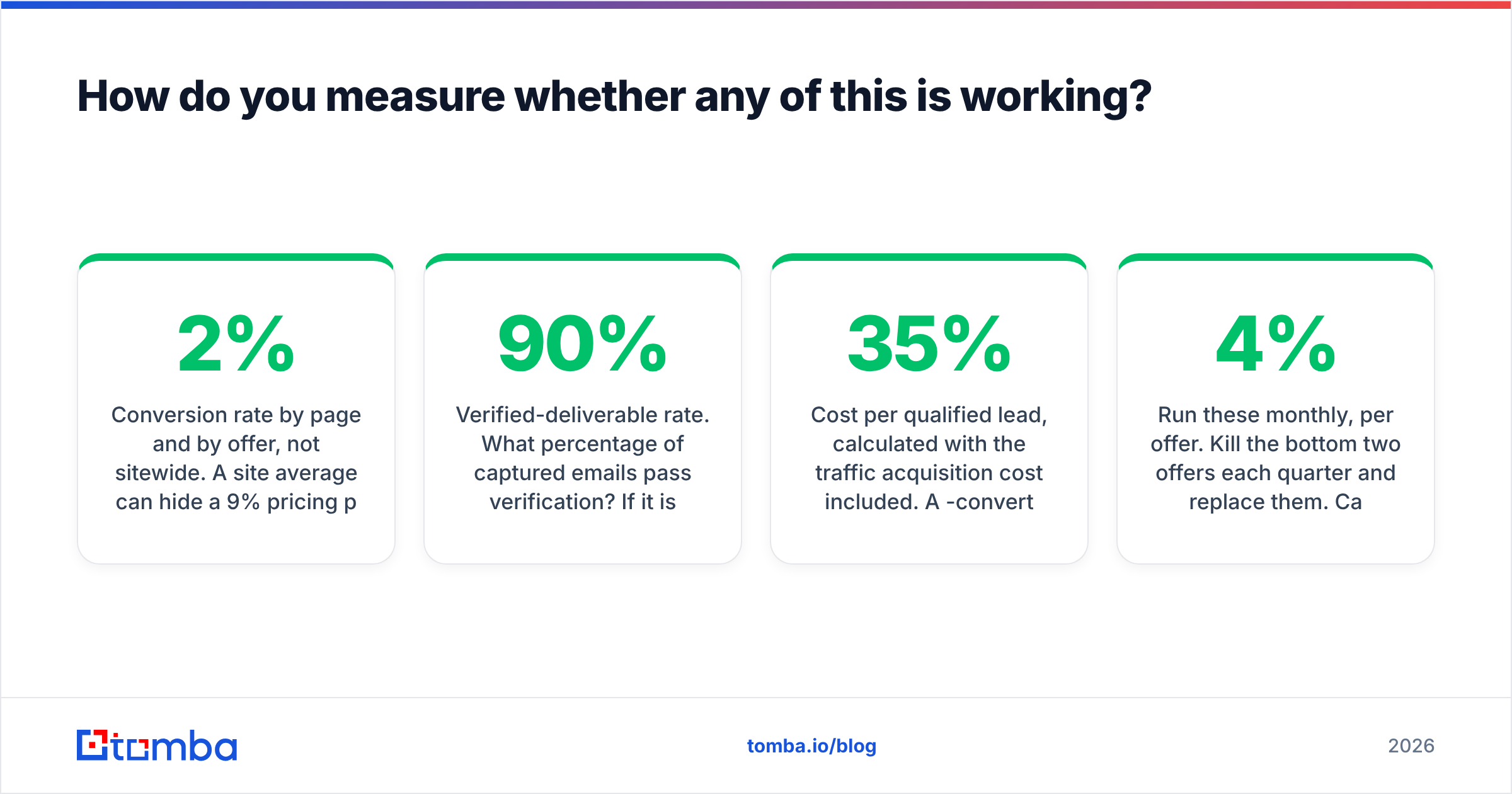
- Conversion rate by page and by offer, not sitewide. A 2% site average can hide a 9% pricing page and a 0.3% blog.
- Verified-deliverable rate. How many captured emails pass verification? Under 90% means your form accepts junk, and your sender reputation pays for it.
- ICP fit rate. After enrichment, how many leads match your target firmographics? This number separates a working offer from a magnet for students and competitors.
The last two are about money and speed.
- Cost per qualified lead, with traffic acquisition cost included. A gated ebook that converts at 35% but pulls the wrong companies costs more than a 3% demo form that pulls the right ones.
- Speed to first touch. Replying in five minutes instead of thirty changes qualification odds by roughly an order of magnitude. See Harvard Business Review's audit of lead response times for the classic study.
Run these monthly, per offer. Kill the bottom two offers each quarter and replace them. Capture programs decay. The exit-intent offer that pulled 4% in January will pull 1.8% by August, as your share of returning visitors climbs.
What does a realistic 90-day rollout look like?#
Do not build all seven methods at once. Sequence by effort-to-impact ratio.
Days 1-30 — Fix the basics. Audit every existing form and cut it to four fields or fewer. Wire verification into the submit handler. Add one inline content upgrade to your three busiest blog posts. Add live chat to pricing and case study pages only.
Days 31-60 — Add enrichment and routing. Append company data on submit, so leads arrive scored. Route ICP-fit submissions to a human within five minutes and send everything else to nurture. Launch one exit-intent offer on your comparison pages.
Days 61-90 — Layer in the expensive parts. Test a visitor identification tool on real traffic and measure your true match rate. Scope one calculator or interactive tool if your buyer is technical or budget-driven. Turn on progressive profiling for known return visitors.
By day 90, sitewide conversion should move from roughly 1-2% to 3-5%. More important, your ICP-fit rate should climb, because enrichment now filters the noise before it reaches a rep.
Start with the layer that fixes everything else#
Every method on this page ends in the same place: an email address you have to trust. A capture program that fills your CRM with typos, role accounts, and dead mailboxes is worse than no program at all. It burns your sending domain while looking like progress.
So start there. Use the Tomba Email Finder to find and verify the professional addresses behind the companies your capture program surfaces — from a form submission, an enriched signup, or an anonymous session you identified this morning. That is the honest last step in how to capture leads on your website. The free tier gives you 25 searches a month, so you can test it against your own traffic before you commit to anything.
Related guides#
Ready to find emails that actually work?
Join 150,000+ professionals who stopped guessing and started sending. Free credits on signup — no credit card required.
Get the Tomba newsletter
Practical outbound tactics and product updates — once every two weeks.
About the author