How To Check If An Email Domain Is Legit: 7 Fast Checks
Fake sender domains cost companies millions every year. Here are seven checks — DNS, WHOIS, SPF, MX, and reputation — that tell you whether an email domain is legit in under five minutes.
TL;DR
- A legit email domain has three things a fake one rarely has all at once: an aged WHOIS record, working MX records, and a published SPF/DMARC policy that actually aligns.
- The single fastest red flag is domain age. Anything registered under 30 days ago that is emailing you about money should be treated as hostile until proven otherwise.
- Lookalike domains (
rnform,.cofor.com, hyphens added) defeat casual eyeballing — copy the domain into a text editor and inspect it character by character. - Free tools cover the basics; an email verifier covers the part free tools miss — whether the specific mailbox on that domain actually accepts mail.
- Run the seven checks below in order. Most fakes die at check two or three, so you rarely need all seven.
Why does checking an email domain matter more in 2026?#
Because the cost of getting it wrong keeps climbing, and because the fakes got cheap.
Registering a domain costs under $10. Provisioning Google Workspace on it takes ten minutes. Generating a plausible signature block, a matching LinkedIn profile, and a website that renders takes an AI model about ninety seconds. The economics of impersonation flipped: it used to take effort to look legitimate, and now it takes effort to be legitimate in a way that survives inspection.
The FBI's Internet Crime Complaint Center has tracked business email compromise as one of the highest-loss crime categories for years running — losses measured in billions annually, almost all of it flowing through domains that looked fine at a glance. You can read the IC3 annual reports directly; the pattern is consistent year over year.
There is a second reason that has nothing to do with fraud. If you are doing outbound, sending to a domain that no longer resolves, has no MX records, or is parked will bounce. Bounces damage your sender reputation, and a damaged reputation quietly kills campaigns that would otherwise have worked. So domain checking is both a security practice and a deliverability practice.

What actually makes an email domain "legit"?#
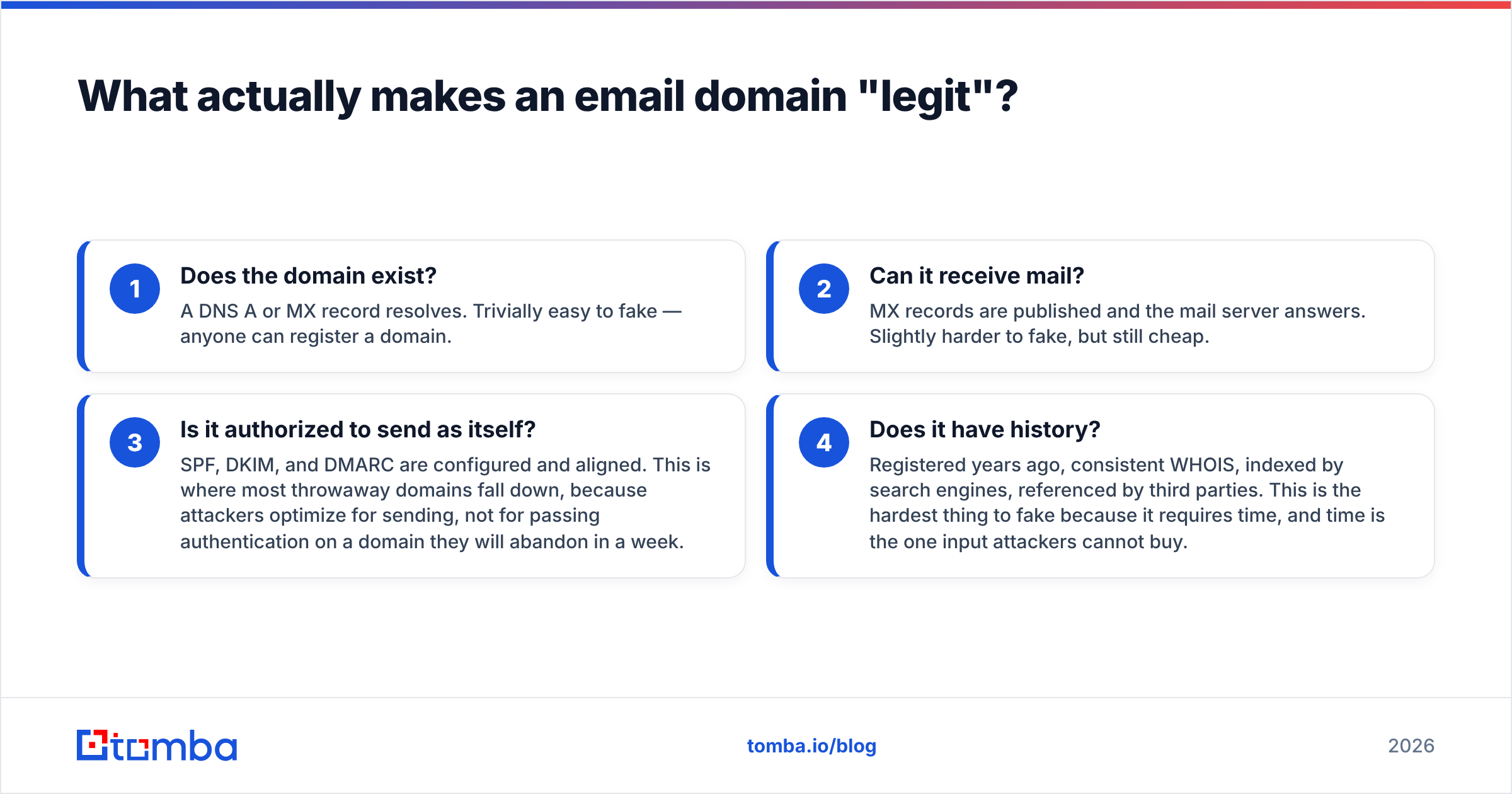
Legitimacy is not one property. It is four separate questions that people collapse into one, which is why they get it wrong.
- Does the domain exist? A DNS A or MX record resolves. Trivially easy to fake — anyone can register a domain.
- Can it receive mail? MX records are published and the mail server answers. Slightly harder to fake, but still cheap.
- Is it authorized to send as itself? SPF, DKIM, and DMARC are configured and aligned. This is where most throwaway domains fall down, because attackers optimize for sending, not for passing authentication on a domain they will abandon in a week.
- Does it have history? Registered years ago, consistent WHOIS, indexed by search engines, referenced by third parties. This is the hardest thing to fake because it requires time, and time is the one input attackers cannot buy.
A domain that passes 1 and 2 but fails 3 and 4 is the classic phishing profile. A domain that passes all four is almost certainly real. Weight your judgment accordingly — existence proves nothing, history proves a lot.
How do you check if an email domain is legit, step by step?#
Here is the sequence. Run it top to bottom and stop the moment something fails hard.
1. Read the domain character by character. Not the display name — the actual domain after the @. Paste it into a plain text editor at a large font size. You are looking for homoglyph swaps (rn reading as m, l for I, Cyrillic а for Latin a), added hyphens (micro-soft.com), swapped TLDs (.co, .cm, .net where the real brand uses .com), and appended words (paypal-security.com). This check alone catches a large share of phishing attempts and takes ten seconds.
2. Check WHOIS creation date. Use ICANN's official lookup tool or any registrar WHOIS. Domain registered three weeks ago, privacy-shielded, registrar in a jurisdiction unrelated to the claimed company? That is your answer. Legitimate businesses that email you about invoices have domains older than their sales cycle.
3. Query MX records. From a terminal: dig MX example.com +short or nslookup -type=mx example.com. No MX records means the domain cannot receive mail at all — which means any "reply to us" instruction is a lie, or replies route somewhere else entirely. Note that a domain can send without MX records, so absence of MX on a sending domain is a strong signal something is off.
4. Inspect SPF and DMARC. Run dig TXT example.com +short and look for v=spf1 and, at _dmarc.example.com, v=DMARC1. A missing or wide-open SPF record (+all) is a serious hygiene failure. A DMARC policy of p=none means the domain owner is not enforcing anything. You can shortcut the terminal work with an SPF checker if you would rather paste a domain into a form.
5. Read the full email headers. In Gmail, "Show original". You want the Return-Path, the Authentication-Results line, and the originating IP. If SPF=fail or DKIM=none or the Return-Path domain differs from the From domain, the message is not what it claims to be. Headers do not lie the way display names do.
6. Check the domain against blacklists. A domain or its sending IP appearing on Spamhaus, SORBS, or Barracuda tells you it has already been observed doing something antisocial. A blacklist checker resolves this in one query.
7. Verify the specific mailbox. The domain can be perfectly legitimate while the address ceo@realcompany.com does not exist — a common trick where an attacker registers a real-looking address on a real-looking domain. SMTP-level verification tells you whether that exact mailbox accepts mail. This is the check that free WHOIS tools structurally cannot perform.
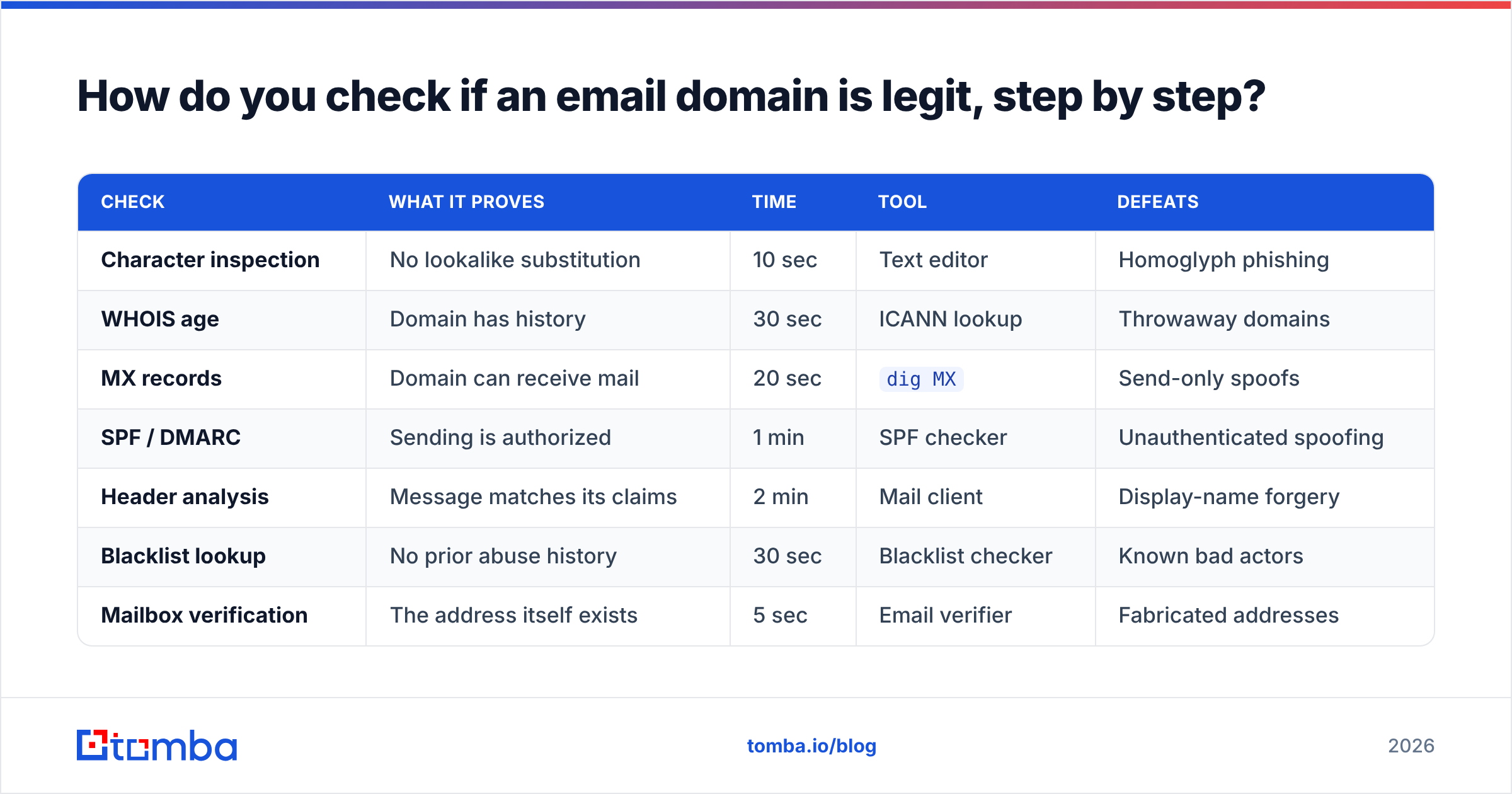
| Check | What it proves | Time | Tool | Defeats |
|---|---|---|---|---|
| Character inspection | No lookalike substitution | 10 sec | Text editor | Homoglyph phishing |
| WHOIS age | Domain has history | 30 sec | ICANN lookup | Throwaway domains |
| MX records | Domain can receive mail | 20 sec | dig MX |
Send-only spoofs |
| SPF / DMARC | Sending is authorized | 1 min | SPF checker | Unauthenticated spoofing |
| Header analysis | Message matches its claims | 2 min | Mail client | Display-name forgery |
| Blacklist lookup | No prior abuse history | 30 sec | Blacklist checker | Known bad actors |
| Mailbox verification | The address itself exists | 5 sec | Email verifier | Fabricated addresses |
Which signals separate a real business domain from a throwaway?#
Some signals carry far more weight than others. Here is roughly how to rank them when the evidence is mixed.
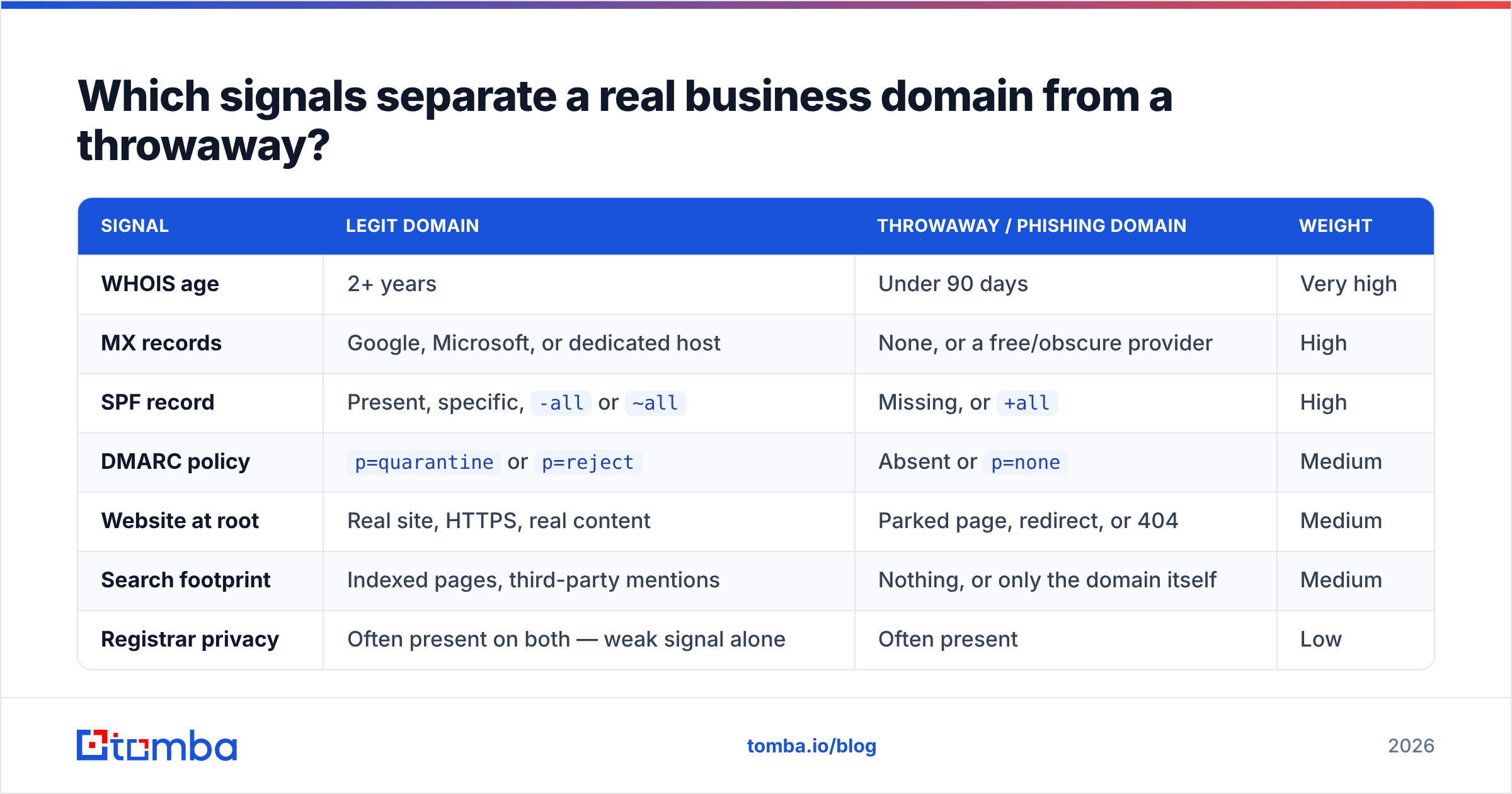
| Signal | Legit domain | Throwaway / phishing domain | Weight |
|---|---|---|---|
| WHOIS age | 2+ years | Under 90 days | Very high |
| MX records | Google, Microsoft, or dedicated host | None, or a free/obscure provider | High |
| SPF record | Present, specific, -all or ~all |
Missing, or +all |
High |
| DMARC policy | p=quarantine or p=reject |
Absent or p=none |
Medium |
| Website at root | Real site, HTTPS, real content | Parked page, redirect, or 404 | Medium |
| Search footprint | Indexed pages, third-party mentions | Nothing, or only the domain itself | Medium |
| Registrar privacy | Often present on both — weak signal alone | Often present | Low |
| TLD | .com, country TLD matching the business |
.top, .xyz, .click, mismatched country |
Low-medium |
That last row deserves a caveat. Plenty of legitimate companies use newer TLDs, and plenty of scams use .com. Treat the TLD as a tiebreaker, never as a verdict. The same goes for registrar privacy — it is standard practice now, not evidence of anything.
The combination that should stop you cold: recent registration + no DMARC + no search footprint + urgency in the message body. Any one of those alone is noise. All four together is a decision.
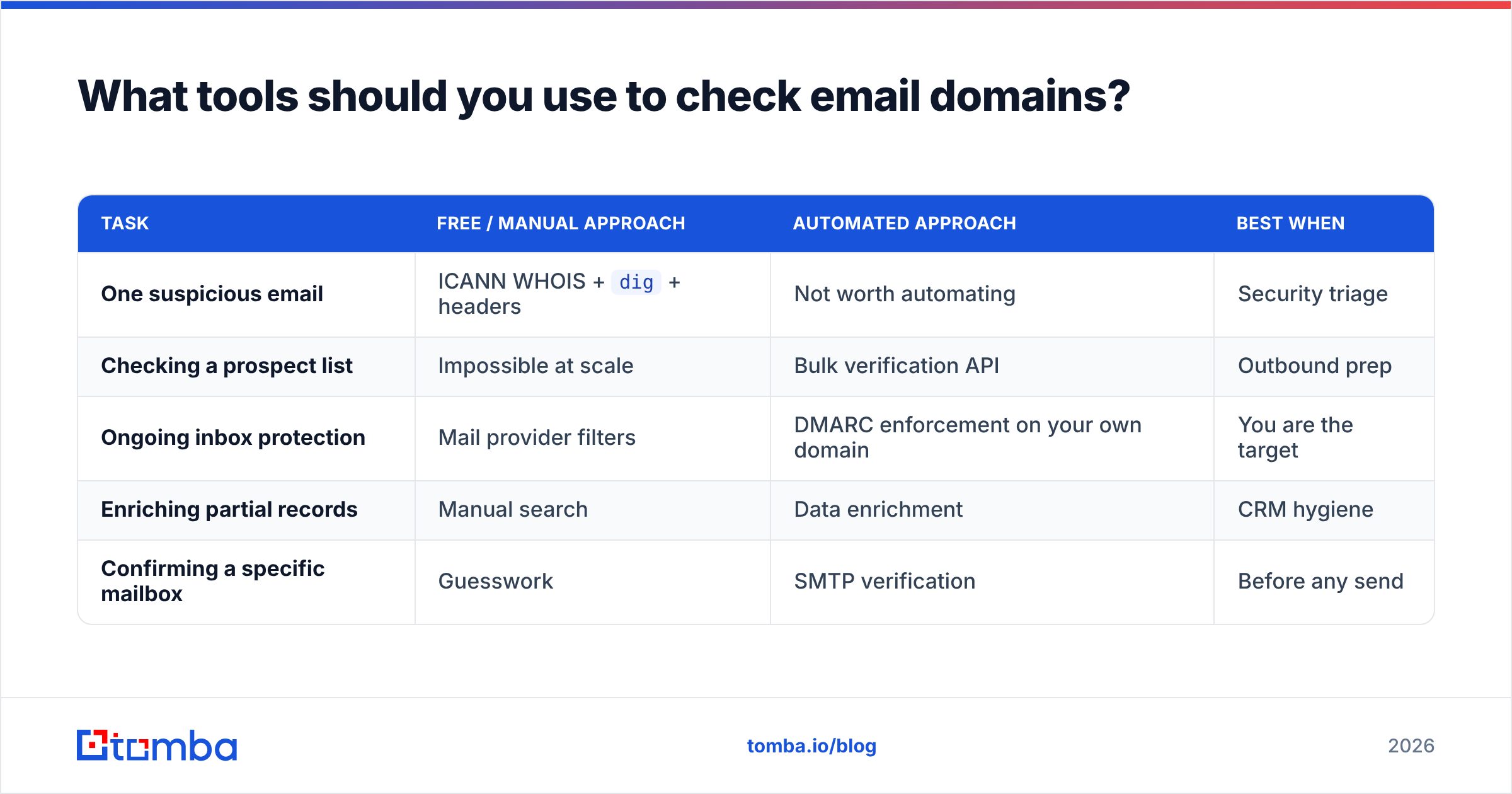
What tools should you use to check email domains?#
Depends on whether you are verifying one suspicious message or screening thousands of records.
| Task | Free / manual approach | Automated approach | Best when |
|---|---|---|---|
| One suspicious email | ICANN WHOIS + dig + headers |
Not worth automating | Security triage |
| Checking a prospect list | Impossible at scale | Bulk verification API | Outbound prep |
| Ongoing inbox protection | Mail provider filters | DMARC enforcement on your own domain | You are the target |
| Enriching partial records | Manual search | Data enrichment | CRM hygiene |
| Confirming a specific mailbox | Guesswork | SMTP verification | Before any send |
For the manual path, the essentials are free: ICANN lookup, dig or nslookup from any terminal, and your mail client's "show original" view. That covers checks 1 through 6 in the sequence above with zero spend.
Where it breaks down is volume. If you have a 4,000-row list from a scraper, a trade show, or a partner handoff, you cannot manually WHOIS every domain. That is the point where you need an API — and it is worth checking where the underlying data comes from before you trust any vendor's verdict.
Two honest notes on the automated side. First, no verifier is 100% accurate; anyone claiming that is selling. Second, catch-all domains — where the mail server accepts everything sent to it — are genuinely hard, and different vendors handle them differently. If catch-alls are a large share of your list, look specifically at how a tool handles them, because a catch-all verifier is a distinct capability from ordinary SMTP verification. Peer reviews on G2 are a reasonable sanity check on vendor claims here.

Is a domain with no MX record always fake?#
No — and this is the most common false positive people hit.
A domain with no MX records cannot receive mail. That is a fact. But plenty of legitimate setups involve send-only domains:
- Transactional subdomains.
mail.company.comornotifications.company.comoften send without receiving, by design. - Cold outreach domains. Legitimate sales teams frequently buy secondary domains to protect the primary domain's reputation. Many are misconfigured but not malicious.
- Recently migrated domains. DNS propagation and provider switches leave temporary gaps.
- Parked-but-owned brand defense domains. Companies register typo variants of their own name specifically so nobody else can. These resolve, have WHOIS history, and no MX.
The correct reading of "no MX" is: this domain cannot be replied to. If the email asks you to reply, that is a contradiction worth investigating. If it does not, weigh it against the other signals rather than treating it as proof of fraud.
Similarly, a missing DMARC record is a hygiene problem, not a crime. A meaningful share of small businesses still have not deployed it. Absence lowers your confidence; it does not settle the question.
How do you check email domains at scale without doing this manually?#
Three approaches, in increasing order of effort and reliability.
- Pattern rules. Filter out free providers, disposable domains, and obvious junk TLDs with a regex pass. Cheap, catches maybe 20% of the garbage, produces false positives on legitimate small businesses.
- DNS-level batch checks. Script
digacross your domain list to flag missing MX and SPF. Free, fast, and it tells you which domains are structurally incapable of receiving mail — before you burn sends on them. - SMTP verification via API. Query the actual mail server for each address. This is the only method that confirms a specific mailbox exists, and it is what an email finder API or verification endpoint does under the hood. Pair it with bulk verify when you are processing a list rather than a stream.
A practical hybrid: run the DNS pass first because it is free and eliminates dead domains, then send only the survivors to a paid verifier. You cut verification spend meaningfully and you get a cleaner list than either method produces alone.
Whichever route you take, build the check into the point of data entry rather than running it as a periodic cleanup. Contact data decays at roughly 25–30% per year as people change jobs — a list you verified in January is measurably worse by June. HubSpot's research on database decay has covered this for years and the number has not improved.
What should you do when a domain fails the check?#
Different failures call for different responses.
- Lookalike domain detected: Do not reply, do not click. Report it to your security team and to the impersonated brand — most large companies have a phishing report address. Block the domain at your mail gateway.
- Domain is real but the mailbox is not: Usually a stale record or a typo, not an attack. Re-find the correct address rather than guessing at permutations; an email permutator generates candidates but you still need to verify which one lands.
- Domain is real, mailbox is real, but SPF fails on the message: The domain is being spoofed. Notify the real domain owner — they may not know their DMARC policy is unenforced.
- Domain is on a blacklist: Do not send to it or accept mail from it. If it is your own domain, that is an urgent deliverability fire, not a research task.
- Everything passes but something still feels wrong: Verify through a separate channel. Call the number on the company's actual website — not the number in the email. This costs two minutes and defeats essentially every BEC attack, because attackers control the email but not the published phone line.
What is the fastest reliable workflow?#
For a single suspicious message: character check, WHOIS age, headers. Three steps, under two minutes, catches the overwhelming majority of fakes.
For a prospecting list: DNS batch pass to strip dead domains, then verification on the remainder, then re-verify anything older than 90 days before you send. Building this into your workflow costs you an hour once and saves you bounce rates that would otherwise compound into a deliverability problem you cannot easily undo.
For your own domain: publish SPF, DKIM, and DMARC properly, move DMARC to p=quarantine once you have monitored reports for a few weeks, and register the obvious typo variants of your name. You are making it harder for anyone to impersonate you, which protects both your customers and your email deliverability.
The underlying principle across all three: existence is not legitimacy. A domain resolving proves someone paid $9. History, authentication, and mailbox-level confirmation are what actually separate a real business from a convincing prop.
Stop guessing whether an address is real. Tomba Email Finder finds professional email addresses by domain, name, or company — and every result comes back with a confidence score and verification status, so you know whether the mailbox exists before you send. The free tier includes 25 searches a month; paid plans start at $49/mo with bulk processing and API access. Check the Tomba pricing page for the full breakdown, or run a domain through it right now and see what comes back.
Related guides#
// get started
Find, verify and enrich your first contacts today
Start on the free plan with 25 searches a month, then scale when your team is ready.
Free plan · No credit card required · GDPR & CCPA
// about the author