How To Check Valid Email ID: 6 Methods That Actually Work
Six ways to confirm an email address is real before you hit send — from a two-second syntax check to SMTP pings, catch-all handling, and bulk verification at scale.
TL;DR
- "Valid" means four different things: correct syntax, a real domain, a live mailbox, and a mailbox that actually accepts your mail. Most free checkers only test the first two.
- For one address, a free email checker plus an MX lookup takes about ten seconds and catches roughly 60-70% of the junk in a typical list.
- For anything over a few hundred addresses, bulk SMTP-level verification is the only method that meaningfully moves your bounce rate.
- Catch-all domains (about 15-20% of B2B domains) will never return a clean SMTP answer — you need pattern confidence scoring, not a yes/no.
- Target under 2% bounce rate before a send. Above 5%, Google and Microsoft start throttling you regardless of how good your copy is.
What does a "valid email ID" actually mean?#
There is no single yes/no answer, and that is the part most guides skip. When someone asks how to check valid email ID status, they are usually asking one of four separate questions:
- Is the syntax legal? Does the string follow the format rules — local part,
@, domain, valid TLD, no illegal characters? This is a pure string test with no network calls.john..doe@acmefails.j@acme.iopasses. - Does the domain exist and accept mail? A DNS lookup for MX records.
john@acme-that-never-existed.comhas perfect syntax and zero chance of delivery. - Does the mailbox exist? An SMTP conversation with the receiving server that asks, without sending anything, whether that specific mailbox is there.
- Will the mailbox accept and read your message? A live mailbox can still be a spam trap, a role account (
info@,sales@), an abandoned inbox, or a catch-all that swallows everything and answers "yes" to every address you try.
An address can pass 1, 2 and 3 and still be worthless for outreach. That gap is why teams with "verified" lists still see 8% bounce rates. The Wikipedia entry on email address syntax is a good reference for how permissive the spec actually is — far more permissive than the regex most developers copy off Stack Overflow.

How do you check a valid email ID for free?#
Six methods, ordered from fastest to most reliable. The first three cost nothing and need no account.
- Run a syntax and MX check in a browser tool. Paste the address into a free email checker and you get format validation plus a DNS answer in under two seconds. This alone kills typos, dead domains, and made-up addresses. It cannot tell you whether the mailbox exists.
- Do a manual MX lookup. On any terminal:
dig MX acme.com +short(ornslookup -type=mx acme.comon Windows). If nothing comes back, no mail is being delivered to that domain, full stop. Useful when you are checking a whole company rather than one person. - Check the company's email pattern. If you already know two real addresses at a company, you know the pattern. A company email pattern checker will tell you whether a domain uses
first.last@,flast@, orfirst@, and an address that violates the house pattern is almost certainly wrong even if it passes every technical test. - Run an SMTP handshake. Connect to the MX host on port 25 and issue
HELO,MAIL FROM, thenRCPT TO. A250means the mailbox is accepted;550means it does not exist. This is what commercial verifiers automate. Doing it manually from your own IP is a bad idea at any volume — you will get your IP rate-limited or blocklisted quickly. - Use the provider's own signal. Some platforms leak existence through password-reset or invite flows. It works, it is slow, and it is ethically grey at scale. Include it in your mental model, not in your workflow.
- Run a bulk verification pass. Upload the CSV to a dedicated email verifier and let it do syntax, MX, SMTP, role detection, disposable detection and catch-all scoring in one pass. For any list above ~200 rows this is the only method that scales.
What's the difference between syntax, MX, SMTP and catch-all checks?#
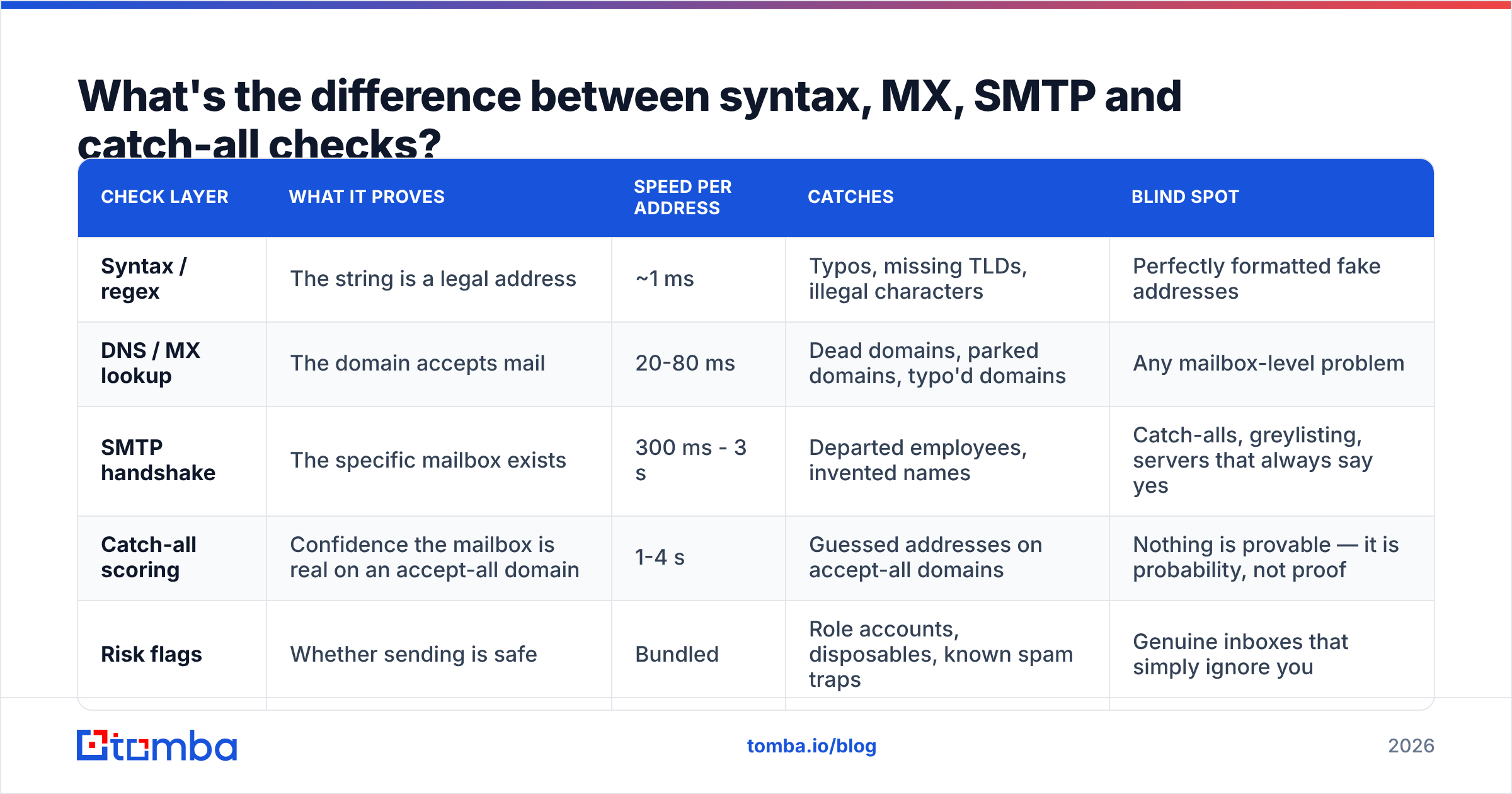
Each layer catches a different failure mode, and they get progressively slower and more expensive to run.
| Check layer | What it proves | Speed per address | Catches | Blind spot |
|---|---|---|---|---|
| Syntax / regex | The string is a legal address | ~1 ms | Typos, missing TLDs, illegal characters | Perfectly formatted fake addresses |
| DNS / MX lookup | The domain accepts mail | 20-80 ms | Dead domains, parked domains, typo'd domains | Any mailbox-level problem |
| SMTP handshake | The specific mailbox exists | 300 ms - 3 s | Departed employees, invented names | Catch-alls, greylisting, servers that always say yes |
| Catch-all scoring | Confidence the mailbox is real on an accept-all domain | 1-4 s | Guessed addresses on accept-all domains | Nothing is provable — it is probability, not proof |
| Risk flags | Whether sending is safe | Bundled | Role accounts, disposables, known spam traps | Genuine inboxes that simply ignore you |
The practical read: syntax and MX are free and instant, so run them on everything. SMTP is where the real money is spent, so run it on the list you actually intend to mail. Catch-all scoring is where verification vendors genuinely differ from one another — everyone can do a regex, almost nobody handles accept-all domains well.
Why do catch-all domains break most email checkers?#
Because a catch-all server is contractually obliged to lie to you. It answers 250 OK to ceo@acme.com and to asdkjh@acme.com with equal confidence. Around 15-20% of B2B domains run this way, and it skews heavily toward mid-market and enterprise — exactly the accounts you care about.
A naive verifier does one of two unhelpful things: marks every catch-all address as "valid" (and you bounce), or marks them all as "unknown" (and you throw away a fifth of your pipeline). Neither is a result you can act on.
The workable approach is probabilistic. Instead of asking the server, you ask the data: does this address match the domain's dominant pattern, has the mailbox appeared in crawled sources, does the person still show as employed at that company, has the address received mail before. A catch-all verifier turns that into a confidence score so you can set your own threshold — mail everything above 80% and hold the rest, for instance.
Which tools should you use to check email validity?#
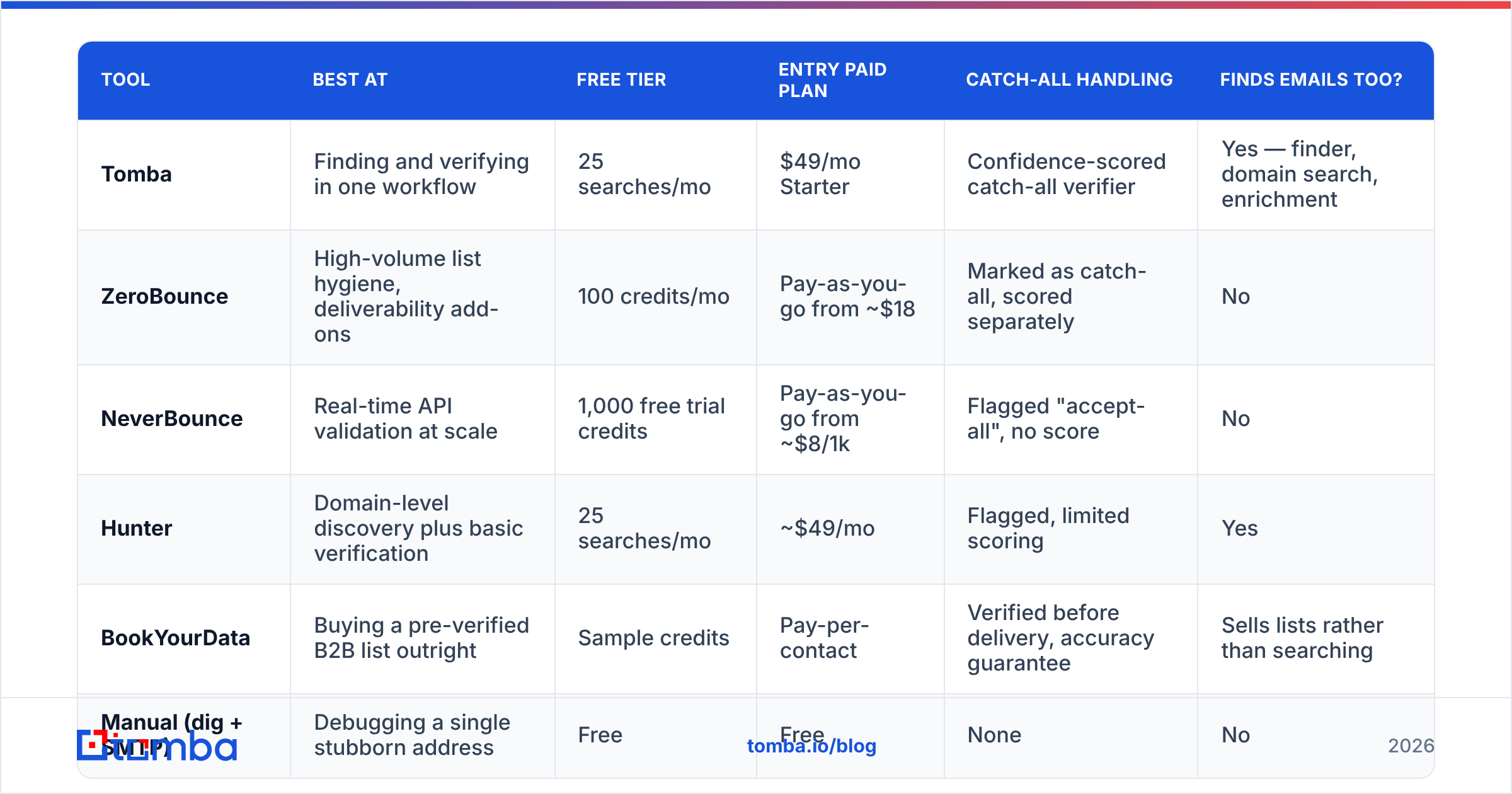
Prices below were checked in early 2026 and vendors change them regularly — confirm on the vendor's own page before you buy. The tools split into three groups: pure verifiers (you bring the list), finder-plus-verifier platforms (they help you build the list too), and prebuilt-database providers (they sell you a list that is already verified).
| Tool | Best at | Free tier | Entry paid plan | Catch-all handling | Finds emails too? |
|---|---|---|---|---|---|
| Tomba | Finding and verifying in one workflow | 25 searches/mo | $49/mo Starter | Confidence-scored catch-all verifier | Yes — finder, domain search, enrichment |
| ZeroBounce | High-volume list hygiene, deliverability add-ons | 100 credits/mo | Pay-as-you-go from ~$18 | Marked as catch-all, scored separately | No |
| NeverBounce | Real-time API validation at scale | 1,000 free trial credits | Pay-as-you-go from ~$8/1k | Flagged "accept-all", no score | No |
| Hunter | Domain-level discovery plus basic verification | 25 searches/mo | ~$49/mo | Flagged, limited scoring | Yes |
| BookYourData | Buying a pre-verified B2B list outright | Sample credits | Pay-per-contact | Verified before delivery, accuracy guarantee | Sells lists rather than searching |
| Manual (dig + SMTP) | Debugging a single stubborn address | Free | Free | None | No |
If you already have a list and just need it cleaned, a pure verifier is the cheapest path. If you are still building the list, paying twice — once to a finder, once to a verifier — is wasteful; platforms that do both, with verification baked into the find step, cost less per usable contact. If you have no list and no time, buying pre-verified data from a provider like BookYourData is a legitimate shortcut, provided you still re-verify before the send, because any list decays from the moment it is exported.
Independent user reviews on G2's email verification category are a reasonable sanity check on accuracy claims, since vendors all publish their own numbers and those numbers are all suspiciously similar.
How accurate are free email checkers, really?#
Free browser checkers are excellent at what they do and honest about what they don't. Expect them to catch:
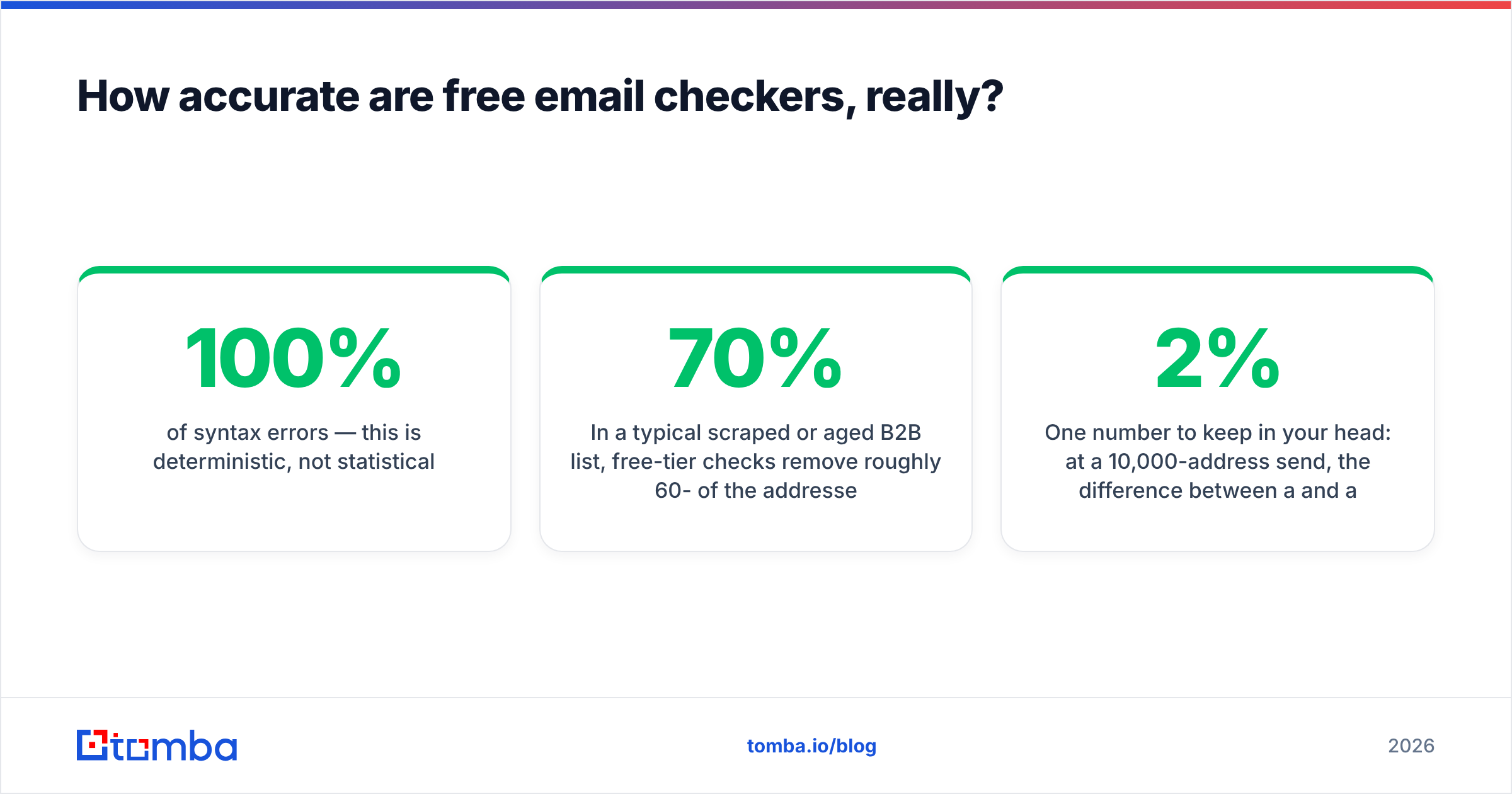
- 100% of syntax errors — this is deterministic, not statistical.
- Effectively all dead domains — an MX lookup either returns records or it doesn't.
- Most disposable addresses — if the checker maintains a blocklist of throwaway domains.
- Zero mailbox-level problems on their own — the employee who left in November still has flawless syntax and a live domain.
In a typical scraped or aged B2B list, free-tier checks remove roughly 60-70% of the addresses that would have bounced. The remaining 30-40% — departed employees, deactivated mailboxes, catch-all guesses — needs SMTP-level work. That last slice is disproportionately expensive to find and disproportionately damaging to leave in, which is the entire commercial argument for paid verification.
One number to keep in your head: at a 10,000-address send, the difference between a 2% and a 6% bounce rate is 400 extra bounces. That is usually enough to trip Google's and Microsoft's sender thresholds and get your legitimate mail throttled for weeks afterwards. HubSpot's guide to email bounce rates walks through why the reputation damage outlasts the campaign.
How do you check thousands of email IDs at once?#
Manual checks stop being viable somewhere around 50 addresses. The batch workflow:
- Deduplicate first. You pay per credit, and duplicates are pure waste. Run the file through a deduplication tool before it touches a verifier — 5-12% shrinkage on a merged list is normal.
- Strip obvious junk locally. Role accounts (
info@,support@,noreply@), free-mail domains if you are strictly B2B, and anything failing regex. Free, instant, no credits burned. - Upload the survivors for bulk verification. A bulk email finder and verifier processes the file and returns per-address status plus a reason code. Reason codes matter — "invalid mailbox" and "server temporarily unavailable" require completely different follow-up.
- Segment by result, don't just delete. Valid goes to the send. Invalid gets dropped. Catch-all goes to a low-volume test batch. Unknown gets re-run in a week — greylisting resolves itself surprisingly often.
- Wire verification into the intake. The real fix is not cleaning lists, it is never letting bad addresses in. An email verification API called at form submit or at CRM-create time keeps the database clean permanently instead of quarterly.
- Re-verify on a schedule. B2B data decays at roughly 2-2.5% per month through job changes alone. A list verified in January is meaningfully worse by June.
When is a paid verifier worth it?#
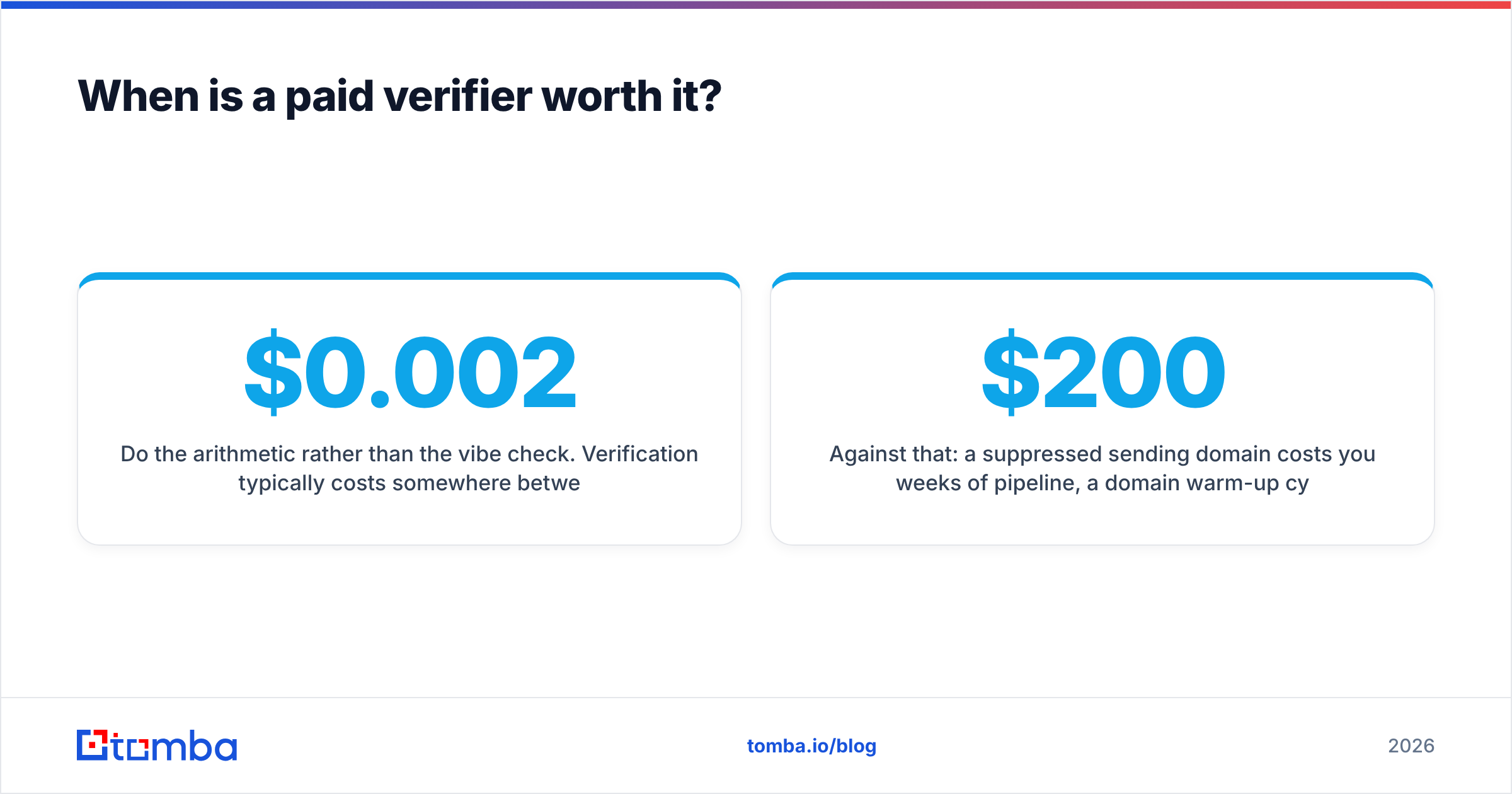
Do the arithmetic rather than the vibe check. Verification typically costs somewhere between $0.002 and $0.008 per address. If your list is 10,000 contacts, that is $20-$80 for the pass.
Against that: a suppressed sending domain costs you weeks of pipeline, a domain warm-up cycle you have to redo, and a sales team sitting on their hands. If your average deal is worth more than about $200, one recovered meeting pays for the verification of a list ten times that size.
The honest exception: if you are sending to 50 hand-picked accounts a month, free checks plus a careful look at each address will get you there. Paid tooling earns its keep at volume and on catch-all-heavy enterprise lists — not on a boutique target account list you could verify manually over a coffee. Compare Tomba pricing tiers against your actual monthly volume before committing to anything above the Starter plan; most teams overbuy by a full tier in month one.
Frequently asked questions#
Can you check if an email is valid without sending anything?
Yes. SMTP verification opens a conversation with the receiving server and terminates before the DATA command, so no message is ever delivered. Nothing arrives in the recipient's inbox.
Does a valid address guarantee delivery? No. Validity is about the mailbox existing. Delivery also depends on your SPF, DKIM and DMARC configuration, your sending domain's reputation, and your content. Verification removes one failure mode out of several.
Why do some addresses come back "unknown"? Greylisting (the server deliberately defers first-time senders), aggressive rate limiting, or a temporarily unreachable mail host. Re-run unknowns after a few days rather than deleting them — a chunk will resolve to valid.
Are role accounts worth keeping?
For cold outreach, no — info@ and sales@ addresses have low engagement and higher complaint rates. For support or billing workflows, they are exactly right. Segment them; don't blanket-delete them.
Start with verified addresses instead of cleaning up afterwards#
The cheapest verification is the one you never have to run, because the address was correct when it entered your system. Tomba's Email Finder returns a confidence score with every address it finds, so the find step and the validation step are the same step — no export, no second vendor, no separate credit pool. The free tier gives you 25 searches a month to test it against a domain you already know the answers for, which is the only benchmark that actually tells you anything.
Related guides#
// get started
Find, verify and enrich your first contacts today
Start on the free plan with 25 searches a month, then scale when your team is ready.
Free plan · No credit card required · GDPR & CCPA
// about the author