How to Choose Lead Management Software: 2026 Buyer's Guide
Most lead management software demos hide the same three cost traps: seat minimums, enrichment credits, and data residency add-ons. Here's a 7-step evaluation process that surfaces them before you sign.
TL;DR
- Pick lead management software by scoring five things in order: data quality at the top of the funnel, routing speed, scoring logic you can actually explain, CRM sync fidelity, and total cost at 24 months — not at signup.
- The demo will not show you the three costs that break budgets: seat minimums, enrichment credit overages, and "enterprise-only" API access.
- Run a 50-lead pilot with your own list before you commit. Vendors that resist this are telling you something.
- Lead management and lead sourcing are different jobs. Most teams need a CRM-adjacent workflow tool plus a separate data layer that keeps records accurate.
- A scorecard beats a feature checklist. Weight the criteria before you see any pricing, or anchoring will do your thinking for you.
What is lead management software, exactly?#
Lead management software is the layer between "someone showed interest" and "a rep is having a conversation." It captures leads from forms, ads, chat, events, and outbound lists, enriches them with firmographic and contact data, scores them against your ICP, routes them to the right owner, and tracks status until the lead converts or dies.
Think of it as an airport control tower. Planes (leads) arrive from a dozen directions with wildly different fuel levels and destinations. The tower does not fly the planes — that is your reps and your CRM. It decides which plane lands on which runway, in what order, and how fast.
That distinction matters when you buy. A lot of tools marketed as "lead management" are really one of four different products:
- Capture-and-route tools — form handlers, chat qualifiers, round-robin schedulers. Strong on speed-to-lead, thin on data.
- Scoring and orchestration platforms — rules engines, sometimes predictive models, sitting on top of an existing CRM.
- CRM-native modules — HubSpot's or Salesforce's built-in lead objects, workflows, and assignment rules.
- Data and enrichment layers — the systems that make sure the lead record has a valid email, a real phone number, and correct company attributes before scoring touches it.
Most stacks need three of the four. Very few teams need to buy all four from one vendor, and vendors who claim to do all four well are usually excellent at one and adequate at the rest.
What criteria should you score vendors against?#
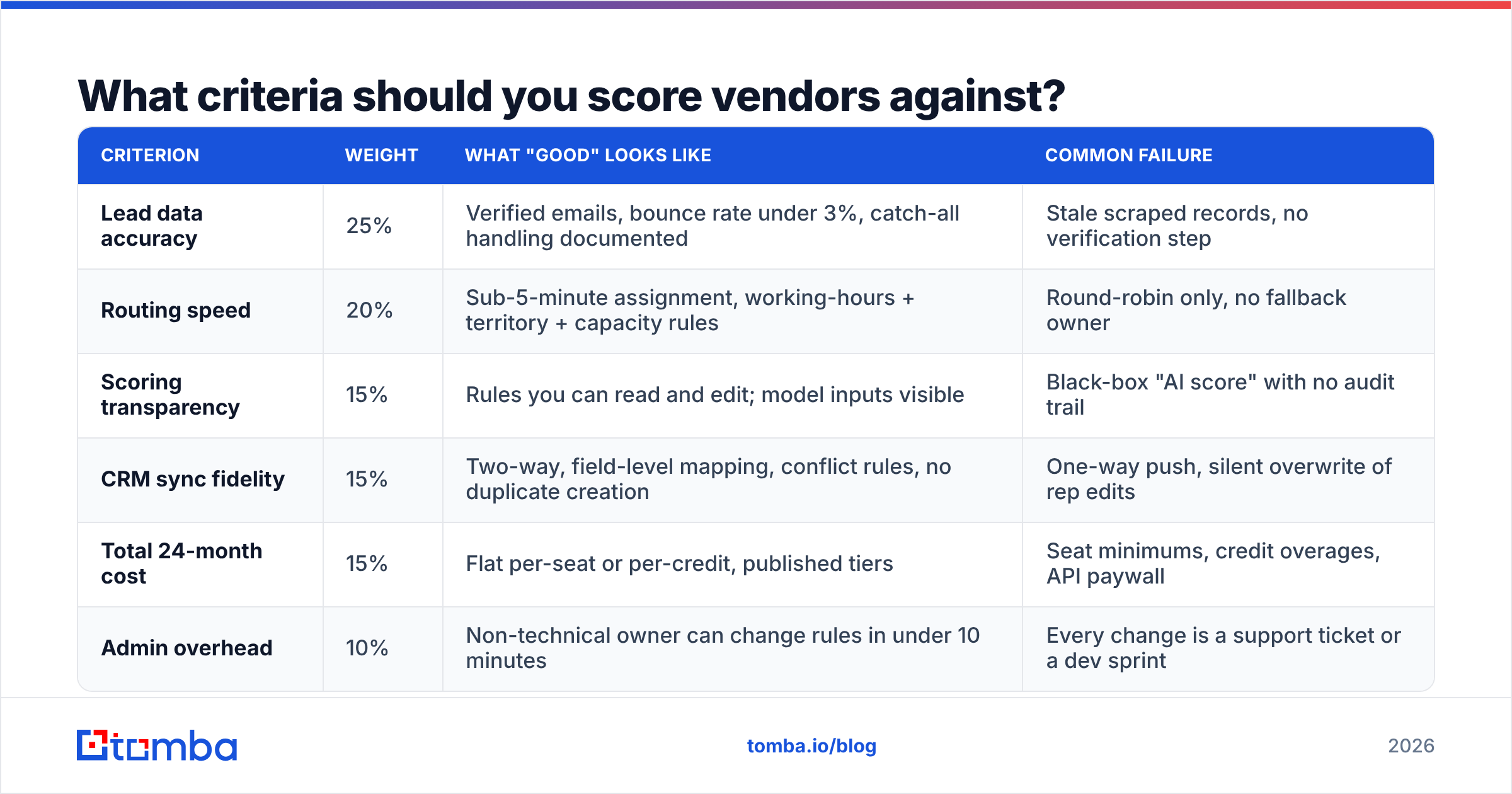
Build the scorecard before the first demo. Weight each criterion now, while you are still thinking clearly and no salesperson has anchored you on a number.
| Criterion | Weight | What "good" looks like | Common failure |
|---|---|---|---|
| Lead data accuracy | 25% | Verified emails, bounce rate under 3%, catch-all handling documented | Stale scraped records, no verification step |
| Routing speed | 20% | Sub-5-minute assignment, working-hours + territory + capacity rules | Round-robin only, no fallback owner |
| Scoring transparency | 15% | Rules you can read and edit; model inputs visible | Black-box "AI score" with no audit trail |
| CRM sync fidelity | 15% | Two-way, field-level mapping, conflict rules, no duplicate creation | One-way push, silent overwrite of rep edits |
| Total 24-month cost | 15% | Flat per-seat or per-credit, published tiers | Seat minimums, credit overages, API paywall |
| Admin overhead | 10% | Non-technical owner can change rules in under 10 minutes | Every change is a support ticket or a dev sprint |
Score each vendor 1-5 per row, multiply by weight, and you get a number that survives the post-demo enthusiasm. Do not skip the weighting step. Teams that score without weights consistently over-index on the flashiest feature in the last demo they saw.
Why does data quality outrank every other feature?#
Because every downstream feature inherits the quality of the record it operates on. Routing a lead to the right rep is worthless if the email bounces. Scoring a lead as an MQL is noise if the company size field is three years stale. Attribution reporting built on duplicate records tells you a confident lie.
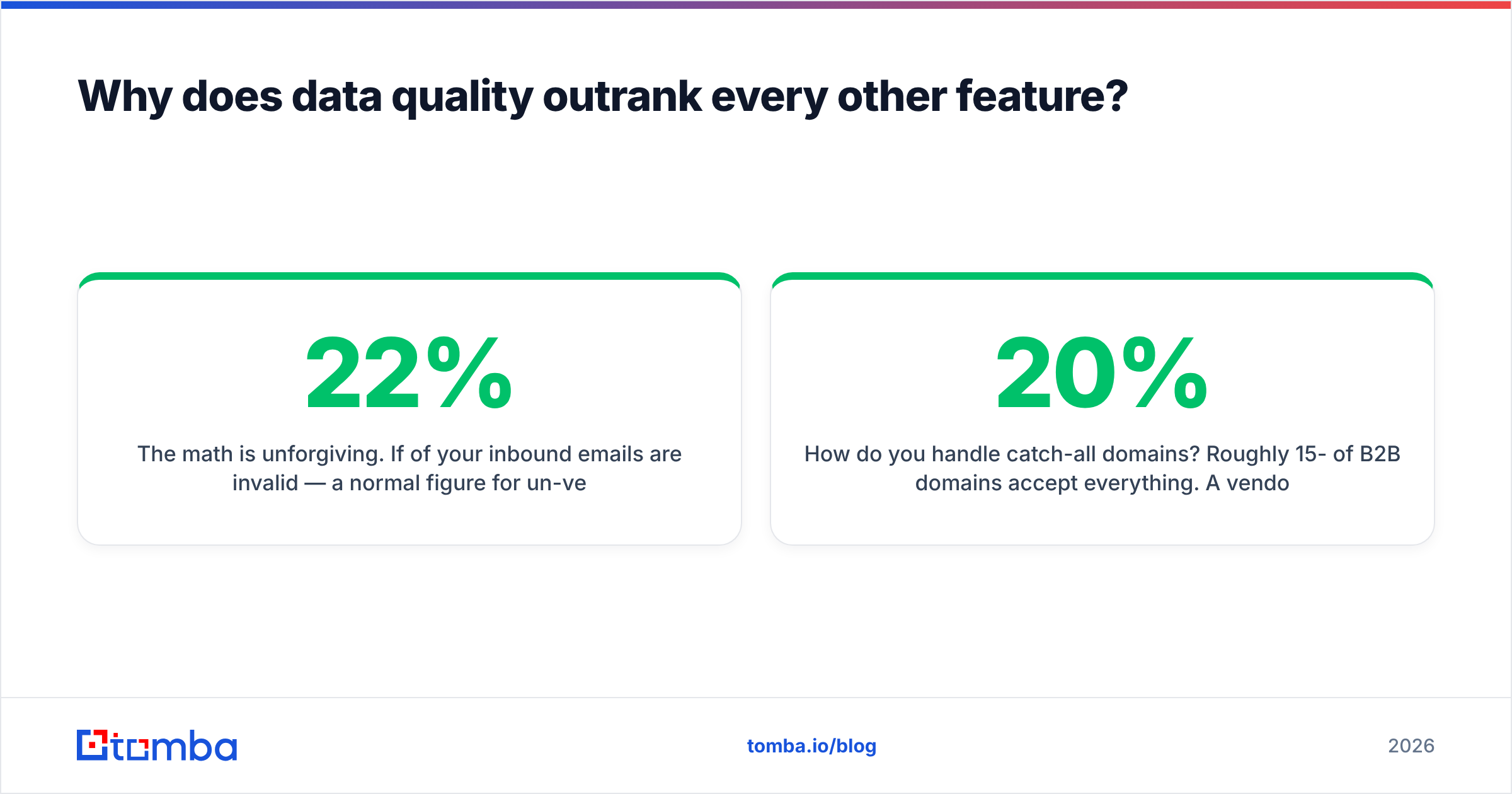
The math is unforgiving. If 22% of your inbound emails are invalid — a normal figure for un-verified form fills after six months of decay — then a 30% reply-rate improvement from better sequencing nets you less than fixing the data would. B2B contact data decays at roughly 22-30% per year according to widely cited industry benchmarks, and job-change velocity in tech has made that worse, not better.

So when you evaluate, ask these specific questions instead of "how accurate is your data?":
- What is your verification method? SMTP-level checks, MX record validation, or just pattern matching? Pattern matching alone is a guess with a confidence score attached.
- How do you handle catch-all domains? Roughly 15-20% of B2B domains accept everything. A vendor that marks all of them "valid" is inflating its own accuracy stat. Ask whether they offer a dedicated catch-all verifier or just flag and move on.
- What is the refresh cadence? Monthly re-verification is table stakes. Annual is a database, not a live system.
- Do you charge for invalid results? Some vendors bill a credit whether or not they return a usable record.
- Where does the data come from? Vendors should be able to explain their data sources without hand-waving about "proprietary AI."
If you already have a lead management workflow you like and the problem is record quality, you may not need a new platform at all. Layering an email verifier and an enrichment step in front of your existing system solves the actual problem for a fraction of a platform migration.
How do the main categories compare on price and fit?#
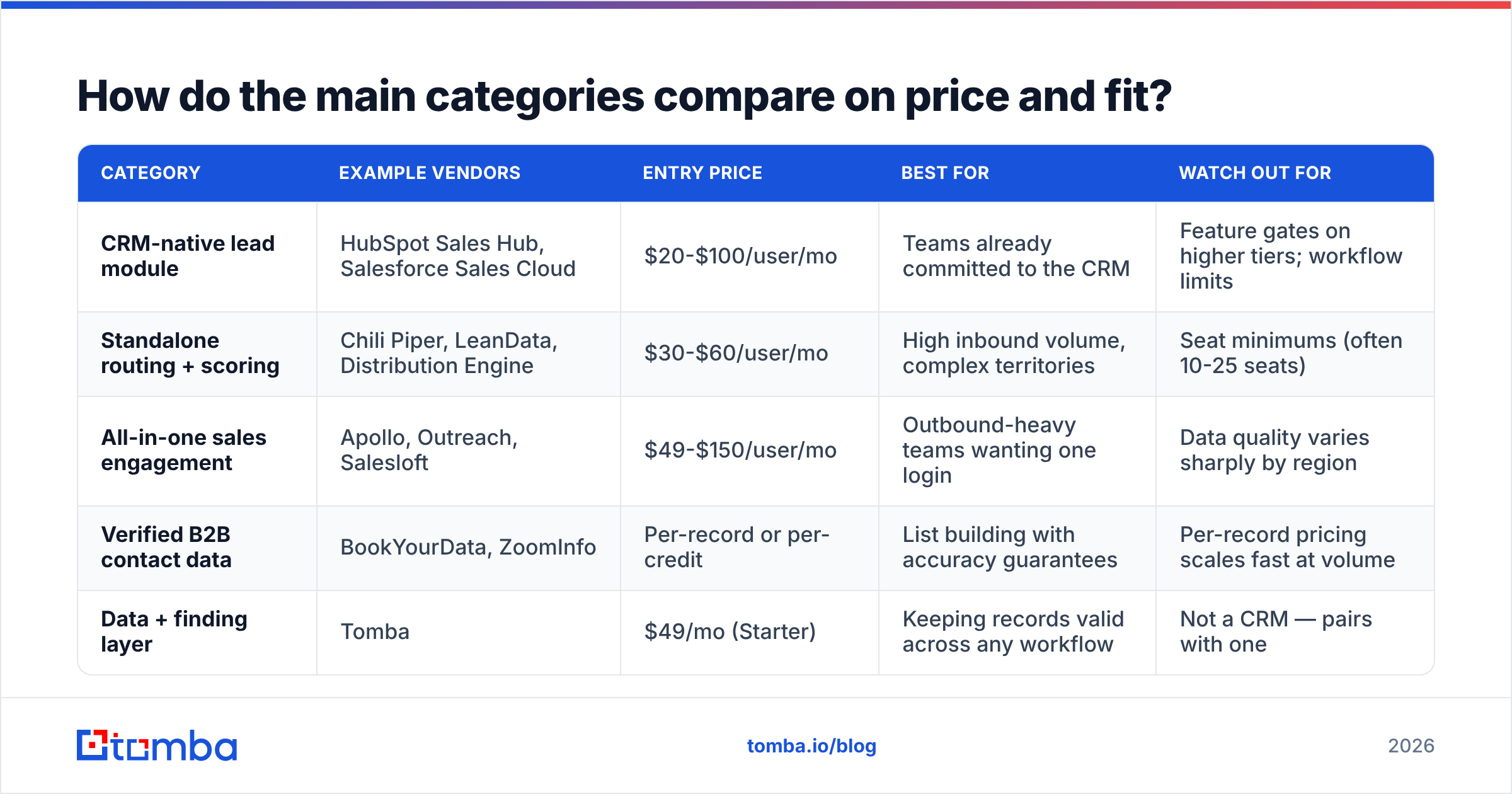
Here is the honest breakdown of what each category costs and who it fits. Prices are 2026 list rates for the entry paid tier; nearly all are negotiable above 20 seats.
| Category | Example vendors | Entry price | Best for | Watch out for |
|---|---|---|---|---|
| CRM-native lead module | HubSpot Sales Hub, Salesforce Sales Cloud | $20-$100/user/mo | Teams already committed to the CRM | Feature gates on higher tiers; workflow limits |
| Standalone routing + scoring | Chili Piper, LeanData, Distribution Engine | $30-$60/user/mo | High inbound volume, complex territories | Seat minimums (often 10-25 seats) |
| All-in-one sales engagement | Apollo, Outreach, Salesloft | $49-$150/user/mo | Outbound-heavy teams wanting one login | Data quality varies sharply by region |
| Verified B2B contact data | BookYourData, ZoomInfo | Per-record or per-credit | List building with accuracy guarantees | Per-record pricing scales fast at volume |
| Data + finding layer | Tomba | $49/mo (Starter) | Keeping records valid across any workflow | Not a CRM — pairs with one |
A note on the fifth row, since we publish this blog: Tomba is a data layer, not a lead management platform. It does not route leads or run scoring workflows. What it does is find and verify the contact records that your routing and scoring depend on. If a vendor tells you their all-in-one replaces both, ask to see bounce rates from a real customer cohort.
BookYourData sits in a genuinely different lane — pre-built verified lists with an accuracy guarantee, priced per record. If your motion is "buy a clean list of 5,000 CFOs in DACH and hand it to SDRs," that model is cleaner than a subscription. If your motion is "continuously verify and enrich whatever leads arrive," a subscription data layer fits better. Both are legitimate; they answer different questions.
What are the seven steps to actually run the evaluation?#
- Write the failure statement first. One sentence: "Leads sit unassigned for 14 hours and 30% of inbound emails bounce." Not "we need better lead management." A vague problem produces a vague purchase.
- Map your current stack and find the gap. List every tool that touches a lead today. Most teams discover they already own 70% of what they are about to buy — the gap is usually data quality or routing rules, not the whole platform.
- Build the weighted scorecard from the table above, adjusted for your business. Do this before demo one.
- Shortlist three vendors, not seven. Pull candidates from G2 and Capterra but read the 3-star reviews specifically — 5-star reviews are marketing and 1-star reviews are usually billing disputes. The 3-star ones describe the actual product.
- Run a 50-lead pilot with your own data. Not their sample set. Take 50 real leads from last quarter, run them through each tool, and measure: how many enriched correctly, how many bounced, how long routing took, how many records duplicated in the CRM.
- Price the 24-month total, not the monthly. Include seat growth, credit overages, implementation fees, and the API tier you will inevitably need. Ask for the overage rate in writing.
- Negotiate on term length, not price. Vendors will trade a longer commitment for a lower rate. Only take that trade after the pilot, and cap the seat minimum in the contract.

What hidden costs should you ask about before signing?#
These are the four that show up in month three, after the champagne.
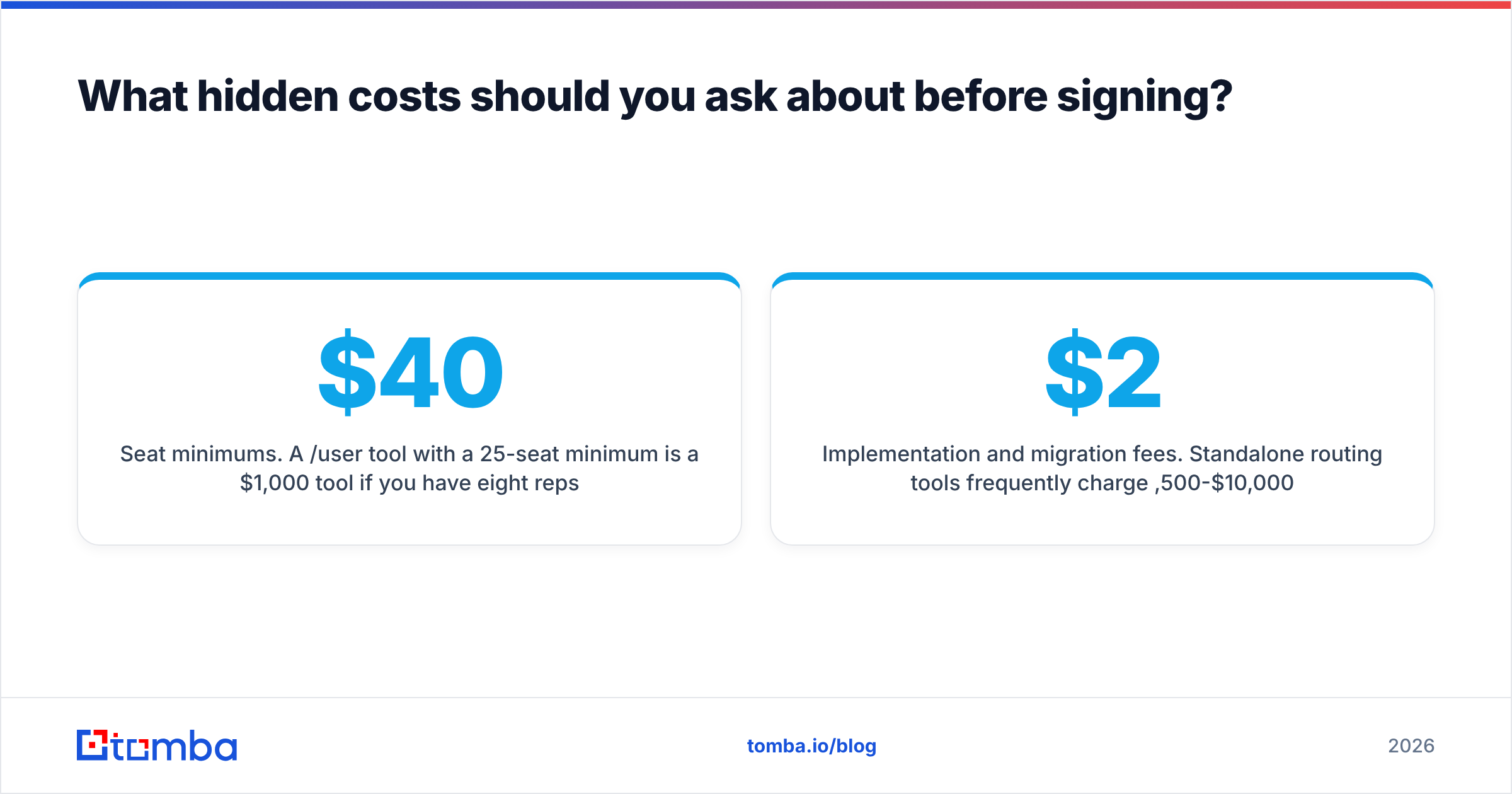
Seat minimums. A $40/user/mo tool with a 25-seat minimum is a $1,000/mo tool if you have eight reps. This is the single most common budget surprise in the category. Ask directly: "What is the minimum billable seat count on this tier?"
Enrichment credit overages. Platforms bundle credits, then charge 2-4x the marginal rate once you exceed them. A team that enriches 5,000 records a month on a 3,000-credit plan can pay more in overages than in subscription. Get the overage rate before signing and model your realistic volume, not your optimistic one.
API access gating. Many vendors put API access behind the enterprise tier. If your plan involves piping leads into a warehouse or triggering enrichment from your own app, confirm API availability on the tier you can afford. For reference, a straightforward email finder API should be available on paid plans generally, not reserved for six-figure contracts.
Implementation and migration fees. Standalone routing tools frequently charge $2,500-$10,000 for onboarding. Sometimes that is real work. Sometimes it is a config session that a competent RevOps person does in an afternoon. Ask what specifically is delivered.
How should lead scoring work if you want to trust it?#
Start with rules, not models. A predictive model trained on 400 closed-won deals is fitting noise; you need volume in the thousands before machine scoring beats a well-designed rules table. Most mid-market teams do not have that volume.
A workable v1 scoring model has four inputs:
- Fit — does the account match your ICP on size, industry, geography, and tech stack? Weight this highest. A perfect-fit lead who moves slowly beats a fast-moving lead who cannot buy.
- Intent — pricing page visits, demo requests, competitor comparison views. Weight second. Intent without fit produces enthusiastic tire-kickers.
- Engagement — email opens are nearly worthless post-MPP; replies, clicks, and meeting bookings are real. Weight third.
- Data completeness — a record missing a verified email or phone cannot be worked, regardless of score. Treat this as a gate, not a score input. Route incomplete records to enrichment first.
That last point is where most scoring implementations quietly fail. They score records that reps cannot contact. Gate on contactability first, using data enrichment to fill gaps, then score what remains. Salesforce's own guidance on lead scoring fundamentals makes the same point about separating qualification from prioritization.
Review the model quarterly against closed-won data. If your "hot" tier does not convert at least 3x better than your "warm" tier, the model is decoration.
Does CRM sync fidelity really deserve 15% of the score?#
Yes, and teams that skip this question spend the following year cleaning up duplicates.
Four things to test during the pilot:
- Direction. One-way push means rep edits in the CRM get overwritten on the next sync. Two-way with conflict rules is what you want.
- Field-level mapping. Can you map custom fields, or only the vendor's fixed schema? Fixed schemas force you to abandon fields your reporting depends on.
- Duplicate handling. Feed the same lead in twice with slightly different email casing and a different phone format. See what happens. A surprising number of tools create two records.
- Sync latency. Real-time, five minutes, or hourly batch? Hourly batch kills speed-to-lead advantages you paid for elsewhere.
Whichever platform you land on, confirm it connects to what you already run — check the vendor's integration list against your stack, and if you are on HubSpot or Pipedrive, verify the integrations exist natively rather than through a Zapier workaround that adds latency and another bill.
What does a sensible final stack look like?#
For a 10-30 rep B2B team in 2026, the pattern that works most often:
- CRM as the system of record — HubSpot or Salesforce, with the native lead object doing status tracking.
- A routing layer if inbound volume exceeds roughly 200 leads/month or territories are complex. Below that, native CRM assignment rules are fine and free.
- A rules-based scoring model living in the CRM, reviewed quarterly.
- A dedicated data layer for finding and verifying contact records — this is the piece teams most often skip and most often regret skipping.
That fourth piece is cheap relative to the rest. Data verification at $49-$99/mo protects the ROI of a $3,000/mo engagement platform. Getting the order wrong — buying the expensive orchestration layer and feeding it decayed records — is the most expensive mistake in this category. HubSpot's own research on data decay has been making this argument for years, and it has not gotten less true.
The bottom line#
Choosing lead management software is mostly an exercise in resisting feature seduction. Write the failure statement, weight the scorecard before the demos, pilot with your own leads, and price 24 months instead of one. The tool that scores highest on your weighted sheet is almost never the one with the best demo.
And whatever platform you route and score with, the records flowing into it decide whether any of it works. If your immediate problem is that leads arrive without valid contact details, start there — the Tomba Email Finder finds and verifies professional email addresses by domain, name, or company, with a free tier at 25 searches/month and paid plans starting at $49/mo. Run your last 50 inbound leads through it before your next platform demo. The bounce rate you get back will tell you which problem you are actually buying a solution for.
Related guides#
// get started
Find, verify and enrich your first contacts today
Start on the free plan with 25 searches a month, then scale when your team is ready.
Free plan · No credit card required · GDPR & CCPA
// about the author