How to Cold Email in 2026: A 7-Step System That Gets Replies
Cold email still works in 2026 — but only if your list is verified, your domain is warm, and your first line isn't about you. Here's the full 7-step system, with the numbers to hit at each stage.
TL;DR
- Cold email still works in 2026, but the margin for error is gone: Google and Microsoft now enforce spam-complaint thresholds (0.3%) that kill sloppy senders in weeks, not months.
- The order matters more than the copy. Verified list → warm domain → tight targeting → short email → 2-3 follow-ups. Skip step one and nothing downstream saves you.
- Keep bounce rate under 2% and complaint rate under 0.1%. Verify every address before it enters a sequence.
- A working cold email is 60-120 words, has one ask, and mentions the prospect before it mentions you.
- Expected benchmarks in 2026: 40-60% open rate (unreliable metric now), 5-12% reply rate on a tight list, 1-3% positive reply rate.
What actually counts as a cold email in 2026?#
A cold email is a one-to-one business message sent to someone who has not opted in, with a specific commercial ask. That's it. It is not a newsletter, not a drip campaign, and not a blast — and the distinction matters legally and technically.
Legally, cold B2B email is permitted in the US under CAN-SPAM as long as you identify yourself, use a real postal address, and honor opt-outs. The FTC's CAN-SPAM compliance guide is the primary source — read it once rather than trusting secondhand summaries. In the EU and UK, GDPR and PECR require legitimate interest and a documented basis; corporate role addresses at businesses are generally defensible, personal addresses are not.
Technically, the thing that changed between 2023 and 2026 is enforcement. Gmail and Outlook now hold bulk senders to a hard complaint ceiling and require SPF, DKIM, and DMARC on the sending domain. Google's bulk sender guidelines spell out the thresholds. You no longer get a slow decline in email deliverability — you get filtered, quietly and completely, and your replies drop to zero while your dashboard still shows sends.
So "how to cold email" in 2026 is really two questions stacked: how to earn the right to land in the inbox, and what to say once you're there. Most people only work on the second one.
How do you build a cold email list that doesn't bounce?#
Your list determines 70% of your outcome. A perfect email to the wrong person is worse than a mediocre email to the right one, because the wrong person marks it spam.
Build the list in this order:
- Define the trigger, not the persona. "VP Marketing at 50-200 person SaaS" is a persona and it's too broad. "VP Marketing at a SaaS company that hired two SDRs in the last 60 days" is a trigger — it tells you why now, and gives you the first line of the email for free.
- Source companies before contacts. Build a list of 200-500 accounts that match the trigger. Job boards, funding announcements, tech-stack changes, and conference exhibitor lists all beat generic firmographic filters.
- Find the right person at each account. Use domain search to pull the email pattern and contacts for a company, then narrow to the one human who owns the problem. One well-chosen contact beats five hopefuls at the same company — multi-threading before you have any traction reads as a blast.
- Verify every single address. Non-negotiable. Run the list through an email verifier and drop anything that isn't a confirmed deliverable. Catch-all domains need a separate decision (see below).
- Deduplicate and suppress. Remove anyone already in your CRM, anyone who opted out in the last 24 months, and duplicates across campaigns. Competitors' employees and your own customers should be suppressed too.
- Cap the list at what you can personalize. If you can't spend 30 seconds per prospect, the list is too big. Cut it.
Catch-all domains are the judgment call. Roughly 15-20% of B2B domains accept everything at the SMTP layer, so a standard verifier returns "unknown." You have three options: exclude them (safest, costs you real prospects), include them in a separate low-volume campaign on a secondary domain, or run them through a dedicated catch-all verifier that uses pattern confidence and secondary signals. For most teams, the third option recovers a meaningful slice of the list without moving the bounce rate.
What does the deliverability setup look like before you send anything?#
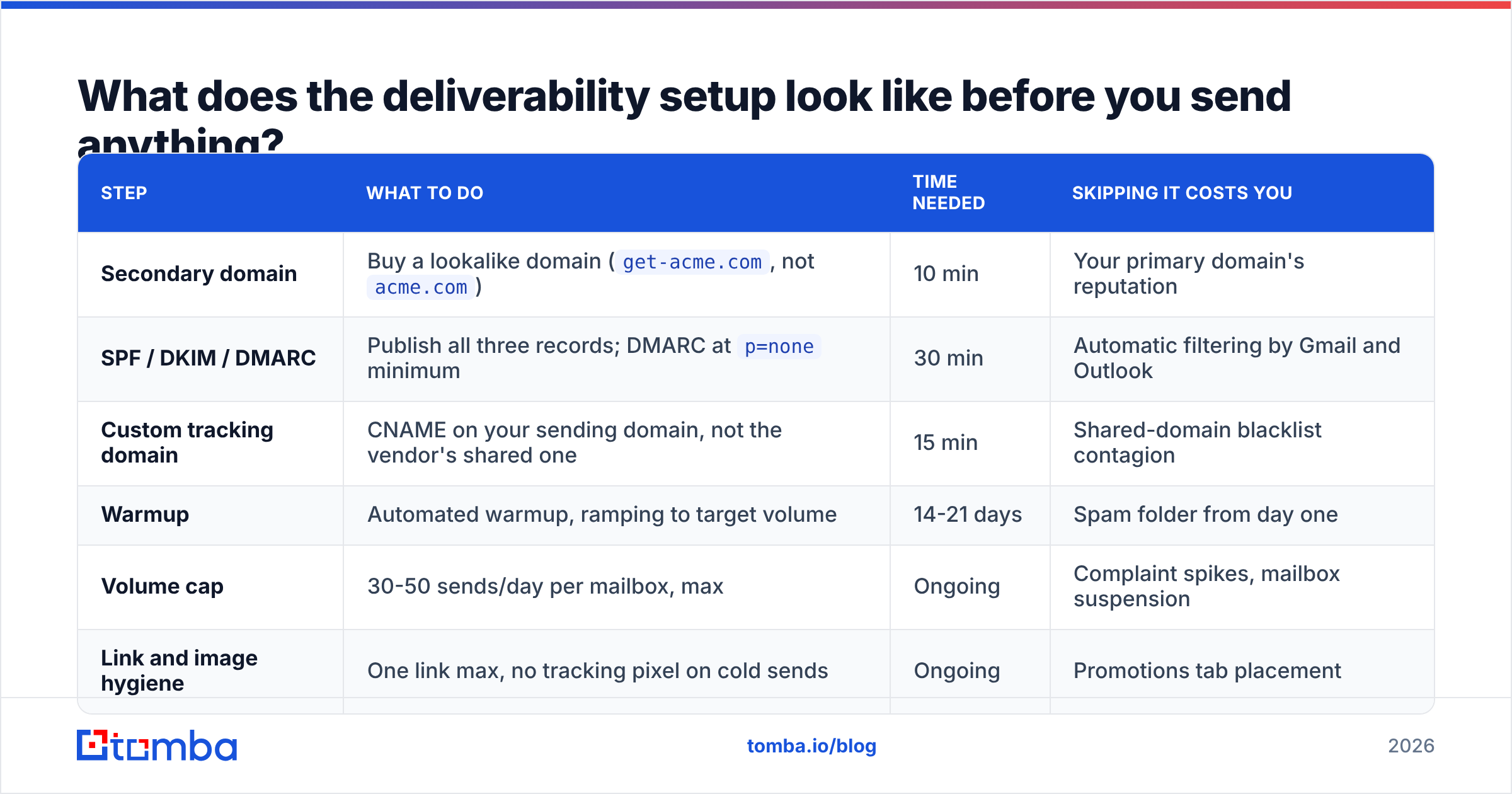
Do this before you write a word of copy. It takes about two weeks of calendar time and almost no work.
| Step | What to do | Time needed | Skipping it costs you |
|---|---|---|---|
| Secondary domain | Buy a lookalike domain (get-acme.com, not acme.com) |
10 min | Your primary domain's reputation |
| SPF / DKIM / DMARC | Publish all three records; DMARC at p=none minimum |
30 min | Automatic filtering by Gmail and Outlook |
| Custom tracking domain | CNAME on your sending domain, not the vendor's shared one | 15 min | Shared-domain blacklist contagion |
| Warmup | Automated warmup, ramping to target volume | 14-21 days | Spam folder from day one |
| Volume cap | 30-50 sends/day per mailbox, max | Ongoing | Complaint spikes, mailbox suspension |
| Link and image hygiene | One link max, no tracking pixel on cold sends | Ongoing | Promotions tab placement |
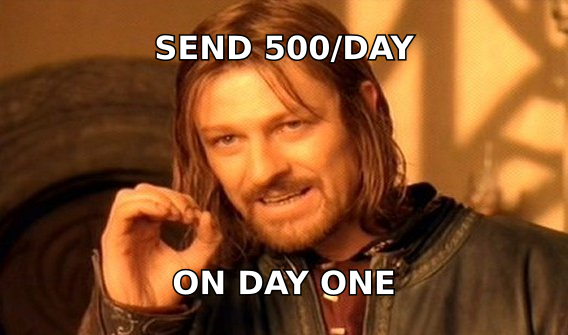
The volume line is where most teams break the system. If you need 500 sends a day, that's ten mailboxes across two or three domains, not one mailbox pushed to 500. Run the math with a warmup calculator before you commit to a target, because the mailbox count drives your tool budget more than seat pricing does.
One more thing people get wrong: open tracking. Apple Mail Privacy Protection and Gmail's image proxying have made open rates roughly decorative since 2022. In 2026, tracking pixels are a deliverability liability with almost no analytical payoff. Turn them off, measure replies, and stop optimizing subject lines against a number that isn't real.
What does a cold email that gets replies actually look like?#
Short, specific, and about them. The structure that consistently works:
Subject line (2-5 words, lowercase, no hype). "question about your SDR hiring" outperforms "Unlock 3x Pipeline Growth 🚀" every time. It looks like a colleague wrote it.
Line 1 — the trigger. Prove you did research in under 15 words. "Saw you posted two SDR roles last week." No compliments, no "hope this finds you well."
Line 2-3 — the relevance bridge. Connect the trigger to a problem you actually solve, with a concrete number if you have one. "Teams that scale SDR headcount usually hit a list-quality wall around month two — bounce rates go from 2% to 9%."
Line 4 — one ask, low friction. "Worth a 12-minute call Thursday?" Not "let me know if you'd like to learn more." Ask for a specific, small commitment.
Signature — plain text, no banner, no legal wall. Name, title, company, and the physical address CAN-SPAM requires. That's it.
Total: 60-120 words. If your draft is longer, you're explaining your product instead of earning a conversation. HubSpot's sales email research has consistently found that shorter emails outperform long ones at the reply stage, and that pattern hasn't reversed.
Personalization has a ceiling worth knowing about. Deep manual research on 20 prospects beats shallow merge tags on 2,000 — but it also beats deep research on 200 that took you a week to compile. The efficient middle is one researched sentence per prospect, generated from a shared trigger, applied to a segment of 50-100. Segment tightly enough and one sentence feels bespoke to everyone in the group.
How many follow-ups should you send, and what goes in them?#
Three to four total touches, spaced 3-4 business days apart, then stop. Most positive replies land on touches two and three, so single-send campaigns leave the majority of their pipeline on the table. Past touch four, incremental replies collapse and complaint risk rises.
Each follow-up needs a new angle — not "just bumping this to the top of your inbox."
- Touch 2 (day 4): A different value framing. Same problem, different consequence or a specific customer example.
- Touch 3 (day 8): Social proof with a name and a number. "We did this for [comparable company]; their bounce rate went from 9% to 1.8%."
- Touch 4 (day 14): The polite close. "Sounds like this isn't a priority right now — I'll stop here. If it changes, reply and I'll pick it back up." This one gets a surprising number of replies, because it removes pressure.
Send follow-ups in the same thread. Different threads read as automation; the same thread reads as a person who remembers you.
Which tools do you actually need for cold email?#
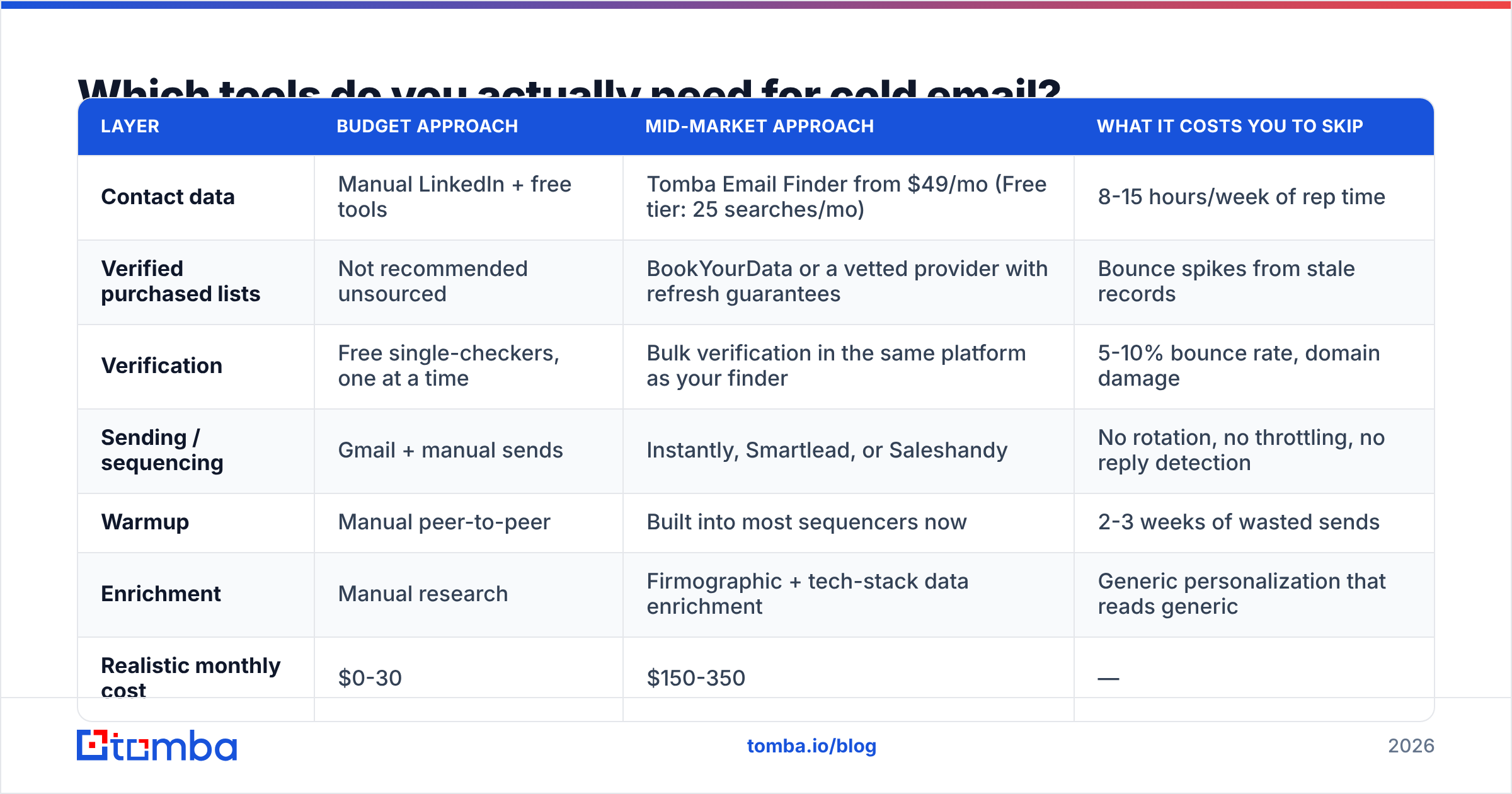
You need four categories: contact data, verification, sending/sequencing, and warmup. Everything else is optional. Here's how the common approaches compare for a team sending roughly 3,000 emails a month.
| Layer | Budget approach | Mid-market approach | What it costs you to skip |
|---|---|---|---|
| Contact data | Manual LinkedIn + free tools | Tomba Email Finder from $49/mo (Free tier: 25 searches/mo) | 8-15 hours/week of rep time |
| Verified purchased lists | Not recommended unsourced | BookYourData or a vetted provider with refresh guarantees | Bounce spikes from stale records |
| Verification | Free single-checkers, one at a time | Bulk verification in the same platform as your finder | 5-10% bounce rate, domain damage |
| Sending / sequencing | Gmail + manual sends | Instantly, Smartlead, or Saleshandy | No rotation, no throttling, no reply detection |
| Warmup | Manual peer-to-peer | Built into most sequencers now | 2-3 weeks of wasted sends |
| Enrichment | Manual research | Firmographic + tech-stack data enrichment | Generic personalization that reads generic |
| Realistic monthly cost | $0-30 | $150-350 | — |
Two notes on this table. First, the finder and the verifier should ideally be the same vendor — when they're split, you pay twice for the same record and you get conflicting confidence scores with no way to arbitrate. Second, don't buy a sequencer before you have a verified list; it's the most common ordering mistake and the most expensive one, because you'll burn your domain reputation while learning the tool.
If you're evaluating vendors, G2's email-finder category is a reasonable starting point for real user reviews, but weight recent reviews heavily — data providers' accuracy shifts quarter to quarter as sources change.
What numbers tell you it's actually working?#
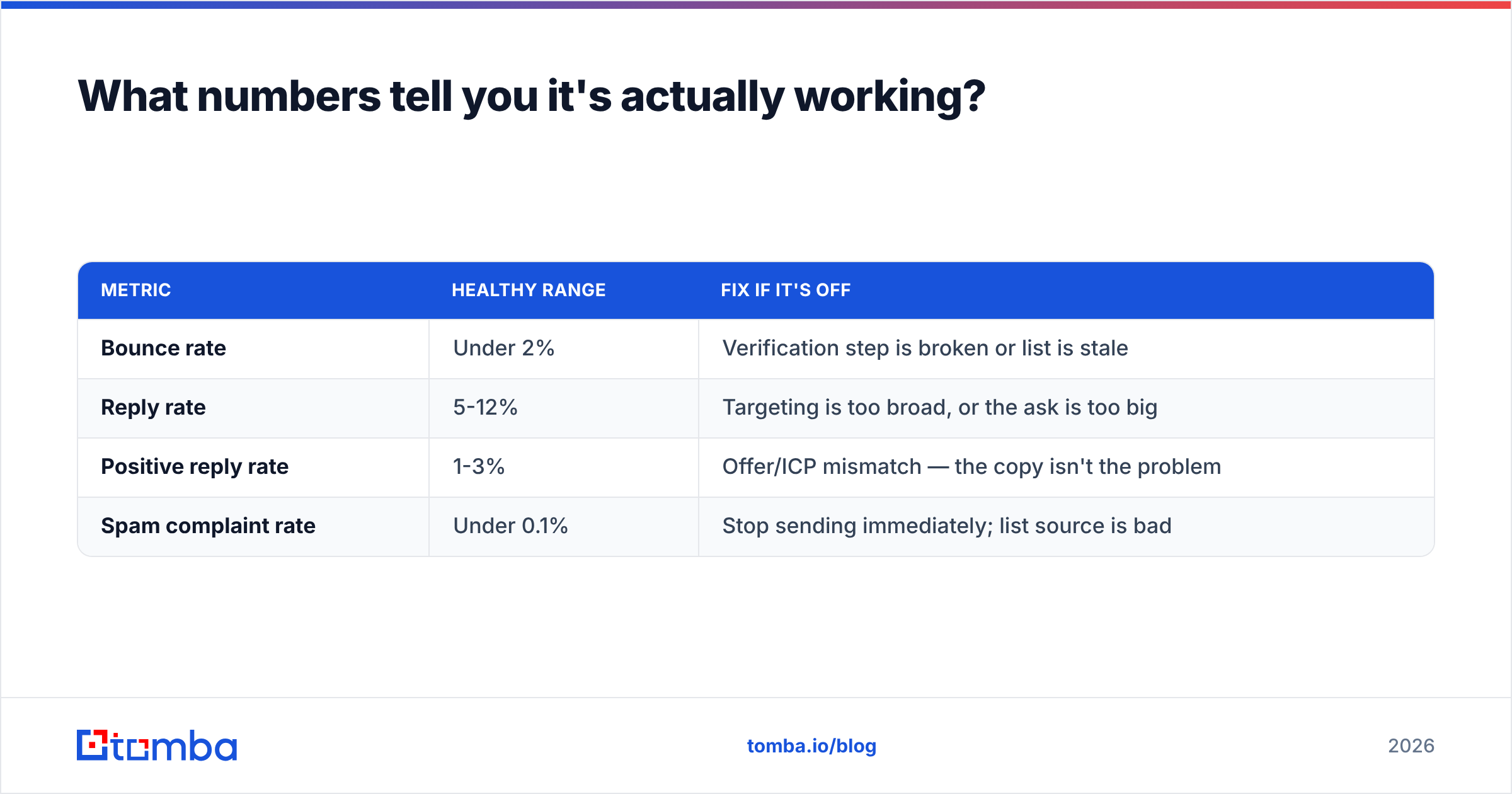
Track four, ignore the rest:
| Metric | Healthy range | Fix if it's off |
|---|---|---|
| Bounce rate | Under 2% | Verification step is broken or list is stale |
| Reply rate | 5-12% | Targeting is too broad, or the ask is too big |
| Positive reply rate | 1-3% | Offer/ICP mismatch — the copy isn't the problem |
| Spam complaint rate | Under 0.1% | Stop sending immediately; list source is bad |
Reply rate is your primary signal because it's the only one nobody can fake and no privacy feature can distort. If reply rate is healthy but positive reply rate is near zero, you're reaching real people with the wrong offer — that's a positioning problem, not a copy problem, and rewriting subject lines won't touch it.
Run tests on one variable at a time, with at least 200 sends per variant, over at least a week. Anything smaller is noise dressed up as insight.
What are the most common ways teams break cold email?#
- Sending from the primary domain. One bad campaign and your invoices stop reaching customers.
- Scaling volume before scaling mailboxes. 50/day/mailbox is the ceiling, and it isn't negotiable by paying more.
- Skipping verification because the source "looked clean." Scraped and exported lists decay at roughly 2-3% per month. A six-month-old list is 15% dead.
- Writing about your product in the first email. The first email sells the reply, not the product.
- Ignoring opt-outs or hiding them. Legally risky, and it converts an ignorable email into a complaint.
- Measuring opens. You're optimizing a number that Apple and Google have already broken.
Where should you start this week?#
Pick 100 accounts that match a single trigger. Find one decision-maker at each, verify every address, buy a secondary domain and start warmup today so it's ready in two weeks. Write one 90-word email and three follow-ups. Send 25 a day. Read every reply and rewrite based on what people actually push back on.
That's a two-week build and it will teach you more than any template library. The part you can't shortcut is the data — a verified, correctly-targeted list is the difference between a 9% reply rate and a suspended mailbox.
Start there with the Tomba Email Finder: find verified professional emails by domain, name, or company, with verification built into the same workflow so nothing unverified reaches your sequencer. The free tier gives you 25 searches a month to test the process on a real segment, and paid plans start at $49/mo when you're ready to scale. Check current Tomba pricing to match a plan to your monthly send volume, or run an existing list through bulk verify before your next campaign goes out.
Related guides#
// get started
Find, verify and enrich your first contacts today
Start on the free plan with 25 searches a month, then scale when your team is ready.
Free plan · No credit card required · GDPR & CCPA
// about the author