How to Cold Email for Networking: A 2026 Playbook
Networking cold emails fail for different reasons than sales cold emails. Here is the research, structure, and follow-up cadence that actually earns replies from busy people in 2026.
TL;DR
- Networking cold emails and sales cold emails fail for opposite reasons: sales emails get ignored for being generic, networking emails get ignored for being vague about the ask.
- The winning structure is five lines: proof you did homework, one specific reason it's them, one small ask, a time-boxed offer, an easy exit.
- Ask for something that costs under 15 minutes. "Can I pick your brain?" is an unbounded request and reads as a favor with no ceiling.
- Send to a verified personal work address, not
info@. Bounce rates above 3-4% on a small manual list usually mean you guessed the pattern. - Two follow-ups, spaced 4 and 10 days out, roughly double reply rates. A third rarely helps and starts costing you goodwill.
What makes a networking cold email different from a sales cold email?#
A sales email asks the recipient to consider a purchase. A networking email asks them to spend a piece of their attention on you with no obvious return. That difference changes almost everything about how you write it.
Sales emails can survive being slightly generic because there's an implied trade: you're offering something with commercial value. Networking emails have no such trade. The only currency you have is specificity — evidence that you chose this person deliberately and that answering you will take a defined, small amount of effort.
The practical consequence: you send fewer of them, you research each one properly, and you optimize for reply quality instead of volume. A 40-person networking campaign that lands eight real conversations beats a 400-person blast that lands two.
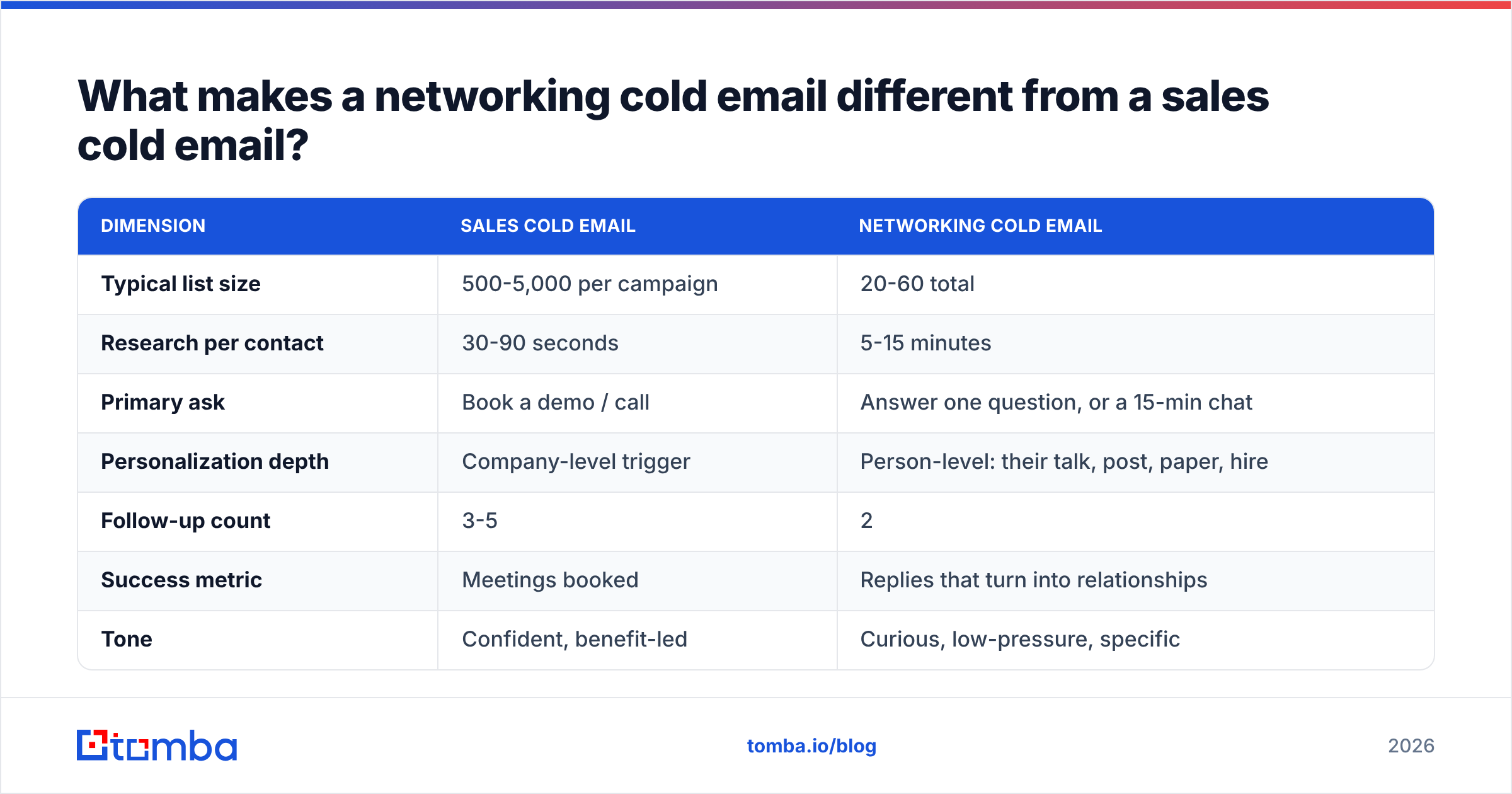
| Dimension | Sales cold email | Networking cold email |
|---|---|---|
| Typical list size | 500-5,000 per campaign | 20-60 total |
| Research per contact | 30-90 seconds | 5-15 minutes |
| Primary ask | Book a demo / call | Answer one question, or a 15-min chat |
| Personalization depth | Company-level trigger | Person-level: their talk, post, paper, hire |
| Follow-up count | 3-5 | 2 |
| Success metric | Meetings booked | Replies that turn into relationships |
| Tone | Confident, benefit-led | Curious, low-pressure, specific |
| Sending method | Sequencer / automation | Manual send from your real inbox |
That last row matters more than people expect. Networking emails sent through a sequencing tool tend to carry tracking pixels, link wrappers, and unsubscribe footers — all of which signal "campaign" to a recipient who was supposed to feel individually chosen. Send these from your actual mail client.
How do you find the right person to email?#
Start from the artifact, not the org chart. The strongest networking emails reference something the person made: a conference talk, a changelog entry, a public teardown, a paper, a hiring post, a podcast appearance. That artifact is both your reason for reaching out and your opening line.
Work in this order:
- Pick the artifact first. Read the thing. Take one specific note that could not have been written by someone who only skimmed the title.
- Identify the human behind it. Not the company account. If it's a blog post, use an author finder to resolve the byline to a real person and address instead of guessing at
press@. - Confirm current role and company. People move. A message addressed to someone's job from two years ago is worse than no message — it proves you didn't check.
- Find their work address. Use domain search to pull the company's email pattern and named contacts, then narrow to the individual.
- Verify before sending. Run the address through an email verifier. On a 40-person list, three bounces is a meaningful signal that you guessed patterns rather than confirmed them.
- Log the context. One line per contact: what you read, what you'll ask, when you sent. You will need this for the follow-up in nine days.
Skipping step 5 is the single most common failure. Manual networking lists feel small enough to trust intuition on, so people send to firstname@ because it "looked right." Bounces on a warm-intent list don't just cost you the contact — repeated hard bounces from your personal domain drag down your sender reputation, which then quietly hurts the emails you actually care about.
What should a networking cold email actually say?#
Five components, roughly five to eight sentences total. Anything longer reads as a burden.
1. The specific hook (1 sentence). Name the artifact and one concrete detail from inside it. Not "loved your post on onboarding" — that's what someone writes after reading the headline. Instead: "Your point about killing the second onboarding email because it cannibalized the activation nudge is the opposite of what we did, and it worked better."
2. Who you are, compressed (1 sentence). Role, company, and the one detail that makes you relevant to this person. No career history.
3. The reason it's them (1 sentence). Why this person and not the fifty others who work on similar things. If you can't answer this, you don't have an email yet — you have a template.
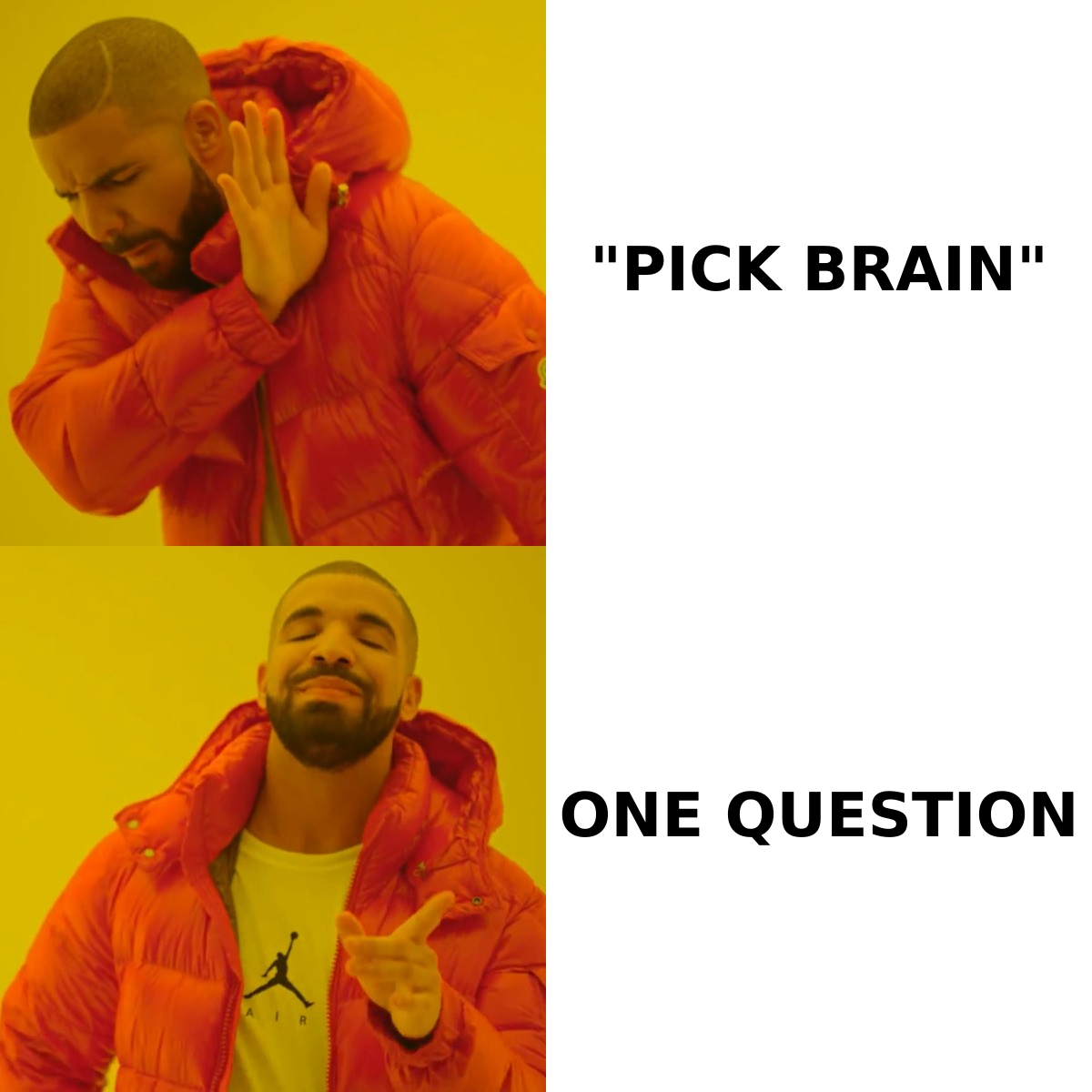
4. The ask, bounded (1-2 sentences). State exactly what you want and how long it takes. "Would you be open to a 15-minute call in the next two weeks?" or, better for busy people, "Can I ask you one question by email: did you test that with self-serve accounts too, or only sales-led?"
5. The easy exit (1 sentence). "Totally fine if you're heads-down — no reply needed." This costs you nothing and materially raises reply rates, because it removes the social debt of saying no.
Here's the shape in practice:
Subject: your point about the second onboarding email
Hi Dana — your Reforge talk had a line about cutting the day-2 onboarding email because it cannibalized the activation nudge. We ran the opposite test at Northwind and got the same result, which was not what I expected.
I run lifecycle at Northwind, ~200 seats, mostly self-serve.
You're the only person I've seen publish that specific finding rather than the generic "send less" advice, so I'd rather ask you than guess.
One question, no call needed: did that hold for sales-led accounts, or only self-serve?
Either way, thanks for publishing it. No reply needed if you're buried.
— Sam
Note what's absent: no "I hope this email finds you well," no paragraph about your company's mission, no calendar link, no "let me know if you'd like to hop on a quick sync." The ask is a question that can be answered in one line from a phone.
Why does "can I pick your brain?" fail so consistently?#
Because it's an unbounded request. The recipient has to define the scope, decide the time cost, and manage the meeting — three jobs you handed them for free.
Compare the cognitive load:
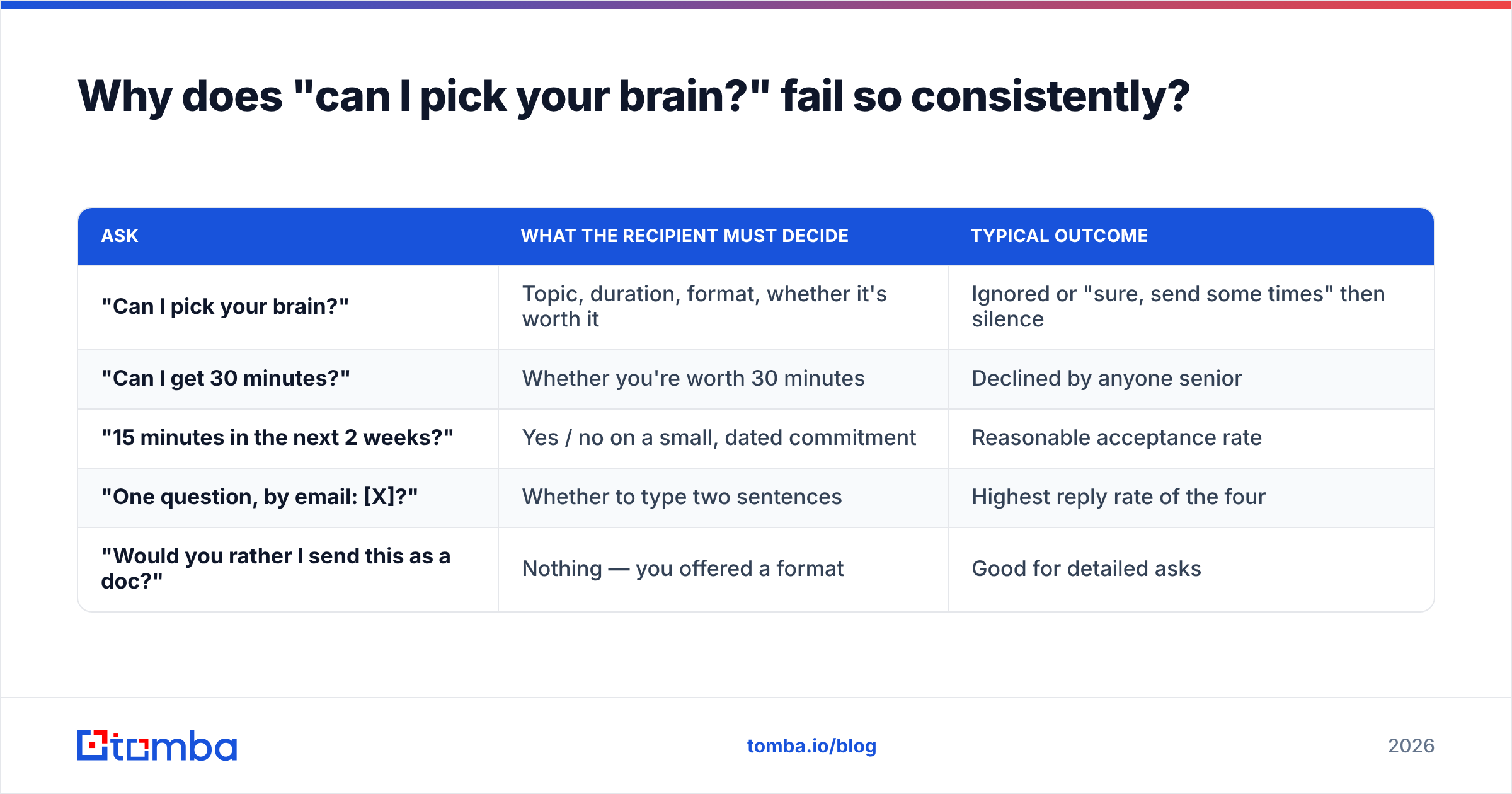
| Ask | What the recipient must decide | Typical outcome |
|---|---|---|
| "Can I pick your brain?" | Topic, duration, format, whether it's worth it | Ignored or "sure, send some times" then silence |
| "Can I get 30 minutes?" | Whether you're worth 30 minutes | Declined by anyone senior |
| "15 minutes in the next 2 weeks?" | Yes / no on a small, dated commitment | Reasonable acceptance rate |
| "One question, by email: [X]?" | Whether to type two sentences | Highest reply rate of the four |
| "Would you rather I send this as a doc?" | Nothing — you offered a format | Good for detailed asks |
The email-only ask wins because it's asynchronous. A senior person can answer it at 11pm from a phone with no calendar negotiation. Many of those email replies then turn into calls anyway — but the call happens because they opted in, not because you demanded a slot upfront.
If you genuinely need a call, time-box it and name the window. "15 minutes, any time in the next two weeks" is a smaller ask than "30 minutes, here's my Calendly" because it doesn't imply you expect them to work around a scheduling tool.
When should you send, and how often should you follow up?#
Send Tuesday through Thursday, in the recipient's morning. This isn't magic — it's just that Monday inboxes are triage mode and Friday afternoon replies get postponed into the weekend and forgotten. HubSpot's ongoing send-time research lands in roughly the same place across years of data, and it matches what most senders see on their own response rate reporting.
Follow-up cadence for networking:
- Initial send. Tuesday-Thursday morning, recipient's timezone.
- Follow-up 1 — day 4. Reply to your own thread. Two sentences. Add something, don't just bump: a related link, a narrower version of the question, or a data point from your own test.
- Follow-up 2 — day 10. One sentence, explicit close: "Closing the loop on this — happy to circle back another time if it's just bad timing."
- Stop. A third follow-up on a no-ask, no-value email converts poorly and costs you the option of reaching out again in six months with better timing.
The "add something" rule is what separates a follow-up from a nag. A bump that says "just floating this to the top of your inbox" tells the recipient you have nothing new and are simply spending their attention again. A bump that says "we ran the sales-led version of that test and got the inverse — happy to share the numbers either way" is a second, better email.
What tools do you actually need for this?#
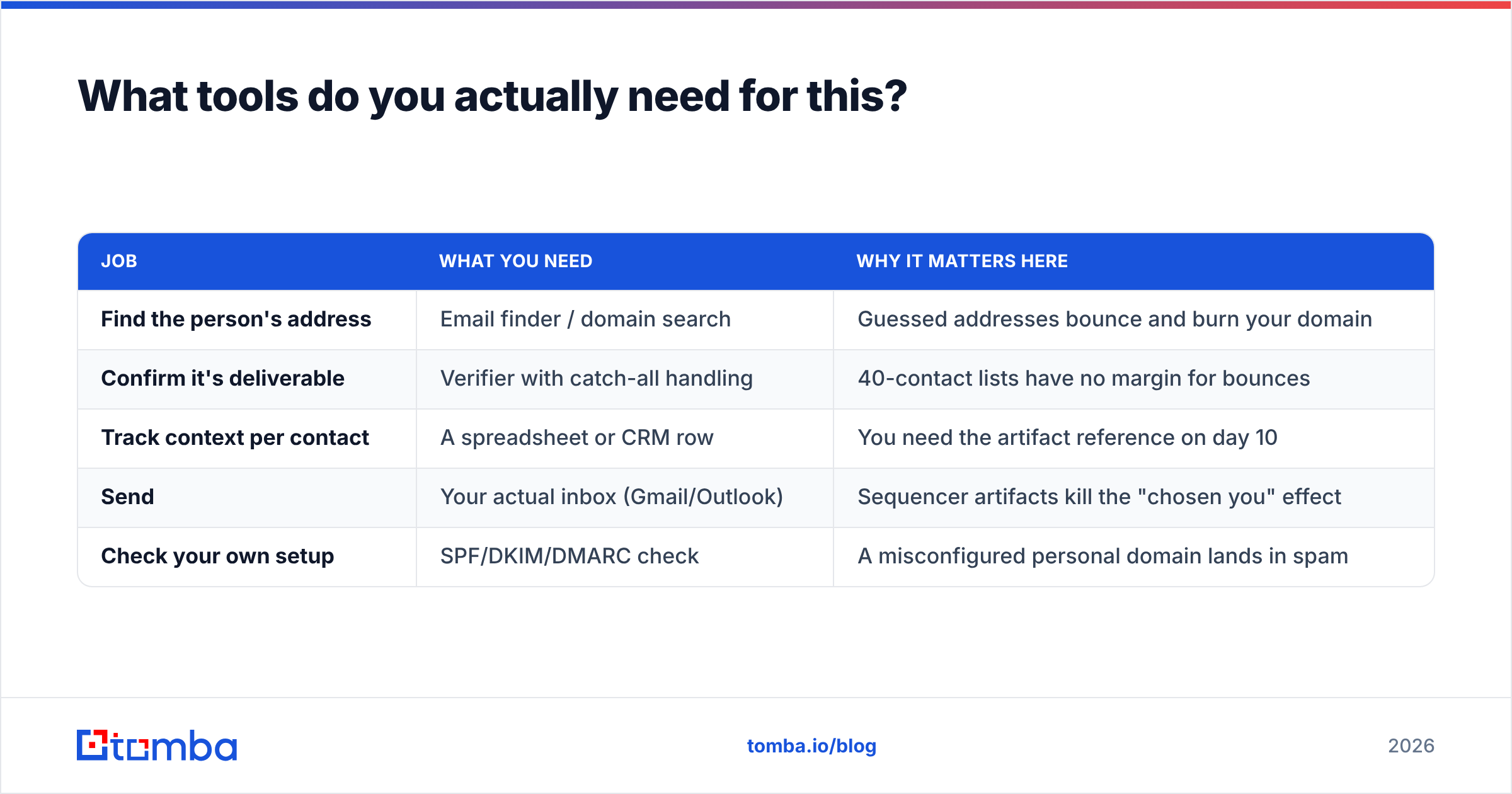
Fewer than you think. Networking outreach is deliberately manual — the tooling exists to get you a correct address and to keep your notes straight, not to automate the sending.
| Job | What you need | Why it matters here |
|---|---|---|
| Find the person's address | Email finder / domain search | Guessed addresses bounce and burn your domain |
| Confirm it's deliverable | Verifier with catch-all handling | 40-contact lists have no margin for bounces |
| Track context per contact | A spreadsheet or CRM row | You need the artifact reference on day 10 |
| Send | Your actual inbox (Gmail/Outlook) | Sequencer artifacts kill the "chosen you" effect |
| Check your own setup | SPF/DKIM/DMARC check | A misconfigured personal domain lands in spam |
For finding addresses, Tomba's email finder covers the name-plus-domain case and the Google Sheets add-on is useful if your target list already lives in a sheet — you can resolve and verify 40 rows without touching a UI. Tomba's free tier gives 25 searches a month, which is genuinely enough for a small networking push; paid plans start at $49/mo on Tomba pricing if you're running this quarterly.
If you'd rather buy a pre-built list than research one, BookYourData is a solid pay-as-you-go option with per-contact pricing and no subscription — a reasonable fit when you need a specific industry slice fast. For networking specifically, though, list purchase is usually the wrong shape: the whole point is that you chose each person for a reason.
On the deliverability side, run your domain through a SPF checker once and forget about it. Most networking emails that "get no replies" from a fresh personal domain were never seen. Google's own sender guidelines spell out the authentication baseline; meeting it takes about twenty minutes.
How do you measure whether it's working?#
Not by open rate. Open tracking on a networking email is both unreliable (Apple Mail Privacy Protection inflates it) and slightly rude if the recipient notices the pixel.
Track three numbers across a batch of 30-50:
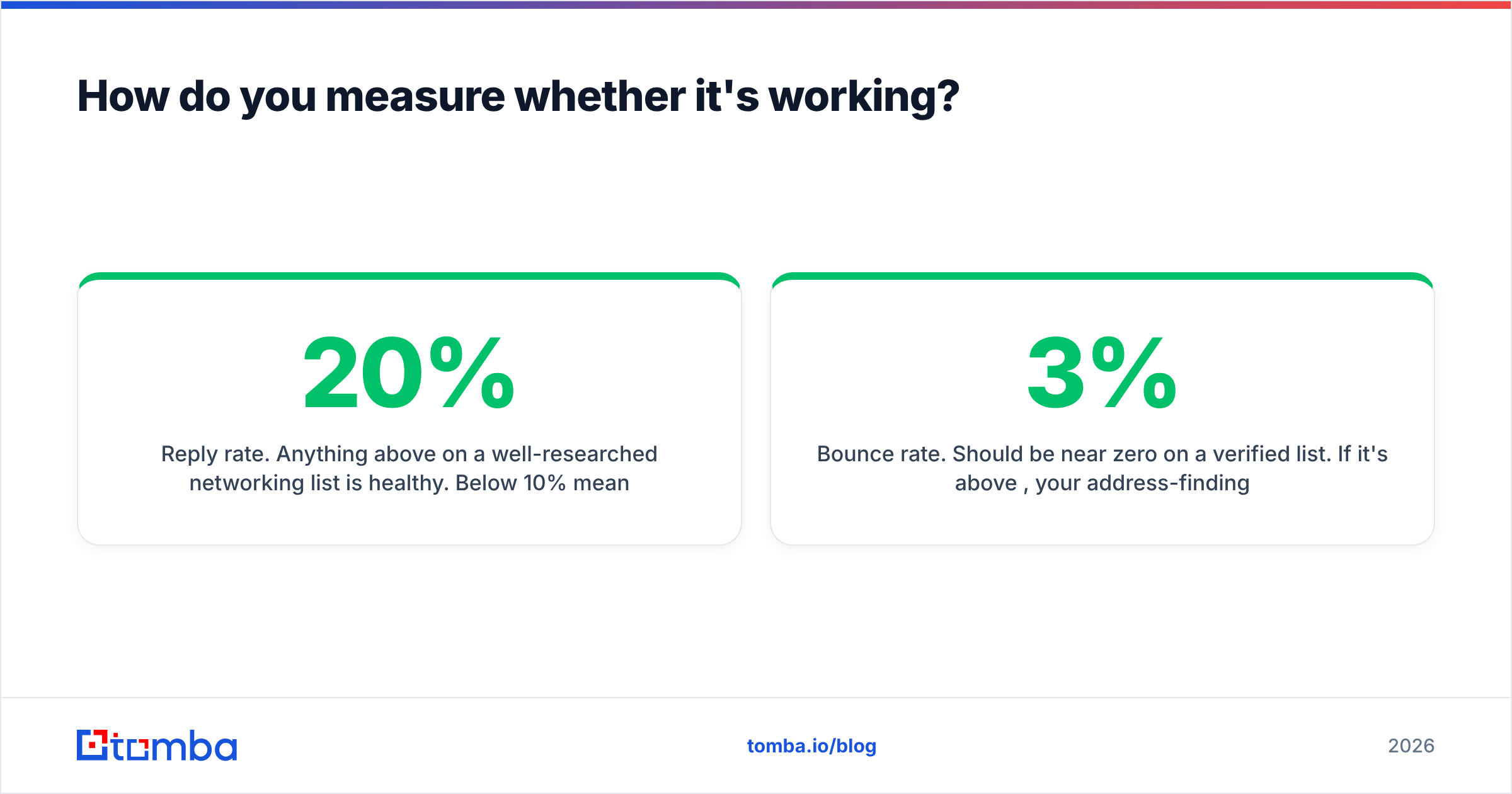
- Reply rate. Anything above 20% on a well-researched networking list is healthy. Below 10% means your ask is too big or your hook is too generic.
- Useful-reply rate. Replies that answered the question or agreed to a conversation, divided by total sent. This is the real number.
- Bounce rate. Should be near zero on a verified list. If it's above 3%, your address-finding step is guessing.
Then read the no replies. "Not the right person, try Priya" is a successful email. "Sorry, what is this regarding?" means your first sentence failed. Sorting declines into those two buckets will fix your next batch faster than any subject-line A/B test.
One more thing worth checking: G2's category reviews for outbound and email-finding tools are useful for sanity-checking accuracy claims, since networking lists are small enough that a single wrong address is a measurable percentage of your campaign.
What are the most common mistakes?#
- Leading with yourself. The first sentence should be about them or about the artifact. Your bio is sentence two, and it's one sentence.
- The unbounded ask. "Coffee sometime?" "Pick your brain?" "Quick chat?" All the same failure.
- Faked familiarity. "Hope you're doing well!" to a stranger, or referencing a mutual connection you've never spoken to.
- Attaching a deck. Networking emails with attachments read as pitches and trip spam filters on cold sends.
- Sending to a catch-all without checking. Catch-all domains accept everything, so a "valid" result can still be a black hole. Run those through a catch-all verifier before you count them as deliverable.
- Not following up at all. Most positive replies to networking emails arrive on the second touch, from someone who genuinely meant to reply and didn't.
- Automating it. The moment this becomes a sequence, the thing that made it work is gone.
What does a good networking sequence look like end to end?#
A concrete two-week plan for one batch:
- Days 1-2 — build the list. 40 people, each tied to a specific artifact you actually read. One row per person: name, company, artifact, the note you took, the question you'll ask.
- Day 3 — resolve and verify. Find addresses, verify all 40, drop anything unverifiable rather than gambling on it.
- Day 4 — write. One email each, five components, no template variables. Budget 6-8 minutes per email. Yes, that's four hours. That's the job.
- Days 5-7 — send in waves. 12-15 per morning, Tuesday-Thursday, from your real inbox.
- Day 9-11 — follow-up 1. Only to non-repliers, with something added.
- Day 15-17 — follow-up 2. One sentence, explicit close.
- Day 18 — review. Count reply rate, useful-reply rate, bounces. Read the declines. Adjust the ask for the next batch.
Four hours of writing for eight to twelve real conversations is an excellent trade at any career stage. It is a terrible trade if you spent those four hours writing to addresses that bounce.
Start with a verified list#
The writing advice above only pays off if the email arrives. Before you spend four hours crafting 40 individual messages, spend twenty minutes making sure all 40 addresses are real and current — resolve each name against its company domain with the Tomba Email Finder, verify the results, and drop anything you can't confirm. The free tier covers 25 lookups a month, which is enough to test the whole workflow on your first batch before committing to a plan.
Get the address right, then get the ask small. That's most of it.
Related guides#
// get started
Find, verify and enrich your first contacts today
Start on the free plan with 25 searches a month, then scale when your team is ready.
Free plan · No credit card required · GDPR & CCPA
// about the author