How to Combine Multiple SPF Records Into One Valid Record (2026)
Two SPF records on one domain is an instant permerror, and mail starts failing quietly. Here's how to merge them into a single valid record and keep DNS lookups under 10.

TL;DR
- A domain can publish exactly one SPF record. Two
v=spf1TXT records is a permanent error (permerror), and most receivers treat the whole check as failed — not as "pick the best one." - To combine them, you keep one
v=spf1prefix, merge every unique mechanism (include:,ip4:,ip6:,a,mx) into that single string, and keep one terminal qualifier (~allor-all). - The hard ceiling is 10 DNS lookups. Every
include:,a,mx,ptr,exists, andredirect=costs a lookup — and nested includes count too.ip4:andip6:cost zero. - If the merged record blows past 10 lookups, your options are flattening, subdomain delegation, or removing senders you no longer use. Delegation is the safest long-term fix.
- Always validate the merged record with an SPF checker and a live test send before you delete the old one.
You added a new sending tool — a marketing platform, a helpdesk, an invoicing system — and it told you to "add this TXT record to your DNS." You did. Now you have two v=spf1 records sitting next to each other, and somewhere between 5% and 100% of your mail is landing in spam or bouncing outright.
This is one of the most common self-inflicted email deliverability wounds in B2B, and it is also one of the fastest to fix. Here's the complete process.
Why can't a domain have two SPF records?#
Because the spec says so, and receivers enforce it strictly.
RFC 7208, the standard that defines Sender Policy Framework, is unambiguous: "A domain MUST NOT have multiple records that would cause an authorization check to select more than one record." When a receiving mail server queries your domain for TXT records and finds two strings starting with v=spf1, it does not merge them, it does not pick the newer one, and it does not pick the more permissive one. It returns permerror and stops.
Think of it like a guest list at a venue. One list, one door policy. If the venue staff find two conflicting lists at the desk, they don't stitch them together on the fly — they refuse to admit anyone until management sorts it out. SPF works the same way.
What makes this dangerous is that the failure is silent and partial. Gmail might soft-fail and deliver to spam. A corporate Microsoft 365 tenant with a strict DMARC policy might reject outright. Your own internal mail keeps working fine because it never leaves the perimeter. So you get a slow bleed of missed replies rather than an obvious outage, and it can run for weeks before anyone traces it back to DNS.

What actually happens when you publish two SPF records?#
Here's the sequence, in order:
- The receiver queries
example.comfor TXT records. It gets back everything — SPF, DKIM policy hints, domain verification strings from Google, Atlassian, Zoom, and whatever else you've accumulated. - It filters for records starting with
v=spf1. Verification strings and DKIM records are ignored. Only true SPF records count. - It counts. One record: evaluate normally. Zero records:
none. Two or more:permerror. permerrorpropagates to DMARC. SPF cannot pass, so DMARC alignment depends entirely on DKIM. If DKIM is also misconfigured or the message was forwarded, DMARC fails.- The receiver applies your DMARC policy.
p=nonemeans it's logged but delivered.p=quarantinemeans spam folder.p=rejectmeans the message is refused at SMTP time.
The severity of the outcome is entirely determined by your DMARC policy — which is why teams running p=reject (the correct end state) feel this bug hardest and fastest.
How do you combine multiple SPF records into one?#
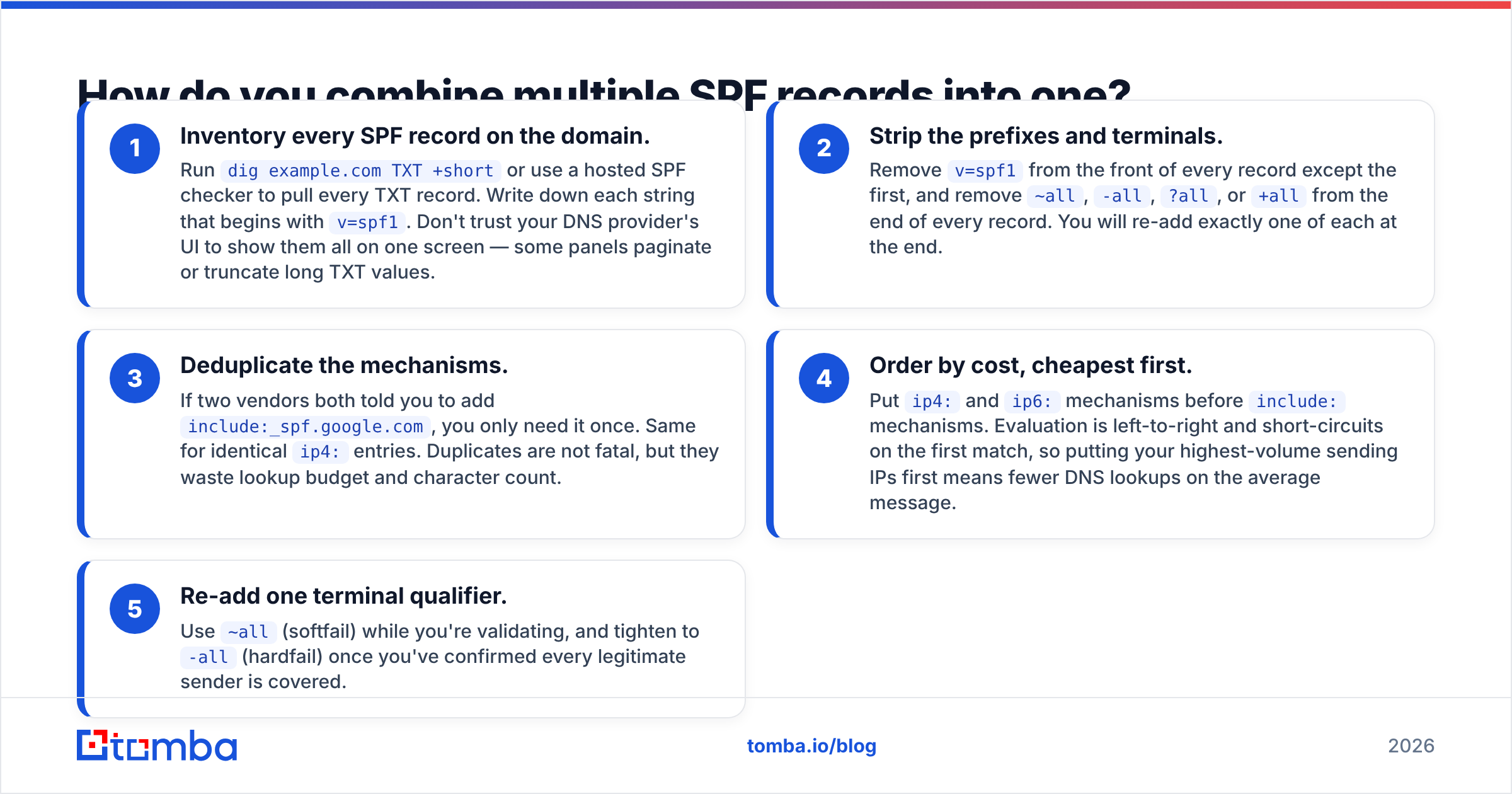
The merge itself is mechanical. Five steps:
- Inventory every SPF record on the domain. Run
dig example.com TXT +shortor use a hosted SPF checker to pull every TXT record. Write down each string that begins withv=spf1. Don't trust your DNS provider's UI to show them all on one screen — some panels paginate or truncate long TXT values. - Strip the prefixes and terminals. Remove
v=spf1from the front of every record except the first, and remove~all,-all,?all, or+allfrom the end of every record. You will re-add exactly one of each at the end. - Deduplicate the mechanisms. If two vendors both told you to add
include:_spf.google.com, you only need it once. Same for identicalip4:entries. Duplicates are not fatal, but they waste lookup budget and character count. - Order by cost, cheapest first. Put
ip4:andip6:mechanisms beforeinclude:mechanisms. Evaluation is left-to-right and short-circuits on the first match, so putting your highest-volume sending IPs first means fewer DNS lookups on the average message. - Re-add one terminal qualifier. Use
~all(softfail) while you're validating, and tighten to-all(hardfail) once you've confirmed every legitimate sender is covered.
A worked example#
Say you have three records on the domain:
v=spf1 include:_spf.google.com ~all
v=spf1 include:sendgrid.net ip4:198.51.100.24 ~all
v=spf1 include:spf.protection.outlook.com -all
The merged, valid single record is:
v=spf1 ip4:198.51.100.24 include:_spf.google.com include:sendgrid.net include:spf.protection.outlook.com ~allOne v=spf1. One all. Every unique mechanism preserved. IPs first. That's the entire operation.
What is the 10-lookup limit and how do you stay under it?#
This is the part that catches people after the merge succeeds. RFC 7208 caps SPF evaluation at 10 DNS-querying mechanisms. Exceed it and you get permerror again — the same failure you were trying to escape.
Critically, the count is recursive. An include: that resolves to a record containing three more include: statements costs you four lookups, not one. Large ESPs are the worst offenders here; some vendor includes consume 3–5 lookups on their own.
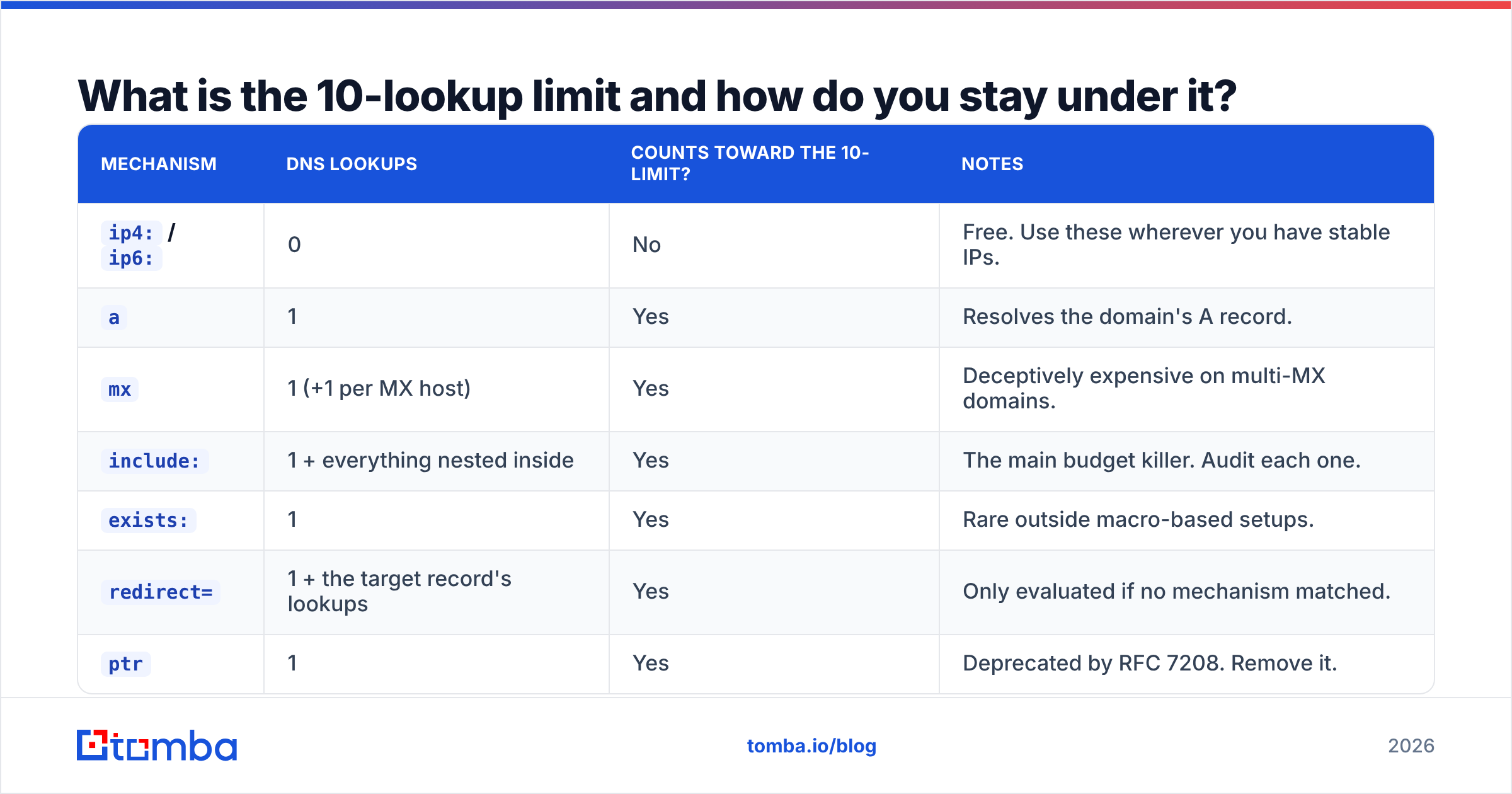
| Mechanism | DNS lookups | Counts toward the 10-limit? | Notes |
|---|---|---|---|
ip4: / ip6: |
0 | No | Free. Use these wherever you have stable IPs. |
a |
1 | Yes | Resolves the domain's A record. |
mx |
1 (+1 per MX host) | Yes | Deceptively expensive on multi-MX domains. |
include: |
1 + everything nested inside | Yes | The main budget killer. Audit each one. |
exists: |
1 | Yes | Rare outside macro-based setups. |
redirect= |
1 + the target record's lookups | Yes | Only evaluated if no mechanism matched. |
ptr |
1 | Yes | Deprecated by RFC 7208. Remove it. |
all |
0 | No | Terminal. Always last. |
There's also a second, less-discussed cap: the 255-character limit per TXT string. A record longer than that must be split into multiple quoted chunks inside a single TXT record — for example "v=spf1 ip4:..." " include:... ~all". That's still one record, and it's legal. It is not the same thing as publishing two records, and DNS providers handle it differently, so check how yours concatenates chunks.
Which approach should you use when the merged record is too big?#
Once you've merged and you're at 11+ lookups, you have four realistic options. They are not equally good.
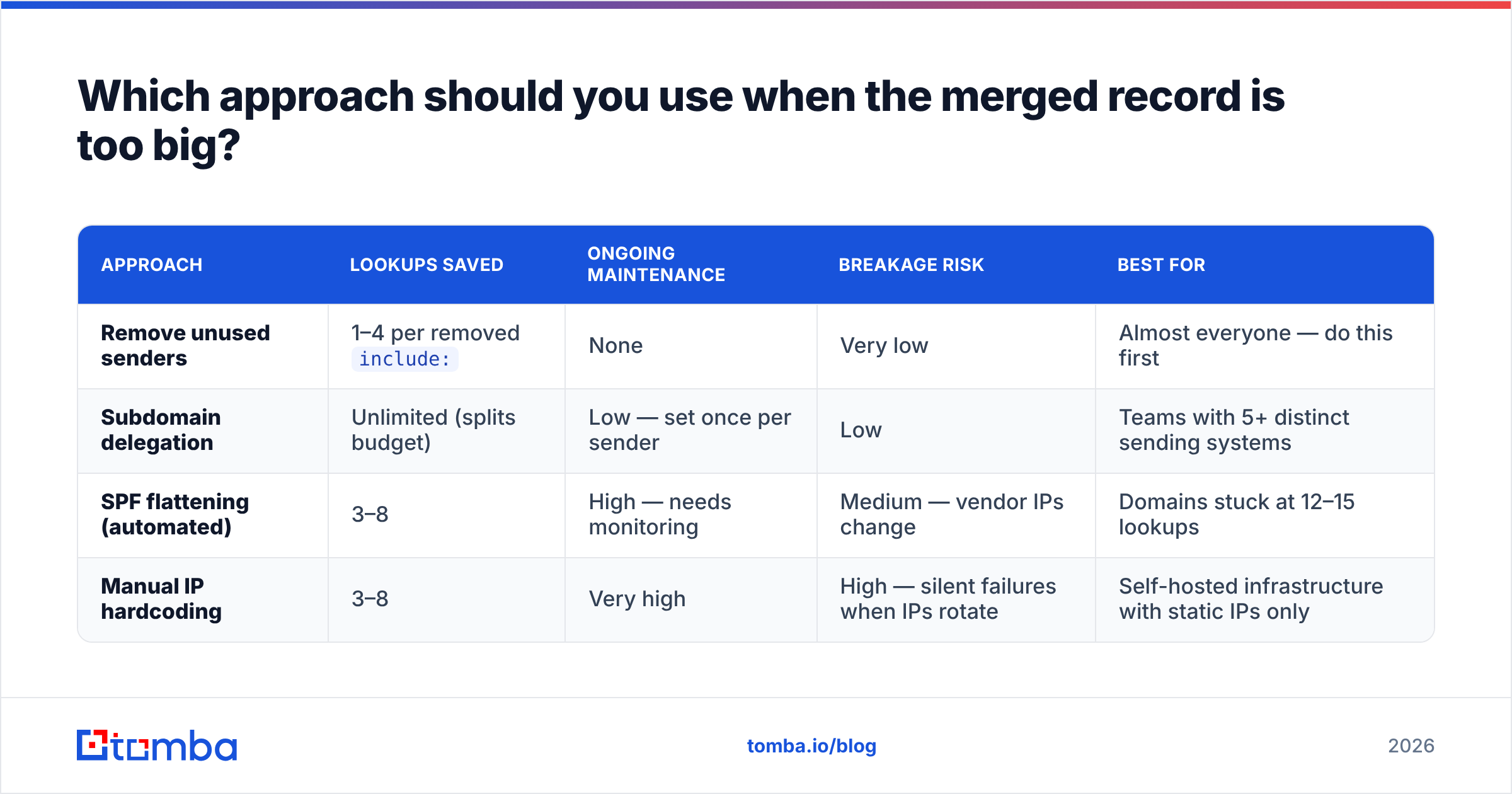
| Approach | Lookups saved | Ongoing maintenance | Breakage risk | Best for |
|---|---|---|---|---|
| Remove unused senders | 1–4 per removed include: |
None | Very low | Almost everyone — do this first |
| Subdomain delegation | Unlimited (splits budget) | Low — set once per sender | Low | Teams with 5+ distinct sending systems |
| SPF flattening (automated) | 3–8 | High — needs monitoring | Medium — vendor IPs change | Domains stuck at 12–15 lookups |
| Manual IP hardcoding | 3–8 | Very high | High — silent failures when IPs rotate | Self-hosted infrastructure with static IPs only |
Remove unused senders first. In practice, most bloated SPF records carry two or three includes for tools nobody has used in eighteen months — an old newsletter platform, a decommissioned ticketing system, a trial that never converted. Auditing this is free and permanent.
Subdomain delegation is the best structural fix. Instead of sending everything from @example.com, you route marketing mail from mail.example.com, transactional mail from notify.example.com, and human mail from the root domain. Each subdomain gets its own SPF record with its own fresh 10-lookup budget. As a bonus, it isolates reputation: a bad marketing campaign no longer drags down your sales team's sender reputation.
Flattening is a trade, not a win. Flattening replaces include:_spf.google.com with the literal list of IP ranges it resolves to. It works — until Google, SendGrid, or Microsoft changes their IP blocks, at which point your record silently authorizes the wrong set of servers and legitimate mail starts failing. If you flatten, use a service that re-resolves and republishes automatically, and set up alerting. Never flatten by hand and forget about it.

How do you verify the merged record actually works?#
Do not delete the old records and walk away. Verify in this order:
- Syntax check. Run the merged string through a validator that reports lookup count, not just "valid/invalid." You want a number, and you want it to be 10 or lower with margin.
- Propagation check. Query multiple resolvers —
dig @8.8.8.8,dig @1.1.1.1, and your own ISP's resolver. TTLs mean the old record can persist for hours. If your TTL is 86400, lower it to 300 before making changes next time. - Live test send. Send from each system you merged — your ESP, your CRM, your helpdesk — to a Gmail address and a Microsoft 365 address. Open the raw headers and look for
spf=passinAuthentication-Results.spf=softfailorspf=permerrormeans you missed something. - DMARC aggregate reports. These are the ground truth. Within 24–72 hours you'll get XML reports showing SPF results across every receiver. This is where you catch the sender you forgot existed.
- List hygiene. A clean SPF record doesn't help if you're hammering dead addresses. Run your list through an email verifier before your next campaign — bounce rate and authentication both feed the same reputation score at the receiving end.
Both Google Workspace and Microsoft 365 publish their own SPF guidance with the exact include values they expect. Use those as the source of truth rather than a vendor's onboarding email, which is sometimes years out of date.
What mistakes break SPF after a merge?#
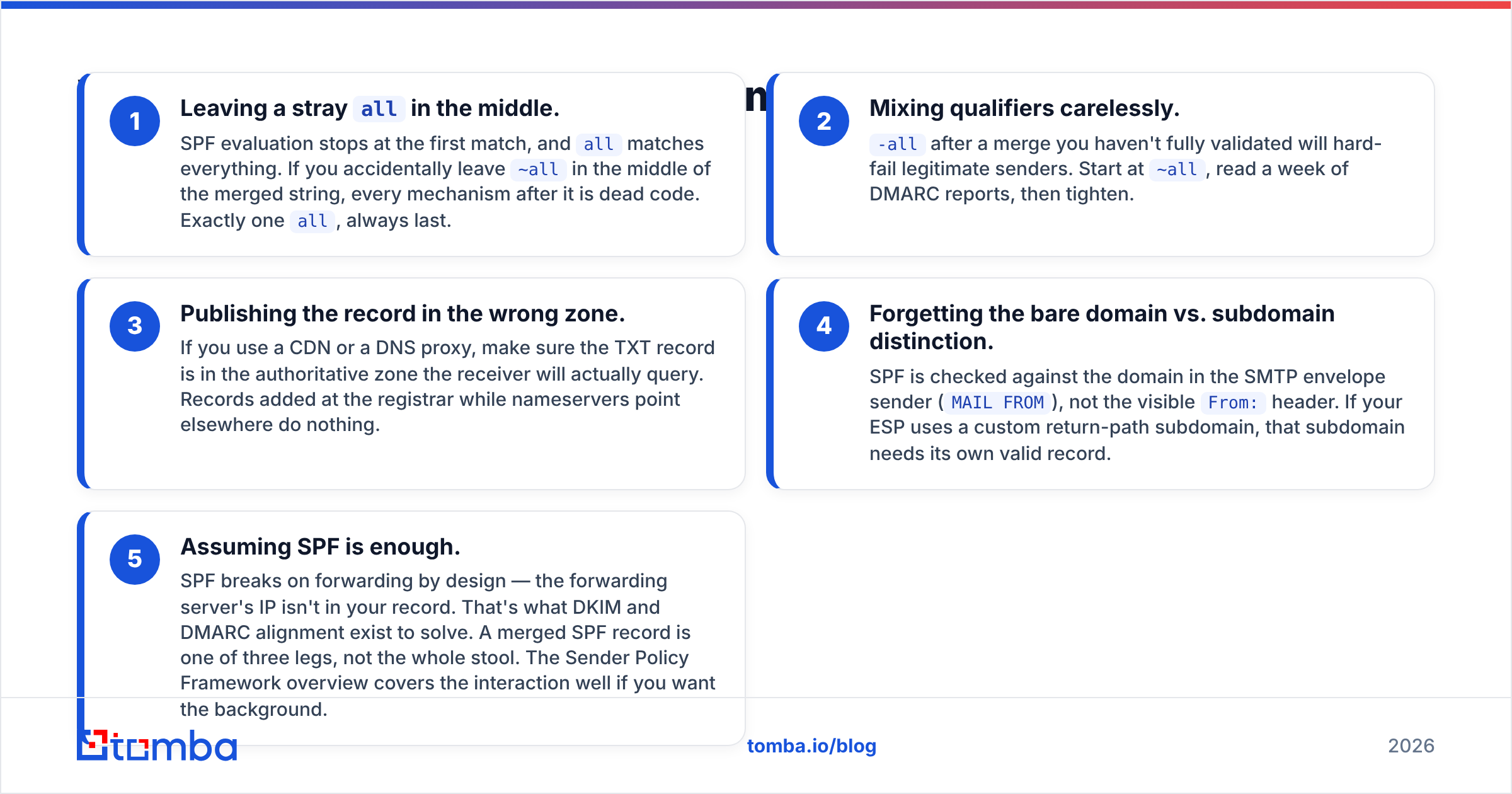
Five failure modes account for nearly everything that goes wrong post-merge:
- Leaving a stray
allin the middle. SPF evaluation stops at the first match, andallmatches everything. If you accidentally leave~allin the middle of the merged string, every mechanism after it is dead code. Exactly oneall, always last. - Mixing qualifiers carelessly.
-allafter a merge you haven't fully validated will hard-fail legitimate senders. Start at~all, read a week of DMARC reports, then tighten. - Publishing the record in the wrong zone. If you use a CDN or a DNS proxy, make sure the TXT record is in the authoritative zone the receiver will actually query. Records added at the registrar while nameservers point elsewhere do nothing.
- Forgetting the bare domain vs. subdomain distinction. SPF is checked against the domain in the SMTP envelope sender (
MAIL FROM), not the visibleFrom:header. If your ESP uses a custom return-path subdomain, that subdomain needs its own valid record. - Assuming SPF is enough. SPF breaks on forwarding by design — the forwarding server's IP isn't in your record. That's what DKIM and DMARC alignment exist to solve. A merged SPF record is one of three legs, not the whole stool. The Sender Policy Framework overview covers the interaction well if you want the background.
Does fixing SPF actually change reply rates?#
Yes, but indirectly, and it's worth being precise about the mechanism.
Authentication doesn't make a bad email good. What it does is remove a hard gate. A permerror on SPF combined with a p=quarantine DMARC policy means a meaningful fraction of your outbound never reaches a human at all — and it fails in exactly the environments that matter most for B2B, since large enterprises run the strictest inbound filtering.
So the honest framing is: fixing a duplicate SPF record recovers volume you were already paying for. If your cold sequences were seeing a 1.5% response rate with a third of sends quarantined, the copy wasn't the problem. Fix the DNS, then judge the copy.
The same logic applies upstream. Authentication gets you into the inbox; accurate data gets you to the right person in the first place. Bad addresses generate bounces, bounces damage reputation, and damaged reputation undoes the SPF work you just did. Clean records and clean data are the same project.
Quick reference: the merge checklist#
- Pull every TXT record and identify all
v=spf1strings - Strip extra
v=spf1prefixes and all but oneallterminal - Deduplicate identical mechanisms
- Reorder:
ip4/ip6first,include:after - Count DNS lookups — must be ≤ 10, ideally ≤ 8 for headroom
- Publish as a single TXT record (split into quoted chunks if over 255 chars)
- Set terminal to
~allinitially - Test-send from every merged system, check
Authentication-Resultsheaders - Review DMARC aggregate reports for 7 days
- Tighten to
-alland remove the deprecatedptrmechanism if present
Fix the record, then fix the list#
A single valid SPF record gets your mail authenticated. It doesn't guarantee it gets read — that still depends on whether the address is real and the person is the right one.
If you're rebuilding outbound after a deliverability cleanup, start with contacts that won't bounce. The Tomba Email Finder returns verified professional addresses by name and domain, with a confidence score attached to each result, so you're not burning a freshly repaired sender reputation on guesses. The free tier includes 25 searches a month, and paid plans start at $49/mo — see Tomba pricing for the full breakdown. Merge the record, verify the list, then send.
Related guides#
// get started
Find, verify and enrich your first contacts today
Start on the free plan with 25 searches a month, then scale when your team is ready.
Free plan · No credit card required · GDPR & CCPA
// about the author