How to Create a Drip Campaign in 2026: A 7-Step Playbook
A drip campaign is only as good as its trigger, its timing, and its list. Here is the seven-step build process, the delay maths, a tool comparison, and the metrics that tell you whether it is working.
TL;DR
- A drip campaign is a pre-written email series sent automatically on a trigger (signup, demo request, download, cold-list import) with fixed delays between sends. It is not a newsletter and it is not a one-off blast.
- The build order that works: pick one trigger, define one exit condition, write the sequence backwards from the ask, set delays in business days, verify the list, then launch to a small batch.
- Four to six emails over 14–21 business days is the sweet spot for B2B. Longer sequences do not fail because they are long; they fail because emails 4–6 repeat email 1.
- List quality decides deliverability before copy ever matters. A 3% bounce rate is the line most inbox providers start punishing you at.
- Measure reply rate and meeting rate per email position, not campaign-level open rate. Opens have been unreliable since Apple Mail Privacy Protection started pre-fetching images.
What is a drip campaign, exactly?#
A drip campaign is a sequence of emails that fires automatically over time after a contact does something (or fails to do something). Think of it like a physical drip irrigation line: instead of dumping a bucket of water on a plant once, you deliver small amounts on a schedule so the soil actually absorbs it.
The mechanics come down to four pieces:
- A trigger — the event that enrolls someone. A form fill, a trial signup, a pricing-page visit, a closed-lost deal hitting 90 days, or a manual import of a prospect list.
- A cadence — the delay between each send, usually expressed in business days so nothing lands on a Saturday.
- A content ladder — each email advances a single argument. Email 1 earns attention, email 3 handles the objection, email 5 makes the low-friction ask.
- An exit condition — the rule that pulls someone out. Replied, booked, purchased, unsubscribed, or marked as unqualified. Without this, you will email people who already said yes, which is the fastest way to lose them.
Drip marketing as a concept predates email automation by decades — it came out of direct mail. What changed is the cost of a send and the cost of getting it wrong. Sending is now free; sender reputation is not.
How is a drip campaign different from a newsletter or a sequence?#
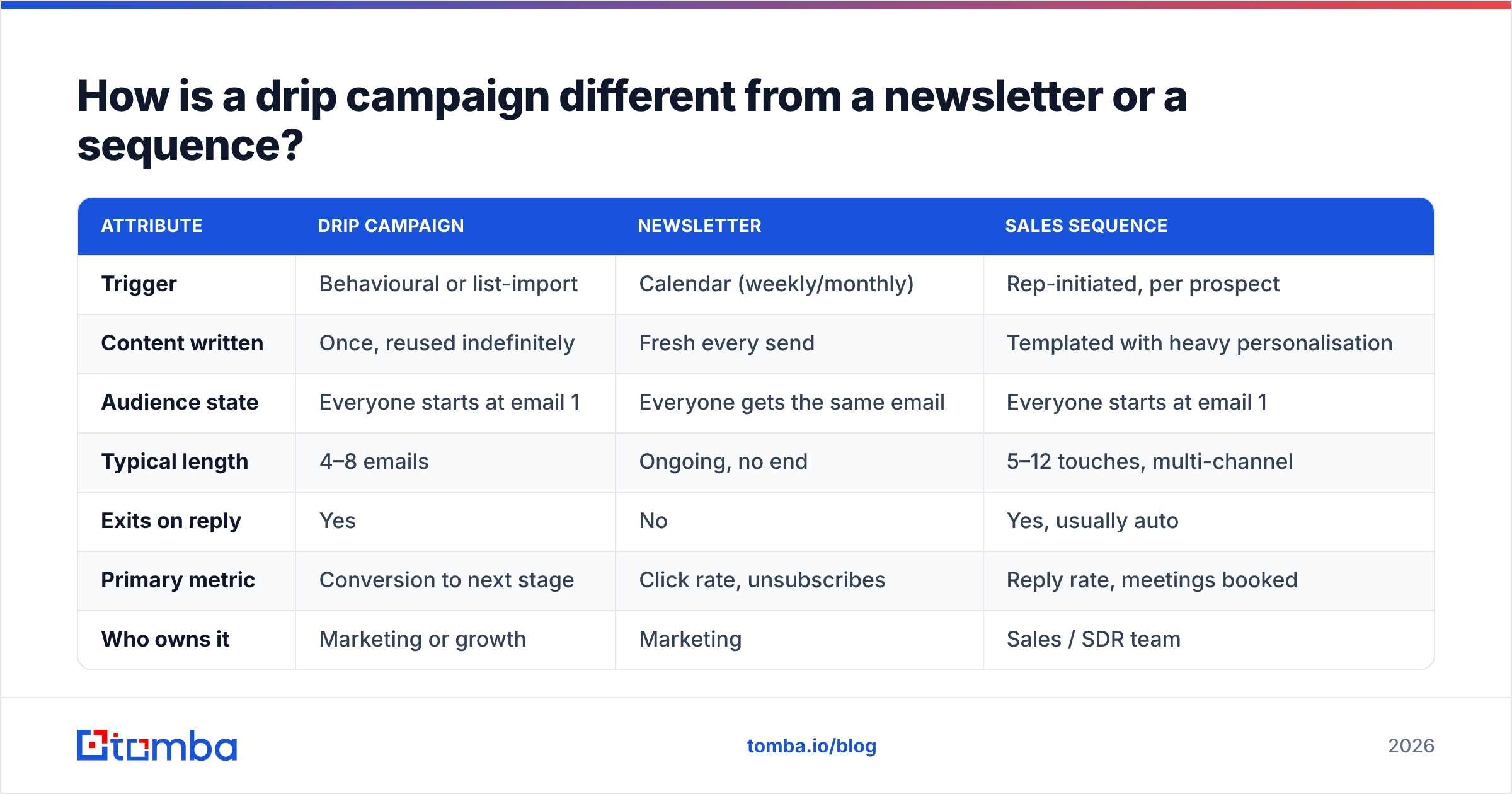
These three get used interchangeably in tool marketing, and the confusion causes real problems when you pick software. Here is the practical split:
| Attribute | Drip campaign | Newsletter | Sales sequence |
|---|---|---|---|
| Trigger | Behavioural or list-import | Calendar (weekly/monthly) | Rep-initiated, per prospect |
| Content written | Once, reused indefinitely | Fresh every send | Templated with heavy personalisation |
| Audience state | Everyone starts at email 1 | Everyone gets the same email | Everyone starts at email 1 |
| Typical length | 4–8 emails | Ongoing, no end | 5–12 touches, multi-channel |
| Exits on reply | Yes | No | Yes, usually auto |
| Primary metric | Conversion to next stage | Click rate, unsubscribes | Reply rate, meetings booked |
| Who owns it | Marketing or growth | Marketing | Sales / SDR team |
The important row is "audience state." In a drip, a contact who enrolls today gets email 1 today, while a contact who enrolled three weeks ago gets email 5 today. That evergreen property is what makes drips scale — and it is also why stale copy rots quietly. Nobody notices that email 4 references a webinar from last year until a prospect replies to point it out.
Correction on the image syntax above — here it is properly:
How do you create a drip campaign in 7 steps?#
This is the build order. Do not reorder it — writing copy before you have defined the exit condition is how you end up with a sequence that argues with itself.
- Define one trigger and one outcome. Write it as a sentence: "When someone downloads the pricing calculator, I want them to book a 20-minute demo." If you cannot write it in one sentence, you have two campaigns.
- Write the exit conditions before the copy. Minimum: replied, booked, unsubscribed, hard-bounced. Add "visited pricing page twice" if your tool supports behavioural exits — those people should get a human, not email 4.
- Build the list and verify it. For inbound triggers, this is automatic. For outbound drips, you are sourcing contacts — use domain search to pull role-based contacts at target accounts, then run every address through an email verifier before a single send. Unverified lists routinely carry 15–25% invalid addresses.
- Draft the sequence backwards. Start with the final ask, then work out what someone needs to believe to say yes to it, then assign one belief per email. This prevents the classic failure where all five emails are variations of "just checking in."
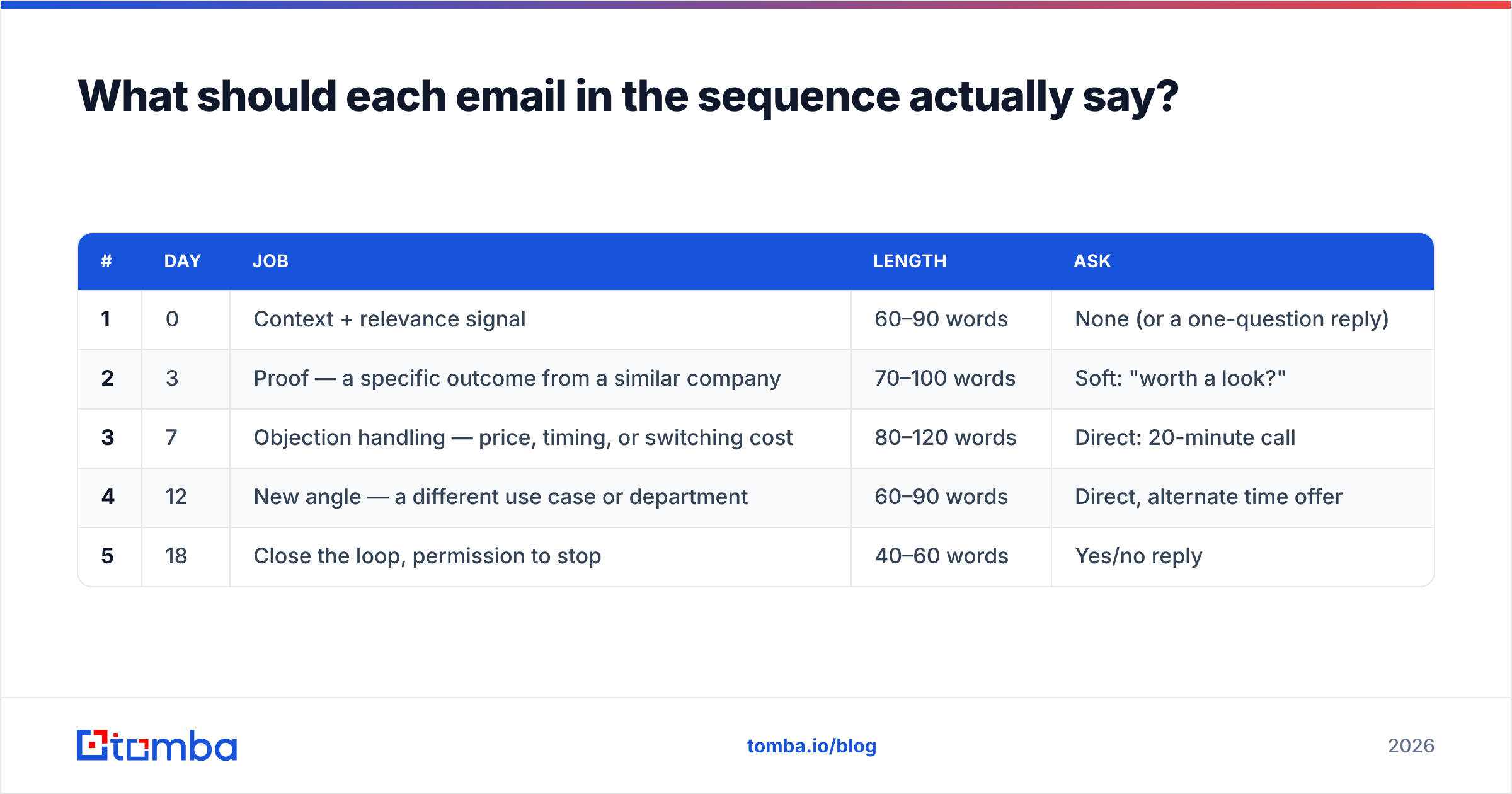
- Set delays in business days. Day 0, day 3, day 7, day 12, day 18 is a solid default. Configure the tool to skip weekends and, if you sell internationally, respect the recipient's time zone.
- Launch to 10% of the list. Watch bounce rate, spam-complaint rate, and reply sentiment for 72 hours. If bounces exceed 3%, stop and re-verify. If you get one spam complaint per 500 sends, the copy or the targeting is wrong.
- Review at 30 days and cut. Look at reply rate per email position. Any email producing under 20% of the sequence's total replies while consuming a send slot should be rewritten or deleted.
What should each email in the sequence actually say?#
Assign one job per email. Here is a five-email B2B structure that holds up across most offers:
| # | Day | Job | Length | Ask |
|---|---|---|---|---|
| 1 | 0 | Context + relevance signal | 60–90 words | None (or a one-question reply) |
| 2 | 3 | Proof — a specific outcome from a similar company | 70–100 words | Soft: "worth a look?" |
| 3 | 7 | Objection handling — price, timing, or switching cost | 80–120 words | Direct: 20-minute call |
| 4 | 12 | New angle — a different use case or department | 60–90 words | Direct, alternate time offer |
| 5 | 18 | Close the loop, permission to stop | 40–60 words | Yes/no reply |
Three rules that matter more than the structure:
- One idea per email. If you are explaining two benefits, you have two emails.
- Never write "just following up." It contains zero new information and signals that you had nothing to add. Give a reason to reply that did not exist three days ago.
- Keep the last email short and honest. The breakup email consistently produces outsized reply rates precisely because it is brief and asks for a clean no. Do not pad it with a final pitch.
If subject lines are where you get stuck, run drafts through a subject line tester before committing them to an evergreen sequence you will not look at again for six months.
How long should the delays between emails be?#
Delay length is the most over-tuned and under-thought variable in drip design. The honest answer: the gap should match the buying rhythm, not a best-practice blog post.
- Transactional or onboarding drips (trial started, account created): 1–2 day gaps. The user's intent is hot and decays within a week.
- Outbound prospecting drips: 3–5 day gaps. Anything tighter reads as pressure; anything looser and email 1 has been forgotten by email 3.
- Re-engagement or closed-lost drips: 7–14 day gaps, 3 emails maximum. These people already have context; you are waiting for a trigger event, not building awareness.
One structural detail teams miss: front-load the value, back-load the ask. Most sequences do the opposite — the hardest ask sits in email 1, when trust is at its minimum. Moving the direct meeting request to email 3 typically lifts positive reply rate without changing a word of the copy.
Which tool should you build your drip campaign in?#
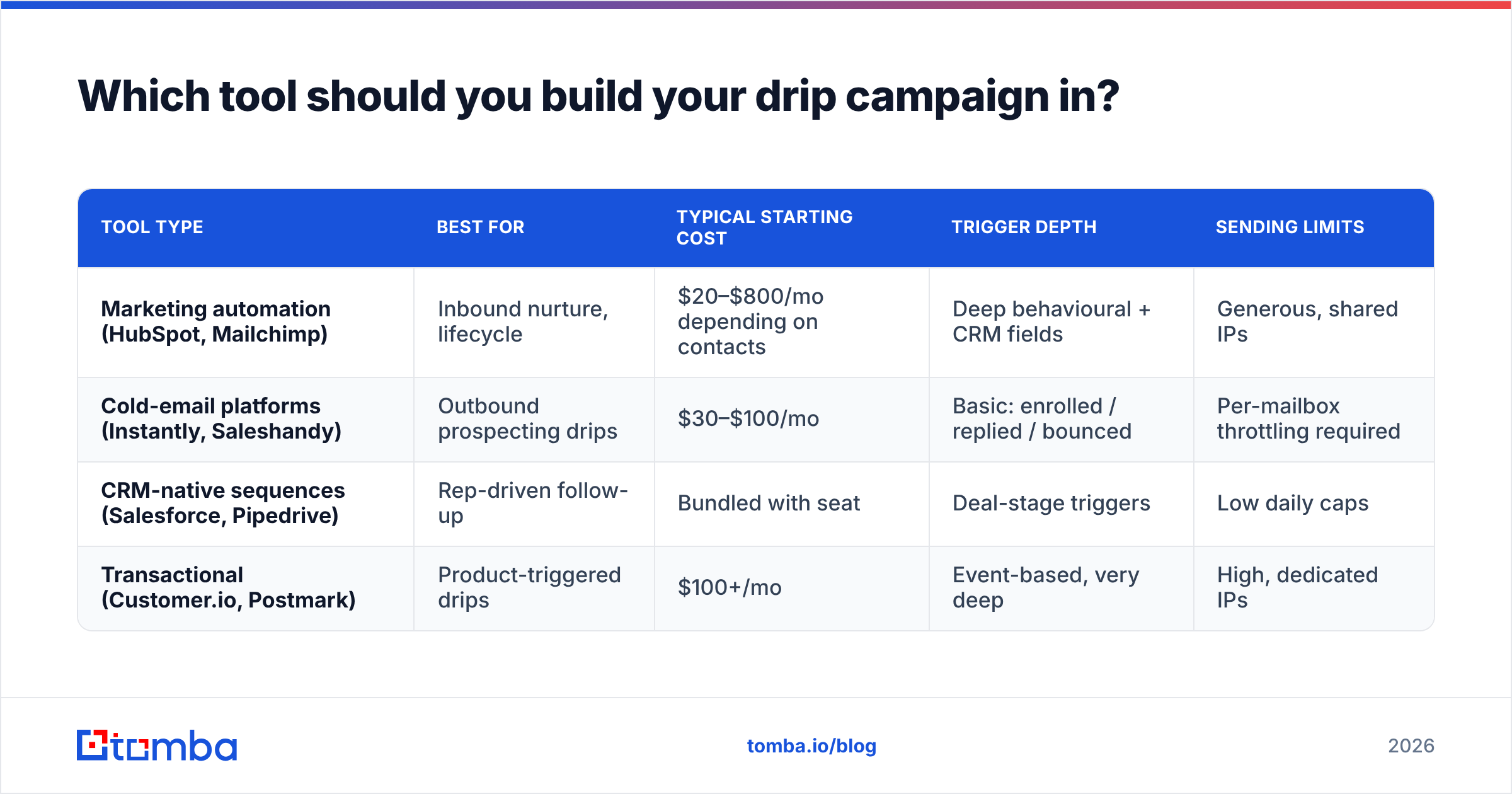
Tool choice depends on whether the drip is inbound nurture or outbound prospecting. Marketing automation platforms are built for the former and throttle the latter; cold-email tools are built for the latter and have weak CRM depth.
| Tool type | Best for | Typical starting cost | Trigger depth | Sending limits |
|---|---|---|---|---|
| Marketing automation (HubSpot, Mailchimp) | Inbound nurture, lifecycle | $20–$800/mo depending on contacts | Deep behavioural + CRM fields | Generous, shared IPs |
| Cold-email platforms (Instantly, Saleshandy) | Outbound prospecting drips | $30–$100/mo | Basic: enrolled / replied / bounced | Per-mailbox throttling required |
| CRM-native sequences (Salesforce, Pipedrive) | Rep-driven follow-up | Bundled with seat | Deal-stage triggers | Low daily caps |
| Transactional (Customer.io, Postmark) | Product-triggered drips | $100+/mo | Event-based, very deep | High, dedicated IPs |
For inbound work, HubSpot's workflow builder remains the reference implementation and most teams already have the CRM. For outbound, use a dedicated sending tool with per-mailbox rotation — and connect it to your data layer rather than pasting CSVs. Tomba's HubSpot integration and Tomba API let you enrich and verify contacts at enrollment time, so nobody enters the drip with a guessed address.
How do you keep a drip campaign out of spam?#
Deliverability is a list problem first and a copy problem second. In rough order of impact:
- Bounce rate under 2%. Every hard bounce is a signal to the receiving provider that you do not know who you are emailing. Verify at import and re-verify anything older than 90 days — B2B data decays at roughly 2–3% per month as people change jobs.
- Authentication configured. SPF, DKIM, and DMARC on the sending domain. Google's sender guidelines made these effectively mandatory for bulk senders, and Microsoft followed. Check your records with an SPF checker before launch, not after your first campaign tanks.
- Volume ramp. New sending domains need warm-up. Going from 0 to 500 sends a day in week one will get you filtered regardless of content quality.
- Complaint rate under 0.1%. One complaint per 1,000 sends is the tolerance band. Make the unsubscribe link obvious — burying it raises complaints, which cost far more than the unsubscribe would have.
- Content hygiene. No link shorteners, no image-only emails, no more than two links in the first email. Run drafts through a spam checker once per sequence, not once per email.
The uncomfortable truth: a beautifully written drip sent to a 20%-invalid list will underperform a mediocre drip sent to a clean one. Fix the data first.
What metrics tell you the drip is working?#
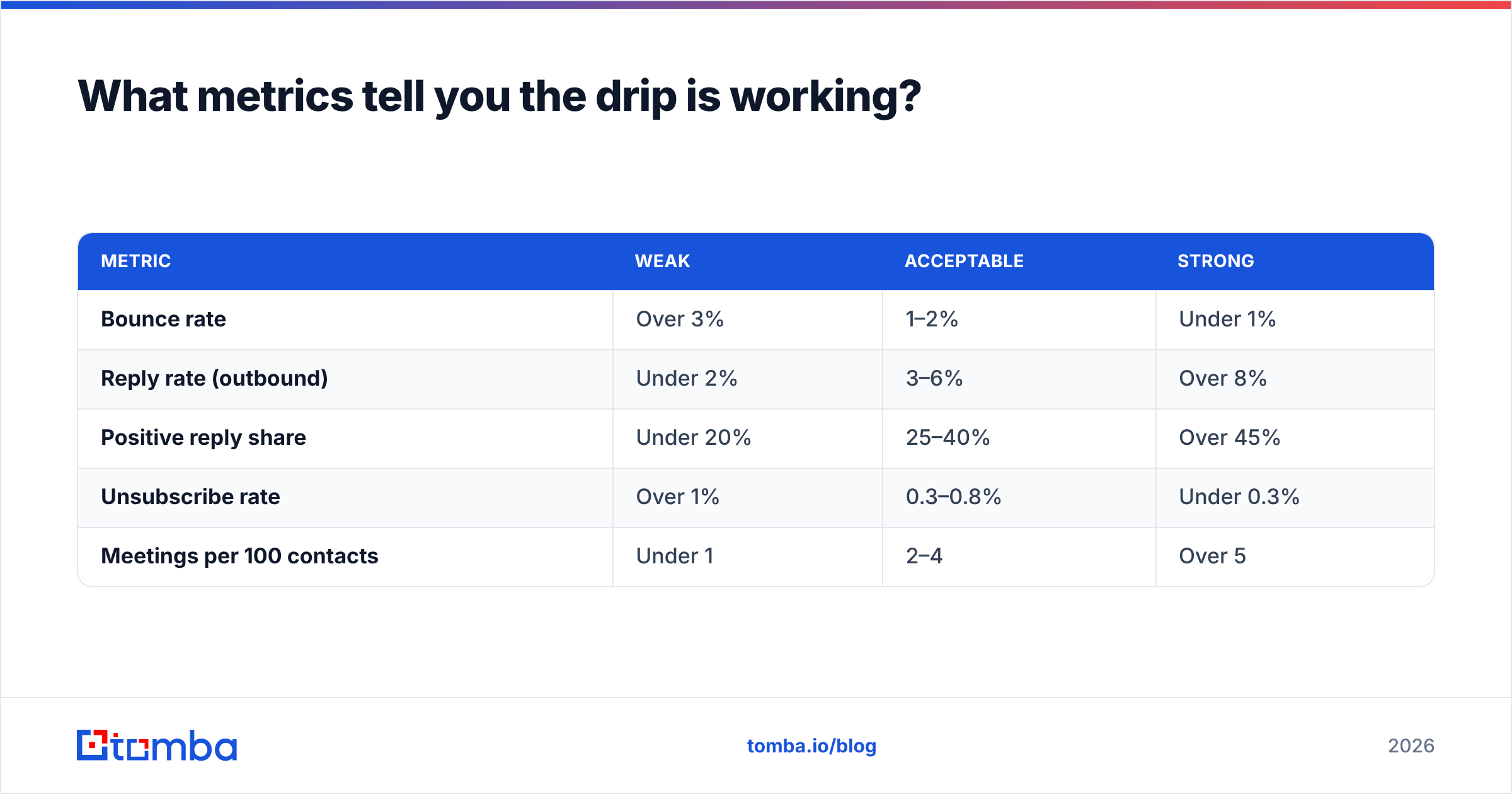
Track these per email position, not per campaign. Campaign-level averages hide the one email that is destroying the sequence.
| Metric | Weak | Acceptable | Strong |
|---|---|---|---|
| Bounce rate | Over 3% | 1–2% | Under 1% |
| Reply rate (outbound) | Under 2% | 3–6% | Over 8% |
| Positive reply share | Under 20% | 25–40% | Over 45% |
| Unsubscribe rate | Over 1% | 0.3–0.8% | Under 0.3% |
| Meetings per 100 contacts | Under 1 | 2–4 | Over 5 |
Treat open rate as directional only. Image pre-fetching by privacy proxies inflates it enough that a 60% "open rate" can coexist with a 1% reply rate. If your tool reports opens, use it to compare subject lines against each other within the same week — not as an absolute measure of anything.
Also watch time-to-first-reply. If most replies arrive after email 3, your first two emails are doing setup work and cannot be cut. If replies cluster on email 1, your sequence is longer than it needs to be and emails 4–5 are burning goodwill.
What are the most common drip campaign mistakes?#
- No exit on reply. Someone answers your email and gets the next automated touch two days later. This single misconfiguration undoes more pipeline than any copy problem.
- Enrolling the same person in two drips. Set a global frequency cap — one automated email per contact per week, across all campaigns.
- Personalisation tokens with no fallback. "Hi {{first_name}}," rendering as "Hi ," tells the recipient exactly what they are looking at.
- Never auditing evergreen copy. Put a recurring calendar reminder to re-read every active drip quarterly. Product names change, case studies expire, pricing moves.
- Skipping verification on re-imports. A list you verified last March is not verified today. Use a bulk email finder run to re-check before any large re-enrollment.
Where should you start?#
Build one drip, not five. Pick the trigger with the highest volume you already have — trial signups, demo requests, or a defined target-account list — and ship a four-email sequence to a 10% test batch this week. You will learn more from 200 real sends than from another month of planning the perfect eight-email masterpiece.
Before you write a single subject line, make sure the addresses are real. Start with the Tomba Email Finder to source verified contacts by domain, name, or company, then push them straight into your sending tool via API or integration. The free tier gives you 25 searches a month to test the workflow, and paid plans start at $49/mo — full Tomba pricing is public. A drip campaign built on verified data does not just deliver better; it protects the sending domain you will still need next quarter.
Related guides#
// get started
Find, verify and enrich your first contacts today
Start on the free plan with 25 searches a month, then scale when your team is ready.
Free plan · No credit card required · GDPR & CCPA
// about the author