How to Create an Email Marketing Campaign That Converts
A step-by-step build plan for your next email marketing campaign: list sourcing, segmentation, deliverability setup, copy, send cadence, and the metrics that tell you whether it worked.
TL;DR
- A campaign is not one email. It is a list, a segment, a sequence, a sending domain, and a measurement plan — build them in that order.
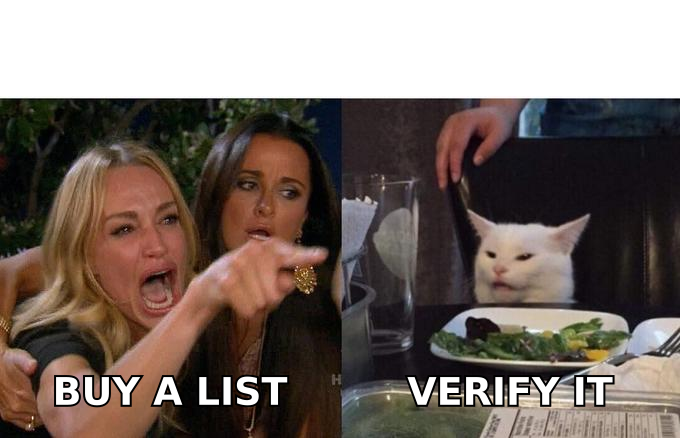
- Your list quality decides 60-70% of the outcome before you write a single word. Verify every address; a list above 3% bounce rate will damage your sender reputation within two sends.
- Warm the sending domain for 3-4 weeks before volume. Skipping this is the single most common reason first campaigns land in spam.
- Segment by behavior or firmographics, not by "everyone." Three segments of 500 will beat one blast of 1,500 nearly every time.
- Measure reply rate and pipeline, not open rate. Apple Mail Privacy Protection has made opens a directional signal at best since 2021.
What actually counts as an "email marketing campaign"?#
A campaign is a bounded set of emails, sent to a defined segment, with one measurable goal and a fixed end date. That definition matters because most failed campaigns fail on scope: someone writes one email, blasts an unsegmented list, and calls the 0.4% reply rate a copywriting problem.
It almost never is. The copy is the last 15% of the work.
There are two broad shapes, and they have different rules:
- Opt-in marketing campaigns — newsletters, product announcements, nurture sequences. Sent to people who gave you consent. Governed by CAN-SPAM, GDPR, and your ESP's terms. High volume, low personalization.
- Cold outbound campaigns — sent to B2B prospects who have not opted in. Legal in most jurisdictions with legitimate-interest grounds and a working opt-out, but far more sensitive to deliverability and list accuracy. Low volume, high personalization.
This guide covers both, flagging where they diverge. If you are running cold outbound, the list-sourcing and deliverability sections are where you should spend your attention.
What do you need before you write anything?#
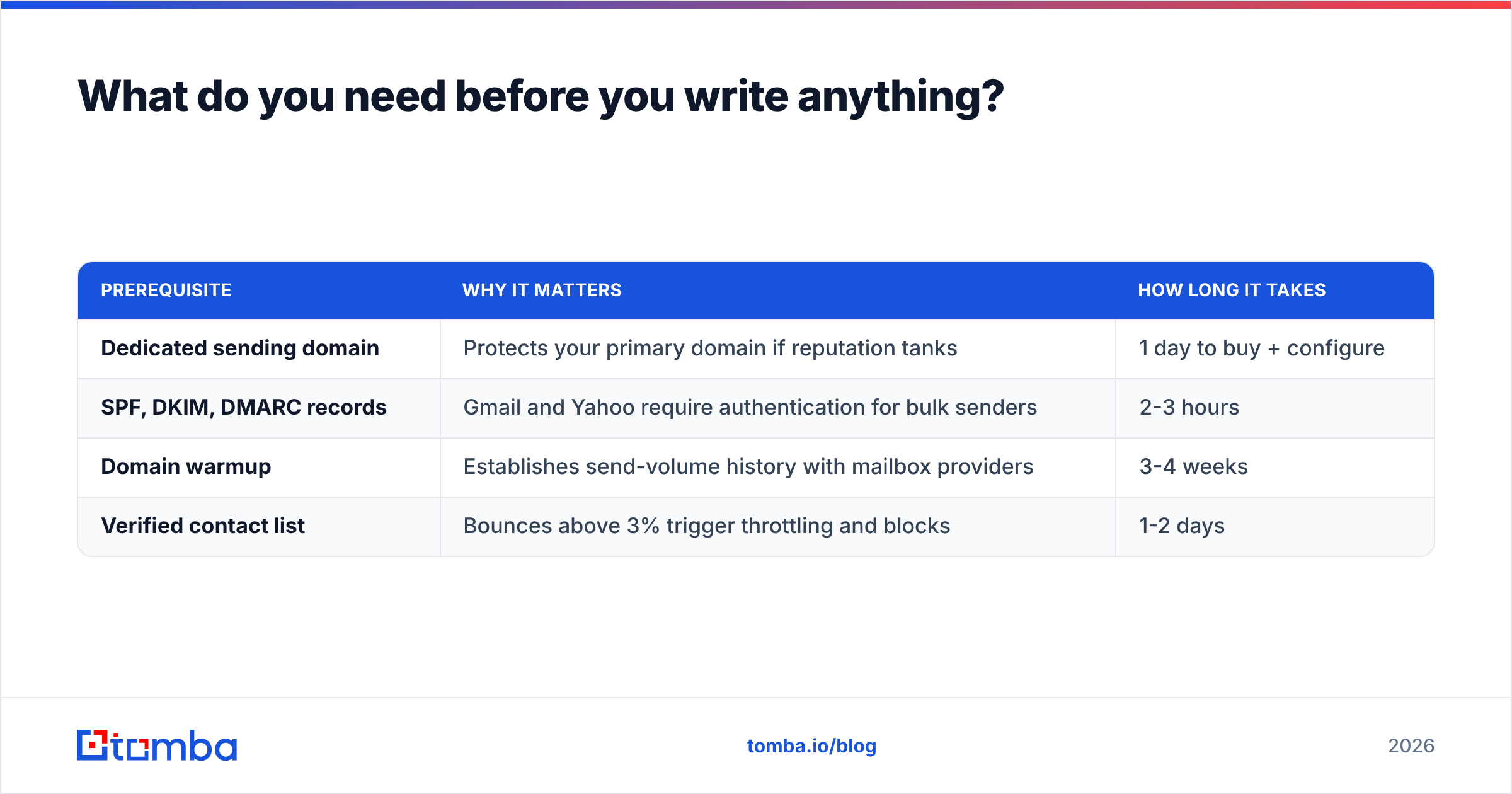
Do these four things first. Every one of them is cheaper to fix now than after your first send.
| Prerequisite | Why it matters | How long it takes |
|---|---|---|
| Dedicated sending domain | Protects your primary domain if reputation tanks | 1 day to buy + configure |
| SPF, DKIM, DMARC records | Gmail and Yahoo require authentication for bulk senders | 2-3 hours |
| Domain warmup | Establishes send-volume history with mailbox providers | 3-4 weeks |
| Verified contact list | Bounces above 3% trigger throttling and blocks | 1-2 days |
Buy a lookalike domain (getyourcompany.com instead of yourcompany.com) for cold outbound. Configure your SPF record and DKIM before you send a single test, and set DMARC to p=none initially so you collect reports without bouncing legitimate mail. Google's bulk sender requirements, updated in 2024, now make all three effectively mandatory above 5,000 daily recipients — see Google's official sender guidelines for the current thresholds.
Run a quick SPF checker and a blacklist checker against the new domain before you start warming it. Occasionally a "fresh" domain has burned history from a previous owner.
How do you build the list?#
Three sourcing paths, and they are not equivalent.
Path 1 — Opt-in capture. Lead magnets, webinar registrations, product signups, gated content. Slowest, highest quality, zero legal exposure. If you are building a newsletter, this is the only path.
Path 2 — Targeted discovery. You define an ICP, identify the companies that match, then find the specific people. This is the standard for B2B outbound. Start with a company list — from a database, LinkedIn Sales Navigator export, or a funding-round scrape — then resolve contacts per domain.
Path 3 — Purchased static lists. Fast and cheap. Also where most deliverability disasters begin, because static lists decay at roughly 22-30% per year as people change jobs. If you buy, buy from vendors that timestamp and re-verify their records rather than reselling a 2023 dump. Reputable providers like BookYourData build around verified, refreshed records and offer bounce guarantees — that is the bar to hold any vendor to.
For Path 2, the mechanical step is turning a company domain into named contacts. Run a domain search against each target company to pull the published addresses and detect the org's email pattern, then use the email finder for named people the domain search missed. For a list of 800 companies, do this as a bulk email finder job rather than one at a time.
Whatever the path, verification is not optional. Run the finished list through an email verifier and drop anything that returns invalid. Catch-all domains — where the server accepts everything, so SMTP checks can't distinguish real mailboxes — need a catch-all verifier to score deliverability probability rather than a binary valid/invalid.
How should you segment it?#
Segmentation is the highest-ROI hour in the whole build. A 2023 Mailchimp benchmark analysis found segmented campaigns outperformed unsegmented ones on nearly every engagement metric, and the effect compounds because higher engagement feeds back into inbox placement.
Pick segmentation axes you can actually act on in the copy:
- Firmographic — company size, industry, tech stack. Lets you swap the proof point ("we cut CAC 30% for three Series-B fintechs" vs "for 12-person agencies").
- Role/seniority — a VP Sales and a Sales Ops manager care about different halves of the same product. Different subject lines, different CTAs.
- Behavioral — visited pricing, opened last three emails, abandoned a trial. The strongest signal you have, and the only one that justifies a same-week follow-up.
- Lifecycle stage — cold, engaged, MQL, customer, churned. Never send a "meet our product" email to an existing customer; it is the fastest way to look like you don't know who they are.
- Trigger-based — new funding, new hire in a relevant role, tech-stack change. The most timely segment, and usually the smallest.
Three to five segments is plenty for a first campaign. More than that and you cannot write distinct copy for each, which defeats the point.
What does the sequence structure look like?#
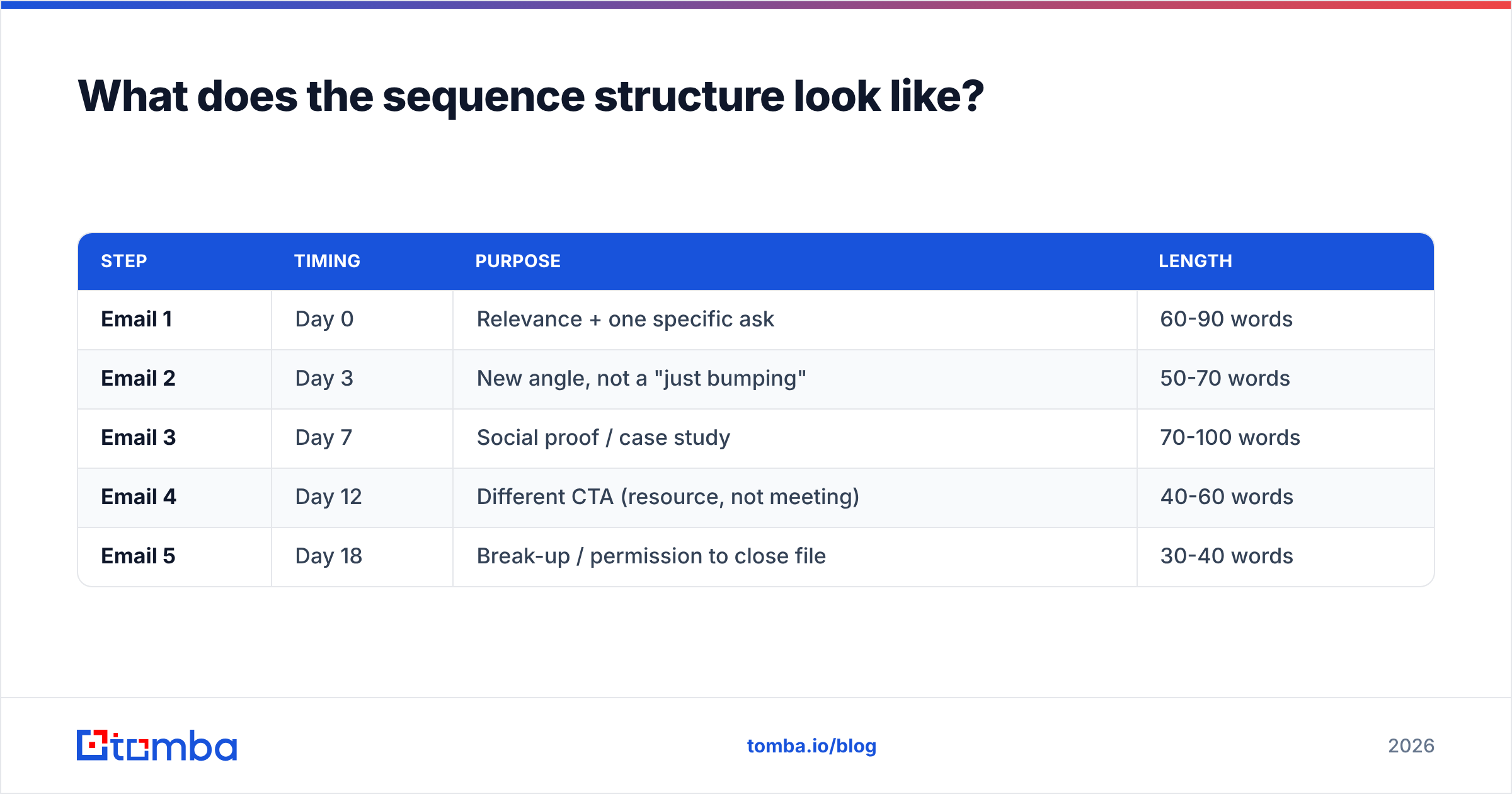
Stop thinking about "an email" and start thinking about a sequence. Here is a structure that holds up across most B2B use cases:
| Step | Timing | Purpose | Length |
|---|---|---|---|
| Email 1 | Day 0 | Relevance + one specific ask | 60-90 words |
| Email 2 | Day 3 | New angle, not a "just bumping" | 50-70 words |
| Email 3 | Day 7 | Social proof / case study | 70-100 words |
| Email 4 | Day 12 | Different CTA (resource, not meeting) | 40-60 words |
| Email 5 | Day 18 | Break-up / permission to close file | 30-40 words |
Rules that matter more than the exact spacing:
- Never reuse the same ask. If email 1 asked for a 15-minute call and got nothing, email 2 asking for a 15-minute call gets nothing again. Downgrade the ask each step.
- One idea per email. If you need two paragraphs to set up the value prop, the value prop is not sharp enough.
- Send from a person, not
marketing@. Reply rates on role addresses are consistently worse, and role addresses attract more spam complaints. - Cap at five steps for cold. Beyond that you are trading marginal replies for complaints.
- Kill the sequence on any reply. Automated follow-up after a human answered is the fastest trust destroyer in outbound.
For opt-in campaigns the cadence stretches — weekly or biweekly rather than every three days — but the "one idea, one ask" discipline is identical.
How do you write emails people answer?#
Write the first line last. It is the only line most recipients read in the preview pane, and it should reference something true about them, not about you.
Practical constraints that consistently correlate with replies:
- Subject line: 3-6 words, lowercase, no punctuation gimmicks. "quick question about your onboarding" beats "🚀 Transform Your Onboarding Today!!" every time. Test yours with a subject line tester before it goes out.
- Under 100 words. Mobile is over half of B2B opens. Anything longer gets scrolled past.
- One link maximum, zero images, in the cold case. Images and multiple links raise spam-filter weight and are worthless when your goal is a text reply.
- Explicit, low-friction CTA. "Worth a look?" outperforms "Book 30 minutes here" on cold traffic because it asks for a yes, not a calendar commitment.
- Plain-text formatting. No HTML templates, no tracking pixels for cold sends. Tracking pixels are a documented deliverability tax and inflate open data you shouldn't trust anyway.
Run a draft through a spam checker before launch. It catches the obvious triggers — excessive capitalization, spam-flagged phrases, bad link-to-text ratios — in about ten seconds.
What sending setup keeps you out of spam?#
This is where campaigns quietly die. You can have a perfect list and perfect copy and still hit a 12% inbox placement rate if the sending infrastructure is wrong.
Volume discipline first: 20-40 emails per mailbox per day for cold outbound, ramping over the warmup period. If you need 400 sends a day, you need 10-15 mailboxes, not one mailbox sending 400. Spread across two or three sending domains so a single domain's reputation problem doesn't take the whole program down.
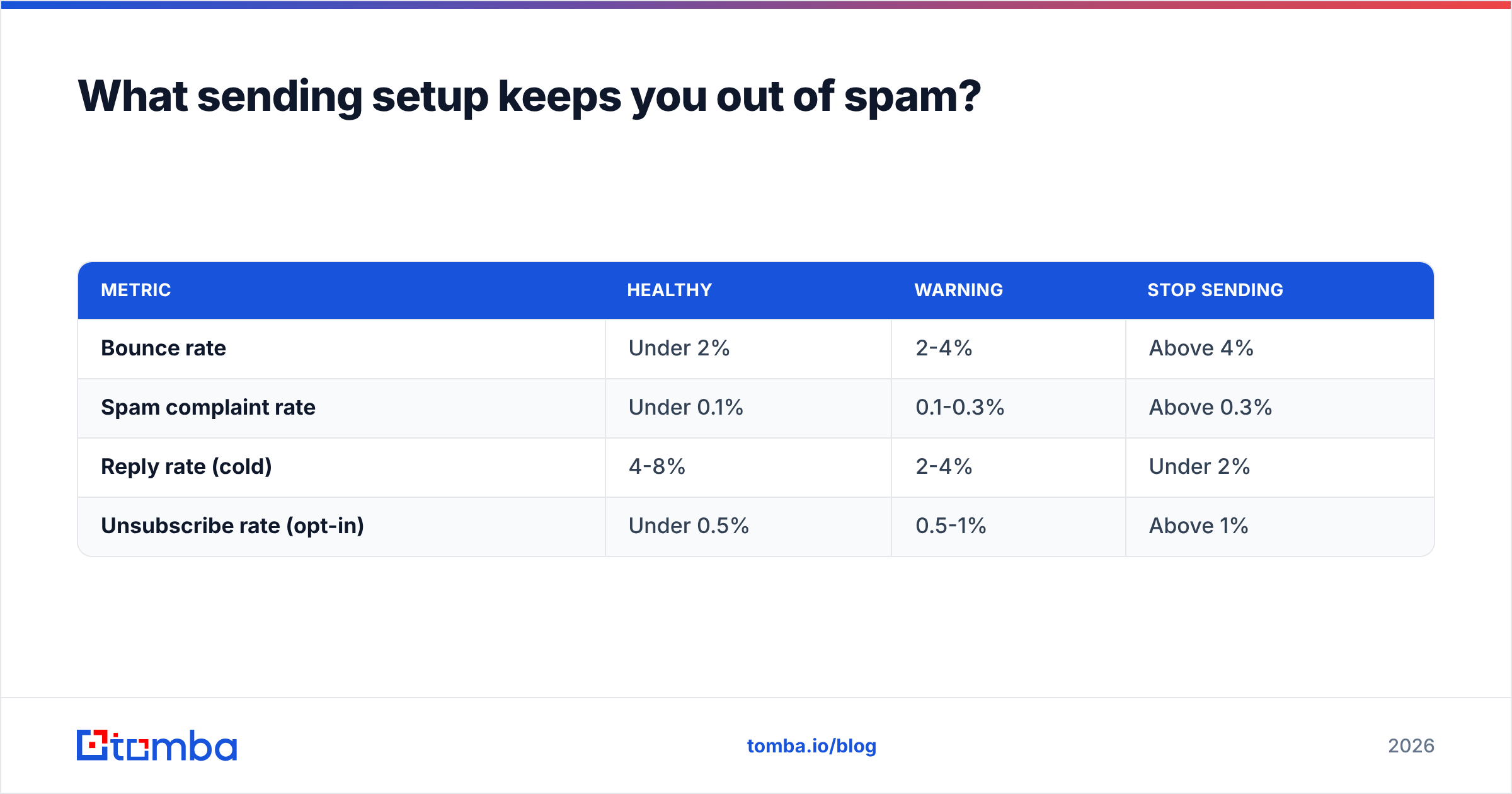
Keep these thresholds in view:
| Metric | Healthy | Warning | Stop sending |
|---|---|---|---|
| Bounce rate | Under 2% | 2-4% | Above 4% |
| Spam complaint rate | Under 0.1% | 0.1-0.3% | Above 0.3% |
| Reply rate (cold) | 4-8% | 2-4% | Under 2% |
| Unsubscribe rate (opt-in) | Under 0.5% | 0.5-1% | Above 1% |
Google's Postmaster Tools and Microsoft SNDS both expose complaint and reputation data for free — connect them on day one so you find out about a reputation dip from a dashboard rather than from a silent quarter of your pipeline. Poor sender reputation takes weeks to repair and days to destroy.
Include a working unsubscribe link on every send, including cold. It is legally required in the EU and UK under GDPR/PECR, required in the US for commercial email under CAN-SPAM, and it is strictly better to lose a contact than to collect a spam complaint — complaints are weighted roughly 100x more heavily by mailbox providers.
Which metrics actually tell you if it worked?#
Open rate stopped being reliable in September 2021 when Apple's Mail Privacy Protection began pre-loading images for Apple Mail users, which is a substantial share of consumer inboxes. Treat opens as a directional trend, never as an absolute.
Rank your metrics in this order:
- Meetings booked / opportunities created — the only number that ties to revenue. Everything else is a proxy.
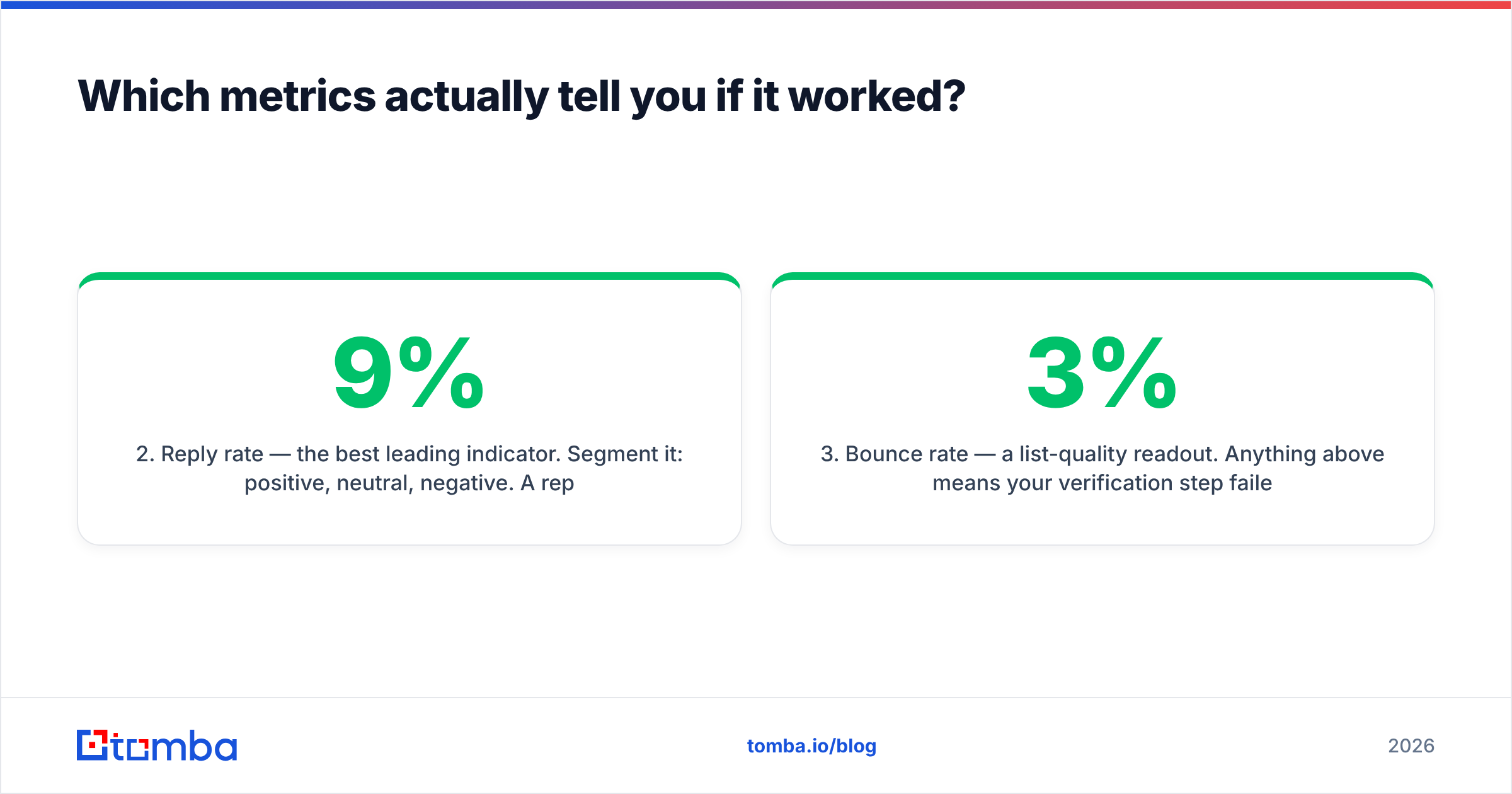
- Reply rate — the best leading indicator. Segment it: positive, neutral, negative. A 9% reply rate that is 80% negative is worse than a 4% rate that is 60% positive.
- Bounce rate — a list-quality readout. Anything above 3% means your verification step failed.
- Spam complaint rate — the survival metric. It determines whether the program exists next quarter.
- Click-through rate — useful for opt-in campaigns with a real landing page; near-meaningless for one-link cold emails.
- Open rate — trend only, and only within a single segment over time.
Set your baseline before launch, hold everything constant except one variable per test, and give each test at least 300-500 sends per arm before you read the result. Below that, you are reading noise. Track response rate by segment rather than campaign-wide, because a strong segment can hide two dead ones in the average.
How do you iterate after the first send?#
Wait five business days after the last sequence step before you judge anything. Replies arrive on a long tail, and campaigns that look flat on day 2 routinely land 40% of their replies in week two.
Then diagnose in this order, because fixing a downstream problem while an upstream one exists wastes the test:
- High bounce (over 3%)? List problem. Re-verify and re-source. Do not touch the copy.
- Low bounce, near-zero replies? Targeting problem. Your ICP definition is wrong, or the segment doesn't have the pain you're describing.
- Replies but all negative? Positioning problem. You're reaching the right people with the wrong claim.
- Positive replies but no meetings? Handoff problem. Look at your response time and your calendar-booking friction, not the campaign.
- Everything fine, volume too low? Scaling problem. Add mailboxes and domains, keep per-mailbox volume flat.
Refresh the list quarterly regardless of results. Roughly a quarter of B2B contact data goes stale each year through job changes alone, so a list that verified clean in January will bounce noticeably by October. Running the list back through data enrichment surfaces job changes — and a contact who just moved to a new company is often your warmest possible lead, because they have budget and a mandate to change things.
Ready to build the list your campaign runs on?#
Every step above is downstream of one thing: accurate contact data. Copy, segmentation, and cadence all compound on top of a clean list, and none of them can rescue a dirty one.
Start with the Tomba Email Finder — search by domain, name, or company, get verified addresses with confidence scores, and run bulk jobs when you're building a segment of a few hundred. The free tier gives you 25 searches a month to test accuracy against contacts you already know; paid plans start at $49/mo for Starter, $99/mo for Growth, and $249/mo for Pro. Full Tomba pricing is on the site, and the Tomba API handles it if you'd rather wire discovery and verification straight into your existing stack.
Related guides#
// get started
Find, verify and enrich your first contacts today
Start on the free plan with 25 searches a month, then scale when your team is ready.
Free plan · No credit card required · GDPR & CCPA
// about the author