How to Create an Email Sequence That Actually Books Meetings
Most email sequences fail before the first send because the list is wrong and the steps repeat the same pitch. Here is the 7-step framework, timing table, and tooling stack that turns a sequence into booked meetings.
TL;DR
- A sequence is 4-7 emails over 18-25 days, each with a different angle — not the same pitch resent five times.
- Your bounce rate decides everything downstream. Verify the list before you write a single line of copy; under 2% bounce is the gate.
- Space steps unevenly: 3 days, then 4, then 5, then 7. Tight early gaps look eager; tight late gaps look desperate.
- Rotate angles across steps (problem, proof, resource, question, breakup) instead of rotating adjectives.
- Kill a sequence when reply rate drops under 3% across 200+ contacts. Rewrite the offer, not the subject line.
What is an email sequence, and how is it different from a campaign?#
An email sequence is a fixed set of messages sent to one contact over a defined window, where each message stops firing the moment that person replies. A campaign is the container — the audience, the sending domains, the schedule. The sequence is the script inside it.
Think of it like a series of knocks on a door. One knock and you walk away, nobody answers. Seven knocks in ten seconds and you're a nuisance. The whole craft is in the spacing and in what you say through the door each time.
Three things separate a sequence from a newsletter blast:
- It is one-to-one in appearance. Sent from a personal mailbox, plain text, no tracking pixel banner, no unsubscribe footer template that screams bulk.
- It branches on behavior. Reply, click, or meeting booked all pull the contact out. No reply means the next step fires on schedule.
- It has a defined end. A breakup email closes the loop. Sequences without an end become spam complaints.
Why do most email sequences fail before the first send?#
Because the list is wrong. Copy gets all the attention and almost none of the blame it deserves.
Run the math. A 1,000-contact sequence with a 12% bounce rate burns 120 hard bounces into your sending domain in week one. Google and Microsoft both read that as a spam signal — Google's bulk sender guidelines are explicit that invalid recipient rates and complaint rates drive filtering decisions. Your step-2 and step-3 emails then land in spam, and you conclude the copy failed. It didn't. The list did.
The fix sequence is boring and non-negotiable:
- Source contacts from a verified provider, not a scraped export from three years ago.
- Verify every address before import. Use an email verifier that returns a status, not just a boolean.
- Handle catch-all domains separately. They accept everything at SMTP level and tell you nothing. A catch-all verifier scores them against pattern and historical signal instead of guessing.
- Cap the daily send volume per mailbox at 30-50 for the first 30 days on a new domain.

How do you build the list your sequence runs on?#
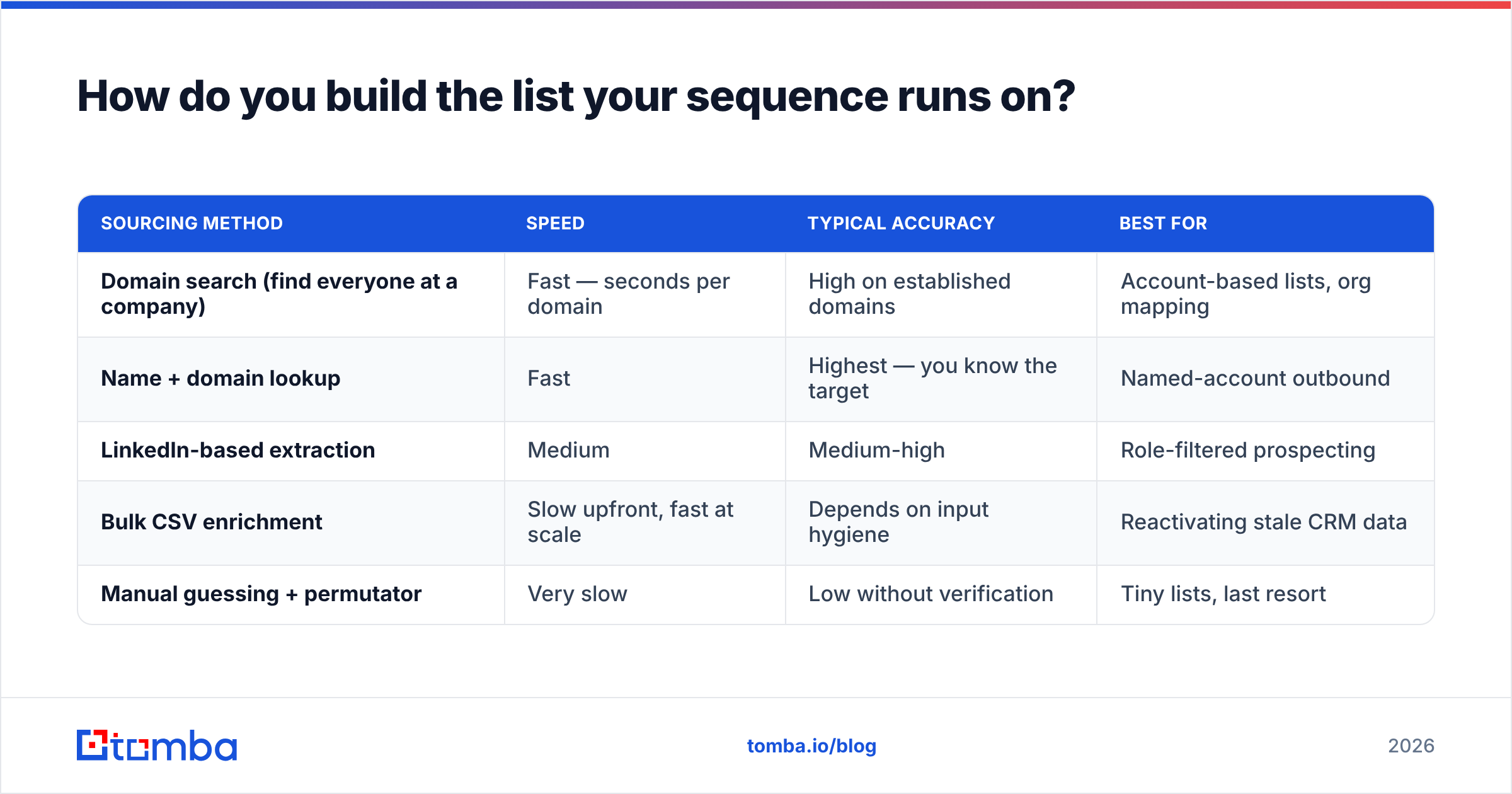
Start from the account list, not from the contact list. Pick 100-300 companies that match a pattern you can actually prove — same tech stack, same funding stage, same trigger event. Then find the people.
For each account, you need three things: the right role, a valid work email, and one fact you can reference in line one that isn't "I saw you're the VP of Sales."
| Sourcing method | Speed | Typical accuracy | Best for |
|---|---|---|---|
| Domain search (find everyone at a company) | Fast — seconds per domain | High on established domains | Account-based lists, org mapping |
| Name + domain lookup | Fast | Highest — you know the target | Named-account outbound |
| LinkedIn-based extraction | Medium | Medium-high | Role-filtered prospecting |
| Bulk CSV enrichment | Slow upfront, fast at scale | Depends on input hygiene | Reactivating stale CRM data |
| Manual guessing + permutator | Very slow | Low without verification | Tiny lists, last resort |
A domain search gets you the full contact map for an account in one call, which matters when your buying committee has four people in it. For named targets you already know, the email finder resolves first name + last name + domain directly. Then push the whole thing through bulk verify before it touches your sending tool.
One rule that saves accounts: never import an unverified list "just to test." A test send to 50 bad addresses damages the same domain your good list will use next month.
What does a 7-step email sequence actually look like?#
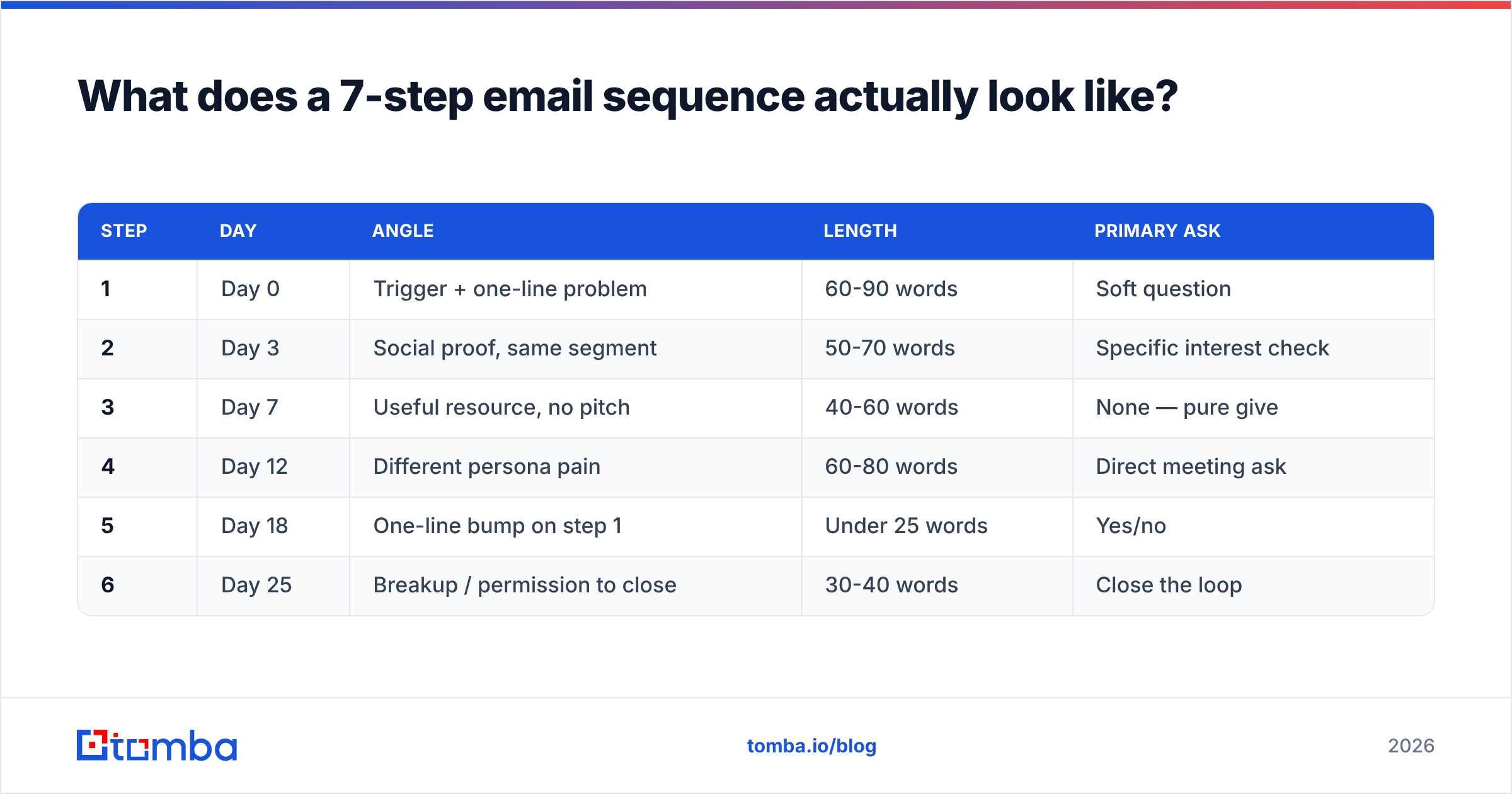
Here is the structure that holds up across most B2B motions. Adjust the day gaps to your sales cycle, but keep the angle rotation.
| Step | Day | Angle | Length | Primary ask |
|---|---|---|---|---|
| 1 | Day 0 | Trigger + one-line problem | 60-90 words | Soft question |
| 2 | Day 3 | Social proof, same segment | 50-70 words | Specific interest check |
| 3 | Day 7 | Useful resource, no pitch | 40-60 words | None — pure give |
| 4 | Day 12 | Different persona pain | 60-80 words | Direct meeting ask |
| 5 | Day 18 | One-line bump on step 1 | Under 25 words | Yes/no |
| 6 | Day 25 | Breakup / permission to close | 30-40 words | Close the loop |
Notice what changes step to step: the reason for writing, not the phrasing of the same reason. Step 2 is not "just following up on my last email." Step 2 is a new piece of information that stands on its own if step 1 never arrived.
Notice also what shrinks. By step 5 you're at one sentence. Long emails late in a sequence read as someone who hasn't noticed they're being ignored.
The five angles worth rotating:
- Problem angle — name a specific operational failure their role owns. "Your SDRs are probably verifying lists manually in a spreadsheet."
- Proof angle — one named customer in their segment, one number, no adjectives. Not "great results." A percentage and a timeframe.
- Resource angle — a teardown, a benchmark, a calculator. No CTA at all. This is the step that earns replies from people who ignored the first two.
- Persona angle — reframe the same product around a different pain the same person also owns.
- Breakup angle — "Should I close this out?" gets replies because it's easy to answer and it returns control to them.
How do you write each email so it doesn't sound like a template?#
Cut the first sentence you write. It's almost always throat-clearing.
Structure every email in four lines:
- Line 1 — the observation. Something specific and checkable about them. If you can send it to 500 people unchanged, it's not an observation, it's a greeting.
- Line 2 — the bridge. Why that observation means you're writing. One sentence.
- Line 3 — the substance. The proof, the resource, the number.
- Line 4 — the ask. One question, answerable in under ten words.
Subject lines follow one rule: they should look like internal mail. Three to five words, lowercase-ish, no colons, no brackets, no "Quick question re: your Q3 pipeline strategy." Test variants with a subject line tester before you commit 1,000 sends to a guess.
On personalization depth, be honest about the tradeoff. Deep manual research at 20 emails/day beats shallow merge-tag personalization at 300/day only if your ACV justifies it. Below roughly $10k ACV, the math usually favors tighter segmentation over deeper per-contact research — write one genuinely specific email per segment of 50, not per person.
Things that flag your sequence as automated regardless of copy quality: HTML signatures with images, tracking pixels on every step, more than one link before step 3, and the phrase "I wanted to reach out."
How should you time and space the steps?#
Uneven gaps, widening as you go. Even spacing (every 3 days, six times) reads mechanical because it is mechanical, and recipients notice.
The pattern that works: 3, 4, 5, 7 days. Front-loaded enough to stay in memory, spread enough by the end that step 6 arrives almost a month after step 1 — which is roughly when a "not right now" from week one has aged into "maybe now."
Send-time details that matter more than people admit:
- Tuesday through Thursday, 7-9am recipient local time. Monday competes with weekend backlog; Friday gets archived.
- Randomize the exact minute. Sends at :00 on the hour across your whole list is a bot fingerprint.
- Throttle to 30-50/day per mailbox even on warm domains. Volume spikes trigger filters faster than content does.
- Pause the whole sequence on reply, click-to-book, or out-of-office. Out-of-office should reschedule the step, not skip it.
If you're running multiple mailboxes, rotate sending domains and keep each one's sender reputation monitored independently. One burned domain shouldn't take the sequence down.
Which tools do you actually need to run a sequence?#
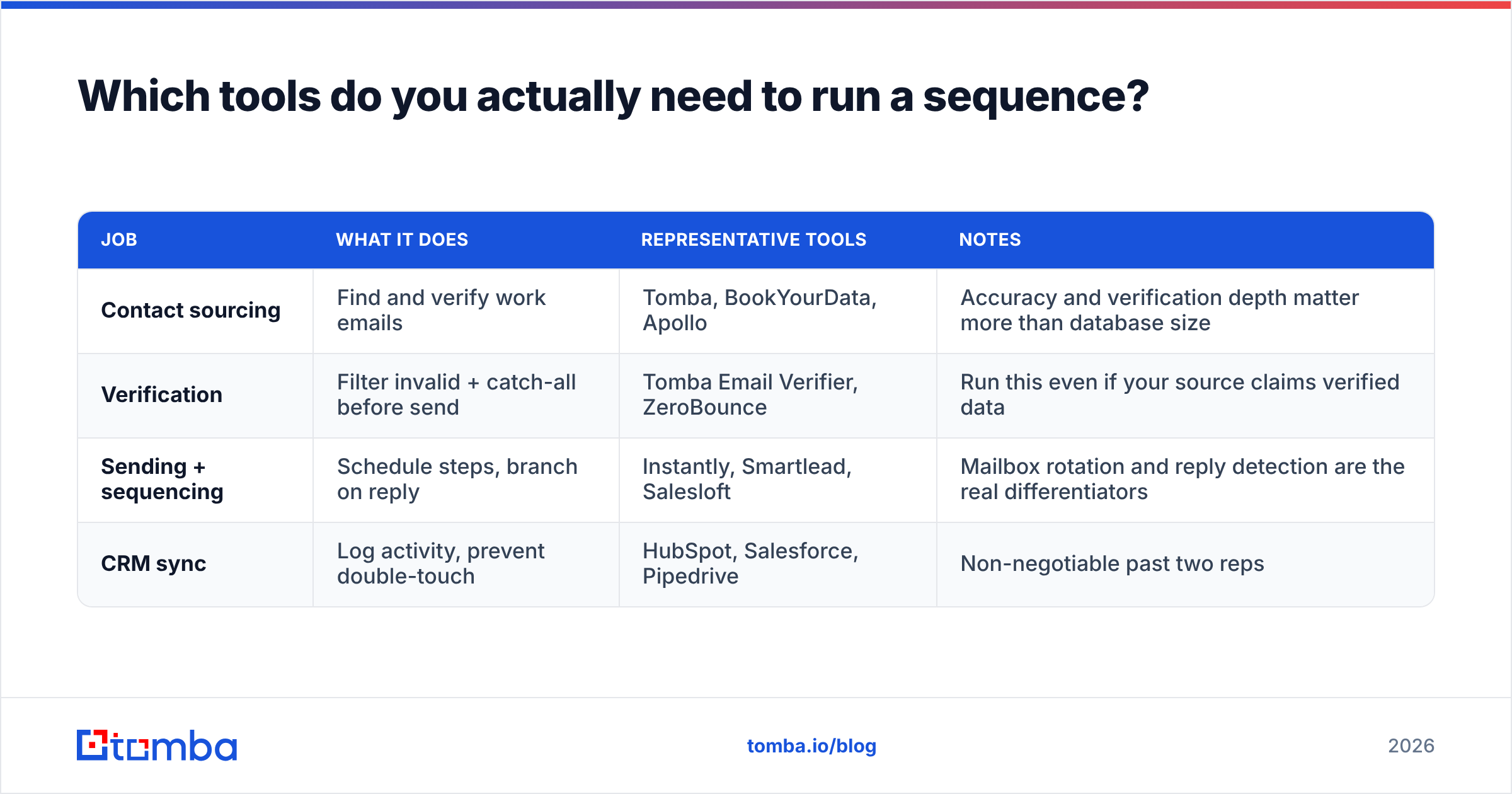
Four jobs, and you need all four covered. Some tools do two, none do all four well.
| Job | What it does | Representative tools | Notes |
|---|---|---|---|
| Contact sourcing | Find and verify work emails | Tomba, BookYourData, Apollo | Accuracy and verification depth matter more than database size |
| Verification | Filter invalid + catch-all before send | Tomba Email Verifier, ZeroBounce | Run this even if your source claims verified data |
| Sending + sequencing | Schedule steps, branch on reply | Instantly, Smartlead, Salesloft | Mailbox rotation and reply detection are the real differentiators |
| CRM sync | Log activity, prevent double-touch | HubSpot, Salesforce, Pipedrive | Non-negotiable past two reps |
Sourcing quality is where sequences are won or lost, so weigh that decision carefully. BookYourData is a solid option if you want pre-built, pay-as-you-go B2B lists with no subscription commitment. Tomba fits differently — it's built around live lookups against a domain you specify, with verification in the same call, and it plugs into the rest of the stack through the Tomba API, a Google Sheets add-on, and a HubSpot integration. Tomba pricing runs Free (25 searches/mo), Starter at $49/mo, Growth at $99/mo, and Pro at $249/mo.
For sending, check independent review volume on G2 before committing — the sequencing category churns fast and last year's leader is often this year's acquisition.
How do you measure whether the sequence is working?#
Reply rate is the only metric that survives contact with reality. Open rate has been unreliable since Apple Mail Privacy Protection started pre-fetching images, and click rate on a plain-text cold email is mostly noise.
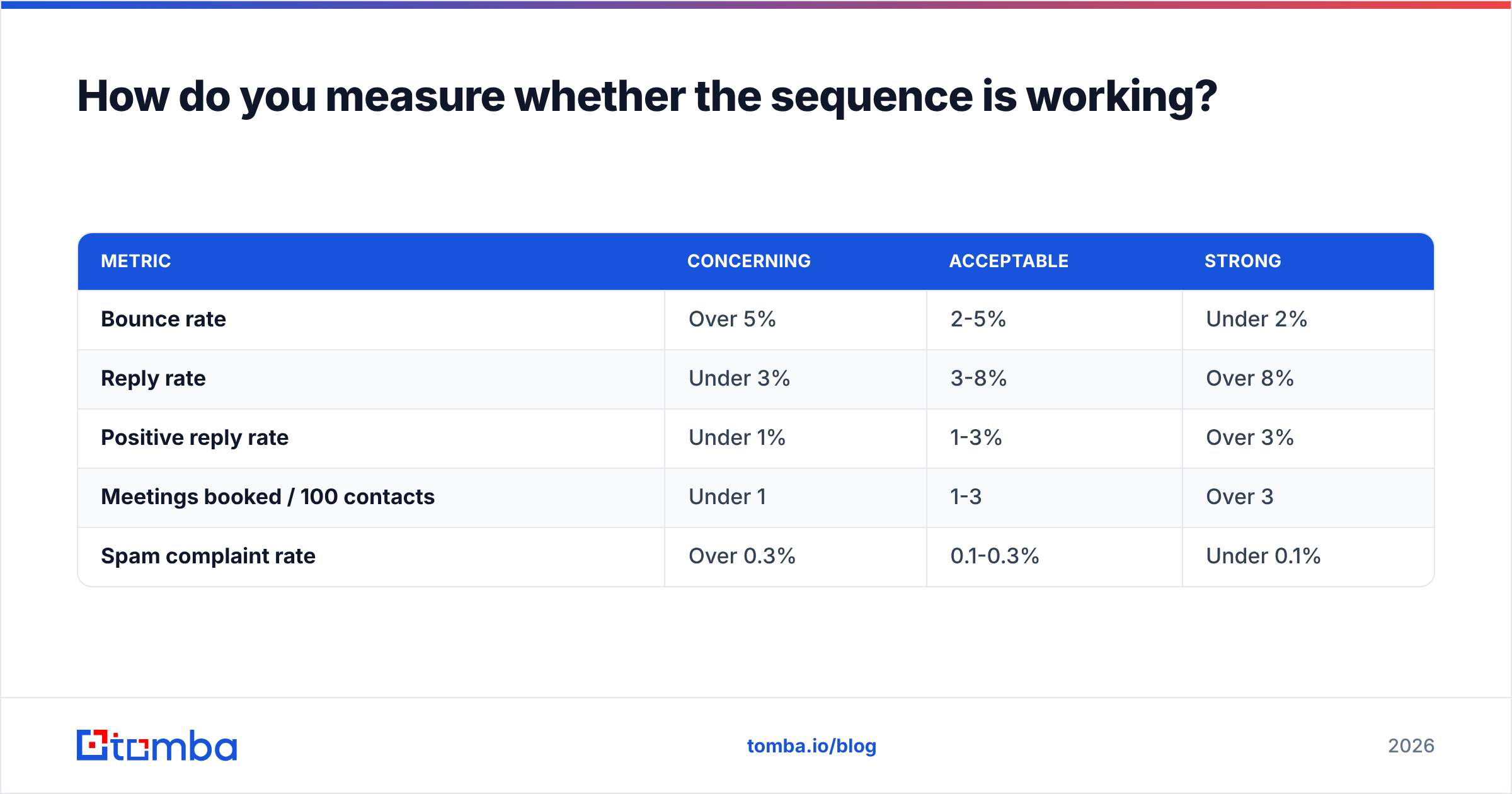
Benchmarks to judge against, per sequence, across at least 200 contacts:
| Metric | Concerning | Acceptable | Strong |
|---|---|---|---|
| Bounce rate | Over 5% | 2-5% | Under 2% |
| Reply rate | Under 3% | 3-8% | Over 8% |
| Positive reply rate | Under 1% | 1-3% | Over 3% |
| Meetings booked / 100 contacts | Under 1 | 1-3 | Over 3 |
| Spam complaint rate | Over 0.3% | 0.1-0.3% | Under 0.1% |
Diagnose in this order, because fixing them out of order wastes weeks:
- Bounce rate high? List problem. Stop sending, re-verify, fix sourcing. Nothing else matters until this is under 2%.
- Bounce fine, reply rate near zero? Deliverability problem. Check SPF, DKIM, DMARC and whether you're landing in Promotions. Run an SPF checker and a blacklist check.
- Delivering fine, replies still low? Targeting problem. Your segment doesn't have the pain you're describing. Change the list, not the copy.
- Replies coming but all negative? Offer problem. The message lands, the value doesn't. Rewrite the substance line.
- Everything decent but no meetings? Ask problem. Your CTA is too big a step. Downgrade from "30-minute demo" to "worth a look?"
Most teams jump straight to step 5 and spend a month A/B testing subject lines while a 9% bounce rate quietly kills the domain.
Set a review cadence: check bounce daily for the first week, reply rate weekly, and do a full angle rewrite every 6-8 weeks. Sequences decay — the same message to the same segment gets weaker as your competitors copy it.
When should you kill a sequence instead of optimizing it?#
Kill it when reply rate is under 3% across 200+ verified contacts and two rounds of copy changes. At that point you are not looking at a copy problem, you are looking at a market fit problem inside that segment.
Also kill it when:
- Spam complaints exceed 0.3% — pause everything, warm the domain again, and audit which step triggered it.
- Positive replies exist but never convert to meetings — your qualification criteria and your list criteria have drifted apart.
- The same objection appears in more than half of replies — that objection belongs in step 1, not in your rebuttal doc.
Rebuilding beats patching. Keep the sending infrastructure, throw out the angles, and re-derive the segment from your last ten closed-won deals.
Where should you start this week?#
Pick 100 accounts. Map the buying committee with domain search, verify every address, and write four emails with four genuinely different reasons for writing. Send at 40/day. Review bounce rate on day 3 and reply rate on day 14. That's a complete first cycle in two weeks, and it will teach you more than another month of reading frameworks.
The part you cannot skip is the data layer. A perfect six-step sequence sent to a 12%-bounce list produces worse results than a mediocre three-step sequence sent to verified contacts. Start with the Tomba Email Finder to build and verify the list your sequence runs on — the free tier gives you 25 searches a month to test the workflow before you commit to a plan.
Related guides#
// get started
Find, verify and enrich your first contacts today
Start on the free plan with 25 searches a month, then scale when your team is ready.
Free plan · No credit card required · GDPR & CCPA
// about the author