How to Create Battle Cards That Sales Reps Actually Use
Most battle cards die in a Drive folder. Here is the 7-step process, the exact template, and the research workflow that turns competitive intel into higher win rates.
TL;DR
- A battle card is a one-page, role-specific cheat sheet that tells a rep what to say when a specific competitor, objection, or buying scenario shows up on a live call.
- The failure mode is length, not accuracy. Cards over one screen get ignored; cards built from marketing pages instead of lost-deal interviews get distrusted.
- Build them in seven steps: pick the trigger, gather primary evidence, draft the trap questions, write the landmines, add proof, pressure-test with two reps, then set a 90-day review date.
- Source your intel from won/lost call recordings, G2 reviews, competitor pricing pages, and buyer conversations — not from your own positioning deck.
- Measure the card, not the effort: competitive win rate, time-to-first-objection-handled, and card open rate all move within a quarter if the card is real.
What is a battle card, exactly?#
A battle card is a single-screen reference a rep can scan in the eight seconds between a prospect saying "we're also looking at [Competitor]" and the rep having to respond.
Think of it like a chef's mise en place. The chef doesn't read the recipe during service — everything is chopped, measured, and within arm's reach before the first ticket prints. A battle card is that prep work for a sales conversation. The thinking happens weeks in advance; the call just requires reaching.
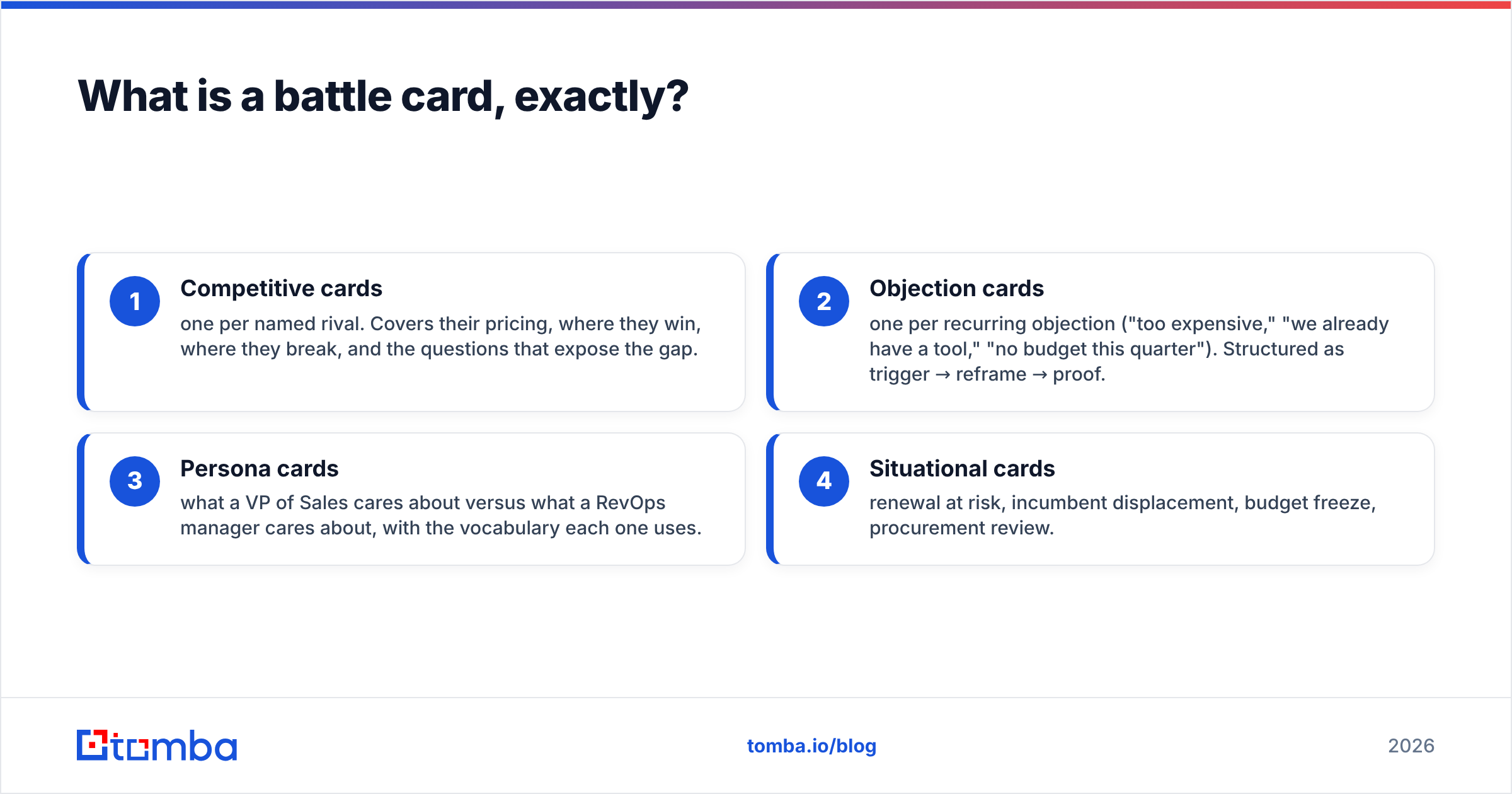
Battle cards come in four flavors, and conflating them is the most common reason they go unused:
- Competitive cards — one per named rival. Covers their pricing, where they win, where they break, and the questions that expose the gap.
- Objection cards — one per recurring objection ("too expensive," "we already have a tool," "no budget this quarter"). Structured as trigger → reframe → proof.
- Persona cards — what a VP of Sales cares about versus what a RevOps manager cares about, with the vocabulary each one uses.
- Situational cards — renewal at risk, incumbent displacement, budget freeze, procurement review.
Most teams only build the first type, then wonder why reps still fumble the pricing objection.
Why do most battle cards fail?#
Because they get written by someone who has never been on the call.
Product marketing writes a beautiful 12-slide competitive deck. It gets posted in Slack, pinned for a week, then buried. Six months later a rep opens it, sees pricing that changed two releases ago, gets burned in front of a prospect, and never opens a card again. One bad data point kills the whole program.
The specific failure patterns:
- Too long. If it doesn't fit on one screen without scrolling, it's a document, not a card. Reps will not scroll during a live call.
- Written from your own marketing site. Everything reads "we're better at everything," which reps know is false and prospects can smell.
- No honest weaknesses. A card that never says "they genuinely beat us here" is a card reps stop trusting the moment reality contradicts it.
- Stale by default. No owner, no review date, no changelog. Competitor pricing pages change quarterly.
- Wrong location. Living in a Drive folder instead of inside the CRM, the dialer, or a browser extension where the call actually happens.
Gartner's research on B2B buying complexity makes the underlying point: buyers spend a small fraction of their time with any single vendor, so the moments you do get have to be sharp. A rep improvising a competitive response is spending that scarce time badly.
How do you create battle cards in 7 steps?#
Here's the process end to end. Budget roughly four to six hours per card for the first one, then two hours each once you have a template.
1. Pick the trigger, not the topic. Don't build "the Apollo card." Build the card for the moment a prospect says "we're already paying for Apollo." The trigger defines what goes on the card and what gets cut. If information doesn't help in that exact moment, it's not on the card.
2. Pull primary evidence, not secondary opinion. Three sources, in priority order: (a) recordings of your last 10 deals where this competitor appeared — five won, five lost; (b) direct buyer interviews with three customers who switched from them; (c) public artifacts — their pricing page, their docs, their G2 reviews filtered to 2- and 3-star. Your own sales deck is not evidence.
3. Write the trap questions. These are the two or three discovery questions that surface the competitor's structural weakness without you naming it. Not "did you know they charge extra for verification?" but "how are you currently handling bounce rate on your exported lists?" The prospect discovers the gap; you didn't sell it.
4. Write the landmines honestly. Every card needs a "where they legitimately win" line. This is counterintuitive and it's the single thing that makes reps trust the card. It also prevents them walking into a deal that was never winnable, which protects forecast accuracy.
5. Attach one proof point per claim. A customer name, a number, a doc link. Claims without proof get challenged and the rep has nothing. One proof point, not three — three reads as desperate.
6. Pressure-test with two reps in a live roleplay. Give the card to your best AE and your newest AE. Run the scenario cold. Anything the newest rep can't find in eight seconds gets cut or moved up. Anything the best rep says "I'd never say that" about gets rewritten in their words.
7. Set an owner and a 90-day review date. Put both on the card itself, visibly. A card with no review date is a card that will be wrong within two quarters.
What goes on the card itself?#
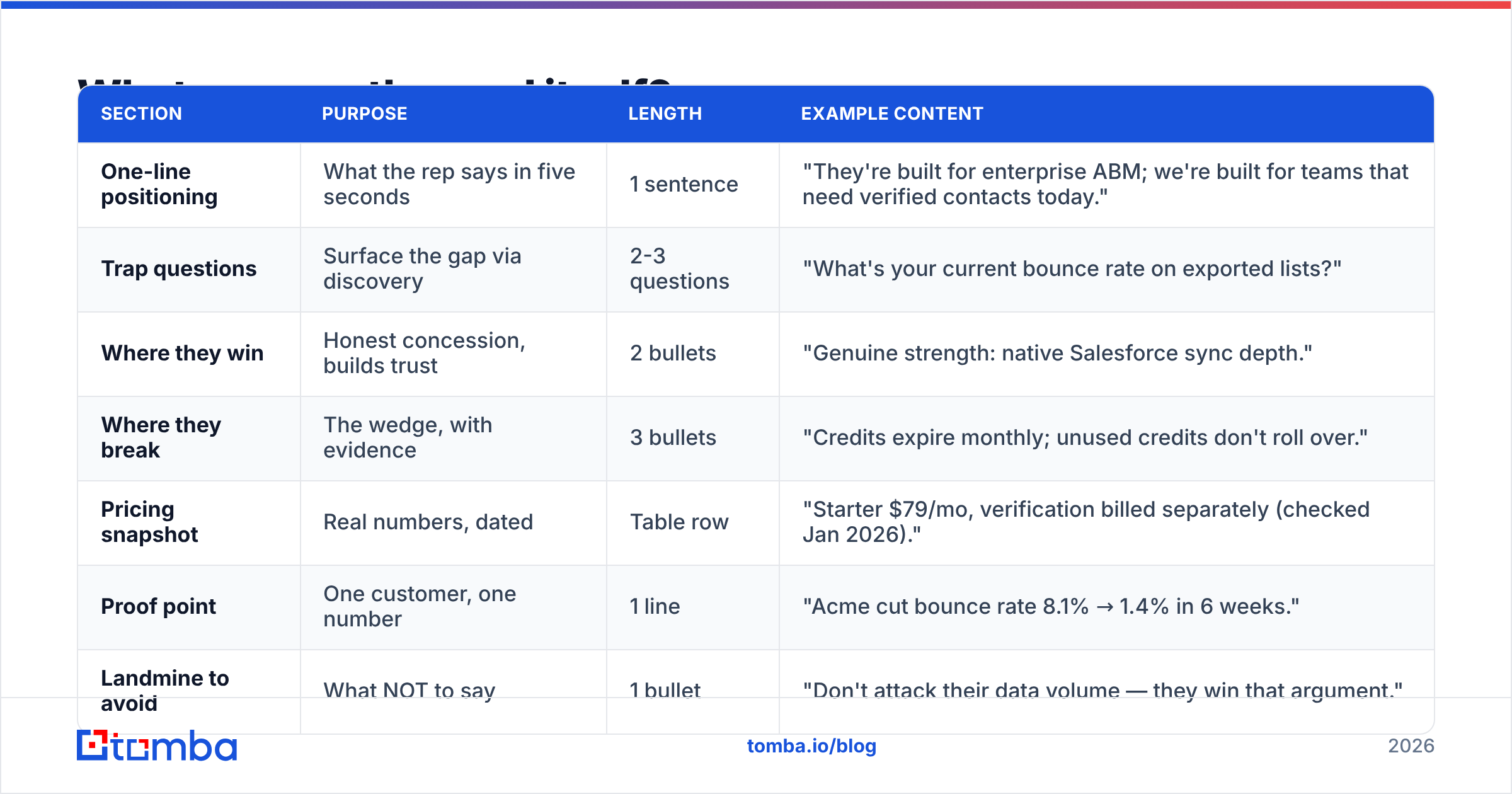
Here is the structure that survives contact with a real call. Keep the whole thing under 250 words.
| Section | Purpose | Length | Example content |
|---|---|---|---|
| One-line positioning | What the rep says in five seconds | 1 sentence | "They're built for enterprise ABM; we're built for teams that need verified contacts today." |
| Trap questions | Surface the gap via discovery | 2-3 questions | "What's your current bounce rate on exported lists?" |
| Where they win | Honest concession, builds trust | 2 bullets | "Genuine strength: native Salesforce sync depth." |
| Where they break | The wedge, with evidence | 3 bullets | "Credits expire monthly; unused credits don't roll over." |
| Pricing snapshot | Real numbers, dated | Table row | "Starter $79/mo, verification billed separately (checked Jan 2026)." |
| Proof point | One customer, one number | 1 line | "Acme cut bounce rate 8.1% → 1.4% in 6 weeks." |
| Landmine to avoid | What NOT to say | 1 bullet | "Don't attack their data volume — they win that argument." |
| Owner + review date | Accountability | 1 line | "Owner: J. Rivera. Next review: 2026-04-15." |
The pricing snapshot deserves a note. Always date it. A rep quoting a competitor's price from memory is a liability; a rep quoting a price with "as of January" is credible even if it's since changed.
Which format and tool should you use?#
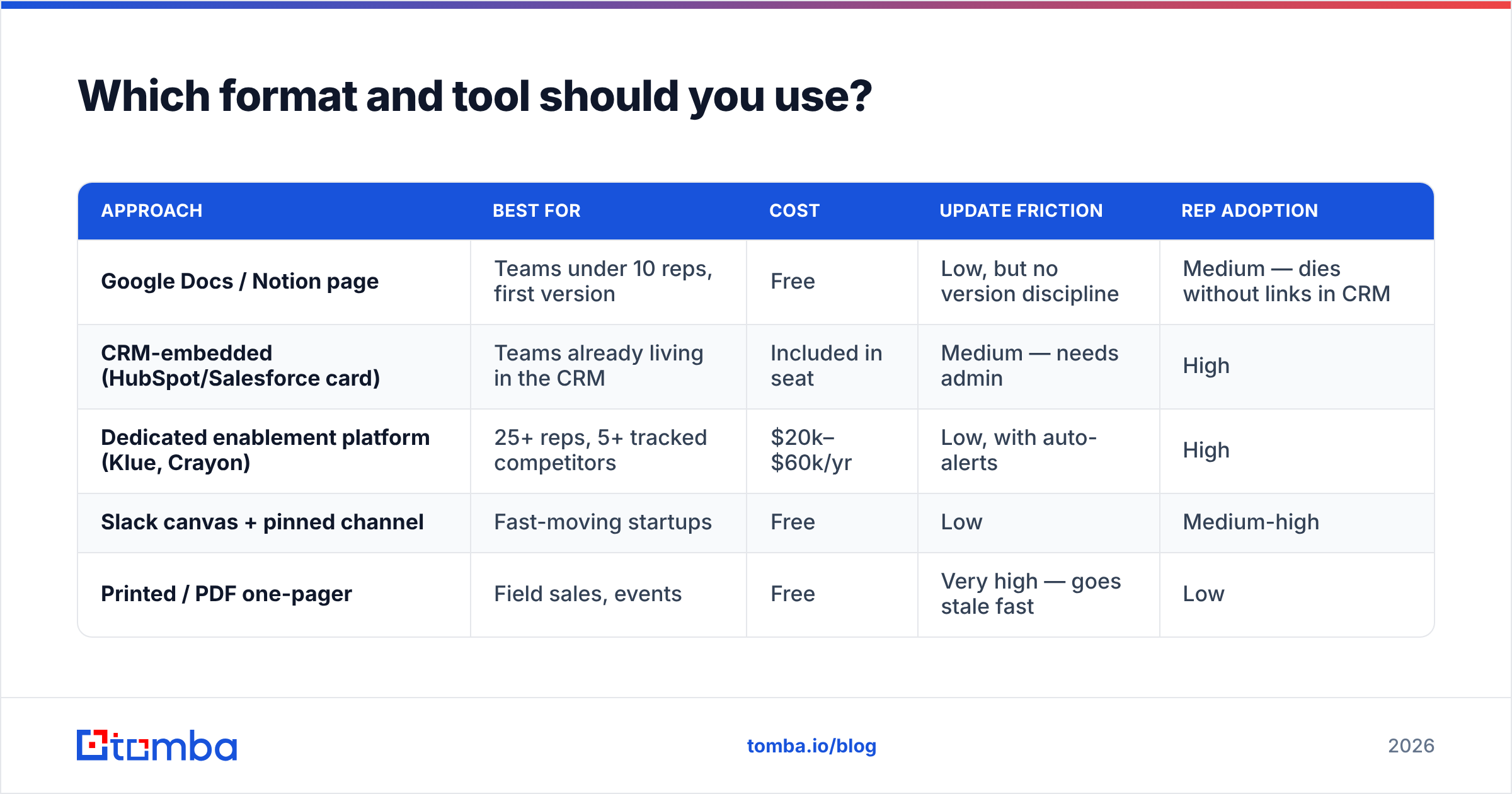
The format matters less than the location. A card in a tool reps already have open beats a better card one tab away.
| Approach | Best for | Cost | Update friction | Rep adoption |
|---|---|---|---|---|
| Google Docs / Notion page | Teams under 10 reps, first version | Free | Low, but no version discipline | Medium — dies without links in CRM |
| CRM-embedded (HubSpot/Salesforce card) | Teams already living in the CRM | Included in seat | Medium — needs admin | High |
| Dedicated enablement platform (Klue, Crayon) | 25+ reps, 5+ tracked competitors | $20k–$60k/yr | Low, with auto-alerts | High |
| Slack canvas + pinned channel | Fast-moving startups | Free | Low | Medium-high |
| Printed / PDF one-pager | Field sales, events | Free | Very high — goes stale fast | Low |
Start with the free option. A Notion page that gets reviewed every quarter beats a $40k platform nobody maintains. Move up when you're tracking more than five competitors or more than 25 reps.
If you're on HubSpot, their sales enablement documentation covers embedding playbook content directly in the deal record, which removes the tab-switch entirely.
Where do you get the intel to fill them?#
Four sources, ranked by signal quality.
Lost-deal interviews. Highest signal, lowest volume. Call five prospects who chose someone else in the last quarter. Ask one question: "What did they say in the room that we didn't?" Reps will give you their version; buyers give you the truth.
Call recording search. Search your Gong/Chorus/Fathom library for the competitor's name. Read the 60 seconds before and after each mention. You'll find the exact phrasing prospects use, which should become the exact phrasing on the card.
Public artifacts, tracked over time. Competitor pricing page, changelog, job postings (hiring three security engineers signals a compliance push), and review sites. Screenshot and date everything.
Your own data quality layer. This is the underrated one. Competitive claims about coverage, accuracy, and deliverability are testable. Run the same 200-contact list through your tool and theirs, verify both with a neutral email verifier, and you have a number instead of an adjective. Numbers survive procurement review; adjectives don't. If your card claims better data, you should be able to show where the data comes from — Tomba publishes its data sources for exactly this reason.
When you're building the contact list for lost-deal interviews or competitor customer outreach, a bulk email finder turns a list of names from LinkedIn into reachable inboxes in one pass, which is usually the bottleneck in getting those five interviews scheduled.
How do you know if your battle cards are working?#
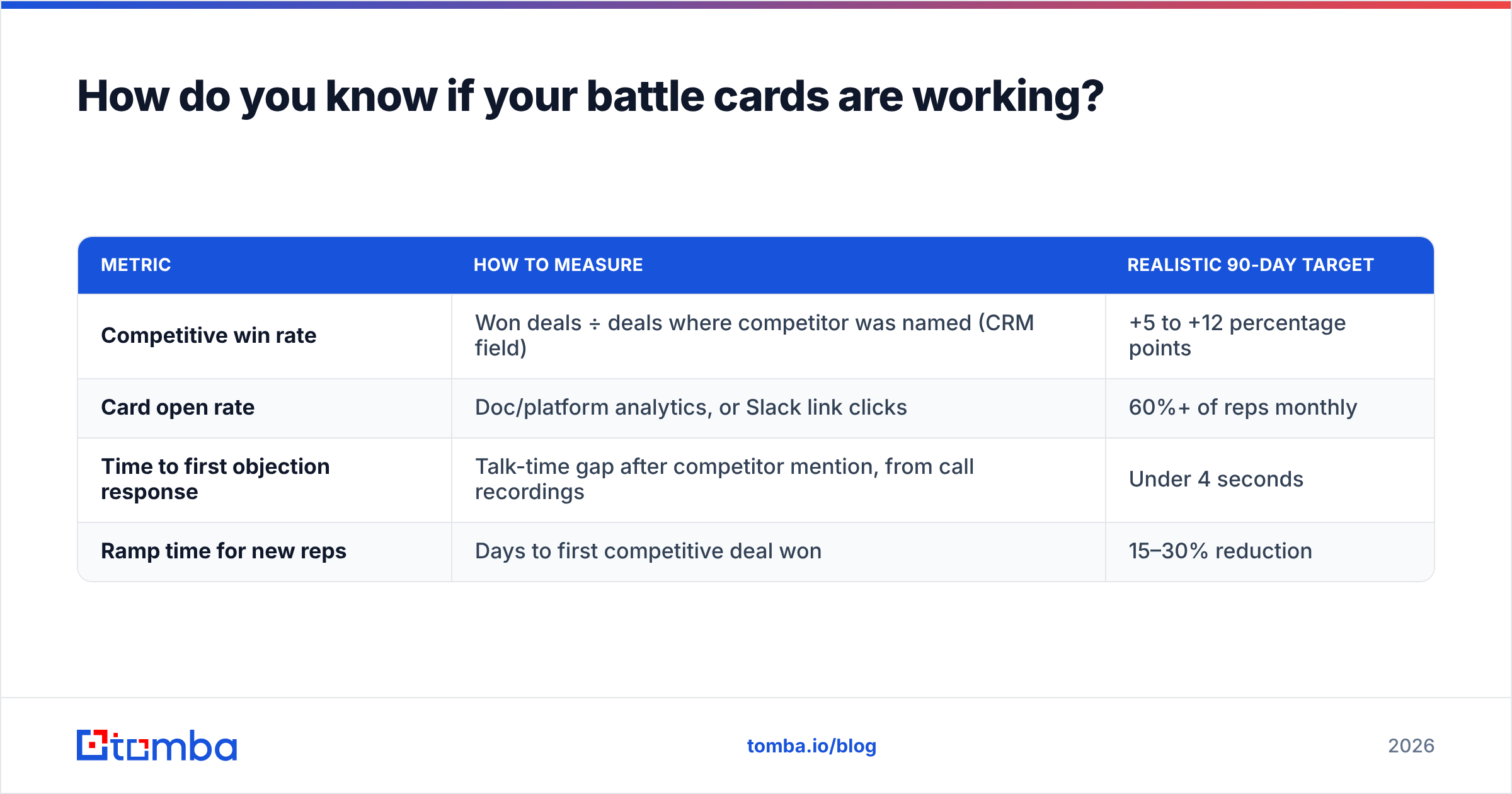
Track four numbers. Baseline them before you launch the card, then check at 30, 60, and 90 days.
| Metric | How to measure | Realistic 90-day target |
|---|---|---|
| Competitive win rate | Won deals ÷ deals where competitor was named (CRM field) | +5 to +12 percentage points |
| Card open rate | Doc/platform analytics, or Slack link clicks | 60%+ of reps monthly |
| Time to first objection response | Talk-time gap after competitor mention, from call recordings | Under 4 seconds |
| Ramp time for new reps | Days to first competitive deal won | 15–30% reduction |
If competitive win rate doesn't move but open rate is high, the card is being read and the content is wrong — go back to step 2 and get better evidence. If open rate is low, the content might be fine and the distribution is broken — move the card into the CRM.
Add a mandatory "competitor named" picklist field on every opportunity. Without it, none of these metrics are computable, and you'll be arguing about battle cards on vibes for the next two years. This is standard practice in most mature revenue operations functions and takes an admin about 20 minutes to configure.
How often should you update them?#
Quarterly review, event-driven rewrite.
The quarterly cadence is the floor: someone named on the card checks every line, updates the pricing snapshot with a fresh date, and either bumps the review date or archives the card. Ten minutes per card if nothing changed.
Event-driven rewrites happen immediately when:
- A tracked competitor changes pricing or packaging
- They ship a feature that removes one of your "where they break" bullets
- You lose three deals in a row to the same objection the card supposedly handles
- A funding round or acquisition changes their positioning
Keep a visible changelog at the bottom of every card — two lines, date and what changed. Reps who see the card was updated last month trust it. Reps who see no date assume it's from 2023 and close the tab.
One more discipline: archive aggressively. A competitor you haven't seen in six months doesn't need a maintained card. Move it to an archive folder and note the date. Five sharp cards beat twenty stale ones, and the maintenance cost is what kills most programs.
What's the fastest way to build your first card this week?#
Do this in one 90-minute block:
- Minutes 0–20: Pull your CRM list of the last 20 closed-lost deals. Find the competitor that appears most. That's your first card.
- Minutes 20–50: Search your call recording library for that name. Read ten mentions. Write down the exact prospect phrasing.
- Minutes 50–65: Open their pricing page and their 2-star G2 reviews. Screenshot both with today's date.
- Minutes 65–80: Fill the eight-row template above. Cut anything that doesn't fit on one screen.
- Minutes 80–90: Send it to your two most opinionated reps with one question: "What's wrong with this?"
Ship version one at 70% quality. A card in a rep's hands this Friday is worth more than a perfect card in April, and the corrections you get from real calls are better than anything you'd have guessed alone. Version two writes itself.
Ready to build the list behind the intel?#
Battle cards run on primary research, and primary research runs on being able to reach people — the five buyers who picked your competitor, the three customers who switched, the analyst who covers your category. That's a contact-finding problem before it's a content problem.
Tomba's Email Finder gets you verified addresses by name and domain so you can actually schedule those lost-deal interviews instead of guessing at what happened in the room. Free tier covers 25 searches a month — enough to run your first round of interviews before you commit to anything. Paid plans start at $49/mo on Starter and scale to Growth at $99/mo; full Tomba pricing is public. Start with the free tier, book five calls, and let the buyers write your first battle card for you.
Related guides#
// get started
Find, verify and enrich your first contacts today
Start on the free plan with 25 searches a month, then scale when your team is ready.
Free plan · No credit card required · GDPR & CCPA
// about the author