How to Draft a Follow Up Email That Actually Gets Replies
Most deals die in the follow-up, not the first email. Here is a 6-step framework for drafting follow-ups that add value, plus timing data, templates, and the mistakes that get you ignored.
TL;DR
- Roughly half of all replies to cold outreach arrive after the first email, so a sequence without follow-ups leaves most of its pipeline unclaimed.
- The best follow-up is not a reminder. It is a new, smaller piece of value: a benchmark, a customer example, a one-line question, or a graceful exit.
- Space touches 3, 5, 7, and 14 days apart on the same thread, and stop at four to six touches unless the prospect engages.
- "Just bumping this up" and "circling back" are the two fastest ways to train a prospect to ignore your name.
- A follow-up sent to an unverified or wrong address is not a follow-up — it's a bounce. Clean the address before you write the second email.
Why do follow-up emails matter more than the first email?#
Because the first email is a coin flip on timing, and the follow-up is where you control the outcome.
Your first email lands when the prospect is in a QBR, on a plane, or three days into an inbox backlog. Nothing about your offer was wrong. The moment was. A follow-up is a second, third, and fourth attempt at catching a moment you cannot see from the outside.
Sales teams that track this properly find the same pattern over and over: reply volume does not collapse after email one. It spreads out. Touch two often performs close to touch one, and touches three and four still pull meaningful replies from people who genuinely meant to respond and forgot. If you stop at one send, you are voluntarily giving up the majority of the conversations you could have had.
There is a second reason, and it is less obvious. Follow-ups are where you get to prove you are not a bot. Anyone can write one polished cold email. Only someone paying attention can write a second email that references something new — a funding round, a job posting, a competitor's announcement — and that difference is what separates a real conversation from a sequence.
What makes a follow-up email different from the first one?#
The first email introduces a reason to talk. The follow-up has to introduce a reason to talk now, without repeating yourself.
That means a follow-up should be shorter, more specific, and carry a lower ask. If email one asked for a 30-minute call, email three should ask for a yes/no or a redirect to the right person. Every touch that goes out should decrease the cost of replying.
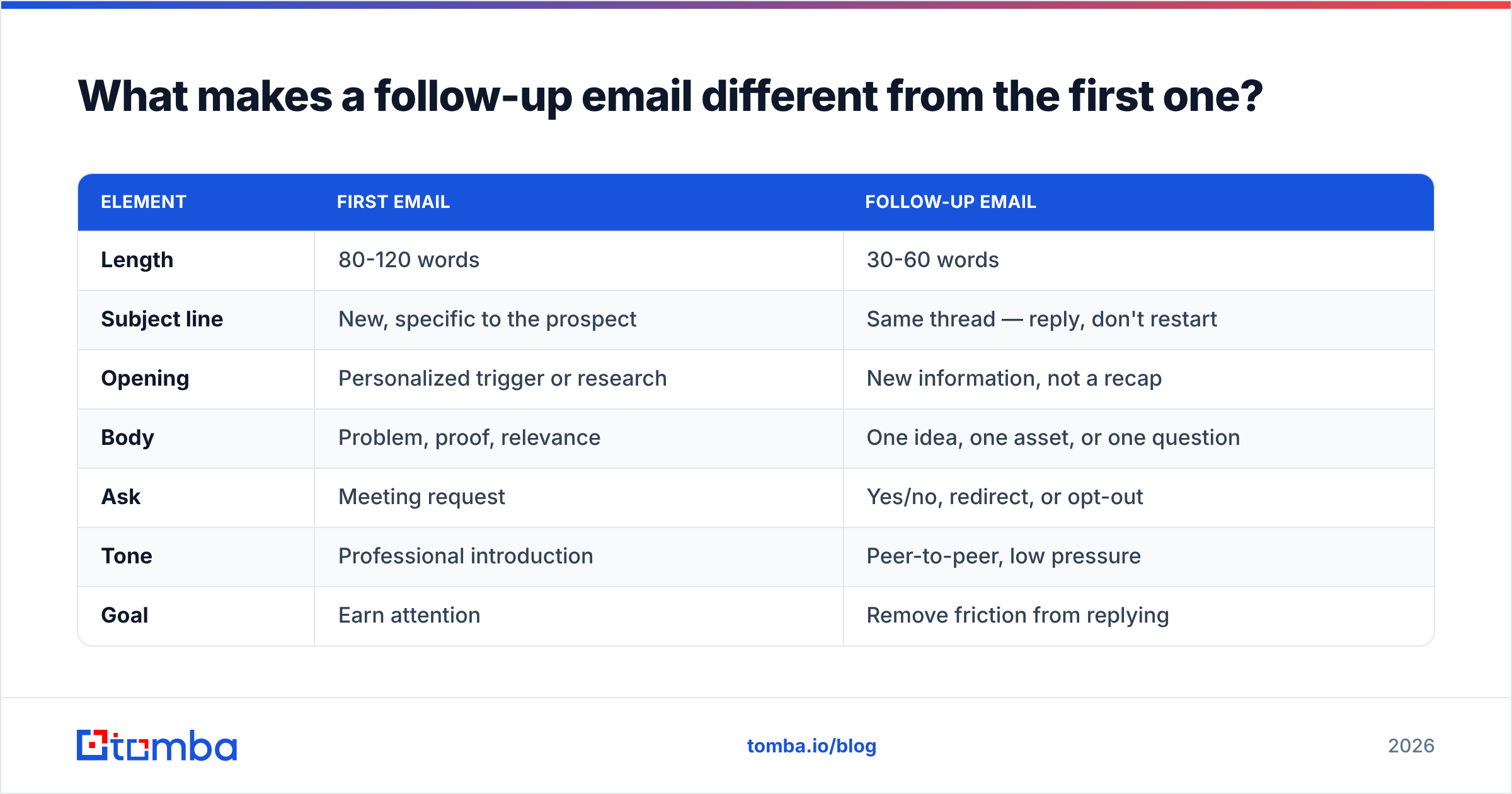
Here is the structural difference laid out:
| Element | First email | Follow-up email |
|---|---|---|
| Length | 80-120 words | 30-60 words |
| Subject line | New, specific to the prospect | Same thread — reply, don't restart |
| Opening | Personalized trigger or research | New information, not a recap |
| Body | Problem, proof, relevance | One idea, one asset, or one question |
| Ask | Meeting request | Yes/no, redirect, or opt-out |
| Tone | Professional introduction | Peer-to-peer, low pressure |
| Goal | Earn attention | Remove friction from replying |
The most common failure is treating the follow-up as a repeat of the first email in a smaller font. If your second email says the same thing as your first email, you have just told the prospect that ignoring you produced no consequence and no new information. They will do it again.
How do you draft a follow-up email in six steps?#
- Confirm the address is still valid. Contacts change jobs constantly, and B2B data decays fast. If touch one bounced or went to a catch-all domain, everything downstream is wasted. Run the address through an email verifier before you queue the next send, and use a catch-all verifier for domains that accept everything.
- Find one new input. Never open a follow-up with nothing new. Check the company's newsroom, a recent LinkedIn post, a job listing, a product changelog, or a G2 review. One sentence of fresh context is enough to justify the send.
- Reply on the original thread. Keep the same subject line with a
Re:prefix so the prospect gets the full context in one scroll. Restarting with a new subject line resets their memory and reads as a new cold email. - Lead with the new value, not the apology. Cut "sorry to bother you again" and "I know you're busy." Open with the thing that is worth their four seconds: "Saw you're hiring three SDRs in Berlin — here's how a team that size usually handles list building."
- Make the ask smaller than last time. Move from "do you have 30 minutes Thursday?" to "worth a look, or should I close the file?" A binary question is far easier to answer than an open calendar request.
- Set the next step before you hit send. Decide the date of the next touch and what new angle it will carry. If you cannot name the angle, you have reached the end of the sequence — send the breakup email instead.
Follow that order and drafting takes four minutes, not twenty. The research step is the only one that requires real thought; everything else is structure.
What is the right follow-up timing and cadence?#
Space your touches so they widen over time, and cap the sequence before you become background noise.
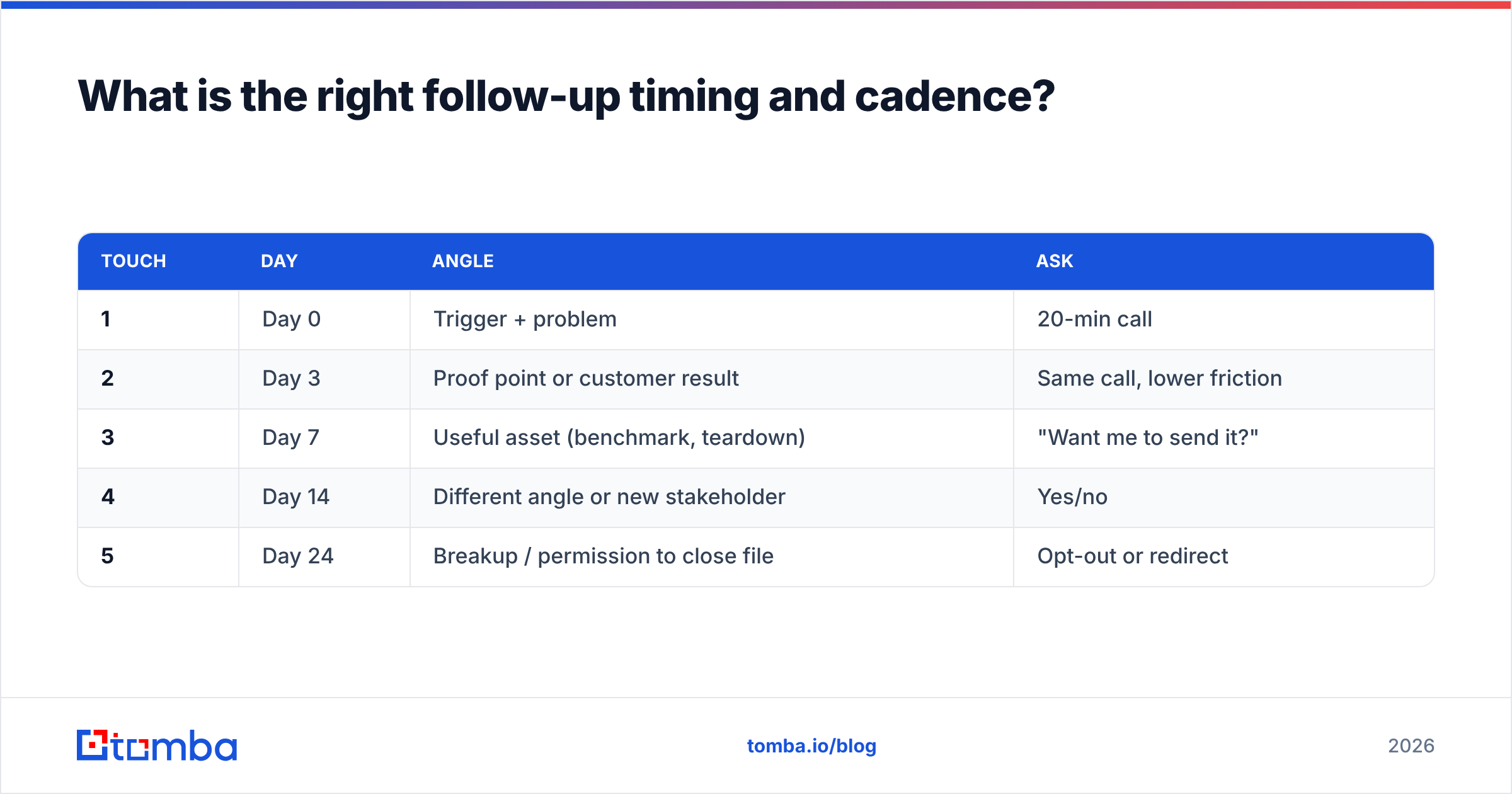
A cadence that holds up across most B2B segments:
| Touch | Day | Angle | Ask |
|---|---|---|---|
| 1 | Day 0 | Trigger + problem | 20-min call |
| 2 | Day 3 | Proof point or customer result | Same call, lower friction |
| 3 | Day 7 | Useful asset (benchmark, teardown) | "Want me to send it?" |
| 4 | Day 14 | Different angle or new stakeholder | Yes/no |
| 5 | Day 24 | Breakup / permission to close file | Opt-out or redirect |
Two rules govern this table. First, the gaps expand — 3, 4, 7, 10 days — because a prospect who has ignored you three times needs more space, not less. Second, five touches on the same thread is a ceiling for most cold sequences. Past that, your response rate falls and your spam complaint rate rises, which is a bad trade in both directions.
Timing within the day matters less than people claim, but it is not zero. Tuesday through Thursday, sent to land between 7-9am in the recipient's timezone, is a reasonable default. Test it against your own data rather than trusting a blog stat — including this one.
What follow-up email templates actually work?#
Four patterns cover most B2B situations. Adapt the specifics; keep the structure.
1. The new-information follow-up (day 3)
Subject: Re: [original subject]
Hi [Name] — one more data point since I wrote: [Competitor] just moved their SDR team onto a verified-first list workflow and cut bounce rate to under 2%.
If bounce rate is on your list for Q4, worth 15 minutes?
[Your name]
2. The value-drop follow-up (day 7)
Subject: Re: [original subject]
[Name], I put together a one-page teardown of how three companies in [industry] structure their outbound data stack. No pitch in it.
Want me to send it over?
3. The wrong-person redirect (day 14)
Subject: Re: [original subject]
Hi [Name] — I may have the wrong person. If lead data isn't yours, who owns it these days? Happy to stop emailing you either way.
4. The breakup (day 24)
Subject: Closing the file
[Name], I'll assume the timing isn't right and stop here. If it changes, my line is open.
One thing worth keeping regardless: [specific, useful resource].
The breakup email reliably outperforms everything before it, for an uncomfortable reason — it is the only email in the sequence that costs the prospect something to ignore. Use it honestly. If you say you are closing the file, close the file.
If you'd rather start from a vetted library, the cold email templates collection and a subject line tester will get you to a first draft faster than staring at a blank compose window.
What mistakes kill follow-up reply rates?#
Most bad follow-ups fail for one of six reasons, and all six are avoidable in the draft.
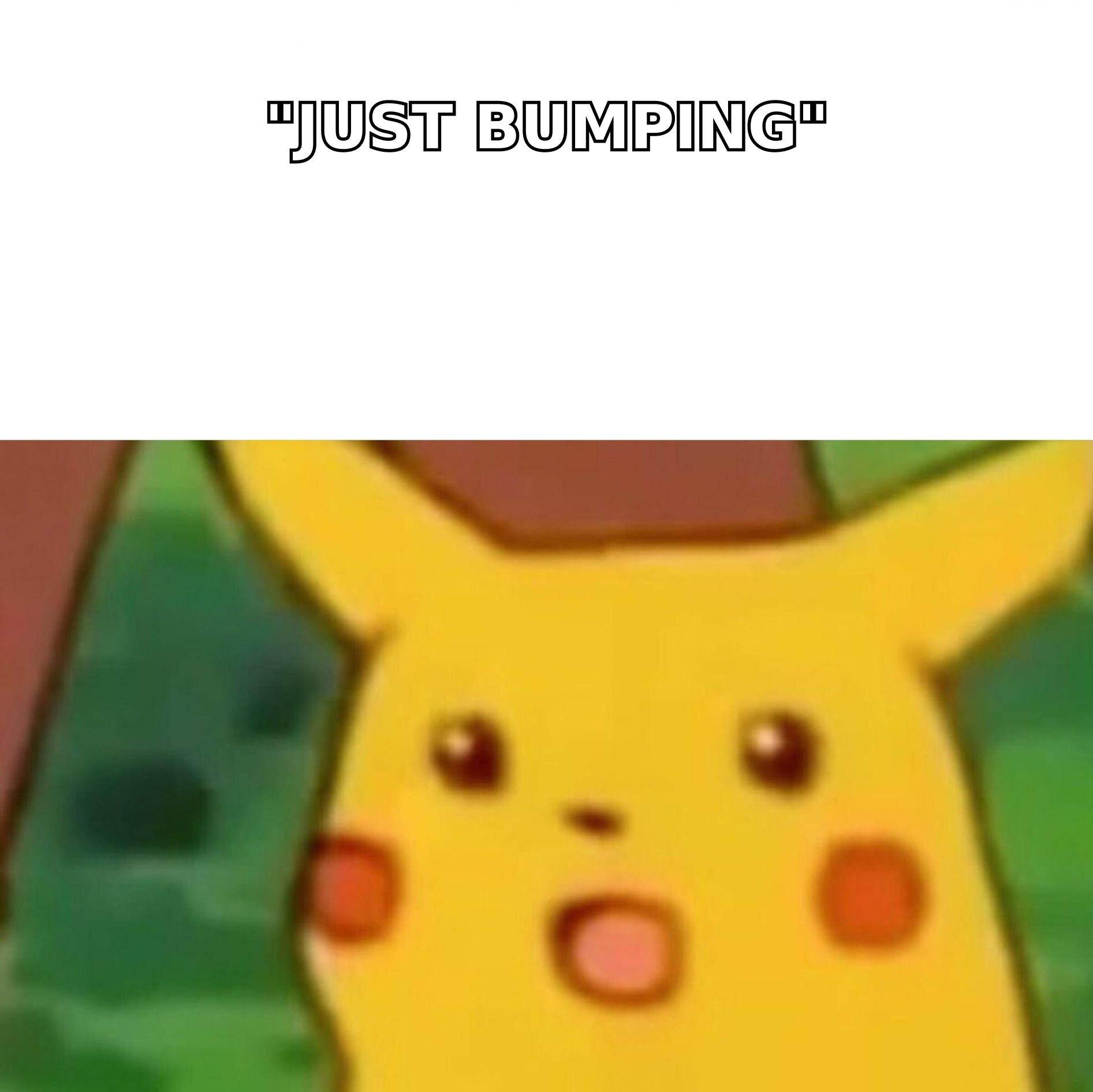
- "Just bumping this to the top of your inbox." This says: I have nothing new, but I want your attention anyway. It is the single most common opener in bad follow-ups and it signals zero effort.
- Guilt framing. "I haven't heard back from you" makes the prospect responsible for your pipeline. They aren't. Nobody owes you a reply to an unsolicited email.
- Restarting the thread. New subject lines break context and get flagged as a fresh cold email by both the human and the filter.
- Escalating the ask. Going from "quick call?" to "here's my Calendly, pick any 45-minute slot" after silence reads as desperation.
- Ignoring deliverability. Repeated sends to invalid addresses damage your sender reputation and eventually push even your good emails into spam. Check your domain setup with an SPF checker before you scale a sequence.
- No exit. Sequences that never end train recipients to mark you as spam. Always include a breakup.
The deliverability point deserves emphasis because it compounds silently. Google's Postmaster Tools guidance is explicit that repeated sends to nonexistent addresses and high complaint rates are treated as sender-quality signals. A follow-up sequence multiplies your send volume against the same list — which means it also multiplies whatever data quality problem you started with. Clean first, then sequence.
How do you personalize follow-ups at scale without sounding robotic?#
Pick a personalization tier per segment, and be honest about what each tier costs you.
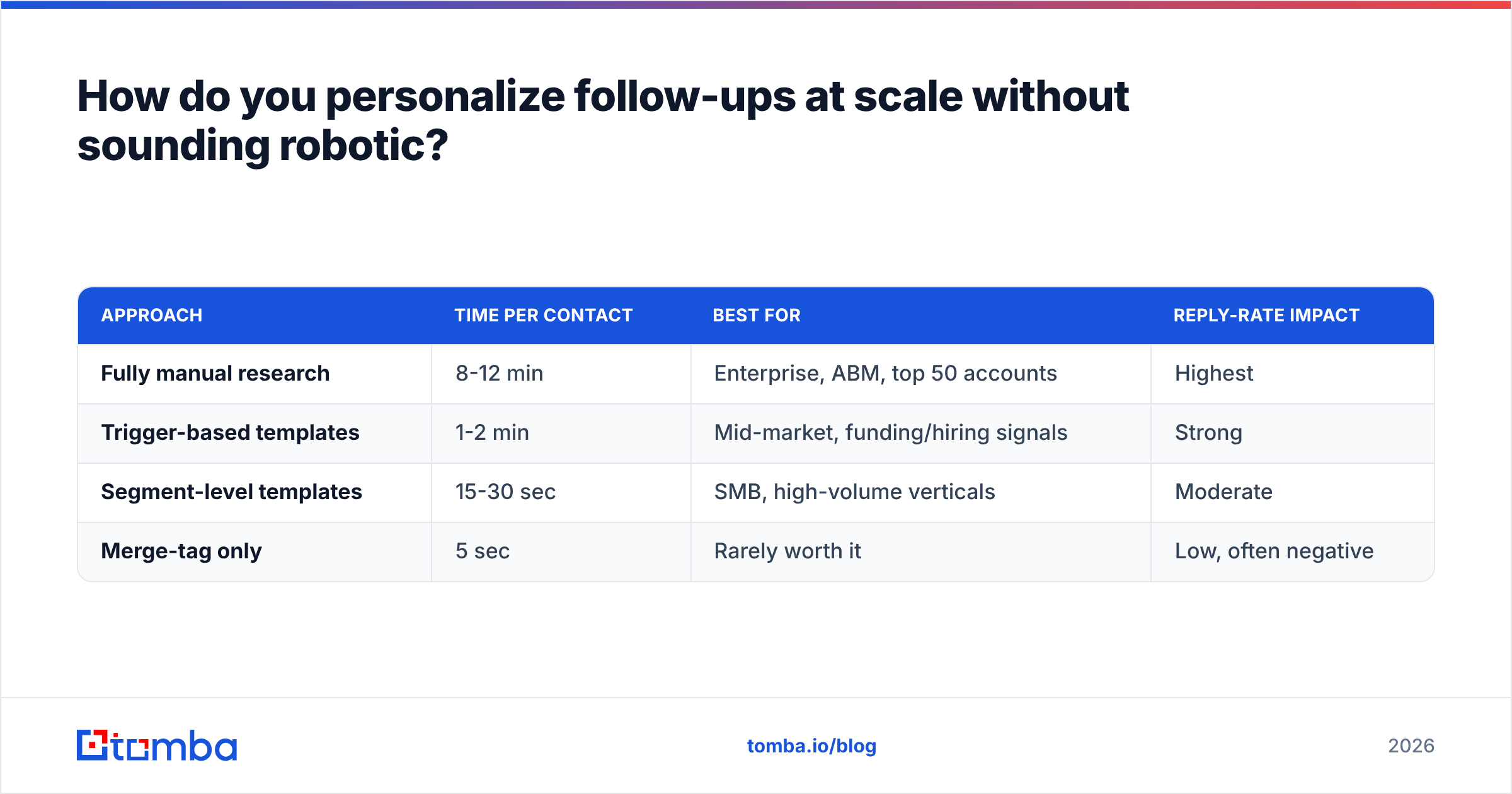
| Approach | Time per contact | Best for | Reply-rate impact |
|---|---|---|---|
| Fully manual research | 8-12 min | Enterprise, ABM, top 50 accounts | Highest |
| Trigger-based templates | 1-2 min | Mid-market, funding/hiring signals | Strong |
| Segment-level templates | 15-30 sec | SMB, high-volume verticals | Moderate |
| Merge-tag only | 5 sec | Rarely worth it | Low, often negative |
The pragmatic play for most teams is trigger-based: build the templates once, then attach each one to a real-world signal (a funding round, a new VP of Sales, a tech-stack change). The template does the writing; the trigger does the personalizing. That is how you keep follow-ups feeling written without spending an afternoon on 40 contacts.
Enrichment is what makes triggers usable. If your CRM rows only contain a name and a company, there is nothing to personalize against. Running contacts through data enrichment to pull role, seniority, location, and company technology gives every follow-up something concrete to reference. Vendors in this space vary in coverage — BookYourData is a solid option when you need pre-verified contact records with firmographic depth, and it pairs well with an enrichment step on your existing list.
For a broader view of how buyers evaluate outreach tooling, G2's sales engagement category is a reasonable place to compare what teams actually complain about versus what vendors advertise.
How do you measure whether your follow-ups are working?#
Track four numbers, per touch, not per campaign.
- Reply rate by touch number. If touch three outperforms touch one, your first email is the problem, not your follow-ups. If touch three underperforms badly, your angles are repetitive.
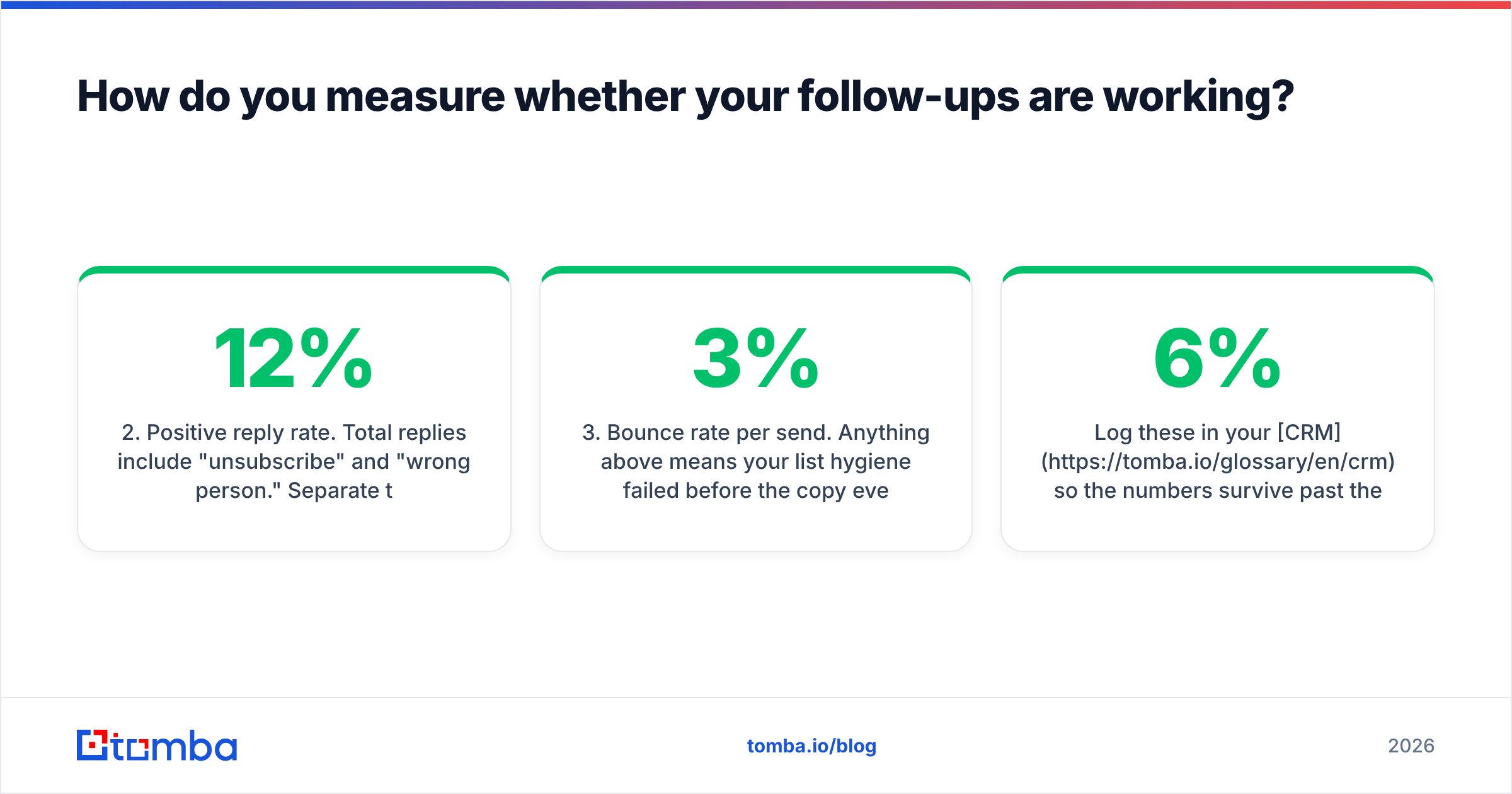
- Positive reply rate. Total replies include "unsubscribe" and "wrong person." Separate them. A campaign with 12% replies and 1% positive is a deliverability liability, not a win.
- Bounce rate per send. Anything above 3% means your list hygiene failed before the copy ever mattered.
- Unsubscribe and complaint rate by touch. A spike at touch four is your cadence telling you where the ceiling is.
Log these in your CRM so the numbers survive past the current quarter. HubSpot's sales email benchmarks are a useful external sanity check when you want to know whether a 6% reply rate is good or quietly terrible for your segment.
One caveat on open rates: since Apple Mail Privacy Protection and similar features became widespread, open tracking is directionally useful at best. Do not build cadence decisions on it. Reply rate is the only metric in that list that cannot be faked by a prefetching proxy.
Where should follow-up drafting sit in your outbound workflow?#
Before the copy, after the data. That ordering is not negotiable.
A follow-up sequence amplifies everything about your list — including the errors. Send four touches to a list that is 15% invalid and you have generated four times the bounces, four times the reputation damage, and zero additional meetings from those rows. Send four touches to a verified, enriched list and each touch compounds in your favor.
The practical sequence looks like this: build the list with domain search to find the right people at target accounts, verify every address, enrich for trigger data, then draft. Drafting first and cleaning later is how teams end up with beautiful copy and a burned domain.
Start with addresses that are actually deliverable#
The best-written follow-up in the world does nothing if it lands on a dead mailbox. Before you queue touch two, run your list through Tomba Email Finder to find and confirm the right professional addresses at your target accounts — including verification and source attribution on each result, so you know why an address is considered valid.
The free tier covers 25 searches a month to test the accuracy on your own accounts. Paid plans start at $49/mo (Starter), with Growth at $99/mo and Pro at $249/mo — full Tomba pricing is on the site. Clean the data first, then let your follow-ups do the work they're capable of.
Related guides#
// get started
Find, verify and enrich your first contacts today
Start on the free plan with 25 searches a month, then scale when your team is ready.
Free plan · No credit card required · GDPR & CCPA
// about the author