How to Drive Leads to Your Website: 9 Tactics That Work
Traffic is not leads. Here are nine tested tactics to drive leads to your website in 2026, plus the conversion math that tells you which channel to fund next quarter.
TL;DR
- Traffic is not leads. Most B2B sites convert 1.5–3% of visitors; if you can't name your conversion rate, you don't have a lead problem, you have a measurement problem.
- The nine tactics below split into three buckets: capture (turn existing traffic into leads), attract (bring qualified traffic in), and recover (identify the 97% who leave without filling in a form).
- Visitor identification plus enrichment beats adding another gated PDF. You already paid for the traffic — recovering anonymous sessions is the cheapest lead source you have.
- Programmatic and comparison content ("X vs Y", "best X for Y") converts 3–5x better than top-of-funnel blog posts, because intent is already commercial.
- Pick two channels, not seven. A single channel run for six months beats six channels run for six weeks each.
Why does your website get traffic but no leads?#
Because traffic and leads are produced by two different systems, and most teams only invest in one.
Think of it like a retail store on a busy street. Foot traffic is a function of the street — SEO, ads, social, PR. Conversion is a function of the store — layout, signage, staff who talk to browsers. You can triple foot traffic and sell the same amount if nobody inside asks for the sale.
The numbers back this up. Across B2B SaaS, median website visitor-to-lead conversion sits somewhere between 1.5% and 3%. That means 97 out of 100 people who read your pricing page leave without giving you anything. If you get 20,000 monthly visits, you're capturing maybe 400 leads and losing 19,600 sessions of demonstrated interest.
So before you buy more traffic, answer three questions:
- What is your visitor-to-lead rate, by page? Not sitewide. Pricing pages convert at 5–10x the rate of blog posts. Averaging them hides the truth.
- What is your lead-to-opportunity rate, by source? Organic search leads and paid social leads are not the same asset. One converts; the other inflates the top of your funnel.
- How many identified companies visit and never convert? This is the number nobody measures, and it's the one that pays for itself fastest.

What are the three types of lead-driving tactics?#
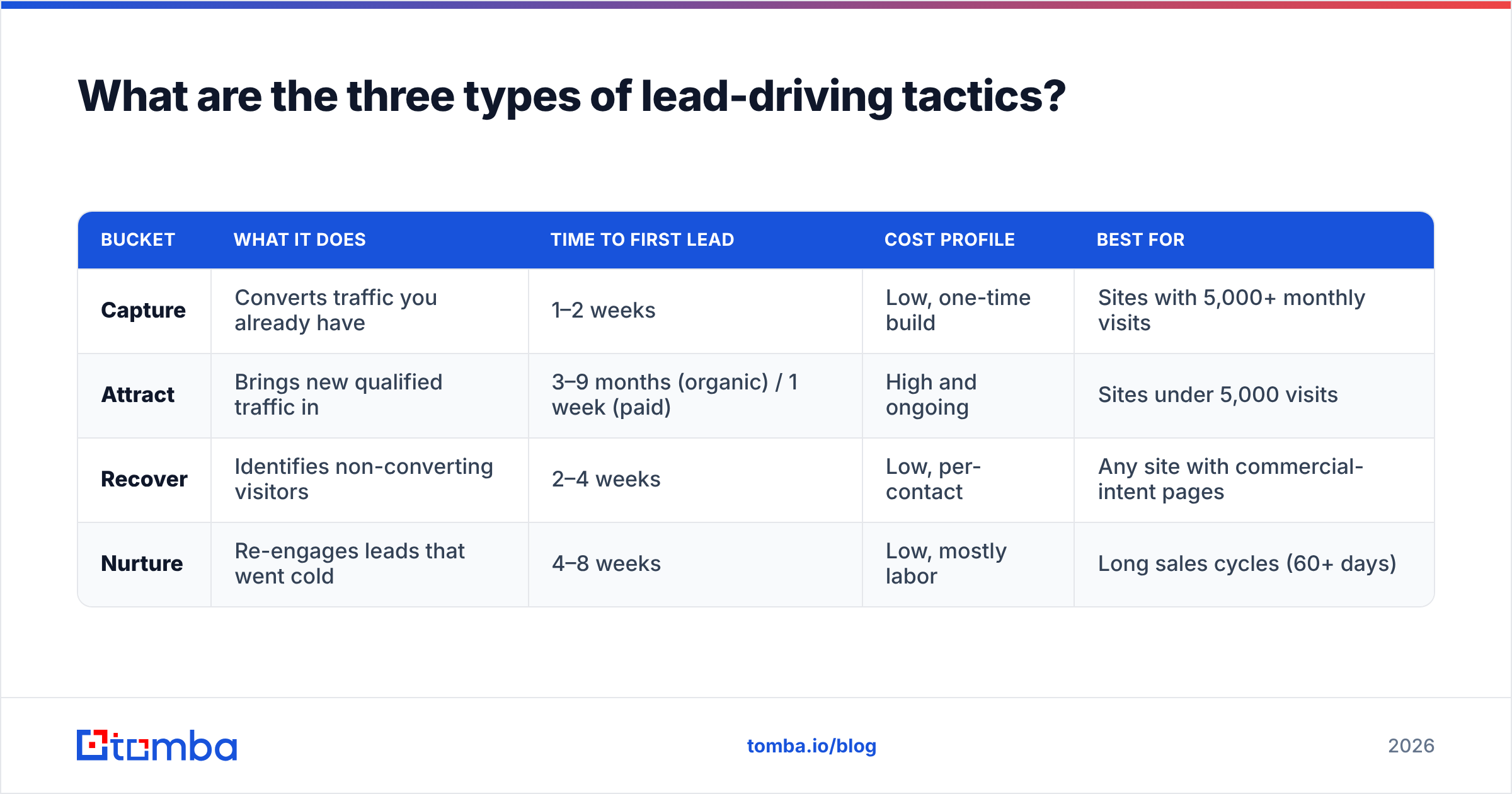
Every tactic that drives leads to your website falls into one of three buckets. Mixing them up is why budgets get wasted.
| Bucket | What it does | Time to first lead | Cost profile | Best for |
|---|---|---|---|---|
| Capture | Converts traffic you already have | 1–2 weeks | Low, one-time build | Sites with 5,000+ monthly visits |
| Attract | Brings new qualified traffic in | 3–9 months (organic) / 1 week (paid) | High and ongoing | Sites under 5,000 visits |
| Recover | Identifies non-converting visitors | 2–4 weeks | Low, per-contact | Any site with commercial-intent pages |
| Nurture | Re-engages leads that went cold | 4–8 weeks | Low, mostly labor | Long sales cycles (60+ days) |
The mistake almost everyone makes: they start with Attract because it feels like the "real" marketing work, when Capture and Recover give you a faster payback on traffic you've already bought.
Order of operations, if you're starting from scratch:
- Fix capture first. A conversion-rate lift from 1.5% to 3% doubles your leads with zero new traffic.
- Turn on recovery second. It monetizes the sessions capture will always miss.
- Scale attraction third. Now every new visitor is worth twice what they were.
- Layer nurture last. It compounds, but only if there's volume flowing into it.
How do you convert the traffic you already have?#
Five capture tactics, ranked by effort-to-impact.
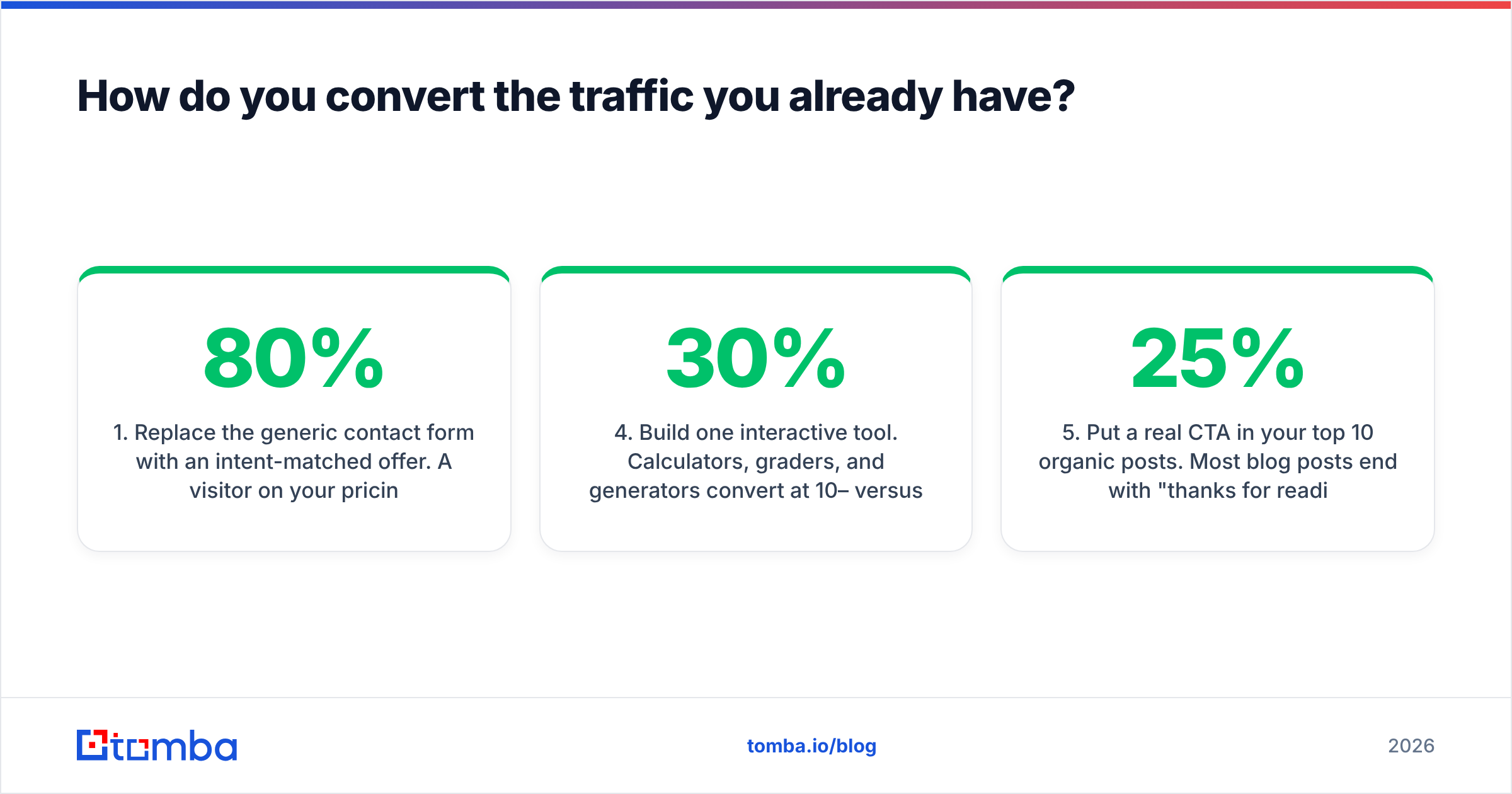
1. Replace the generic contact form with an intent-matched offer. A visitor on your pricing page does not want a whitepaper. They want a quote, a trial, or a calculator. Match the offer to the page's intent and conversion rates typically jump 40–80%. On educational blog posts, offer the template. On comparison pages, offer the side-by-side spreadsheet. On pricing, offer a live demo slot.
2. Cut form fields to four. Every field past four costs you conversions. Collect name, work email, company, and one qualifying field. Everything else — company size, industry, tech stack, headcount, funding — you can append afterward with data enrichment instead of asking. HubSpot's own research on form length has repeatedly found shorter forms outperform longer ones on raw conversion.
3. Add exit-intent to commercial pages only. Exit-intent popups on blog posts annoy readers. On pricing and product pages, they catch someone mid-decision. Same tactic, radically different results depending on placement.
4. Build one interactive tool. Calculators, graders, and generators convert at 10–30% versus 2–4% for a gated PDF, because the visitor gets value before they pay with their email. An email warmup calculator or a free email checker style utility keeps working for years with no content refresh.
5. Put a real CTA in your top 10 organic posts. Most blog posts end with "thanks for reading." Pull your top 10 pages by traffic, and give each one an offer that matches its topic. This is a two-hour job that usually adds 15–25% more leads.
How do you attract higher-intent traffic?#
You don't need more traffic. You need traffic that's closer to a buying decision.
Comparison and alternative pages. Someone searching "Tool A vs Tool B" or "Tool A alternatives" has already decided to buy something — they're just choosing the vendor. These pages convert at 3–5x the rate of awareness content. They're also easier to rank for, because most competitors won't write honestly about rivals. Look at how G2 built an entire business on comparison intent.
Bottom-of-funnel programmatic pages. If your product serves 200 industries or integrates with 80 tools, that's 280 pages of specific, low-competition, high-intent search demand. The trap is thin content — each page needs at least one genuinely unique element (a real screenshot, real data, real use case) or Google will treat the set as spam.
Digital PR for links, not for coverage. One original data study with a real sample size will earn more links than six months of guest posting. Links raise every page's ranking, not just the one you promoted.
Paid search on competitor and problem terms. Expensive per click, but the intent is unambiguous. Cap it, measure to opportunity — not to lead — and kill any keyword that doesn't produce pipeline in 90 days.
LinkedIn thought leadership from human accounts. Company pages get suppressed. Founder and AE accounts don't. The lead path is: post drives profile visit, profile drives site visit, site converts. Pair it with a disciplined LinkedIn outreach motion and the same audience gets touched twice.
Which channels actually produce the cheapest leads?#
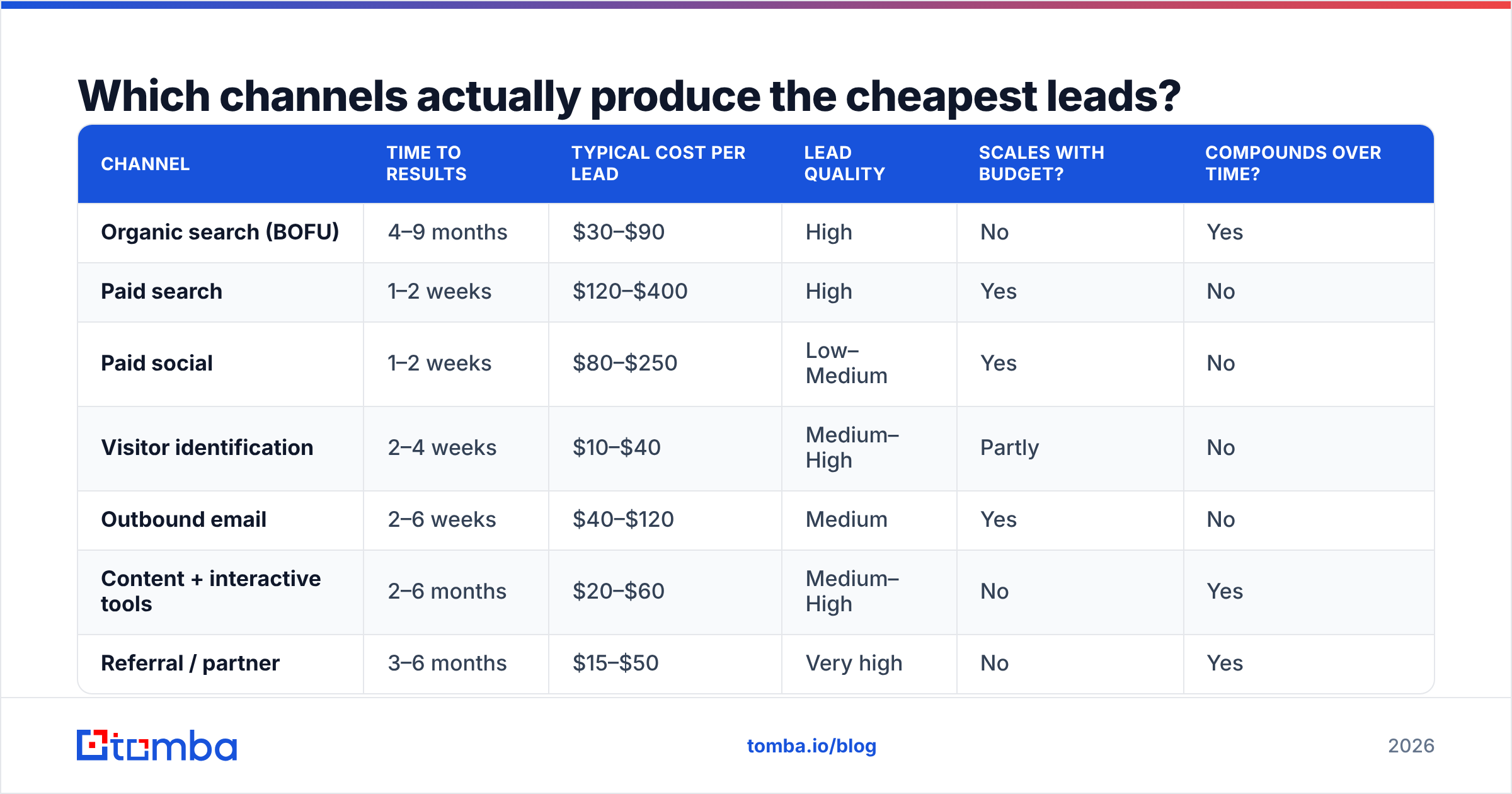
Here's how the main channels compare on the metrics that matter. Figures are typical B2B SaaS ranges — treat them as a planning baseline, not gospel, and replace them with your own numbers as soon as you have 90 days of data.
| Channel | Time to results | Typical cost per lead | Lead quality | Scales with budget? | Compounds over time? |
|---|---|---|---|---|---|
| Organic search (BOFU) | 4–9 months | $30–$90 | High | No | Yes |
| Paid search | 1–2 weeks | $120–$400 | High | Yes | No |
| Paid social | 1–2 weeks | $80–$250 | Low–Medium | Yes | No |
| Visitor identification | 2–4 weeks | $10–$40 | Medium–High | Partly | No |
| Outbound email | 2–6 weeks | $40–$120 | Medium | Yes | No |
| Content + interactive tools | 2–6 months | $20–$60 | Medium–High | No | Yes |
| Referral / partner | 3–6 months | $15–$50 | Very high | No | Yes |
Two things jump out of that table.
First, the cheapest per-lead channels — referral, visitor identification, organic BOFU — are the ones that don't scale linearly with budget. You can't buy your way to more of them, which is exactly why they stay cheap.
Second, paid channels are the only ones that scale on demand, which is why they're the default when a board asks for pipeline next quarter. That's a legitimate use. It's just not a strategy.
The practical allocation for most teams under $10M ARR: 60% into one compounding channel, 30% into one paid channel for predictability, 10% into experiments. Revisit quarterly, and judge each channel on opportunities created, not MQLs.
How do you recover the 97% who never fill in a form?#
This is the tactic most teams skip, and it's usually the highest-ROI thing on the list.
The mechanics are simple. When a visitor hits your site, their IP and firmographic signals can often be resolved to a company. You now know that a 400-person logistics firm read your pricing page three times last week. You don't have a name yet — but you have a target account with proven intent.
Then you close the gap:
- Identify the company. Website visitor reveal turns anonymous sessions into named accounts with page-level behavior.
- Find the right person. Use domain search to pull the relevant role at that company — the VP of Ops, not the intern.
- Get a verified address. Run every result through an email verifier before it enters a sequence. Bounces on cold sends damage sender reputation fast, and a damaged domain poisons every other campaign you run.
- Reference the behavior, not the visit. Never write "I saw you visited our pricing page" — it's creepy and it kills replies. Write about the problem that page solves.
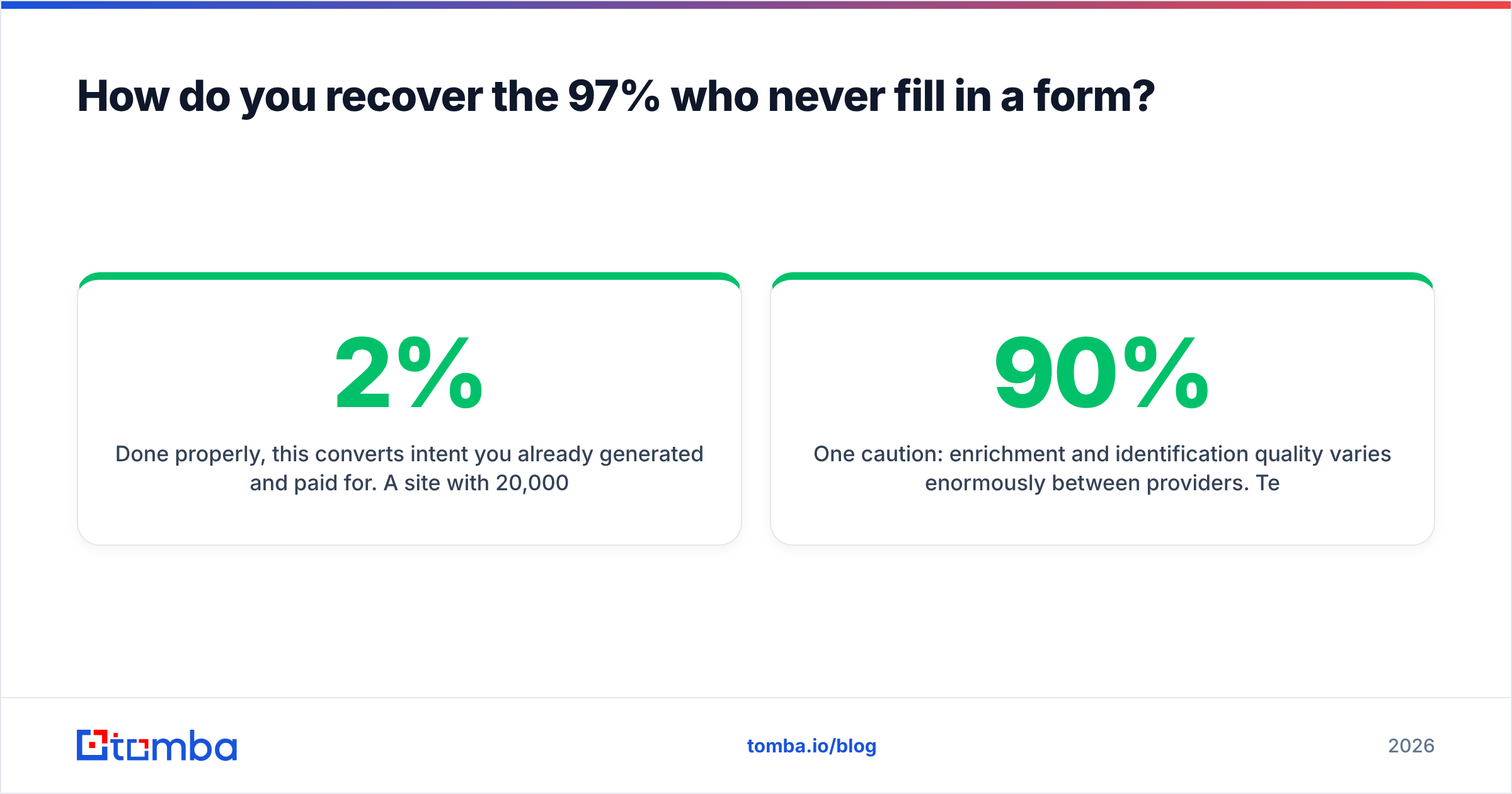
Done properly, this converts intent you already generated and paid for. A site with 20,000 monthly visits and a 2% form conversion rate is leaving 19,600 sessions on the table. Even identifying 15% of those at company level, and reaching a decision-maker at 10% of those companies, adds a few hundred genuinely warm contacts a month at a fraction of paid CPL.
One caution: enrichment and identification quality varies enormously between providers. Test on 100 known accounts before you commit to an annual contract, and measure two things — match rate (how many resolved) and accuracy (how many resolved correctly). A 90% match rate with 60% accuracy is worse than a 60% match rate with 95% accuracy, because bad data costs you sender reputation on top of wasted time.
What should you measure to know it's working?#
Four metrics, checked monthly. Everything else is noise.
- Visitor-to-lead rate, by page template. Segment pricing, product, blog, and comparison pages separately. A sitewide average tells you nothing actionable.
- Lead-to-opportunity rate, by source. This is the number that reveals which channels are producing real buyers and which are producing form-fillers. Expect a 4–10x spread between your best and worst channel.
- Cost per opportunity, by source. Not cost per lead. A $400 paid-search lead that converts to opportunity 30% of the time is cheaper than a $60 content lead that converts at 3%.
- Days from first visit to first conversation. If this is climbing, your capture layer is failing even when volume looks stable.
Set a review cadence and stick to it. Most channels need 90 days before the data means anything, and most teams kill them at 30. Gartner's research on B2B buying behavior consistently shows buyers spend the majority of their journey doing independent research long before they contact a vendor — which means your attribution window is almost always longer than your patience.
What's the 90-day plan?#
If you do nothing else, do this in order.
Days 1–30 — Fix capture.
- Audit your top 10 traffic pages and match each CTA to page intent.
- Cut every form to four fields; append the rest with enrichment.
- Add exit-intent to pricing and product pages only.
- Instrument conversion tracking by page template.
Days 31–60 — Turn on recovery.
- Deploy visitor identification and let it collect two weeks of baseline data.
- Build a workflow: identified account → find contact → verify → sequence.
- Verify every address before send. Consider a bulk verify pass on any existing list too — old lists rot at roughly 2% per month.
- Write three sequences mapped to the pages that triggered identification.
Days 61–90 — Scale one attraction channel.
- Pick one: BOFU comparison content, programmatic pages, or paid search.
- Ship a minimum of 10 assets or 10 ad groups. Anything less isn't a test.
- Measure to opportunity, not to lead.
- Cut the two worst-performing existing channels and move their budget here.
The teams that struggle with this aren't lacking tactics. They're running eleven half-implemented ones simultaneously and can't tell which is working. Two channels executed properly for six months will outperform seven channels dabbled with, every single time.
Where does Tomba fit?#
Once you've identified an account that's been circling your pricing page, you need a verified contact for a real human at that company — fast, and without burning your domain on bounces.
That's the job the Tomba Email Finder does. Point it at a domain and a name, or run a domain-wide search to see who's actually there, then verify before anything hits a sequence. Free tier gives you 25 searches a month to test the data quality on accounts you already know, and paid plans start at $49/mo on Starter with Growth at $99/mo — full Tomba pricing is public, no sales call required. If you're wiring it into an existing workflow, the Tomba API and the Google Sheets, HubSpot, and Zapier integrations mean the identification-to-outreach loop can run without anyone copy-pasting a spreadsheet.
Start with the traffic you already have. It's the cheapest pipeline you'll ever build.
Related guides#
// get started
Find, verify and enrich your first contacts today
Start on the free plan with 25 searches a month, then scale when your team is ready.
Free plan · No credit card required · GDPR & CCPA
// about the author