How to End a Cold Call Email: Closing Lines That Get Replies
Your closing line decides whether a cold call email gets a reply or gets ignored. Here are the sign-offs, CTAs, and P.S. patterns that actually convert — plus the endings that quietly kill your reply rate.
TL;DR
- The last three lines of a cold call email carry more weight than the subject line for reply rate — the subject earns the open, the close earns the response.
- Interest-based CTAs ("worth a conversation?") consistently beat calendar-based CTAs ("15-min call Tuesday at 2?") on first touch because they ask for a decision, not a commitment.
- Kill the multi-option close. One ask per email. Two questions in a closing paragraph split attention and drop replies.
- Sign-offs matter less than people think, but "Best" and "Thanks" are safe; "Cheers" reads casual; "Regards" reads like a form letter.
- None of it works if the email lands in spam or bounces. Clean data first, copy second — verify every address before send.
What Does "Cold Call Email" Actually Mean Here?#
A cold call email is the written follow-up to — or replacement for — a cold call: a first-touch outbound message to someone who has never spoken to you, usually sent after a dial that went to voicemail, or as the opening move before you dial.
That context changes how you close it. A nurture email can end soft. A cold call email cannot. The recipient has zero relationship equity with you, roughly eight seconds of attention, and a delete key. Your ending has to do three jobs at once:
- Signal low cost. Make responding feel cheaper than deleting.
- Ask one thing. A single, unambiguous next step.
- Leave an exit. Give them a graceful way to say no — counterintuitively, this raises reply rates.
Most reps get the first two roughly right and skip the third entirely. That's the gap.
Why Do Most Cold Email Closings Fail?#
Three failure patterns account for most dead closes.
The calendar assumption. "Does Thursday at 10am or Friday at 2pm work for a quick 15 minutes?" You've asked a stranger to block time before they've agreed there's a reason to. Every scheduling question you ask before they've conceded interest is a question they answer with silence.
The stacked ask. "Would you be open to a call? Also, happy to send over the deck. Or I can connect you with our solutions engineer." Three doors. Cognitive load goes up, reply rate goes down. HubSpot's outbound research has repeatedly landed on the same conclusion: emails with a single clear CTA outperform multi-CTA emails on response rate.
The apologetic fade. "Sorry to bother you, I know you're busy, just wanted to reach out in case this is relevant." You've pre-conceded that the email is an imposition. Nobody replies to a message that has already apologized for existing.

How Do You End a Cold Call Email? The 7 Closing Patterns#
Here are the seven closing patterns worth using, ranked by where they fit in a sequence.
- The interest check — "Worth a conversation, or is this off-base for you?" Best for touch #1. Asks for a yes/no on relevance, not on calendar time. Lowest friction close in outbound.
- The one-question close — "Are you still handling vendor selection for the EMEA rollout?" Turns the email into a question a human can answer in four words. Extremely high reply rate, moderate meeting-conversion rate.
- The permission ask — "Want me to send the two-line version of how we did this for [similar company]?" You're asking permission to send value, not permission to sell. Works well on touch #2.
- The soft calendar — "If it's useful, I'll send a couple of times — otherwise no hard feelings." Reserve for touch #3+ once interest is at least neutral.
- The negative close — "Should I close the loop on this?" Deployed on the last email in a sequence. Reply rates on break-up emails are consistently among the highest in a sequence, mostly because they're the only email that asks for a decision instead of a favor.
- The referral redirect — "If this sits with someone else on your team, happy to be pointed their way." Converts a wrong-contact dead end into a warm internal intro.
- The P.S. hook — a one-line P.S. with a concrete proof point or an oddly specific detail. The P.S. is the second-most-read line in an email after the first sentence. Don't waste it on "Looking forward to hearing from you."
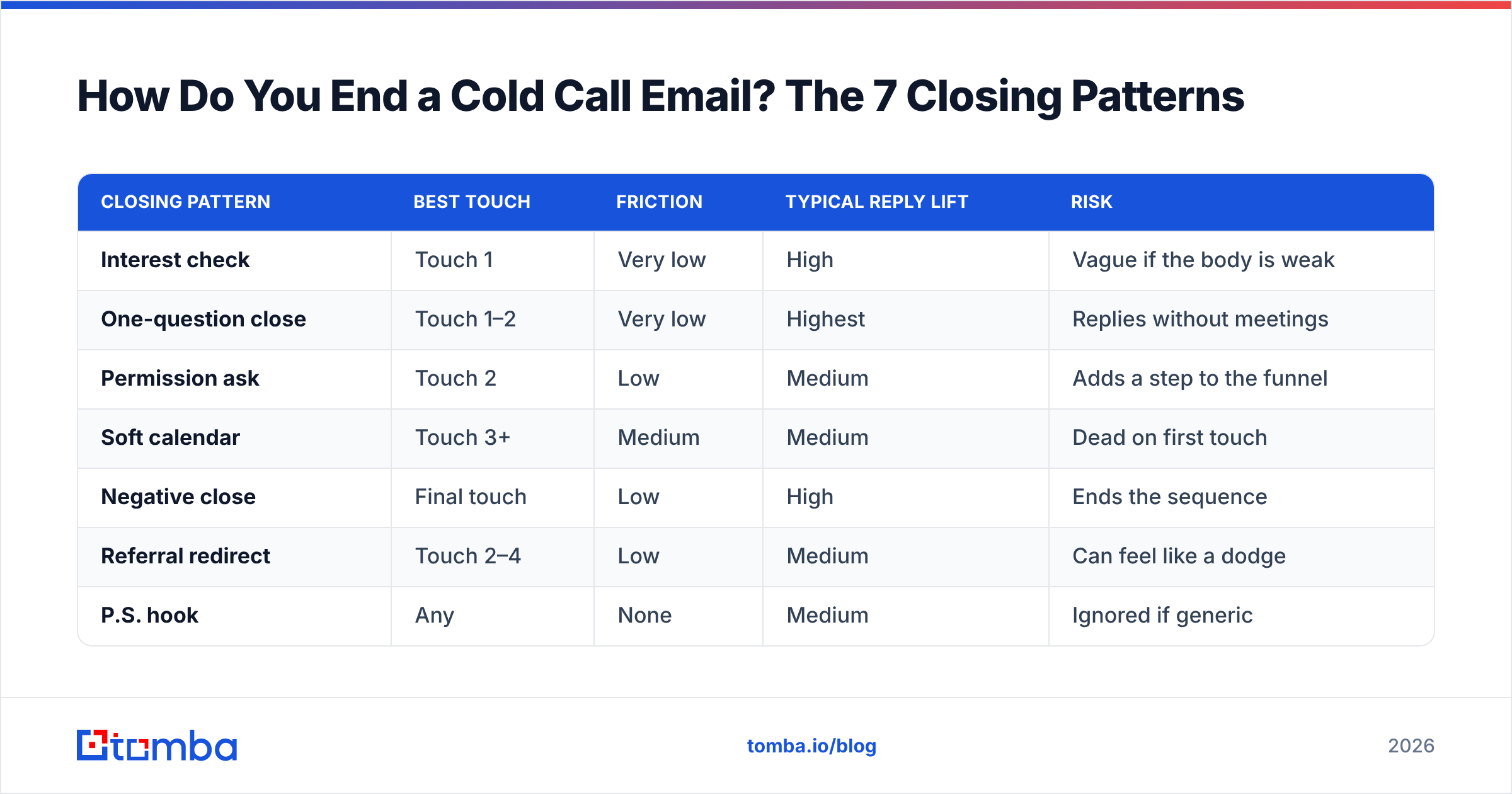
Which Closing Pattern Fits Which Touch?#
| Closing pattern | Best touch | Friction | Typical reply lift | Risk |
|---|---|---|---|---|
| Interest check | Touch 1 | Very low | High | Vague if the body is weak |
| One-question close | Touch 1–2 | Very low | Highest | Replies without meetings |
| Permission ask | Touch 2 | Low | Medium | Adds a step to the funnel |
| Soft calendar | Touch 3+ | Medium | Medium | Dead on first touch |
| Negative close | Final touch | Low | High | Ends the sequence |
| Referral redirect | Touch 2–4 | Low | Medium | Can feel like a dodge |
| P.S. hook | Any | None | Medium | Ignored if generic |
The pattern most teams over-use is the soft calendar on touch one. The pattern most teams under-use is the referral redirect — it's the only close that turns a hard no into a usable outcome.
What Should the Sign-Off Actually Say?#
Sign-offs get argued about far more than they deserve. The delta between a good sign-off and a mediocre one is small. The delta between a good CTA and a bad one is enormous. Spend your energy accordingly.
That said, here's the honest read:
- "Best," / "Thanks," — neutral, safe, invisible. Invisible is the goal.
- "Cheers," — fine in UK/AU markets and in startup-to-startup selling. Slightly off in US enterprise finance or healthcare.
- "Regards," / "Kind regards," — reads templated. It's the sign-off of mail merges everywhere.
- "Talk soon," — presumptuous on a first touch. You have no relationship to be talking soon from.
- No sign-off at all — increasingly common, mirrors how internal colleagues actually email each other. Works if the rest of your email is short and unformatted.
One rule that does move numbers: keep the signature block minimal. A first-touch email with a five-line HTML signature, a logo image, a banner, and three social icons looks like marketing, and marketing gets filtered. Plain text, name, company, one link. If you want to test how your signature renders and scores, run the message through a spam checker before you send at volume — and use an email signature generator that outputs clean text rather than a table-based image block.
How Does the Ending Affect Deliverability?#
More than you'd expect, because closing lines are where the spam triggers cluster.
Common offenders in the last paragraph: "Act now," "limited time," "no obligation," "100% free," multiple exclamation marks, and — the big one — link-heavy closes. A first-touch email with a calendar link, a website link, a case-study link, and a signature with social icons has five outbound links in a message under 120 words. That link-to-text ratio is a classic filtering signal.
Practical rules for the closing block:
- One link maximum on a first touch. Ideally zero.
- No tracked-link shorteners. Bit.ly-class domains carry aggregate reputation you don't control.
- No image-only sign-off. Filters can't read it and neither can screen readers.
- No unsubscribe theater. A cold 1:1 email should read like a person wrote it. A styled unsubscribe footer says "bulk send" to both the filter and the human.
Deliverability also depends on the list, not just the copy. Bounces from bad addresses damage sender reputation fast, and a damaged domain means even a perfectly written close never gets seen. Run your list through an email verifier before every campaign, and treat anything above a 3% bounce rate as a data problem, not a copy problem.
Is a Calendar Link Better Than a Question?#
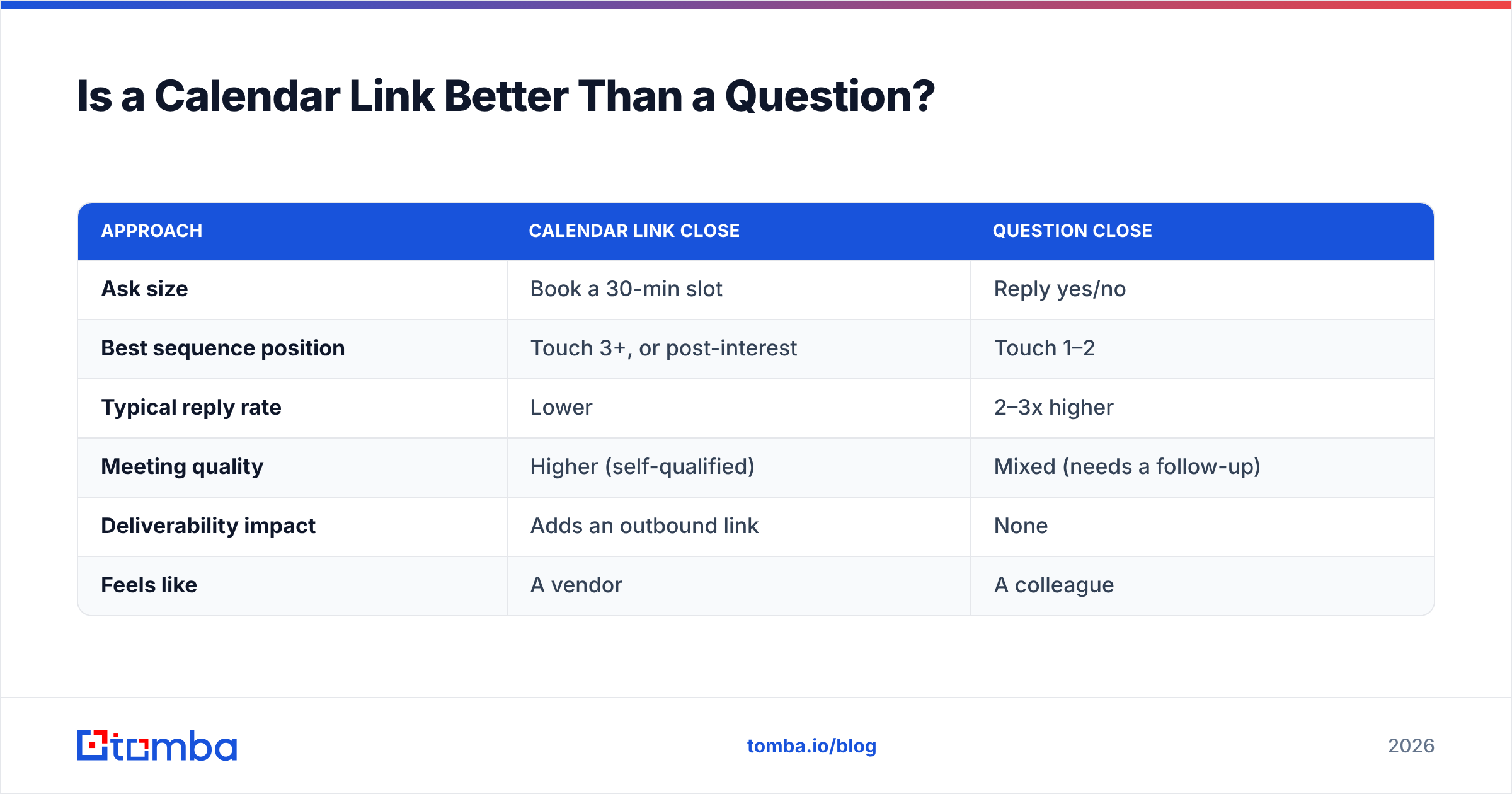
Not on the first touch. Here's the tradeoff laid out.
| Approach | Calendar link close | Question close |
|---|---|---|
| Ask size | Book a 30-min slot | Reply yes/no |
| Best sequence position | Touch 3+, or post-interest | Touch 1–2 |
| Typical reply rate | Lower | 2–3x higher |
| Meeting quality | Higher (self-qualified) | Mixed (needs a follow-up) |
| Deliverability impact | Adds an outbound link | None |
| Feels like | A vendor | A colleague |
The nuance: calendar links aren't bad, they're just early. Once someone has replied "sure, what is this about," dropping a scheduling link is the fastest path to a booked meeting. Leading with it on a cold first touch asks a stranger to spend 30 minutes on a claim they haven't evaluated yet.

What Does a Full Cold Call Email Look Like With a Strong Close?#
Here's a complete example — post-voicemail follow-up, B2B SaaS, ~70 words.
Subject: your voicemail + the Q3 headcount thing
Hi Dana,
Left you a voicemail — short version here so you don't have to listen to it.
Saw the three SDR roles you posted last month. Teams hiring that fast usually hit the same wall: reps burning 6+ hours a week hunting for contact data instead of dialing.
We got Northbeam's team back about a day a week on that.
Worth a conversation, or is prospecting data already solved on your side?
Best,
Ali
P.S. Happy to just send the two-line version of how they did it if a call is overkill.
What that ending does: single ask, a named exit ("already solved on your side?"), and a P.S. that offers a lower-commitment alternative for anyone who's mildly curious but not meeting-curious. Three closes' worth of options without three questions.
If you want more full-message structures to adapt, our library of cold email templates covers the standard outbound plays, and the subject line generator handles the other end of the message.
How Do You Test Which Ending Works?#
Test the CTA, not the sign-off. You will never get statistical significance on "Best," versus "Thanks," and even if you did, the lift would be noise.
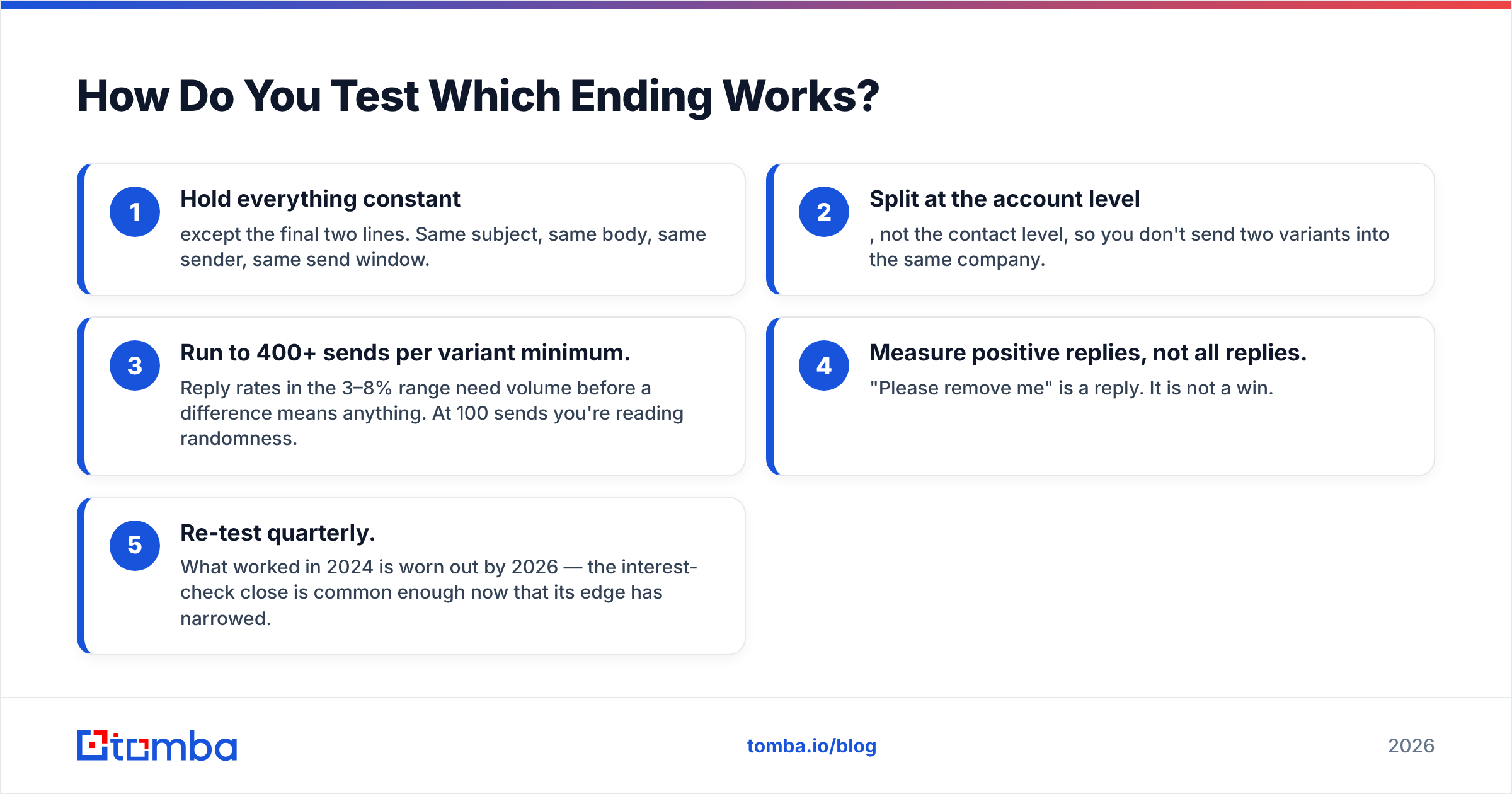
A workable test design:
- Hold everything constant except the final two lines. Same subject, same body, same sender, same send window.
- Split at the account level, not the contact level, so you don't send two variants into the same company.
- Run to 400+ sends per variant minimum. Reply rates in the 3–8% range need volume before a difference means anything. At 100 sends you're reading randomness.
- Measure positive replies, not all replies. "Please remove me" is a reply. It is not a win.
- Re-test quarterly. What worked in 2024 is worn out by 2026 — the interest-check close is common enough now that its edge has narrowed.
Public benchmarks are worth calibrating against but not worshipping. Vendor-published outbound benchmarks on G2 and HubSpot's sales research give you a sanity range; your own list quality, ICP fit, and domain reputation will swamp any published average.
What Are the Endings You Should Delete Today?#
Straightforward list. If any of these are in your active sequences, cut them this week.
- "Looking forward to hearing from you." Adds words, adds no ask. Pure filler.
- "Let me know if you're interested." Passive. Puts the entire burden of defining the next step on the recipient.
- "I'll follow up next week if I don't hear back." Announcing your own persistence reads as a threat of more email.
- "Does Tuesday at 10 or Thursday at 3 work better?" on touch one. Assumes a yes you haven't earned.
- "Circling back / bumping this to the top of your inbox." Says nothing new. If you have nothing new, add something new rather than announcing the bump.
- "Just checking in." The single most-deleted phrase in outbound.
Replace each with one direct question the recipient can answer in under ten words. That's the whole rule.
Does Any of This Matter If Your Data Is Wrong?#
No — and this is where most closing-line optimization gets wasted.
A perfectly closed email sent to a stale address bounces. Sent to a role-based catch-all (info@, sales@), it disappears into a shared box nobody owns. Sent to someone who left the company eight months ago, it does nothing but tax your domain.
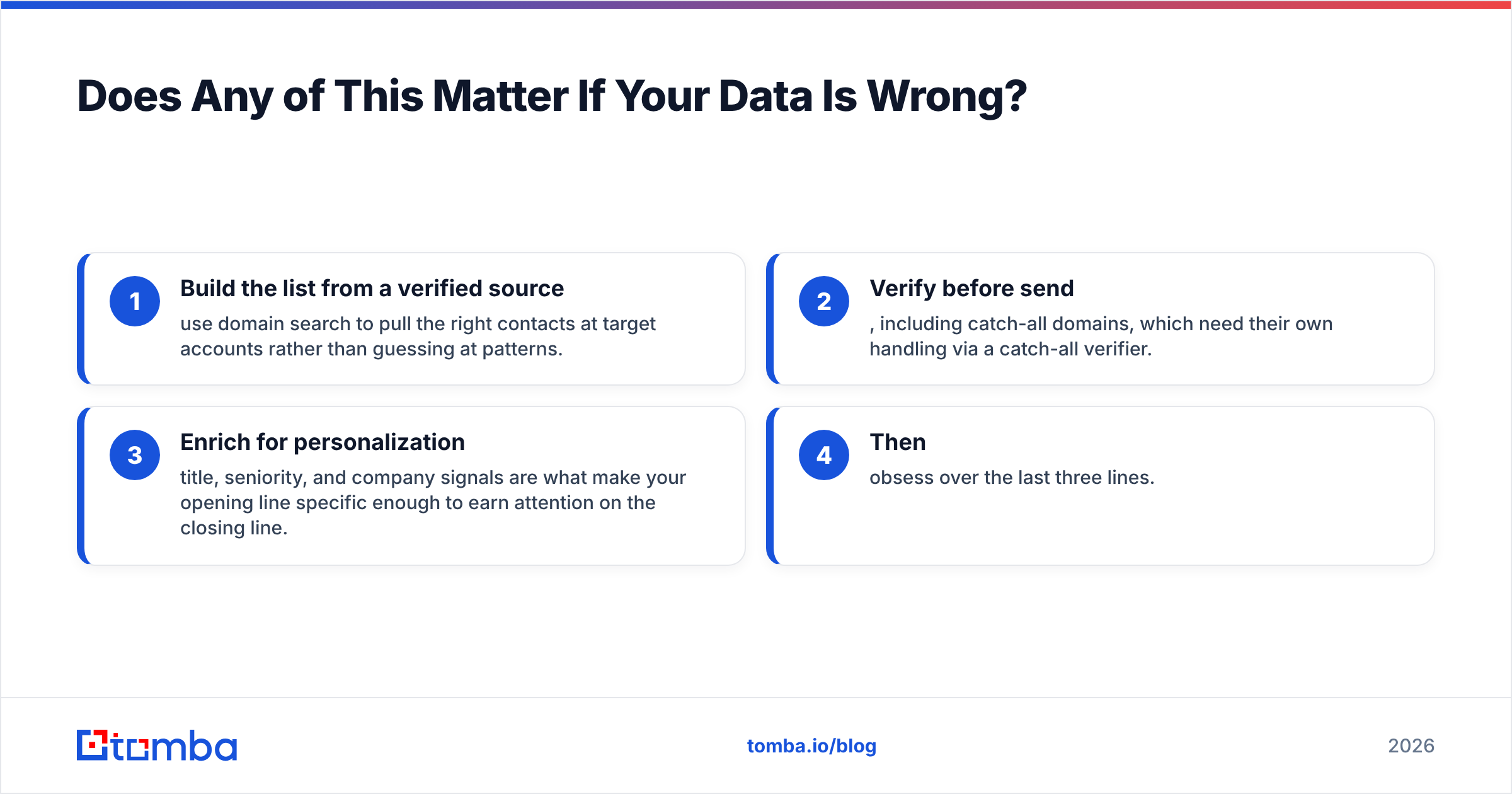
The order of operations that actually works:
- Build the list from a verified source — use domain search to pull the right contacts at target accounts rather than guessing at patterns.
- Verify before send, including catch-all domains, which need their own handling via a catch-all verifier.
- Enrich for personalization — title, seniority, and company signals are what make your opening line specific enough to earn attention on the closing line.
- Then obsess over the last three lines.
Teams that flip steps 1 and 4 spend months A/B testing closes against a list that was never going to reply.
Start With a List That Deserves Your Best Closing Line#
The best closing line in outbound is worthless if it lands in a dead inbox. Before you rewrite another CTA, fix the input: Tomba's Email Finder pulls verified professional addresses by name, company, or domain, with catch-all handling and confidence scoring built in — so your reply-rate tests measure your copy, not your bounce rate. The free tier covers 25 searches a month, and paid plans start at $49/mo on Tomba pricing if you're running real volume.
Get the data right. Then the close does its job.
Related guides#
// get started
Find, verify and enrich your first contacts today
Start on the free plan with 25 searches a month, then scale when your team is ready.
Free plan · No credit card required · GDPR & CCPA
// about the author