How to Enrich CRM Data in 2026: A Practical 7-Step Guide
Stale CRM records quietly kill pipeline. Here's a concrete, step-by-step process for enriching CRM data in 2026 — what to enrich, which tools to use, and how to keep it clean.
TL;DR
- CRM data decays roughly 25-30% per year — job changes, rebrands, and domain switches quietly break your outbound before anyone notices.
- Enrichment is not "buy a database." It is a repeatable loop: audit → define required fields → match → fill → verify → write back → re-run on a schedule.
- Start with 8-12 fields that actually drive routing, scoring, and personalization. Enriching 60 fields you never query is a waste of credits.
- Verify every email you write back. An enrichment provider that returns unverified addresses will torch your sender reputation faster than it fills your pipeline.
- Budget realistically: usable enrichment for a small team runs $49-$99/mo; enterprise waterfall setups run into five figures annually.
What does "enrich CRM data" actually mean?#
Enriching CRM data means taking the thin record you already have — often just a company name, a website, or a first-and-last name — and appending the missing attributes that let your team act on it: verified work email, direct phone, job title, seniority, company size, industry, tech stack, funding stage, and LinkedIn URL.
Think of it like a library catalogue. You have a shelf of books with only the titles written on the spine. Enrichment is the process of adding the author, publication year, ISBN, and subject tags so you can actually find the right book when a customer asks. Without it, your "database" is just a pile.
Two things people conflate, and shouldn't:
- Enrichment adds attributes to a record that already exists in your CRM.
- Prospecting creates new records that were never there.
Both use similar data sources. But the workflows, the QA, and the failure modes are different. Enrichment failures are silent — a wrong title sits in your CRM for eighteen months and quietly misroutes leads. Prospecting failures are loud: bounces, spam complaints, angry replies.
Why does CRM data go stale so fast?#
Because people move. Industry consensus across HubSpot and Salesforce research puts B2B contact decay at roughly 22-30% annually, and it compounds:
- Job changes. Roughly one in five B2B professionals changes roles each year. The email dies, the title is wrong, and the account owner never hears about it.
- Company changes. Rebrands, acquisitions, and domain migrations break the email pattern for everyone at the company at once.
- Rep entry. Manually typed records carry typos, inconsistent picklist values, and "Marketing Mgr" vs "Marketing Manager" vs "marketing manager."
- Form fills. Self-reported data is the least reliable input you have. People type
asdf@gmail.comto get the whitepaper.
The practical consequence: if you last enriched 18 months ago, roughly a third of your database is wrong right now, and you have no signal telling you which third.
How do you enrich CRM data step by step?#
Here's the loop. Run it once to catch up, then automate steps 3-7.
- Audit what you have. Export your contacts and accounts. Count fill rates per field. You will almost certainly find that
phoneis 12% filled andindustryis 40% filled with junk values. This audit defines your target, not vendor marketing. - Define the enrichment schema. Pick 8-12 fields that a workflow actually consumes — routing rules, lead scoring, sequence merge tags, territory assignment. Every field beyond that is credit spend with no downstream reader.
- Deduplicate before you enrich. Enriching three copies of the same account burns 3x credits and creates three conflicting records. Run a dedupe pass on domain (accounts) and email (contacts) first. A remove duplicates pass on the export takes minutes.
- Choose your match key. Domain is the strongest key for accounts. For contacts,
first name + last name + company domainbeats email, because email is exactly the field you're trying to fix. LinkedIn URL is the cleanest key if you have it. - Run the enrichment. Batch upload for the backfill, API for anything ongoing. Keep the provider's confidence score in a custom field — you'll want it during QA.
- Verify before writing back. Every enriched email goes through an email verifier before it touches the CRM. Deliverable, catch-all, and risky get different treatment (more on this below).
- Write back with rules, not overwrites. Never blind-overwrite a rep-entered field. Fill blanks first; flag conflicts for review; log the source and timestamp on every enriched value.
That last point is where most enrichment projects go wrong. A single bad sync that overwrites 40,000 manually-corrected titles is a very bad Tuesday.
Which fields are actually worth enriching?#
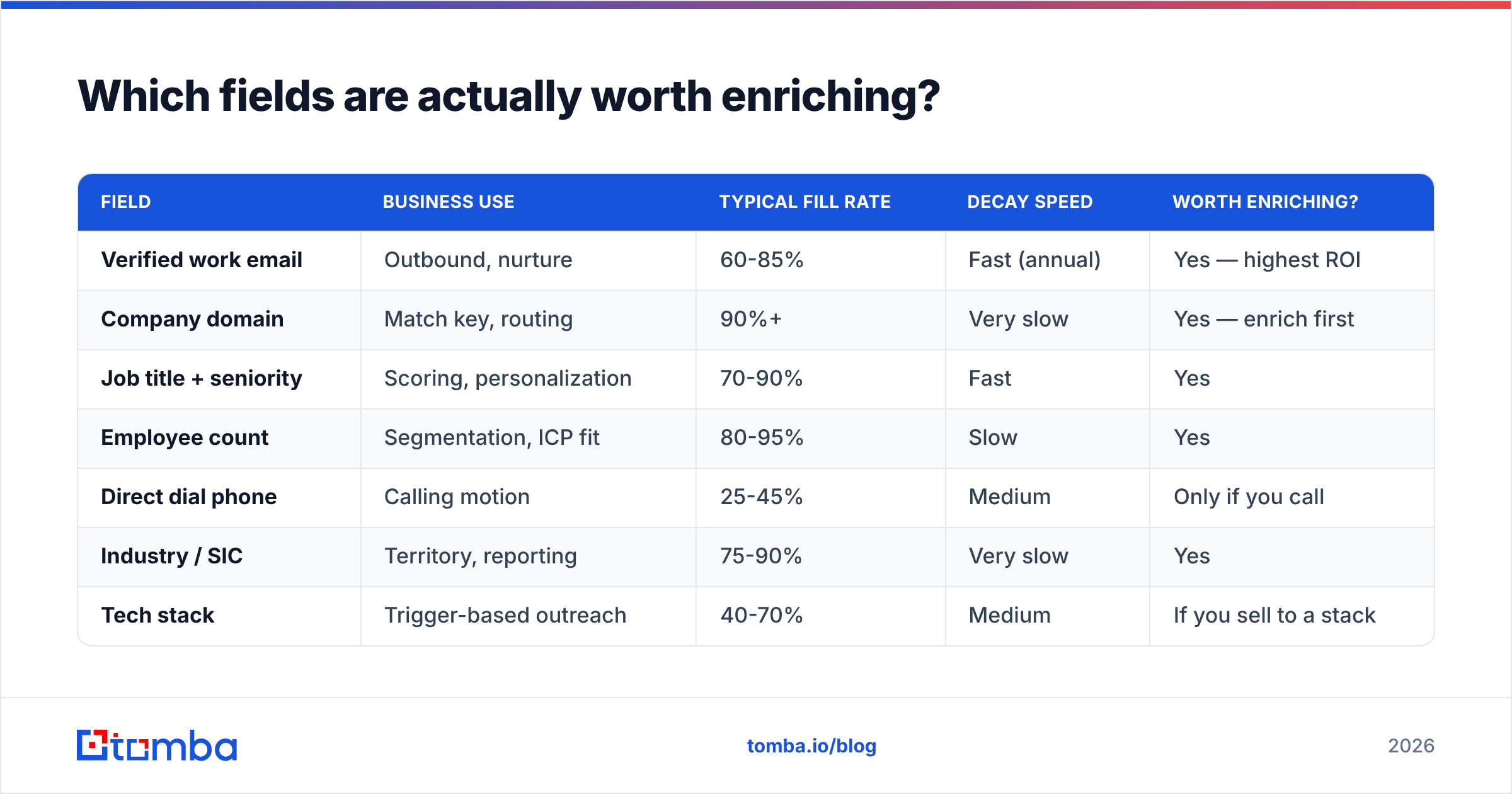
Not all fields earn their credit cost. Here's how they stack up in practice:
| Field | Business use | Typical fill rate | Decay speed | Worth enriching? |
|---|---|---|---|---|
| Verified work email | Outbound, nurture | 60-85% | Fast (annual) | Yes — highest ROI |
| Company domain | Match key, routing | 90%+ | Very slow | Yes — enrich first |
| Job title + seniority | Scoring, personalization | 70-90% | Fast | Yes |
| Employee count | Segmentation, ICP fit | 80-95% | Slow | Yes |
| Direct dial phone | Calling motion | 25-45% | Medium | Only if you call |
| Industry / SIC | Territory, reporting | 75-90% | Very slow | Yes |
| Tech stack | Trigger-based outreach | 40-70% | Medium | If you sell to a stack |
| Funding / revenue | Prioritization | 30-60% | Medium | Marginal for SMB sellers |
| Personal social handles | Rarely queried | 20-40% | Fast | No |
The rule of thumb: if no automation, dashboard, or sequence reads the field, don't pay to fill it. Fill rates below 50% are common for direct dials — plan your calling motion around that, not around a vendor's marketing claim of "95% coverage."
Which CRM enrichment approach should you pick?#
There are four realistic architectures, and they cost wildly different amounts.
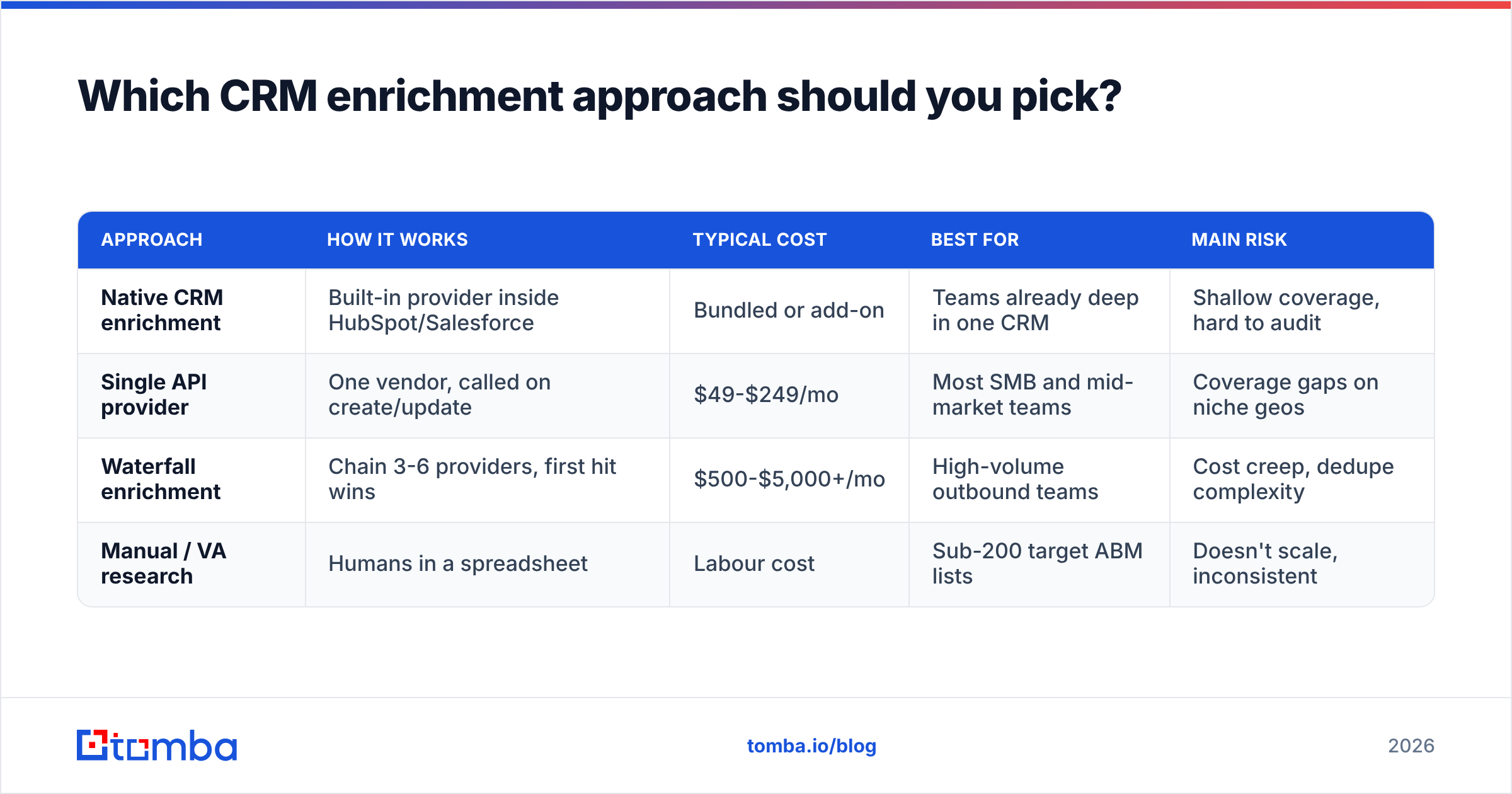
| Approach | How it works | Typical cost | Best for | Main risk |
|---|---|---|---|---|
| Native CRM enrichment | Built-in provider inside HubSpot/Salesforce | Bundled or add-on | Teams already deep in one CRM | Shallow coverage, hard to audit |
| Single API provider | One vendor, called on create/update | $49-$249/mo | Most SMB and mid-market teams | Coverage gaps on niche geos |
| Waterfall enrichment | Chain 3-6 providers, first hit wins | $500-$5,000+/mo | High-volume outbound teams | Cost creep, dedupe complexity |
| Manual / VA research | Humans in a spreadsheet | Labour cost | Sub-200 target ABM lists | Doesn't scale, inconsistent |
For most teams, the single-API route is the right starting point, and you graduate to waterfall only when you can prove a coverage gap costs more than the second provider. Vendor comparison sites like G2 are useful for shortlisting, but treat coverage percentages there as directional — every vendor benchmarks against a list that flatters them.
If you're evaluating specific tools, BookYourData is a solid option when you want pre-built, pay-as-you-go B2B lists with verified contacts rather than a per-record API call — a genuinely different buying model that suits list-first teams. Tomba sits on the API-and-batch side: data enrichment, domain search, and verification under one key, with the Tomba API for real-time calls on record create.
How do you handle catch-all and risky results?#
This is the part most guides skip, and it's where deliverability gets destroyed.
Verification returns more than pass/fail. You'll see roughly four buckets:
- Deliverable — the mailbox exists and accepts mail. Write it back, mark it safe for sending.
- Undeliverable — hard bounce guaranteed. Never write it to a sendable field. Store it in a
rejected_emailfield if you want an audit trail. - Catch-all (accept-all) — the domain accepts everything, so SMTP can't confirm the specific mailbox. Common at enterprises with security gateways. Roughly 15-25% of B2B domains behave this way.
- Risky / unknown — greylisting, temporary failures, disposable domains.
Catch-alls are the judgement call. Don't discard them and don't blast them. Route them through a catch-all verifier that uses pattern confidence and secondary signals, then send to the confident subset on a warmed domain with a low daily cap. Keep them out of your primary sending domain's volume until they prove out.
Set a hard rule in your write-back logic: only deliverable and high-confidence catch-all values populate the field your sequencer reads. Everything else lands in a staging field. This single rule prevents most enrichment-driven bounce spikes.
How often should you re-enrich?#
Enrichment is a subscription, not a purchase. A workable cadence:
- On create — enrich every new record via API within seconds of it entering the CRM. This is the highest-value trigger and costs the least, because you're doing one record at a time.
- Quarterly — re-verify all emails on active pipeline accounts. Cheap, catches job changes before a rep emails a dead box.
- Semi-annually — full re-enrichment of contacts with no activity in 180 days.
- Event-triggered — when a company's domain changes, when an account moves to a new tier, or when a sequence bounces, re-enrich the whole account, not just the one contact. A bounce on one address usually means the pattern changed for everybody.
- Annually — audit the schema itself. Drop fields nobody queried in twelve months.
Run this and your decay rate drops from ~30% to something closer to 8-10%, which is the practical floor.
What does CRM enrichment cost in 2026?#
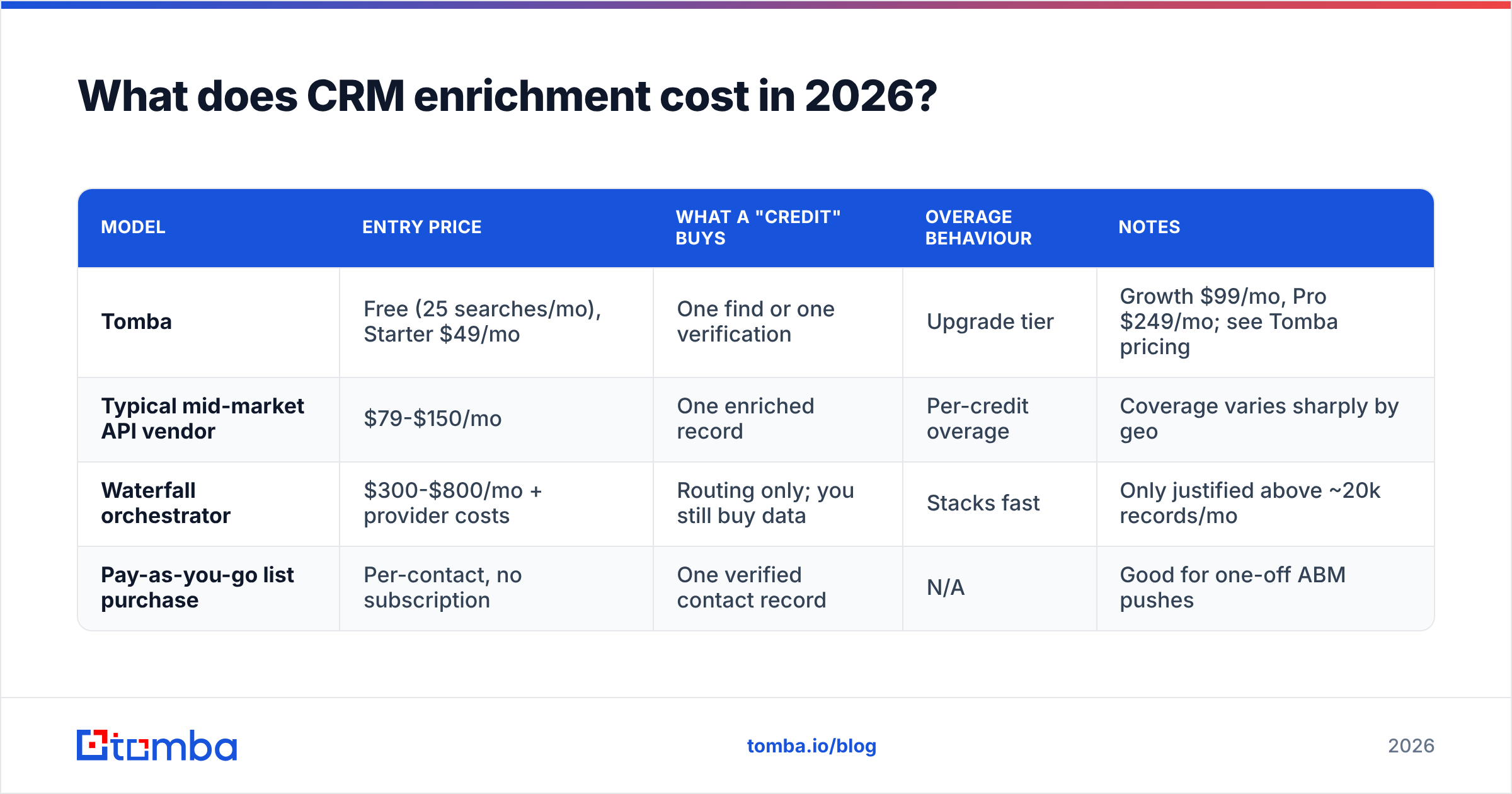
Pricing models split into per-credit, per-record, and flat-rate list buys. A rough comparison of entry points:
| Model | Entry price | What a "credit" buys | Overage behaviour | Notes |
|---|---|---|---|---|
| Tomba | Free (25 searches/mo), Starter $49/mo | One find or one verification | Upgrade tier | Growth $99/mo, Pro $249/mo; see Tomba pricing |
| Typical mid-market API vendor | $79-$150/mo | One enriched record | Per-credit overage | Coverage varies sharply by geo |
| Waterfall orchestrator | $300-$800/mo + provider costs | Routing only; you still buy data | Stacks fast | Only justified above ~20k records/mo |
| Pay-as-you-go list purchase | Per-contact, no subscription | One verified contact record | N/A | Good for one-off ABM pushes |
Do the arithmetic on your actual volume before signing anything. A team enriching 2,000 records a month rarely needs more than a $99/mo plan. A team enriching 200,000 needs a real waterfall conversation and a data engineer.
One cost people forget: the cost of bad data you already paid for. If 30% of your enriched emails bounce, you didn't save money by picking the cheap vendor — you paid for the credits and the domain reputation damage. Price per usable record is the only metric that matters.
How do you connect enrichment to your CRM without a rip-out?#
You don't need a data warehouse to start. Three patterns, in ascending order of effort:
- Native integration. If your provider has a direct connector, use it. Tomba's HubSpot integration and Salesforce integration push enriched values straight into standard and custom fields with field-mapping rules.
- Automation layer. Zapier or Make sitting between a CRM webhook and the enrichment API covers most "on create" needs without an engineer. Set the trigger on record creation, call enrichment, call verification, then a conditional write-back that only fires on
deliverable. - Direct API. For volume or custom logic, call the API from your own middleware. This is the only pattern that lets you implement real waterfall logic, custom confidence thresholds, and proper audit logging.
Whichever you pick, log three things on every enriched field: the source, the confidence score, and the timestamp. Without those, you can't debug a bad sync six months later, and you can't prove provenance during a GDPR request. Speaking of which — document your lawful basis for processing enriched B2B contact data before you scale this, not after.
What are the most common enrichment mistakes?#
- Enriching before deduplicating. Wastes credits and multiplies conflicts.
- Blind overwrites. Destroys rep-verified data. Always fill-blanks-first with conflict flagging.
- Skipping verification. Enrichment providers return the most likely email. Likely is not deliverable.
- Chasing 100% fill rate. Direct dials cap around 40-50% for most ICPs. Chasing the last 10% costs more than the pipeline it produces.
- No re-enrichment schedule. A one-time cleanup is a nice quarter and a useless year.
- Ignoring the confidence score. Providers hand you a number. Use it as a routing signal, not decoration.
Getting started without overcommitting#
Run a 500-record pilot before you sign an annual contract. Take a slice of your CRM you know well — ideally an account list where reps can eyeball the output — enrich it, verify it, and manually spot-check 50 records. Measure two things: match rate (how many records got any data back) and accuracy (how many of those were right). Vendors quote the first and quietly hope you don't measure the second.
If the pilot clears 70% match with 90%+ accuracy on verified emails, you have a workable provider. Below that, test a second one on the same 500 records — same list, same day, direct comparison.
Ready to start? Run your CRM export through the Tomba Email Finder to fill in missing work emails, then verify the results before they touch your CRM. The free tier covers 25 searches a month — enough to pilot on a real slice of your database — and Starter at $49/mo handles most small-team backfills. Your reps will notice the difference the first week they stop emailing dead mailboxes.
Related guides#
// get started
Find, verify and enrich your first contacts today
Start on the free plan with 25 searches a month, then scale when your team is ready.
Free plan · No credit card required · GDPR & CCPA
// about the author