How to Find Anyones Email Address in 2026: 9 Methods
How to find anyones email address in 2026: nine methods ranked by hit rate and cost, from free Google operators to email finder APIs. Plus the verification step most people skip.
Here is how to find anyones email address in 2026: nine methods, ranked by hit rate, cost, and whether they scale.
TL;DR
- The fastest reliable path is a dedicated email finder. Name and company domain go in, a verified address comes out, usually in under two seconds.
- Free methods still work. Google search operators, GitHub commit logs, WHOIS, and personal websites hit about 20-40% of the time, and none of them scale past a handful of contacts.
- Roughly 80% of B2B addresses follow one of six naming patterns. Learn the pattern for a domain and you can predict the rest.
- Never send to an unverified guess. A 5% bounce rate is enough to damage your sending domain, and mailbox providers act on it fast.
- Budget reality: free tools handle 10-25 lookups a month. Paid plans start around $49/mo for a few thousand credits.
What does "finding an email address" actually mean?#
Two very different problems hide under the same question. Mixing them up is why most people waste an afternoon.
Problem one: you know the company. You want to reach the VP of Engineering at Acme Corp. You know the domain (acme.com), you know the name (Dana Whitfield), and you need the address. This one is solved. Pattern detection plus SMTP verification gets you 90%+ accuracy on most domains.
Problem two: you only know the person. You met someone at a conference. You have a LinkedIn profile or a Twitter handle, but no company domain. This is harder. Find the employer first, then fall back to problem one.
Almost every tool and tactic below solves problem one. If you are stuck on problem two, start with enrichment. Turn the name or profile URL into a company, then look for the address.
One more distinction: finding and verifying are separate steps. A tool that hands you dana@acme.com without telling you whether that mailbox accepts mail has done half the job. Sending to unverified addresses is how you land in spam folders for good.
Why do most people fail at this?#
Three reasons, and none of them are technical.
They guess and send. The email permutator approach generates dana@, d.whitfield@, and dana.w@, then blasts all of them. That worked in 2015. In 2026 it gets your domain flagged. Google and Microsoft both track bounce ratios and unknown-recipient rates at the sending-domain level.
They rely on one method. Google operators work well for people who publish. They are useless for a mid-level ops manager at a private company who has never written a blog post.
They skip catch-all handling. Between 15% and 20% of business domains accept mail at any address. Standard SMTP verification returns "valid" for asdfgh@catchalldomain.com. If you do not test for catch-alls, your list looks clean and bounces anyway.

How to find anyones email address: the 9 methods ranked#
Here they are in the order I would actually try them, from most to least efficient.
Start with the tools if you have volume.
- Email finder tool (name + domain). Highest hit rate, fastest, works at scale. It costs money past the free tier. This is the default for anyone doing more than 10 lookups a week.
- Domain search. You do not have a name yet. You want to see everyone the tool has on file at a company, with roles and departments. Use domain search when you are mapping an account rather than chasing one person.
- LinkedIn profile lookup. Paste a profile URL, get the work email. Useful when you have the person but not the company domain. A LinkedIn finder resolves both in one step.
Then the free sources, best for people who publish.
- Google search operators. Free and effective for public-facing people. Try
site:acme.com "dana whitfield" email, or"dana whitfield" "@acme.com", or"dana whitfield" (email OR contact) -site:linkedin.com. - Company contact and team pages. Check
/about,/team,/contact, and/press. Press pages are goldmines. PR contacts publish real addresses because they want to be reached. - GitHub commit history. For engineers, this is the best free source. Visit
github.com/username, open any repo, and append.patchto a commit URL. The author email sits in the header. Many developers commit with their work address.
Last resorts, when nothing else lands.
- WHOIS records. For small businesses and solo founders who registered their own domain, the registrant email is often the owner's real address. GDPR redaction killed this for EU domains. It still works plenty of other places.
- Twitter/X, personal sites, newsletters. People who publish want to be contacted. Check the bio, the site footer, and the "work with me" page.
- Ask a mutual connection or the company. Underrated. A one-line message to a support inbox, such as "who handles partnerships?", gets a real answer more often than you would expect.
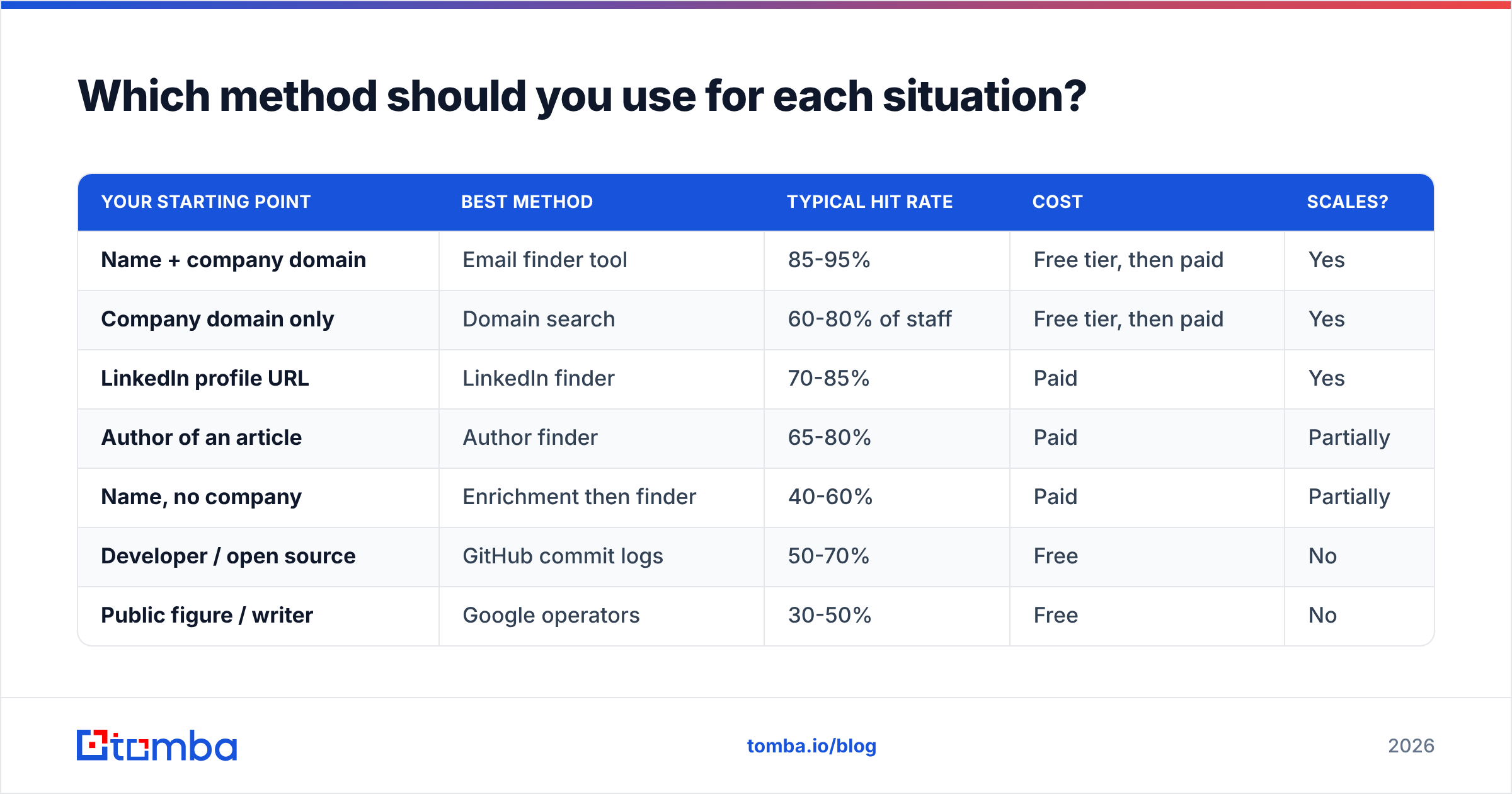
Which method should you use for each situation?#
| Your starting point | Best method | Typical hit rate | Cost | Scales? |
|---|---|---|---|---|
| Name + company domain | Email finder tool | 85-95% | Free tier, then paid | Yes |
| Company domain only | Domain search | 60-80% of staff | Free tier, then paid | Yes |
| LinkedIn profile URL | LinkedIn finder | 70-85% | Paid | Yes |
| Author of an article | Author finder | 65-80% | Paid | Partially |
| Name, no company | Enrichment then finder | 40-60% | Paid | Partially |
| Developer / open source | GitHub commit logs | 50-70% | Free | No |
| Public figure / writer | Google operators | 30-50% | Free | No |
| Small business owner | WHOIS lookup | 20-35% | Free | No |
| Anyone, last resort | Guess from pattern + verify | 60-75% | Free to cheap | Yes |
The pattern is clear. Free methods win on cost and lose on hit rate and throughput. If you need five addresses this month, stay free. If you need five hundred, the math flips. An hour of your time costs more than a month of a finder subscription.
What are the six email patterns you need to know?#
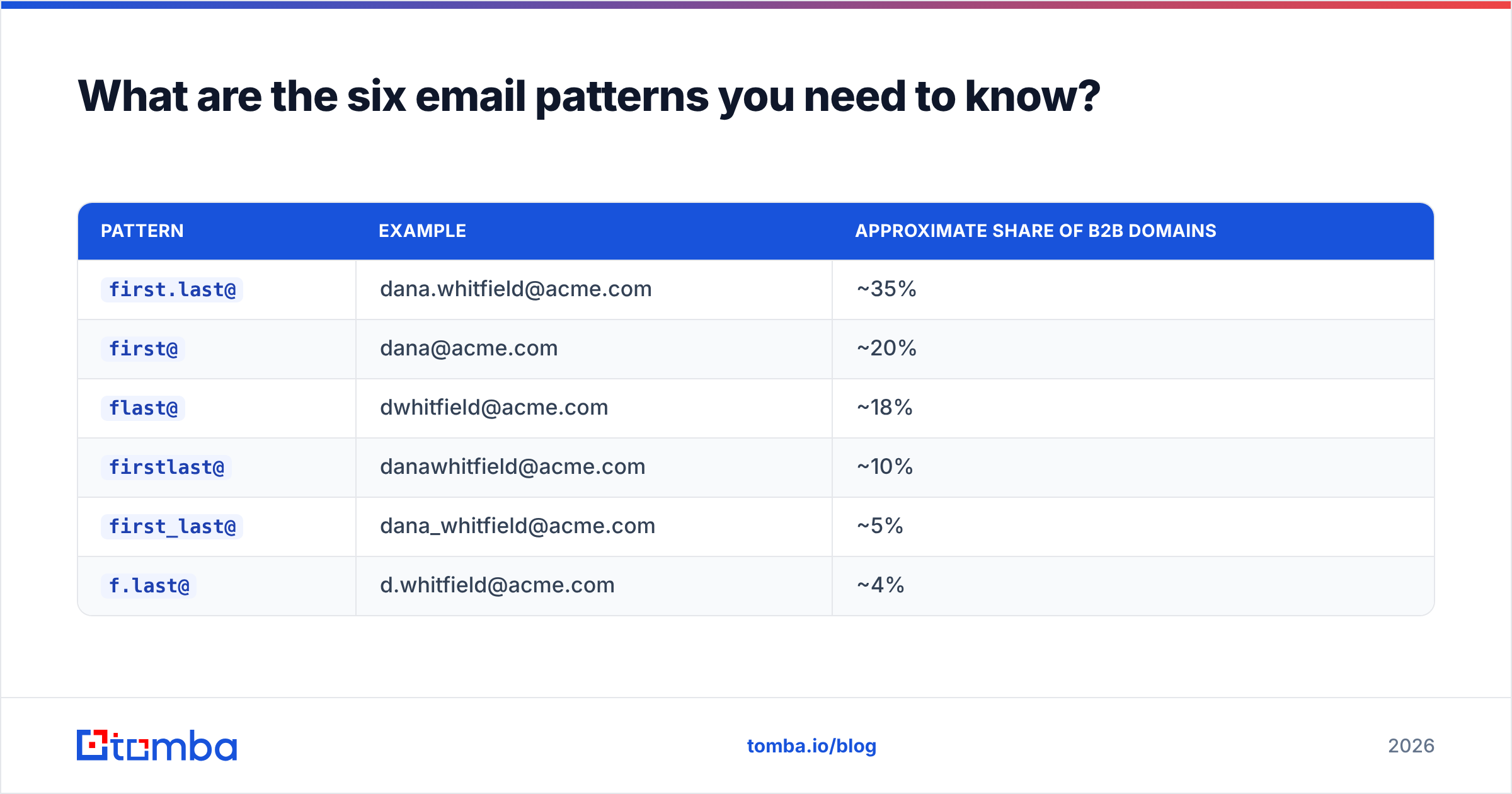
Most companies pick one format and apply it to everyone. Learn the format and you can predict any employee's address.
For "Dana Whitfield" at acme.com:
| Pattern | Example | Approximate share of B2B domains |
|---|---|---|
first.last@ |
dana.whitfield@acme.com | ~35% |
first@ |
dana@acme.com | ~20% |
flast@ |
dwhitfield@acme.com | ~18% |
firstlast@ |
danawhitfield@acme.com | ~10% |
first_last@ |
dana_whitfield@acme.com | ~5% |
f.last@ |
d.whitfield@acme.com | ~4% |
The remaining ~8% is a long tail: lastf@, employee IDs, randomized aliases, and companies that use one format for sales and another for engineering.
To detect the pattern, find one known address at the domain. A press contact, a support address that is clearly a person, or a GitHub commit all work. Reverse-engineer the format, then apply it. A company email pattern checker automates that step, and an email permutator builds the full candidate list if you want to verify several at once.
Critical caveat: a pattern gives you a candidate, not an address. Verify it before you send.

How do the main email finder tools compare?#
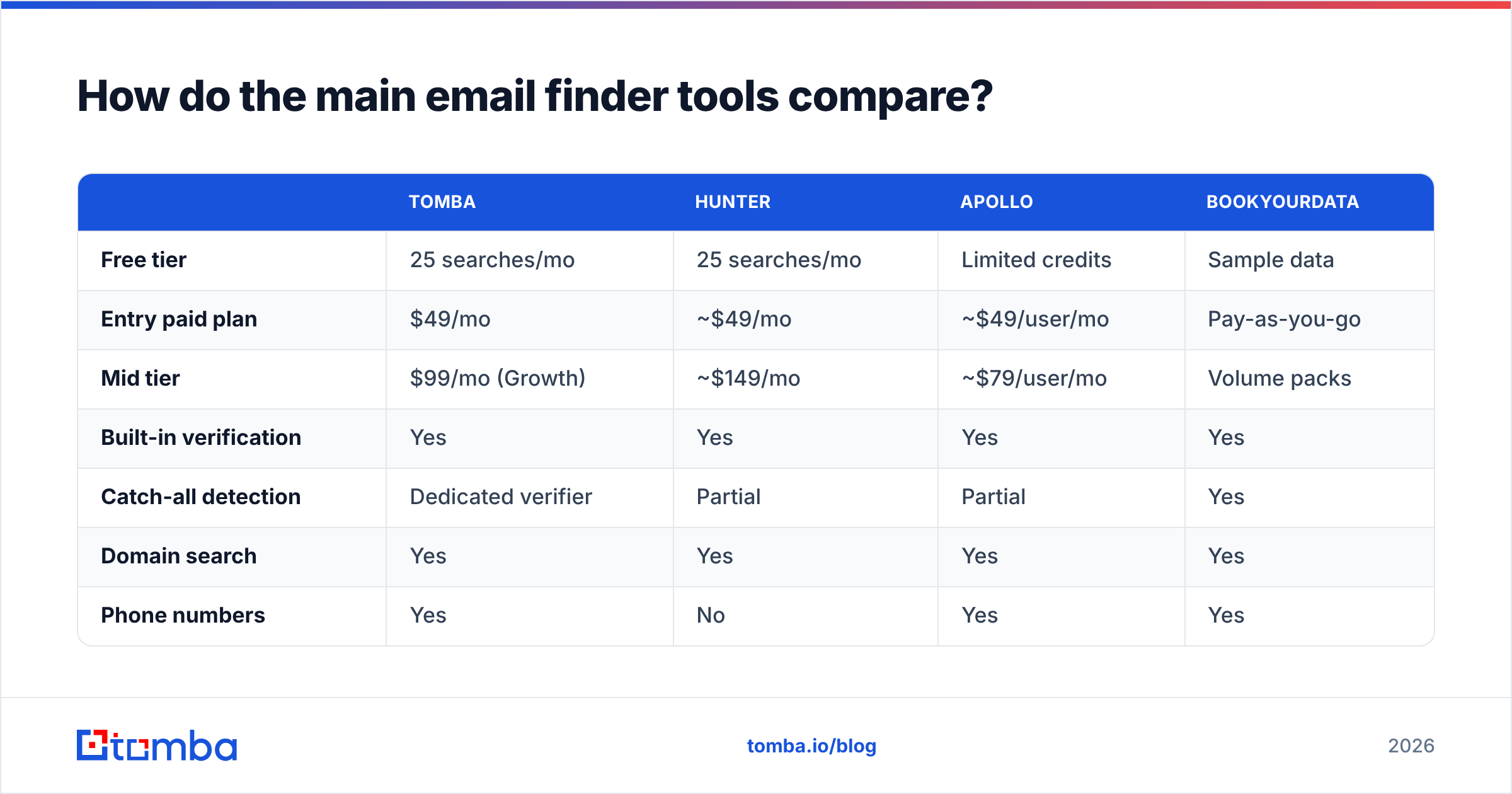
The category has consolidated. Most tools do the same core job. They differ on database size, pricing model, and what happens on a miss.
| Tomba | Hunter | Apollo | BookYourData | |
|---|---|---|---|---|
| Free tier | 25 searches/mo | 25 searches/mo | Limited credits | Sample data |
| Entry paid plan | $49/mo | ~$49/mo | ~$49/user/mo | Pay-as-you-go |
| Mid tier | $99/mo (Growth) | ~$149/mo | ~$79/user/mo | Volume packs |
| Built-in verification | Yes | Yes | Yes | Yes |
| Catch-all detection | Dedicated verifier | Partial | Partial | Yes |
| Domain search | Yes | Yes | Yes | Yes |
| Phone numbers | Yes | No | Yes | Yes |
| API access | All paid plans | Paid plans | Paid plans | Available |
| Best for | Finding + verifying at API scale | Simple domain lookups | All-in-one sales stack | One-time list purchases |
A few honest notes. Apollo bundles sequencing and a CRM, so one subscription can replace three. Seat-based pricing gets expensive on a team. Hunter is clean and well-known, with a slimmer feature set. BookYourData takes a different approach. You buy a targeted list up front instead of running lookups, which suits agencies doing one-off campaigns rather than steady prospecting.
Tomba leads on the finder-plus-verifier combination and on API access at every paid tier. That matters if you are wiring lookups into your own pipeline instead of working in a UI. See Tomba pricing for the full breakdown, and the Apollo alternative page if you are comparing head-to-head.
If you would rather check the tools yourself, G2's email-finder category has volume-weighted reviews that beat any vendor's own accuracy claim.

How do you verify an address before sending?#
This step separates a list that converts from a list that torches your domain.
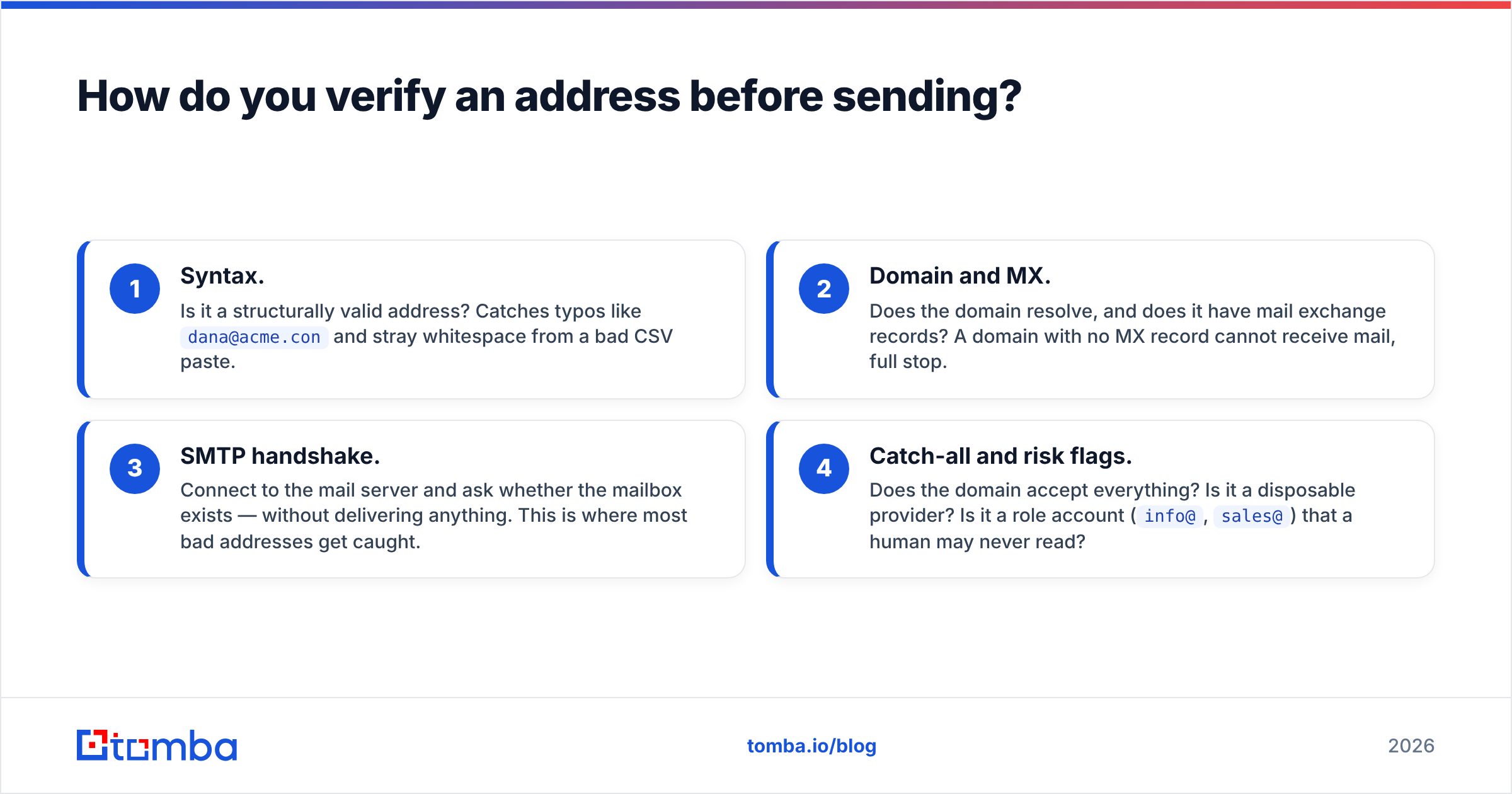
A proper verification runs four checks in sequence:
- Syntax. Is it a valid address? This catches typos like
dana@acme.conand stray whitespace from a bad CSV paste. - Domain and MX. Does the domain resolve, and does it have mail exchange records? A domain with no MX record cannot receive mail.
- SMTP handshake. Connect to the mail server and ask whether the mailbox exists, without delivering anything. Most bad addresses get caught here.
- Catch-all and risk flags. Does the domain accept everything? Is it a disposable provider? Is it a role account (
info@,sales@) that a human may never read?
Step four is where cheap tools quit. A catch-all verifier probes with a known-invalid address first. If that comes back accepted, the domain is catch-all, and a "valid" result on your real address means nothing on its own. Good tools return a confidence score instead of a yes or no, so you can decide whether to risk the send.

Aim for a bounce rate under 2%. Google's bulk sender guidelines are explicit that high unknown-recipient rates hurt delivery, and Microsoft applies similar logic. Once your sender reputation drops, recovery takes weeks of throttled sending. That costs far more than the verification credits you saved.
Run every list through an email verifier before import, not after the first bounce report comes back.
What about finding an email at scale?#
Everything changes past about 50 contacts.
Bulk upload. Drop a CSV with names and domains, get enriched addresses back. Most tools cap the per-file size, so check before you build a 10,000-row sheet. A bulk email finder handles find and verify in a single pass, which saves a round trip.
API integration. If you are enriching form submissions, CRM records, or signup events, do it programmatically. A single email finder API call at the moment a lead arrives beats a weekly batch job. The data is fresh and the workflow is invisible to your reps.
Spreadsheet add-ons. For non-technical teams, a Google Sheets formula is the shortest path from list to enriched list. No engineering ticket required.
CRM-native enrichment. Pipe results straight into HubSpot or Salesforce so reps never touch a CSV. HubSpot's own data enrichment documentation explains how the record-level model works.
One rule holds at every scale: re-verify anything older than 90 days. B2B contact data decays at roughly 2-3% per month through job changes, restructures, and domain migrations. A list you built in January is meaningfully wrong by April.
Is finding someone's email address legal?#
Short answer: finding a business email is generally legal. What you do next is what gets regulated.
GDPR (EU/UK). You can process business contact data under legitimate interest. You have to document that basis, honor deletion requests, and identify yourself in the first message. Cold B2B email to a work address is allowed. Hiding who you are is not.
CAN-SPAM (US). No opt-in required for B2B. You must include a real physical address, a working unsubscribe link, honest headers, and a subject line that matches the content.
CASL (Canada). Strictest of the three. You generally need consent, express or implied, before you send. Implied consent from a published business address exists, but it expires.
Four guardrails keep you compliant everywhere. Target business addresses only. Keep relevance high. Honor opt-outs within 24 hours. Never scrape personal Gmail or Yahoo accounts for cold outreach. The Wikipedia overview of email marketing law is a decent starting map, though it is no substitute for your own counsel at volume.
What's the fastest workflow end to end?#
This sequence works for most B2B use cases, assuming you start from a target company list:
- Run a domain search on each company to see who is there and in what department.
- Pick your targets by role, not by whatever address the tool surfaced first.
- Find the specific addresses with name and domain lookups for anyone the domain search missed.
- Verify everything, including results the finder marked valid. You want the catch-all flag specifically.
- Drop anything below your confidence threshold. For cold outreach, 90% is a reasonable floor.
- Push to your CRM or sequencer and set a 90-day re-verification reminder.
That loop takes about 15 minutes for 100 contacts with a decent tool. Doing it by hand through Google and LinkedIn takes most of a day. At any real volume, this is the fastest way to find anyones email address.
Start with the finder, finish with the verifier#
If you take one thing from this: the address you find is a hypothesis, and the verification is the test. Skip the test and a good list turns into a deliverability problem three weeks later. Every method above answers the same question, which is how to find anyones email address you can actually send to.
For the lookup itself, Tomba Email Finder covers the main path. Name and domain in, a verified address with a confidence score out, with 25 free searches a month.
Use those free searches on contacts whose addresses you already know. That is the honest way to evaluate any tool here: run it against 20 addresses you can confirm, then see what it returns. Paid plans start at $49/mo, and every one includes API access, so the same lookup you run in the dashboard is one HTTP call away from your own stack.
Related guides#
// get started
Find, verify and enrich your first contacts today
Start on the free plan with 25 searches a month, then scale when your team is ready.
Free plan · No credit card required · GDPR & CCPA
// about the author