How to Find CEO Email Address: 9 Methods That Work
CEOs guard their inboxes, but their addresses are rarely hidden. Here are nine tested methods for finding a CEO email address, ranked by speed, cost, and hit rate.
Knowing how to find CEO email address details is a pattern problem, not a secrecy problem. Most CEOs use the same address format as everyone else at their company. This guide ranks nine methods by speed, cost, and hit rate.
TL;DR
- CEO email addresses are almost never secret — they follow the same company pattern as everyone else's. Find the pattern, apply the name, verify the result.
- The fastest reliable path: run a domain search on the company, filter by executive role, then verify the address before you send.
- Manual methods (SEC filings, press releases, WHOIS, conference speaker pages, GitHub commits) still work and cost nothing — they're just slow.
- Verification matters more for executives than anyone else. A bounce on a CEO address burns your domain reputation on the exact prospect you most wanted to reach.
- Budget reality: a paid finder runs $49–$99/month for hundreds of verified executive contacts. Manual research costs roughly 8–15 minutes per CEO.
Why is a CEO email address harder to find than a rep's?#
It isn't harder to guess. It's harder to confirm.
Think of a company's email addresses like apartment numbers in a building. Everyone follows the same numbering scheme — the CEO is just on the top floor. If you know the scheme (first.last@, flast@, first@), you already know the CEO's address with maybe 80% confidence. The problem is the last 20%.
Three things make executive addresses uniquely messy:
- Founders often predate the pattern. A founder-CEO who set up the domain in 2014 often sits on
first@company.com. Everyone hired after 2018 usesfirst.last@company.com. Two patterns, one domain. - Aliases and gatekeepers. Larger companies route
ceo@andoffice@to an executive assistant. The address resolves, accepts mail, and never reaches the person. - Aggressive spam filtering. Executive mailboxes get the heaviest filtering in the org. A message that lands fine for a sales rep can get blocked at the C-suite.
So the job splits in two: find the candidate address, then prove it's real and personally routed.

How to find CEO email address details: the 9 fastest methods#
Here are nine methods, ordered roughly by how quickly they produce a usable address.
1. Domain search on the company. Pull every known address at the company domain, then filter by seniority. This is the best first move. It shows you the pattern even when the CEO's own address isn't listed. Tools like domain search return the addresses plus the detected format, so you can build the CEO address yourself if it isn't in the index.
2. Name + domain lookup. If you already know the company domain and the CEO's full name, a direct email finder query is one call. This is the most common path, and it usually resolves in under two seconds.
3. Email pattern inference. Find any three employees at the company, note the pattern, apply it. A company email pattern check automates this. Free, fast, but you still need verification because founders break the pattern.
4. LinkedIn profile → email. The CEO's LinkedIn gives you the exact spelling of the legal name and confirms the current employer. That spelling matters — "Mike" vs "Michael" is the #1 cause of failed guesses. A LinkedIn finder turns the profile URL into an address directly.
5. SEC and regulatory filings. For any US public company, EDGAR filings list executive contact details. 10-K and DEF 14A filings often include an investor-relations email and sometimes direct executive contacts. Free, solid, and slow. Search on sec.gov.
6. Press releases and newsroom pages. Company press releases end with a media contact block. On companies under ~50 people, that block is often the founder-CEO's real address.
7. WHOIS records. Some companies registered their domain before privacy proxies became standard. For those, WHOIS still lists the registrant email — often the founder. Hit rate is low in 2026, but the cost is zero.
8. Conference speaker bios and podcast show notes. Event organizers and podcast hosts publish contact details for speakers. Search "[CEO name]" + email + site:eventsite.com.
9. Open-source and technical trails. If the CEO has a technical background, git log on any public repo exposes commit author emails. Works surprisingly often at seed-stage SaaS companies.
Which method should you use for which company size?#
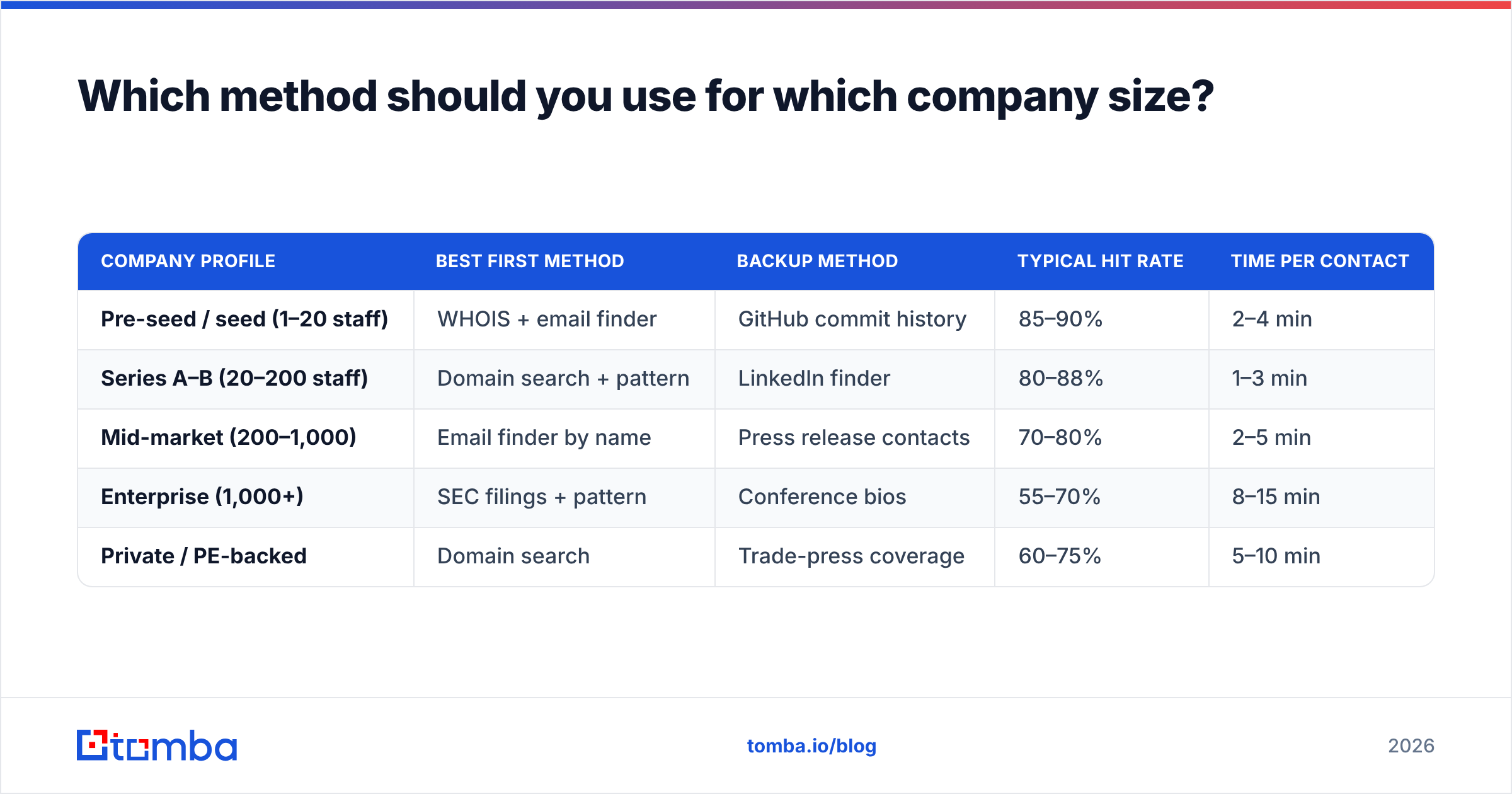
How to find CEO email address details changes with company stage. A 12-person startup and a Fortune 500 need very different approaches.
| Company profile | Best first method | Backup method | Typical hit rate | Time per contact |
|---|---|---|---|---|
| Pre-seed / seed (1–20 staff) | WHOIS + email finder | GitHub commit history | 85–90% | 2–4 min |
| Series A–B (20–200 staff) | Domain search + pattern | LinkedIn finder | 80–88% | 1–3 min |
| Mid-market (200–1,000) | Email finder by name | Press release contacts | 70–80% | 2–5 min |
| Enterprise (1,000+) | SEC filings + pattern | Conference bios | 55–70% | 8–15 min |
| Private / PE-backed | Domain search | Trade-press coverage | 60–75% | 5–10 min |
Two patterns fall out of this table. First, hit rate drops as company size grows. Big companies hide executive addresses and route more mail through assistants. Second, the small end of the market is where automated tools win. Founder addresses are usually indexed somewhere public.
How do you verify a CEO email before you send?#
Verification is the step people skip and then regret.
A bounce costs you more than a lost message. Mailbox providers read your bounce rate as a spam signal. A hard bounce at a domain you've never mailed before is the exact pattern that trips filters. Bounce more than about 2% of a batch and your email deliverability drops across every campaign you run, not just this one.
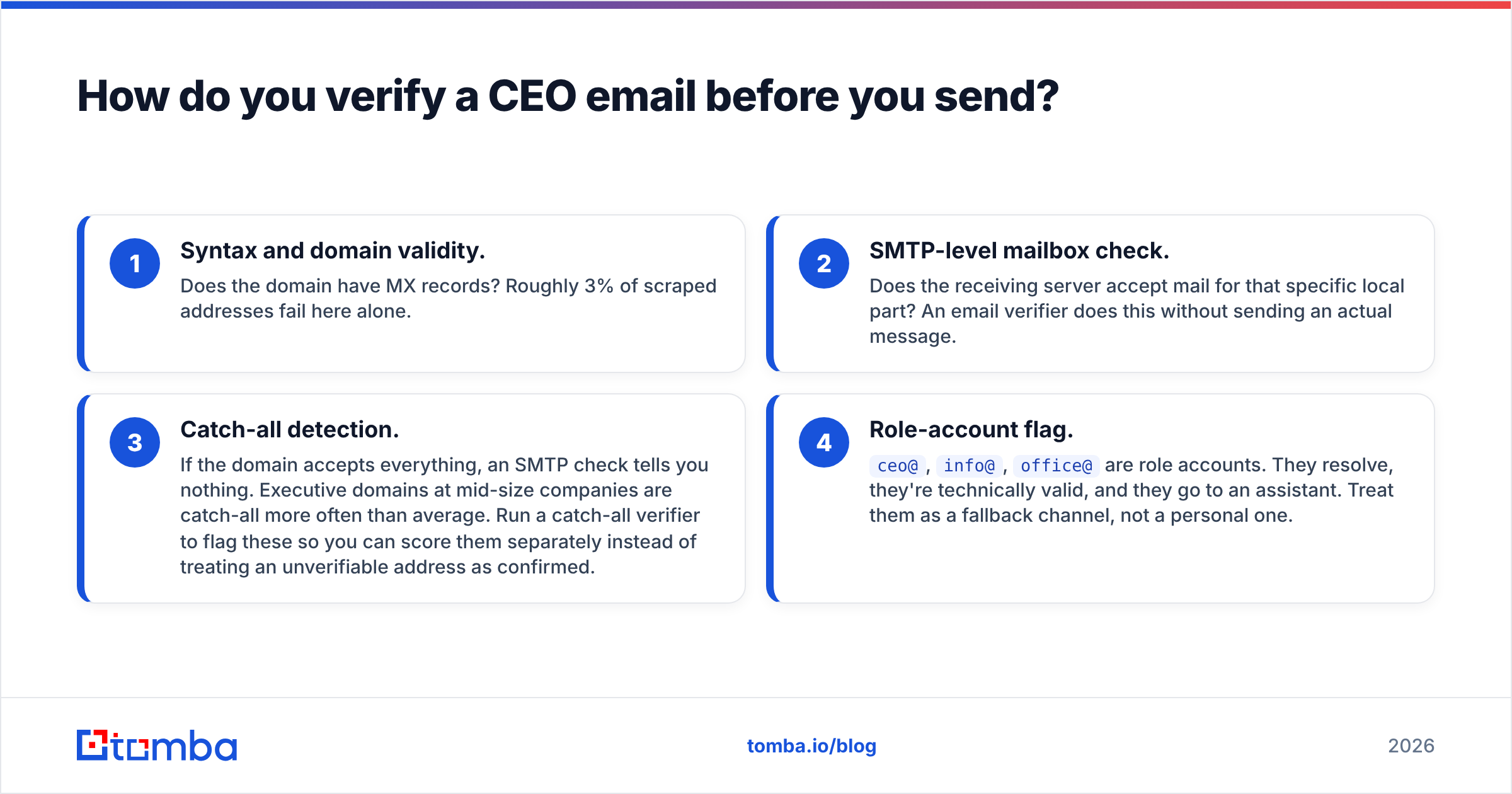
Run every candidate CEO address through these four checks:
- Syntax and domain validity. Does the domain have MX records? Roughly 3% of scraped addresses fail here alone.
- SMTP-level mailbox check. Does the receiving server accept mail for that specific local part? An email verifier does this without sending an actual message.
- Catch-all detection. If the domain accepts everything, an SMTP check tells you nothing. Executive domains at mid-size companies are catch-all more often than average. Run a catch-all verifier to flag these, so you can score them separately instead of treating them as confirmed.
- Role-account flag.
ceo@,info@,office@are role accounts. They resolve, they're technically valid, and they go to an assistant. Treat them as a fallback channel, not a personal one.
A practical rule: only send to addresses that pass SMTP verification and are not role accounts. Park catch-all results in a separate, lower-priority sequence with a softer opener, since you can't confirm the mailbox exists.
Which tools actually find executive emails?#
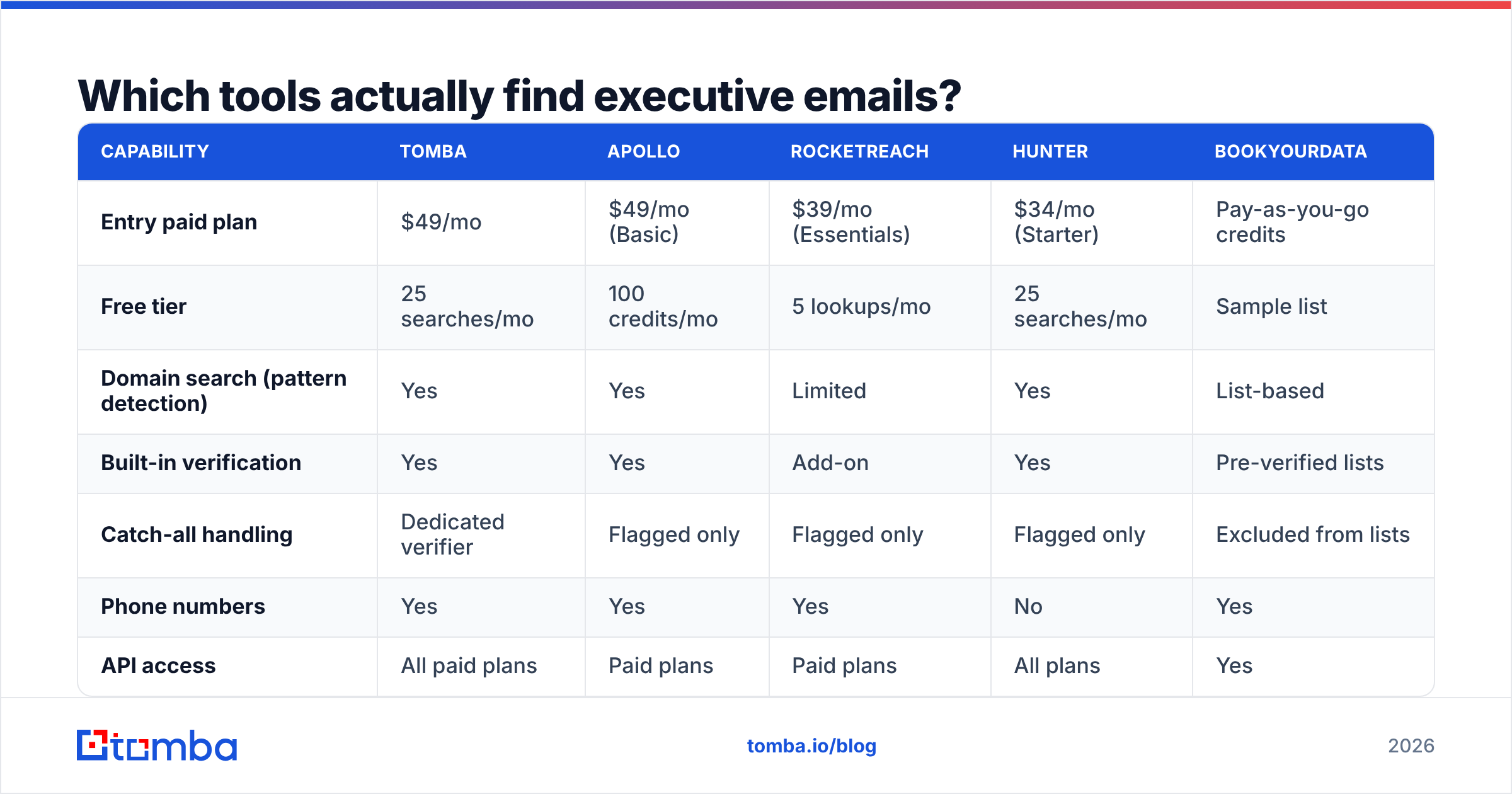
Most email-finding tools index the same web sources: public pages, filings, press, and crawl data. They differ sharply in how they handle executive-tier contacts and how they price it.

Accuracy on executive records tends to run 5–12 points below a vendor's headline number. Founder-era addresses break the pattern models these tools lean on. Ask any vendor for their C-suite accuracy figure, not the blended one.
| Capability | Tomba | Apollo | RocketReach | Hunter | BookYourData |
|---|---|---|---|---|---|
| Entry paid plan | $49/mo | $49/mo (Basic) | $39/mo (Essentials) | $34/mo (Starter) | Pay-as-you-go credits |
| Free tier | 25 searches/mo | 100 credits/mo | 5 lookups/mo | 25 searches/mo | Sample list |
| Domain search (pattern detection) | Yes | Yes | Limited | Yes | List-based |
| Built-in verification | Yes | Yes | Add-on | Yes | Pre-verified lists |
| Catch-all handling | Dedicated verifier | Flagged only | Flagged only | Flagged only | Excluded from lists |
| Phone numbers | Yes | Yes | Yes | No | Yes |
| API access | All paid plans | Paid plans | Paid plans | All plans | Yes |
| Best for | Verified email + pattern work | All-in-one prospecting | Broad person search | Simple domain lookups | Bought lists with guarantees |

A few honest notes on this table. Apollo bundles sequencing and a large contact database. If you want one platform for everything, it's a reasonable single vendor — you just pay for breadth you may not use. RocketReach's people-first search is strong when you know the person but not the company. Hunter is the cheapest way to answer "what's the pattern at this domain."
BookYourData takes a different approach: pre-built, pre-verified lists with an accuracy guarantee. That suits teams who want contacts delivered rather than researched. It's also the fastest path if you need 500 CEO contacts in a vertical this afternoon. Tomba sits closest to the "find and verify, then push to my stack" workflow, with Tomba pricing starting at $49/mo for Starter and $99/mo for Growth.
Compare vendor claims against third-party review data on G2 rather than trusting marketing-site accuracy numbers.

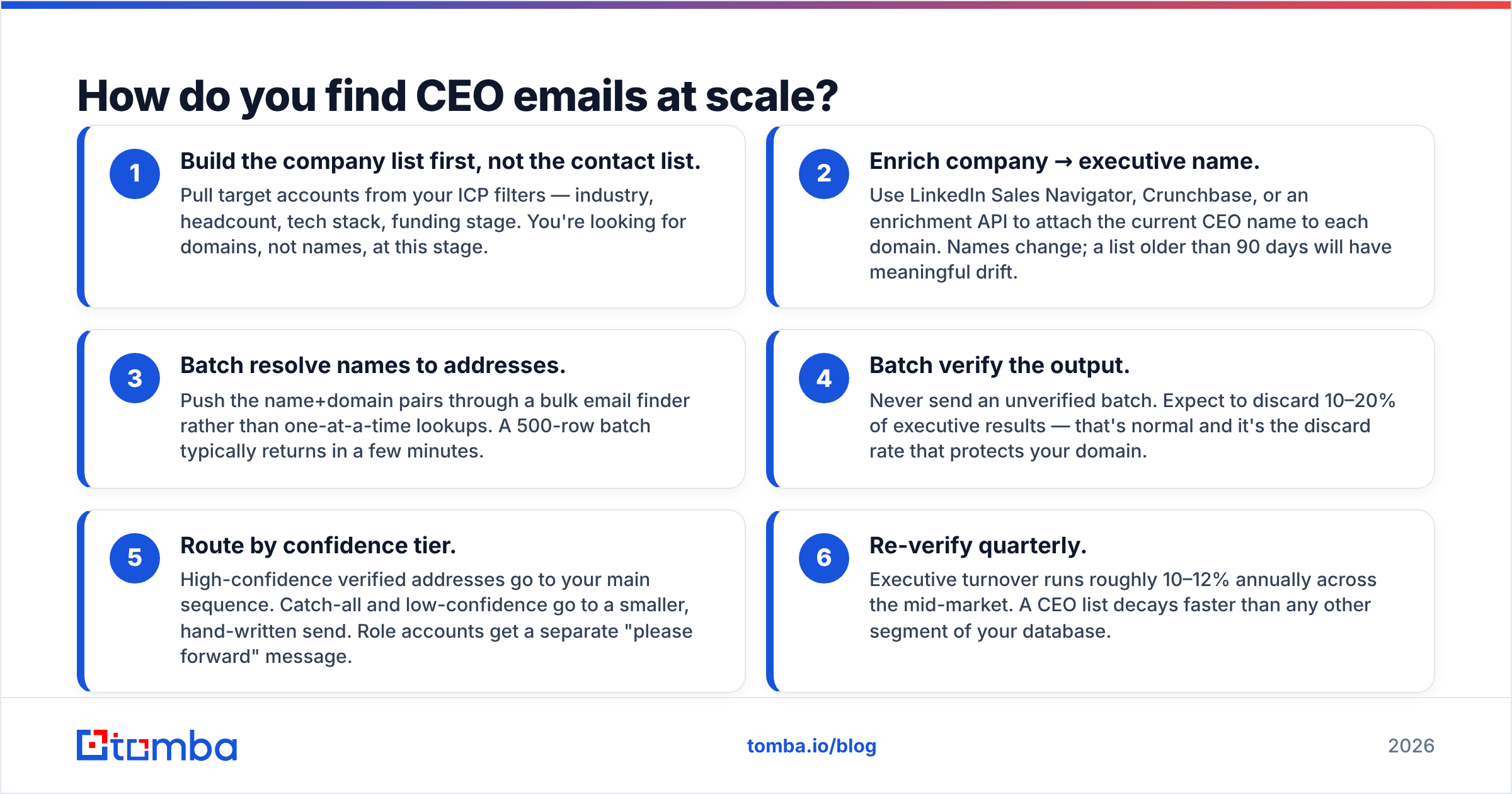
How do you find CEO emails at scale?#
One CEO at a time is a research task. Two hundred is a pipeline problem.
The workflow that holds up:
- Build the company list first, not the contact list. Pull target accounts from your ICP filters — industry, headcount, tech stack, funding stage. You're looking for domains, not names, at this stage.
- Enrich company → executive name. Use LinkedIn Sales Navigator, Crunchbase, or an enrichment API to attach the current CEO name to each domain. Names change fast. A list older than 90 days will have real drift.
- Batch resolve names to addresses. Push the name+domain pairs through a bulk email finder rather than one-at-a-time lookups. A 500-row batch typically returns in a few minutes.
Then protect your sender reputation:
- Batch verify the output. Never send an unverified batch. Expect to discard 10–20% of executive results. That's normal, and the discard rate is what protects your domain.
- Route by confidence tier. High-confidence verified addresses go to your main sequence. Catch-all and low-confidence go to a smaller, hand-written send. Role accounts get a separate "please forward" message.
- Re-verify quarterly. Executive turnover runs roughly 10–12% a year across the mid-market. A CEO list decays faster than any other segment of your database.
If your list lives in a spreadsheet, the Google Sheets add-on removes the export/import step entirely. If it lives in a CRM, push results through the HubSpot integration or the Tomba API so enrichment happens on record creation rather than as a batch chore.
Is it legal to find and email a CEO?#
Short answer: yes in most places, with conditions you need to actually meet.
United States (CAN-SPAM). Commercial email to a business address is legal. You must not use deceptive headers or subject lines, must identify the message as a solicitation where applicable, must include a valid physical postal address, and must honor opt-outs within 10 business days. No prior consent required. The FTC's compliance guide is the authoritative reference.
European Union (GDPR). You need a lawful basis. For B2B outreach, "legitimate interest" usually applies. But your message must fit the person's job, you must document the balancing test, and you must share your data source on request. Generic blasts to any CEO you can find do not pass that test.
United Kingdom (PECR + UK GDPR). Corporate subscribers (limited companies, LLPs) can be emailed without prior consent. Sole traders and partnerships are treated as individuals and require consent.
Practical compliance floor regardless of jurisdiction: real sender identity, working unsubscribe, physical address in the footer, honest subject line, and a documented reason this specific CEO is relevant to your offer. That last one is also just good outreach.
What actually gets a reply from a CEO?#
Finding the address is the easy half. A few things that measurably shift response rate at the executive tier:
- Length under 90 words. Executive attention is the constraint. Every sentence past the fourth reduces reply probability.
- A specific trigger. Reference a funding round, a hire, a product launch, a rule change in their market. Generic praise ("love what you're building") reads as automated because it is.
- One ask, and make it small. "Worth a 15-minute conversation?" beats "book a demo" at this level. The CEO is deciding whether to delegate, not whether to buy.
- Send from a warmed domain. If your sending domain is new, run an email warmup ramp before touching your best-fit accounts. Burning a C-suite list on a cold domain is the most expensive mistake in this workflow.
- Expect the assistant. Roughly a third of executive replies come from someone else. Write a message that survives forwarding.
Start with the address, not the guess#
Every method above depends on one thing: knowing the address is real before you send. Pattern inference gets you a candidate. Verification turns it into a contact. That is the real answer to how to find CEO email address details you can actually mail.
For the fastest version of this workflow, run the company domain through Tomba Email Finder. It returns the CEO's address with a confidence score and the detected company pattern in a single call. The free tier gives you 25 searches a month, so you can test the hit rate on your own accounts before paying anything. Feed the results into the verifier, discard the bounces, and send only to what's confirmed. That's the whole job.
Related guides#
// get started
Find, verify and enrich your first contacts today
Start on the free plan with 25 searches a month, then scale when your team is ready.
Free plan · No credit card required · GDPR & CCPA
// about the author