How to Find Contact Information: 9 Methods That Work in 2026
Nine tested ways to find anyone's business email, phone number, and LinkedIn profile — plus the accuracy trade-offs, costs, and legal limits nobody mentions.
TL;DR
- The fastest reliable path is domain search plus verification: pull every published address on a company domain, then confirm the one you need before sending.
- Manual methods (site footers, WHOIS, LinkedIn, GitHub commits) still work and cost nothing — they just don't scale past about 20 prospects a week.
- Pattern guessing is not a method. It produces a plausible address roughly 60-70% of the time and a bounce the rest, which quietly destroys your sender reputation.
- Phone numbers are harder than emails. Direct dials come from a much smaller pool of sources and decay faster.
- Budget matters less than you'd think: a $49/mo tool and a $500/mo tool often return the same address. What differs is coverage on hard domains and how honest the confidence score is.
What does "contact information" actually mean in a B2B context?#
Before you hunt for anything, get specific about what you need. "Contact information" is four different data problems wearing one coat:
- Business email — the highest-value field. It's the only channel where you control timing, and it's the one most likely to be findable through public sources.
- Direct dial phone — a desk or mobile number that reaches the person, not a switchboard. Scarce, expensive, and decays at roughly 30% per year as people change roles.
- LinkedIn or social profile — free to find, useless for outreach volume, essential for context and personalization.
- Firmographic context — company size, tech stack, funding, role seniority. Not contact info, but it determines whether the contact info is worth using.
Most people asking how to find contact information really mean "how do I get a working email address for this specific person at this specific company." That's the problem this post solves first, then extends to phones and profiles.
One legal note up front: finding a published business email is not the same as being allowed to email it. In the EU, GDPR treats a work email as personal data, and legitimate interest is a defensible but not automatic basis. In the US, CAN-SPAM permits cold email but requires accurate headers, a physical address, and a working opt-out. Read your obligations before you scale. The FTC's CAN-SPAM compliance guide is short and worth ten minutes.
What are the free ways to find contact information?#
Start here. If you need five contacts, you don't need a tool.
Company website footers and legal pages. Privacy policies, terms of service, and imprint pages (mandatory in Germany, Austria, and Switzerland) routinely list a named contact with a real address. Check /legal, /imprint, /impressum, and /contact.
WHOIS records. Registration data for a domain sometimes still exposes an admin email, though GDPR-driven redaction has gutted this since 2018. Worth thirty seconds on smaller or older domains.
GitHub commit history. Developers leak their work email in git log constantly. git clone a public repo and run git log --format='%ae' | sort -u. This is the single best method for reaching engineers at technical companies.
LinkedIn contact info panel. Some users publish an email in the "Contact info" modal. Low hit rate, but zero cost. LinkedIn's own user agreement prohibits automated scraping, so do this by hand.
Conference speaker pages and academic papers. Anyone who has presented or published has almost certainly had their email printed somewhere permanent.
Press releases and newsroom pages. Media contacts are published on purpose. If you're targeting marketing or comms, this is a direct line.

The ceiling on manual methods is time, not accuracy. Expect 8-15 minutes per contact, with a hit rate around 40-50% depending on industry. Fine for account-based outreach into 30 named companies. Impossible for 3,000.
How do email finder tools actually find an address?#
Understanding the mechanism tells you which tool to trust and when to distrust all of them.
Every commercial finder combines three layers:
- Crawled public data. The provider indexes billions of pages — company sites, press releases, directories, code repos, PDF documents — and extracts every email-shaped string alongside the name it appears near. This is the backbone. It's why coverage is excellent for published people and poor for a warehouse supervisor who has never appeared online.
- Pattern inference. From confirmed addresses on a domain, the system derives the format:
first.last@,flast@,first@. Given a new name at that domain, it constructs the likely address. This is a guess with good priors, not a discovery. - Verification. The constructed or crawled address is checked — syntax, MX record, disposable-domain list, and an SMTP handshake that asks the receiving server whether the mailbox exists without delivering anything.
The third layer is where tools separate. A finder that returns a pattern guess labeled "high confidence" without SMTP confirmation is selling you a bounce. Always look for a distinct verification status, not just a percentage.

Catch-all domains break this model. A catch-all server accepts mail to every address at the domain, so the SMTP handshake returns "yes" for asdfgh@company.com too. Roughly 20-25% of B2B domains are configured this way, and it's higher in enterprise. Tools that handle catch-alls with additional signals — engagement data, historical deliverability, secondary sources — meaningfully outperform tools that just shrug and mark them "risky." If you work mid-market and up, a dedicated catch-all verifier is not a nice-to-have.
Which method should you use for which situation?#
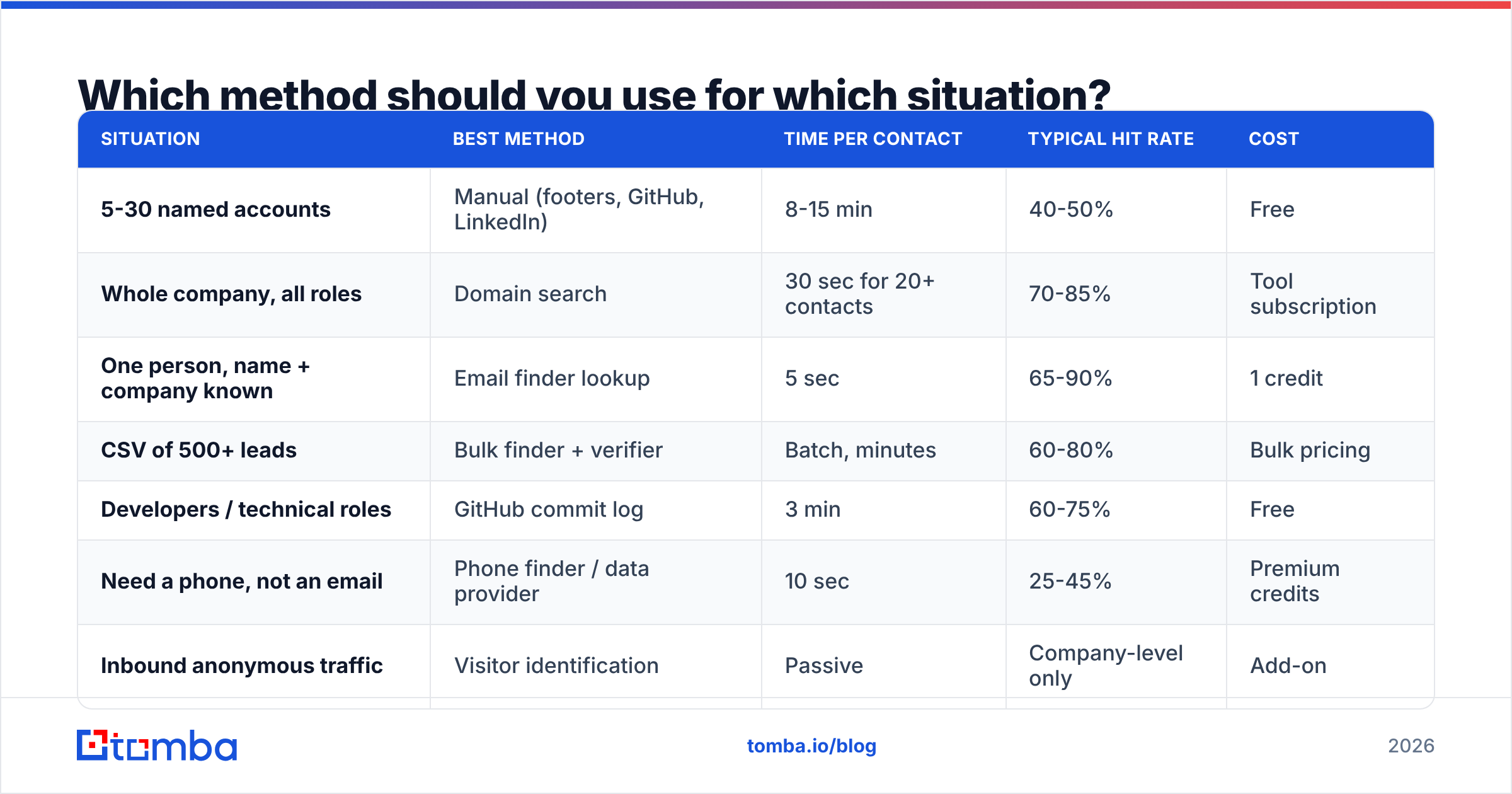
| Situation | Best method | Time per contact | Typical hit rate | Cost |
|---|---|---|---|---|
| 5-30 named accounts | Manual (footers, GitHub, LinkedIn) | 8-15 min | 40-50% | Free |
| Whole company, all roles | Domain search | 30 sec for 20+ contacts | 70-85% | Tool subscription |
| One person, name + company known | Email finder lookup | 5 sec | 65-90% | 1 credit |
| CSV of 500+ leads | Bulk finder + verifier | Batch, minutes | 60-80% | Bulk pricing |
| Developers / technical roles | GitHub commit log | 3 min | 60-75% | Free |
| Need a phone, not an email | Phone finder / data provider | 10 sec | 25-45% | Premium credits |
| Inbound anonymous traffic | Visitor identification | Passive | Company-level only | Add-on |
Two things to read out of that table. First, hit rate for phone numbers is dramatically lower than for email across every provider — anyone advertising 90% direct-dial coverage is measuring something other than what you care about. Second, domain search is the highest-leverage single action in prospecting: one query returns the entire published contact surface of a company, which is how you find the four people you didn't know to look for.
How do the main email finder tools compare in 2026?#
The category has stratified into three tiers: focused finders, all-in-one sales platforms with a bundled database, and verification specialists. Here's how the honest comparison looks on the attributes that decide the purchase.
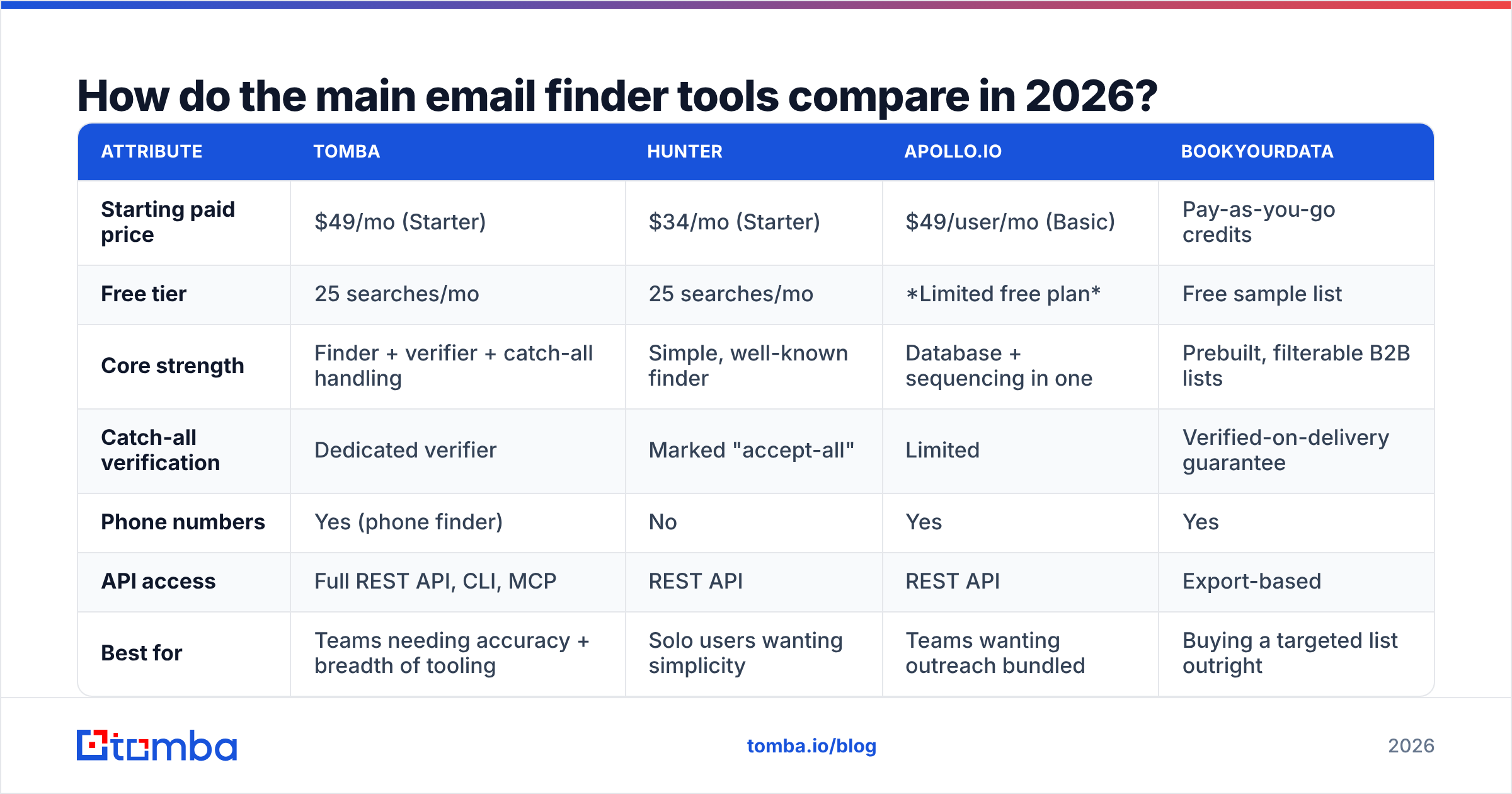
| Attribute | Tomba | Hunter | Apollo.io | BookYourData |
|---|---|---|---|---|
| Starting paid price | $49/mo (Starter) | $34/mo (Starter) | $49/user/mo (Basic) | Pay-as-you-go credits |
| Free tier | 25 searches/mo | 25 searches/mo | Limited free plan | Free sample list |
| Core strength | Finder + verifier + catch-all handling | Simple, well-known finder | Database + sequencing in one | Prebuilt, filterable B2B lists |
| Catch-all verification | Dedicated verifier | Marked "accept-all" | Limited | Verified-on-delivery guarantee |
| Phone numbers | Yes (phone finder) | No | Yes | Yes |
| API access | Full REST API, CLI, MCP | REST API | REST API | Export-based |
| Best for | Teams needing accuracy + breadth of tooling | Solo users wanting simplicity | Teams wanting outreach bundled | Buying a targeted list outright |

BookYourData sits in a genuinely different lane — it sells curated, filterable lists with a delivery guarantee rather than a per-lookup search engine. If your motion is "give me 2,000 CFOs at US manufacturing firms with 200-1000 employees," a list purchase beats a lookup tool on both time and cost. If your motion is "I have a named account list and need the right person at each," a finder wins. Plenty of teams run both.
Apollo bundles sequencing, which is either a feature or a lock-in depending on whether you already own an outreach tool. Check current plans directly on Apollo's pricing page and read the credit-rollover terms, because that's where the effective cost lives. If you're weighing a switch, the Apollo alternative breakdown covers the data-only path.
For Tomba specifically, Tomba pricing runs Free (25 searches/mo), Starter $49/mo, Growth $99/mo, Pro $249/mo, and Enterprise custom — with the finder, verifier, domain search, and enrichment all drawing from the same credit pool rather than sitting behind separate SKUs.
Independent review data is worth a look before you commit. G2's email finder category aggregates thousands of verified reviews, and the complaint patterns per vendor are more informative than the star averages.
What is the workflow for finding contact information at scale?#
Nine methods is useless without a sequence. This is the one that holds up across thousands of contacts.
Step 1 — Define the account list first, not the contact list. Firmographic filters (industry, headcount, tech stack, funding stage) determine relevance. Contact discovery is downstream. Teams that skip this end up with 5,000 accurate emails for people who will never buy.
Step 2 — Run domain search on every account. For each company domain, pull the full published contact set. You'll surface roles you hadn't targeted and identify the email pattern for that domain in one action. Use domain search or the equivalent in your tool.
Step 3 — Fill gaps with named lookups. For decision-makers who didn't appear in the domain crawl, run a first-name/last-name/domain lookup. This is where pattern inference does its work — appropriately, because you're now inferring against a confirmed pattern rather than guessing blind.
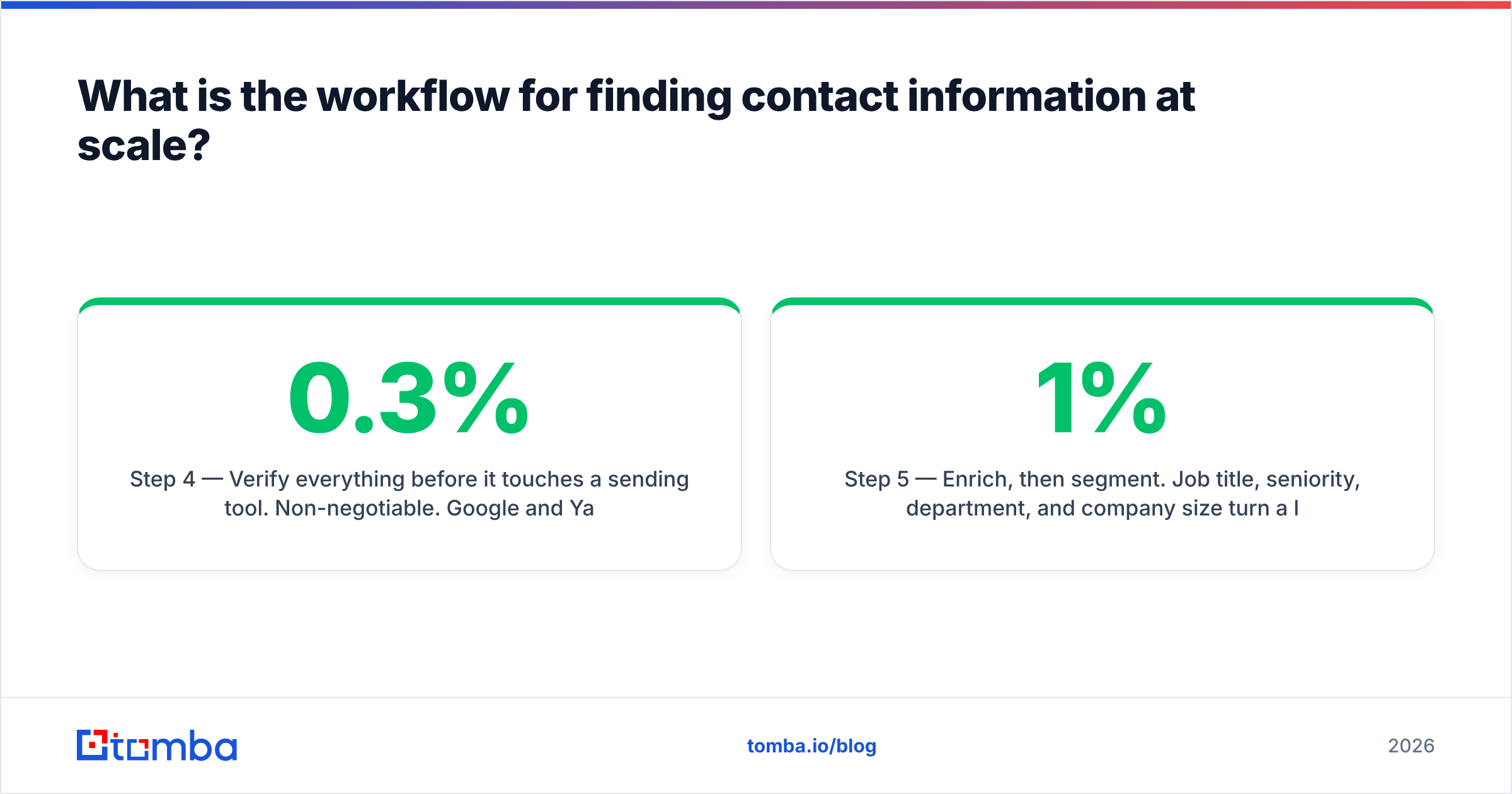
Step 4 — Verify everything before it touches a sending tool. Non-negotiable. Google and Yahoo's bulk sender requirements set a hard 0.3% spam-complaint threshold, and bounce rates above 2-3% put you in filtering territory fast. Run the full list through an email verifier, and drop anything that isn't a clean pass. Catch-alls get their own decision: send to them in a separate, low-volume segment or exclude them entirely.
Step 5 — Enrich, then segment. Job title, seniority, department, and company size turn a list into segments you can write differently for. Data enrichment at this stage costs less than writing one generic sequence that gets 1% replies.
Step 6 — Push to CRM with source and confidence attached. Every record should carry where it came from and how confident the finder was. Six months later, when a segment underperforms, that metadata is the only thing that tells you whether the problem was the data or the message.

How do you find a phone number rather than an email?#
Different problem, thinner sources, lower expectations.
- Company switchboard plus a name. Unglamorous and effective. The main line is on the website; a receptionist connects you. Works far more often than reps assume.
- Dedicated phone data providers. Direct dials and mobiles come from a mix of opt-in data, partner networks, and licensed sources. Coverage of 25-45% on a US B2B list is realistic; anything advertised above that deserves scrutiny about how "coverage" is being counted.
- Public filings and registries. Company registrars, SEC filings, and licensing boards publish contact numbers for officers and licensed professionals.
- Validation before dialing. A disconnected number wastes a dial and can flag your outbound number. Run numbers through a validator to confirm line type (mobile vs landline vs VoIP) and active status before loading a dialer. A phone validator does this in bulk.
Compliance is stricter here than with email. US TCPA rules restrict automated dialing to mobile numbers, and DNC registry checks are mandatory for many use cases. Line-type detection isn't just a quality signal — it's a legal input.
What mistakes make contact data go stale or bounce?#
Five failure modes account for most of the damage:
- Treating a guessed pattern as a verified address. If your tool didn't confirm the mailbox, you have a hypothesis. Send 500 hypotheses and you'll bounce 150 of them.
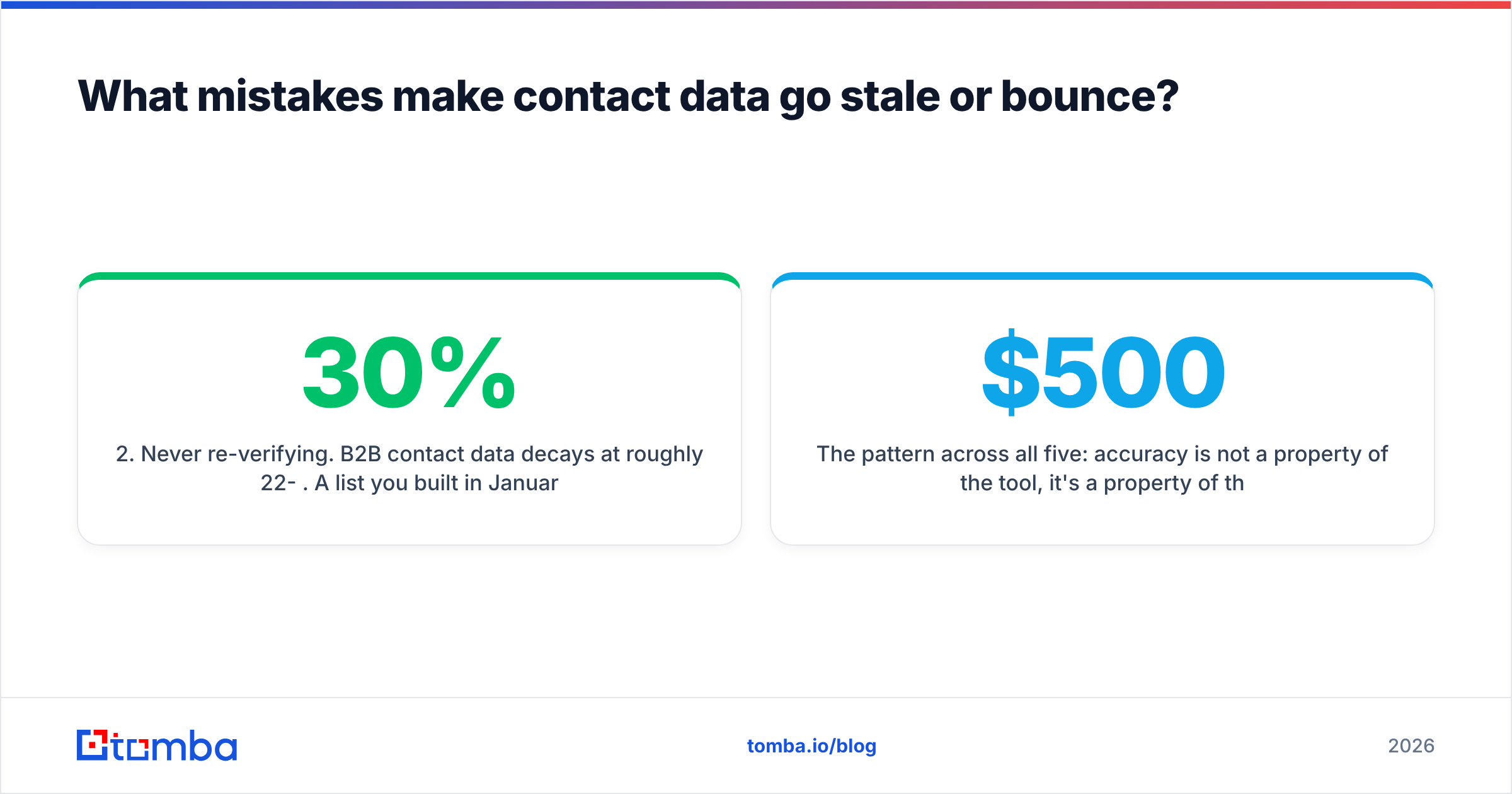
- Never re-verifying. B2B contact data decays at roughly 22-30% per year. A list you built in January is measurably worse by July. Re-verify quarterly at minimum, and always before a large send.
- Ignoring role-based addresses.
info@,sales@,support@inflate your count and depress your reply rate. Segment them out or exclude them. - Sending to catch-alls in the same batch as verified addresses. You can't attribute the resulting bounce rate to anything. Separate the segments and you can actually learn.
- No sender infrastructure behind the list. Perfect data on a domain without SPF, DKIM, and DMARC still lands in spam. Check your SPF record and authentication setup before you blame the data.
The pattern across all five: accuracy is not a property of the tool, it's a property of the process. A $500/mo provider feeding an unverified, un-refreshed, unsegmented list will underperform a $49/mo provider feeding a disciplined one.
How do you know if your contact data is actually good?#
Measure three things and ignore the rest.
Bounce rate. Under 2% is healthy. 2-5% means your verification step is weak or your list is stale. Above 5%, stop sending and rebuild.
Reply rate by data source. Tag every contact by where it came from. If GitHub-sourced developer emails reply at 6% and bulk-purchased lists reply at 0.8%, you've just found where to spend your next dollar.
Coverage on your ICP specifically. Vendor-reported accuracy is measured on the vendor's test set, not your market. Run the same 100 target contacts through two tools during a trial and compare. Ten minutes of work, and it's the only benchmark that describes your situation. Tomba publishes its data sources, which makes this kind of comparison easier to reason about.
Ready to stop guessing addresses?#
The shortest path from "I know who I want to reach" to "I have a verified address for them" is a domain search followed by a verification pass — under a minute per company, repeatable across thousands. If you're currently doing this by hand or trusting pattern guesses, that's the upgrade with the largest immediate return.
Start with the Tomba Email Finder. The free tier gives you 25 searches a month — enough to run your real target list against it and see the hit rate on your own accounts before you pay anything. If the coverage holds up on your ICP, Starter is $49/mo with the verifier, domain search, and enrichment included in the same credit pool. If it doesn't, you'll know in ten minutes and you'll have lost nothing but the time.
Related guides#
// get started
Find, verify and enrich your first contacts today
Start on the free plan with 25 searches a month, then scale when your team is ready.
Free plan · No credit card required · GDPR & CCPA
// about the author