How to Find Email Addresses for Free: 9 Methods That Work
Nine free methods to find anyone's business email — from Google operators and WHOIS to free tiers on paid tools — plus what each one actually costs you in time and accuracy.
TL;DR
- You can find most B2B email addresses for free, but "free" splits into two categories: manual methods that cost you time (Google operators, WHOIS, GitHub commits, LinkedIn) and free tiers on paid tools that cost you nothing until you scale.
- Manual guessing plus a free verifier gets you roughly 60-75% accuracy. A real email finder with a verified database gets you 90%+.
- The break-even point is around 25-40 contacts per month. Below that, free stacking works fine. Above it, you spend more in labour than a $49/mo plan costs.
- Never send to an unverified guess. A single 5% bounce rate can flag your domain with Google and Microsoft filters.
- Best free stack: Google operators to find the pattern → free email finder tier for the lookup → free verifier to confirm before send.
If you have ever stared at a company website that lists only info@ and wondered how anyone actually reaches the VP of Marketing, this guide is for you. Everything below is something you can do today without a credit card.
What does "free" actually mean when finding email addresses?#
There are three distinct things people mean by free, and conflating them is why most guides disappoint.
- Genuinely free, manual. Google search operators, WHOIS records, GitHub commit logs, X/Twitter bios, conference speaker pages. Zero dollars, unlimited volume, but every contact costs you three to eight minutes of clicking.
- Free tiers on commercial tools. Tomba gives you 25 searches a month at no cost. Hunter, Snov.io, and others have similar allowances. You get database-grade accuracy up to a cap, then you pay.
- Free-with-a-catch. Chrome extensions that harvest your inbox, "free" scrapers that require you to log in with your LinkedIn credentials, or sites that hand you a stale 2019 dump. These carry real risk — account bans, GDPR exposure, malware. Skip them.
The honest answer to "how to find email addresses for free" is that you combine categories 1 and 2 and ignore category 3 entirely. That combination will carry a solo founder or a part-time recruiter comfortably for months.

What are the 9 free methods, ranked?#
Here is every method worth your time, in the order I would actually try them.
- Google search operators. The fastest starting point. Search
site:company.com "@company.com"or"firstname lastname" + "@company.com"and you will often surface a press release, a PDF, or a footer that leaks the real format. - The company's own site. Press pages, /team, /about, /contact, and — critically — PDF case studies and whitepapers, which frequently carry an author email in the metadata.
- WHOIS lookups. Smaller companies and agencies still expose a registrant email. GDPR redaction killed this for EU domains, but it works on plenty of US-registered ones.
- GitHub commit history. For any company with engineers,
git logon a public repo exposes committer emails. Many are personal Gmail, but a surprising number are corporate. - X/Twitter and personal sites. People who want to be reached put their address in a bio, a pinned post, or a personal site footer.
- Email pattern deduction. Once you know one email at a domain, you know them all. Ninety percent of companies use one of five formats. Use a free email permutator to generate every variant, then verify.
- Free tiers on email finder tools. This is where accuracy jumps. Tomba's free plan covers 25 searches a month; that is one solid prospecting afternoon.
- Free verification tools. Never optional. A free email checker tells you whether a guessed address will bounce before you burn your sender reputation.
- Ask a human. Underrated. Reception, a support chat widget, or a mutual connection will hand you a direct address in thirty seconds. Nothing scales worse and nothing converts better.
How do Google search operators actually work?#
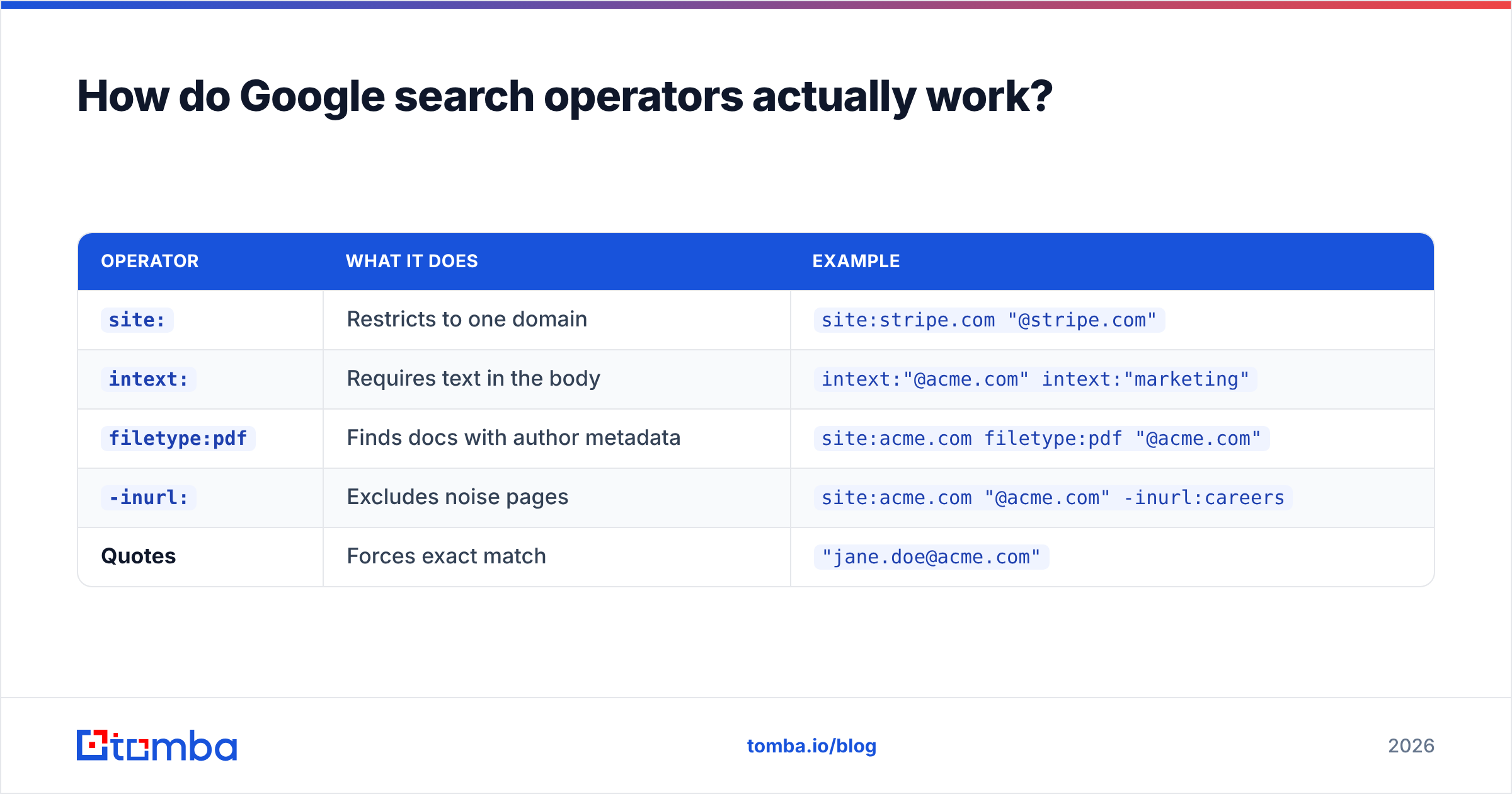
This is the highest-leverage free method, so it deserves specifics. Operators narrow Google to exactly the pages that leak addresses.
| Operator | What it does | Example |
|---|---|---|
site: |
Restricts to one domain | site:stripe.com "@stripe.com" |
intext: |
Requires text in the body | intext:"@acme.com" intext:"marketing" |
filetype:pdf |
Finds docs with author metadata | site:acme.com filetype:pdf "@acme.com" |
-inurl: |
Excludes noise pages | site:acme.com "@acme.com" -inurl:careers |
| Quotes | Forces exact match | "jane.doe@acme.com" |
Chain two or three of these and you will usually crack the pattern within a minute or two. Once you have the pattern — say first.last@acme.com — you can construct any employee's address from their LinkedIn name. That construction step is a guess, not a fact, which brings us to the most important rule in this entire guide.
Why does verification matter more than finding?#
Because a bounce is not a neutral event. It is a negative signal sent directly to the receiving mail server, and it accumulates against your domain.
Google's own sender guidelines are explicit that bulk senders should keep spam complaint rates below 0.3% and maintain valid recipient lists. Microsoft applies similar logic through SNDS. Push your bounce rate past roughly 3-5% and your email deliverability starts degrading for every campaign you run afterward — including to addresses that were perfectly valid.
So the free workflow is never "guess and send." It is always:
- Find or deduce the address using the methods above.
- Verify syntax and MX with a free checker.
- Check the catch-all status — a domain that accepts everything tells you nothing, and needs a catch-all verifier to resolve properly.
- Send only confirmed deliverables, and park the "risky" bucket separately.
A guessed address that survives verification is roughly as good as a database hit. A guessed address that skips verification is a liability.

How accurate is free versus paid?#
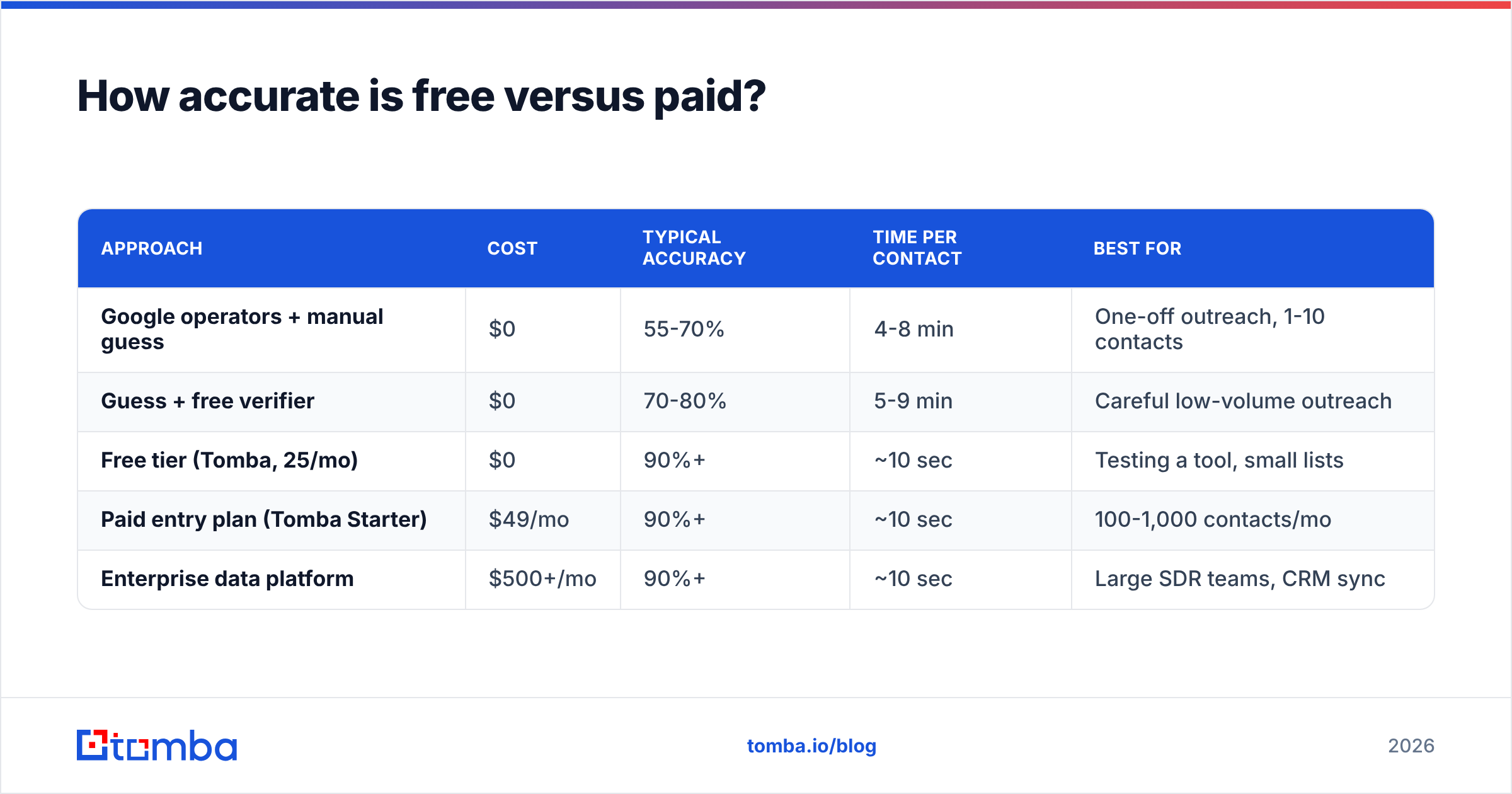
This is where honest comparison matters. Free methods do not fail on availability — they fail on hit rate and time per contact.
| Approach | Cost | Typical accuracy | Time per contact | Best for |
|---|---|---|---|---|
| Google operators + manual guess | $0 | 55-70% | 4-8 min | One-off outreach, 1-10 contacts |
| Guess + free verifier | $0 | 70-80% | 5-9 min | Careful low-volume outreach |
| Free tier (Tomba, 25/mo) | $0 | 90%+ | ~10 sec | Testing a tool, small lists |
| Paid entry plan (Tomba Starter) | $49/mo | 90%+ | ~10 sec | 100-1,000 contacts/mo |
| Enterprise data platform | $500+/mo | 90%+ | ~10 sec | Large SDR teams, CRM sync |
Two things jump out. First, verification alone lifts a pure guess by ten to fifteen points — it is the single cheapest accuracy upgrade available. Second, the time column is the real cost. At six minutes per contact, fifty contacts is five hours of work. At a modest $40/hour opportunity cost, that is $200 of your time to avoid a $49 bill.
That is the break-even math nobody puts in a "free tools" post: free stops being free somewhere around 25-40 contacts per month.

Which free tools are worth using?#
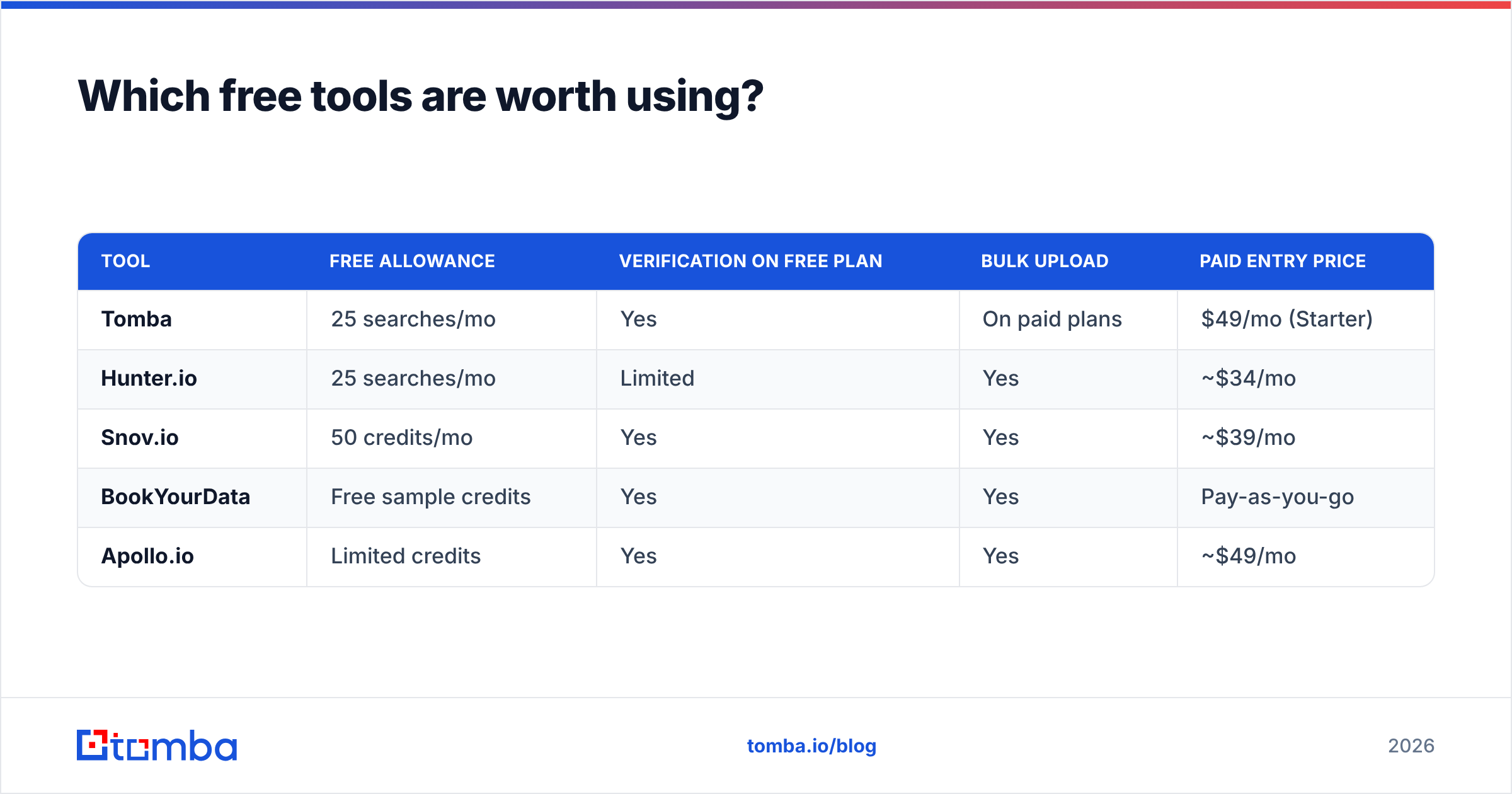
Not all free tiers are equal. Some cap at five lookups, some require a company domain to sign up, some strip verification from the free plan (which makes the results close to useless).

| Tool | Free allowance | Verification on free plan | Bulk upload | Paid entry price |
|---|---|---|---|---|
| Tomba | 25 searches/mo | Yes | On paid plans | $49/mo (Starter) |
| Hunter.io | 25 searches/mo | Limited | Yes | ~$34/mo |
| Snov.io | 50 credits/mo | Yes | Yes | ~$39/mo |
| BookYourData | Free sample credits | Yes | Yes | Pay-as-you-go |
| Apollo.io | Limited credits | Yes | Yes | ~$49/mo |
A note on two of these. BookYourData takes a pay-as-you-go approach rather than a subscription, which suits people who buy a list once a quarter rather than prospecting continuously — a genuinely different model, and a good fit if your volume is lumpy. And if you are evaluating Apollo specifically for email lookup rather than its full sales-engagement suite, the credit accounting is worth reading closely before you commit; there is a fuller breakdown in our Apollo alternative comparison.
Cross-check any vendor's claims against third-party review data on G2 before you trust a marketing page. Accuracy figures published by vendors are self-reported almost without exception, including the ones in this post's source data.
How do you stack free tools into one workflow?#
The mistake most people make is treating each free tier as an isolated tool. Stack them and the caps stop mattering as much.
- Step 1 — Pattern discovery. Run Google operators on the target domain. You need exactly one confirmed address to unlock the format. Or run a domain search on your free allowance, which returns the pattern plus every public address at that company in one call.
- Step 2 — Name collection. Pull target names from LinkedIn, the company team page, or conference agendas. Names are free everywhere; addresses are not.
- Step 3 — Construction. Apply the confirmed pattern to each name. A company email pattern checker does this in bulk without burning finder credits.
- Step 4 — Verification. Run every constructed address through a free checker. Discard hard-fails, isolate catch-alls, keep confirmed deliverables.
- Step 5 — Spend credits only on the gaps. Whatever verification could not confirm, resolve with your 25 free finder searches. This is the trick: use your paid-grade credits on the hard 20%, not the easy 80%.
Done properly, a 25-search free tier effectively covers 80-120 contacts a month, because most of them never needed a credit in the first place.
What free methods should you avoid?#
Three categories cause real damage.
Scraped list dumps. Sites offering "10 million B2B contacts, free download" are selling data that is three to five years stale, was collected without consent, and will bounce at 40%+. Under GDPR, processing that data for EU subjects without a lawful basis exposes you to genuine liability, and no free list is worth a regulatory conversation.
Credential-harvesting extensions. Any tool asking you to log in with your LinkedIn or Google password (rather than OAuth) is a bad trade. LinkedIn actively bans accounts detected running automation, and you lose the profile that made you findable in the first place.
Sending without warmup. Even perfect addresses bounce if your domain has no sending history. If you are starting from a fresh domain, run through an email warmup plan and confirm your SPF record is correct before your first campaign. Great data on a cold domain still lands in spam.
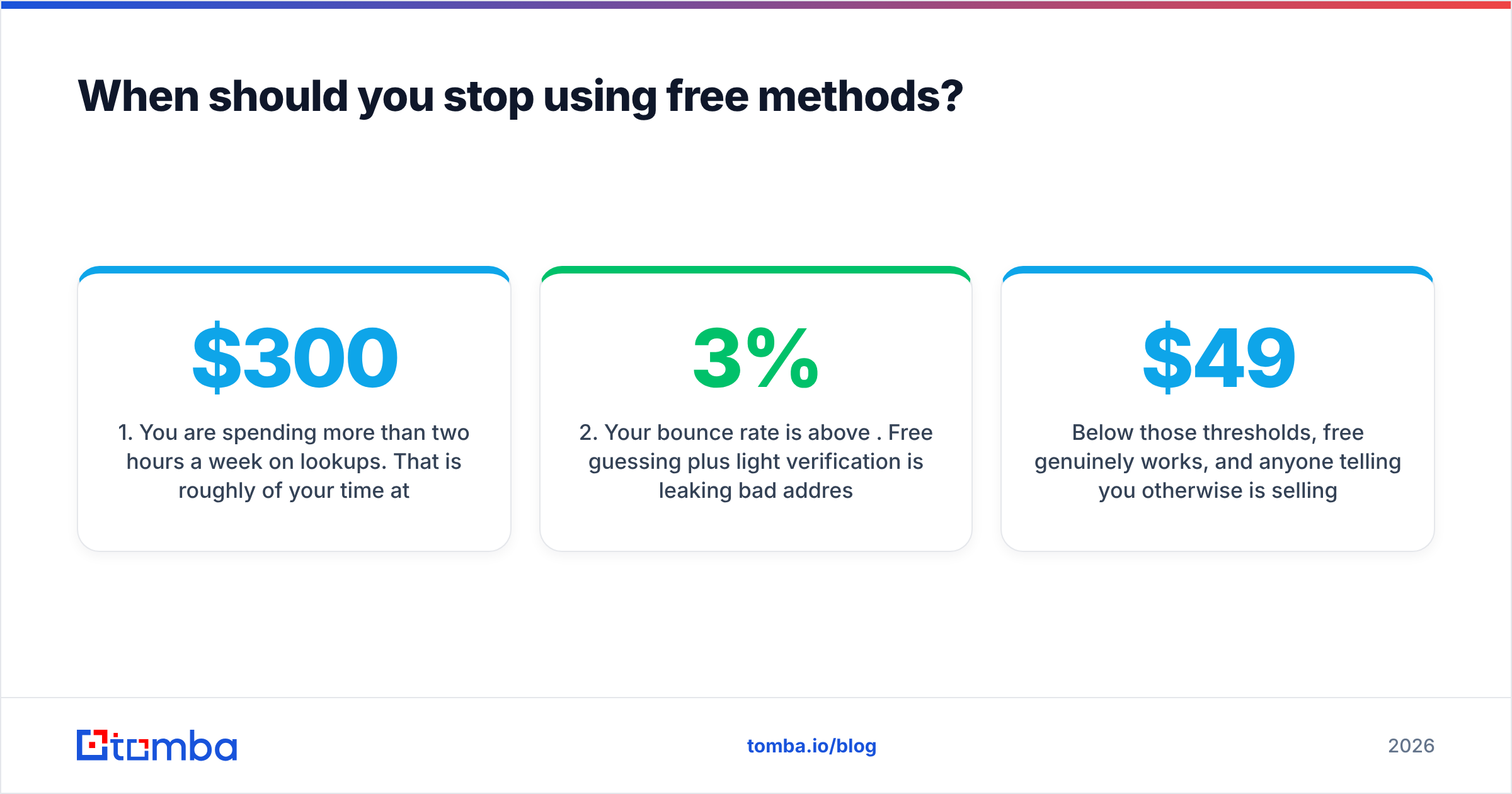
When should you stop using free methods?#
Four signals, any one of which means it is time to pay.
- You are spending more than two hours a week on lookups. That is roughly $300/month of your time at a modest hourly rate, against a $49 plan.
- Your bounce rate is above 3%. Free guessing plus light verification is leaking bad addresses into your sends, and the deliverability cost compounds.
- You need bulk. Manual methods do not batch. The moment you have a CSV of 200 names, you need a bulk email finder, not a browser tab.
- You need it in a system. CRM enrichment, a Sheets workflow, or an automated inbound-lead pipeline needs an email finder API, not a human doing lookups.
Below those thresholds, free genuinely works, and anyone telling you otherwise is selling something. Above them, the arithmetic flips hard and fast. Full Tomba pricing runs from a free 25-search tier through Starter at $49/mo, Growth at $99/mo, and Pro at $249/mo, so the step up from free is a small one.
Frequently asked questions#
Can I find someone's personal Gmail for free? Sometimes, via GitHub commits or personal sites, but you generally should not use it for B2B outreach. Personal addresses have weaker legal footing under GDPR and CAN-SPAM, and reply rates are worse than corporate addresses.
Is guessing an email address legal? Constructing an address from a public naming pattern is not itself illegal in the US or EU. What matters is what you do next: consent, opt-out handling, and identification requirements apply to the send, not the lookup.
How many free searches do I realistically need? For a founder doing targeted outreach, 20-30 a month covers it. For a recruiter or SDR, you will exhaust any free tier inside a week.
Do free email verifiers work as well as paid ones? For syntax and MX checks, yes — those are cheap operations. Free verifiers fall short on catch-all resolution and role-account detection, which is exactly where the hard cases live.
Where should you start?#
Start with Google operators on your five highest-value target accounts today. Crack the pattern, construct the addresses, verify every one before you send. That costs nothing and will teach you more about your target market's data quality than any blog post.
When manual lookups start eating your afternoons — and they will, faster than you expect — move the repetitive part to a tool. The Tomba Email Finder gives you 25 free searches a month with no card required, returns a confidence score with every result, and verifies in the same call so you are not stitching together three tabs. Use the free tier to check the accuracy claims in this post against your own target list, then decide whether the time you get back is worth $49.
Related guides#
// get started
Find, verify and enrich your first contacts today
Start on the free plan with 25 searches a month, then scale when your team is ready.
Free plan · No credit card required · GDPR & CCPA
// about the author