How to Find Someones Business Email: 9 Proven Methods
Nine tested ways to find someone's business email — from free manual tricks to bulk lookup tools — plus how to verify each address before you send.
Learning how to find someones business email comes down to two moves. Work out the company's email pattern, then verify the address before you send. Everything below is the detail: nine methods, ranked by hit rate, plus the traps that burn sending domains.
TL;DR
- The fastest reliable route is a domain-based lookup. Take the company website, run it through an email finder, and confirm the pattern before you send anything.
- Free manual methods (Google operators, GitHub commits, WHOIS, newsletter footers) still work, but they cost 5-15 minutes per contact instead of 5 seconds.
- Roughly 80% of B2B addresses follow four patterns:
first.last@,first@,flast@,firstl@. Knowing the company pattern turns one confirmed contact into a whole department. - Never send to an unverified guess. A single bad list at 8% bounce rate can cook a sending domain for weeks.
- Budget matters less than you think. A free tier of 25 searches/month plus a $49/mo paid plan covers most solo prospecting. Bulk enrichment is where costs actually scale.
Why is finding a business email harder than it used to be?#
Two things changed. First, GDPR and CCPA pushed companies to strip contact pages down to a generic info@ form. Second, LinkedIn locked down contact-info scraping. Most browser hacks that worked in 2020 now trip rate limits within a dozen profiles.
What did not change is the underlying structure. Business email is deterministic in a way personal email never was. A company picks one naming convention, applies it to everyone on payroll, and rarely changes it. Your job is not to find one address. It is to find the rule, then apply it.
Think of it like a building's apartment numbering. You don't need a directory listing every resident. You need to know the floors run 1-12 and the units run A-D. Once you've seen 4C, you can address a letter to anyone in the building.
That is why tool-assisted lookup wins at scale. Manual methods find an address. Pattern detection finds the schema.
How to find someones business email: the 9 methods that work#
The nine are ordered roughly by hit rate for a typical B2B target at a company with 50-5,000 employees.
Fastest: tool-assisted lookups#
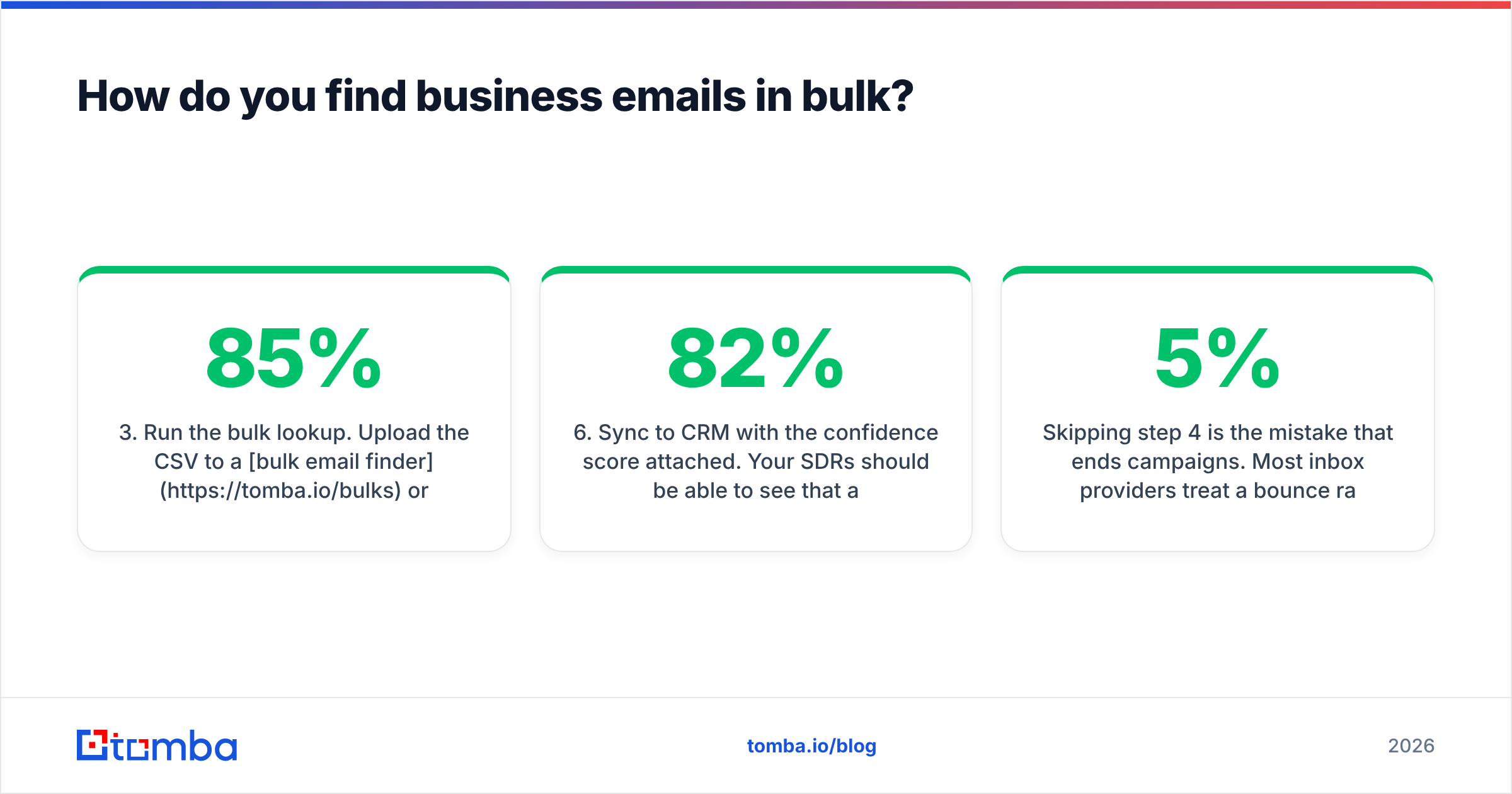
- Domain search on the company website. Feed the domain into a domain search tool. You get back every public address it has indexed for that company, plus the dominant pattern. It is the highest yield per minute of effort, and it works on about 85% of companies with a real web presence.
- Name plus domain email finder. You know "Sarah Chen" works at "acme.com." An email finder cross-references known patterns, public sources, and SMTP signals. It returns the single most likely address with a confidence score.
- LinkedIn-to-email resolution. Paste a profile URL into a LinkedIn finder that maps the profile to a work address. Handy when you know the person but not the exact company domain.
Free manual methods#
- Google search operators. Try
site:acme.com "@acme.com", or"sarah chen" + "@acme.com", or"sarah chen" email contact. Free and slow. It works well on companies that publish press releases or PDF case studies. - GitHub commit history. Open
github.com/<username>, pick a repo, open the commits, then add.patchto a commit URL. The author email sits right in the header. Hit rate on engineers and CTOs is high. On VPs of Marketing it is near zero. - Twitter/X and personal site footers. Founders and consultants still publish addresses. Check the "About" and "Contact" pages. Check the image alt text too, because some people hide the address as a graphic.
Fallbacks when nothing else lands#
- Newsletter reply-to. Subscribe to the company newsletter from a throwaway inbox. The
Reply-Toheader on the first send is often a real human, not a no-reply. - WHOIS records. Most records are privacy-shielded now. Small businesses and older domains still leak an admin contact. It is free, so it is worth 30 seconds.
- Pattern permutation plus verification. Generate the 8-12 plausible permutations with an email permutator, then verify each one. It works, but skip the verify step and you are just guessing loudly.
Which email pattern does a company use?#
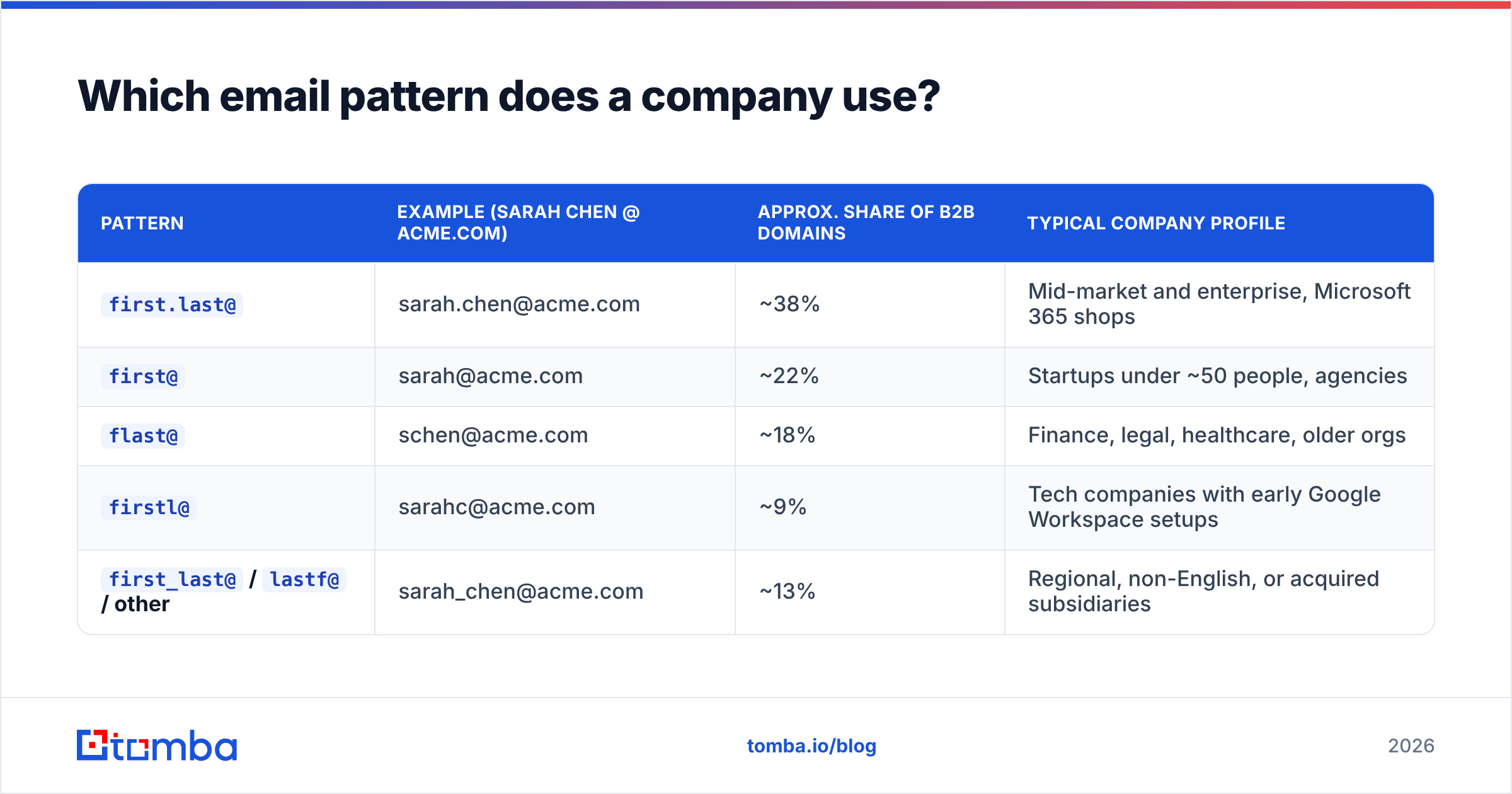
Before you brute-force anything, work out the convention. Four patterns cover most B2B domains, and the split has been stable for years.
| Pattern | Example (Sarah Chen @ acme.com) | Approx. share of B2B domains | Typical company profile |
|---|---|---|---|
first.last@ |
sarah.chen@acme.com | ~38% | Mid-market and enterprise, Microsoft 365 shops |
first@ |
sarah@acme.com | ~22% | Startups under ~50 people, agencies |
flast@ |
schen@acme.com | ~18% | Finance, legal, healthcare, older orgs |
firstl@ |
sarahc@acme.com | ~9% | Tech companies with early Google Workspace setups |
first_last@ / lastf@ / other |
sarah_chen@acme.com | ~13% | Regional, non-English, or acquired subsidiaries |
The practical move is simple. Find one confirmed address at the company — any address, including the receptionist's — and you have the pattern for everyone else. A company email pattern checker does this in one step. You can also do it by hand from a single press release.
Two caveats. Companies that have been acquired often run two patterns in parallel for years. Large enterprises collide as well: at a 20,000-person company there are three Sarah Chens, so the pattern breaks into sarah.chen2@ or sarah.j.chen@. In both cases, verification is the only way to know which address is live.
What's the difference between free manual methods and a paid tool?#
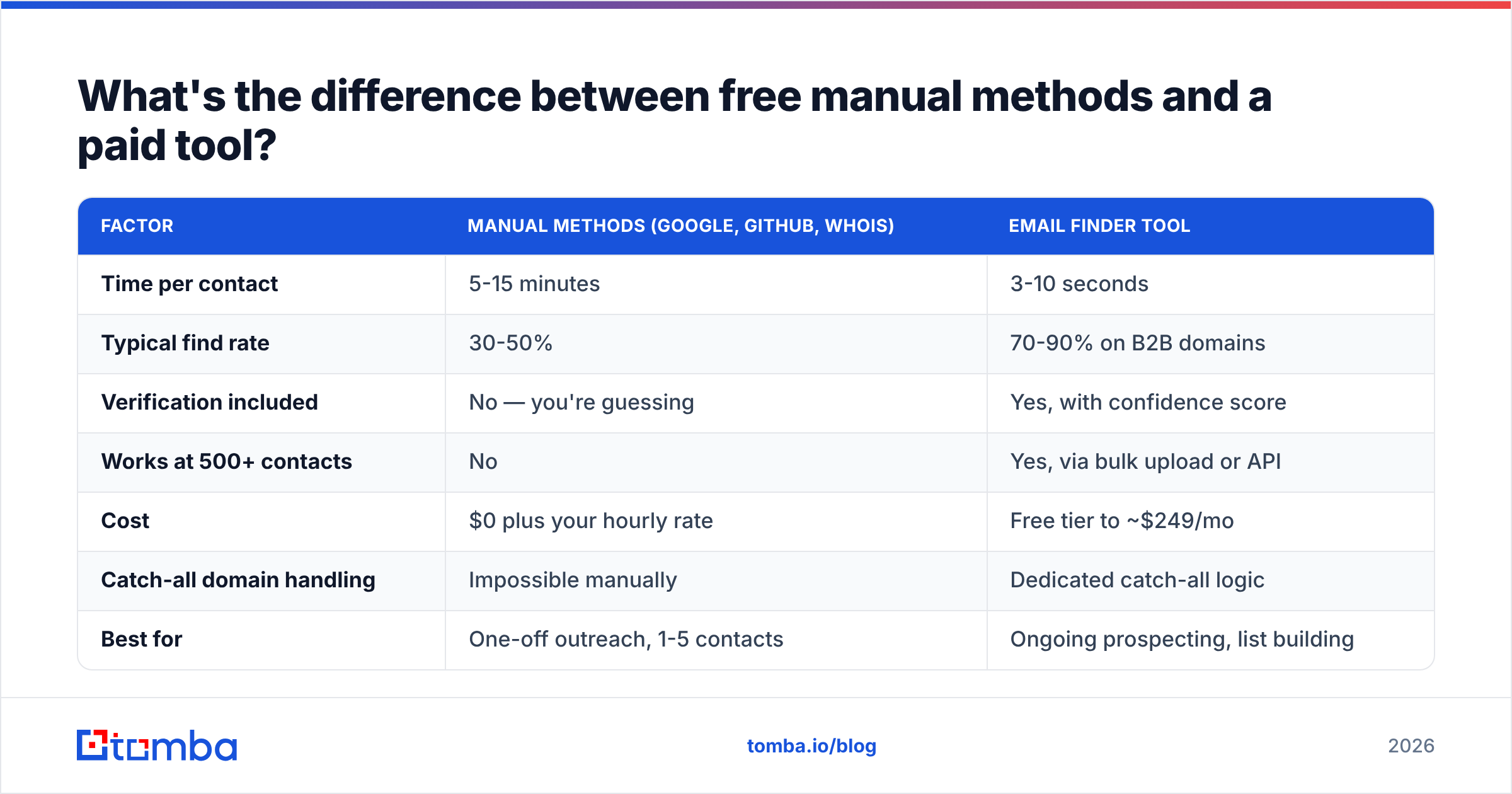
Cost per contact is the wrong metric. Cost per verified, deliverable contact is the one that matters. An unverified address has negative value, because it damages your sender reputation rather than failing quietly.
| Factor | Manual methods (Google, GitHub, WHOIS) | Email finder tool |
|---|---|---|
| Time per contact | 5-15 minutes | 3-10 seconds |
| Typical find rate | 30-50% | 70-90% on B2B domains |
| Verification included | No — you're guessing | Yes, with confidence score |
| Works at 500+ contacts | No | Yes, via bulk upload or API |
| Cost | $0 plus your hourly rate | Free tier to ~$249/mo |
| Catch-all domain handling | Impossible manually | Dedicated catch-all logic |
| Best for | One-off outreach, 1-5 contacts | Ongoing prospecting, list building |
Run the arithmetic once. At 10 minutes per contact and a $60/hour loaded cost, 100 manually sourced contacts cost $1,000 in labor. They land maybe 40 usable addresses, so that is $25 each. A $49/mo plan that returns 70-80 verified addresses from the same 100 names costs well under a dollar each. The manual route only wins when you need one address and the browser is already open.
Do not dismiss the free methods, though. GitHub commit archaeology finds addresses no database has, because the person never appeared in a scrape. Keep it in the toolkit for hard targets.
How do you find business emails in bulk?#
Single lookups are a solved problem. Bulk is where teams get burned, usually in one of three ways: dirty input, skipped verification, or ignored catch-all domains.
Step 1: prep the list
- Clean the input first. Normalize company names to domains before you upload. "Acme Inc.", "Acme, Inc" and "acme.com" should all become
acme.com. Garbage in means credits burned on nothing. - Deduplicate. Run a remove duplicates pass. Duplicate rows are the most common source of wasted credits in a bulk run.
- Run the bulk lookup. Upload the CSV to a bulk email finder, or hit the Tomba API if you are wiring this into a pipeline. Expect 60-85% match rates on clean B2B input. Anything advertised above 95% deserves scepticism.
Step 2: verify and route
- Verify everything that comes back. Even the high-confidence results. An email verifier pass costs a fraction of what a blocked domain costs.
- Segment catch-all results separately. Catch-all domains accept everything at the SMTP layer, so "valid" means nothing there. Route them through a catch-all verifier. If they stay ambiguous, put them in a small test send rather than your main sequence.
- Sync to CRM with the confidence score attached. Your SDRs should see that a contact was an 82% pattern match, not a confirmed address. A HubSpot integration or Salesforce sync keeps that metadata intact.
Skipping step 4 is the mistake that ends campaigns. Most inbox providers treat a bounce rate above 3-5% as a spam signal, and Google's bulk sender guidelines spell out the expectations for anyone sending real volume.

Is it legal to find someone's business email?#
Short answer: in most places, yes. The conditions vary by region and by what you do next.
Business contact data sits in a different legal category than personal data. Under GDPR, a work email at a company domain is still personal data. "Legitimate interest" is an available lawful basis for B2B outreach, as long as you document the interest, collect the minimum, and honor opt-outs at once. Canada's CASL is stricter and effectively requires implied or express consent. The US CAN-SPAM Act is the most permissive of the three. No consent is needed, but you must include a physical address, an honest subject line, and a working unsubscribe.
Practical rules that keep you clean across all three:
- Target roles, not private lives. A work address used for a work-relevant offer is defensible. A personal Gmail scraped from a forum is not.
- Honor unsubscribes within 24 hours, not the 10 days CAN-SPAM allows.
- Keep provenance. Log where each address came from. If someone files a GDPR request, "we found it via public domain search on 2026-03-14" is an answer. "Our vendor had it" is not.
- Don't buy scraped consumer lists. The compliance risk and the deliverability damage both land on you.
None of this is legal advice. Check with counsel if you operate at scale in the EU. But the standard B2B pattern is well established: find a work address on a company domain, then send a relevant, honest, opt-out-able message. HubSpot and the broader vendor ecosystem operate on that basis.
Which tool should you use?#
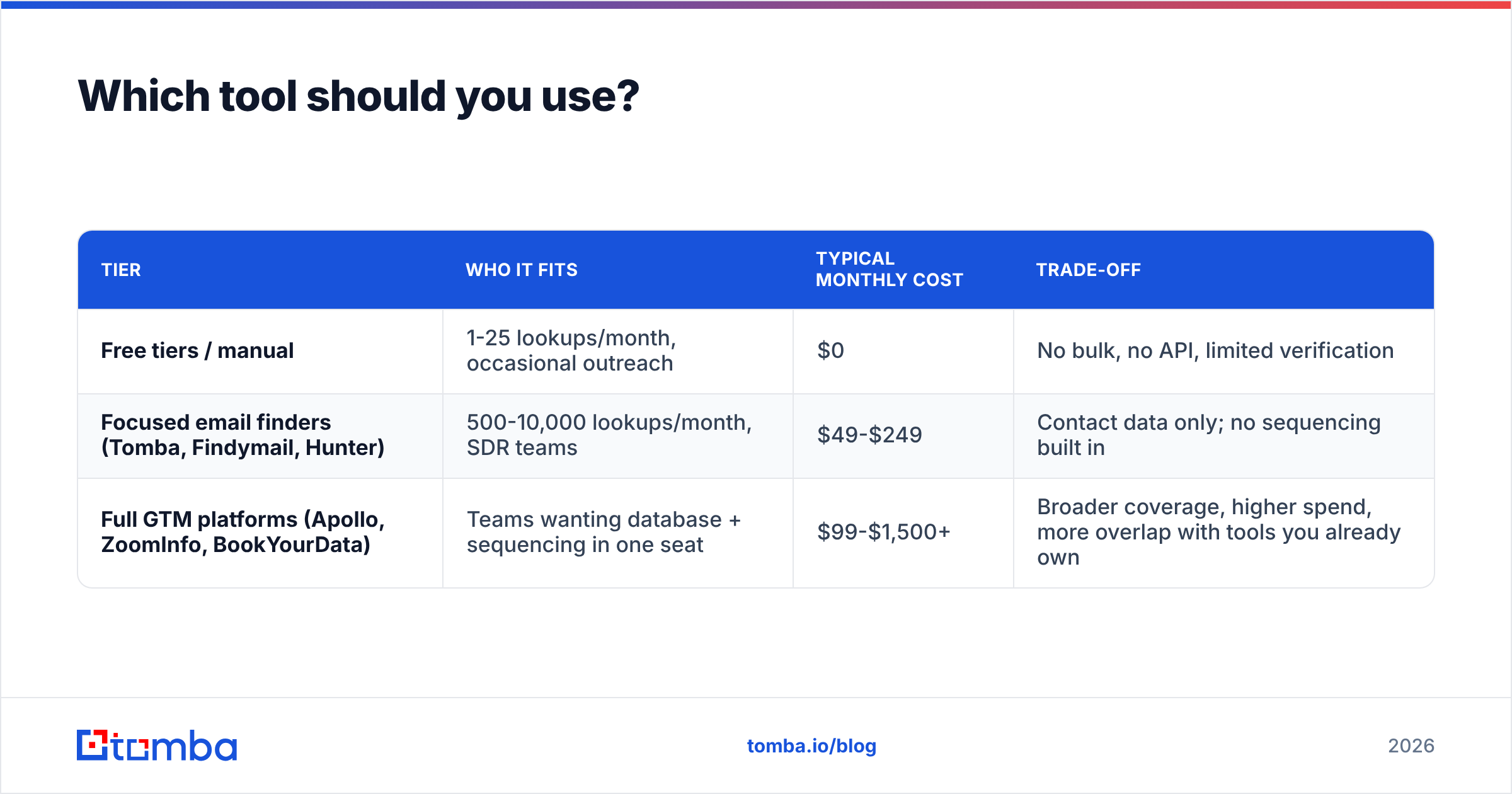
The email-finder market splits into three rough tiers. The right pick depends far more on your volume than on feature checklists.
| Tier | Who it fits | Typical monthly cost | Trade-off |
|---|---|---|---|
| Free tiers / manual | 1-25 lookups/month, occasional outreach | $0 | No bulk, no API, limited verification |
| Focused email finders (Tomba, Findymail, Hunter) | 500-10,000 lookups/month, SDR teams | $49-$249 | Contact data only; no sequencing built in |
| Full GTM platforms (Apollo, ZoomInfo, BookYourData) | Teams wanting database + sequencing in one seat | $99-$1,500+ | Broader coverage, higher spend, more overlap with tools you already own |
Tomba sits in the middle tier. There is a free tier at 25 searches/month, Starter at $49/mo, Growth at $99/mo, and Pro at $249/mo. You also get an API, a Chrome extension, Google Sheets and Excel add-ins, and separate verification and catch-all endpoints. Full Tomba pricing is public, which matters because several top-tier competitors still gate pricing behind a demo call.
BookYourData is a strong option if you would rather buy pre-built, filtered lists than run lookups yourself. Its pay-as-you-go model and accuracy guarantee suit teams doing occasional large pulls rather than continuous enrichment. Different shape of problem, different tool.
If you want independent signal rather than vendor claims, G2's email-finder category aggregates enough reviews to spot the gap between marketing copy and daily use.
What should you do before you hit send?#
Finding the address is maybe 40% of the work. The rest is making sure it arrives.
- Verify, then re-verify. Run new addresses through a verifier, and re-check anything older than 90 days. B2B contact data decays at 2-3% per month through job changes alone.
- Check your own sending setup. An SPF checker run takes 20 seconds and catches the most common misconfiguration. DKIM and DMARC matter just as much for email deliverability.
- Warm the domain if it's new. Sending 500 cold emails from a two-week-old domain is the fastest way to a blocklist.
- Start small on ambiguous segments. Send 50, watch the bounce rate, then scale. Catch-all and low-confidence contacts belong in that test batch.
- Keep bounce rate under 2%. That is the working target, not the 5% ceiling. Under 2% gives you headroom when a list turns out worse than expected.
Get verified business emails without the manual hunting#
At any real volume, how to find someones business email has one answer: find the pattern, then verify. If you are doing this once, Google operators and a permutation guess will get you there. If you are doing it every week, the manual route quietly costs more than any tool on this list.
Start with the Tomba Email Finder. You get 25 free searches a month, no card required, with verification built into every result, so you see a confidence score rather than a guess. Point it at a name and a domain, or run a full domain search to map a company's whole contact structure in one pass. When your volume outgrows the free tier, Starter is $49/mo, and the API is there when you want the whole thing inside your own pipeline.
Related guides#
// get started
Find, verify and enrich your first contacts today
Start on the free plan with 25 searches a month, then scale when your team is ready.
Free plan · No credit card required · GDPR & CCPA
// about the author