How to Find Someone's Email Address: 9 Methods for 2026
Nine tested ways to find someone's email address — from free manual tricks to bulk API lookups — plus which methods still work in 2026 and which quietly waste your day.
Most guides on how to find someones email hand you a list of tools. This one hands you an order to run them in. We tested nine methods on real B2B contacts. Here is what still works in 2026, what quietly fails, and when a paid finder starts to pay for itself.
TL;DR
- The fastest reliable path is a domain-pattern lookup: find the company's email format, apply the person's name, then verify before sending. That covers roughly 70-80% of B2B contacts.
- Free manual methods (Google operators, GitHub commits, WHOIS, personal sites, newsletter footers) still work — they're just slow, roughly 3-8 minutes per contact.
- Never send to an unverified guess. Unverified guesses are the single biggest driver of bounce-rate damage and blocked sending domains.
- Paid finders differ less on "who has more emails" and more on catch-all handling, credit refunds for unfound contacts, and API access at the entry tier.
- Consumer/personal addresses (Gmail, Yahoo, Outlook.com) are far harder and legally riskier to source than work addresses. Stick to business email for outreach.
What does "finding someone's email" actually mean in 2026?#
Search how to find someones email and you get two different problems in one answer. Mixing them up is why most guides feel useless.
Problem one: the work address. You know the person's name and their employer. You need firstname.lastname@company.com. This is a pattern problem. Companies use a small set of formats and stick to them. Learn the format one company uses, and every employee's address falls out of it. That scales, it is legal for normal B2B outreach in most places, and it is what every email-finding tool is built for.
Problem two: the personal address. You know a name and maybe a city. You want their Gmail. This one is an identity problem, not a pattern problem. There is nothing to reverse-engineer. The data comes from breach dumps and consumer brokers. Using it for cold outreach puts you on the wrong side of GDPR, CAN-SPAM's intent rules, and basic decency. This guide covers problem one in full. It covers problem two only enough to explain why you should stop.
The rest of this post assumes you're doing B2B outreach, recruiting, partnerships, PR, or research — work addresses.
What are the 9 methods, and which one should you start with?#
Here's the full menu for how to find someones email, ordered by how I'd actually run it. Start at the top. Drop down only when a method fails.
- Domain pattern + verification — Identify the company's format, apply the name, verify the result. Highest hit rate, fastest, works for any company with its own domain.
- Email finder tool by name + domain — Skip the pattern step. A tool with a crawled index returns the address directly, often with a confidence score and sources.
- Google search operators — Free, and effective for people who publish. Costs you time, not money.
- The company website's own pages — Team pages, press kits, investor relations, and PDF case studies leak addresses constantly.
- GitHub commit history — For engineers and technical founders, commit data often holds a real work address.
Those five cover most contacts. The next four are for the stragglers.
- Newsletter and blog footers — Authors, editors, and marketers publish reply-to addresses they actually read.
- WHOIS and domain records — Mostly hidden since GDPR, but small businesses and older domains still expose contacts.
- Twitter/X, LinkedIn, and personal-site bios — People publish their address to be reachable. Check before you guess.
- Just ask — A connection request, a mutual intro, or a form fill costs one message. When it works, it is 100% accurate.
Method 1 and Method 2 do the heavy lifting. Methods 3-9 handle the stubborn 20-30% that tools can't resolve. They also cover the people whose addresses aren't in any index.
How to find someones email using domain patterns#
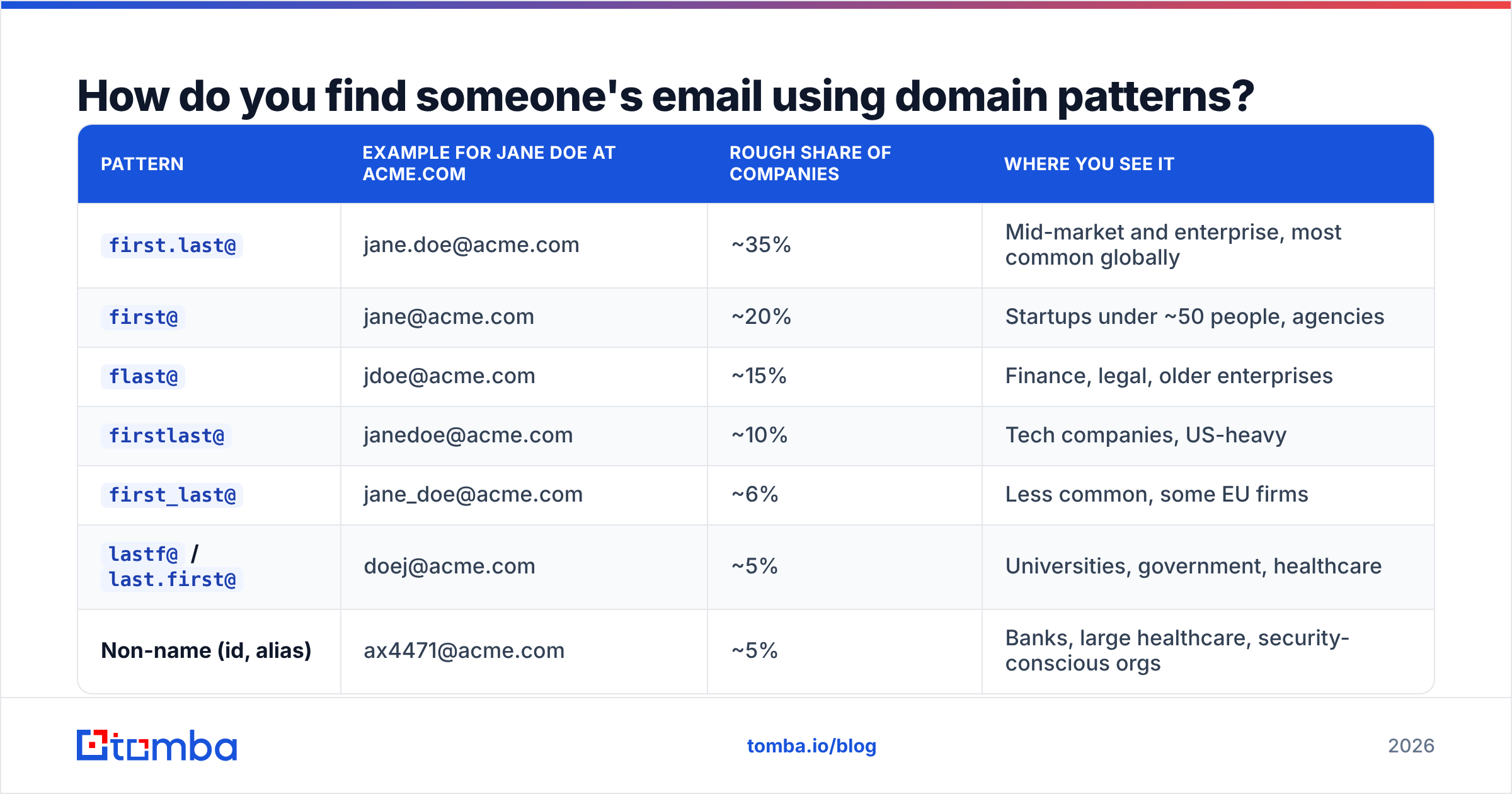
Every company picks a format and sticks to it. There are about eight formats in common use, and two of them cover most of the market.
| Pattern | Example for Jane Doe at acme.com | Rough share of companies | Where you see it |
|---|---|---|---|
first.last@ |
jane.doe@acme.com | ~35% | Mid-market and enterprise, most common globally |
first@ |
jane@acme.com | ~20% | Startups under ~50 people, agencies |
flast@ |
jdoe@acme.com | ~15% | Finance, legal, older enterprises |
firstlast@ |
janedoe@acme.com | ~10% | Tech companies, US-heavy |
first_last@ |
jane_doe@acme.com | ~6% | Less common, some EU firms |
lastf@ / last.first@ |
doej@acme.com | ~5% | Universities, government, healthcare |
| Non-name (id, alias) | ax4471@acme.com | ~5% | Banks, large healthcare, security-conscious orgs |
| Mixed / no single pattern | varies | ~4% | Post-merger companies, holding groups |
The workflow is short. Find one known address at the company — from a press release, a job posting, a support page, a forum signature. Work out the pattern from it. Then apply that pattern to your target's name.
Two tools make this near-instant. A company email pattern checker tells you the dominant format for a domain. An email permutator builds every plausible variant of a name, so you can test them all at once.
The obvious trap: patterns break. Duplicate names (two Jane Does) force one person onto a fallback format. Acquisitions leave people on legacy domains. Executives sometimes get a vanity alias. That's why step three — verification — is not optional.
Why does verification matter more than finding?#
Because a wrong address costs you more than a missing one.
A bounce tells inbox providers you don't know who you're mailing. Bounce rates above roughly 2-3% start to damage sender reputation. Once reputation drops, your correct emails land in spam too. You don't just lose the bad contact. You lose the good ones in the same campaign.
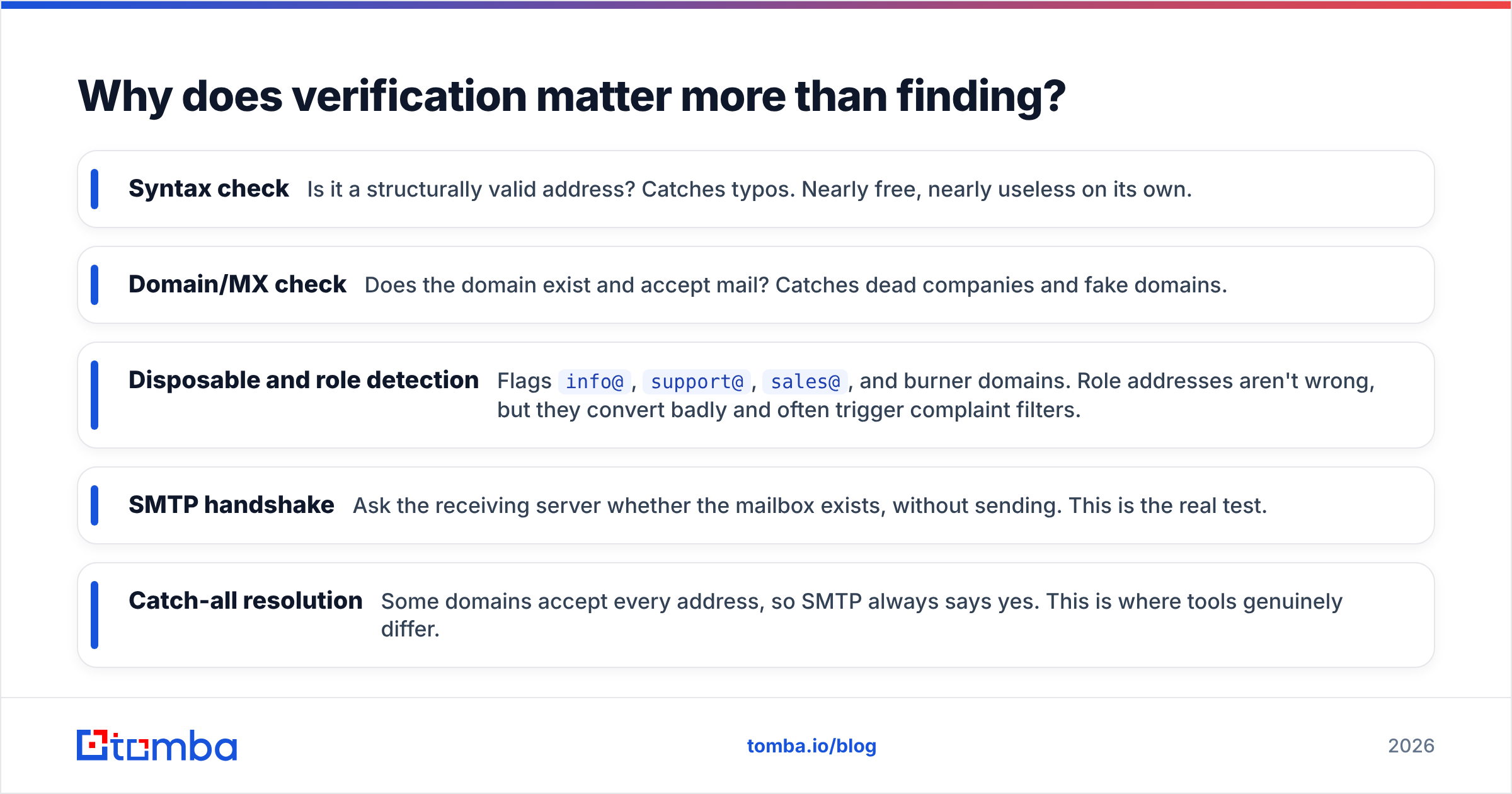
Verification works in layers, and the layers tell you how much to trust a result:
- Syntax check — Is it a structurally valid address? Catches typos. Nearly free, nearly useless on its own.
- Domain/MX check — Does the domain exist and accept mail? Catches dead companies and fake domains.
- Disposable and role detection — Flags
info@,support@,sales@, and burner domains. Role addresses aren't wrong, but they convert badly and often trigger complaint filters. - SMTP handshake — Ask the receiving server whether the mailbox exists, without sending. This is the real test.
- Catch-all resolution — Some domains accept every address, so SMTP always says yes. This is where tools genuinely differ.
That last one deserves a section of its own.

What do you do about catch-all domains?#
Roughly 15-20% of business domains are catch-all. The mail server accepts anything @company.com and sorts it out later. A standard SMTP check returns "valid" for asdkjhasd@company.com on those domains. That makes the result worthless.
Three honest options:
- Skip catch-all contacts entirely. Safest, and what careful senders on new domains should do. You lose real prospects.
- Send but isolate them. Put catch-all addresses in a separate sending domain or campaign, so bounces don't touch your main reputation.
- Use pattern confidence plus a catch-all resolver. Tools like a catch-all verifier score how likely the mailbox is to be real. They weigh the domain's known pattern, past delivery data, and other signals, instead of trusting the server's blanket "yes."
Option three is the practical middle. Nobody can promise certainty on a catch-all without sending. But a scored result lets you decide where your risk sits.
What free methods actually work, and how long do they take?#
Free methods are real. They're just slow. That matters when you need 200 contacts. It doesn't matter when you need three.
Google search operators. The workhorse queries:
site:company.com "@company.com"— surfaces addresses published anywhere on their site"Jane Doe" "@company.com"— direct name+domain match"jane.doe@" OR "jdoe@" company.com— tests two patterns at oncesite:company.com filetype:pdf "@company.com"— press kits and case studies are full of them"Jane Doe" email contact -site:linkedin.com— strips the noisiest result
Expect 2-5 minutes per person. The hit rate is near 100% for anyone who publishes — writers, academics, founders, developer advocates. It is near zero for people who don't.
GitHub. If your target is technical, their commit history often exposes a work address. Open any commit in a repo they contribute to, then add .patch to the URL. The From: header carries the address they had set. Many developers now use GitHub's noreply address, so this works about a third of the time. When it works, you have a confirmed live address.
Company sources. Team pages, /press, /contact, investor decks, SEC filings for public companies, conference speaker bios, and podcast show notes. Journalists and PR people publish addresses on purpose.
WHOIS. Since GDPR, most records sit behind privacy proxies. Small businesses, older domains, and non-EU registrants still expose real contacts. Worth 30 seconds, not worth 10 minutes.
Author and byline lookups. If the person writes anywhere, their address is often reachable from the byline. An author finder turns an article URL straight into the writer's contact. That beats guessing a pattern at a media org, where every writer may sit on a different system.
The direct ask. Underrated. "Hi Jane, I'd like to send you something about X — what's the best address?" That takes 20 seconds on LinkedIn. It works often enough to try before you spend 10 minutes sleuthing.
How do paid email finders compare?#
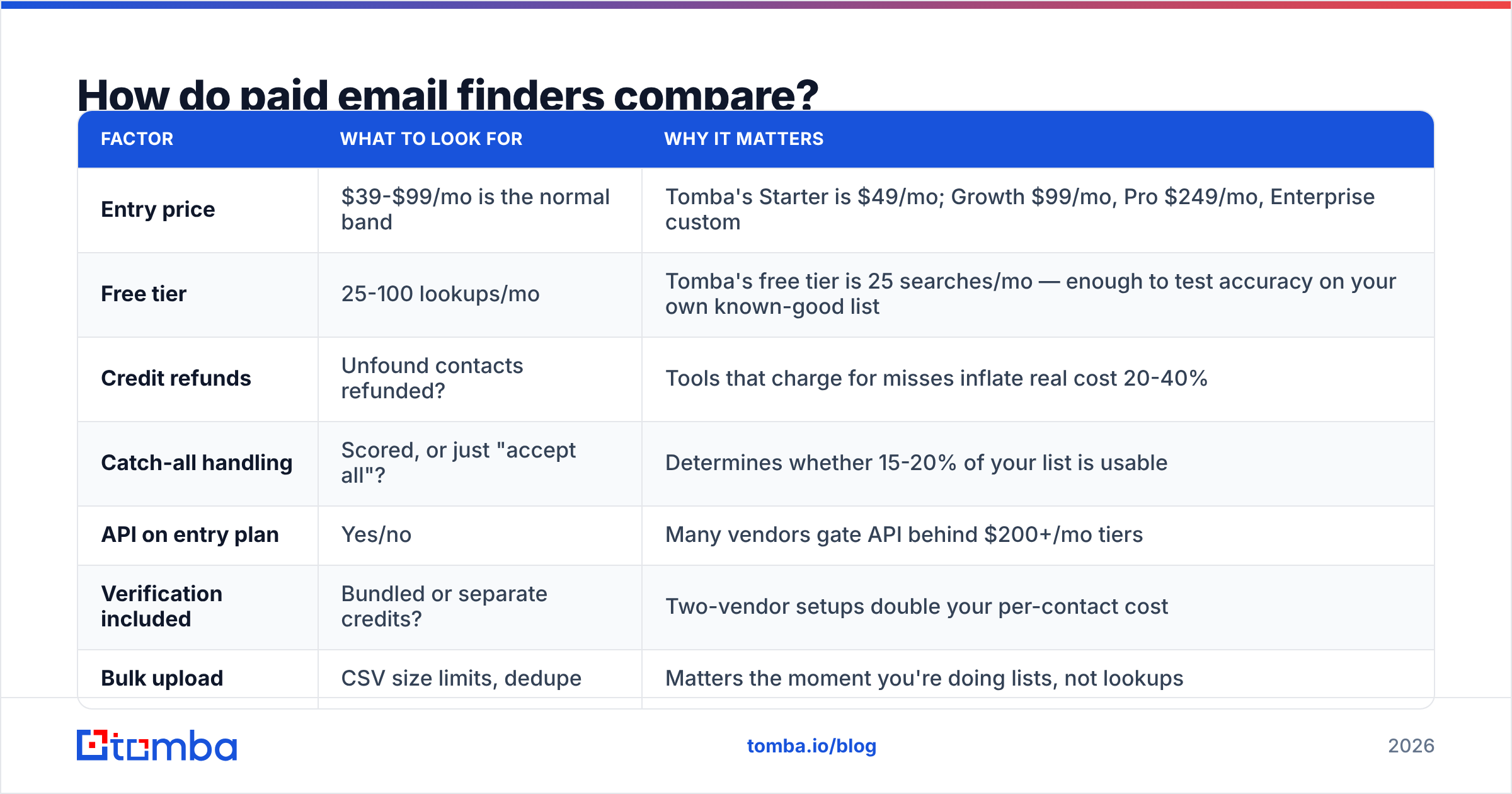
Once you're past a handful of contacts a week, manual methods stop paying for themselves. Here's how paid tools differ on the things that change your outcomes.

The chart above is the headline number most vendors advertise. Treat it as directional, not gospel. Accuracy swings by geography — US and UK data is far denser than APAC or LATAM. It swings by company size too, and by role seniority.
| Factor | What to look for | Why it matters |
|---|---|---|
| Entry price | $39-$99/mo is the normal band | Tomba's Starter is $49/mo; Growth $99/mo, Pro $249/mo, Enterprise custom |
| Free tier | 25-100 lookups/mo | Tomba's free tier is 25 searches/mo — enough to test accuracy on your own known-good list |
| Credit refunds | Unfound contacts refunded? | Tools that charge for misses inflate real cost 20-40% |
| Catch-all handling | Scored, or just "accept all"? | Determines whether 15-20% of your list is usable |
| API on entry plan | Yes/no | Many vendors gate API behind $200+/mo tiers |
| Verification included | Bundled or separate credits? | Two-vendor setups double your per-contact cost |
| Bulk upload | CSV size limits, dedupe | Matters the moment you're doing lists, not lookups |

A few honest observations about the category:
Accuracy claims are mostly unfalsifiable. Every vendor claims 95%+. They measure different things. Some count "deliverable" (it didn't hard bounce). Some count "correct person," a much higher bar. Only one test settles it: run 50 contacts you already know through a free tier, then check the answers yourself.
Coverage beats accuracy for most buyers. A tool that is 99% accurate on the 40% of your list it can find is worse than one that is 94% accurate on 75%. Ask for the hit rate on your ICP, not aggregate accuracy.
Data provenance is a real differentiator. Tools that publish their data sources and refresh cadence make a claim you can hold them to. Ones that don't are usually reselling the same pools as everyone else. G2's category listings show which vendors draw repeat complaints about stale data.
BookYourData is worth a look if you want a pre-built, pay-as-you-go list rather than per-contact lookup. It sits in a different lane: bought lists with a bounce guarantee. Some teams run it alongside a finder rather than instead of one.
How do you do this at scale without wrecking your domain?#
Scale changes the problem. Finding 1,000 addresses is easy. Sending to 1,000 addresses without burning your domain is the hard part.
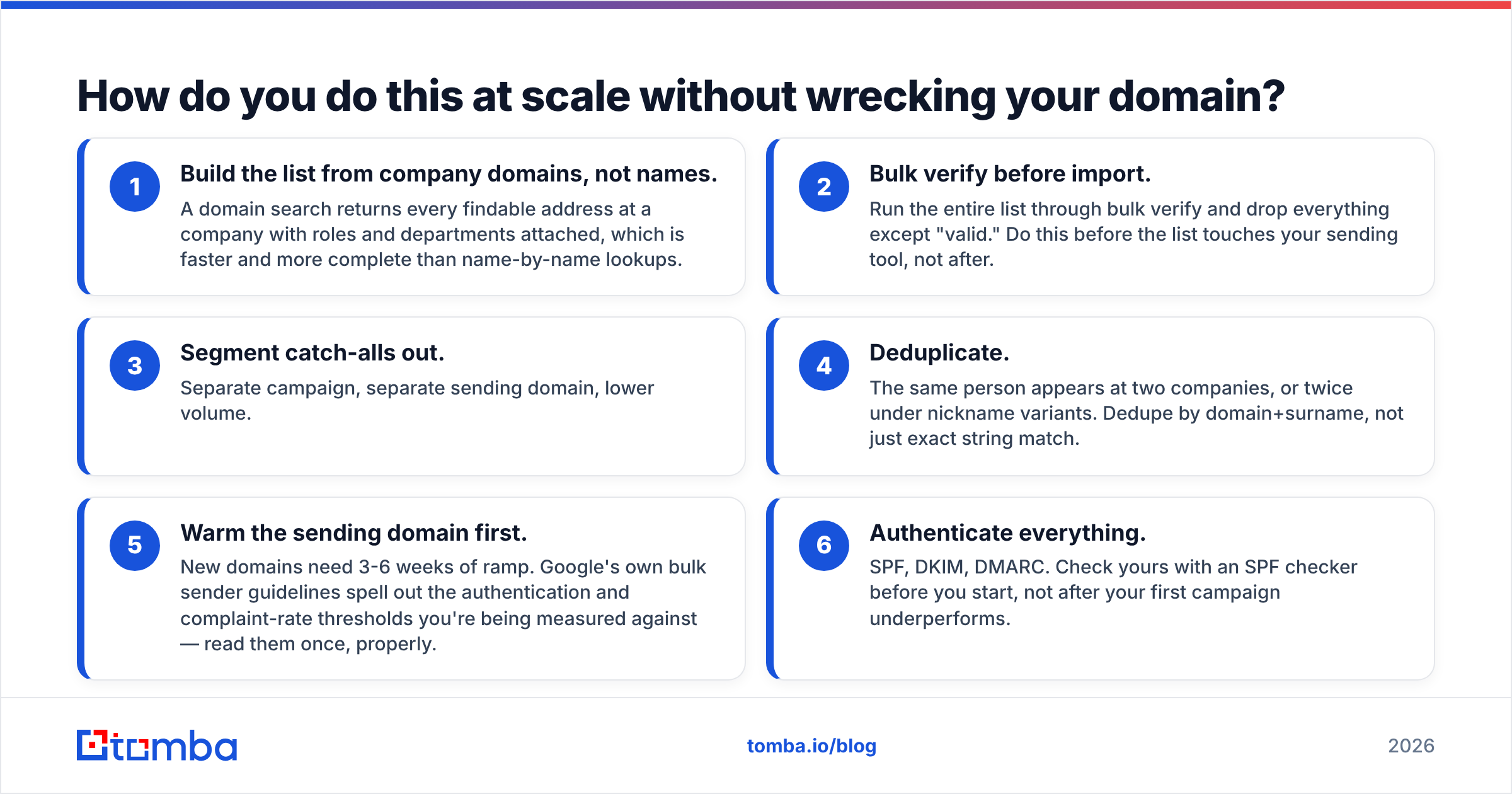
The sequence that works:
- Build the list from company domains, not names. A domain search returns every findable address at a company, with roles and departments attached. That is faster and more complete than name-by-name lookups.
- Bulk verify before import. Run the list through bulk verify and drop everything except "valid." Do this before the list touches your sending tool, not after.
- Segment catch-alls out. Separate campaign, separate sending domain, lower volume.
- Deduplicate. The same person shows up at two companies, or twice under nickname variants. Dedupe by domain+surname, not just exact string match.
- Warm the sending domain first. New domains need 3-6 weeks of ramp. Google's own bulk sender guidelines spell out the authentication and complaint thresholds you are measured against. Read them once, properly.
- Authenticate everything. SPF, DKIM, DMARC. Check yours with an SPF checker before you start, not after your first campaign underperforms.
Pulling contacts into a CRM or an enrichment pipeline? Automate the first two steps with an email finder API. Running finds and verifies at write-time keeps your database from decaying. B2B contact data decays roughly 25-30% per year as people change jobs.
When should you give up on finding an email?#
Some addresses aren't worth the hunt.
Give up when the company uses a non-name format, like banks and large healthcare systems. Give up when the target is a junior IC behind a locked-down directory. Give up when three checks all come back catch-all with low confidence. And give up when one contact has eaten 10 minutes and isn't a top-20 account.
Switch channels instead. LinkedIn, a phone call, a mutual introduction, or a contact form all beat a guessed email that bounces. For phone-first outreach, a phone finder is often faster than grinding on an address that isn't in any index.
And on personal addresses: if your only path is a consumer data broker, stop. The legal exposure under GDPR and similar rules isn't worth one prospect. Cold-emailing a personal Gmail also draws complaints that cost you more than the deal is worth.
Where should you start today?#
The short answer to how to find someones email: search site:company.com "@company.com", spot the pattern, apply the name, verify it. Five minutes, free.
If you need this repeatedly: stop doing it by hand. Run your next 25 contacts through Tomba's free tier. Check the answers against people you can confirm. See whether the hit rate on your target market justifies a paid plan. Tomba pricing starts at $49/mo for Starter, and the API is there from the entry tier rather than locked behind enterprise pricing.
Start with the Tomba Email Finder. Give it a name and a domain, and you get a scored address with its sources. Run it through the email verifier before it enters a single campaign. The finding is the easy half. The verifying is what keeps your domain alive.
Related guides#
// get started
Find, verify and enrich your first contacts today
Start on the free plan with 25 searches a month, then scale when your team is ready.
Free plan · No credit card required · GDPR & CCPA
// about the author