How to Find the Domain of an Email Address: 5 Fast Methods
Everything after the @ is the domain — but extracting it cleanly at scale, and knowing whether it's a real company mailbox or a catch-all, is where most people get stuck. Here's the 30-second version and the bulk version.
TL;DR
- The domain of an email address is everything after the
@. Insarah.chen@stripe.com, the domain isstripe.com. That part takes two seconds. - The hard part is what comes next: is that domain a real corporate mail server, a free provider like Gmail, a parked domain, or a catch-all that accepts everything and delivers nothing?
- For one address, split on the
@and check the MX records. For 10,000 addresses, use a spreadsheet formula, a script, or an API — manual extraction stops scaling around row 50. - Once you have the domain, it becomes a lead-gen asset: run a domain search to pull every other mailbox at that company, detect the email pattern, and enrich the account.
- Verify before you send. A syntactically perfect domain with no mail exchanger will bounce 100% of the time and drag your sender reputation down with it.
What is the domain of an email address?#
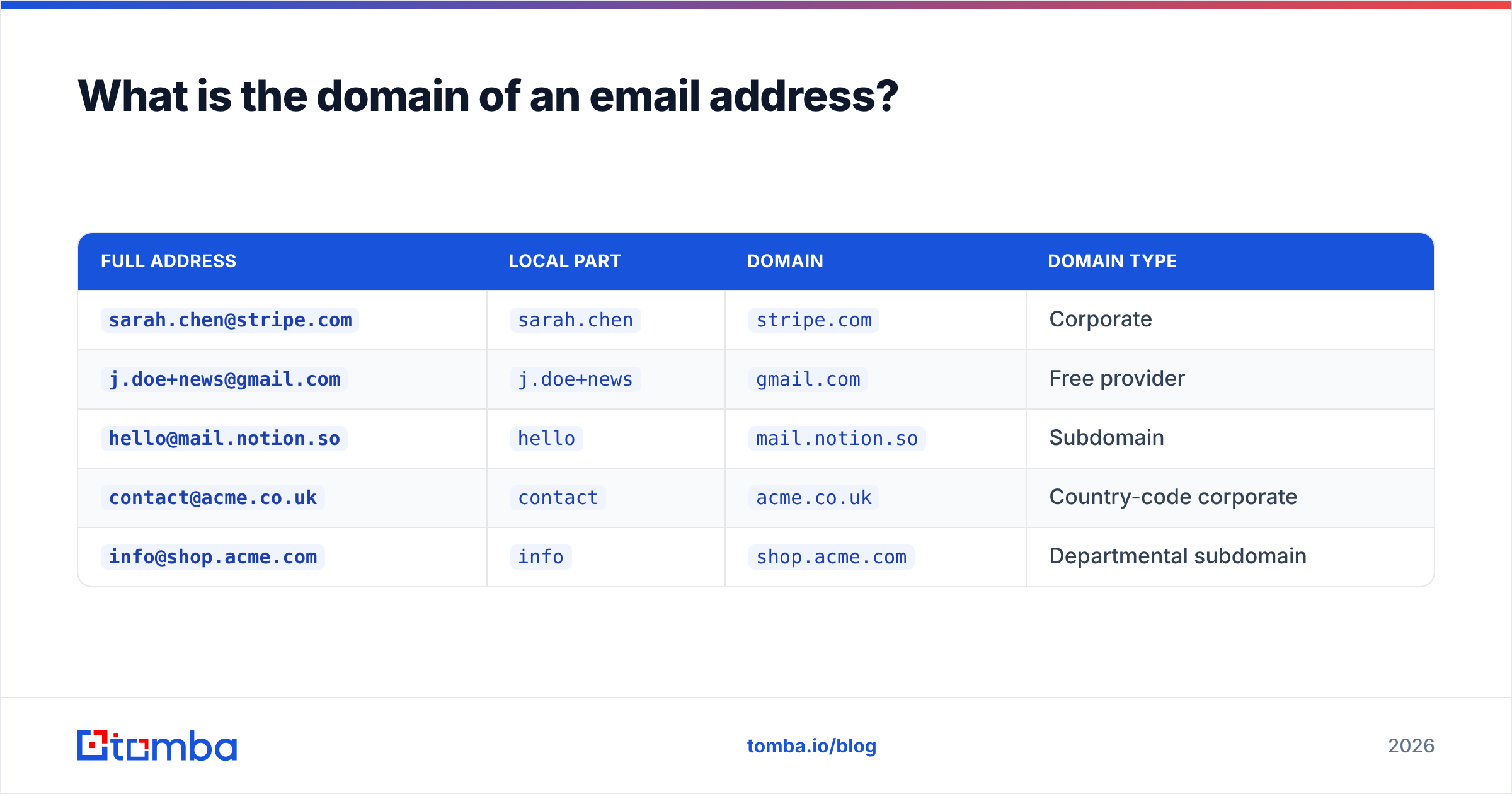
An email address has exactly two parts separated by a single @ symbol: the local part (the mailbox name) and the domain part (the mail host). The email address spec allows a lot of weirdness in the local part — dots, plus signs, quoted strings — but the domain is always the last segment after the final @.
| Full address | Local part | Domain | Domain type |
|---|---|---|---|
sarah.chen@stripe.com |
sarah.chen |
stripe.com |
Corporate |
j.doe+news@gmail.com |
j.doe+news |
gmail.com |
Free provider |
hello@mail.notion.so |
hello |
mail.notion.so |
Subdomain |
contact@acme.co.uk |
contact |
acme.co.uk |
Country-code corporate |
info@shop.acme.com |
info |
shop.acme.com |
Departmental subdomain |
Three distinctions matter more than people expect:
- Domain vs. root domain.
mail.notion.sois the domain of that address, butnotion.sois the root domain — the one you search for company data against. Strip subdomains when you're doing lead research, keep them when you're debugging deliverability. - Domain vs. company website. They usually match, but not always. Plenty of companies send from
getacme.comwhile their marketing site lives onacme.io. Never assume the domain and the URL are interchangeable. - Case insensitivity. The domain part is case-insensitive by spec.
Stripe.comandstripe.comare the same host. The local part technically isn't, but virtually every mail provider treats it as if it were.
If you only need the string after the @, you're already done. Keep reading if you need it for 5,000 rows, or if you need to know whether that domain will actually accept mail.
How do you find the domain of an email address?#
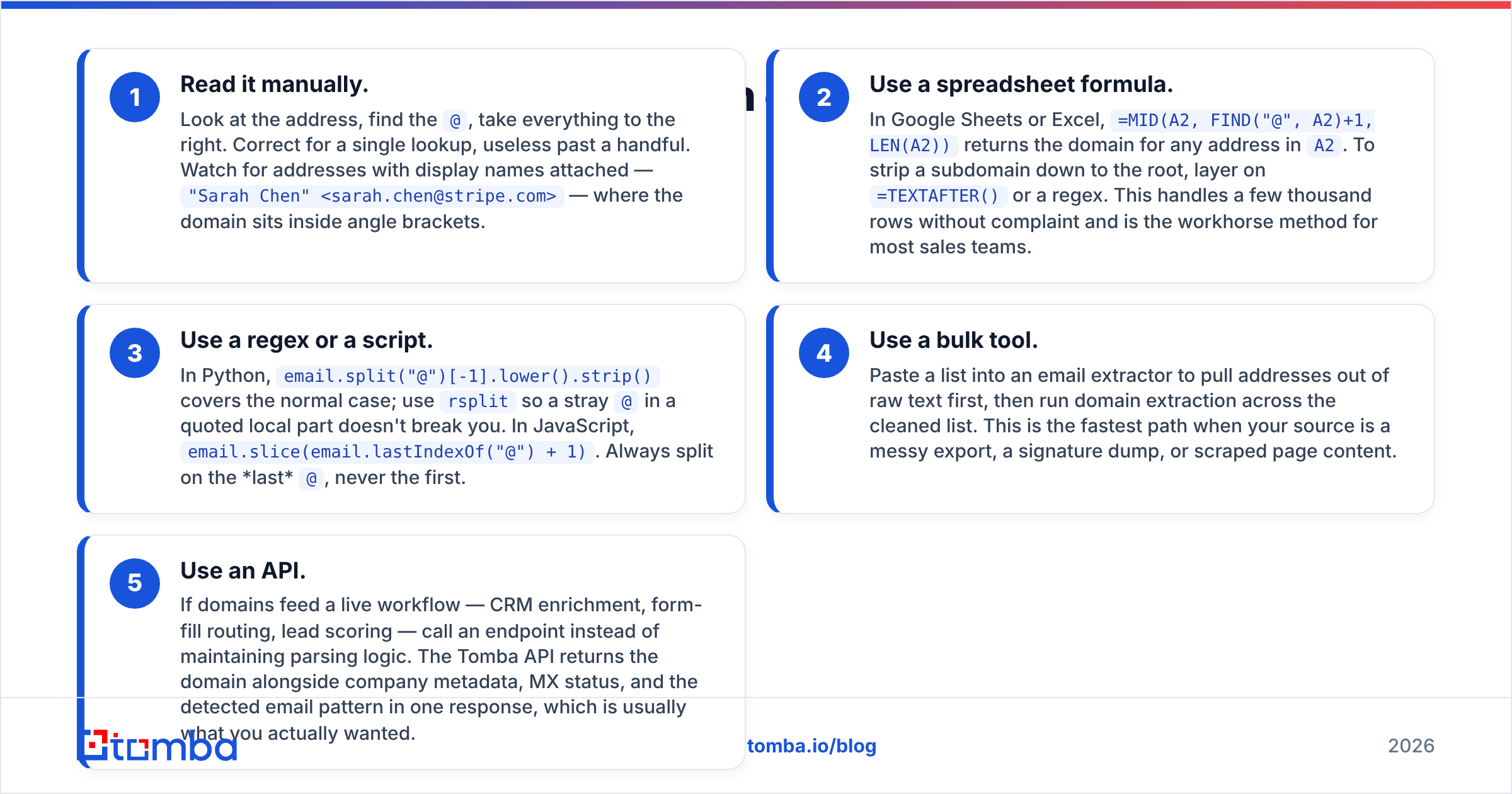
Five methods, ordered from "one address, right now" to "half a million rows in a warehouse."
- Read it manually. Look at the address, find the
@, take everything to the right. Correct for a single lookup, useless past a handful. Watch for addresses with display names attached —"Sarah Chen" <sarah.chen@stripe.com>— where the domain sits inside angle brackets. - Use a spreadsheet formula. In Google Sheets or Excel,
=MID(A2, FIND("@", A2)+1, LEN(A2))returns the domain for any address inA2. To strip a subdomain down to the root, layer on=TEXTAFTER()or a regex. This handles a few thousand rows without complaint and is the workhorse method for most sales teams. - Use a regex or a script. In Python,
email.split("@")[-1].lower().strip()covers the normal case; usersplitso a stray@in a quoted local part doesn't break you. In JavaScript,email.slice(email.lastIndexOf("@") + 1). Always split on the last@, never the first. - Use a bulk tool. Paste a list into an email extractor to pull addresses out of raw text first, then run domain extraction across the cleaned list. This is the fastest path when your source is a messy export, a signature dump, or scraped page content.
- Use an API. If domains feed a live workflow — CRM enrichment, form-fill routing, lead scoring — call an endpoint instead of maintaining parsing logic. The Tomba API returns the domain alongside company metadata, MX status, and the detected email pattern in one response, which is usually what you actually wanted.
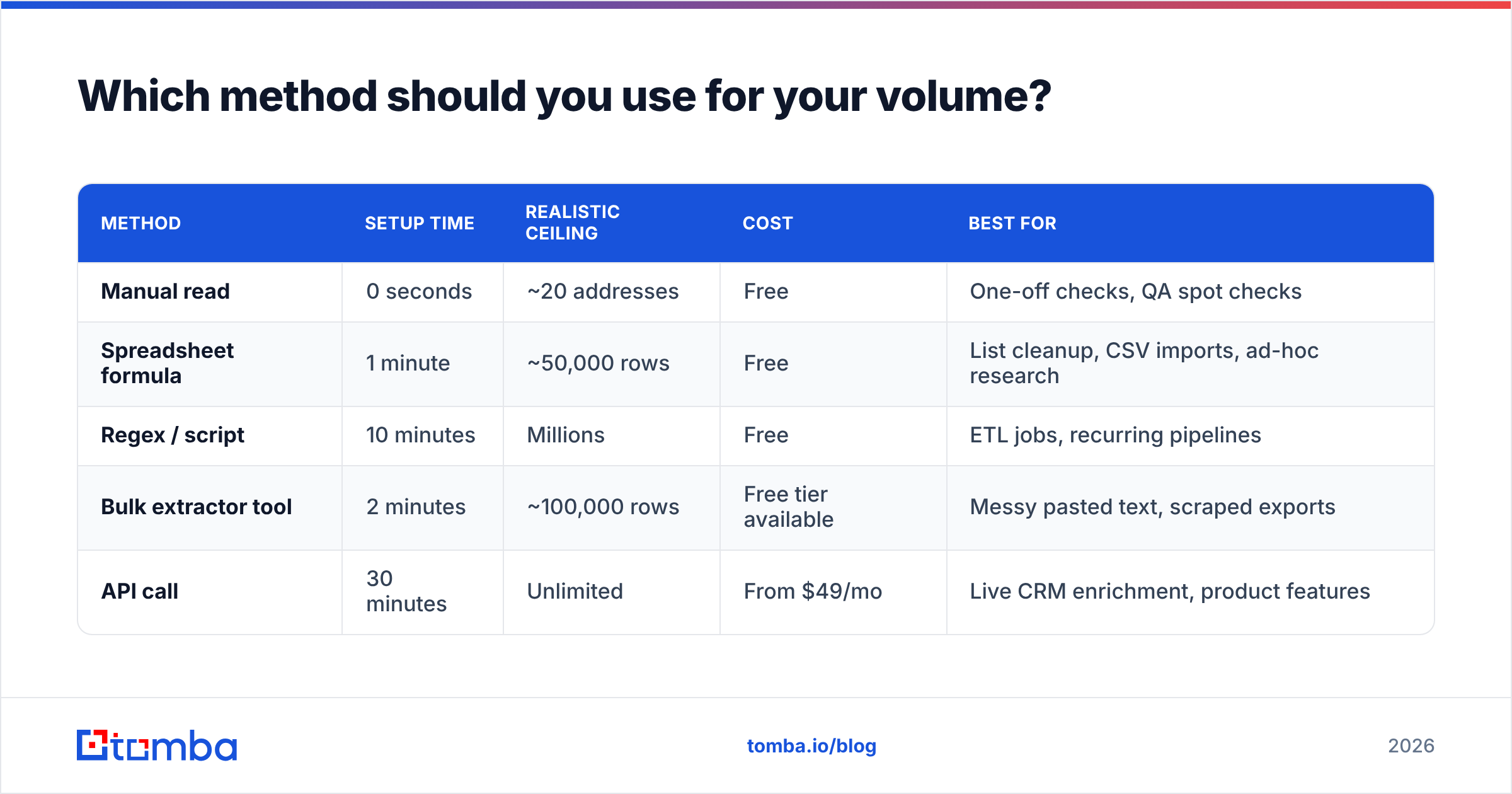
The method you pick should match the volume and the downstream job. Nobody needs an API to read one address. Nobody should be reading 20,000 addresses by hand.

Which method should you use for your volume?#
| Method | Setup time | Realistic ceiling | Cost | Best for |
|---|---|---|---|---|
| Manual read | 0 seconds | ~20 addresses | Free | One-off checks, QA spot checks |
| Spreadsheet formula | 1 minute | ~50,000 rows | Free | List cleanup, CSV imports, ad-hoc research |
| Regex / script | 10 minutes | Millions | Free | ETL jobs, recurring pipelines |
| Bulk extractor tool | 2 minutes | ~100,000 rows | Free tier available | Messy pasted text, scraped exports |
| API call | 30 minutes | Unlimited | From $49/mo | Live CRM enrichment, product features |
Two traps show up in every one of these methods. First, trailing whitespace — a domain of stripe.com with a trailing space will fail every DNS lookup you throw at it, silently. Trim aggressively. Second, mixed case — normalize everything to lowercase before you deduplicate, or Stripe.com and stripe.com will land as two separate accounts in your CRM.
How do you tell a corporate domain from a free or catch-all domain?#
Extracting the domain is trivial. Classifying it is the part that decides whether your campaign works.
Free providers. gmail.com, outlook.com, yahoo.com, proton.me, icloud.com and a few hundred others. These tell you nothing about the company. If B2B is your game, a free-provider domain means you either have a personal address for a real prospect (usable but low-signal) or a junk lead. Maintain a blocklist and flag them at import.
Role addresses on a corporate domain. info@, sales@, support@, admin@. The domain is real, the mailbox is a shared inbox. Response rates on these are dramatically lower than on named mailboxes, and some sending platforms count them against your list quality score.
Parked or dead domains. The domain resolves in DNS but has no MX records, meaning no mail server is configured. Every message you send bounces. Check MX before you send, not after.
Catch-all domains. The server accepts mail addressed to any mailbox on the domain, valid or not. Standard SMTP verification returns "accepted" for asdkjhasd@theirdomain.com, which makes normal verification worthless there. Roughly a fifth of corporate domains are configured this way, and they're overrepresented among enterprise accounts — exactly the accounts you most want. A dedicated catch-all verifier uses pattern confidence and historical engagement signals instead of a naive SMTP handshake, which is the only way to get a usable answer on these.
Subdomain sending. Companies increasingly send transactional mail from mail.company.com or email.company.com to isolate reputation. If you extract that subdomain and treat it as the company domain, your enrichment lookups will return nothing. Roll up to the root before you search for company data.
To check the raw DNS side yourself, MXToolbox will show MX, SPF, and blacklist status for any domain in a browser, and ICANN Lookup shows registration data — registrar, creation date, and status. A domain registered three weeks ago and paired with a "VP of Procurement" title is a signal worth acting on.
What can you actually do once you have the domain?#
The domain isn't the destination. It's the key that unlocks the rest of the account.
- Find everyone else at the company. One address gives you one contact. Running a domain search against
stripe.comreturns the mailboxes that are publicly discoverable on that domain, with names, titles, and sources. One inbound lead becomes a mapped buying committee. - Detect the email pattern. If you have
sarah.chen@stripe.com, the pattern is almost certainly{first}.{last}@. Confirm it with a company email pattern check, then construct addresses for anyone else at that company whose name you know. This is the single highest-leverage use of a domain. - Enrich the account record. The domain maps to firmographics — headcount, industry, funding, tech stack, HQ location. Contact enrichment turns a bare domain into a scored account without anyone touching a form.
- Route and score inbound leads. A form submission from a free provider goes to self-serve. One from a corporate domain matching your ICP goes to an AE, immediately. Domain classification at form-submit is one of the cheapest routing wins in RevOps.
- Deduplicate and group. Grouping contacts by root domain collapses eleven separate "leads" into one account with eleven contacts — which is what your pipeline reporting actually needs.

How do you verify the domain will accept mail?#
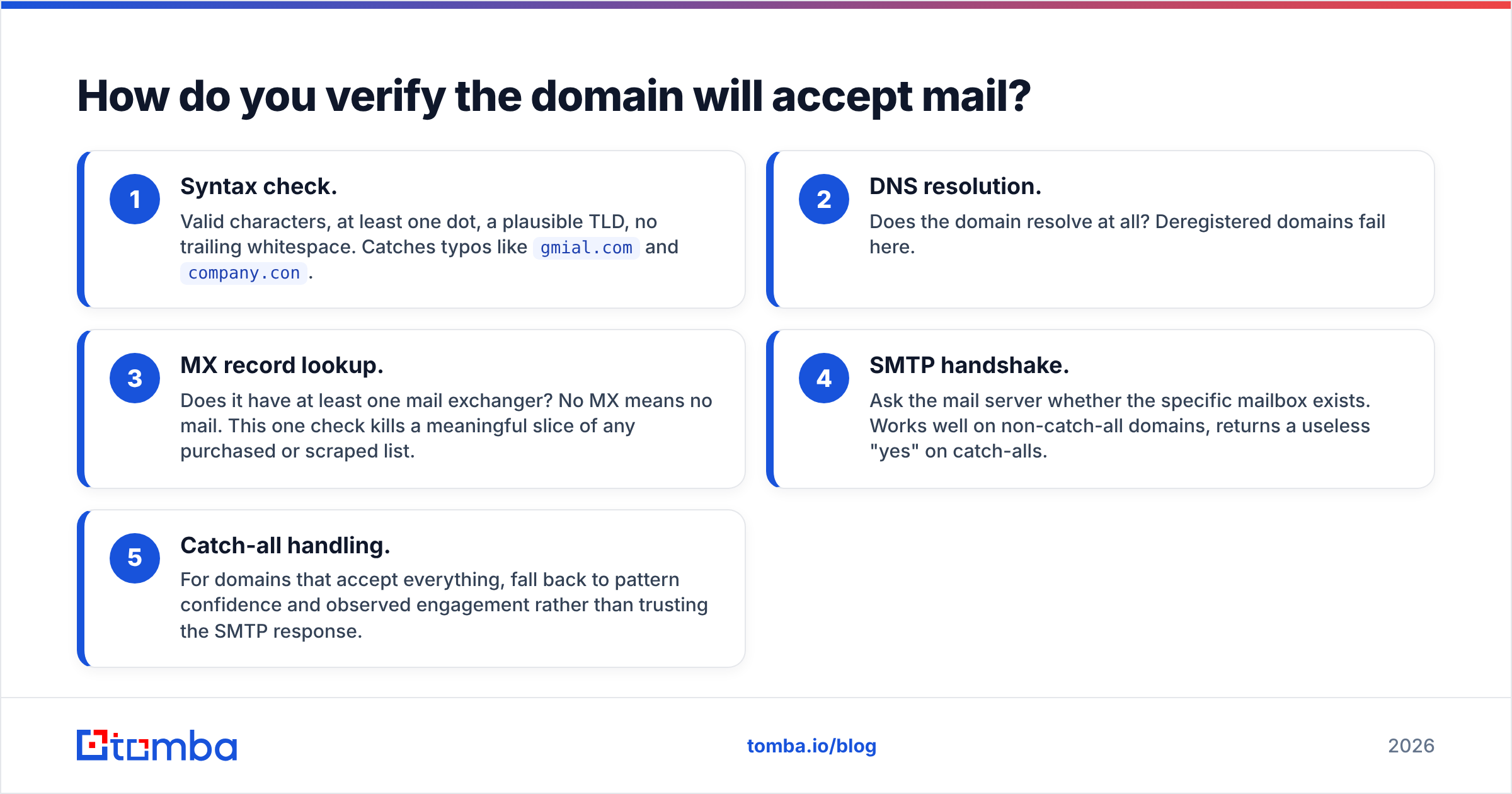
Extraction and verification are different jobs. A domain can be perfectly formatted and completely dead. Run this sequence before any send:
- Syntax check. Valid characters, at least one dot, a plausible TLD, no trailing whitespace. Catches typos like
gmial.comandcompany.con. - DNS resolution. Does the domain resolve at all? Deregistered domains fail here.
- MX record lookup. Does it have at least one mail exchanger? No MX means no mail. This one check kills a meaningful slice of any purchased or scraped list.
- SMTP handshake. Ask the mail server whether the specific mailbox exists. Works well on non-catch-all domains, returns a useless "yes" on catch-alls.
- Catch-all handling. For domains that accept everything, fall back to pattern confidence and observed engagement rather than trusting the SMTP response.
Running an email verifier collapses all five steps into one call and returns a status you can filter on. The economics are not subtle: mailbox providers watch bounce rates closely, and sustained rates above roughly 2–3% start throttling your delivery. Verification costs a fraction of a cent per address. A damaged sending domain costs weeks. If you want the vendor-neutral view of how sending reputation is scored, HubSpot's email deliverability guide is a reasonable primer, and the email deliverability glossary entry covers the mechanics in short form.
What mistakes do people make when extracting email domains?#
- Splitting on the first
@instead of the last. Quoted local parts can legally contain an@.rsplitorlastIndexOfis always the correct choice. - Treating subdomains as root domains.
mail.acme.comwon't matchacme.comin your CRM, and your enrichment lookup will come back empty. - Assuming the domain equals the website. Verify separately when it matters. Rebrands and acquisitions break this assumption constantly.
- Skipping normalization. Lowercase and trim before deduplicating, or you'll ship duplicate accounts into reporting.
- Ignoring internationalized domains. IDNs (non-ASCII domains) need punycode conversion before DNS lookups. Rare in B2B, but they exist and they fail loudly.
- Verifying after sending instead of before. Bounces are irreversible. Reputation damage takes weeks to unwind and there is no undo button.
Can you find the domain if you only have a person's name?#
You're solving the reverse problem, and it's a different workflow. Start from the company, not the person: identify the employer from LinkedIn or a company database, resolve that company to its sending domain, then confirm the pattern and construct the address.
That's the chain a find email addresses lookup runs for you — first name, last name, company domain in; verified address out. Going the other direction, if you have an address and want to know who owns it, a reverse email lookup resolves the address back to a person and a company.
Start with the domain, end with the pipeline#
Extracting the domain of an email address takes two seconds. Turning that domain into a mapped account — every relevant contact, a confirmed email pattern, verified deliverability, and enriched firmographics — is the part that moves revenue.
Tomba Email Finder does that chain in one place: give it a domain and it returns the discoverable mailboxes at that company, the detected pattern, confidence scores, and source citations for each address. Verification is built in, so nothing leaves your list unchecked. The free tier includes 25 searches a month to test it against domains you already know the answer for — the correct way to evaluate any data tool. Paid plans start at $49/mo, with full Tomba pricing published up front.
Grab the domain. Then go get the rest of the company.
Related guides#
// get started
Find, verify and enrich your first contacts today
Start on the free plan with 25 searches a month, then scale when your team is ready.
Free plan · No credit card required · GDPR & CCPA
// about the author