How To Follow Up On An Email: Examples, Timing & Templates
Most replies come from follow-ups, not first sends. Here are seven follow-up email examples, the timing rules behind them, and the mistakes that get you muted.
TL;DR
- Roughly half of all cold-email replies arrive after the first message, so the follow-up sequence is the campaign — the opener is just the entry ticket.
- Space follow-ups 3, 5, 7, and 10 business days apart, and cap the thread at four or five touches unless the prospect signals interest.
- Every follow-up needs a new reason to exist: a resource, a data point, a reframed question. "Just bumping this" is the single most ignored sentence in B2B email.
- Reply in the same thread for touches two and three, then start a fresh thread with a new subject line for touch four.
- Follow-ups only compound if the address is real. Bounced sends damage your sending domain long before your copy ever gets read.
What Counts as a Good Follow-Up Email?#
A good follow-up email adds something the previous message did not have. That is the whole test.
Think of it like knocking on a neighbor's door. The first knock is neutral. The second knock, ten seconds later, with nothing new to say, is annoying. The second knock two days later holding a package that got delivered to your house is welcome. Same action, completely different reception — because the second version carries new value.
Technically, a follow-up qualifies as "good" when it satisfies four conditions:
- It stands alone. The reader should understand the ask without scrolling to the original message. Assume they never opened it.
- It carries new information. A customer story, a benchmark, a relevant news item about their company, or a genuinely different angle on the problem.
- It shrinks the ask. If the first email asked for a 30-minute call, the third should ask for a yes/no answer or a single-sentence reply.
- It gives a clean exit. One line offering to close the loop respectfully outperforms three paragraphs of pressure.
Miss any one of those and you are writing a reminder, not a follow-up. Reminders get archived.
How Many Follow-Ups Should You Send?#
Four to five total touches, including the original email, is the range most outbound teams land on after testing. Beyond that the incremental reply rate flattens while unsubscribes and spam complaints keep climbing.
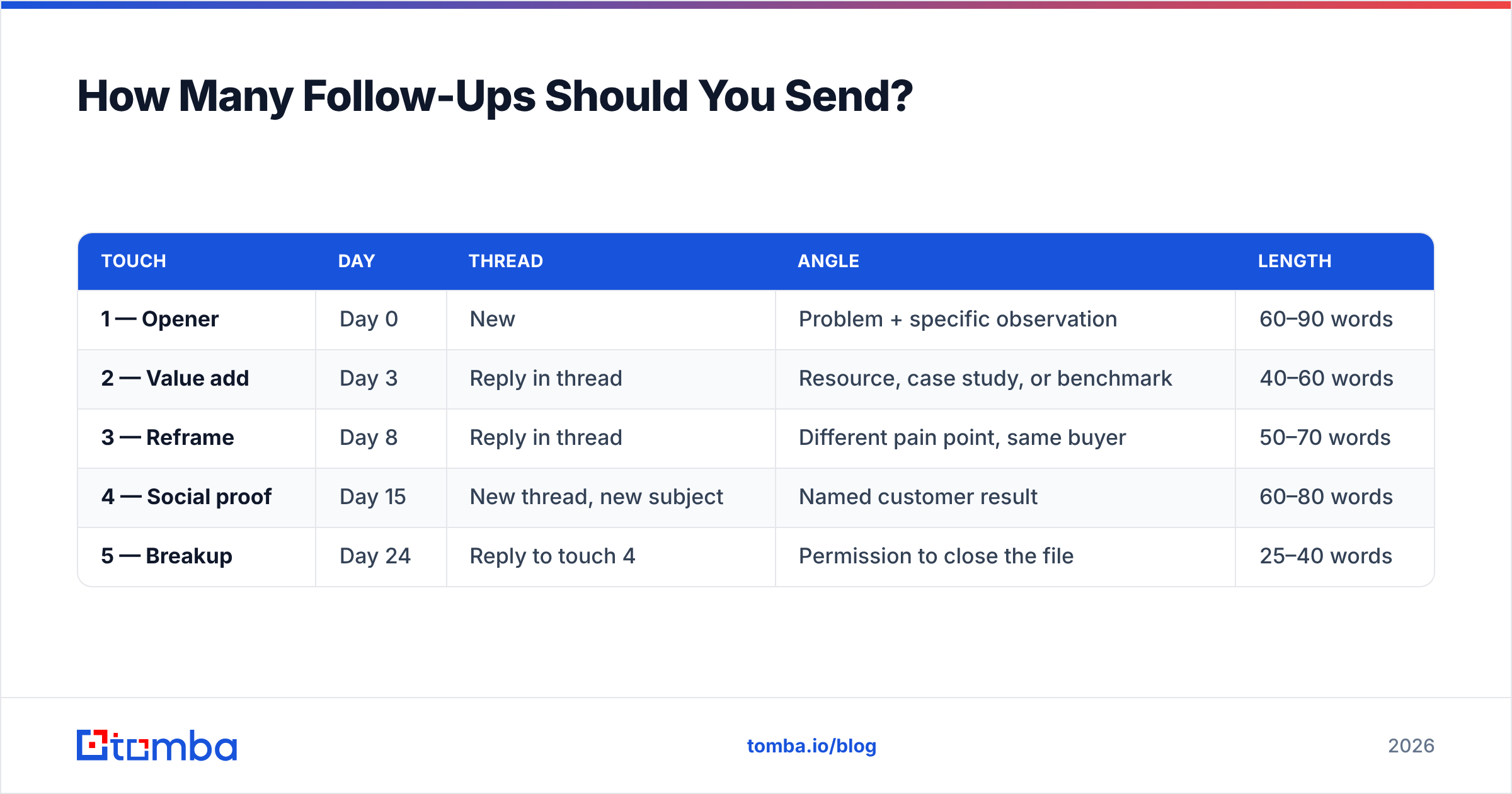
Here is a cadence that works for most B2B sequences:
| Touch | Day | Thread | Angle | Length |
|---|---|---|---|---|
| 1 — Opener | Day 0 | New | Problem + specific observation | 60–90 words |
| 2 — Value add | Day 3 | Reply in thread | Resource, case study, or benchmark | 40–60 words |
| 3 — Reframe | Day 8 | Reply in thread | Different pain point, same buyer | 50–70 words |
| 4 — Social proof | Day 15 | New thread, new subject | Named customer result | 60–80 words |
| 5 — Breakup | Day 24 | Reply to touch 4 | Permission to close the file | 25–40 words |
Two things in that table matter more than the templates below. First, the gaps widen as the sequence progresses — tight early spacing keeps you top of mind, wider late spacing keeps you from looking desperate. Second, touch four breaks into a new thread with a new subject line, which gives a prospect who ignored the original chain a fresh entry point.
If you run multi-channel, slot a LinkedIn touch between emails three and four rather than adding a sixth email. A well-timed connection request on the same day as a follow-up lifts reply rates without adding inbox pressure. Our LinkedIn outreach primer covers the sequencing details.
What Does a Follow-Up Email Example Actually Look Like?#
Below are seven templates covering the situations that actually come up. Replace the bracketed fields with real specifics — a template with generic placeholders left in reads worse than no email at all.
1. The value-add follow-up (touch 2, day 3)#
Subject: Re: [original subject]
Hi [First name],
Following my note on [problem]. We just published a teardown of how [similar company] cut [metric] by [number] — the section on [specific tactic] is the part most relevant to you: [link]
Worth 15 minutes to walk through how it maps to [their company]?
[Your name]
Why it works: it delivers something usable whether or not they reply. The ask is secondary to the gift.
2. The reframe follow-up (touch 3, day 8)#
Subject: Re: [original subject]
Hi [First name],
I may have led with the wrong angle. Most [job title]s I talk to at [company size] companies care less about [original pain] and more about [second pain].
If that is closer to your situation, I can send a two-minute Loom showing exactly how [customer] handled it. Yes or no is a fine reply.
[Your name]
Why it works: it admits a miss, which is disarming, and it reduces the reply cost to a single word.
3. The social-proof follow-up (touch 4, day 15, new thread)#
Subject: [Competitor or peer company] cut [metric] by [number]
Hi [First name],
[Named customer], also in [industry], was running [status quo approach] until [month]. After switching, their [metric] moved from [before] to [after] in [timeframe].
The setup took their team [effort estimate]. Happy to send the one-page breakdown if useful.
[Your name]
Why it works: a new subject line escapes a dead thread, and a named result beats an adjective every time.
4. The post-meeting follow-up (same day)#
Subject: Recap + next steps — [company] / [your company]
Hi [First name],
Good talking today. Capturing what we agreed:
- You are evaluating [tool category] to solve [problem] before [deadline]
- I am sending [deliverable] by [day]
- We reconnect [date] with [stakeholder] to review pricing
Anything I got wrong?
[Your name]
Why it works: written recaps create accountability and give your champion something to forward internally without rewriting it.
5. The no-show follow-up (within an hour)#
Subject: Missed you — rebook?
Hi [First name],
Looks like our [time] slot got away from us. No problem at all — calendars win sometimes.
Here are two options next week: [link]. If the timing has changed on your side entirely, just say so and I will close it out.
[Your name]
Why it works: zero guilt, zero passive aggression, and an explicit permission to decline.
6. The stalled-deal follow-up (14 days of silence)#
Subject: Re: [deal or proposal name]
Hi [First name],
Usually when things go quiet after a proposal it is one of three things: budget moved, priorities shifted, or someone internally raised a concern I have not addressed.
Which is closest? I can work with any of them.
[Your name]
Why it works: multiple-choice questions get answered because they cost almost nothing to answer.
7. The breakup follow-up (final touch)#
Subject: Re: [original subject]
Hi [First name],
I have not heard back, so I will assume [problem] is not a priority this quarter and stop emailing.
If that changes, my inbox is open. Wishing you a good [quarter].
[Your name]
Why it works: the breakup email reliably outperforms touches two and three in reply rate, largely because removal from a list feels like a loss. Keep it genuinely final — sending another email after the breakup destroys the credibility that made it work.
When Should You Send Each Follow-Up?#
Timing rules are simpler than most guides make them. Three that hold up under testing:
- Wait at least 48 business hours after the opener. Same-day follow-ups read as automated, because they usually are.
- Send between 7am and 10am in the recipient's timezone. You want to land near the top of the morning triage pile, not in the 4pm dump.
- Skip Monday morning and Friday afternoon. Monday inboxes are cleared in bulk; Friday afternoons are cleared not at all.
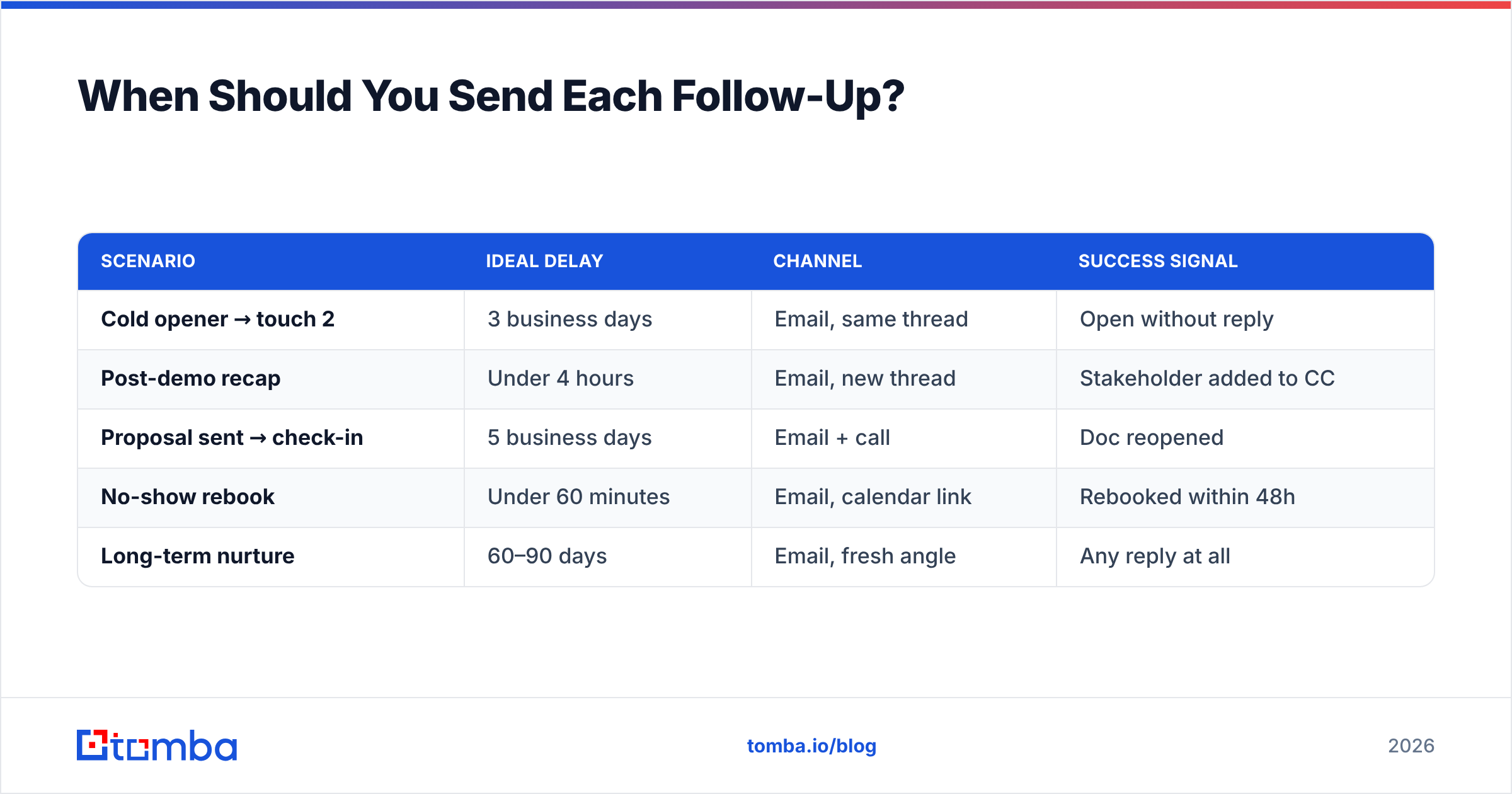
The bigger timing variable is deal stage, not clock time. A post-demo follow-up should go out within four hours while context is warm. A cold-sequence touch can wait a week without losing anything. Match the interval to how much the prospect currently cares.
| Scenario | Ideal delay | Channel | Success signal |
|---|---|---|---|
| Cold opener → touch 2 | 3 business days | Email, same thread | Open without reply |
| Post-demo recap | Under 4 hours | Email, new thread | Stakeholder added to CC |
| Proposal sent → check-in | 5 business days | Email + call | Doc reopened |
| No-show rebook | Under 60 minutes | Email, calendar link | Rebooked within 48h |
| Long-term nurture | 60–90 days | Email, fresh angle | Any reply at all |
Why Do Most Follow-Ups Get Ignored?#
Because they violate one of five patterns. In rough order of damage:
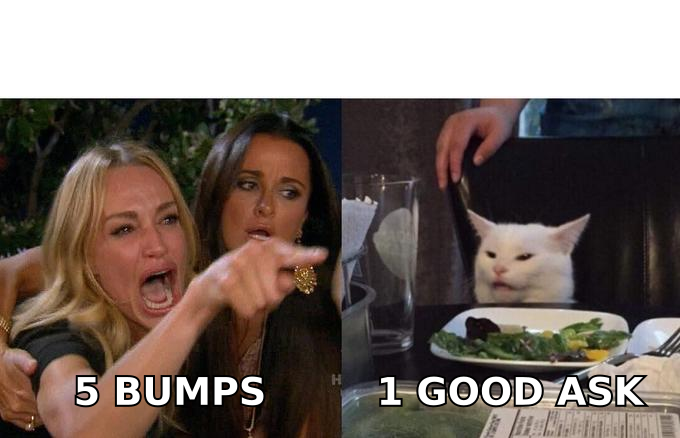
- No new information. "Circling back," "bumping this," and "just checking in" tell the reader you have nothing to say. If you have nothing to say, do not send.
- The ask never shrinks. Asking for the same 30-minute call five times in a row signals you are not listening.
- Wrong person entirely. No amount of persistence fixes emailing a manager who left 18 months ago.
- The email never arrived. Bounces, spam placement, and dead addresses account for a large share of what looks like silence. Check your setup with a free email checker and an SPF checker before you blame the copy.
- Volume without segmentation. Sending the same four-touch sequence to CFOs and SDR managers guarantees both find it irrelevant.
The deliverability point deserves emphasis. A follow-up sequence multiplies whatever your list quality already is. If 12% of your addresses are invalid, a five-touch sequence sends five times as many bounces, and mailbox providers read that pattern as spam behavior. Running the list through an email verifier before the sequence starts protects your sender reputation across every campaign that follows. Google's own Postmaster Tools documentation spells out how bounce and complaint rates feed into inbox placement.
How Do You Personalize at Scale Without Sounding Like a Robot?#
Personalization has three tiers, and only two of them survive automation.
Tier 1 — Firmographic. Company size, industry, funding stage, tech stack. Fully automatable from enriched data, and enough for touch one. Pulling technology signals or headcount into a merge field takes seconds with contact enrichment.
Tier 2 — Role-based. What this job title cares about at this company stage. Also automatable if your segments are tight. This is what powers the "reframe" template above: you are not personalizing to the person, you are personalizing to the role's actual priorities.
Tier 3 — Individual. A podcast they were on, a post they wrote, a product change they shipped. Not automatable, genuinely expensive, and worth reserving for your top 10% of accounts. Save tier 3 for touch four on named targets — that is where the effort converts.
The trap is faking tier 3 with a template. "Loved your recent post!" with no reference to what the post said is worse than no personalization at all, because it proves you are running a machine and hoping the prospect will not notice. Research from HubSpot's sales benchmarks consistently shows specificity beats warmth in cold outreach; vague flattery reads as noise.
What Tools Support a Follow-Up Sequence?#
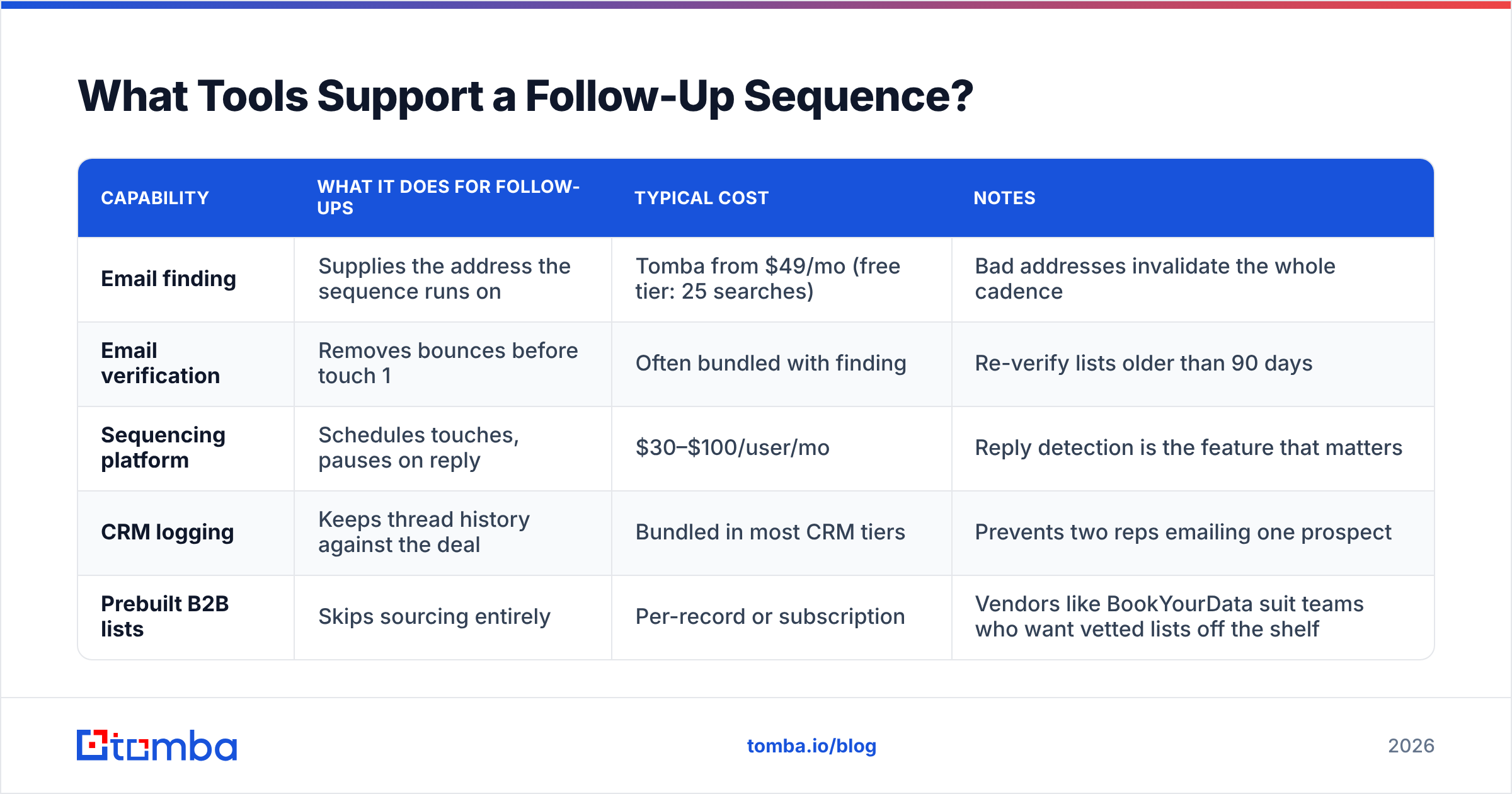
You need three things: accurate contact data, a sequencing tool, and verification. Different vendors bundle these differently.
| Capability | What it does for follow-ups | Typical cost | Notes |
|---|---|---|---|
| Email finding | Supplies the address the sequence runs on | Tomba from $49/mo (free tier: 25 searches) | Bad addresses invalidate the whole cadence |
| Email verification | Removes bounces before touch 1 | Often bundled with finding | Re-verify lists older than 90 days |
| Sequencing platform | Schedules touches, pauses on reply | $30–$100/user/mo | Reply detection is the feature that matters |
| CRM logging | Keeps thread history against the deal | Bundled in most CRM tiers | Prevents two reps emailing one prospect |
| Prebuilt B2B lists | Skips sourcing entirely | Per-record or subscription | Vendors like BookYourData suit teams who want vetted lists off the shelf |
A note on sequencing tools: the feature to scrutinize is reply detection, not template libraries. A sequence that keeps firing after a prospect replies is the fastest way to lose a warm deal. Test it with your own address before you point it at a list.
On the data side, the practical workflow is to find addresses by company using domain search, verify the results, then push them into your sequencer. If you are prospecting from LinkedIn profiles rather than company domains, a LinkedIn finder closes the gap between a profile and a working inbox. For pricing across tiers, Tomba pricing lists the credit allocations per plan.
Independent review sites like G2's sales engagement category are useful for narrowing the sequencer shortlist, though weight recent reviews heavily — deliverability performance in this category changes fast.
How Do You Measure Whether Your Follow-Ups Work?#
Track four numbers, per touch, not per campaign:
- Reply rate by touch. If touch three underperforms touch two by more than half, the angle is wrong, not the timing.
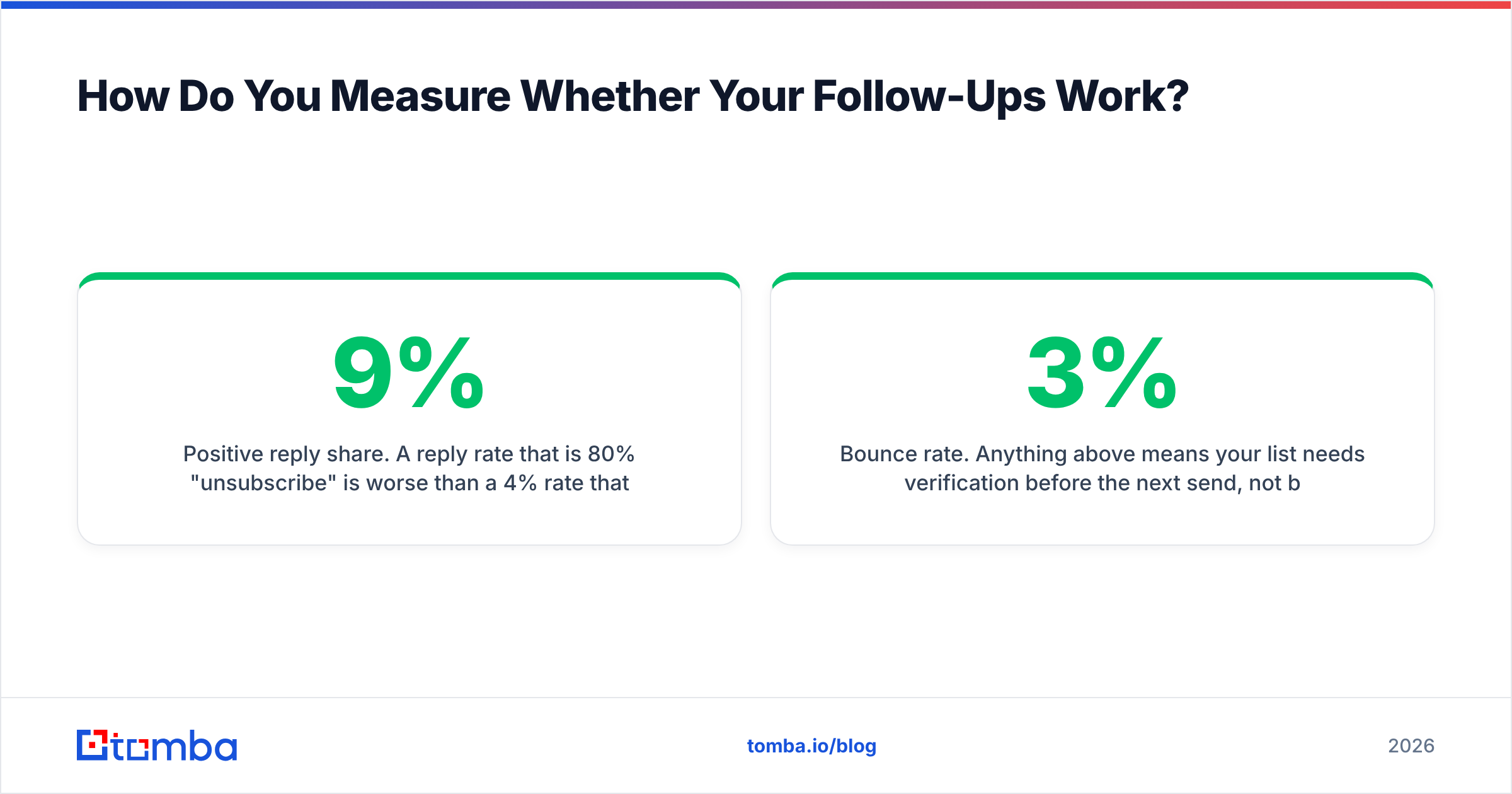
- Positive reply share. A 9% reply rate that is 80% "unsubscribe" is worse than a 4% rate that is 60% positive.
- Bounce rate. Anything above 3% means your list needs verification before the next send, not better copy.
- Time to first reply. If most replies land after touch three, you are under-following-up. If they all land on touch one, your later touches are dead weight.
Segment those by persona. A cadence that works on ops managers frequently fails on VPs, and the aggregate number hides it. Track response rate as a per-segment metric and you will find which sequences deserve more volume.
Ready to Build Sequences on Data That Actually Delivers?#
The best-written follow-up in the world does nothing if it lands on a dead address. Start your sequence with verified, current contacts: the Tomba Email Finder finds professional email addresses by domain, name, or company, with verification built into the same workflow. The free tier gives you 25 searches a month to test the data quality against your own target list, and paid plans start at $49/mo when you are ready to scale the cadence across a full territory.
Related guides#
// get started
Find, verify and enrich your first contacts today
Start on the free plan with 25 searches a month, then scale when your team is ready.
Free plan · No credit card required · GDPR & CCPA
// about the author