How to Generate Outbound Leads in 2026: A Practical Playbook
Outbound still works in 2026 — but only if your list, timing, and message line up. Here is the exact 7-step system for generating outbound leads, plus the math on how many contacts you actually need.
TL;DR
- Outbound lead generation is a math problem wrapped in a messaging problem. Fix the list first — 40% of a typical scraped list is dead or wrong, and no subject line survives a bounce.
- The working sequence in 2026: define a trigger-based ICP, build the list from source data, verify before send, run a 3-channel touch pattern (email, phone, LinkedIn), and only then optimize copy.
- Expect 1-3% positive reply rates on cold email at a good list quality. To book 10 meetings/month you need roughly 1,000-1,500 verified, well-targeted contacts — not 10,000 bad ones.
- Warm up domains for 3-4 weeks before volume sending, keep per-inbox volume under ~40 emails/day, and split across multiple sending domains.
- The tooling stack is smaller than vendors want you to think: a list source, a verifier, a sequencer, and a CRM. Everything else is optional.
What does "outbound lead generation" actually mean in 2026?#
Outbound lead generation is the practice of initiating contact with prospects who have not raised their hand — cold email, cold calls, LinkedIn messages, direct mail, and targeted ads aimed at named accounts. Inbound waits. Outbound goes.
The reason people declare outbound dead every 18 months is that the easy version stopped working around 2021. Buying a 50,000-row list, blasting a "quick question" template, and hoping for 2% replies now gets you spam-foldered inside a week. Google and Yahoo's bulk-sender requirements (authentication, one-click unsubscribe, spam complaint rate under 0.3%) made sloppy volume genuinely expensive.
What replaced it is narrower and more deliberate: smaller lists, better data, more research per contact, and multi-channel touch patterns. Teams doing this well in 2026 send fewer emails than they did in 2020 and book more meetings.
Here is the honest framing. Outbound has three failure points, and they fail in this order:
- List quality — wrong person, wrong company, dead email address. Kills the campaign before anyone reads a word.
- Deliverability — the message is fine but never reaches the inbox. Kills it silently, which is worse.
- Message relevance — it arrives, gets read, and gets ignored because it's about you and not them.
Most teams obsess over #3 and never audit #1 or #2. Reverse that order.
How do you build an outbound lead list that isn't garbage?#
Start with a trigger, not a category. "SaaS companies with 50-200 employees" is a category — it describes 40,000 companies and gives you no reason to reach out today. "SaaS companies that posted a RevOps role in the last 30 days" is a trigger. It narrows the list and writes your first line for you.
Useful 2026 triggers, ranked by signal strength:
- Hiring signals — a new job posting for a role adjacent to your product means budget was just approved. Strongest general-purpose trigger available.
- Leadership changes — a new VP of Sales or Head of Marketing has a 90-day window to change the stack. Watch LinkedIn announcements and press releases.
- Funding events — Series A/B rounds correlate with tooling spend, but everyone else is emailing them too. Use it, don't rely on it.
- Technology changes — a company that just added or removed a competitor's script from their site is either shopping or unhappy. Detectable via tech-stack lookups.
- Website visits — anonymous visitor identification tells you who researched you without filling a form. Highest intent, lowest volume.
- Content engagement — someone published an article about the problem you solve. Reach the author directly rather than a generic inbox.
Once you have a trigger, you need contacts. Three routes, in order of typical quality:
Route A — build from the domain. You know the company; you need the right person. Run a domain search to pull the published email pattern and the people who match your buyer titles. This is the highest-fidelity route because you control the targeting and the data is derived from live sources rather than a resold snapshot.
Route B — build from a name list. You exported 500 people from LinkedIn Sales Navigator or a conference attendee page. Now you need addresses. An email finder resolves first name + last name + domain into a deliverable address, with a confidence score attached.
Route C — buy a prebuilt database. Fastest to start, most variable in quality. Vendors like BookYourData and other database providers do well here when you need volume in a defined geography or industry and you accept that you'll re-verify everything. Treat purchased data as raw material, not as a finished list.
Whichever route you take, budget time for enrichment. A row with just an email is a worse row than one with email, title, company size, and a recent trigger — because only the second one lets you write something specific. Bulk data enrichment fills those gaps at list-build time rather than during writing, when you're least patient.
What's the real math behind outbound lead generation?#
Run the numbers before you run the campaign. Outbound is unforgiving arithmetic, and most quota misses are visible in a spreadsheet weeks before they show up in the pipeline.
Working benchmarks for cold email in 2026, assuming a verified list and warmed domains:
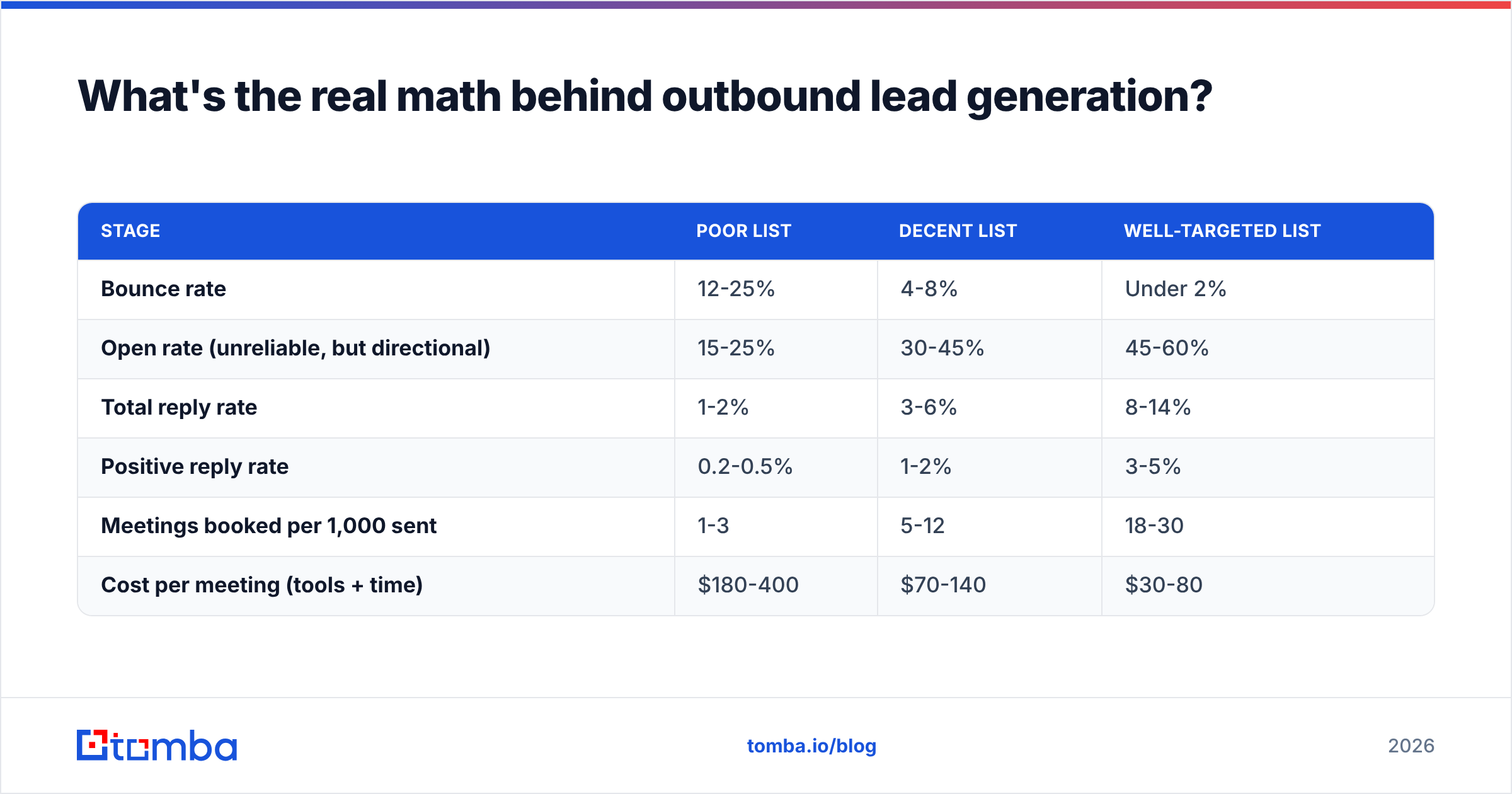
| Stage | Poor list | Decent list | Well-targeted list |
|---|---|---|---|
| Bounce rate | 12-25% | 4-8% | Under 2% |
| Open rate (unreliable, but directional) | 15-25% | 30-45% | 45-60% |
| Total reply rate | 1-2% | 3-6% | 8-14% |
| Positive reply rate | 0.2-0.5% | 1-2% | 3-5% |
| Meetings booked per 1,000 sent | 1-3 | 5-12 | 18-30 |
| Cost per meeting (tools + time) | $180-400 | $70-140 | $30-80 |
Read the bottom row twice. The difference between a poor list and a well-targeted one is roughly 5x on cost per meeting — and none of that gap is closed by better copywriting.
Work backward from your target. If you need 10 meetings a month and you're operating at "decent list" quality (say 8 meetings per 1,000 sent), you need about 1,250 sends per month. At 40 emails per inbox per day, that's roughly 2 inboxes running steadily. Add a follow-up sequence of 3 touches and you're at ~400 net-new contacts a month, not 1,250 — because most of your volume is follow-ups to people you already contacted.
That last point catches people out. Net-new contacts needed per month ≈ total sends ÷ touches per sequence. A 4-touch sequence means you need one-quarter the list you thought you did. Spend the savings on research.
Which channels should you combine, and in what order?#
Single-channel outbound is fragile. Email alone gets you to maybe 2% positive replies; adding a phone touch and a LinkedIn touch to the same contact typically lifts total connect rates by 30-50% because you're catching people where they actually pay attention.
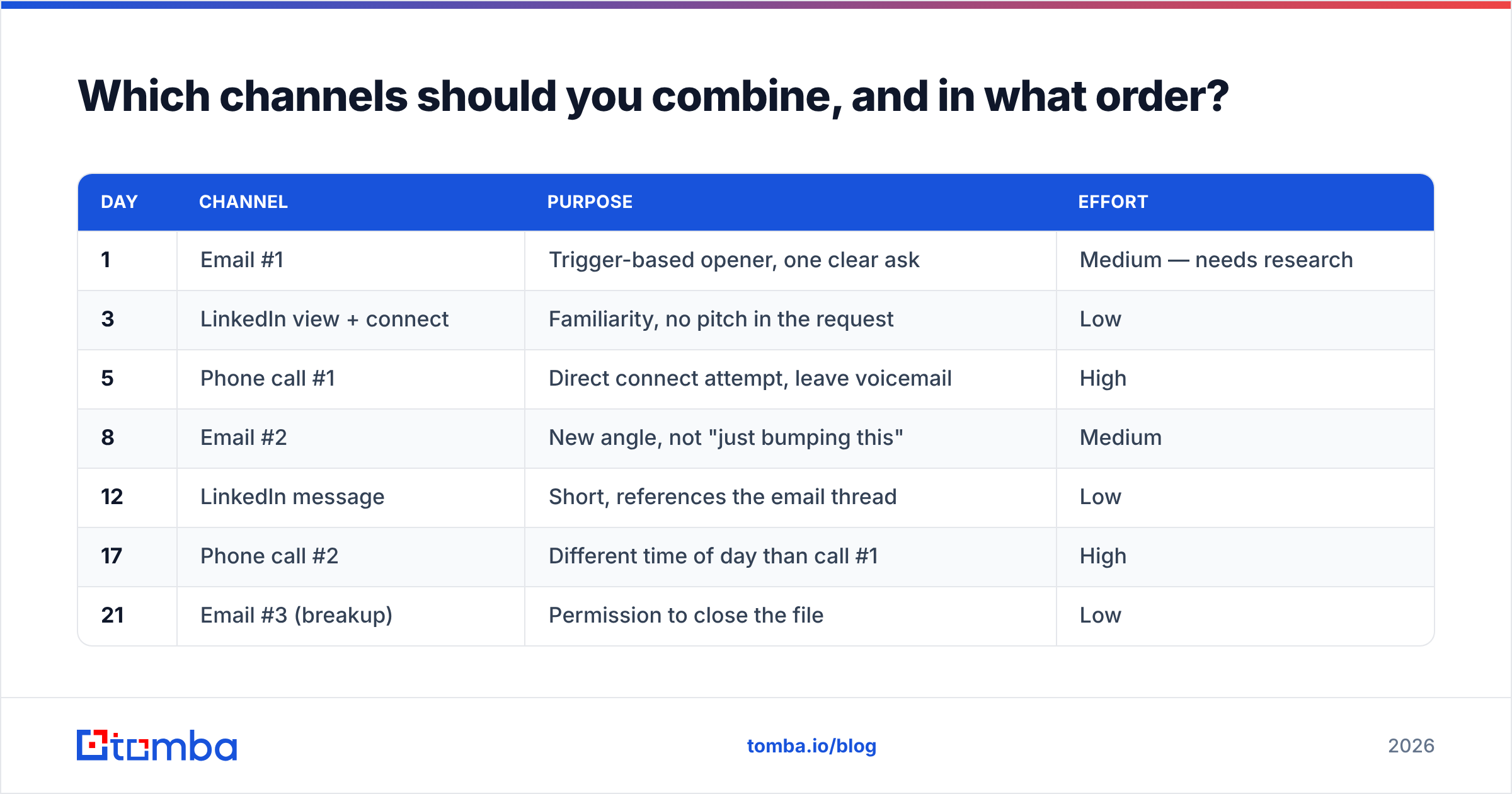
A touch pattern that works across most B2B segments:
| Day | Channel | Purpose | Effort |
|---|---|---|---|
| 1 | Email #1 | Trigger-based opener, one clear ask | Medium — needs research |
| 3 | LinkedIn view + connect | Familiarity, no pitch in the request | Low |
| 5 | Phone call #1 | Direct connect attempt, leave voicemail | High |
| 8 | Email #2 | New angle, not "just bumping this" | Medium |
| 12 | LinkedIn message | Short, references the email thread | Low |
| 17 | Phone call #2 | Different time of day than call #1 | High |
| 21 | Email #3 (breakup) | Permission to close the file | Low |
Two rules that matter more than the exact spacing:
Never send a follow-up whose only content is that time has passed. "Just bumping this to the top of your inbox" tells the prospect you have nothing new to say. Each touch should carry a fresh angle — a different pain, a customer example, a relevant piece of news about their company.
Phone still converts best per attempt. Cold calling has terrible efficiency (60-80 dials per meaningful conversation) and excellent effectiveness (10-20% of conversations convert to a next step). If you have B2B phone numbers for your list, calling the 20% of accounts you care most about is a better use of an hour than emailing 200 you don't.
For a deeper channel breakdown, HubSpot's sales statistics roundup is a reasonable neutral source, and G2's buyer behavior reports are useful for understanding where your buyers actually research.
How do you stop your outbound emails from landing in spam?#
This is the step where most outbound programs quietly die. Your metrics look fine — no bounces, decent opens — and yet nothing converts, because a growing share of your sends is going to the spam folder where opens are sometimes tracked anyway.
The non-negotiable setup checklist:
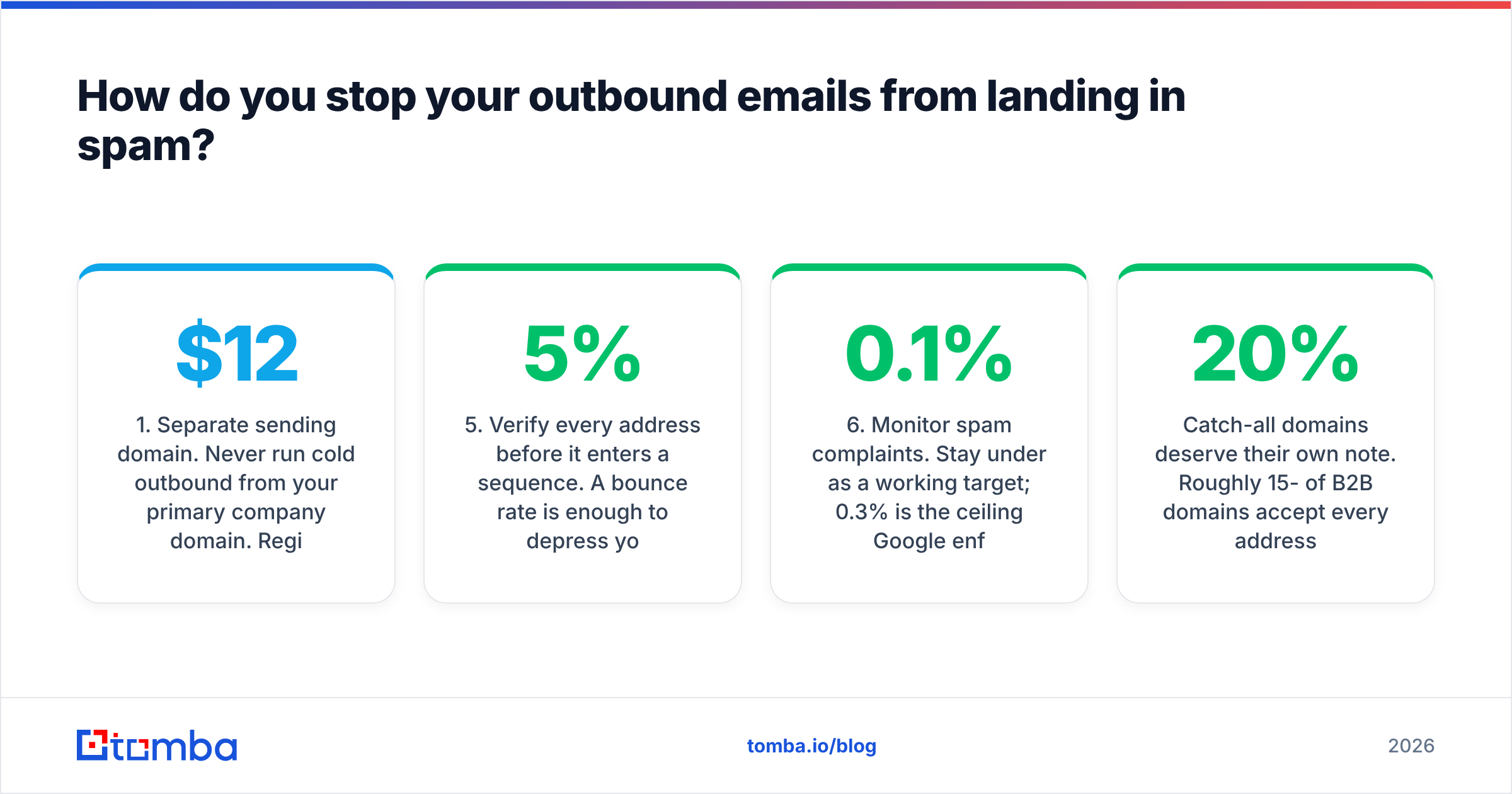
- Separate sending domain. Never run cold outbound from your primary company domain. Register a lookalike (yourcompany-mail.com, getyourcompany.com), and if it burns, you burn a $12 domain instead of your corporate email.
- Full authentication. SPF, DKIM, and DMARC configured before the first send. Google and Yahoo require this for bulk senders, and it's the cheapest deliverability win available. Check your record with an SPF checker.
- Warm up for 3-4 weeks. Start at 5-10 emails per day per inbox and ramp gradually. Warmup tools that generate synthetic conversations help, but they're a supplement to real send volume, not a replacement.
- Cap at 30-40 emails per inbox per day. Above that, you're signaling automation. Scale with more inboxes, not more volume per inbox.
- Verify every address before it enters a sequence. A 5% bounce rate is enough to depress your sender reputation measurably. Run the list through an email verifier and route catch-all domains to a separate, lower-volume track.
- Monitor spam complaints. Stay under 0.1% as a working target; 0.3% is the ceiling Google enforces. One badly targeted campaign can push you over it.
Catch-all domains deserve their own note. Roughly 15-20% of B2B domains accept every address at the MX level, which means standard verification returns "unknown." Don't discard them and don't blindly send to them — use a catch-all verifier to score likelihood, then send to the high-confidence subset at reduced volume. Google's Postmaster Tools is the free way to watch your reputation with the largest mailbox provider in B2B.

What should an outbound email actually say?#
Short, specific, one ask. The structure that consistently outperforms:
- Line 1 — the trigger. Why them, why now. "Saw you're hiring two RevOps analysts" beats "I hope this finds you well" by a distance.
- Line 2 — the connection. How that trigger relates to a problem you solve, stated as an observation about companies like theirs, not a claim about your product.
- Line 3 — the proof. One number or one named customer. Not three.
- Line 4 — the ask. A low-commitment, specific question. "Worth a look?" converts better than "Do you have 15 minutes Tuesday at 2pm?" because it doesn't ask for calendar commitment from a stranger.
Total length: under 90 words. Every additional sentence reduces reply rate. No images, no tracking pixels if you can avoid them (pixel-heavy emails filter worse), no more than one link.
Personalization has a ceiling. Deep manual research per prospect lifts reply rates, but at 20 minutes per email your cost per meeting goes up, not down. The sweet spot for most teams: one genuinely researched line per prospect (the trigger), and a templated remainder. Automate the research, not the relevance — that's the distinction that separates a working program from a spam cannon.
If you're stuck on openers, a subject line tester will catch the obvious spam triggers before you send, and running drafts through a spam checker catches formatting problems that no amount of copy editing will reveal.
What tools do you actually need?#
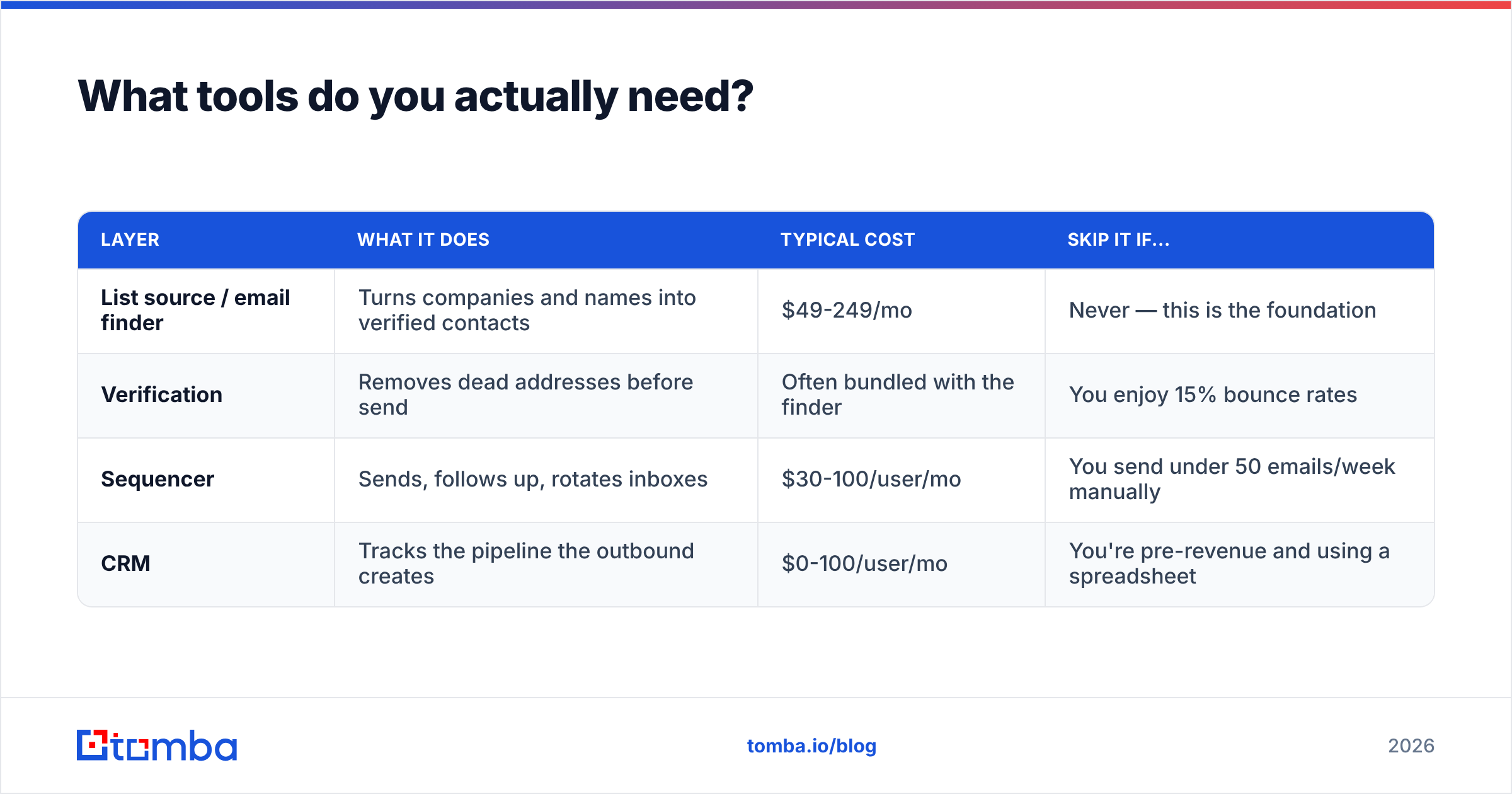
Four categories. Everything else is a nice-to-have that will quietly consume your budget.
| Layer | What it does | Typical cost | Skip it if... |
|---|---|---|---|
| List source / email finder | Turns companies and names into verified contacts | $49-249/mo | Never — this is the foundation |
| Verification | Removes dead addresses before send | Often bundled with the finder | You enjoy 15% bounce rates |
| Sequencer | Sends, follows up, rotates inboxes | $30-100/user/mo | You send under 50 emails/week manually |
| CRM | Tracks the pipeline the outbound creates | $0-100/user/mo | You're pre-revenue and using a spreadsheet |
On the first layer, Tomba pricing starts with a free tier at 25 searches/month for testing, Starter at $49/mo, Growth at $99/mo, and Pro at $249/mo — with verification, domain search, and enrichment included rather than sold as separate line items. That bundling matters more than headline price: buying finding and verification from two vendors typically costs 40-60% more than a combined plan at the same volume.
If your list building happens in a spreadsheet, the Google Sheets add-on and the Tomba API both remove the CSV round-trip, which is where most data quality decays in practice.
Two categories worth resisting until you have a working motion: AI SDR platforms that promise fully autonomous outbound (they generate volume, not relevance), and intent-data subscriptions priced above $2,000/month (the signal is real but you need enough pipeline for it to pay back).
How do you know if it's working — and what do you fix first?#
Track four numbers weekly, in this order. Each one gates the next.
- Bounce rate. Target under 2%. If it's higher, stop everything and fix the list. No other metric means anything while this is broken.
- Reply rate (all replies, including negative). Target 5%+. Low reply rate with a clean list means either deliverability or targeting. Check placement with a seed-list test before you rewrite copy.
- Positive reply rate. Target 1-3%. If total replies are healthy but positives are low, your targeting is off — you're reaching real people who aren't buyers.
- Meetings held / meetings booked. Target 70%+. A gap here means your email is overselling relative to what the meeting delivers.
Change one variable at a time and give each test at least 300 sends before you read the result. At typical reply rates, anything under 200 sends is noise, and the number of teams who "learned" something from a 50-email A/B test is depressingly large.
Review the whole program monthly, not weekly. Outbound has a lag — a meeting booked in March closes in June — so weekly pipeline panic leads to thrashing on the parts that are easiest to change (subject lines) instead of the parts that matter (list and offer).
Start with the list#
Outbound in 2026 rewards precision over volume. The teams generating consistent outbound leads aren't sending more email than they were five years ago — they're sending to better-identified people, with a real reason to reach out, from properly authenticated domains, with a phone and LinkedIn touch layered on top.
All of it depends on the first step: knowing exactly who to contact and having an address that actually delivers. That's the part you can fix this week. Start with the Tomba Email Finder — the free tier gives you 25 searches a month to test your ICP hypothesis before you commit budget, and verification is built in so nothing dead reaches your sequencer. Build 100 well-targeted contacts, send to them properly, and read the reply rate. That single number tells you more about your outbound program than any benchmark article, including this one.
Related guides#
// get started
Find, verify and enrich your first contacts today
Start on the free plan with 25 searches a month, then scale when your team is ready.
Free plan · No credit card required · GDPR & CCPA
// about the author