How To Get Customers For Your Online Business in 2026
Nine acquisition channels ranked by cost per customer, time to first sale, and how well they scale — plus the exact outbound stack that works when your ad budget is $0.
Figuring out how to get customers for your online business comes down to one choice: which channel fits your price point. Pick wrong and you burn cash for months. Here is the ranked list, with real costs.
TL;DR
- Paid ads are the fastest channel to test and the worst channel to depend on — customer acquisition cost rises every quarter you scale it.
- Targeted outbound email is still the cheapest repeatable way to get your first 50 B2B customers: roughly $0.10–$0.60 per verified contact versus $80–$300 per paid lead.
- SEO and content compound but pay back in month 6–12, not week 2. Start it now, fund it with something else.
- Your channel mix should be picked by deal size: sub-$100/mo products need self-serve and organic; $2,000+ contracts justify one-to-one outbound.
- Whatever channel you pick, list quality decides the outcome. A 30% bounce rate kills your sending domain before your copy ever gets read.
Why do most online businesses stall at zero customers?#
Because they pick a channel based on what's loud, not on what matches their price point.
Think of customer acquisition like fishing. Paid ads are a trawler: expensive to run, catches a lot fast, and stops the second you cut fuel. Outbound email is a spear: slow per fish, precise, and nearly free once you know where to aim. SEO is stocking a pond — nothing for months, then it feeds you forever. Founders who fail usually bought a trawler with a spearfishing budget.
The second failure mode is treating "get customers" as one problem. It is really three. You have to find people who plausibly need what you sell. You have to reach them somewhere they will actually respond. And you have to turn that attention into a paid transaction. Most online businesses are fine at the third step and terrible at the first.
This guide ranks the nine channels that actually move revenue in 2026. For each one you get a real cost range, an honest time-to-first-sale window, and the exact stack you need.
How to get customers for your online business: 9 channels worth testing#
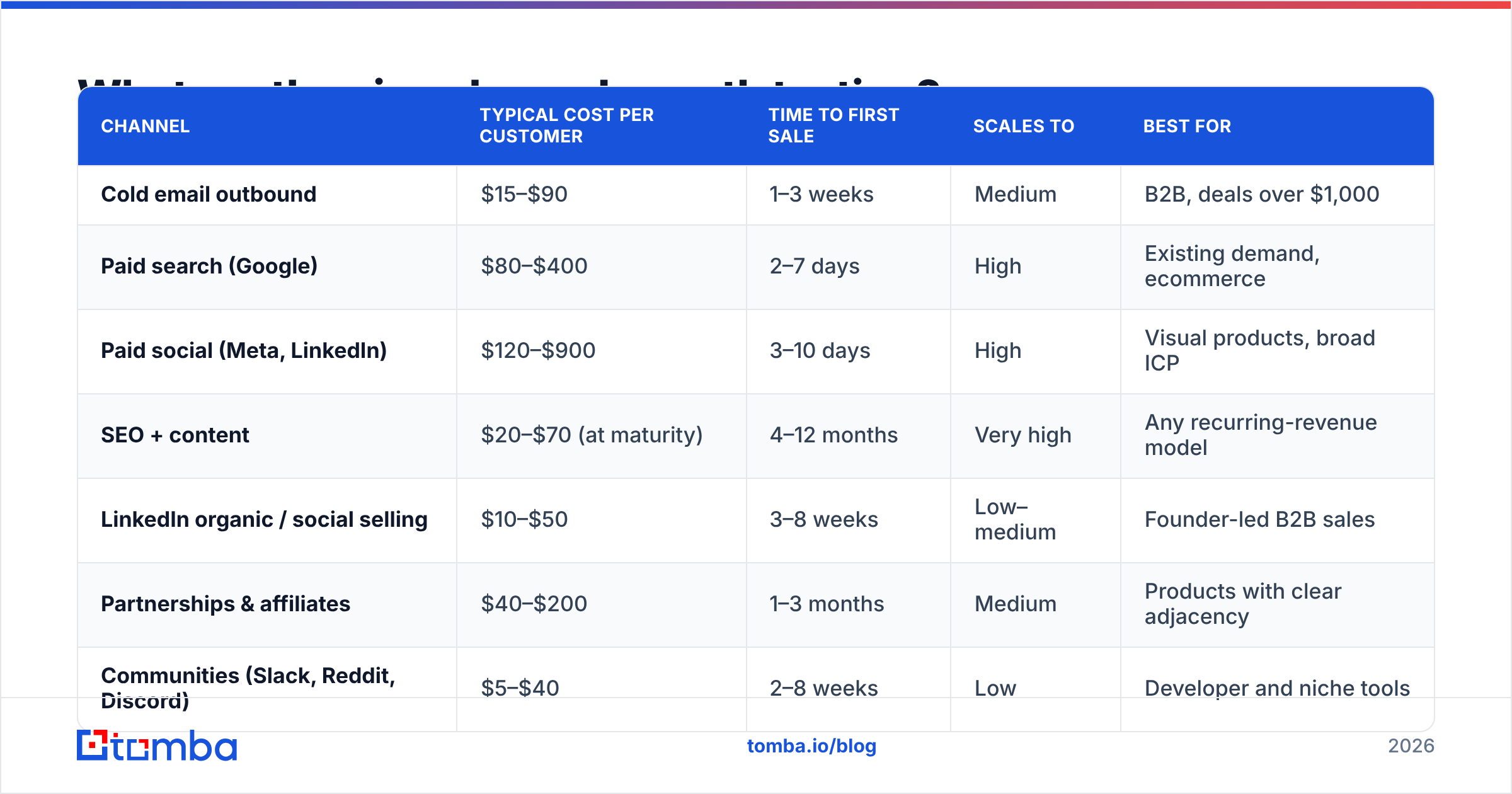
Here's the full landscape before we go deep. Costs are blended 2026 medians across B2B SaaS, ecommerce, and services — your numbers will move ±40% by vertical.
| Channel | Typical cost per customer | Time to first sale | Scales to | Best for |
|---|---|---|---|---|
| Cold email outbound | $15–$90 | 1–3 weeks | Medium | B2B, deals over $1,000 |
| Paid search (Google) | $80–$400 | 2–7 days | High | Existing demand, ecommerce |
| Paid social (Meta, LinkedIn) | $120–$900 | 3–10 days | High | Visual products, broad ICP |
| SEO + content | $20–$70 (at maturity) | 4–12 months | Very high | Any recurring-revenue model |
| LinkedIn organic / social selling | $10–$50 | 3–8 weeks | Low–medium | Founder-led B2B sales |
| Partnerships & affiliates | $40–$200 | 1–3 months | Medium | Products with clear adjacency |
| Communities (Slack, Reddit, Discord) | $5–$40 | 2–8 weeks | Low | Developer and niche tools |
| Marketplaces (App stores, G2, Shopify) | $30–$150 | 2–6 weeks | Medium | Plug-in and integration products |
| Referrals from existing customers | $0–$60 | After ~20 customers | Medium | Anything with real retention |
Two observations most founders miss. First, the cheapest channels (communities, referrals) are also the slowest to reach scale. They are excellent for your first ten customers and useless for your hundredth. Second, the fastest channel is the one that gets expensive fastest. Paid search costs climb as you grow, because you run out of high-intent keywords and start bidding on browsers.
Is cold outbound still the fastest way to get your first customers?#
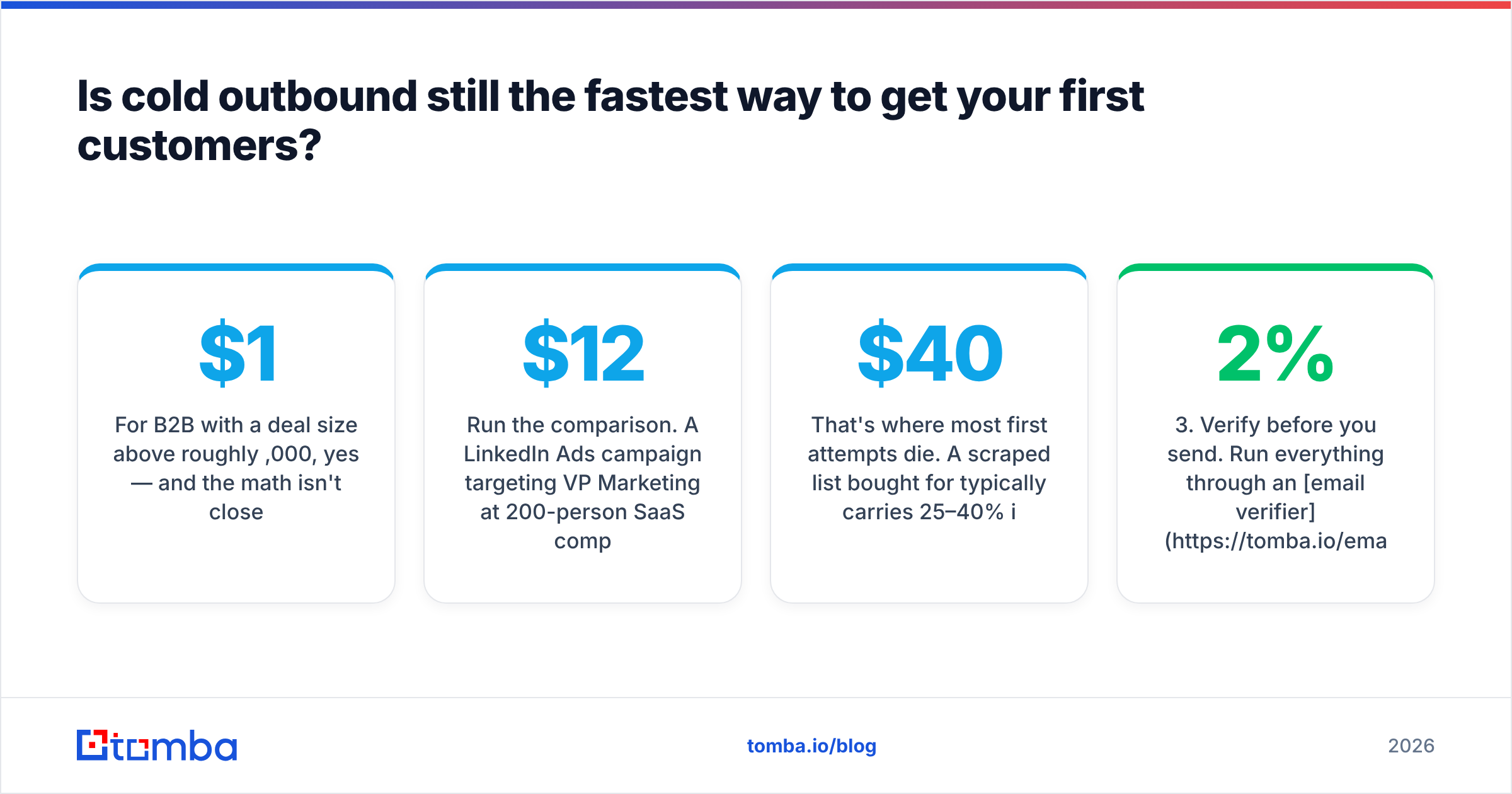
For B2B with a deal size above roughly $1,000, yes — and the math isn't close.
Run the comparison. A LinkedIn Ads campaign targeting VP Marketing at 200-person SaaS companies costs $12–$18 per click in 2026. It converts at 3–6% to a booked meeting, and you need a $4,000 minimum spend before the data means anything. That's $250–$500 per meeting. Now take the same 500 people and email them directly. Sourcing costs about $150 in data credits plus a sending tool, and a good 4-email sequence books 8–15 meetings. Call it $15 per meeting.
The catch is that outbound has a hard prerequisite paid ads doesn't: you need accurate contact data. Ads deliver themselves. Email only delivers if the address exists, the domain is warm, and the person is actually in the role you think they're in.
That's where most first attempts die. A scraped list bought for $40 typically carries 25–40% invalid addresses. Send to it and your bounce rate crosses the line where Google and Microsoft route you to spam — permanently, for that domain. You don't get a warning. You get a slow decline in reply rate that looks like bad copy.
The fix is sequencing your list build correctly:
- Define the account list first. Firmographics before people. 200 well-chosen companies beat 5,000 random ones.
- Find the right person at each account. Use a domain search to pull every public email pattern at a company, then filter by role rather than guessing formats.
- Verify before you send. Run everything through an email verifier and drop anything not marked deliverable. Target sub-2% bounce.
- Handle catch-all domains separately. Roughly 15–20% of B2B domains accept everything at the SMTP layer. A catch-all verifier tells you which of those are actually safe to mail instead of forcing a coin flip.
- Enrich for personalization. Job title, company size, and tech stack give you the one specific line that separates a reply from a delete.
- Cap volume per domain. 30–50 sends per mailbox per day, no more, regardless of what your tool allows.
Tools like Tomba, Hunter, Apollo, and BookYourData all solve pieces of this. BookYourData is strong if you want pre-built verified lists by industry without doing your own sourcing. Tomba fits better when you build the list yourself from domains you've already researched. Its email finder works domain-first rather than database-first, so you aren't limited to whoever sits in a vendor's index. Pricing starts at a free tier of 25 searches per month, then $49/mo Starter, $99/mo Growth, and $249/mo Pro on the published Tomba pricing page.
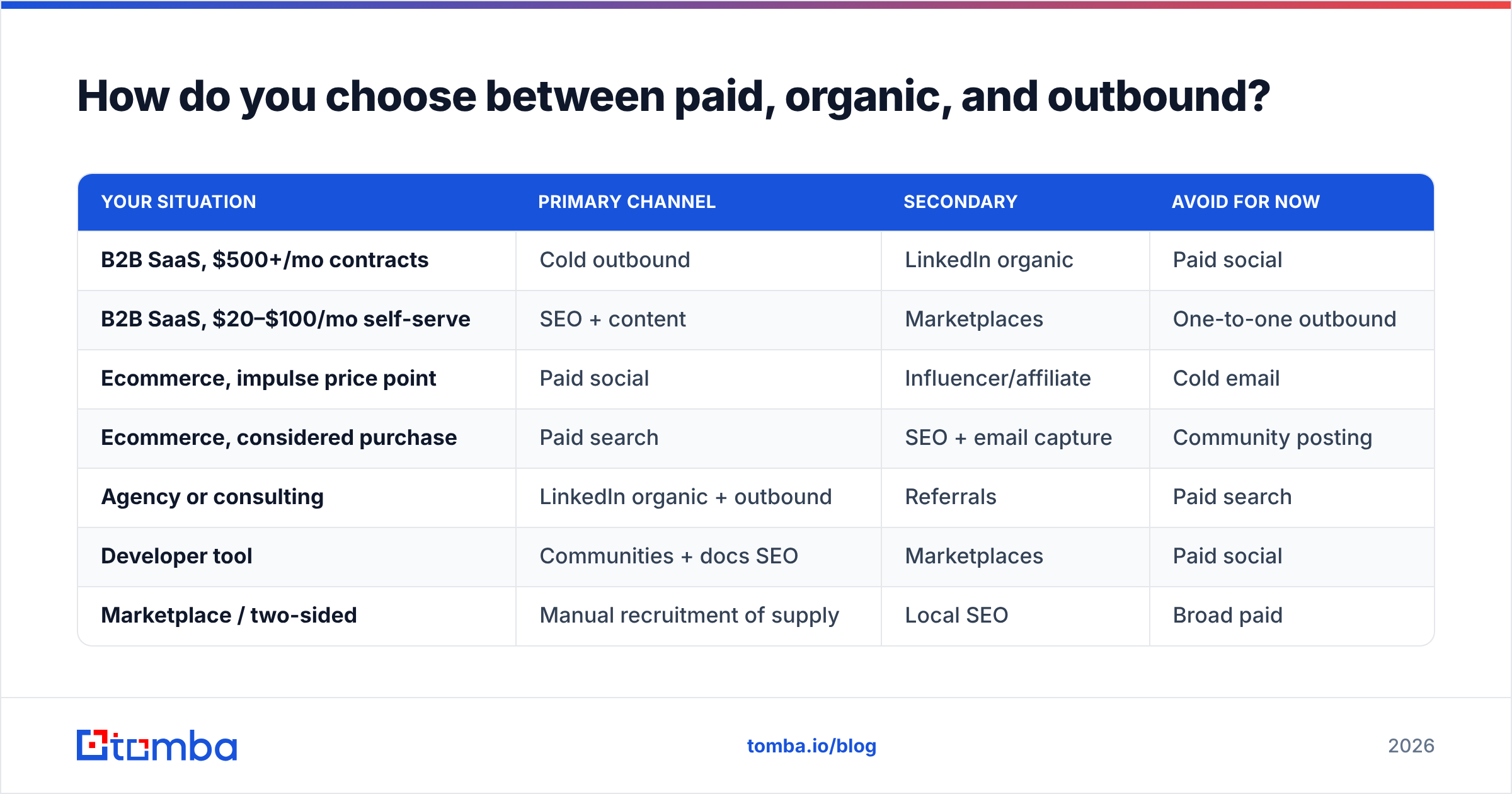
How do you choose between paid, organic, and outbound?#
Match the channel to your deal size and your patience. Here's the decision grid.
| Your situation | Primary channel | Secondary | Avoid for now |
|---|---|---|---|
| B2B SaaS, $500+/mo contracts | Cold outbound | LinkedIn organic | Paid social |
| B2B SaaS, $20–$100/mo self-serve | SEO + content | Marketplaces | One-to-one outbound |
| Ecommerce, impulse price point | Paid social | Influencer/affiliate | Cold email |
| Ecommerce, considered purchase | Paid search | SEO + email capture | Community posting |
| Agency or consulting | LinkedIn organic + outbound | Referrals | Paid search |
| Developer tool | Communities + docs SEO | Marketplaces | Paid social |
| Marketplace / two-sided | Manual recruitment of supply | Local SEO | Broad paid |
The rule underneath the grid: the cost of acquiring a customer must be recoverable inside your payback window. Say your product is $29/mo with 70% gross margin and 18-month retention. Your ceiling is roughly $360 in lifetime gross profit, and you want payback under 12 months. So a $300 paid-social customer is a slow bleed, even though the spreadsheet says "profitable."
One more filter: how much demand already exists. Paid search only works if people are typing your category into Google. If you invented the category, there's no search volume to buy. That forces you into outbound, content, or communities whether you like it or not.
What does a working outbound sequence actually look like?#
Four touches over 12 days, each shorter than the last, and only the first one does any real work.
Email 1 (day 0) — the specific observation. One sentence proving you looked at their company, one sentence on the problem you suspect, one soft question. Under 90 words. No calendar link.
Email 2 (day 3) — the proof point. Reply in-thread. Name a comparable company and a number. "We did X for [similar company], moved Y from A to B." Still under 60 words.
Email 3 (day 7) — the reframe. Different angle on the same problem, in case your first framing missed. This is the email that catches the people who mentally agreed but didn't feel urgency.
Email 4 (day 12) — the close-the-loop. "Sounds like this isn't a priority — should I close the file?" Counterintuitively this pulls the highest reply rate of the four, because it costs nothing to answer.
What kills sequences, in order of frequency: sending to unverified addresses, five-plus emails (past four you're just annoying people who already decided), personalization tokens that break, and a subject line that reads like a newsletter. Keep subject lines to two to four lowercase words that sound like an internal email.
If you want to sanity-check tone and length before launching, run drafts through a spam checker and test your subject lines — both catch mechanical problems that no amount of rewriting fixes.
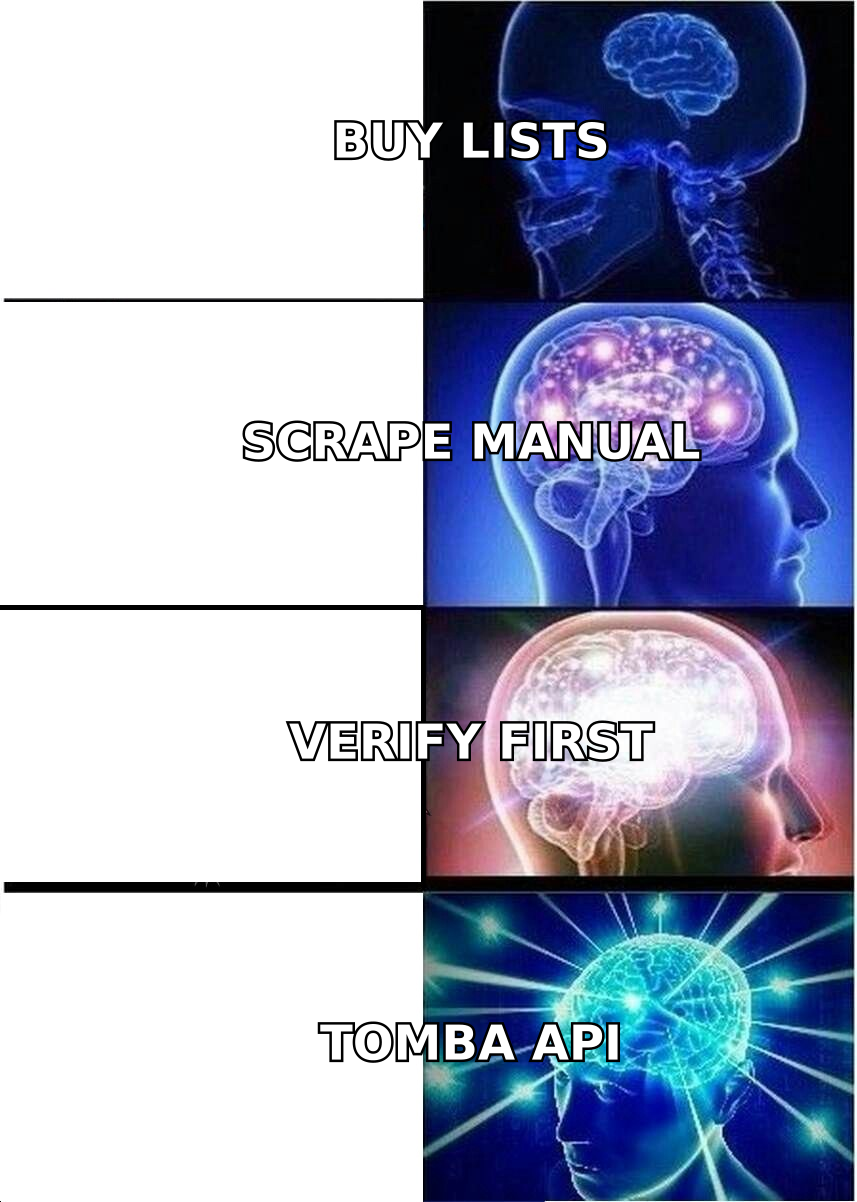
How do you make SEO and content pay off before month twelve?#
Stop writing for volume and write for the bottom of the funnel first.
The standard mistake is publishing twenty top-of-funnel posts ("what is customer acquisition") that rank in month nine and convert at 0.3%. Instead, publish the six to ten pages that capture people already shopping:
- "[Competitor] alternative" — highest-intent page you can own. Someone searching this has a credit card out and a grievance.
- "[Category] pricing" — pricing queries convert 3–5x better than definitional ones.
- "Best [category] tools for [specific segment]" — narrow segments have low competition and buyers who self-identify.
- "How to [job your product does] without [painful manual method]" — captures people mid-problem.
- Integration pages — "[Your tool] + [Popular tool]" ranks fast and pulls qualified traffic from the other tool's ecosystem.
These pages rank in six to ten weeks rather than nine months, because the queries are low-competition. They also convert at 2–8% instead of fractions of a percent. Broad educational content is worth doing — later, once the money pages are live. G2 and Capterra category listings are worth claiming at the same time; they rank for comparison queries you'd otherwise spend a year fighting for.
Pair every content page with an email capture that has a real reason to exist — a calculator, a template, a teardown. Then treat that list as its own channel. Content that only produces traffic is a hobby; content that produces addressable contacts is a channel.
How do you avoid burning your sending domain?#
Treat deliverability as infrastructure, not an afterthought. You get one reputation per domain, and repairing it takes months.
The non-negotiable setup before your first outbound campaign:
- Buy a separate sending domain. Never send cold email from your primary domain. Use
getyourcompany.comoryourcompany.coand keep the main domain clean for transactional and customer mail. - Configure SPF, DKIM, and DMARC properly. Check with an SPF checker before you send, not after replies stop.
- Warm up for 3–4 weeks. Start at 5 sends/day per mailbox, add 5 per day. Yes, it's slow. It's slower to recover from a burned domain.
- Keep bounce rate under 2%. This is the single number that determines whether you stay in the inbox. Verification is not optional here.
- Monitor your sender reputation through Google Postmaster Tools weekly. Reputation drops show up there two weeks before they show up in your reply rate.
Google's own bulk sender guidelines spell out the thresholds explicitly — spam complaint rate under 0.3%, authenticated sending, one-click unsubscribe on anything promotional. These aren't suggestions. They're enforced filters, and they apply to a 40-email-a-day outbound campaign the same way they apply to a newsletter blast.
The practical implication for your list: quality over quantity is arithmetic, not a platitude. Sending 200 emails to a 98%-verified list produces more meetings than sending 1,000 to a 70%-verified one. And only one of those two options leaves you with a working domain next quarter.
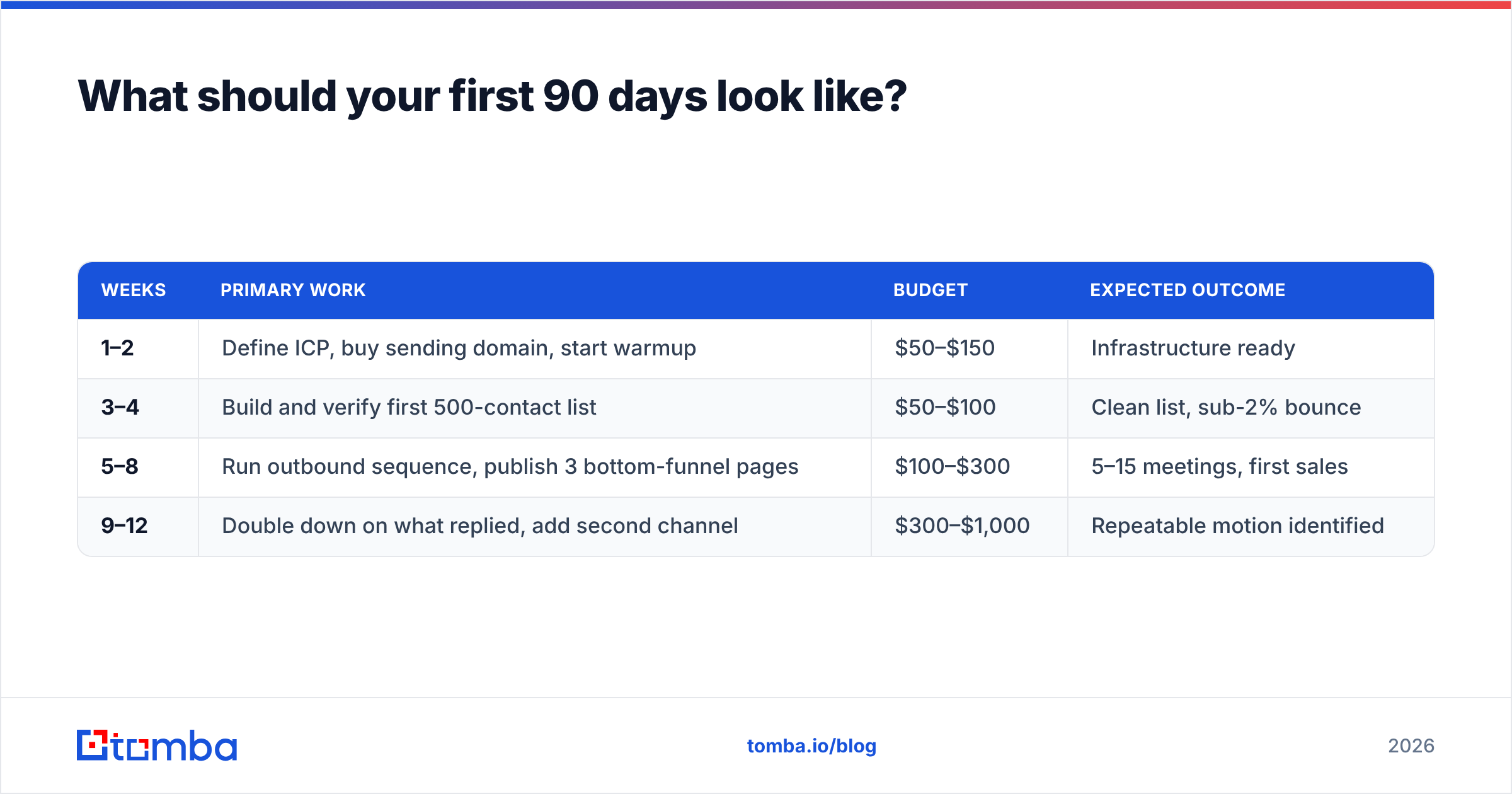
What should your first 90 days look like?#
Sequence matters more than effort. This is how to get customers for your online business without a big budget, week by week.
| Weeks | Primary work | Budget | Expected outcome |
|---|---|---|---|
| 1–2 | Define ICP, buy sending domain, start warmup | $50–$150 | Infrastructure ready |
| 3–4 | Build and verify first 500-contact list | $50–$100 | Clean list, sub-2% bounce |
| 5–8 | Run outbound sequence, publish 3 bottom-funnel pages | $100–$300 | 5–15 meetings, first sales |
| 9–12 | Double down on what replied, add second channel | $300–$1,000 | Repeatable motion identified |
Notice what's absent: no paid ads in the first 90 days unless you already know your conversion rate. Ads amplify a working funnel; they don't create one. Spending $3,000 on Meta before you know what message converts is buying data you could have gotten free from 200 outbound replies.
Also notice the budget. The entire first two months costs under $500 — most of it data and domains. That's the real argument for outbound-first. It's the only channel where the experiment is cheap enough that being wrong doesn't end the business.
What metrics tell you a channel is working?#
Track four numbers per channel, weekly, from day one:
- Cost per qualified conversation — not per click, per lead, or per impression. A conversation is someone who replied and is in your ICP.
- Conversation-to-customer rate — if this is under 10%, your targeting is wrong, not your closing.
- Payback period — months of gross profit needed to recover acquisition cost. Under 12 for SaaS, under 3 for ecommerce.
- Channel saturation curve — cost per customer at 1x, 2x, and 4x volume. Channels that hold cost while doubling are the ones you scale; channels where cost doubles with volume are the ones you cap.
Kill any channel whose payback exceeds your runway and whose cost curve bends upward. Keep the boring one that produces two customers a week at $30 each — that's the channel that becomes a business.
Where do you start today?#
Start with the list. Every answer to how to get customers for your online business depends on two things: knowing exactly who you sell to, and being able to reach them.
Pick 100 companies that look like your best-fit customer. Pull the decision-makers at each with the Tomba Email Finder, verify every address before it enters your sequencer, and send a 4-email sequence from a warmed secondary domain. The free tier gives you 25 searches to test the workflow before spending anything; Starter at $49/mo covers a full first campaign. If you'd rather build it into a script or spreadsheet, the Tomba API and the Google Sheets add-on do the same job without leaving your workflow.
Ninety days from now you'll either have a repeatable channel or clear evidence about which message doesn't land. Both beat another quarter of guessing.
Related guides#
// get started
Find, verify and enrich your first contacts today
Start on the free plan with 25 searches a month, then scale when your team is ready.
Free plan · No credit card required · GDPR & CCPA
// about the author