How to Get Email Addresses in 2026: 9 Methods Tested
How to get email addresses nine different ways — from free manual tricks to bulk finder APIs — with accuracy expectations, costs, and a table showing which method fits your list size.
TL;DR
- The fastest reliable answer to how to get email addresses at scale is a domain-based lookup: take the company website, run it through an email finder, and get the pattern plus named contacts in one step.
- Free manual methods (Google operators, GitHub commits, WHOIS, personal sites) still work and cost nothing, but they cap out around 10-20 contacts an hour.
- Pattern guessing alone gets you roughly 60-70% right. Guessing plus SMTP verification pushes that past 95%.
- Never send to an unverified address at scale — bounce rates above 3% start damaging your sender reputation with Gmail and Outlook.
- For anything over 50 contacts, a paid finder at $49-$99/month is cheaper than the hours you'd spend doing it by hand.
You need one person's email. Or four hundred. How to get email addresses fast depends entirely on that number: the method that works for one wastes a morning at four hundred, and the method built for four hundred is overkill for one. This guide splits the nine practical approaches by list size, tells you what accuracy to expect from each, and shows where the free routes quietly break.
What does "getting an email address" actually mean in 2026?#
Two separate problems hide inside the question. Mixing them up is why most people's lists bounce.
Problem one: discovery. Finding a string that plausibly belongs to the person — sarah.chen@stripe.com. This is pattern work. Roughly 80% of B2B companies use one of six formats, so a decent guess is often right.
Problem two: validation. Proving that string actually accepts mail. A pattern guess is a hypothesis. Until a mail server confirms the mailbox exists, you're gambling with your domain reputation.
Here's the split that matters:
- Discovery methods — Google operators, domain search, LinkedIn extraction, WHOIS, GitHub, press pages. These produce candidates.
- Validation methods — syntax check, MX record lookup, SMTP handshake, catch-all detection, role-account flagging. These filter candidates.
- Enrichment methods — taking a known email or name and appending job title, company size, phone, LinkedIn URL. These make the contact usable.
- Monitoring — re-verifying quarterly, because B2B contact data decays at roughly 22-30% per year as people change jobs.
- Compliance — checking that your legal basis (legitimate interest under GDPR, or CAN-SPAM in the US) actually covers the send.
Skip step two and you'll learn about it from your deliverability dashboard three weeks later.

How to Get Email Addresses for Free: 6 Methods#
Free works. It's just slow. Here are the six methods that still return results in 2026, ordered by hit rate.
1. Google search operators. Search site:companydomain.com "@companydomain.com" to surface published addresses. Add "firstname" "lastname" email for a specific person. Team pages, PDF case studies, and conference speaker bios leak addresses constantly. Hit rate: maybe 15% for a random target, much higher for anyone in marketing or PR.
2. The company's own pages. /about, /team, /contact, /press, and /careers are the obvious four. The one people forget is the press kit — PR contacts are published deliberately and almost always work.
3. GitHub commit history. If your target writes code, their email is in the git log. Go to their profile, open any repo they've committed to, append .patch to a commit URL, and read the From: header. This works on a startling number of CTOs and founders.
4. WHOIS records. For smaller companies that didn't buy privacy protection, whois domain.com still returns a registrant email. Coverage has fallen sharply post-GDPR — expect this to work maybe one time in ten.
5. Twitter/X and personal sites. People put their email in bios, in the footer of a personal blog, or in a Linktree. A quick "name" + "gmail.com" OR "@company.com" search covers it.
6. Pattern guessing with a permutator. Take the name and domain, generate the twelve likely combinations with an email permutator, then test each one. Without verification this is a coin flip. With verification it's genuinely good.
The problem with all six: they scale linearly with your time. Ten contacts is a coffee break. Two hundred is a lost week.
Which email formats do companies actually use?#
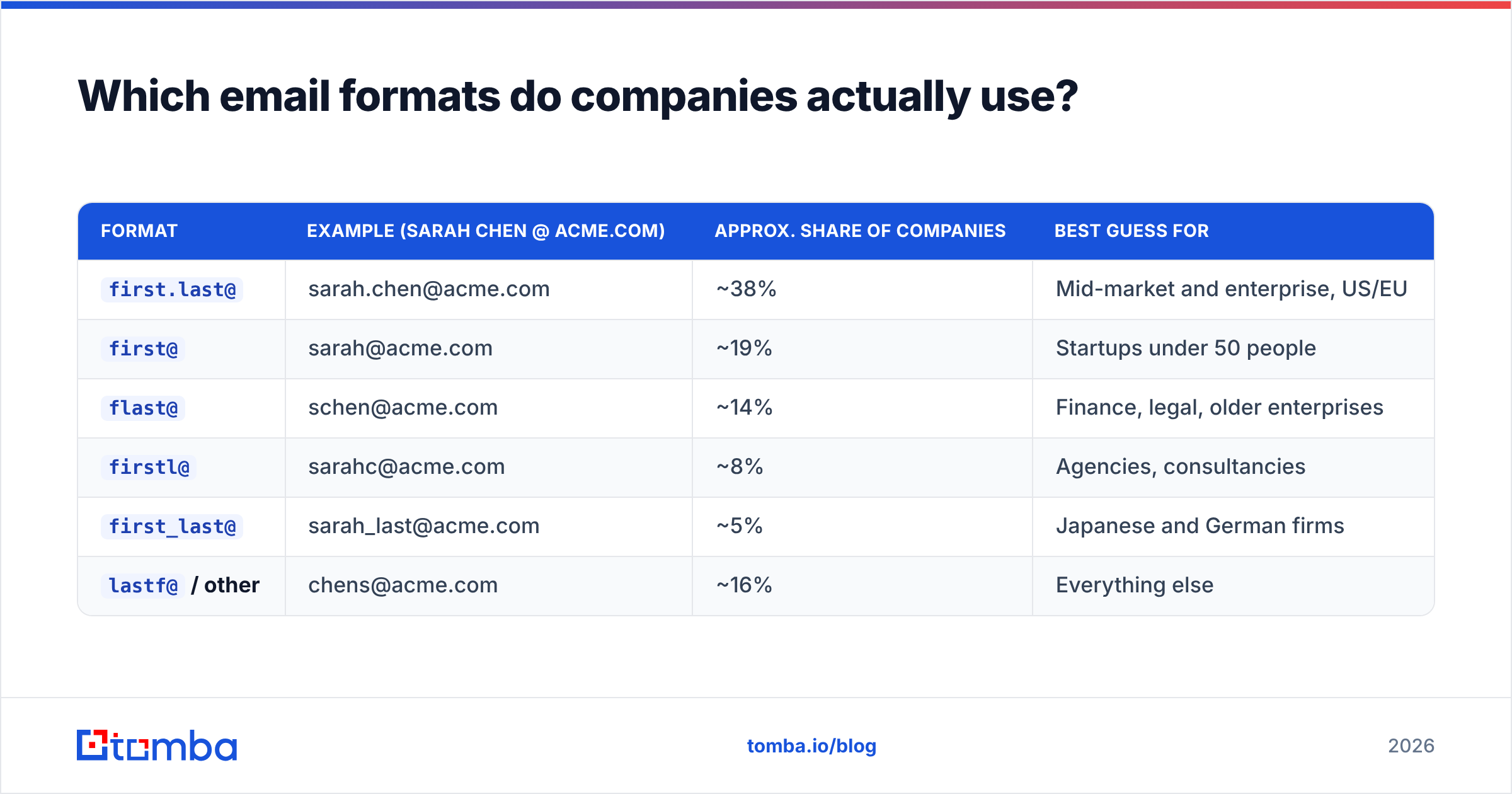
Pattern knowledge is the backbone of every guessing method. These six formats cover the large majority of B2B domains:
| Format | Example (Sarah Chen @ acme.com) | Approx. share of companies | Best guess for |
|---|---|---|---|
first.last@ |
sarah.chen@acme.com | ~38% | Mid-market and enterprise, US/EU |
first@ |
sarah@acme.com | ~19% | Startups under 50 people |
flast@ |
schen@acme.com | ~14% | Finance, legal, older enterprises |
firstl@ |
sarahc@acme.com | ~8% | Agencies, consultancies |
first_last@ |
sarah_last@acme.com | ~5% | Japanese and German firms |
lastf@ / other |
chens@acme.com | ~16% | Everything else |
Two practical notes. First, format is a company-level property, not a person-level one — confirm it once against a known address and it holds for the whole org. Second, big companies run collision rules: the second Sarah Chen becomes sarah.chen2@ or s.chen@. A company email pattern check saves you from guessing all twelve permutations individually.

How accurate are email finder tools?#
Vendors quote accuracy numbers that aren't measuring the same thing. Read the definition before you believe the percentage.
- Coverage — what share of your input list returns any address. Typically 55-80% for B2B domains.
- Accuracy — of the addresses returned, what share actually deliver. Good tools sit at 95-98%.
- Bounce guarantee — the contractual commitment. Some vendors refund credits above a stated bounce threshold; others don't.
A tool that returns an address for 90% of your list at 80% accuracy is worse than one returning 60% at 97%. Bounces cost you more than blanks. Blanks cost you nothing but a gap in the spreadsheet. Bounces cost you inbox placement.
Good accuracy is layered. A finder cross-references crawled web sources, verified historical sends, and pattern inference. Then it runs an SMTP handshake before returning a result. That handshake is why an email verifier is a different product from a finder — and why the good finders bundle both. Tomba's data sources page shows what sits behind a result, rather than a marketing number.
The uncomfortable case is catch-all domains. A catch-all server accepts mail to any address at the domain, so SMTP verification returns "valid" for asdkjhasd@company.com. Roughly 15-20% of B2B domains are catch-all. Handling them takes a separate technique — pattern confidence scoring plus historical send data. That's why a dedicated catch-all verifier exists as its own tool.
Which method should you use for your list size?#
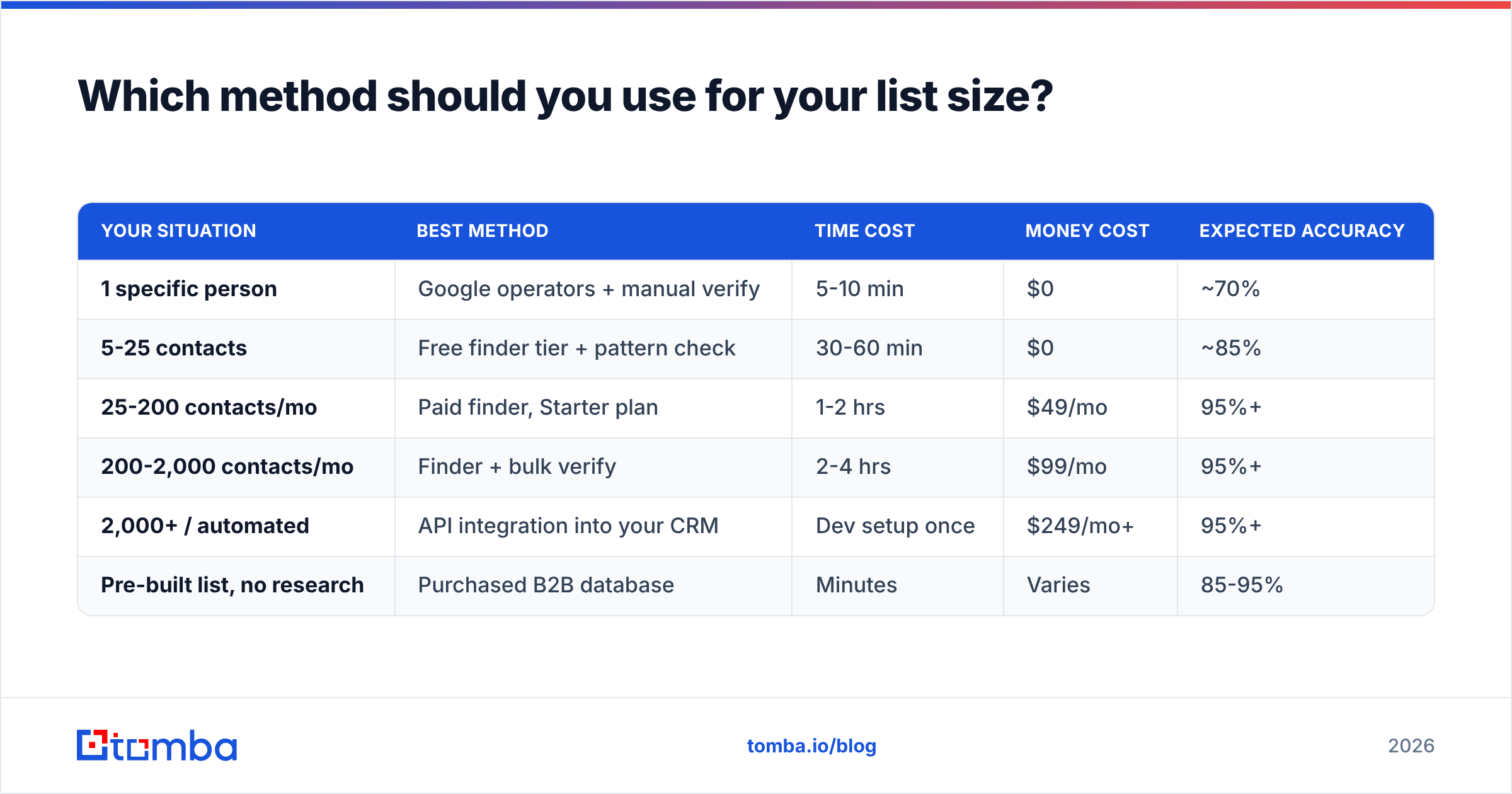
This is the decision that actually matters. Match the method to the volume.
| Your situation | Best method | Time cost | Money cost | Expected accuracy |
|---|---|---|---|---|
| 1 specific person | Google operators + manual verify | 5-10 min | $0 | ~70% |
| 5-25 contacts | Free finder tier + pattern check | 30-60 min | $0 | ~85% |
| 25-200 contacts/mo | Paid finder, Starter plan | 1-2 hrs | $49/mo | 95%+ |
| 200-2,000 contacts/mo | Finder + bulk verify | 2-4 hrs | $99/mo | 95%+ |
| 2,000+ / automated | API integration into your CRM | Dev setup once | $249/mo+ | 95%+ |
| Pre-built list, no research | Purchased B2B database | Minutes | Varies | 85-95% |
A note on that last row: buying a list and finding emails are different products with different risk profiles. Vendors like BookYourData sell pre-verified contact records with bounce guarantees. That suits teams who want volume now and have no specific account list. If you already know exactly which 300 companies you're targeting, a finder is the better fit — you're not paying for records you'll never contact.

How do you get emails in bulk without wrecking deliverability?#
The bulk workflow has five steps. Skip any of them and it shows up in your bounce rate.
Step 1 — Build the company list first, not the contact list. Start from domains. Firmographic filters (industry, headcount, tech stack, funding stage) beat trying to filter people directly. A website tech stack check is a fast way to qualify domains by the tools they already run.
Step 2 — Run domain search per company. Feed the domain in, get back every published address at that company plus the detected format. This gives you both the contacts and the pattern for anyone the tool didn't find. Tomba's domain search handles this, and the same call returns confidence scores per address.
Step 3 — Fill gaps with name + domain lookups. For named targets the domain search missed, run individual finder queries. This is where the pattern from step 2 does the heavy lifting.
Step 4 — Bulk verify everything, including results from step 2. Yes, even the ones the finder returned as valid. Data decays between crawl and send. A bulk verify pass right before you upload to your sequencer catches the job-changers.
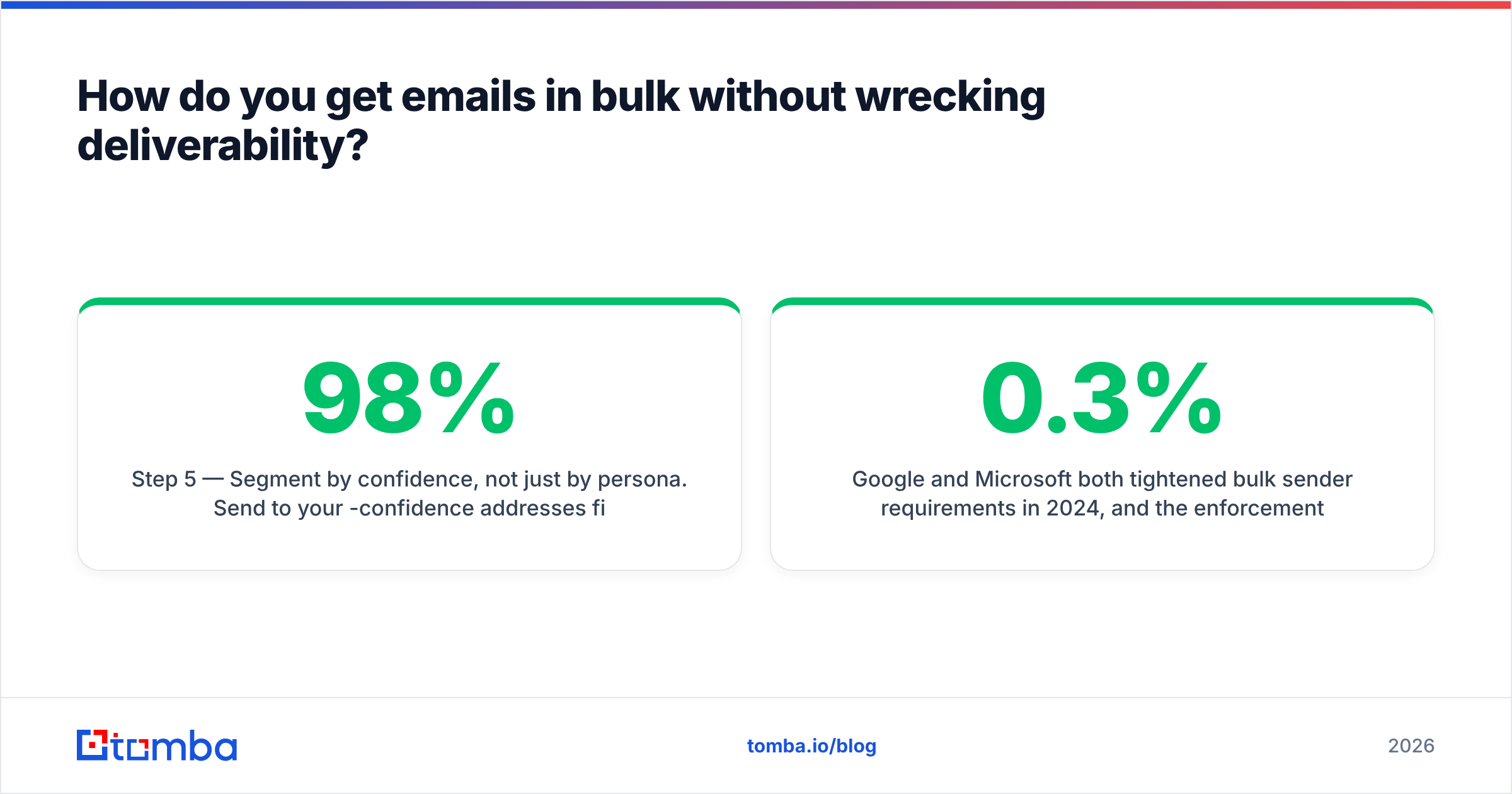
Step 5 — Segment by confidence, not just by persona. Send to your 98%-confidence addresses first, in small batches. Watch the bounce rate for 48 hours. Only then release the 85-90% tier. This protects your domain if something in the list is worse than expected.

Google and Microsoft both tightened bulk sender requirements in 2024, and enforcement has only gotten stricter since. Gmail's sender guidelines put the spam complaint threshold at 0.3% and expect authenticated, low-bounce sending. That's not a suggestion. Cross it consistently and your mail goes to spam wholesale, including your replies to warm leads.
What about LinkedIn — can you get emails from profiles?#
Partly. LinkedIn doesn't expose email addresses on profiles unless the person is a first-degree connection who chose to show it. Three routes exist:
- Connection export. Settings → Data Privacy → Get a copy of your data → Connections. This gives you the emails of your existing first-degree network, and only the ones who allow it. Legitimate, free, limited.
- Profile URL to email. Feed a public profile URL into a tool that resolves name + company, then finds the address at that domain. A LinkedIn finder does exactly this and works at reasonable scale.
- Sales Navigator lists. Build a filtered lead list, export the names and companies, then enrich. This is the standard outbound workflow, and it's why most finder tools ship a Chrome extension.
Scraping LinkedIn at volume breaks their user agreement, and they sue over it. The safer pattern is using LinkedIn for targeting — deciding who to contact — and a separate data source for the address.
What does it cost to get emails at each tier?#
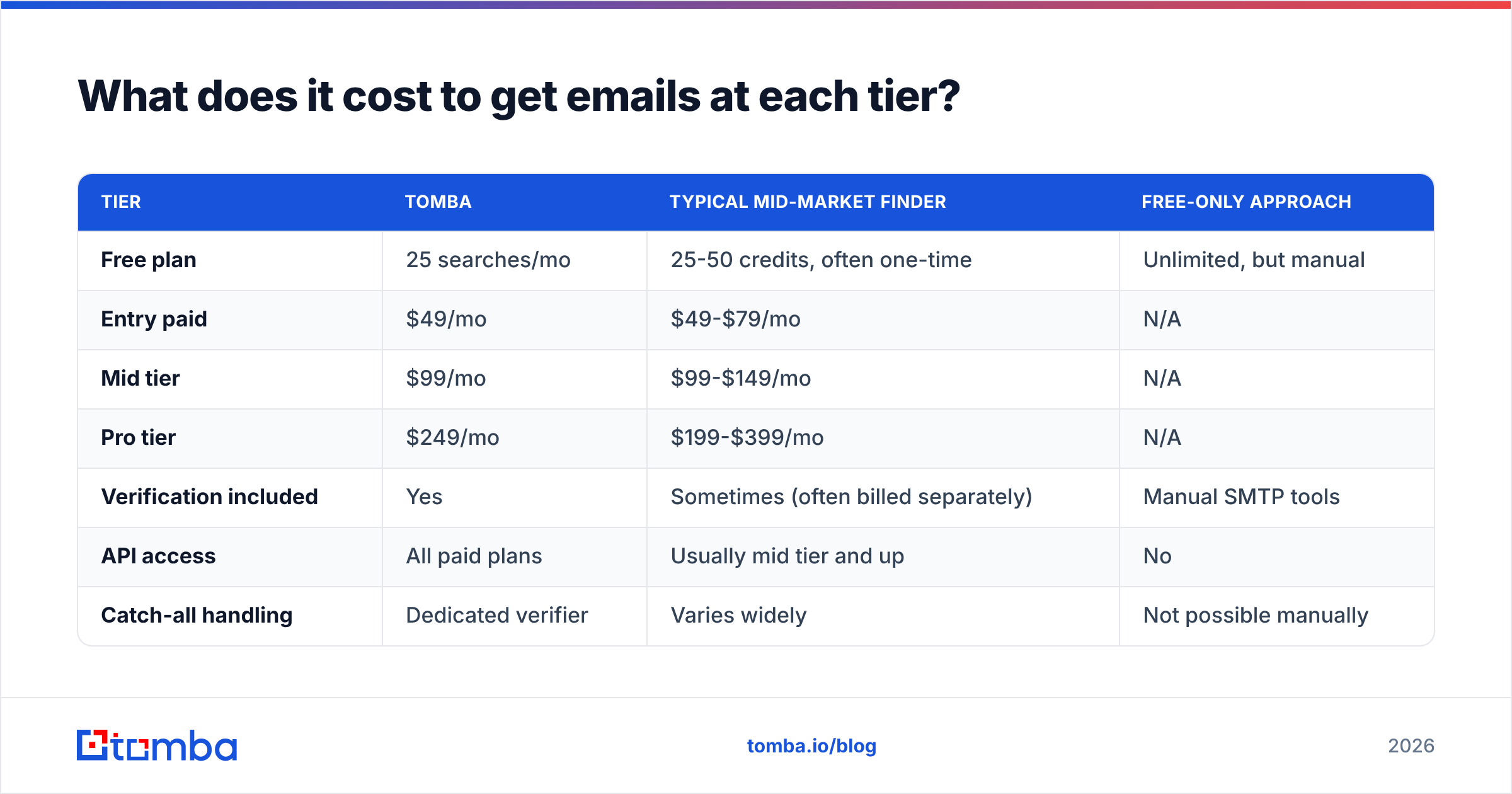
Pricing across the category clusters into three shapes: per-credit, per-seat, and flat monthly with a credit pool. Here's how the tiers compare on what you actually get:
| Tier | Tomba | Typical mid-market finder | Free-only approach |
|---|---|---|---|
| Free plan | 25 searches/mo | 25-50 credits, often one-time | Unlimited, but manual |
| Entry paid | $49/mo | $49-$79/mo | N/A |
| Mid tier | $99/mo | $99-$149/mo | N/A |
| Pro tier | $249/mo | $199-$399/mo | N/A |
| Verification included | Yes | Sometimes (often billed separately) | Manual SMTP tools |
| API access | All paid plans | Usually mid tier and up | No |
| Catch-all handling | Dedicated verifier | Varies widely | Not possible manually |
| Bulk upload | Yes | Yes | Spreadsheet gymnastics |
The break-even math is simple. If finding one contact by hand takes six minutes and your loaded hourly cost is $50, that's $5 per contact. A $49/month plan covering a few hundred lookups drops the per-contact cost under $0.25. The paid route pays for itself somewhere around contact number twelve. Full Tomba pricing breaks the credit allocations down per plan.
What mistakes make people's outreach fail?#
Five recurring ones, in rough order of damage:
Sending to role accounts. info@, sales@, support@, hello@. These are shared inboxes with high complaint rates and near-zero reply rates. Filter them out unless you're genuinely contacting a support desk.
Treating a catch-all "valid" as verified. It isn't. It means the server accepts everything. Route catch-all domains to a separate, smaller-batch send with a pattern-confidence filter.
Verifying once and reusing the list for a year. With ~25% annual decay, a twelve-month-old list is a quarter garbage. Re-verify quarterly at minimum.
Ignoring authentication. No SPF, DKIM, or DMARC and it doesn't matter how clean your list is. Run an SPF checker on your sending domain before you send anything. This takes thirty seconds.
Blasting a fresh domain. A brand-new sending domain that suddenly emits 500 emails looks exactly like a spammer to Gmail's filters. Warm up over 3-4 weeks, ramping volume gradually. G2's email verification category is a reasonable place to compare vendors if you want third-party reviews rather than vendor claims.
Frequently asked questions#
Is it legal to find someone's business email? In most jurisdictions, yes, for B2B outreach. GDPR permits processing business contact data under legitimate interest, provided you disclose your source and honor opt-outs. CAN-SPAM in the US requires accurate headers, a physical address, and a working unsubscribe. CASL in Canada is stricter and generally requires consent. Check your target's jurisdiction, not yours.
How accurate is pattern guessing without a tool? Around 60-70% on a first guess if you know the company's format, closer to 40% if you don't. Verification is what closes the gap.
Can I find personal Gmail addresses? Much harder, and usually a bad idea for B2B outreach. Work addresses are what legitimate-interest arguments cover. Personal ones generally aren't.
What bounce rate is acceptable? Under 2% is healthy. Above 3% and mailbox providers start throttling. Above 5% and your sequencing platform may suspend the account.
Where should you start?#
Pick by volume. One contact: Google operators and five minutes. Under 25 a month: a free tier plus a pattern check. Anything more: pay for the tool, because your time is the expensive input. That's the short answer to how to get email addresses without burning a week on it.
If you're in that third bucket, start with the Tomba Email Finder. Give it a name and a domain, or just a domain to pull the whole company, and it returns verified addresses with confidence scores and the sources behind each result. The free plan includes 25 searches a month — enough to test it against contacts whose addresses you already know, which is the only benchmark that means anything. Run twenty known-good contacts through it, count the matches, and decide from there.
Related guides#
// get started
Find, verify and enrich your first contacts today
Start on the free plan with 25 searches a month, then scale when your team is ready.
Free plan · No credit card required · GDPR & CCPA
// about the author