How To Get Leads Online in 2026: 9 Channels That Work
Nine online lead generation channels ranked by cost per qualified lead, speed to first meeting, and how hard they are to run without a team. With a working 30-day playbook.
TL;DR
- There is no single answer to how to get leads online — there are nine channels, and only three of them produce a qualified conversation in under 30 days without a budget of $10k+.
- Outbound email is still the fastest cold start: a verified list plus a relevant message beats a beautiful website with no traffic every time.
- Paid search buys intent, content buys compounding traffic, and outbound buys speed. Most teams need two of the three, not all nine.
- Bad data kills more campaigns than bad copy. A 25% bounce rate torches your sending domain before anyone reads sentence two.
- The 30-day playbook at the end costs under $200 in tooling and produces a reproducible pipeline of 150-300 verified contacts per month.
What does "getting leads online" actually mean in 2026?#
A lead is a person who has a problem you solve and a reason to talk to you this quarter. Everything else is a name in a spreadsheet.
That distinction matters because most advice on how to get leads online optimizes for volume — form fills, newsletter signups, "MQLs." Volume is easy to buy and hard to convert. What you want is a repeatable process that produces conversations with people who can sign a contract.
Online lead generation splits cleanly into three motions:
- Inbound — people find you (SEO, content, YouTube, communities). Slow to start, cheap at scale, compounds for years.
- Outbound — you find them (cold email, LinkedIn, cold calling, ads that target accounts). Fast to start, linear cost, stops when you stop.
- Partner and referral — someone else vouches for you (integrations, affiliates, agencies, marketplaces). Highest close rate, hardest to control.
Nearly every failed lead gen effort we see picks the slowest motion first. A brand-new company writing blog posts for six months before sending a single outbound email is choosing to be invisible for two quarters. Start with the motion that produces feedback fastest, then reinvest that revenue in the ones that compound.
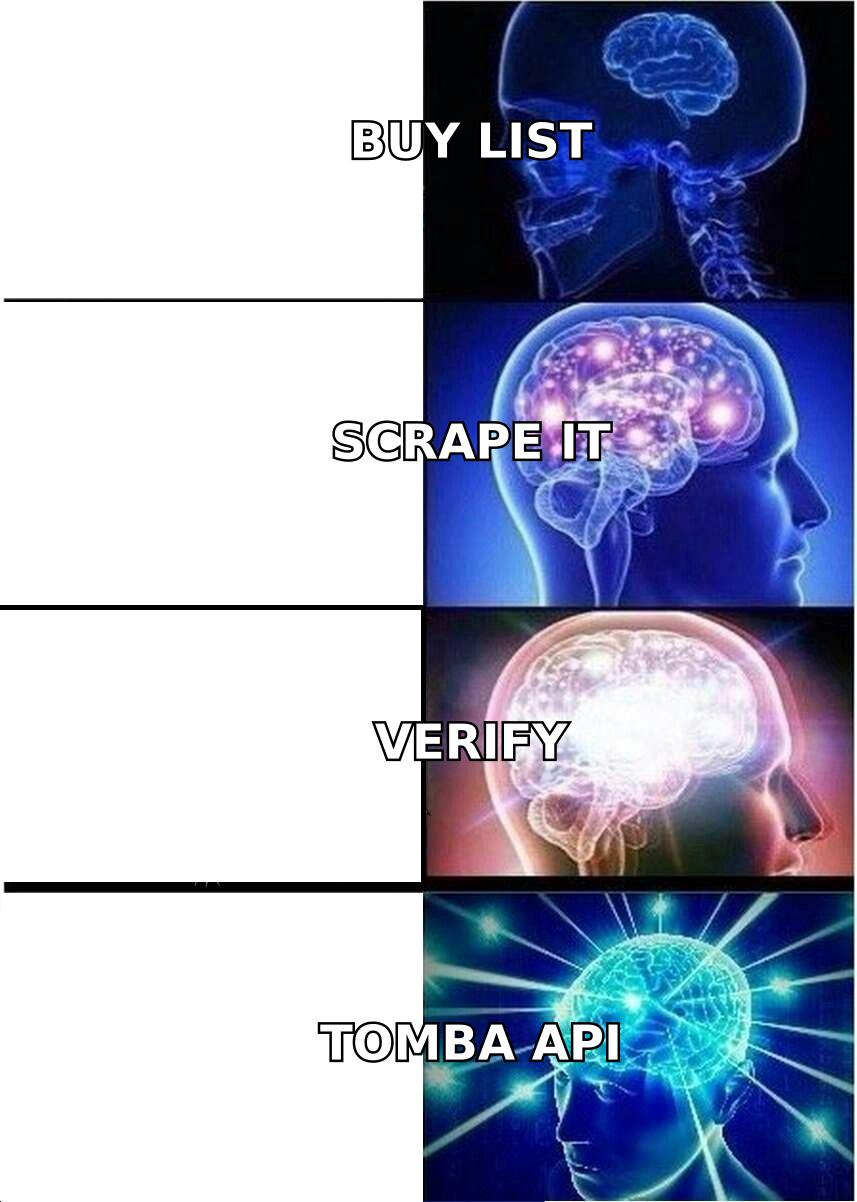
Which online lead generation channels are worth your time?#
Here are the nine channels that actually generate B2B pipeline, ranked on the metrics that matter when you're deciding where to put your next $1,000.
| Channel | Time to first lead | Typical cost/qualified lead | Skill required | Compounds? |
|---|---|---|---|---|
| Cold email (verified list) | 3-7 days | $15-60 | Medium — copy + data hygiene | No |
| Google Search ads | 1-3 days | $80-400 | Medium — keyword + landing page | No |
| SEO / content | 4-9 months | $20-90 (after ramp) | High — research + writing | Yes |
| LinkedIn outbound | 7-14 days | $25-100 | Low-Medium | No |
| LinkedIn organic posting | 2-4 months | $10-40 | High — consistency | Yes |
| Website visitor identification | 1-2 weeks | $30-120 | Low | Partly |
| Communities (Slack, Reddit, forums) | 3-8 weeks | $5-40 | High — genuine participation | Yes |
| Partner / integration listings | 2-6 months | $10-50 | Medium — BD work | Yes |
| Paid social (Meta, LinkedIn ads) | 2-5 days | $150-600 | High — creative + targeting | No |
Read that table as a portfolio, not a leaderboard. The right combination for a two-person SaaS at $0 MRR looks nothing like the right combination for a 40-person agency with a content team.
If you have more time than money, start with communities and content. If you have more money than time, start with search ads. If you have neither — which is most people — start with cold outbound, because a verified list of 300 contacts and a good message costs about $50 and can be running by Thursday.
How do you build a lead list without buying garbage data?#
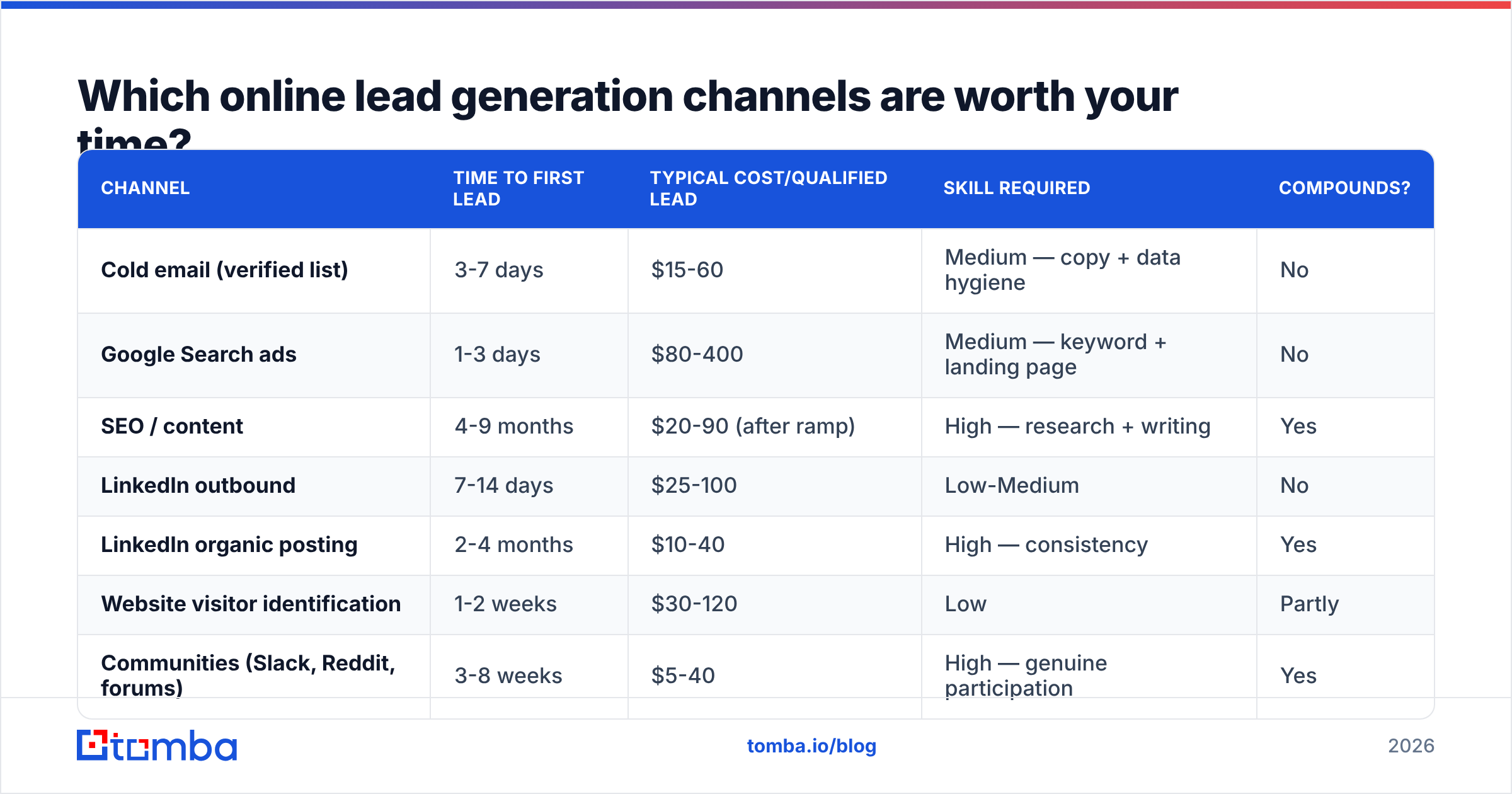
Skip the list vendors selling "50 million B2B contacts for $99." That data is scraped, stale, and shared with every competitor in your category. You will bounce, you will get flagged, and you will spend three months rebuilding sender reputation.
Build the list yourself in four steps:
- Define the account, not the person. Write down firmographics you can filter on: industry, headcount range, tech stack, funding stage, geography. "SaaS companies" is not a filter. "Series A-B SaaS, 20-200 employees, running HubSpot, US/UK" is.
- Source company domains first. Pull them from G2 category pages, funding databases, conference exhibitor lists, LinkedIn Sales Navigator exports, or a curated B2B database. Aim for 200-500 domains before you touch names.
- Find the right people at each domain. Use domain search to pull every public email at a company and see the pattern, then narrow by role. For named prospects, an email finder resolves first name + last name + domain into a deliverable address.
- Verify before you send — every time. Run the whole list through an email verifier. Delete anything that isn't marked valid. Catch-all domains need a separate pass with a catch-all verifier, because a plain SMTP check returns "unknown" on them and unknowns are where bounce rates hide.

The accuracy difference between providers is not cosmetic. On a 1,000-contact send, a tool with 92% deliverable accuracy produces an 8% bounce rate — high enough that Google and Microsoft start routing you to spam. At 97-98%, you stay under the 2-3% threshold that mailbox providers treat as normal. That gap is the entire difference between a campaign that lands and one that quietly dies.
[Suggested screenshot: Tomba domain search results showing detected email pattern and confidence scores for a sample company]
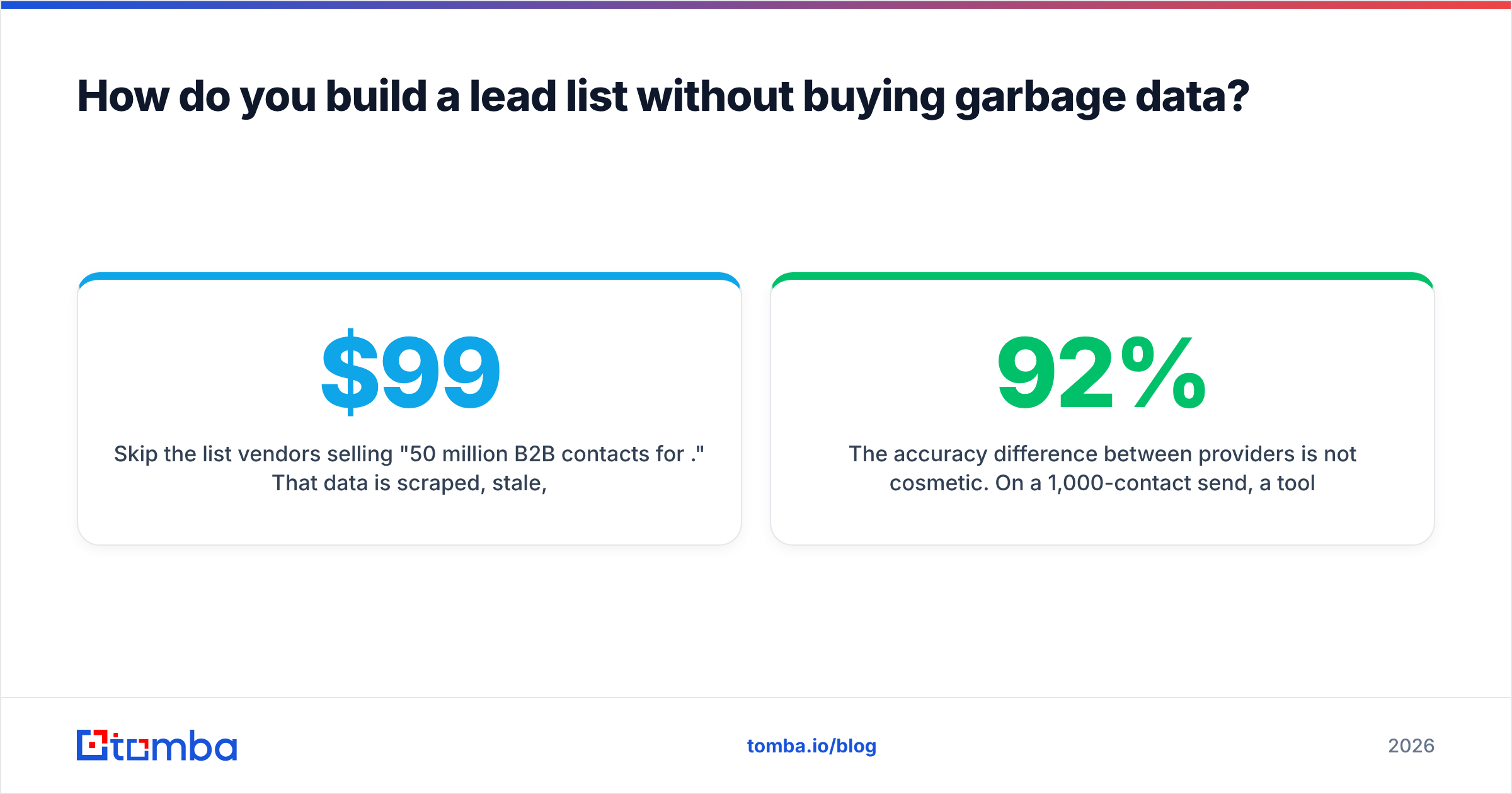
For scale, run the whole thing through the Tomba API or a bulk email finder job instead of clicking one contact at a time. A 500-row CSV of first name / last name / domain comes back enriched and verified in minutes.
Is cold email still the fastest way to get leads online?#
Yes — with two caveats that most people ignore.
The first caveat is technical. Since the 2024 Google and Yahoo bulk sender requirements, you need SPF, DKIM, and DMARC properly configured, a one-click unsubscribe header, and a spam complaint rate under 0.3%. Google's own sender guidelines spell out the thresholds. If you skip this, nothing else in this section matters — your mail won't reach the inbox regardless of how good the copy is.
The second caveat is volume discipline. Cold email works at 30-50 sends per mailbox per day, from a secondary domain, warmed for two to three weeks before the first campaign. People who blast 2,000 emails from their primary domain on day one destroy the asset their whole company runs on.
What a functional cold email sequence looks like:
- Email 1 (day 0) — one observation specific to their company, one sentence on what you do, one low-friction ask. Under 90 words.
- Email 2 (day 3) — a different angle, not a "just bumping this." Share a relevant result or a short case detail.
- Email 3 (day 7) — the shortest one. "Worth a look, or should I close this out?" This gets a surprising number of replies.
- Email 4 (day 14) — a breakup note with a piece of value attached (a template, a benchmark, a teardown). No ask.
Four emails. Then stop and move to a different channel for that contact. Sequences of 9-12 touches generate complaints, not meetings.

Two things move reply rate more than anything else: the relevance of the first line, and whether the person is in a position to care this month. Neither is fixed by better subject-line testing. If you're stuck under a 2% response rate, your targeting is wrong, not your adjectives.
How do inbound channels compare to outbound?#
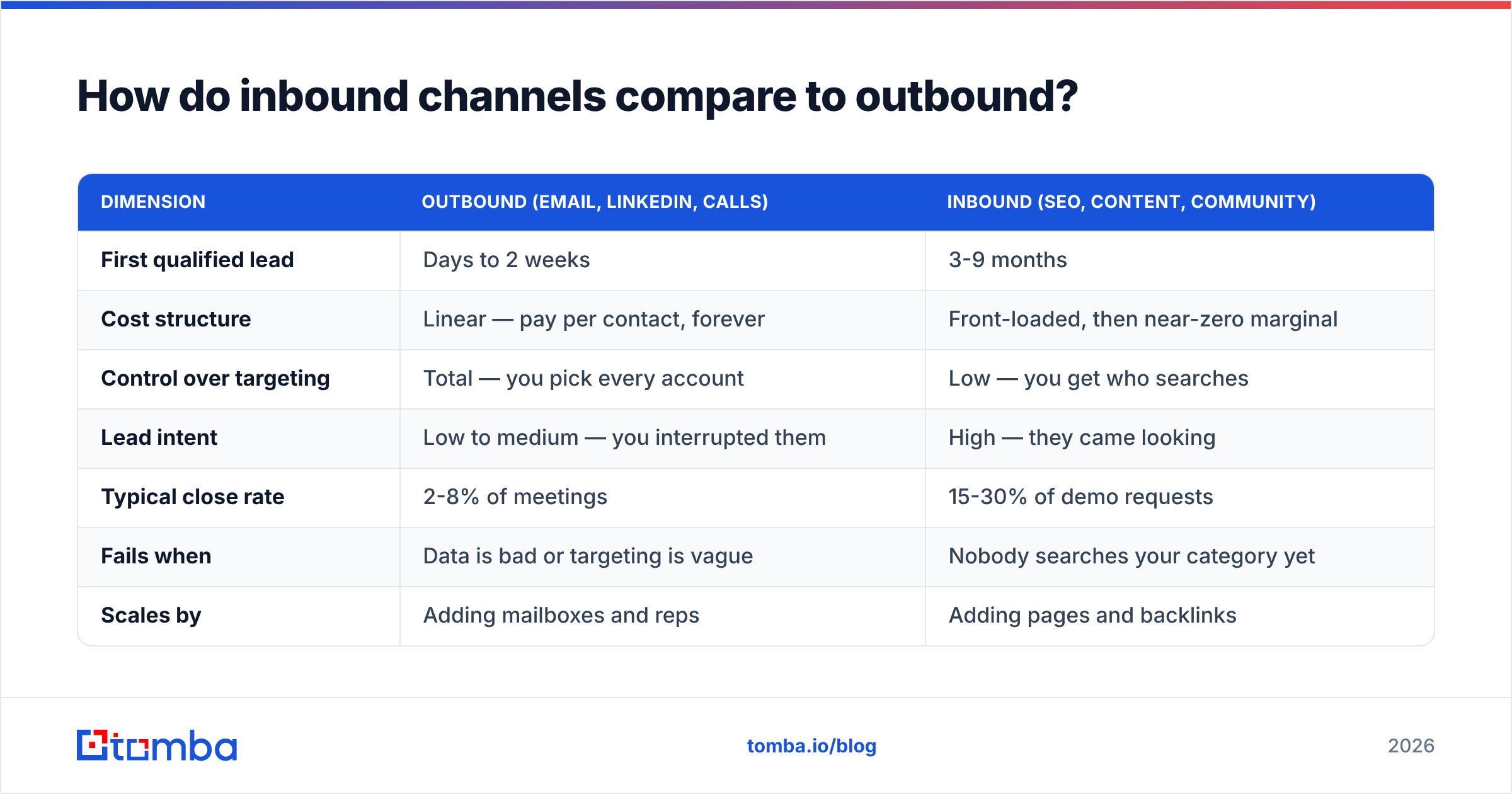
Different tools, different timelines, different failure modes. Here is the honest side-by-side.
| Dimension | Outbound (email, LinkedIn, calls) | Inbound (SEO, content, community) |
|---|---|---|
| First qualified lead | Days to 2 weeks | 3-9 months |
| Cost structure | Linear — pay per contact, forever | Front-loaded, then near-zero marginal |
| Control over targeting | Total — you pick every account | Low — you get who searches |
| Lead intent | Low to medium — you interrupted them | High — they came looking |
| Typical close rate | 2-8% of meetings | 15-30% of demo requests |
| Fails when | Data is bad or targeting is vague | Nobody searches your category yet |
| Scales by | Adding mailboxes and reps | Adding pages and backlinks |
Notice the last row. Outbound scales with headcount, which means margins compress. Inbound scales with assets, which means margins expand. That's why mature companies push toward inbound over time — and why early companies can't afford to wait for it.
The practical answer for most teams: run outbound to fund the business now, and put 20% of your time into one compounding channel. Not five. One. A single blog publishing consistently for nine months beats five channels attempted for six weeks each.
[Suggested screenshot: Google Search Console performance graph showing impression growth over 9 months for a new B2B blog]
What about website visitors who never fill out a form?#
Roughly 95-98% of your website traffic leaves without identifying itself. Those visitors researched you, looked at pricing, and vanished.
Visitor identification closes part of that gap. Reverse-IP and identity-resolution tools match anonymous sessions to companies, and sometimes to individuals, so your team can follow up with people who already showed intent. Website visitor reveal handles the company-level match; you then use an email finder to reach the right role at that account.
This channel is underrated because the intent signal is so strong. Someone who spent four minutes on your pricing page is a fundamentally different prospect from a cold name pulled off a list. Treat them differently — reference the problem, not the pageview, and never say "I saw you visited our site" in a way that feels like surveillance.
Similar logic applies to other intent signals you can act on today:
- Job postings — a company hiring three SDRs needs sales tooling now.
- Tech stack changes — a site that just added a competitor's script is in an evaluation cycle.
- Funding announcements — new budget, new headcount, 60-90 day buying window.
- Content engagement — people commenting on a relevant LinkedIn post about your problem space.
- Author bylines — writers covering your category are reachable via an author finder and make good partnership or PR targets.
Which tools do you actually need to run this?#
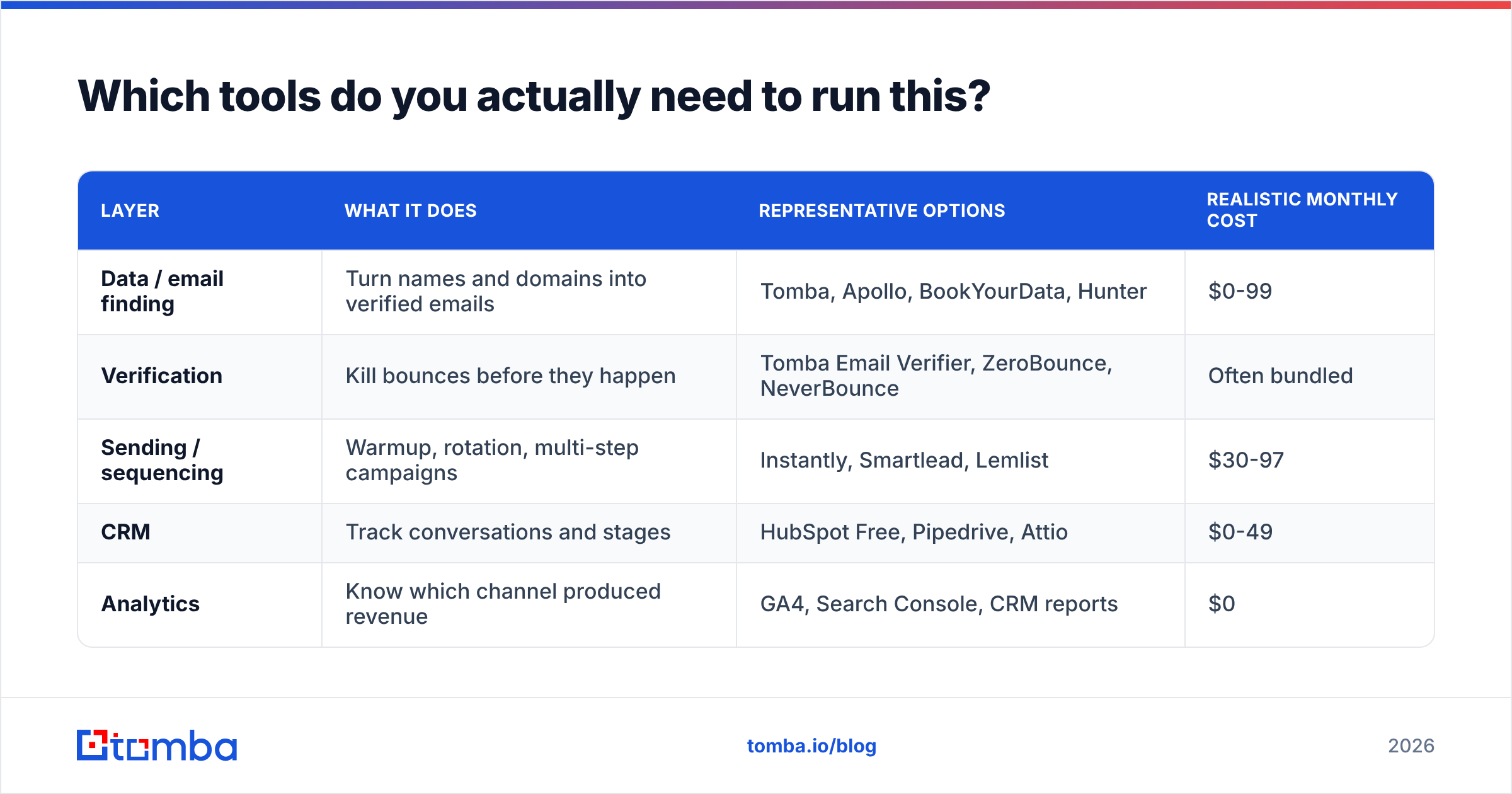
Fewer than the market wants you to believe. Here's the minimum viable stack and what each layer costs.
| Layer | What it does | Representative options | Realistic monthly cost |
|---|---|---|---|
| Data / email finding | Turn names and domains into verified emails | Tomba, Apollo, BookYourData, Hunter | $0-99 |
| Verification | Kill bounces before they happen | Tomba Email Verifier, ZeroBounce, NeverBounce | Often bundled |
| Sending / sequencing | Warmup, rotation, multi-step campaigns | Instantly, Smartlead, Lemlist | $30-97 |
| CRM | Track conversations and stages | HubSpot Free, Pipedrive, Attio | $0-49 |
| Analytics | Know which channel produced revenue | GA4, Search Console, CRM reports | $0 |
Notes on picking within each layer. On data, coverage and accuracy vary by region and company size — test the same 50 contacts across two providers before committing. Tomba pricing starts with a free tier at 25 searches per month, then $49/mo Starter, $99/mo Growth, and $249/mo Pro, which makes a head-to-head test cheap. BookYourData takes a different approach with pay-as-you-go prepaid credits and a bounce guarantee, which suits teams that buy in occasional bursts rather than running continuous enrichment.
On sending, do not use your CRM's built-in mass mailer for cold outreach. Those are built for opted-in marketing lists and their shared IP pools are not tuned for cold volume.

If you already live in a spreadsheet, the Google Sheets add-on and Excel add-in let you enrich in place instead of exporting CSVs back and forth. If you live in a CRM, the HubSpot integration pushes verified contacts straight into your pipeline. Review options with real user feedback on G2 before you commit annually — most of these tools have generous free tiers for exactly this reason.
What does a 30-day online lead generation plan look like?#
Concrete, week by week. This assumes one person, roughly two hours a day, and a tooling budget under $200.
Week 1 — Infrastructure and targeting
Buy a secondary sending domain (something like getyourbrand.com if you're yourbrand.com). Set up SPF, DKIM, and DMARC — verify with an SPF checker. Create two mailboxes and start warmup. While warmup runs, write your ICP definition and source 250 target domains.
Week 2 — List building and copy
Run domains through domain search to identify email patterns and decision-maker roles. Enrich named contacts with the email finder. Verify everything; delete anything not marked valid. Expect to lose 15-25% of your raw list — that's the process working. Write your four-email sequence. Test it against a spam checker before sending.
Week 3 — Launch and measure
Start sending at 20 emails per mailbox per day, ramping to 40 by week's end. Track four numbers only: delivery rate, open rate, reply rate, positive reply rate. Ignore everything else for now. A healthy first campaign lands around 97%+ delivered, 40-60% opened, 4-8% replied, 1-3% positive.
Week 4 — Diagnose and add the second channel
If delivery is under 95%, your data or your DNS is the problem. If opens are fine but replies aren't, your offer or targeting is wrong — rewrite the first line, not the subject. Once the loop is stable, start your compounding channel: publish one genuinely useful piece of content per week, or begin daily commenting in the two communities where your buyers actually spend time.
By day 30 you should have a functioning outbound engine and the first brick of an inbound one. That's the realistic answer to how to get leads online without a budget — not a growth hack, a loop you run every week.
Where should you start today?#
Pick the fastest feedback loop you can afford, then make it boring and repeatable. For most B2B teams that means a tightly targeted list of 250-500 verified contacts, a four-email sequence, and one compounding channel running quietly in the background.
The part that breaks first is almost always the data. Start there — build your list with the Tomba Email Finder, verify it before the first send, and give your copy a fair chance to land in an actual inbox. The free tier covers 25 searches a month, which is enough to test your targeting hypothesis before you spend a cent on tooling.
Related guides#
// get started
Find, verify and enrich your first contacts today
Start on the free plan with 25 searches a month, then scale when your team is ready.
Free plan · No credit card required · GDPR & CCPA
// about the author