How to Grab Attention in an Email: 9 Tactics That Work
Most cold emails die in the first seven words. Here are nine tested ways to grab attention in an email — subject line, first line, and the boring hygiene work nobody talks about.
TL;DR
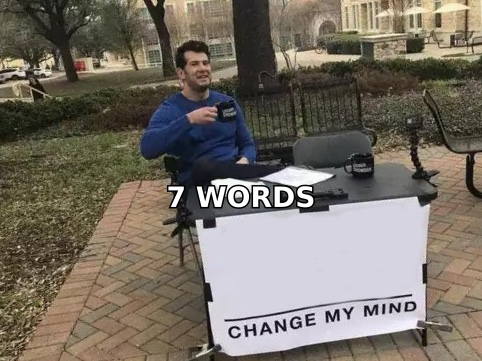
- Attention is won or lost in about seven words: the sender name, the subject line, and the preview text. Everything after that is a bonus round you only get to play if those three land.
- The single highest-leverage fix is not clever copy — it's sending to a verified, correctly-attributed address. A brilliant opener sent to
info@is worth zero. - Specificity beats cleverness. "Your Q3 hiring page lists 14 SDR roles" outperforms "Quick question" in nearly every test that measures replies rather than opens.
- Personalization has a floor and a ceiling: one genuinely researched detail beats five merge tags, and five merge tags beat none.
- Length matters less than people claim. Relevance-per-word matters more. Cut every sentence that could appear in an email to someone else.
Every guide on how to grab attention in an email starts with subject lines. That's fine, but it skips the part that actually kills most campaigns: the email never reached a human who could care. So this post handles both halves — the deliverability and data work that earns you a reader, and the copy work that keeps them for six more seconds.
What actually happens in the first seven seconds?#
Your recipient does not "read" your email. They triage it. In a scan that takes roughly one to two seconds, they process three things in this order:
- Sender name — Do I recognize this? Is it a person or a system? A name they half-recognize ("Sarah at Ramp") gets a different reflex than "noreply-marketing".
- Subject line — Is this about me, or about you? Anything that reads like a pitch gets archived before the brain finishes parsing it.
- Preview text — The first ~90 characters of the body, rendered in grey next to the subject. Most senders waste this on "Hi {{FirstName}}, I hope this email finds you well," which is the most reliable way to signal that nothing worth reading follows.
Only after those three survive does anyone open. And only after the first line survives does anyone read paragraph two. Treat each of these as a separate gate with its own pass rate, not one blob called "the email."
The practical consequence: optimize the gates in order. There is no point A/B testing your call to action while your sender reputation is putting you in Promotions.
Why do most attention tactics fail before the copy matters?#
Because attention presupposes delivery, and delivery presupposes data.
Three failure modes account for the majority of "my open rates cratered" posts:
- Bad addresses. Bounces above roughly 2–3% signal to mailbox providers that you're working from a scraped or stale list. Google's bulk sender guidelines are explicit that spam complaints and invalid recipients directly affect placement. Run every list through an email verifier before it touches your sequence.
- Wrong person. A perfectly deliverable address belonging to someone who left in 2023, or to a shared
contact@alias, produces zero replies no matter how good the copy is. Attribution is a data problem, not a writing problem. - Unauthenticated domains. Missing SPF, DKIM, or DMARC records land you in the spam folder regardless of content. Run an SPF checker on your sending domain before you write a single subject line, and read up on email deliverability if any of those acronyms are new.
Fix these first. They are boring, they take an afternoon, and they move numbers more than any headline formula in this post.
What makes a subject line get opened in 2026?#
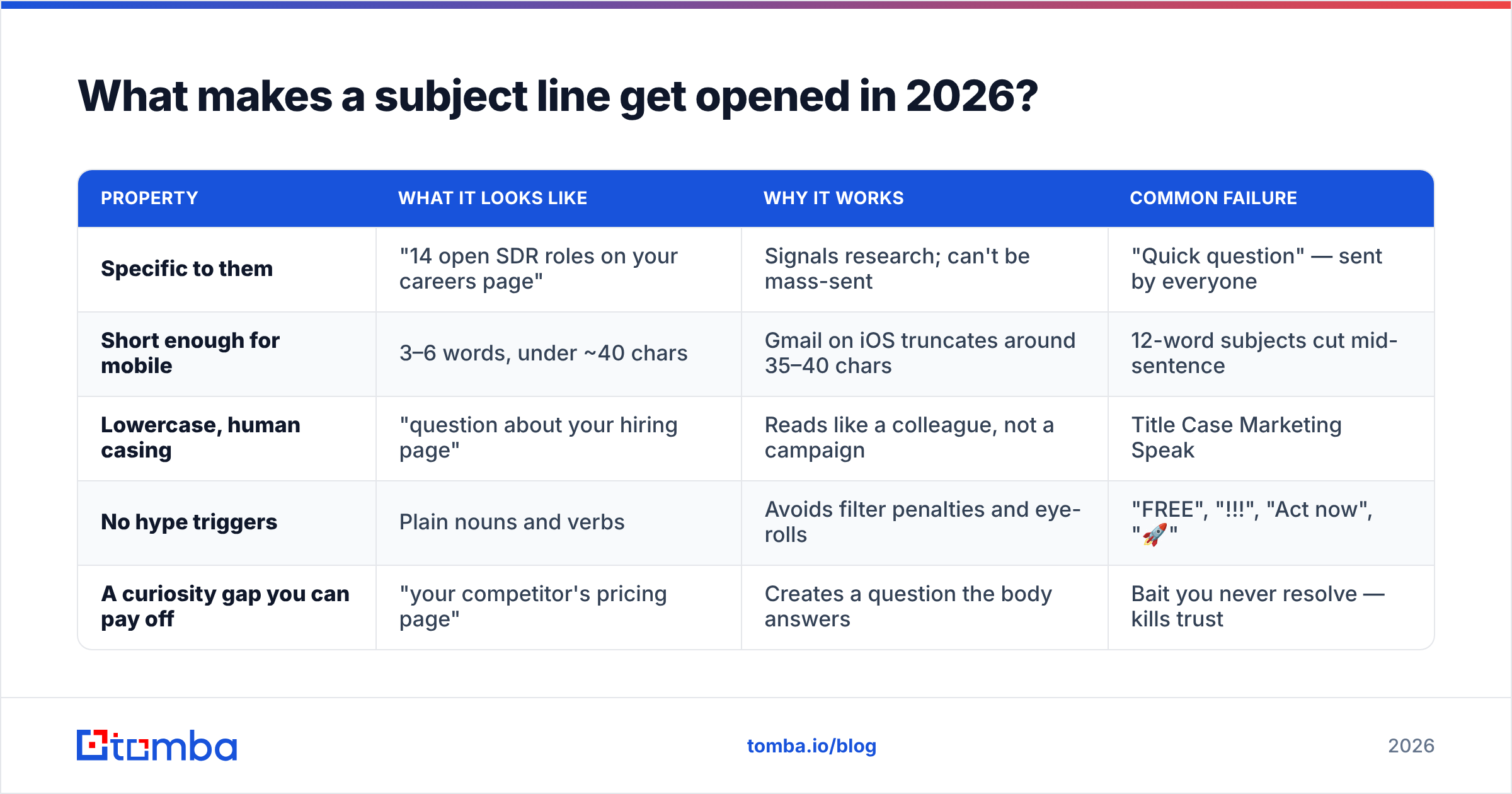
Four properties, roughly in order of impact:
| Property | What it looks like | Why it works | Common failure |
|---|---|---|---|
| Specific to them | "14 open SDR roles on your careers page" | Signals research; can't be mass-sent | "Quick question" — sent by everyone |
| Short enough for mobile | 3–6 words, under ~40 chars | Gmail on iOS truncates around 35–40 chars | 12-word subjects cut mid-sentence |
| Lowercase, human casing | "question about your hiring page" | Reads like a colleague, not a campaign | Title Case Marketing Speak |
| No hype triggers | Plain nouns and verbs | Avoids filter penalties and eye-rolls | "FREE", "!!!", "Act now", "🚀" |
| A curiosity gap you can pay off | "your competitor's pricing page" | Creates a question the body answers | Bait you never resolve — kills trust |
A working test: read the subject line out loud and ask whether you'd send it to a coworker. If it would feel weird in Slack, it will feel weird in an inbox.
Avoid the "Re:" and "Fwd:" fake-thread trick. It gets opens and burns the relationship in the same second, and it's explicitly flagged as deceptive under the FTC's CAN-SPAM guidance when it misrepresents the message.
How do you write a first line that earns the second line?#
Delete every opener that references the email itself. "I hope this finds you well," "I'm reaching out because," "My name is X and I work at Y" — all of these spend your most valuable sentence on nothing.
Replace them with one of five patterns:
- The observed detail. "You've got Segment and Hubspot on the site but no reverse-ETL — that combo usually means someone's exporting CSVs weekly." Requires actual research, works far above every other pattern.
- The specific compliment with evidence. Not "love your content" — "your teardown of the Snowflake pricing change was the only one that ran the actual numbers." Proves you read it.
- The shared-context bridge. "Saw you spoke on the same panel as Dana Chen last month." Borrowed trust, no flattery required.
- The blunt problem statement. "Most Series B teams route inbound demos through a form that adds 40 minutes to first touch." Works when the problem is genuinely common and you name it precisely.
- The permission-first open. "Bad timing if you're mid-quarter-close — happy to circle back in three weeks." Low-pressure, unusually high reply rate from senior titles.
What all five share: they could only have been sent to this person, or they demonstrate expertise the recipient can verify in one second. That's the whole mechanic.
Which attention tactic should you use for which channel?#
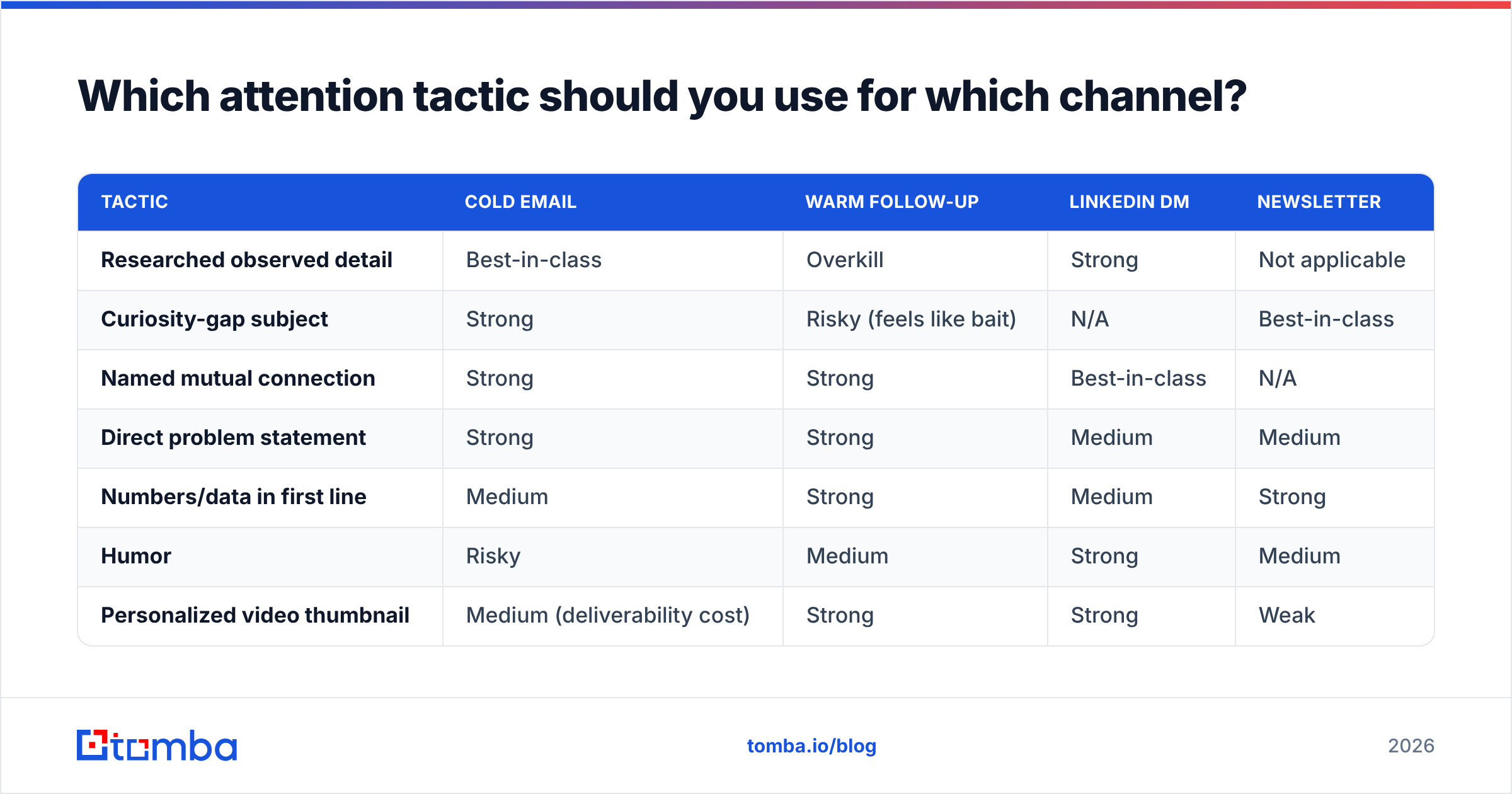
Not every tactic transfers. Here's how the main approaches compare across the channels most B2B teams actually use:
| Tactic | Cold email | Warm follow-up | LinkedIn DM | Newsletter |
|---|---|---|---|---|
| Researched observed detail | Best-in-class | Overkill | Strong | Not applicable |
| Curiosity-gap subject | Strong | Risky (feels like bait) | N/A | Best-in-class |
| Named mutual connection | Strong | Strong | Best-in-class | N/A |
| Direct problem statement | Strong | Strong | Medium | Medium |
| Numbers/data in first line | Medium | Strong | Medium | Strong |
| Humor | Risky | Medium | Strong | Medium |
| Personalized video thumbnail | Medium (deliverability cost) | Strong | Strong | Weak |
The pattern: cold channels reward proof-of-research; warm channels reward brevity and directness; social channels reward personality. Copying a tactic across the boundary is where most "this worked for someone on LinkedIn but not for me" stories come from.
How much personalization is actually worth it?#
There's a curve, and most teams sit at the wrong end of it.
- Zero personalization — pure blast. Reply rates are usually a rounding error, and you burn domain reputation to get there.
- Merge-tag personalization — first name, company, maybe job title. Cheap, scalable, and now so common it reads as automated. Still better than nothing, and it's the baseline for anything above a few hundred sends.
- One researched detail per prospect — the sweet spot. Roughly 60–120 seconds of work per contact, and it's the level at which reply rates typically jump by a multiple, not a percentage.
- Deep-dive personalization — custom Loom, tailored deck, three paragraphs of research. Reserve this for named accounts where a single closed deal justifies an hour of prep.
The unlock for the middle tier is enrichment. If your CRM already holds a name and a domain, filling in title, seniority, department, and tech stack via data enrichment turns a generic blast into a segmentable list — and segments let you write one genuinely relevant email for fifty people instead of fifty mediocre ones.
A practical rule: if the sentence you wrote could be pasted into an email to a different company without editing, it isn't personalization. It's filler with a merge tag attached.
What structure keeps attention once you have it?#
Five lines. That's the whole template, and it survives contact with reality better than any longer format:
- Line 1 — the hook. The observed detail or problem statement. No greeting fluff.
- Line 2 — the relevance bridge. One sentence connecting that observation to something you do. Not a pitch, a link.
- Line 3 — the proof. A number, a named customer in their segment, or a specific outcome. One sentence, no case-study paragraph.
- Line 4 — the ask. Small, singular, and easy to say yes or no to. "Worth a look?" outperforms "Do you have 15 minutes on Tuesday or Thursday?"
- Line 5 — the exit. A single line that makes ignoring you costless. This is what makes people reply instead of archive.
Formatting rules that matter more than people expect: no images in a cold email (they hurt placement and add nothing), one link maximum, no attachments, plain text over HTML, and a signature that's three lines instead of a rendered banner. If you want to sanity-check tone and structure before sending, the cold email templates library is a faster starting point than a blank page, and a spam checker will catch the trigger words you stopped noticing.
How do you measure whether you're actually grabbing attention?#
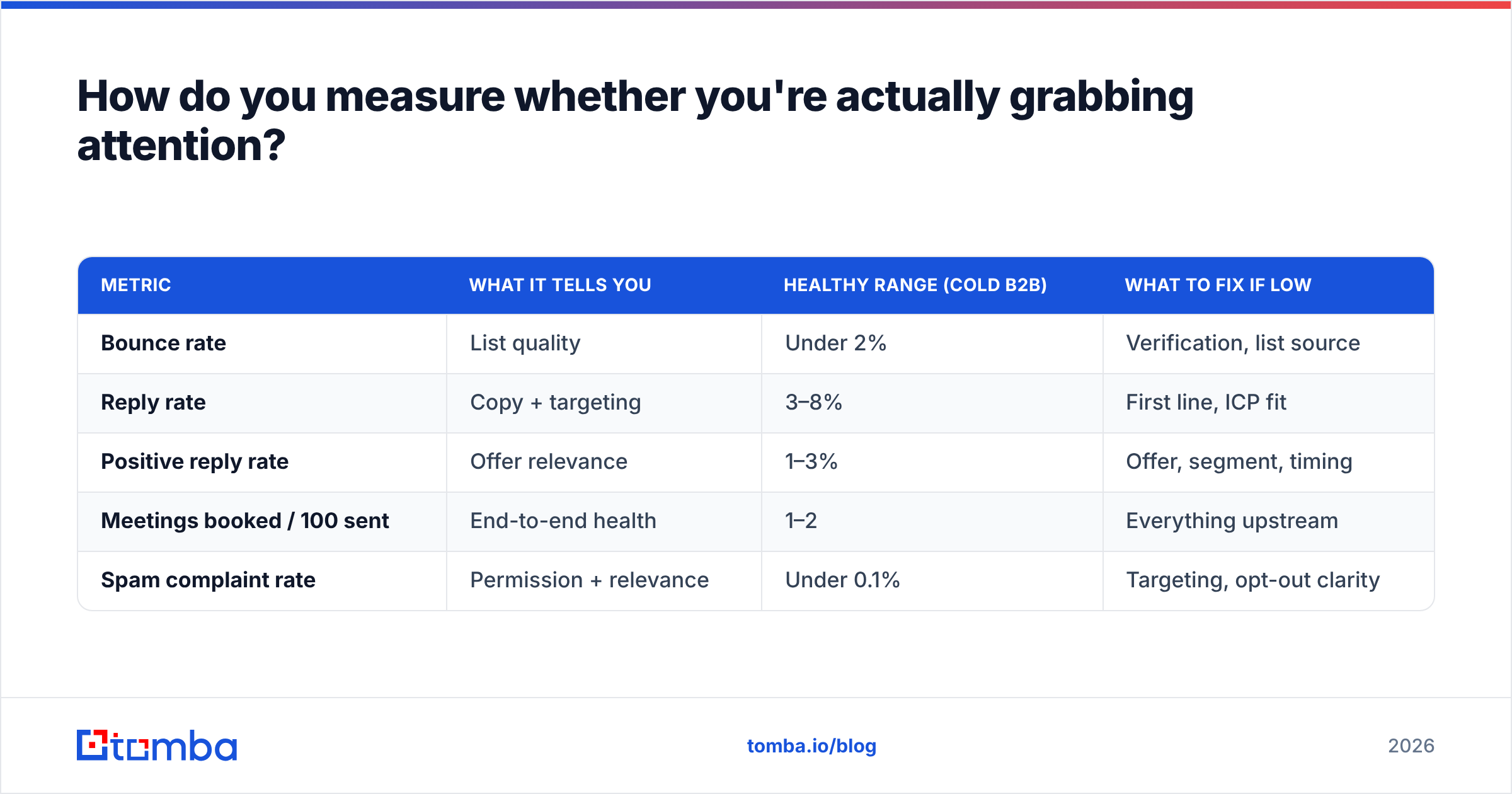
Open rate is now close to useless. Apple Mail Privacy Protection pre-fetches images and inflates opens for a meaningful share of your list, so a 60% open rate may mean nothing at all. Track these instead:
| Metric | What it tells you | Healthy range (cold B2B) | What to fix if low |
|---|---|---|---|
| Bounce rate | List quality | Under 2% | Verification, list source |
| Reply rate | Copy + targeting | 3–8% | First line, ICP fit |
| Positive reply rate | Offer relevance | 1–3% | Offer, segment, timing |
| Meetings booked / 100 sent | End-to-end health | 1–2 | Everything upstream |
| Spam complaint rate | Permission + relevance | Under 0.1% | Targeting, opt-out clarity |
Note the diagnostic logic: a low bounce rate with a low reply rate means your data is fine and your copy isn't. A high bounce rate makes every other number meaningless. Fix in that order.
Benchmarks vary widely by industry and list source — G2's sales-engagement category reviews are a reasonable place to sanity-check vendor claims against what practitioners report. Treat any vendor promising a 40% reply rate as marketing, not data.
What are the fastest wins if you only have an hour?#
Ranked by effort-to-impact:
- Verify your current list. Twenty minutes with a bulk verify run removes the bounces that are dragging your placement down. Nothing else you do this hour matters as much.
- Rewrite your first lines. Take your active sequence and delete every opener that mentions yourself, your company, or the act of emailing. Replace with an observation.
- Cut your subject lines to five words. Lowercase them. Remove every adjective.
- Kill the second call to action. Every email should ask for exactly one thing. Two asks halve your response rate.
- Fix your sender name. "Sarah Chen" beats "Sarah Chen | Acme Sales Team" beats "Acme Marketing." Human names get human responses.
- Check one email format before sending to a new domain. A quick company email pattern lookup avoids the guess-and-bounce cycle entirely.
None of these require a new tool, a new budget, or a strategy offsite. They require an hour and a willingness to delete your own writing.
Where does the data layer fit in all this?#
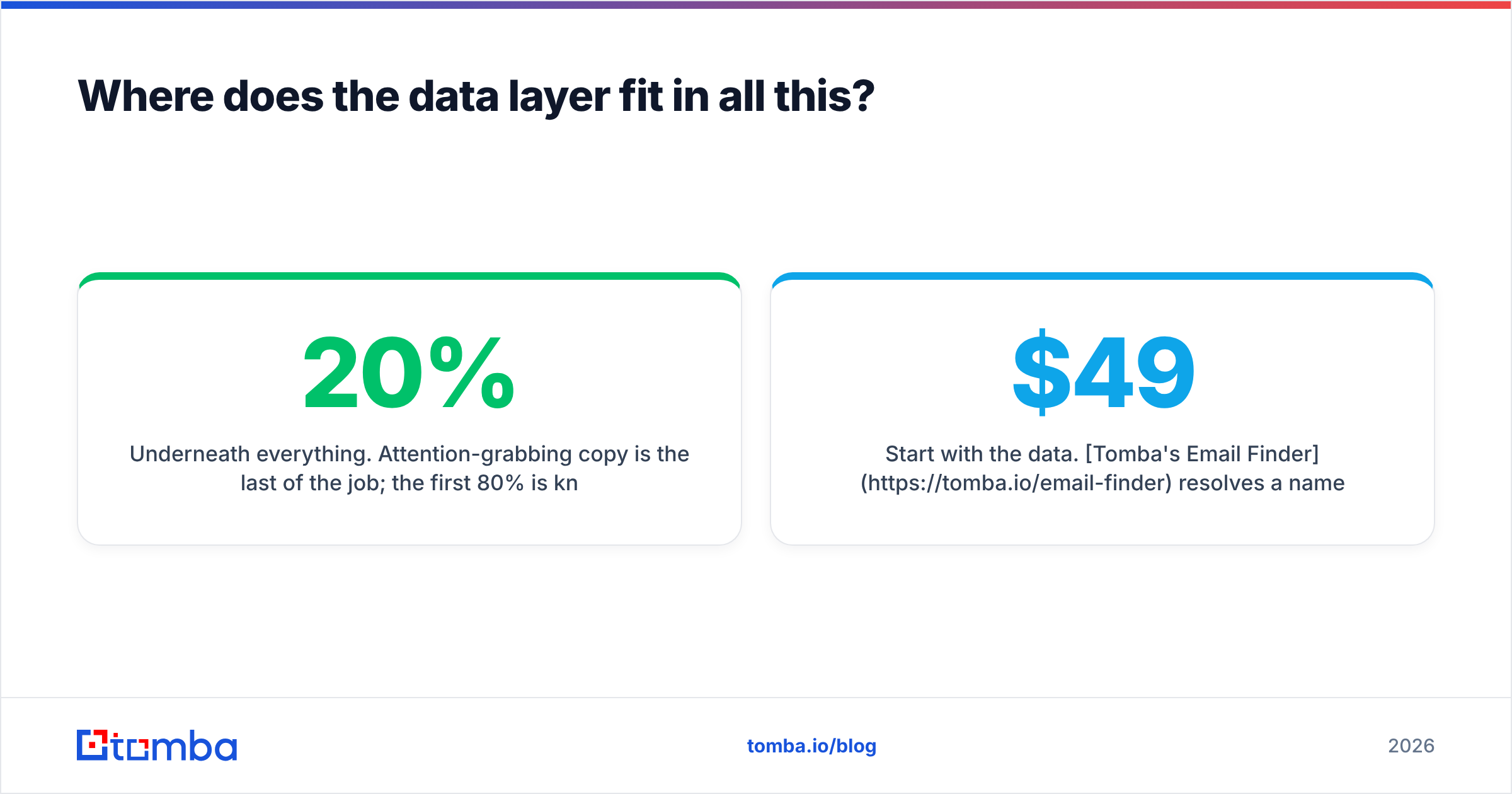
Underneath everything. Attention-grabbing copy is the last 20% of the job; the first 80% is knowing who you're writing to and being confident the message will land in their inbox.
That means: the right person's real address, current title, current company, and enough context to write a first line that couldn't have been sent to anyone else. If you're pulling contacts from a website, a LinkedIn profile, or a company domain, you want that pipeline to produce verified, attributed records — not a spreadsheet of plausible guesses.
Start with the data. Tomba's Email Finder resolves a name and a domain into a verified professional address, with the source citations behind it so you know why the match is what it is. The free tier gives you 25 searches a month to test it against contacts you already have; paid plans start at $49/mo, and full Tomba pricing scales through Growth at $99/mo and Pro at $249/mo. Verify the list, enrich the records, then spend your writing time on the one sentence that actually earns the reply.
Related guides#
// get started
Find, verify and enrich your first contacts today
Start on the free plan with 25 searches a month, then scale when your team is ready.
Free plan · No credit card required · GDPR & CCPA
// about the author