How to Implement AI in Sales: A 90-Day Rollout Plan
Most AI sales pilots die in month three — not because the model is bad, but because the CRM data underneath it is. Here is a 90-day rollout plan, a tool comparison, and the metrics that prove it worked.
TL;DR
- AI in sales fails at the data layer, not the model layer. Fix contact accuracy and CRM hygiene before you buy anything.
- Start with three use cases only: research/enrichment, first-draft messaging, and pipeline hygiene. Everything else is phase two.
- Budget $50–$150 per rep per month for a working AI sales stack in 2026 — not the six-figure platform quotes you will get from enterprise vendors.
- Run a 90-day rollout: 30 days data cleanup, 30 days two-rep pilot, 30 days measured expansion.
- Measure meetings booked per 100 contacts touched, not "hours saved." Time savings are unfalsifiable; conversion is not.
What does implementing AI in sales actually mean in 2026?#
It means wiring models into three specific places in your existing sales motion: before the touch (research, enrichment, prioritization), during the touch (drafting, personalization, call assistance), and after the touch (summarization, CRM updates, forecasting). That is the whole map.
What it does not mean is buying an "AI sales platform" and hoping it replaces a process you never wrote down. Every failed implementation we have seen follows the same shape: a team with a fuzzy ICP, a CRM full of dead contacts, and no baseline metrics buys a tool, sees no lift in 60 days, and quietly stops logging into it.
The pattern is boring and predictable. AI amplifies whatever process you already have. If your outbound converts at 0.8% because you are emailing the wrong people at stale addresses, an AI writer will produce beautifully personalized emails that bounce at the same rate — just faster and at higher volume, which actively damages your email deliverability.
So the first question is not "which AI tool?" It is "which part of my sales process is measurably broken, and is it a data problem or a judgment problem?" AI is good at the first. It is mediocre at the second.
Where does AI actually move the needle in a sales cycle?#
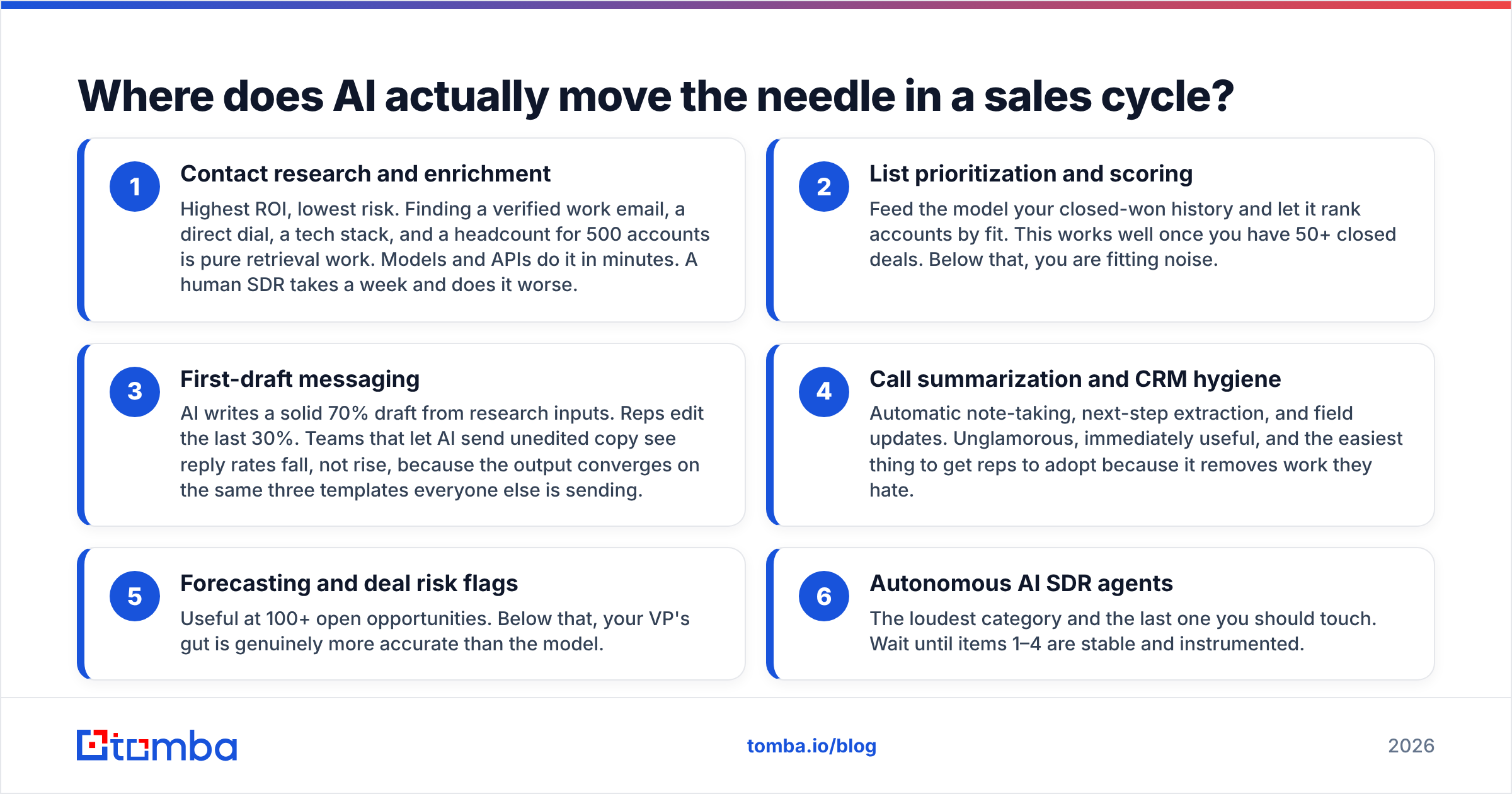
Rank your use cases by how much of the work is pattern-matching over text and data versus how much is human judgment. The top of that list is where you start.
- Contact research and enrichment — Highest ROI, lowest risk. Finding a verified work email, a direct dial, a tech stack, and a headcount for 500 accounts is pure retrieval work. Models and APIs do it in minutes. A human SDR takes a week and does it worse.
- List prioritization and scoring — Feed the model your closed-won history and let it rank accounts by fit. This works well once you have 50+ closed deals. Below that, you are fitting noise.
- First-draft messaging — AI writes a solid 70% draft from research inputs. Reps edit the last 30%. Teams that let AI send unedited copy see reply rates fall, not rise, because the output converges on the same three templates everyone else is sending.
- Call summarization and CRM hygiene — Automatic note-taking, next-step extraction, and field updates. Unglamorous, immediately useful, and the easiest thing to get reps to adopt because it removes work they hate.
- Forecasting and deal risk flags — Useful at 100+ open opportunities. Below that, your VP's gut is genuinely more accurate than the model.
- Autonomous AI SDR agents — The loudest category and the last one you should touch. Wait until items 1–4 are stable and instrumented.
Notice that four of the six depend entirely on the quality of the underlying contact and account data. That ordering is not accidental.
What do you need in place before you touch an AI tool?#
Three things: a defined ICP, clean contact data, and a baseline. Skip any of them and you cannot tell whether the AI helped.
Define the ICP in filters, not adjectives. "Mid-market SaaS companies that care about security" is not an ICP. "B2B SaaS, 50–500 employees, US/UK/DE, uses AWS, has a security or compliance job posting in the last 90 days" is. The second version is a query. The first is a vibe.
Fix the contact layer. This is where most budgets should go first. Run your existing CRM contacts through an email verifier and see what percentage come back invalid — for lists older than 12 months, 20–30% rot is normal because people change jobs. Then close the gaps with a proper email finder rather than guessing patterns. If you are working from company domains, domain search will pull the verified addresses and role patterns for an entire org in one call.
Capture a baseline for 30 days before you change anything. Record: contacts touched, open rate, reply rate, meetings booked, meetings held, opportunities created, and average research time per account. Without this, every post-rollout claim is a story.
Vendor-neutral note on data sources: there is no single provider with the best coverage in every geography and segment. Waterfall enrichment — querying two or three providers in sequence and taking the first verified hit — consistently beats any single source. Providers like Tomba, BookYourData, and the larger database vendors each win in different regions and company-size bands, and a serious ops team tests two or three against a sample of their own ICP before committing. Look at where the data comes from rather than at the headline "million contacts" number, which is meaningless without a verification date.
Which AI sales tools should you compare?#
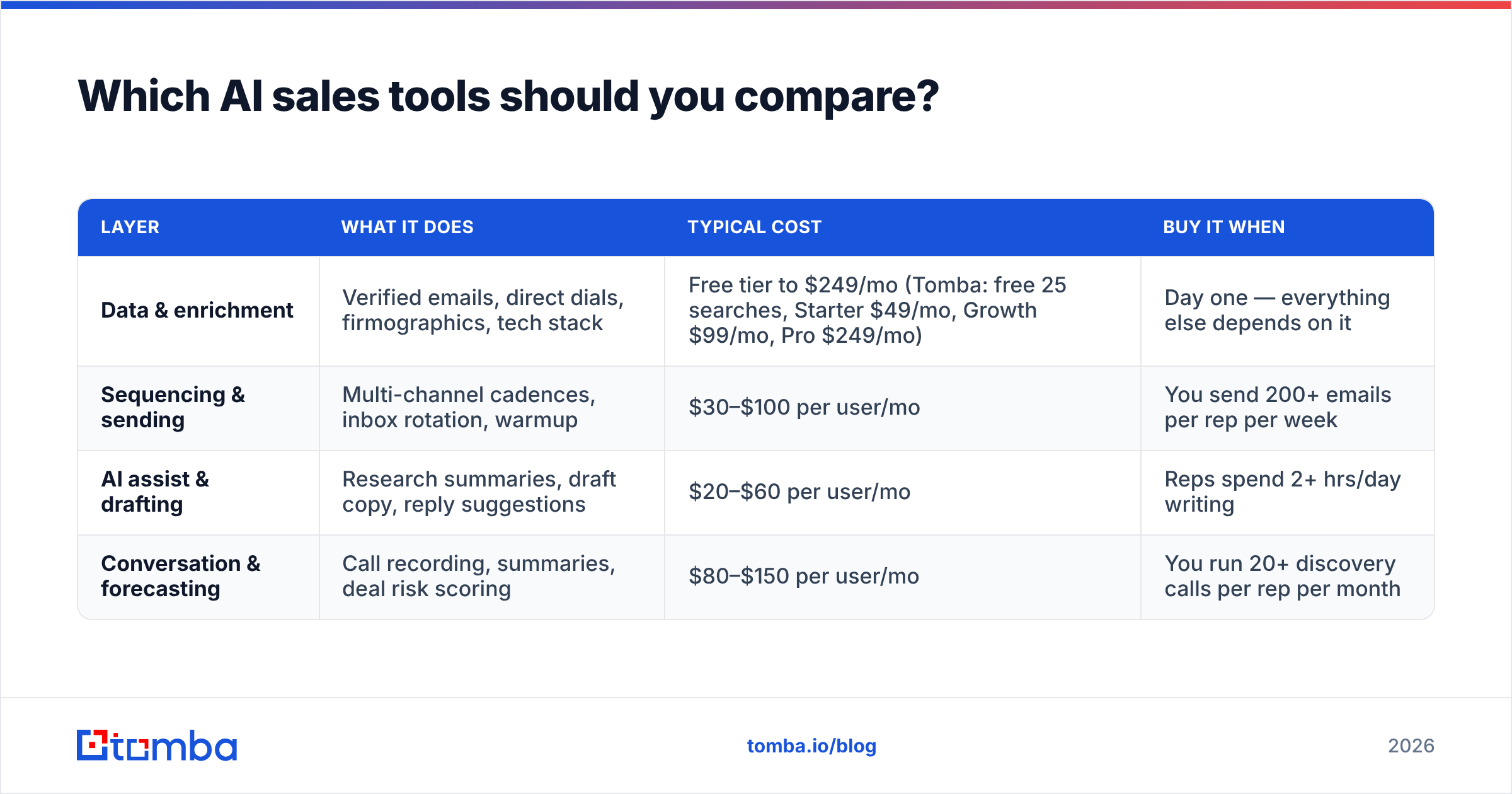
Split the market into four layers. Buying one tool from each layer beats buying one platform that claims to do all four badly.
| Layer | What it does | Typical cost | Buy it when |
|---|---|---|---|
| Data & enrichment | Verified emails, direct dials, firmographics, tech stack | Free tier to $249/mo (Tomba: free 25 searches, Starter $49/mo, Growth $99/mo, Pro $249/mo) | Day one — everything else depends on it |
| Sequencing & sending | Multi-channel cadences, inbox rotation, warmup | $30–$100 per user/mo | You send 200+ emails per rep per week |
| AI assist & drafting | Research summaries, draft copy, reply suggestions | $20–$60 per user/mo | Reps spend 2+ hrs/day writing |
| Conversation & forecasting | Call recording, summaries, deal risk scoring | $80–$150 per user/mo | You run 20+ discovery calls per rep per month |
A realistic 5-rep stack in 2026 lands at $600–$900 per month all-in. Compare that against the enterprise "AI revenue platform" quotes, which start around $30k/year and lock you into an 18-month contract before your pilot has produced a single data point. G2 and Gartner peer reviews are useful here specifically because they surface implementation-time complaints that vendor demos never show.
One practical rule: prefer tools with an API and a free tier over tools with a sales-led-only motion. You will want to test enrichment quality against your own ICP sample before signing anything, and a vendor that will not let you do that is telling you something. Tomba's email finder API and the free tier exist precisely for that kind of pre-purchase validation, and comparable providers offer trial credits too — use them all and score the results yourself.
How do you actually run the bake-off?#
Take 200 contacts from your ICP where you already know the correct email — closed-won accounts, existing customers, inbound signups. Strip the emails. Run the list through each provider. Score on three axes:
- Coverage — what percentage returned any result
- Accuracy — what percentage matched the known-correct address
- Confidence calibration — when the tool said "high confidence," was it right?
That third axis is the one nobody tests and the one that matters most in production, because it determines what you can safely send without manual review.
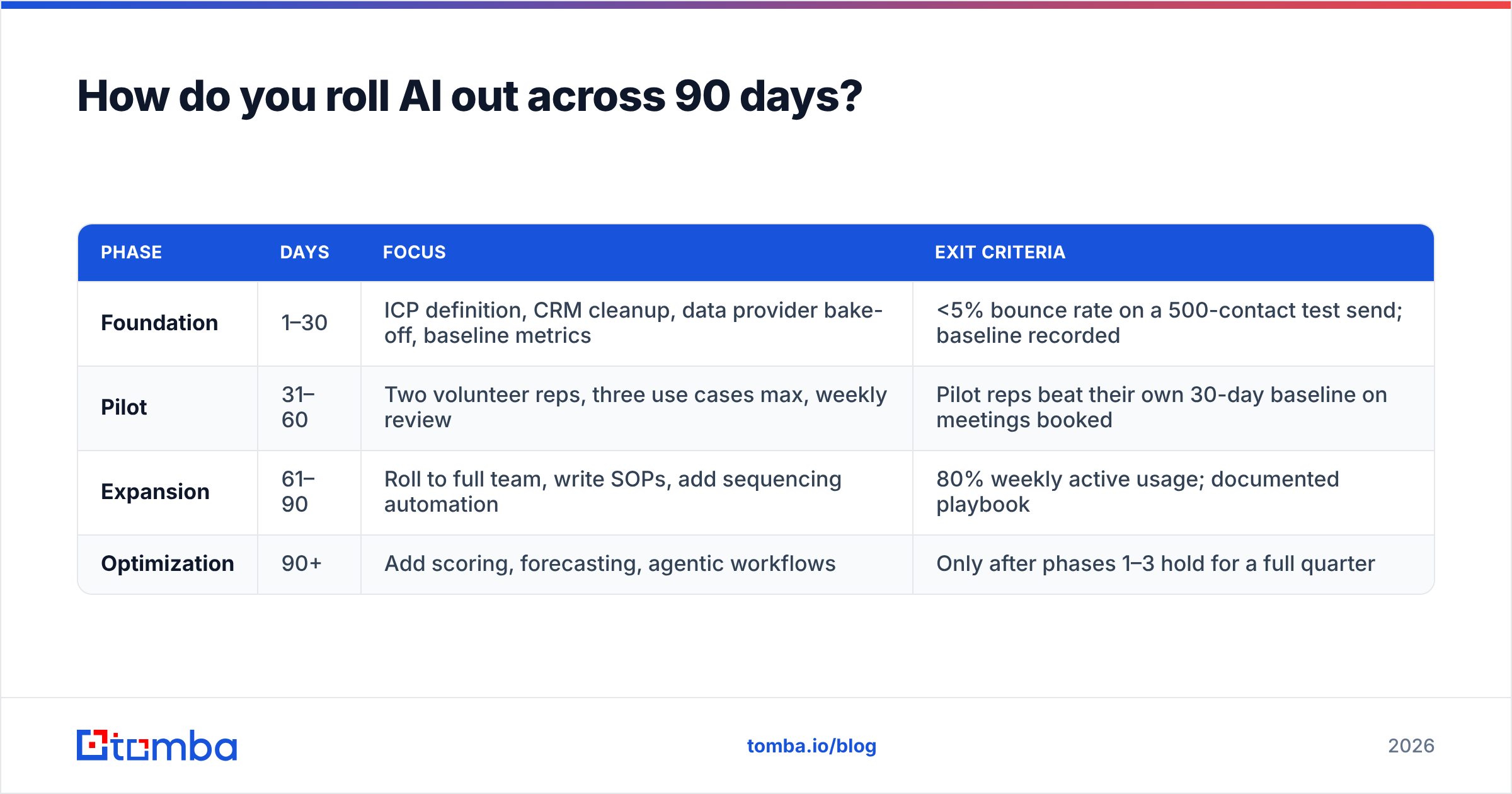
How do you roll AI out across 90 days?#
| Phase | Days | Focus | Exit criteria |
|---|---|---|---|
| Foundation | 1–30 | ICP definition, CRM cleanup, data provider bake-off, baseline metrics | <5% bounce rate on a 500-contact test send; baseline recorded |
| Pilot | 31–60 | Two volunteer reps, three use cases max, weekly review | Pilot reps beat their own 30-day baseline on meetings booked |
| Expansion | 61–90 | Roll to full team, write SOPs, add sequencing automation | 80% weekly active usage; documented playbook |
| Optimization | 90+ | Add scoring, forecasting, agentic workflows | Only after phases 1–3 hold for a full quarter |
Days 1–30, foundation. Nothing AI-facing happens this month and that is the point. Deduplicate the CRM, verify every contact, kill records with no activity in 18 months, and write the ICP query. Run bulk verification on the whole database in one pass rather than trickling records through manually. Record the baseline.
Days 31–60, pilot. Pick two reps who volunteered — never the two who complained loudest, and never the top performer whose numbers you cannot afford to disturb. Give them exactly three use cases: enriched research briefs before outreach, AI-drafted first-touch emails that they edit, and automatic call summaries. Meet weekly. The single most valuable output of this phase is a list of prompts and workflows that actually worked, in the reps' own words.
Days 61–90, expansion. Now you write the SOP. Not a policy document — a two-page runbook with the exact prompts, the exact tool sequence, and three annotated examples of good output versus bad output. Teams that skip this step get 30% adoption, because everyone else has to reinvent the workflow from scratch.
Day 90 onward. Only now do you look at lead scoring, forecasting, or agentic sequences. Sales automation layered onto a process nobody has validated just automates the errors.

What kills AI sales implementations?#
Five failure modes account for nearly all of them.
Buying the platform before defining the process. The tool becomes a project instead of a lever. Six months in, someone asks what it cost and nobody has an answer.
Sending unedited AI output. Reply rates drop within weeks. Prospects now recognize the register — the em-dash cadence, the "I noticed you recently…" opener, the three-item list. Generic AI copy is worse than a plain short human email because it signals mass automation. Use AI for research and structure; keep the voice human.
Ignoring deliverability. Volume goes up 5x, sender reputation collapses, and inbox placement quietly falls off a cliff while your dashboard still shows "sent." Watch sender reputation and bounce rate as first-class metrics, not afterthoughts. Anything above a 3% bounce rate is a data problem you have not fixed.
No owner. "The AI initiative" belongs to RevOps or to a named sales manager with time allocated. Distributed ownership means no ownership.
Measuring the wrong thing. "We saved 10 hours a week" is unauditable. If those hours did not turn into more meetings, more pipeline, or better win rates, they did not exist. HubSpot and most CRM vendors publish adoption benchmarks worth reading here, but the honest version is simpler: track output, not effort.
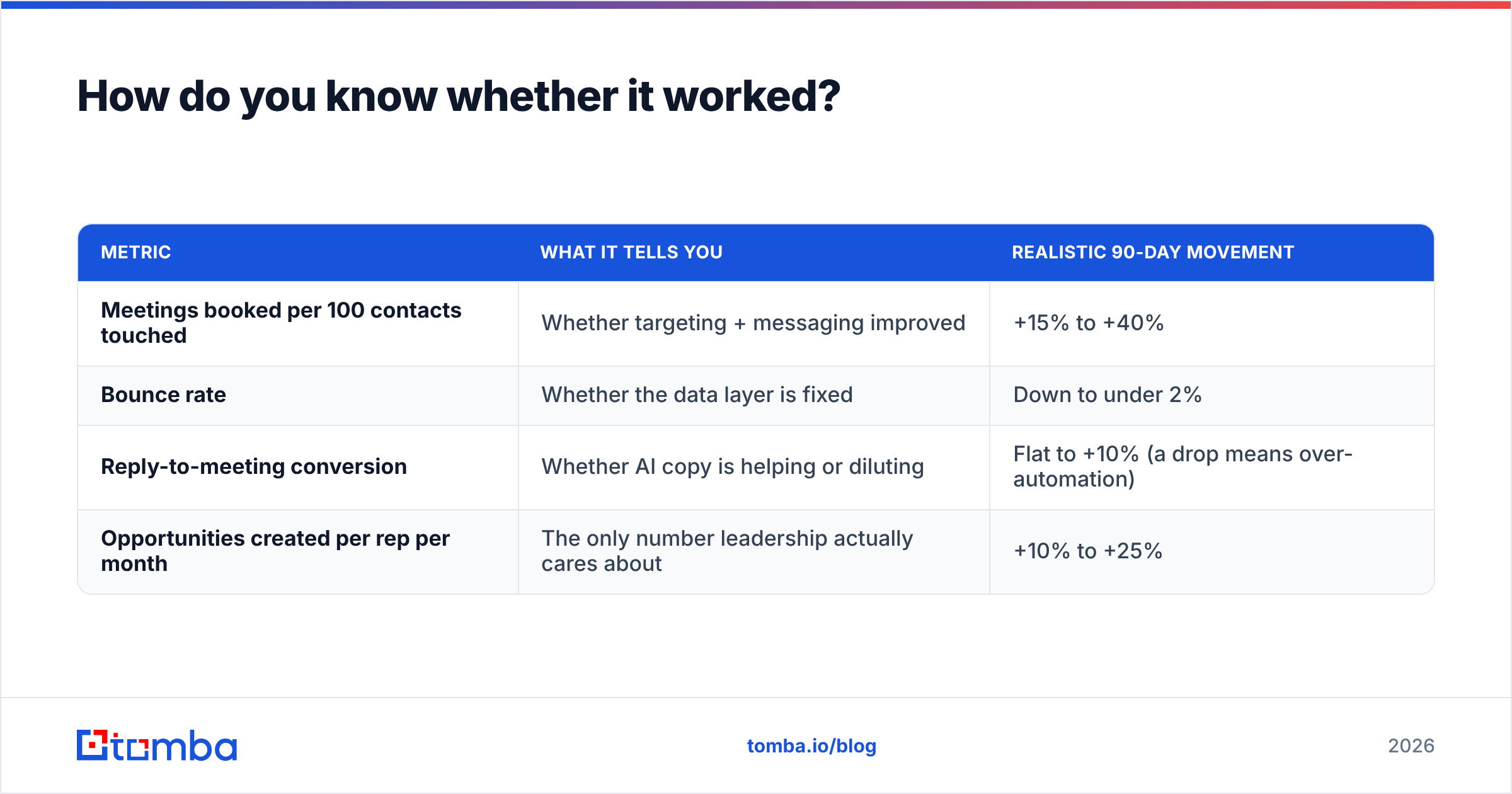
How do you know whether it worked?#
Compare four metrics against your 30-day pre-rollout baseline, measured on the same rep cohort:
| Metric | What it tells you | Realistic 90-day movement |
|---|---|---|
| Meetings booked per 100 contacts touched | Whether targeting + messaging improved | +15% to +40% |
| Bounce rate | Whether the data layer is fixed | Down to under 2% |
| Reply-to-meeting conversion | Whether AI copy is helping or diluting | Flat to +10% (a drop means over-automation) |
| Opportunities created per rep per month | The only number leadership actually cares about | +10% to +25% |
If meetings per 100 contacts went up but reply-to-meeting conversion went down, you increased volume and decreased quality — a net wash dressed up as progress. If bounce rate did not fall, phase one was never finished, and no amount of model quality will rescue it. Track response rate at the sequence level, not the account level, so you can see which step is failing.
Be honest about attribution. A 90-day window overlaps with seasonality, headcount changes, and pricing shifts. Keep a small control group — two reps on the old process — if you can afford it. Most teams cannot, in which case just note the confounders in writing rather than claiming a clean causal win.
What should you do first this week?#
Three concrete steps, in order:
- Export your CRM contacts and run them through verification. The bounce number you get back is your real starting point, and it is usually worse than expected.
- Write your ICP as a filterable query with five or fewer conditions. If you cannot, that is the actual bottleneck, not AI.
- Pick one use case — enriched research briefs — and run it manually for a week before automating it. If it does not help manually, automating it will not save it.
Everything above assumes the contact layer holds up. It usually does not, and that is the single most fixable thing on this list. Start with the Tomba Email Finder to close the gaps in your ICP list and verify what you already have — the free tier covers 25 searches a month, Starter runs $49/mo, and Growth is $99/mo, which is enough to validate coverage against your own accounts before you commit budget to anything else in the stack. Full Tomba pricing is public, and the API means you can wire verification directly into whatever AI workflow you build on top. Get the data right, and every model you layer on afterward works better by default.
Related guides#
Ready to find emails that actually work?
Join 150,000+ professionals who stopped guessing and started sending. Free credits on signup — no credit card required.
Get the Tomba newsletter
Practical outbound tactics and product updates — once every two weeks.
About the author