How to Improve Email Conversion Rate: A 2026 Playbook
Open rates lie. Conversion rate is the only email metric tied to revenue. Here are seven levers that actually move it — with benchmarks, a diagnostic table, and the order to fix them in.
TL;DR
- Conversion rate is replies-to-meetings, not opens. If you optimize opens, you optimize the least valuable step in the chain.
- The biggest single lever is list quality. A 12% bounce rate caps your ceiling before a single word of copy matters.
- Segment tighter than you think you need to. Sending 200 emails to one persona beats 2,000 emails to five.
- One ask per email. Multi-CTA emails convert roughly half as well as single-CTA emails in most B2B tests.
- Fix in this order: deliverability → list accuracy → segmentation → offer → copy → timing → follow-up. Skipping ahead wastes the work below it.
What actually counts as email conversion rate?#
Conversion rate is the percentage of delivered emails that produce the action you actually want — a booked meeting, a demo request, a signed trial, a paid order. Not an open. Not a click.
This distinction matters more than any tactic in this post. Most teams report on opens because opens look flattering, and since Apple Mail Privacy Protection started pre-fetching images in 2021, open rates have been structurally inflated anyway. Google's own Postmaster Tools documentation tracks reputation and spam rate, not opens, because opens tell inbox providers nothing.
Here is the chain you're actually optimizing:
- Sent — emails you pushed out.
- Delivered — sent minus hard bounces and blocks.
- Inboxed — delivered minus spam-foldered. Invisible in most tools; you have to seed-test for it.
- Replied — humans who typed something back.
- Converted — replies that became a meeting, trial, or deal.
Every stage multiplies. A 5% reply rate on a list where only 60% of mail reaches the inbox is really a 3% reply rate on sends. Improving the middle of the chain often beats rewriting the top.
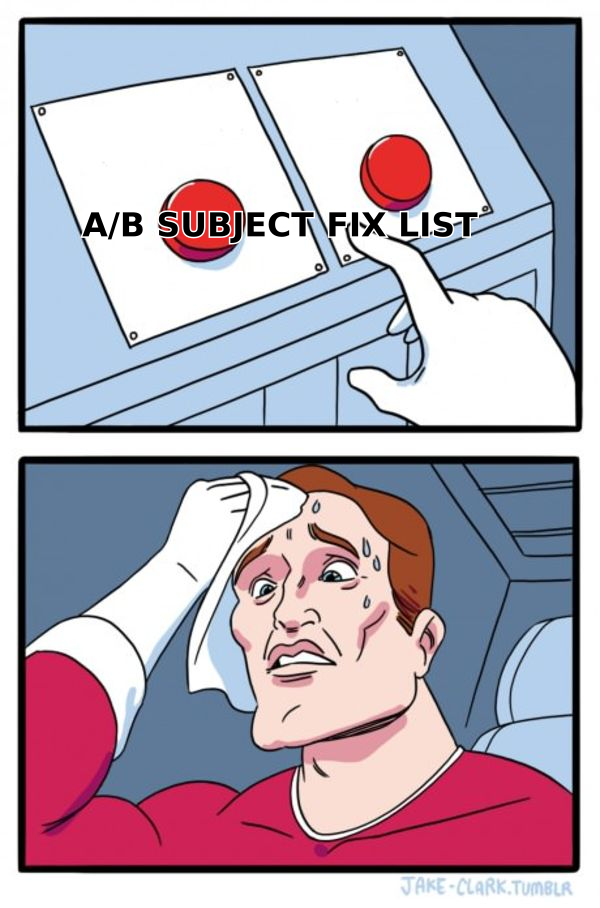
Typical B2B cold outbound benchmarks in 2026, from aggregated vendor reporting and G2's outbound category data:
| Metric | Poor | Average | Good | Elite |
|---|---|---|---|---|
| Bounce rate | >8% | 3-8% | 1-3% | <1% |
| Reply rate | <2% | 2-5% | 5-10% | 10%+ |
| Positive reply rate | <0.5% | 0.5-1.5% | 1.5-4% | 4%+ |
| Meeting booked / 100 sent | <0.3 | 0.3-1 | 1-3 | 3+ |
| Spam complaint rate | >0.3% | 0.1-0.3% | <0.1% | <0.05% |
If you don't know where you sit on this table, that's the first job. You cannot improve a number you aren't measuring at the send level.
Why does list quality beat copy every time?#
Because a bad address converts at exactly zero, and a bad address also damages every good address behind it.
Here's the mechanic most teams miss. Mailbox providers score your sending domain on a rolling basis. High bounce rates and spam complaints push that score down, and a degraded sender reputation means your valid prospects start landing in Promotions or Spam. So a dirty list doesn't just waste the invalid 15% — it quietly suppresses the clean 85%.
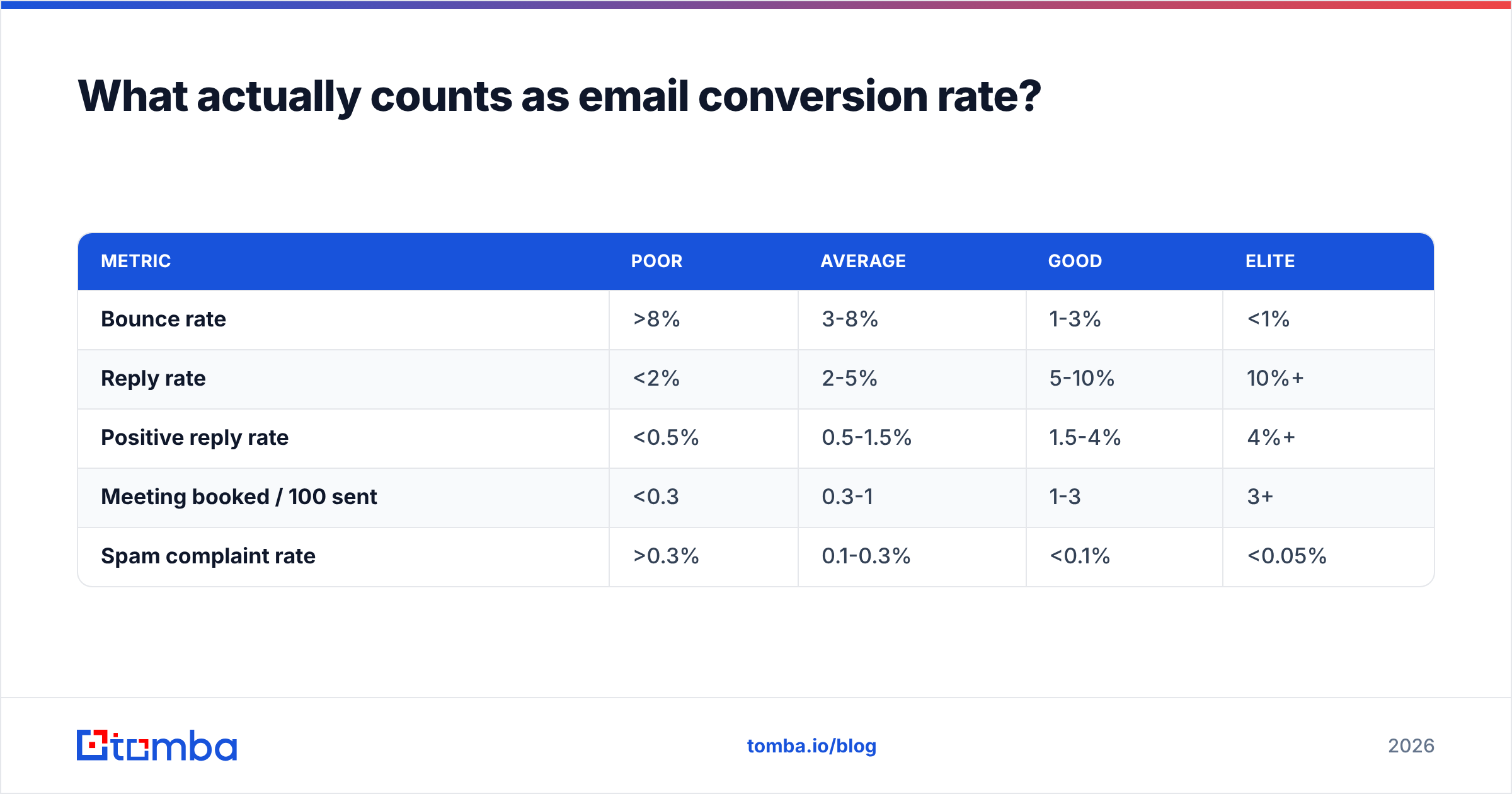
Run the math on a 5,000-contact campaign:
| Scenario | Valid addresses | Inbox placement | Replies at 6% | Meetings at 25% |
|---|---|---|---|---|
| Unverified scraped list | 4,100 (18% bad) | ~62% | 153 | 38 |
| Verified list, warm domain | 4,950 (1% bad) | ~91% | 270 | 68 |
| Verified + enriched + segmented | 4,950 | ~91% | 380 | 95 |
Same copy in all three rows. The difference is entirely infrastructure and data.
Practical fixes, in order of impact per hour spent:
- Verify before every send, not once per quarter. B2B data decays roughly 22-30% annually — people change jobs constantly. Run the list through an email verifier the week you send, not the month you bought it.
- Handle catch-all domains deliberately. Catch-all servers accept everything, so a standard verifier returns "unknown." Either use a catch-all verifier that probes deeper, or split catch-alls into a separate low-volume segment so they can't tank your main domain's stats.
- Source addresses from a pattern-confirmed finder rather than a permutator. Guessing
first.last@and blasting all six permutations is the single fastest way to earn a spam-trap hit. A proper email finder confirms the pattern against known-good records first. - Deduplicate across sequences. Two reps emailing the same prospect from the same domain in the same week reads as a bot to both the human and the filter.
- Suppress aggressively. Anyone who replied "no," bounced twice, or unsubscribed goes on a permanent list-wide suppression file — not just the one campaign's.
If you're buying data rather than finding it, evaluate providers on verified-rate rather than headline record count. BookYourData publishes a verification guarantee on its records, which is the right thing to be comparing across vendors — a 200M-record database with 70% accuracy is a smaller usable list than a 40M-record one at 97%.
How do you segment for conversion rather than for volume?#
Segment until the email could only have been written for that one group. That's the test.
Most teams segment by industry and company size, then write copy generic enough to cover all of it. That produces mail that's technically targeted and functionally generic. Tighter axes that actually change the message:
- Trigger-based — hired a new VP of Sales in the last 60 days, opened an office, shipped a funding round, started running ads.
- Tech stack — currently running the tool you replace, or running a tool that pairs badly with your category. A website tech stack checker makes this a one-minute lookup per domain.
- Role-specific pain — the CFO and the RevOps lead at the same company have opposite objections. Don't send them the same paragraph.
- Engagement history — someone who opened three emails and clicked once gets a different sequence than a cold first touch.
- Account tier — your top 50 dream accounts get hand-written mail. Everything else gets a template with a personalized first line.
The volume trade is real and worth making. Fifty tightly segmented emails with a 12% reply rate produce six conversations. Two thousand generic emails at 1.5% produce thirty replies, most of them "not interested," plus a measurable reputation hit. The second number looks better on a dashboard and is worse for the business.
Enrich before you segment. You can't sort on data you don't have — job title, seniority, headcount, funding stage, tech stack. Pushing contacts through data enrichment before they hit the sequence builder is what makes real segmentation possible instead of aspirational.
Which copy changes actually lift conversion?#
Four, in rough order of measured effect. Everything else is noise at typical B2B volumes.
One ask, and make it small. Multi-CTA emails ("book a demo, or grab the whitepaper, or connect on LinkedIn") consistently underperform single-CTA emails. Worse, "book a 30-minute demo" asks a stranger for the most valuable thing they own. "Worth a look?" or "Should I send the two-line version?" asks for nothing and gets replies you can convert manually.
Lead with the observation, not the introduction. Nobody converts on "I'm reaching out because." They convert on "Saw you're hiring three SDRs in Q1 — most teams that scale that fast hit a data problem by month two." The first line has to prove you looked.
Cut the email in half, then cut the first paragraph. Sub-100-word emails outperform 200-word emails on reply rate in nearly every published test. Your value prop paragraph is almost always deletable — the prospect will ask if they're interested.
Write the subject line like an internal email. Lowercase, three to five words, no promise. "quick question re: Q1 hiring" beats "Transform Your Sales Pipeline in 2026." If you want to sanity-check before sending, a subject line tester will flag the spam-trigger words you stopped noticing.
What doesn't move the needle as much as people hope: emoji in subject lines, personalized images, video thumbnails, and "P.S." lines. They're not harmful — they're just not the constraint.
Does deliverability or offer matter more?#
Deliverability is a gate; offer is a multiplier. Fix the gate first, because a multiplier applied to zero is still zero.
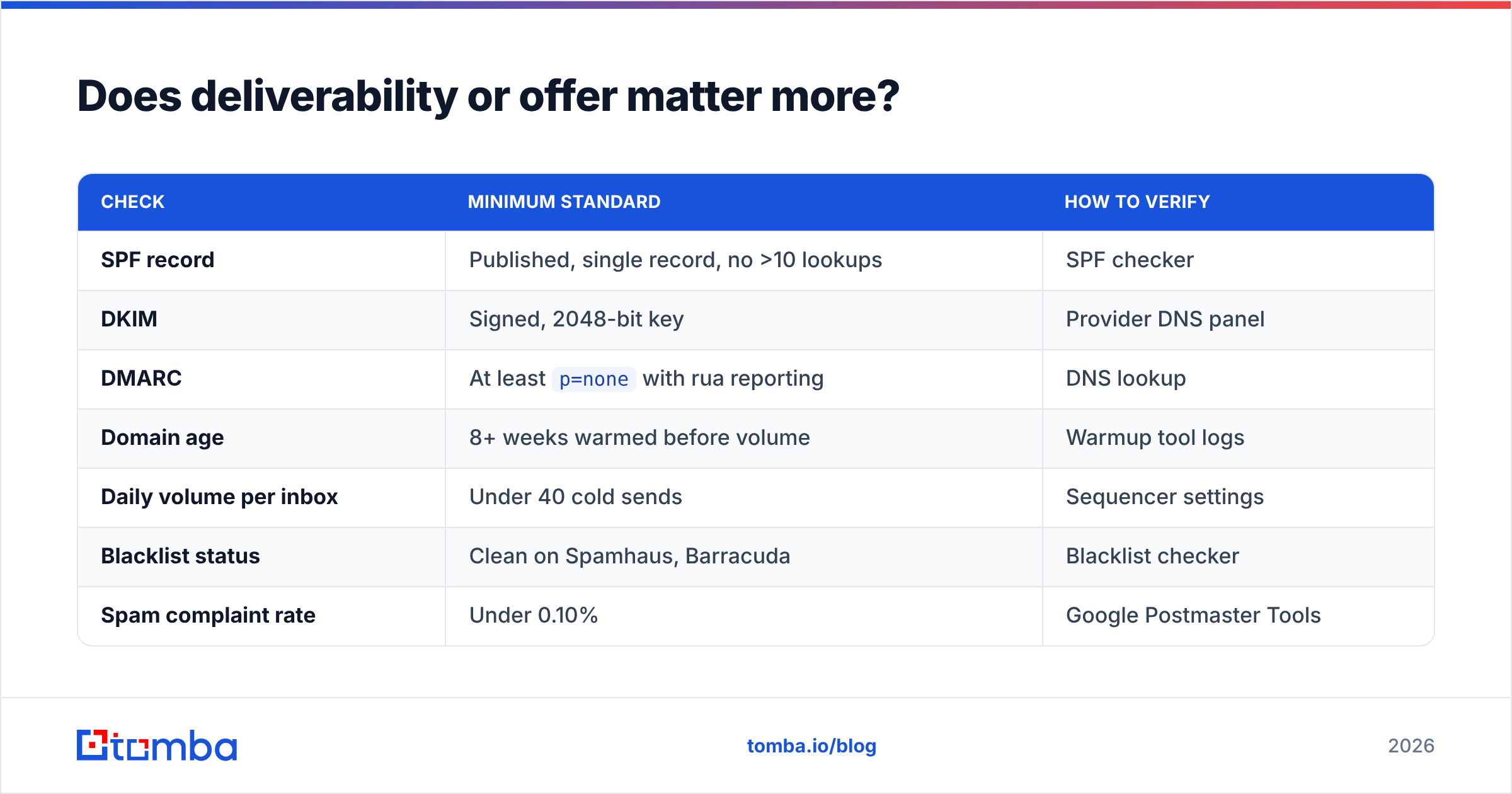
The deliverability floor you need before any copy work is worth doing:
| Check | Minimum standard | How to verify |
|---|---|---|
| SPF record | Published, single record, no >10 lookups | SPF checker |
| DKIM | Signed, 2048-bit key | Provider DNS panel |
| DMARC | At least p=none with rua reporting |
DNS lookup |
| Domain age | 8+ weeks warmed before volume | Warmup tool logs |
| Daily volume per inbox | Under 40 cold sends | Sequencer settings |
| Blacklist status | Clean on Spamhaus, Barracuda | Blacklist checker |
| Spam complaint rate | Under 0.10% | Google Postmaster Tools |
Google and Yahoo's 2024 bulk-sender requirements made DMARC and one-click unsubscribe non-negotiable, and enforcement has only tightened since. If you're sending cold mail from a domain without authentication in 2026, your conversion problem is a DNS problem.
Once the gate is open, the offer is where the leverage sits. The offer is not your product — it's the specific reason to reply to this email. Ranked by how well they convert in cold B2B:
- A relevant insight about their business they didn't have. Highest converting, highest effort.
- A free audit or teardown with a real deliverable attached.
- A short intro to someone useful — referral currency, converts extremely well, doesn't scale.
- A benchmark or dataset for their segment.
- A case study from a direct competitor.
- A demo. Lowest converting cold ask, and the one most teams default to.
If your emails all end in #6, moving up two rungs will usually do more than a month of copy testing.
What's the right follow-up cadence in 2026?#
Three to five touches over 12-18 days, each one adding something new, then stop.
The data on follow-ups is unusually consistent: roughly 40-50% of positive replies to cold sequences arrive after the first email. Teams that send one touch and quit are throwing away half their pipeline. Teams that send nine touches burn their domain and their brand.
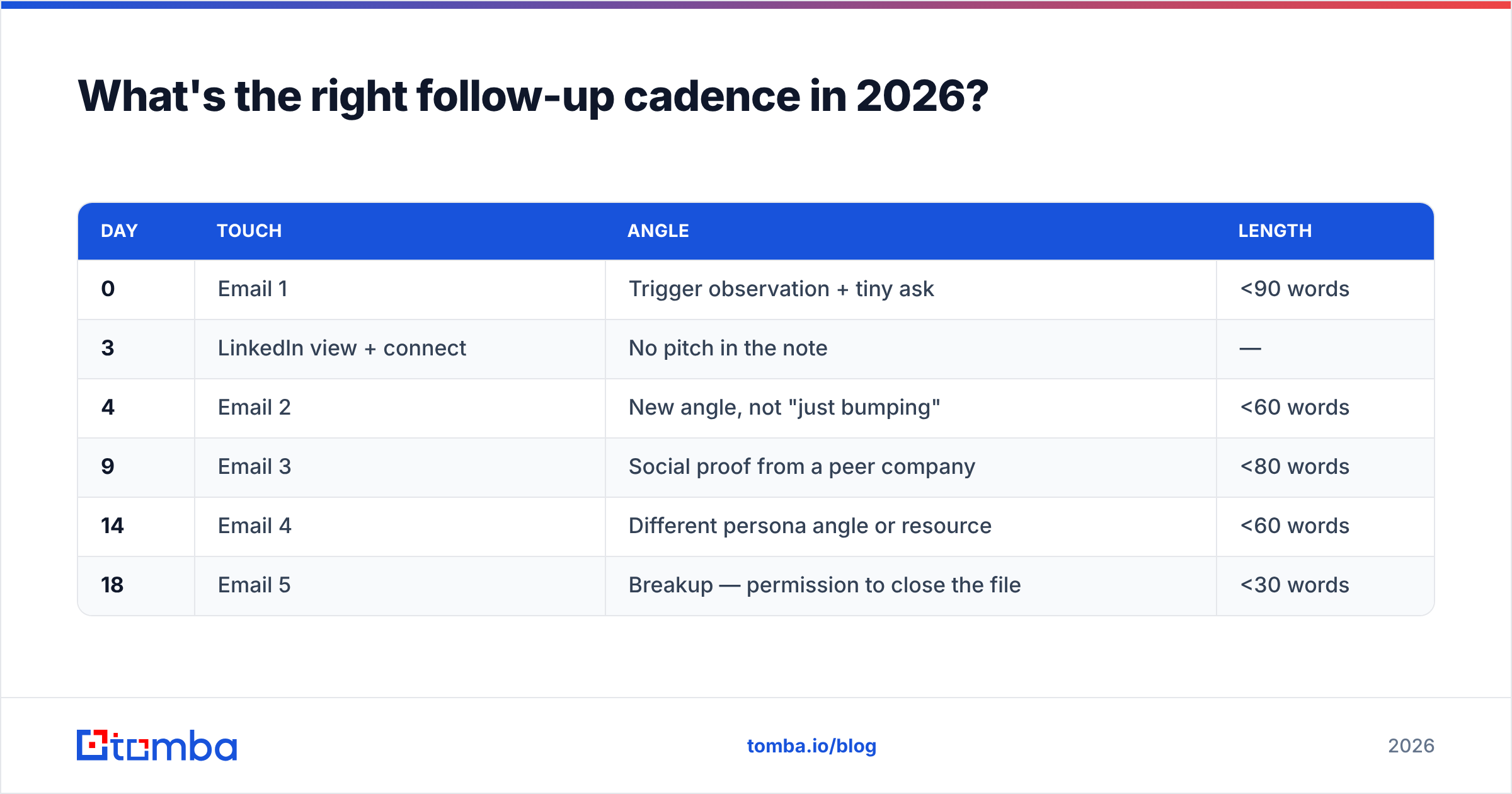
A cadence that holds up:
| Day | Touch | Angle | Length |
|---|---|---|---|
| 0 | Email 1 | Trigger observation + tiny ask | <90 words |
| 3 | LinkedIn view + connect | No pitch in the note | — |
| 4 | Email 2 | New angle, not "just bumping" | <60 words |
| 9 | Email 3 | Social proof from a peer company | <80 words |
| 14 | Email 4 | Different persona angle or resource | <60 words |
| 18 | Email 5 | Breakup — permission to close the file | <30 words |
Two rules that matter more than the schedule itself. First, never send "just following up." It signals you have nothing new, and it trains the prospect to ignore your thread. Every touch needs its own reason to exist. Second, break the thread on touch 3 or 4. Long reply chains with no responses look like automation to filters. A fresh subject line resets that read.
The breakup email is underrated. "Assuming this isn't a priority right now — I'll close the file. If that's wrong, just reply 'later' and I'll ping you in Q3." It converts because it removes the pressure and gives an easy low-commitment out that's still a yes.
For account-based motions, layer channels. A LinkedIn outreach touch between emails 1 and 2 lifts reply rate meaningfully at the same email volume — you're adding surface area, not sends. HubSpot's sales research has documented the multichannel lift repeatedly across its cohorts.
How do you measure and iterate without fooling yourself?#
Track conversions per 100 sent, segment by segment, over a minimum of 300 sends per variant. Everything else is superstition.
The three mistakes that produce false learnings:
- Testing on samples too small to mean anything. A 2% versus 3% reply rate on 100 sends each is two replies of difference. That's noise. You need several hundred per arm before the delta is real.
- Changing more than one variable. New list plus new subject line plus new CTA means you learned nothing when the number moves.
- Reporting on opens. Pixel-based opens are inflated by privacy proxies and prefetching. If your dashboard's headline number is open rate, your dashboard is lying to you politely.
Build a simple weekly review: sends, bounce %, reply %, positive reply %, meetings, and meetings per 100 sends — sliced by segment and by sending inbox. The per-inbox slice catches a single burned mailbox before it drags the whole team's numbers down, which is a failure mode that hides beautifully in aggregate reporting.
Then iterate in the fixed order: deliverability, list accuracy, segmentation, offer, copy, timing, follow-up. Each layer sets the ceiling for the one above it. Rewriting copy on a list with an 11% bounce rate is rearranging furniture in a burning building.
Start with the layer that's capping everything else#
If you take one thing from this: your conversion rate is capped by the worst layer in the stack, and for most teams that layer is data, not copy. Verified, enriched, correctly-segmented contacts turn mediocre copy into a working channel. Great copy on a decayed list does nothing at all.
Start there. Run your next campaign list through the Tomba Email Finder to source pattern-confirmed addresses instead of permutations, verify them the week you send, and enrich them with the job-title and tech-stack fields your segmentation actually needs. The free tier gives you 25 searches a month to test the difference on a single segment; paid plans start at $49/mo on Starter — full Tomba pricing is public if you want to size it against your send volume.
Fix the floor. The ceiling takes care of itself.
Related guides#
// get started
Find, verify and enrich your first contacts today
Start on the free plan with 25 searches a month, then scale when your team is ready.
Free plan · No credit card required · GDPR & CCPA
// about the author