How To Measure Email Deliverability: The 2026 Metrics Guide
Open rates lie. Here is the exact stack of metrics, seed tests, and Postmaster signals that tell you whether your cold email is actually landing in the inbox.

TL;DR
- Delivery rate is not deliverability. A 98% delivery rate can hide a 40% spam-folder placement rate — the mailbox accepted the message, then filed it away from the inbox.
- The only metrics that prove inbox placement are seed-list tests, Google Postmaster Tools data, Microsoft SNDS, and reply rate. Everything else is a proxy.
- Apple Mail Privacy Protection inflates opens by 30-60% depending on your audience mix, so open rate alone is now a broken deliverability signal.
- Bounce rate above 3% and spam complaint rate above 0.3% are the two hard thresholds that trigger throttling at Google and Microsoft.
- Fix the input before you tune the output: a verified list removes most bounce-driven reputation damage before it starts.
Why does delivery rate mislead you about deliverability?#
Start here, because almost every deliverability argument dies on this distinction.
Delivery rate answers one question: did the receiving mail server accept the message instead of bouncing it? That is a transport-layer answer. Your sending tool reports it, it usually reads 97-99%, and it tells you nothing about where the message ended up.
Deliverability — properly, inbox placement rate — answers the question that actually matters: of the messages that were accepted, what share landed in the primary inbox instead of spam, Promotions, or a quarantine folder?
Think of it like a package delivery. Delivery rate says the courier handed the box to the building. Inbox placement says whether the box got to the recipient's desk or sat in a mailroom bin nobody checks. Your carrier only reports the first one.
This gap is why teams stare at a 98.4% delivery rate while replies fall off a cliff. The mailbox provider is accepting everything and silently filtering it. Google, in particular, rarely rejects at SMTP time for reputation reasons — it accepts and files. That behaviour is documented in Google's sender guidelines, which spell out the complaint-rate and authentication thresholds that drive filtering decisions.
So when someone asks how to measure email deliverability, the honest answer is: you need at least three independent measurements, because no single number is trustworthy on its own.

What are the core email deliverability metrics you should track?#
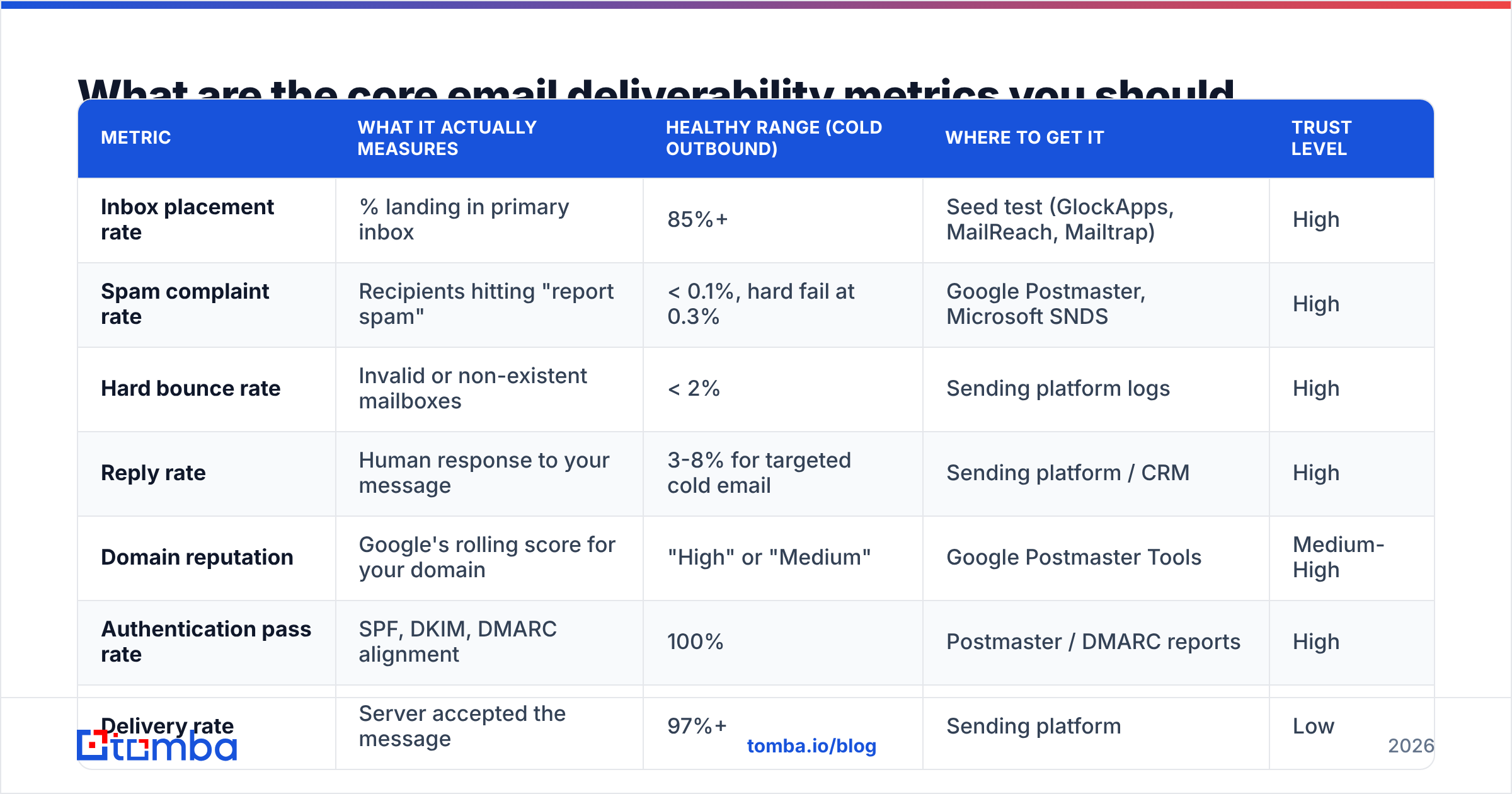
Here is the full measurement stack, ranked by how much truth each metric carries.
| Metric | What it actually measures | Healthy range (cold outbound) | Where to get it | Trust level |
|---|---|---|---|---|
| Inbox placement rate | % landing in primary inbox | 85%+ | Seed test (GlockApps, MailReach, Mailtrap) | High |
| Spam complaint rate | Recipients hitting "report spam" | < 0.1%, hard fail at 0.3% | Google Postmaster, Microsoft SNDS | High |
| Hard bounce rate | Invalid or non-existent mailboxes | < 2% | Sending platform logs | High |
| Reply rate | Human response to your message | 3-8% for targeted cold email | Sending platform / CRM | High |
| Domain reputation | Google's rolling score for your domain | "High" or "Medium" | Google Postmaster Tools | Medium-High |
| Authentication pass rate | SPF, DKIM, DMARC alignment | 100% | Postmaster / DMARC reports | High |
| Delivery rate | Server accepted the message | 97%+ | Sending platform | Low |
| Open rate | Pixel fired (or Apple prefetched it) | Directionally useful only | Sending platform | Low |
The pattern is obvious once you lay it out: the metrics your sending tool shows you most prominently — delivery rate, open rate — are the two least reliable. The metrics that carry real signal live outside your sending tool, in Postmaster Tools, SNDS, and seed tests.
How do you run a seed-list test correctly?#
A seed list is a set of test mailboxes across Gmail, Outlook, Yahoo, and corporate providers that you send to, then check to see which folder each message landed in. It is the closest thing to a direct measurement of inbox placement.
Most people run these wrong. Follow this sequence:
- Use a seed list you did not build yourself. Personal test accounts you've been opening your own emails in for six months have artificially warm engagement history. Providers like GlockApps and MailReach maintain seeds with neutral history.
- Send the real campaign, not a test blast. Same subject line, same body, same links, same sending identity, same time of day. A sanitised test message measures nothing.
- Mix the seeds into a live send. Seeds sent in isolation get different treatment than seeds sitting inside a batch of 300 real recipients.
- Test per-domain, not in aggregate. An 87% aggregate placement rate can be 96% Gmail and 61% Outlook. Those are two completely different fixes.
- Repeat weekly, same day, same hour. Deliverability is a trend, not a snapshot. One test tells you almost nothing; eight consecutive tests tell you whether your reputation is drifting.
Expect a cost. Seed testing burns 20-100 sends per test and most tools charge per test run. Budget for it — it is cheaper than discovering placement collapse three weeks into a campaign.
[Screenshot placeholder: GlockApps inbox placement report showing per-provider folder breakdown across Gmail, Outlook, and Yahoo]
What does Google Postmaster Tools actually tell you?#
Postmaster Tools is free, it is the only first-party window into how Gmail sees you, and roughly half of B2B mailboxes route through Google Workspace. If you are not using it, you are guessing.
You get seven dashboards. Four matter:
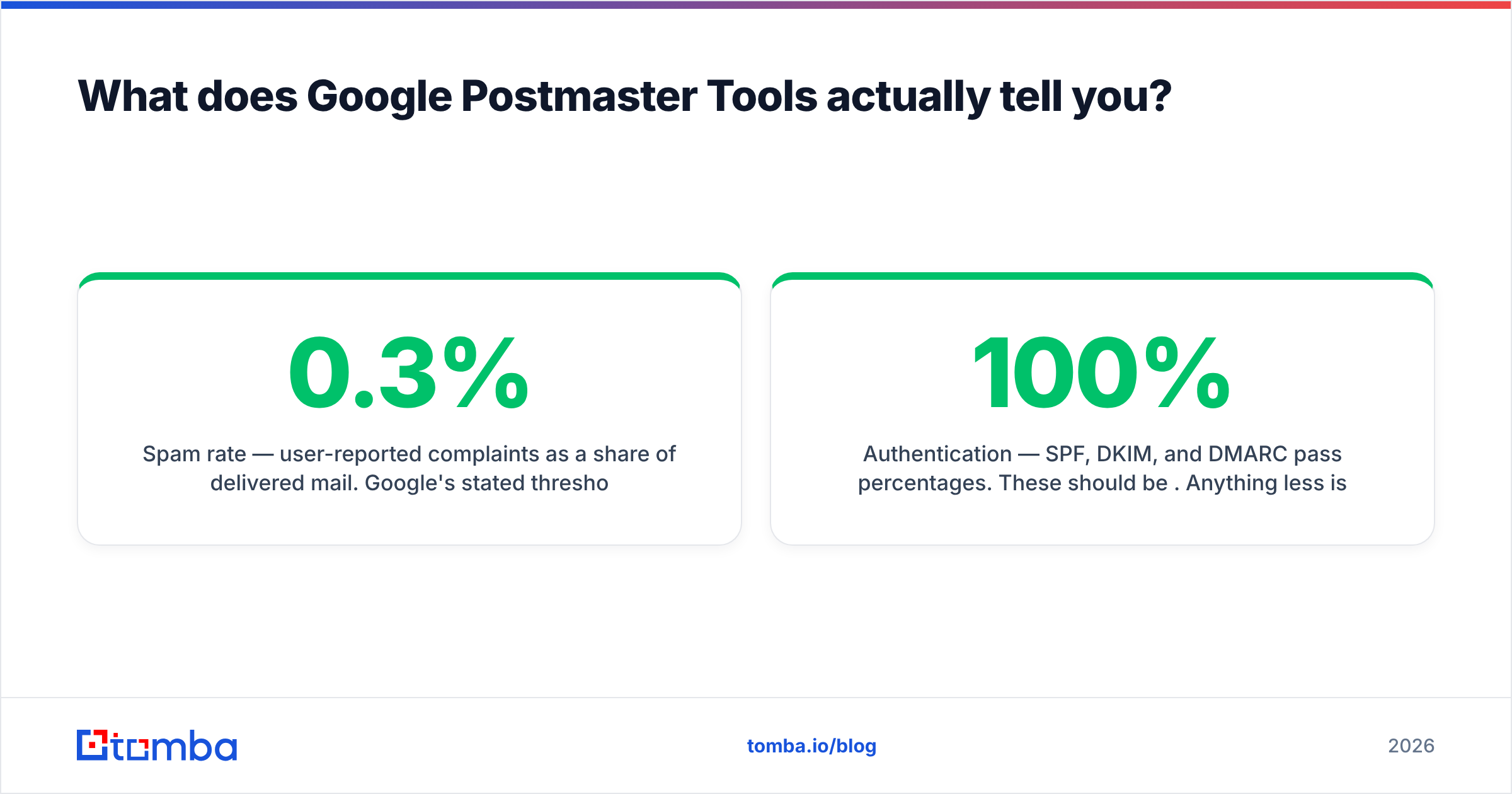
- Domain reputation — Bad / Low / Medium / High. Anything below Medium means active filtering. This is the single most important number in the tool.
- IP reputation — mostly relevant if you send on dedicated IPs. On shared infrastructure (most cold email tools), you cannot control it, so watch domain reputation instead.
- Spam rate — user-reported complaints as a share of delivered mail. Google's stated threshold is 0.3%; in practice you want to sit under 0.1%. Crossing 0.3% for even a couple of days produces filtering that takes weeks to unwind.
- Authentication — SPF, DKIM, and DMARC pass percentages. These should be 100%. Anything less is a configuration bug, not a reputation problem, and it is the fastest thing on this list to fix. Run your domain through an SPF checker before you blame content.
One catch: Postmaster only populates data once you send meaningful volume to Gmail — historically around 100 messages per day from the domain. Small senders see empty charts. If that is you, lean harder on seed tests and reply rate.
For Microsoft, the equivalent is SNDS, which reports complaint rates and trap hits for your sending IPs. It is clunkier and IP-based rather than domain-based, but it is the only Outlook-side signal you get.
[Screenshot placeholder: Google Postmaster Tools domain reputation graph showing a drop from High to Medium over a two-week window]
Is open rate still useful in 2026?#
Partially — but never as a deliverability metric on its own.
Apple Mail Privacy Protection, which shipped in 2021 and is now on by default across a large share of Apple Mail users, prefetches tracking pixels regardless of whether the human opened anything. Depending on your audience, 30-60% of your reported opens may be machine-generated. Gmail's image proxy adds its own noise. Corporate security scanners that click every link in a message add more.
That does not make open rate worthless. It makes it useful only in three specific ways:
- As a relative trend on a stable audience. If your Gmail-segment open rate drops from 42% to 19% in a week while your Apple-heavy segment holds steady, something changed with Gmail specifically. The absolute number is junk; the delta is a signal.
- As a segmented comparison. Compare open rates by mailbox provider, not in aggregate. Divergence between providers is diagnostic.
- As a spike detector. A sudden open-rate jump with no reply-rate movement usually means a security scanner started chewing through your links, not that your copy improved.
Reply rate is the metric that replaced it. A reply requires a human to have seen the message, read it, and acted. No pixel, no prefetch, no proxy can fake that. If you can only track one number, track replies per 100 sent. Track it alongside your response rate benchmarks by segment so you know what "normal" looks like before you panic.
How do bounce rate and list quality connect to placement?#
Directly and brutally. Bounce rate is the input metric that drives most of the output metrics on this page.
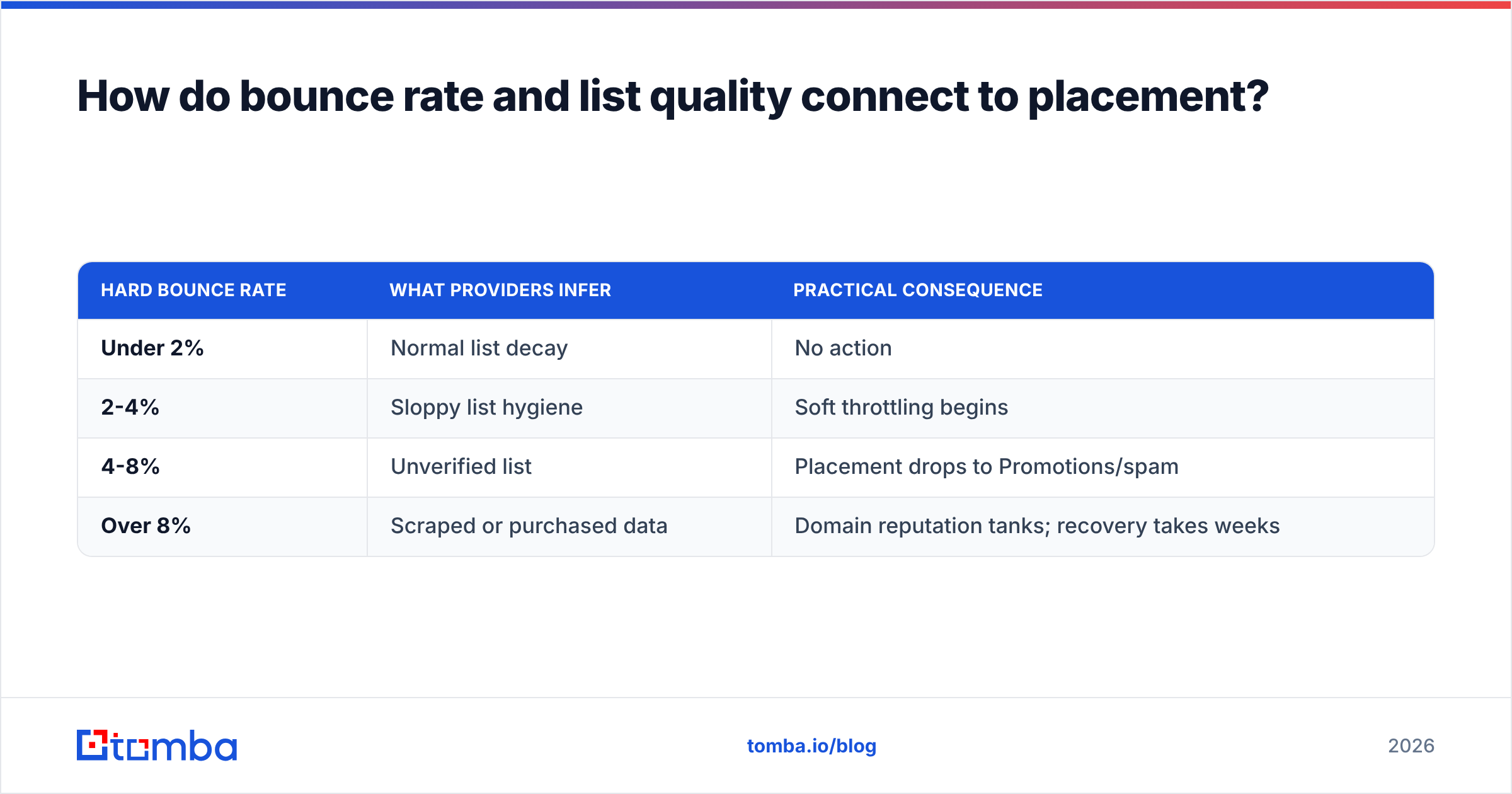
Every hard bounce is a signal to the mailbox provider that you are sending to addresses you did not verify — which is exactly the pattern of a scraped or purchased list. Providers weight this heavily. The rough thresholds:
| Hard bounce rate | What providers infer | Practical consequence |
|---|---|---|
| Under 2% | Normal list decay | No action |
| 2-4% | Sloppy list hygiene | Soft throttling begins |
| 4-8% | Unverified list | Placement drops to Promotions/spam |
| Over 8% | Scraped or purchased data | Domain reputation tanks; recovery takes weeks |
B2B data decays at roughly 22-30% per year — people change jobs, companies restructure, mailboxes get deprovisioned. A list you built in January is measurably worse by June. That decay is the reason bounce rate creeps up on campaigns that used to perform.
Two things fix this before it becomes a reputation problem:
Verify before every send, not once at import. A verification pass at list-build time is stale by the time you actually send. Run the list through an email verifier immediately before the campaign goes out, and remove anything flagged invalid or risky.
Handle catch-all domains deliberately. Catch-all servers accept every address, so standard verification returns "unknown" rather than valid or invalid. Sending blindly to catch-alls inflates your apparent delivery rate while producing zero engagement — the worst combination for reputation. A catch-all verifier gives you a confidence score instead of a coin flip, so you can decide whether to include them or park them in a separate low-risk sequence.

What does a complete measurement routine look like?#
Measurement without a cadence is just occasional anxiety. Here is a routine that catches problems while they are still cheap to fix.
Daily (5 minutes)
- Check bounce rate on yesterday's sends. Anything above 3% stops the campaign until you know why.
- Scan for SMTP error codes in your sending logs. Repeated 5.7.1 or 550 responses from a specific provider mean you are being blocked, not filtered.
Weekly (30 minutes)
- Run one seed test with the live campaign content, segmented by provider.
- Pull Google Postmaster domain reputation and spam rate for the week.
- Compare reply rate to the previous four weeks by segment.
- Check whether your domain appears on any major blocklist with a blacklist checker.
Monthly (2 hours)
- Full authentication audit: SPF, DKIM, DMARC. Confirm alignment, not just presence.
- Re-verify your entire active list and purge anything that has gone invalid.
- Review sending volume per mailbox. Most cold-email infrastructure degrades past 40-50 sends per mailbox per day regardless of what the vendor claims.
- Run content through a spam checker to catch newly-flagged phrases, link shorteners, or image-to-text ratios.
Per campaign
- Warm-up status check on every new sending domain and mailbox before it enters rotation.
- Placement test on the exact template before scaling past 50 recipients.
Which tools should you use for each measurement?#
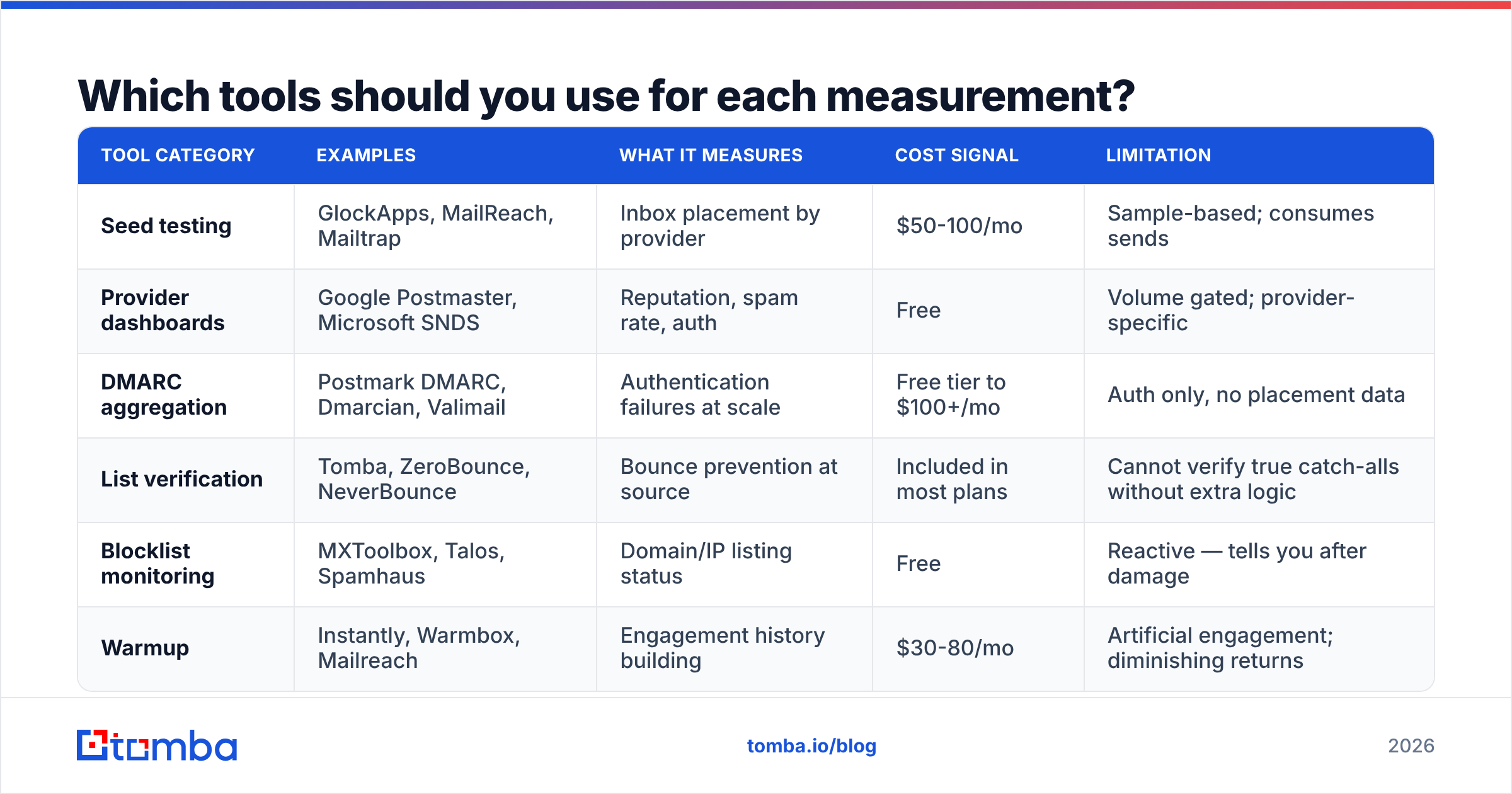
No single tool covers the whole stack. Here is how the categories divide, with the honest limitation of each.
| Tool category | Examples | What it measures | Cost signal | Limitation |
|---|---|---|---|---|
| Seed testing | GlockApps, MailReach, Mailtrap | Inbox placement by provider | $50-100/mo | Sample-based; consumes sends |
| Provider dashboards | Google Postmaster, Microsoft SNDS | Reputation, spam rate, auth | Free | Volume gated; provider-specific |
| DMARC aggregation | Postmark DMARC, Dmarcian, Valimail | Authentication failures at scale | Free tier to $100+/mo | Auth only, no placement data |
| List verification | Tomba, ZeroBounce, NeverBounce | Bounce prevention at source | Included in most plans | Cannot verify true catch-alls without extra logic |
| Blocklist monitoring | MXToolbox, Talos, Spamhaus | Domain/IP listing status | Free | Reactive — tells you after damage |
| Warmup | Instantly, Warmbox, Mailreach | Engagement history building | $30-80/mo | Artificial engagement; diminishing returns |
The realistic minimum stack for a B2B outbound team: Google Postmaster (free) + one seed-test tool + list verification on every send. That combination catches the overwhelming majority of deliverability failures before they compound. You can read independent user reviews of most of these categories on G2 if you want to compare feature depth before buying.
Verification deserves a note on cost structure, because it is where teams over- or under-spend. Tomba's plans start with a free tier at 25 searches per month, then Starter at $49/mo, Growth at $99/mo, and Pro at $249/mo — with verification bundled alongside finding rather than metered separately. If you are already paying per-verification elsewhere on top of a separate finder subscription, run the math on consolidating; for most teams sending 5,000-20,000 messages a month, the bundled approach comes out cheaper than stacking two point tools.
What are the most common measurement mistakes?#
- Averaging across providers. Gmail and Outlook filter on almost entirely different logic. An aggregate placement number hides which one is failing.
- Testing with a clean template, sending a different one. Links, images, and tracking domains change placement. Test what you actually send.
- Treating a single bad seed test as a crisis. Placement fluctuates. Look at four consecutive tests before you rebuild your infrastructure.
- Ignoring the sending domain age. A domain under 30 days old will underperform regardless of how clean your list is. Measure it, but do not over-correct.
- Watching reputation without watching volume. Reputation scores are volume-weighted. A "High" rating on 40 sends a day means far less than "Medium" on 4,000.
- Fixing content before fixing the list. Rewriting subject lines will not save a list with a 9% bounce rate. Sequence your fixes: authentication, then list quality, then volume, then content.
Fix the input, and the metrics follow#
Most deliverability problems that look like content problems or infrastructure problems are actually data problems. A list full of stale, guessed, or unverified addresses generates bounces, bounces generate reputation damage, and reputation damage generates the spam placement you are trying to measure your way out of.
Measure everything on this page — but fix the source first.
Tomba's Email Finder returns addresses with a confidence score and source attribution, so you know why an address is believed valid before you send to it, and its verification runs on the same credits rather than as a second subscription. Start on the free tier at 25 searches a month, run your next campaign list through it, and compare your bounce rate to the last one. That delta is the fastest deliverability win available to most outbound teams.
Related guides#
// get started
Find, verify and enrich your first contacts today
Start on the free plan with 25 searches a month, then scale when your team is ready.
Free plan · No credit card required · GDPR & CCPA
// about the author