How to Obtain Email Addresses for Businesses: 9 Methods
Nine tested ways to obtain business email addresses in 2026 — from domain search and pattern rules to paid databases — plus what each method actually costs in accuracy and bounce rate.
TL;DR
- The fastest reliable path is domain search plus verification: pull every published address on a company domain, then SMTP-check each one before it enters a sequence.
- Pattern guessing (
first.last@domain.com) works on roughly 60-70% of mid-market companies but silently fails on catch-all domains — never send to a guessed address unverified. - Scraping LinkedIn manually is the slowest method per contact and the highest legal risk; API-based finders cost less per verified email once you count your own hours.
- Bought lists and static databases decay at roughly 22-30% per year. Enrich on the day you send, not the day you buy.
- Budget realistically: quality email data costs $0.01-$0.08 per verified contact. Anything advertised as free at volume is recycled, stale, or both.
What Does "Obtaining a Business Email Address" Actually Mean?#
It means producing a deliverable, correctly-attributed work address for a named person at a named company — not a info@ catch-all, not a guess, not a personal Gmail.
Think of it like finding someone's desk in an office building. You need three things: the right building (the company domain), the right floor plan (the email pattern that company uses), and confirmation the desk is still occupied (verification). Skip any one of them and you're mailing an empty chair.
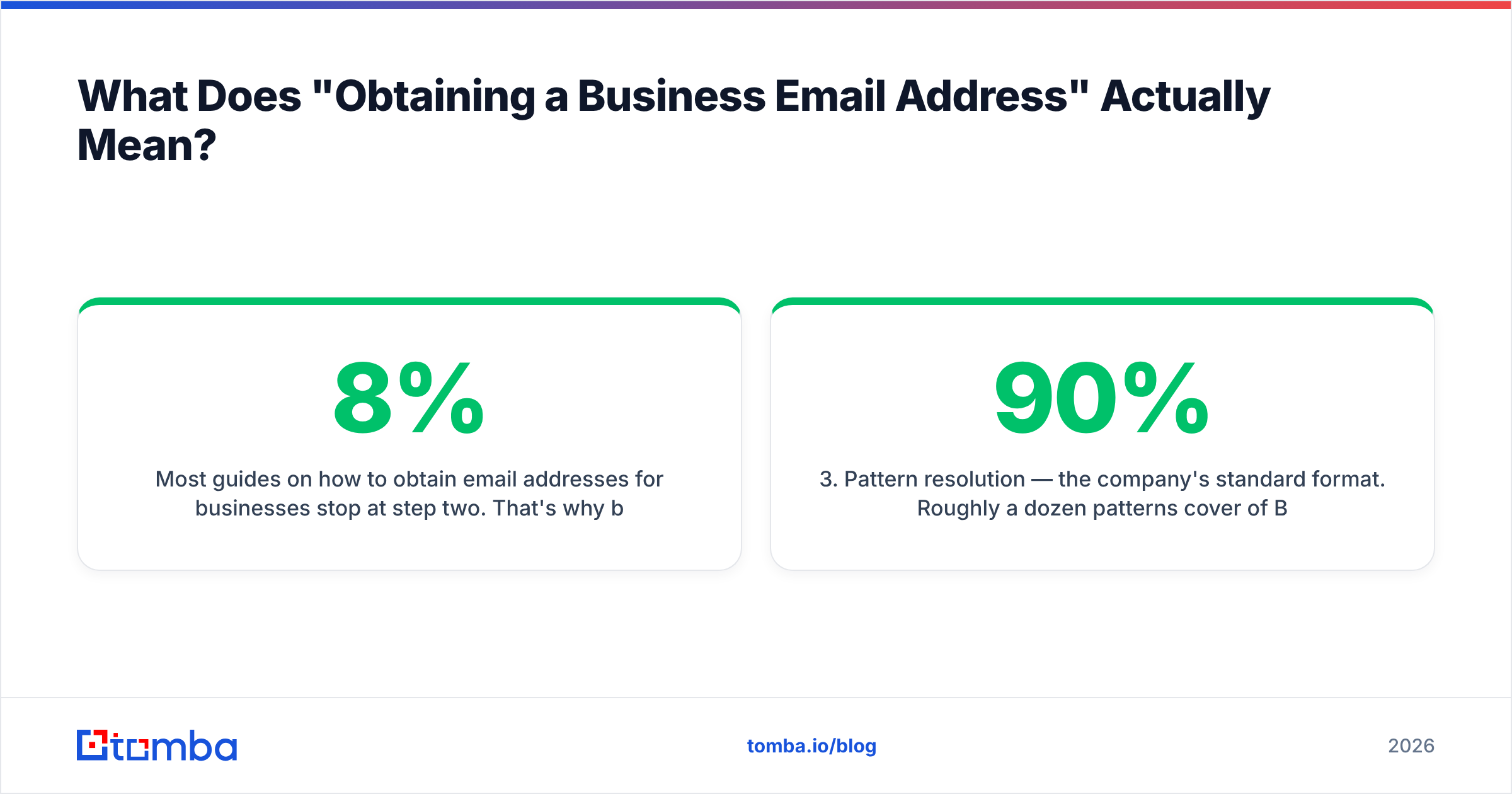
Most guides on how to obtain email addresses for businesses stop at step two. That's why bounce rates in cold outbound are still ugly: the industry sees 3-8% hard bounces on unverified lists, and mailbox providers start throttling well before you hit 5%.
Here's what each layer contributes:
- Company identification — you need the correct root domain, not the marketing microsite or the parent holding company.
acme.comvsacmegroup.co.ukproduces two completely different address spaces. - Person identification — full legal-ish name as the company records it. "Mike" vs "Michael" flips the pattern result on maybe a third of contacts.
- Pattern resolution — the company's standard format. Roughly a dozen patterns cover 90% of B2B domains.
- Existence check — SMTP-level confirmation the mailbox accepts mail.
- Risk scoring — catch-all, role-based, disposable, and complainer flags that predict damage before you send.

What Are the 9 Methods to Obtain Business Email Addresses?#
Ranked from most to least reliable in practice.
1. Domain search. Give a tool a company domain and get back every email address it has indexed for that domain, with source URLs and confidence scores. This is the highest-yield method for account-based outbound because you get the pattern and several confirmed live addresses in one call. Tomba's domain search returns addresses plus the department and seniority tags, which lets you filter before you enrich.
2. Name + domain lookup. You know who you want. You feed first name, last name, and domain into an email finder and get a single best-guess address with a confidence score. Accuracy on this method sits in the 80-95% band for tech and SaaS companies, lower for franchises, healthcare networks, and companies using vanity per-employee domains.
3. Pattern inference. Find two or three known addresses at a company, derive the rule, apply it to everyone else. Free, fast, and dangerous — it's the method that generates the most confident-looking garbage. Use a company email pattern checker to confirm the rule before you extrapolate across 200 contacts.
4. LinkedIn-based extraction. Start from a Sales Navigator list, resolve each profile to a company domain, then find the address. This is how most SDR teams actually work. A LinkedIn finder automates the profile-to-email step; doing it manually costs 2-4 minutes per contact.
5. Website and footer harvesting. Team pages, press-contact pages, /about, PDF case studies, and job postings all leak real addresses. Highest quality per address, lowest volume. An email extractor will pull addresses out of any pasted page text.
6. Author and byline lookup. For content, PR, and partnership outreach, the writer's address is often derivable from the publication's domain plus their byline. An author finder does this from the article URL directly.
7. Paid B2B databases. Static or semi-static contact records you query or export. Fast at volume, but freshness varies wildly by vendor and by segment — enterprise records decay slower than startup records because startup people move more.
8. Conference, association, and registry data. Attendee lists, chamber-of-commerce directories, trade-body member rolls, and public filings. Legitimate, often under-used, and usually needs manual cleanup.
9. Direct ask. Reply-to-a-comment, a form fill, a webinar registration, a mutual intro. Lowest volume, highest conversion, zero bounce risk. Don't dismiss it because it doesn't scale — it's the only method that produces a warm address.
Which Method Should You Use for Your Situation?#
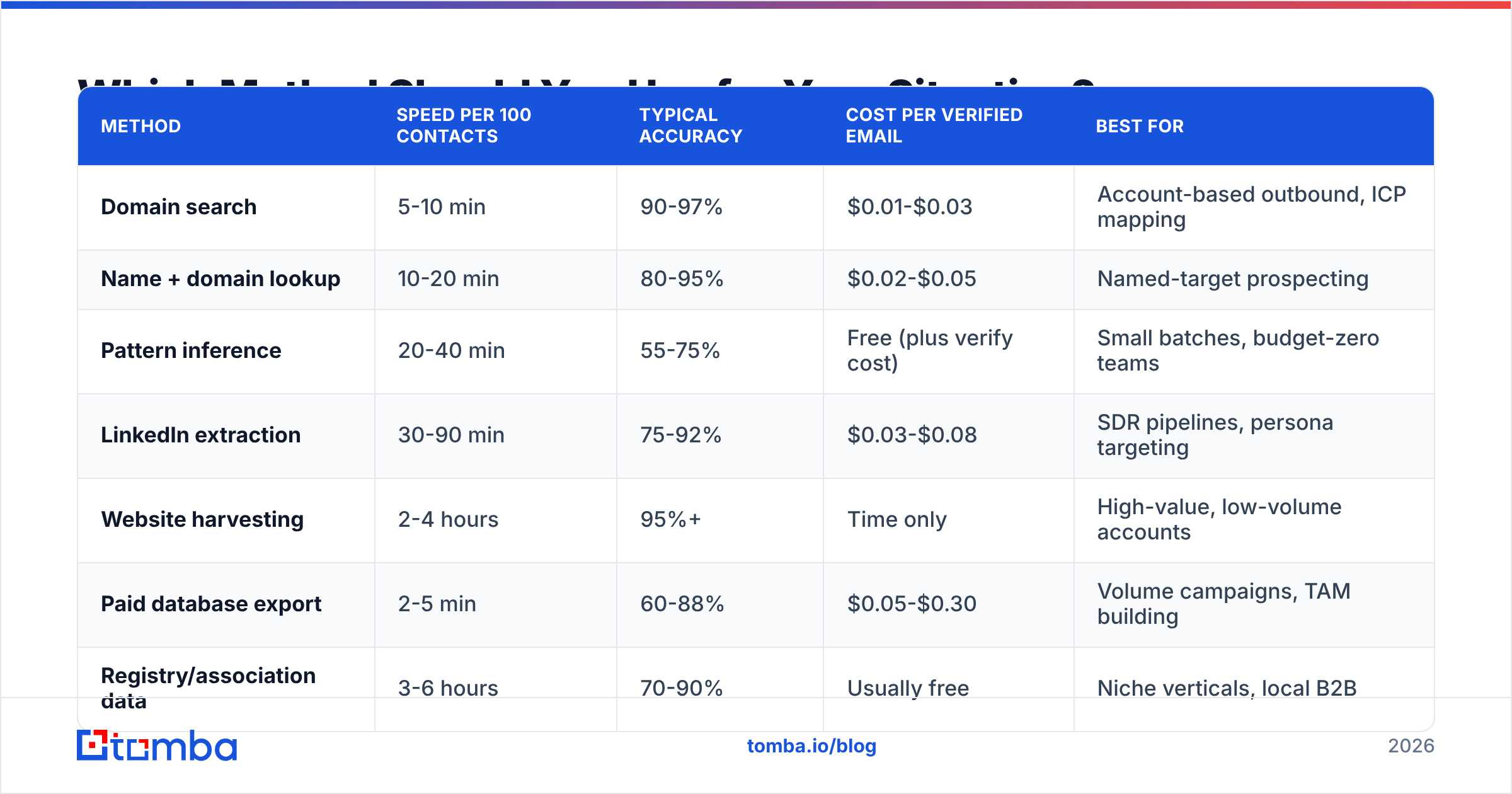
| Method | Speed per 100 contacts | Typical accuracy | Cost per verified email | Best for |
|---|---|---|---|---|
| Domain search | 5-10 min | 90-97% | $0.01-$0.03 | Account-based outbound, ICP mapping |
| Name + domain lookup | 10-20 min | 80-95% | $0.02-$0.05 | Named-target prospecting |
| Pattern inference | 20-40 min | 55-75% | Free (plus verify cost) | Small batches, budget-zero teams |
| LinkedIn extraction | 30-90 min | 75-92% | $0.03-$0.08 | SDR pipelines, persona targeting |
| Website harvesting | 2-4 hours | 95%+ | Time only | High-value, low-volume accounts |
| Paid database export | 2-5 min | 60-88% | $0.05-$0.30 | Volume campaigns, TAM building |
| Registry/association data | 3-6 hours | 70-90% | Usually free | Niche verticals, local B2B |
Two things stand out. First, the "free" methods aren't free — they're time-expensive, and at any realistic hourly rate they cost more than API credits. Second, accuracy and cost aren't linearly related. The most expensive per-contact option in that table (bulk database export) is not the most accurate.
If you're building a target account list from scratch, start with domain search on your ICP account list, then fill gaps with name+domain lookups. If you're working named accounts, invert the order.
Why Do So Many "Found" Business Emails Still Bounce?#
Because finding and verifying are different operations, and most workflows only do the first.
Four specific failure modes account for the majority of bounces:
- Catch-all domains. The server accepts everything, so a standard SMTP check returns "valid" for
asdfghjkl@company.com. Roughly 15-20% of B2B domains are catch-all. You need a dedicated catch-all verifier that scores likelihood rather than returning a binary valid/invalid. - Departed employees. The average B2B contact record goes stale in about 18 months because people change jobs. Data bought in Q1 and sent in Q3 has already lost a chunk of its accuracy.
- Role addresses.
sales@,info@,hello@deliver fine but convert terribly and attract spam complaints, which damages your sender reputation faster than a bounce does. - Greylisting and rate limits. Some mail servers temporarily reject unknown senders. A one-shot verification marks these "unknown" — retry logic matters more than most vendors admit.
The fix is procedural, not technological: verify at send time, not at acquisition time. Run your list through an email verifier within 72 hours of the send, and re-verify anything that's been sitting in your CRM for more than a quarter.

How Do the Main Email-Finding Tools Compare on Price?#
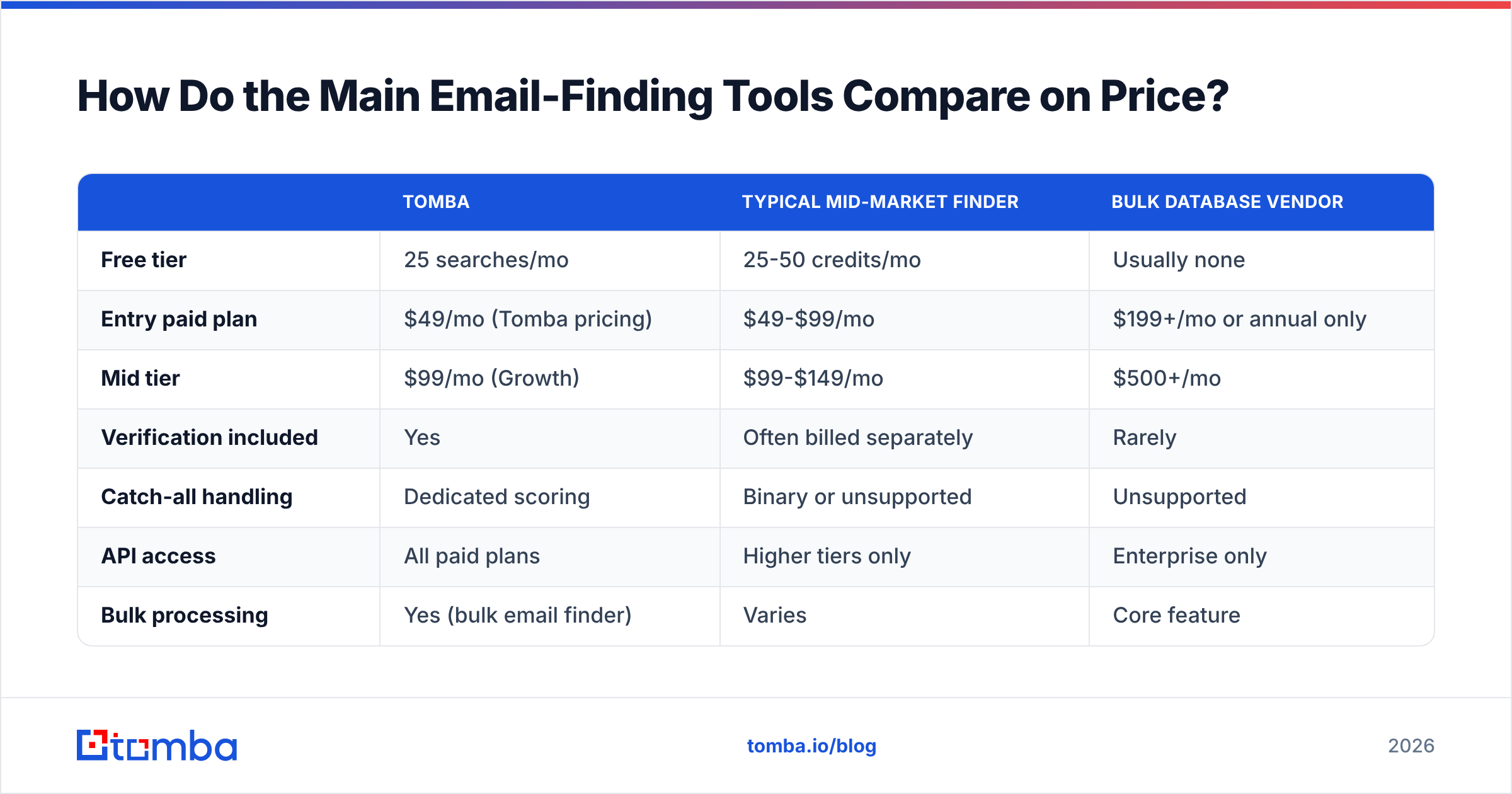
Pricing structures differ enough that headline numbers mislead. Some vendors charge one credit per search regardless of result; others charge only on a successful find; verification is sometimes bundled, sometimes billed separately.

Accuracy claims from vendors are self-reported and rarely audited. The honest read is that most credible finders cluster in the 85-95% range on common B2B domains and diverge sharply on hard segments — non-English domains, sub-50-employee companies, and heavily-firewalled enterprises.
| Tomba | Typical mid-market finder | Bulk database vendor | |
|---|---|---|---|
| Free tier | 25 searches/mo | 25-50 credits/mo | Usually none |
| Entry paid plan | $49/mo (Tomba pricing) | $49-$99/mo | $199+/mo or annual only |
| Mid tier | $99/mo (Growth) | $99-$149/mo | $500+/mo |
| Verification included | Yes | Often billed separately | Rarely |
| Catch-all handling | Dedicated scoring | Binary or unsupported | Unsupported |
| API access | All paid plans | Higher tiers only | Enterprise only |
| Bulk processing | Yes (bulk email finder) | Varies | Core feature |
| Native spreadsheet add-ins | Sheets, Excel, Airtable | Usually one | Export CSV only |

Worth noting: providers with strong static databases — BookYourData is a solid example in the pay-as-you-go segment — solve a different problem than real-time finders. Databases are better when you need volume against a broad firmographic filter. Real-time finders are better when you already know who you want and need the address to be correct today. Plenty of teams run both, using the database for TAM sizing and a finder for the accounts they actually work.
Check independent review corpora before committing. G2's lead intelligence category and Capterra both surface the complaints vendors don't publish — usually about credit expiry, refund policy on bad data, and export limits.
Is It Legal to Obtain Business Email Addresses This Way?#
Mostly yes, with real constraints that vary by jurisdiction.
Under GDPR, a business email address for a named individual is personal data. You can process it under legitimate interest for B2B outreach, but you need to document the balancing test, name your data source in the first email, and honour deletion requests immediately. Under CAN-SPAM in the US, unsolicited commercial email is legal provided you use accurate headers and subject lines, disclose your physical address, and include a working opt-out. CASL in Canada is stricter — it requires implied or express consent, and "found their email on a website" only qualifies as implied consent if the address was published without a statement restricting unsolicited mail, and your message relates to their role.
Three practical rules that keep you clear of most trouble:
- Document provenance. Store where each address came from. If you can't answer "where did you get this?", you have a compliance gap, not a data gap. Vendors should publish their data sources.
- Honour suppression instantly. One list, checked before every send, never purged.
- Don't scrape behind a login. LinkedIn's terms prohibit automated extraction. The legal exposure is contractual rather than criminal in most cases, but account bans are immediate and permanent.
None of this is legal advice — check with counsel for your specific market. The ICO's guidance on direct marketing is the clearest free reference for UK/EU rules.
What Does a Working Workflow Look Like End to End?#
Here's the sequence that survives contact with a real pipeline:
- Define the account list first, contacts second. Firmographic filters (industry, headcount, tech stack, funding stage) before you touch a single person. A website tech stack check is a cheap qualifier if you sell into a specific stack.
- Resolve domains. Company name to root domain, deduplicated. Subsidiaries and rebrands break more lists than bad email patterns do.
- Run domain search on every account. You'll get pattern confirmation plus some free contacts you didn't know existed.
- Fill named-contact gaps. Name + domain lookup for the specific people your ICP calls for.
- Verify everything. Including addresses that came back with high confidence. Confidence scores are predictions; verification is a measurement.
- Segment by risk. Valid → main sequence. Catch-all → separate low-volume sequence on a secondary domain. Unknown → hold or route to phone. A phone finder turns unreachable-by-email contacts into callable ones rather than dead rows.
- Enrich for personalization. Title, seniority, location, company size. Data enrichment at this stage is what separates a relevant email from a mail merge.
- Re-verify quarterly. Anything older than 90 days in an active sequence gets rechecked.
The step teams skip most often is step 6. Blending catch-all addresses into your main sending domain is the single most common cause of an inexplicable deliverability collapse six weeks into a campaign.
How Much Should You Expect to Pay?#
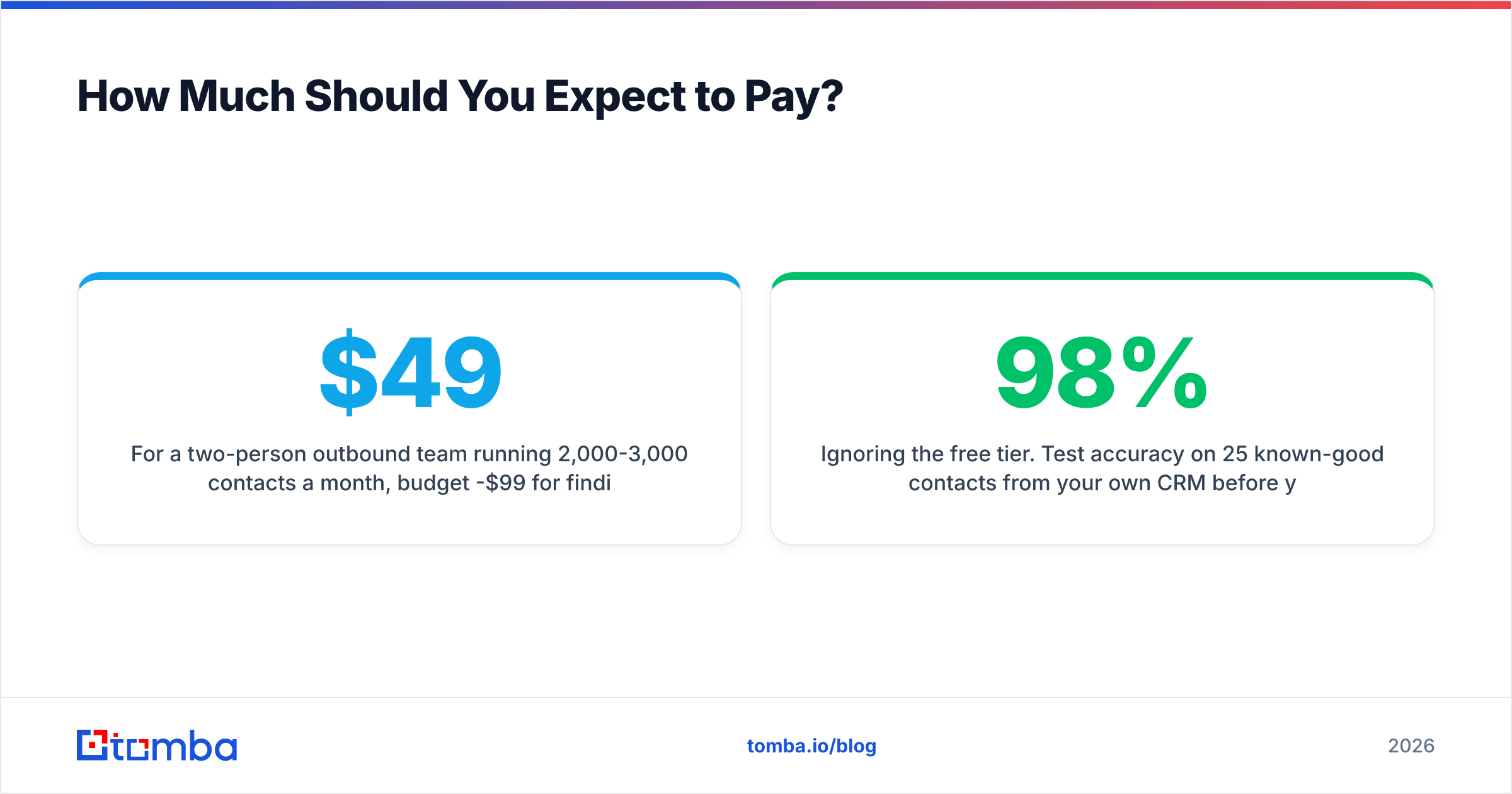
For a two-person outbound team running 2,000-3,000 contacts a month, budget $49-$99/month for finding and verification combined. That's Tomba's Starter ($49/mo) or Growth ($99/mo) tier, and comparable mid-market pricing elsewhere. Teams running 20,000+ contacts monthly land in the $249-$500/month range once API volume and bulk processing enter the picture.
Where budgets get wasted:
- Buying credits you can't use before expiry. Monthly-reset credits punish uneven workloads. Check rollover policy before annual commitments.
- Paying separately for verification. If your finder charges for a search and your verifier charges again for the same address, you're paying twice for one contact.
- Over-buying database seats. Most teams need one enrichment seat and API access, not five UI logins.
- Ignoring the free tier. Test accuracy on 25 known-good contacts from your own CRM before you pay anyone. If a vendor can't find people you already know exist, its 98% accuracy claim is about someone else's data.
Start With the Accounts You Already Want#
Pick your 50 highest-value target accounts, run domain search on each, verify the results, and measure your actual bounce rate against your current process. That comparison takes an afternoon and settles the tooling argument better than any vendor comparison table — including this one.
Tomba's Email Finder covers that full loop: domain search to find who's there, name-based lookup for the people you've already identified, built-in SMTP and catch-all verification so nothing enters a sequence unchecked, and API, CLI, Sheets, and Excel access so it fits whatever your team already uses. The free tier gives you 25 searches a month — enough to test it against contacts you can independently confirm before you spend anything.
Related guides#
// get started
Find, verify and enrich your first contacts today
Start on the free plan with 25 searches a month, then scale when your team is ready.
Free plan · No credit card required · GDPR & CCPA
// about the author