How to Prevent Email Bounces: A 2026 Playbook for Cold Outreach
Bounce rates above 3% put your whole domain at risk. Here are the nine checks that keep hard bounces under 1%, from list hygiene to SMTP-level verification and sending volume caps.
TL;DR
- A hard bounce rate above 2-3% is the fastest way to torch a sending domain. Under 1% is the only safe operating range for cold outreach.
- Most bounces are not a mail-server problem. They are a data problem: stale lists, guessed email patterns, and unverified imports from a CRM nobody has cleaned since 2023.
- The fix stack is ordered: verify at collection → re-verify before send → cap volume per mailbox → authenticate (SPF, DKIM, DMARC) → monitor and suppress.
- Catch-all domains are the hardest category. They accept everything at SMTP time and bounce later, so treat them as a separate risk bucket rather than a pass/fail.
- Automate suppression. Every hard bounce should be permanently blocked across every tool you send from, within minutes, not at the end of the quarter.
What actually causes an email bounce?#
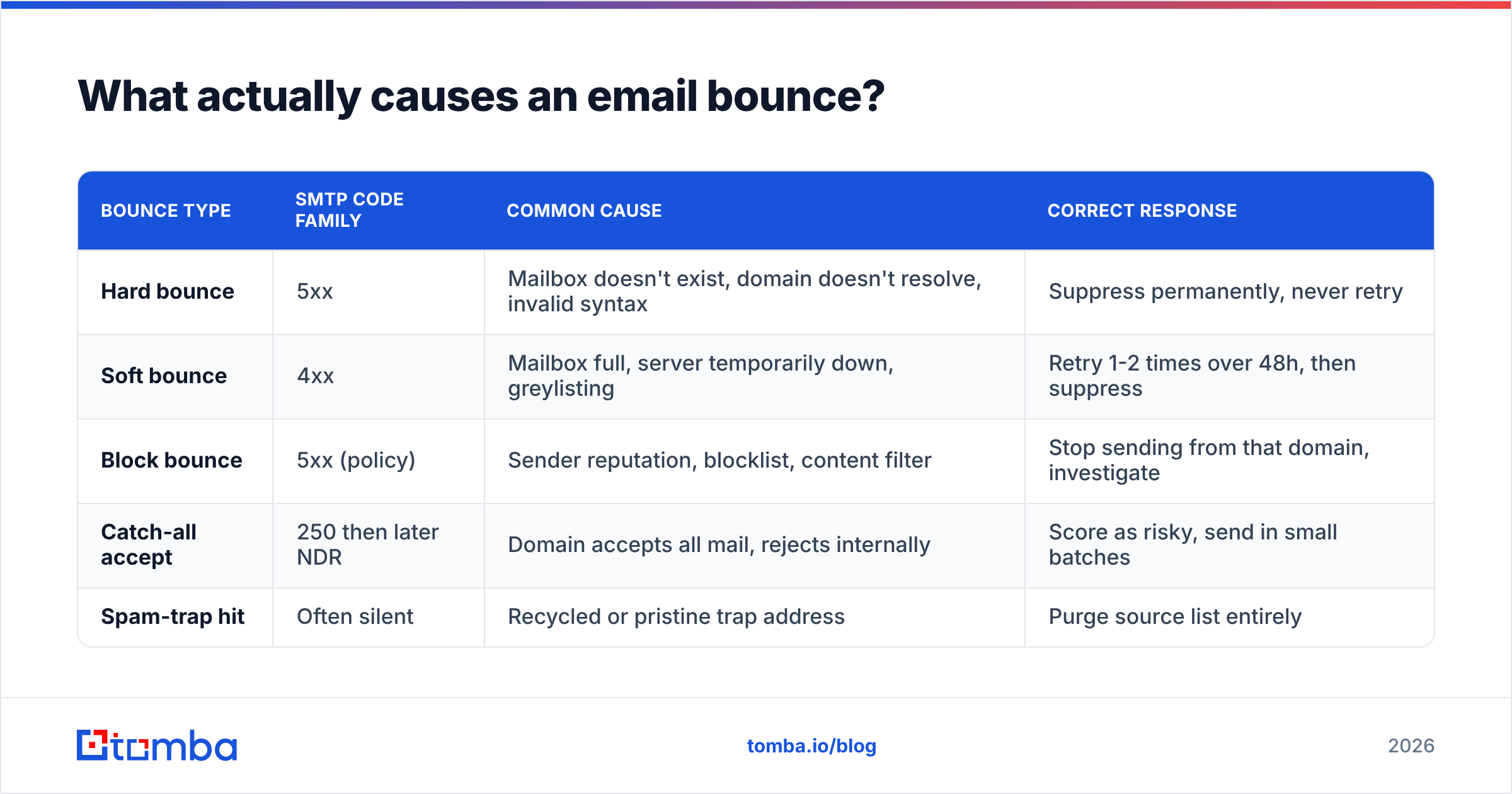
A bounce is the receiving mail server telling you it will not deliver your message. That is it. The interesting part is why, and the reasons split cleanly into two buckets that deserve completely different responses.
Think of it like posting a physical letter. A hard bounce is "no such address, no such house" — permanent, and re-sending is pointless and actively harmful. A soft bounce is "the mailbox is full" or "nobody is home right now" — temporary, and one retry is reasonable.
| Bounce type | SMTP code family | Common cause | Correct response |
|---|---|---|---|
| Hard bounce | 5xx | Mailbox doesn't exist, domain doesn't resolve, invalid syntax | Suppress permanently, never retry |
| Soft bounce | 4xx | Mailbox full, server temporarily down, greylisting | Retry 1-2 times over 48h, then suppress |
| Block bounce | 5xx (policy) | Sender reputation, blocklist, content filter | Stop sending from that domain, investigate |
| Catch-all accept | 250 then later NDR | Domain accepts all mail, rejects internally | Score as risky, send in small batches |
| Spam-trap hit | Often silent | Recycled or pristine trap address | Purge source list entirely |
The critical number: mailbox providers judge you on hard bounces. Google's guidance for bulk senders and most ESP contracts converge on the same threshold — keep hard bounces below 2%, and treat anything above 3% as an emergency. Your practical target for cold outreach should be under 1%, because that leaves headroom for the inevitable job-change churn.
Why does a 5% bounce rate destroy more than 5% of your results?#
Because bounce rate is a reputation signal, not just a delivery statistic.
When you send 1,000 emails and 50 hard bounce, you did not lose 50 prospects. You told Gmail, Outlook, and every spam filter in between that you are sending to a list you have not validated. That signal degrades placement for the other 950 — the ones with real mailboxes. They stop landing in the primary tab and start landing in spam, where they are never seen and never reported as a bounce. Your dashboard shows 95% "delivered" while your reply rate quietly halves.
This is why email deliverability work always starts with bounces. It's the cheapest lever with the highest downstream effect. Fix bounces, and open rates and reply rates improve without a single word of copy changing.
B2B data decays fast. Industry consensus across vendors like ZeroBounce and analyst commentary from Gartner puts annual B2B contact decay somewhere between 22% and 30%. People change jobs, companies get acquired, mail domains get consolidated after a merger. A list you built in January is measurably worse in July, and by the following January roughly a quarter of it is dead weight.
How do you prevent email bounces? The nine-step stack#
Here is the full sequence, ordered by leverage. Steps 1-4 remove most of the problem. Steps 5-9 keep it removed.
- Verify at the point of collection. Every email that enters your CRM, form, or spreadsheet should pass a syntax + MX + SMTP check before it is stored. Catching a bad address at entry costs one API call. Catching it at send time costs reputation.
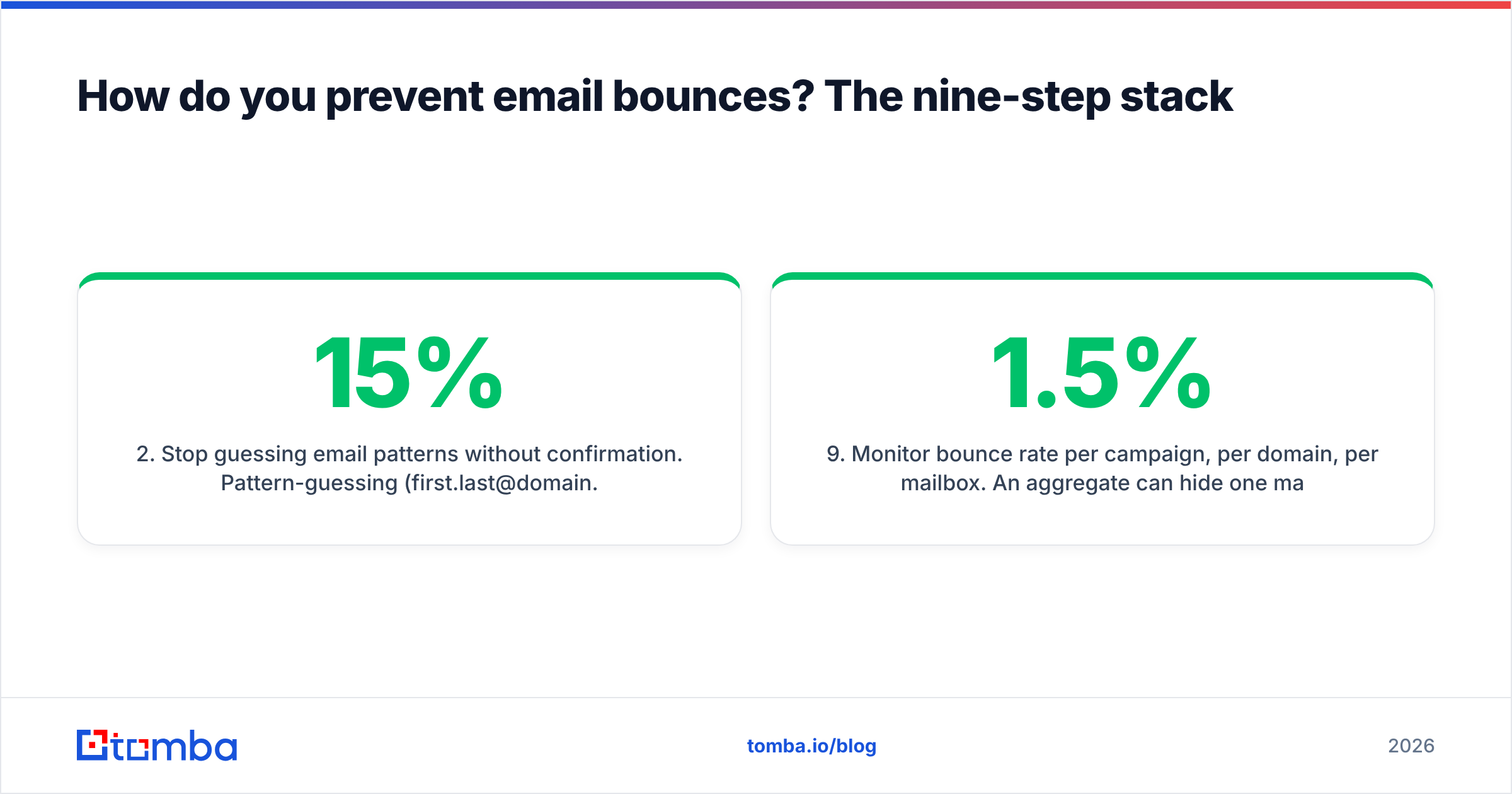
- Stop guessing email patterns without confirmation. Pattern-guessing (
first.last@domain.com) is fine as a hypothesis. Sending to an unconfirmed guess is how bounce rates hit 15%. Use a company email pattern check to identify the format, then confirm the specific mailbox exists. - Re-verify anything older than 90 days. Not the whole database — just the slice you are about to email. Re-verification of a 5,000-contact segment costs less than one lost sending domain.
- Segment catch-all domains into their own bucket. These accept every address at the SMTP handshake and reject internally afterward, producing delayed bounces your sequencer may not attribute correctly. A dedicated catch-all verifier scores these on risk instead of returning a useless "unknown".
- Authenticate the sending domain properly. SPF, DKIM, and DMARC are table stakes since the 2024 Google and Yahoo bulk-sender requirements. A missing or misconfigured SPF record turns legitimate mail into policy bounces. Run an SPF check before every new domain goes live.
- Warm new domains and mailboxes. A brand-new domain sending 300 emails on day one will hit rate limits and block bounces. Ramp over 3-4 weeks; an email warmup schedule keeps the curve realistic.
- Cap per-mailbox daily volume. 30-50 cold emails per mailbox per day is the safe ceiling in 2026. Beyond that, providers throttle you and throttling reads as soft bounces that escalate into blocks.
- Suppress instantly and globally. A hard bounce in your sequencer must propagate to your CRM, your newsletter tool, and every other sending system inside the hour. Shared suppression lists are non-negotiable at scale.
- Monitor bounce rate per campaign, per domain, per mailbox. An aggregate 1.5% can hide one mailbox running at 9%. Break the metric down or you will find the problem after the damage.
What is the difference between verification methods?#
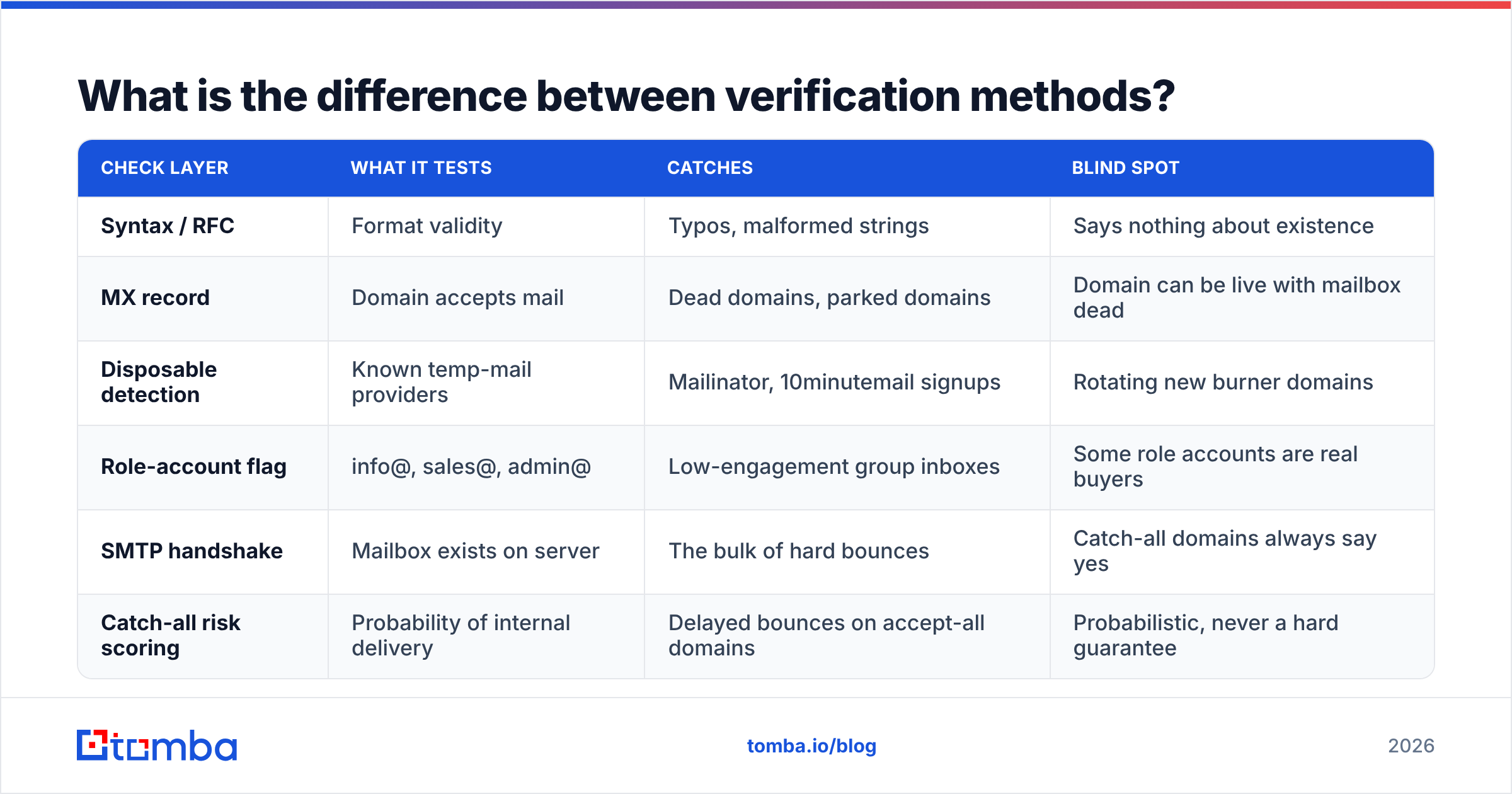
Not all "verification" is the same, and vendors use the word loosely. Here is what each layer actually tests and where it fails.
| Check layer | What it tests | Catches | Blind spot |
|---|---|---|---|
| Syntax / RFC | Format validity | Typos, malformed strings | Says nothing about existence |
| MX record | Domain accepts mail | Dead domains, parked domains | Domain can be live with mailbox dead |
| Disposable detection | Known temp-mail providers | Mailinator, 10minutemail signups | Rotating new burner domains |
| Role-account flag | info@, sales@, admin@ | Low-engagement group inboxes | Some role accounts are real buyers |
| SMTP handshake | Mailbox exists on server | The bulk of hard bounces | Catch-all domains always say yes |
| Catch-all risk scoring | Probability of internal delivery | Delayed bounces on accept-all domains | Probabilistic, never a hard guarantee |
Most bounce disasters come from teams running only the first two layers and calling it verified. Syntax and MX checks are free and fast, which is exactly why they are commodity — they catch maybe 30% of what actually bounces. The SMTP handshake is where the real work happens, and it is the layer that separates a serious email verifier from a regex script.
How do you handle catch-all domains without tanking your rate?#
Catch-all is where most bounce-prevention advice goes vague, so let's be concrete.
A catch-all (or accept-all) domain is configured to accept mail for any address at that domain during the SMTP conversation, then sort out delivery internally. Send to notarealperson@bigcorp.com and the server says 250 OK. Two hours later the message is silently dropped or returns a delayed non-delivery report. Roughly 15-20% of enterprise B2B domains behave this way, and they are overrepresented among exactly the large accounts you most want to reach.
Three workable strategies:
- Risk-score, don't binary-classify. A good catch-all finder combines pattern confidence, source signals, and historical delivery data for that domain to produce a probability rather than an unhelpful "unknown."
- Send catch-alls in isolated batches. Run them from a separate mailbox or subdomain so a bad batch damages a contained reputation, not your main domain.
- Lead with a second signal. Confirm the person via a LinkedIn finder or a public author byline before you spend a send on a catch-all guess.
The teams with sub-1% bounce rates are not the ones avoiding catch-alls. They are the ones who separated the risk and stopped mixing 92%-confidence addresses into the same batch as 45%-confidence ones.
Which tools actually keep bounce rates under 1%?#
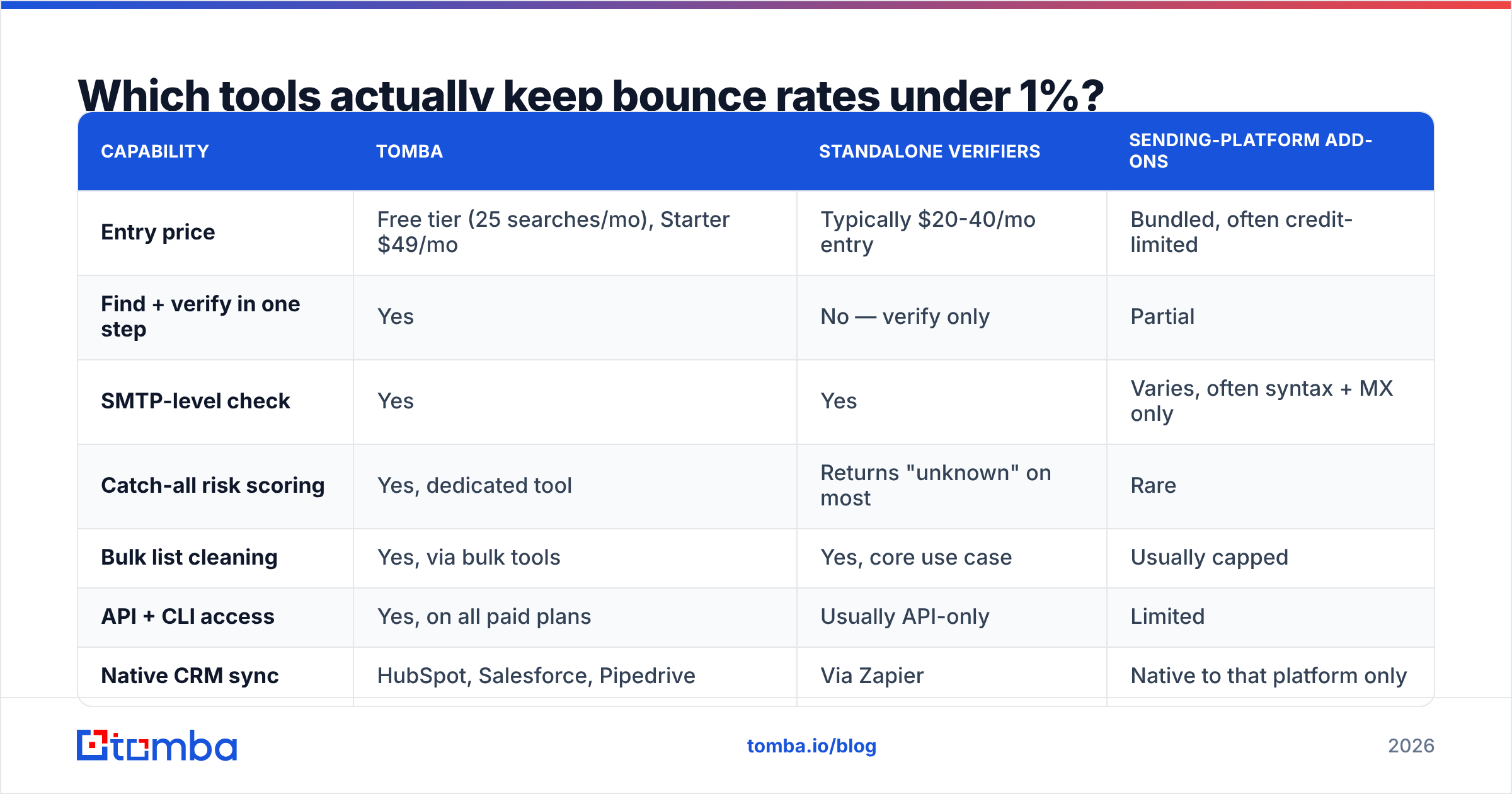
The market splits into three categories: finders that return verified addresses, standalone verifiers that clean lists you already have, and sending platforms with verification bolted on. Most teams need the first two.
| Capability | Tomba | Standalone verifiers | Sending-platform add-ons |
|---|---|---|---|
| Entry price | Free tier (25 searches/mo), Starter $49/mo | Typically $20-40/mo entry | Bundled, often credit-limited |
| Find + verify in one step | Yes | No — verify only | Partial |
| SMTP-level check | Yes | Yes | Varies, often syntax + MX only |
| Catch-all risk scoring | Yes, dedicated tool | Returns "unknown" on most | Rare |
| Bulk list cleaning | Yes, via bulk tools | Yes, core use case | Usually capped |
| API + CLI access | Yes, on all paid plans | Usually API-only | Limited |
| Native CRM sync | HubSpot, Salesforce, Pipedrive | Via Zapier | Native to that platform only |
| Free tier | 25 searches/mo | 100-250 one-time credits | Trial only |
Note the "find + verify in one step" row — it matters more than it looks. If your finder returns unverified guesses and you then pay a second vendor to verify them, you pay twice for every bad address and you still lose the credits. Tools that verify before returning a result mean you only ever pay for addresses that passed.
For teams that already have a list, a standalone cleaner is the right call. Peers like BookYourData take a different route entirely — selling pre-verified contact data with bounce guarantees attached, which suits teams who want to buy a clean list rather than build and maintain one. Both models work; the mistake is assuming a list bought or built in 2024 is still clean in 2026.

If you want to check where a given vendor's records come from before trusting them, read the data sources documentation — any provider that won't explain sourcing is a provider whose bounce rate you cannot predict.
How do you build a bounce-prevention workflow that runs itself?#
Manual hygiene fails because it depends on someone remembering. Wire it into the pipeline instead.
At data entry. Every contact created via form, import, or scrape hits a verification endpoint before it is written. In practice this is one call to an email verification API in your form handler or import job. Reject or quarantine anything that fails; never write an unverified address straight to the contacts table.
Before every send. Re-verify the campaign segment 24-48 hours before launch. For a 3,000-contact segment this takes minutes with a bulk verify run and removes the addresses that died since collection. Automate it as a pre-flight step in your sequencer, not a manual checkbox.
On bounce events. Webhook every hard bounce into a central suppression table. Push it to your CRM, sequencer, and newsletter tool. If suppression lives in only one system, you will re-import the same dead address next quarter and bounce it again.
Weekly review. Pull bounce rate broken out by mailbox, sending domain, and data source. When one source consistently produces 4%+ bounces, that source is the problem — not your copy, not your timing.
Quarterly purge. Re-verify anything untouched for 180 days, or delete it. A B2B database that grows without pruning is a liability, not an asset.
For teams running this in a spreadsheet, the Google Sheets add-on handles verification in place, which is usually easier to get adopted than a new dashboard nobody logs into. And if you want the checks in your terminal or CI pipeline, the Tomba CLI does the same job scriptably.
What bounce rate should you actually expect?#
Depends on the source. Realistic 2026 benchmarks for cold B2B outreach:
- Verified via SMTP-level finder, sent within 30 days: 0.3-1%
- Verified list, 90+ days old, no re-verification: 2-4%
- Pattern-guessed, unverified: 8-20%
- Purchased list, unverified, unknown age: 15-35%
- Scraped from a directory, no verification: 20%+
If you are above 3%, stop sending today. Pause every sequence, run the whole active list through verification, purge the failures, and resume at half volume for two weeks while the domain recovers. Continuing to send while bouncing at 5% costs you more than the pause does — a burned domain takes 6-8 weeks to rehabilitate, and sometimes never fully recovers.
One caveat on benchmarks: a suspiciously low bounce rate on a large cold list can also mean trouble. If you are sending 5,000 emails and seeing 0.1% bounces with a 0.2% reply rate, you may be hitting a wall of catch-all domains that accept and silently discard. Check your response rate alongside bounces — the two together tell a story that neither tells alone.
Frequently asked questions#
Does a soft bounce hurt my sender reputation? Less than a hard bounce, but repeated soft bounces to the same address do accumulate. Retry twice over 48 hours; after that, treat it as a hard bounce and suppress.
Can I just remove role accounts to fix my bounce rate?
Partially. info@ and support@ addresses rarely bounce — they usually exist. They hurt engagement rate rather than bounce rate. Remove them for reply-rate reasons, not bounce reasons.
How often should I clean my list? Before every campaign for the segment you're sending to, and a full-database pass quarterly. Continuous verification at entry makes both cheaper.
Does verification guarantee delivery? No. Verification guarantees the mailbox exists. Delivery also depends on authentication, sender reputation, content, and volume. Verification removes one failure mode out of several — but it's the one that damages the others.
Start with the layer that costs you the most#
Bounce prevention is not a project; it's a default setting. Verify at entry, re-verify before send, suppress instantly, and cap volume. Four habits, and your hard bounce rate stays where it belongs — under 1%, permanently.
The single highest-leverage change most teams can make is to stop importing addresses they have not confirmed. The Tomba Email Finder runs an SMTP-level check before it returns a result, so the addresses that reach your CRM are the ones that will actually accept mail — no second verification pass, no credits burned on guesses. Start on the free tier with 25 searches a month, or check Tomba pricing if you're cleaning at volume.
Related guides#
// get started
Find, verify and enrich your first contacts today
Start on the free plan with 25 searches a month, then scale when your team is ready.
Free plan · No credit card required · GDPR & CCPA
// about the author