How to Prospect for Sales in 2026: A 7-Step System
Most sales prospecting advice stops at "send more emails." This is the full 7-step system: ICP math, list building, data verification, multichannel sequencing, and the metrics that tell you where it broke.
TL;DR
- Prospecting is not "sending emails." It's four jobs stacked: define who, find them, verify the data, then run a sequence long enough to matter.
- Your bounce rate is the single fastest diagnostic. Above 3% and nothing downstream works — Google and Microsoft throttle you before your copy gets read.
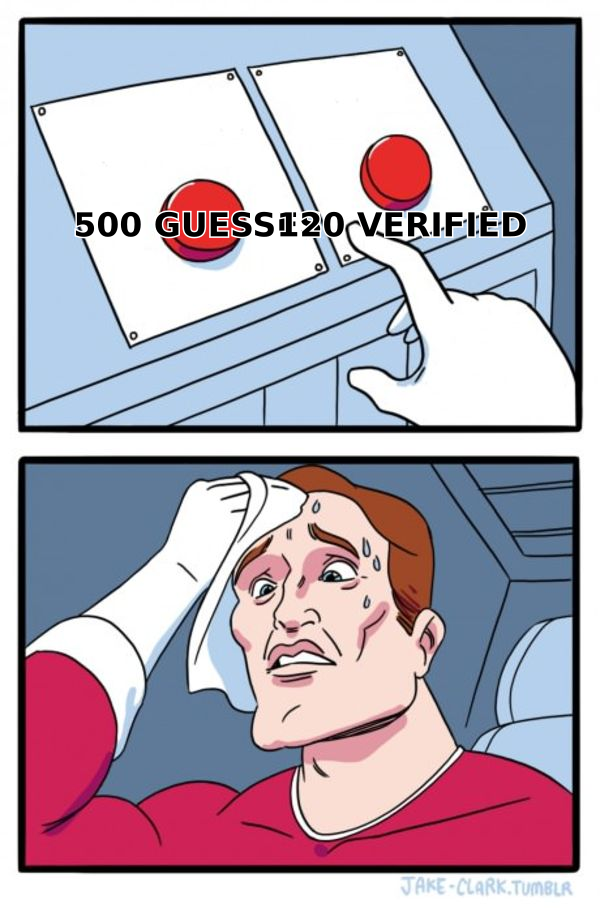
- A tight list of 120 verified, well-researched contacts beats 500 scraped guesses on reply rate, deliverability, and rep morale. Every time.
- Multichannel is not optional in 2026: email + LinkedIn + phone lifts connect rates roughly 2-3x over email alone.
- Track four numbers only — bounce rate, reply rate, positive reply rate, meetings booked per 100 contacts. Everything else is decoration.
What Does "Prospecting" Actually Mean in 2026?#
Prospecting is the work of turning a vague market into a specific list of named humans who might buy, then earning a first conversation with them. That's it. Everything else — the sequencer, the AI writer, the intent data — is machinery bolted onto those two jobs.
The reason most teams struggle with how to prospect for sales isn't effort. It's that they collapse four separate jobs into one blurry activity and then wonder why the funnel leaks:
- Targeting — deciding which accounts and which titles are worth your time at all.
- Sourcing — getting names, companies, and contact details into a list.
- Verification — proving those contact details are real before you send.
- Engagement — the sequence of touches across email, phone, and LinkedIn.
Each has its own failure mode. A rep with great copy and a bad list looks identical, on the dashboard, to a rep with a great list and bad copy: low replies. You cannot fix what you cannot isolate.
Why Does Most Sales Prospecting Fail Before the First Email?#
Because the list was wrong. Not "slightly imperfect" — structurally wrong.
Three specific failures account for most of it:
Wrong ICP granularity. "SaaS companies with 50-500 employees" is not an ICP, it's a census bracket. A usable ICP names a trigger and a pain: "Series B SaaS companies that just hired a first RevOps lead and still run reporting in spreadsheets." The second one tells you what to say in line one.
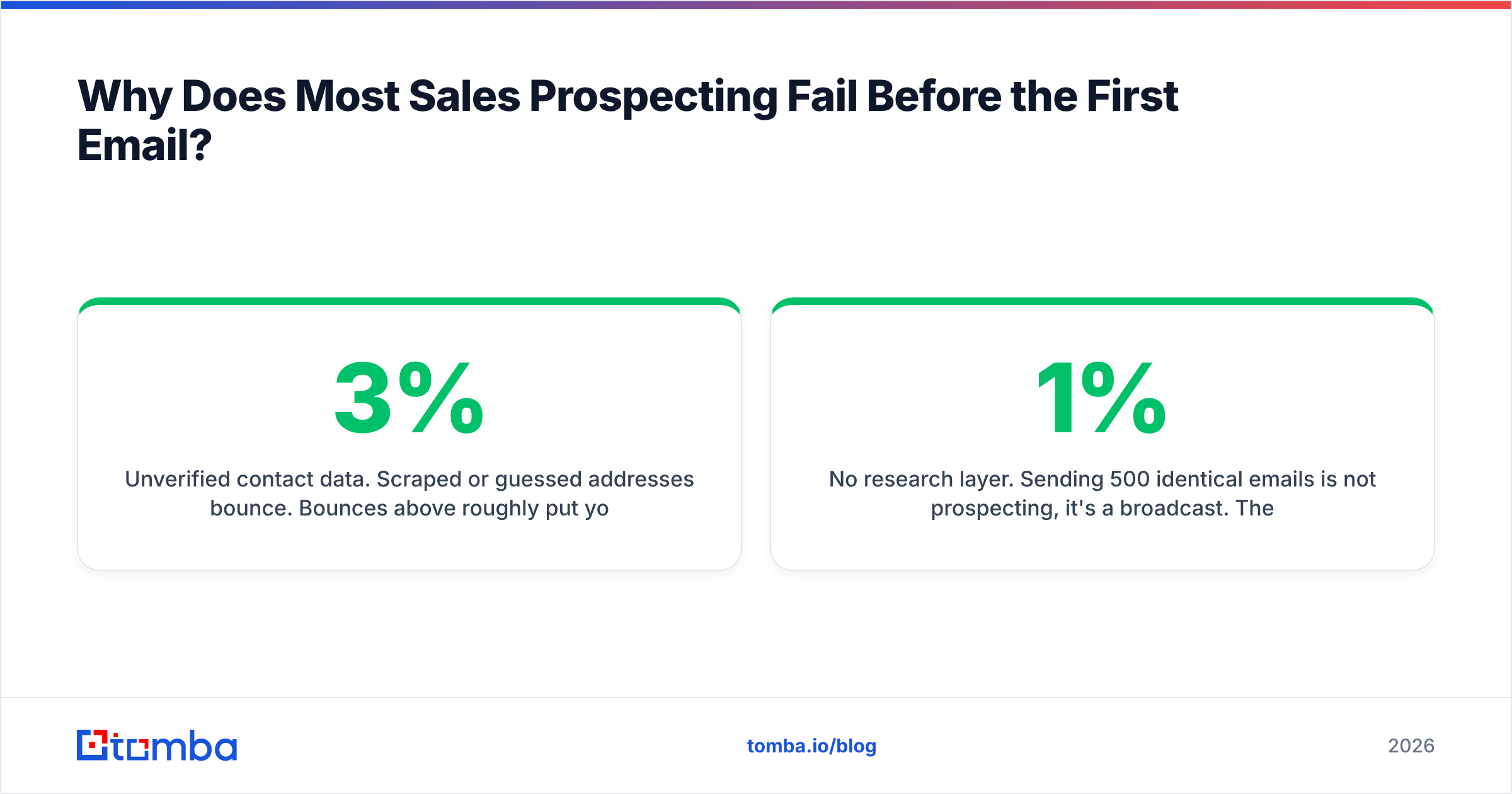
Unverified contact data. Scraped or guessed addresses bounce. Bounces above roughly 3% put you in throttling territory with major mailbox providers, and once your domain reputation slides, even your perfectly-targeted emails land in spam. Google's bulk sender requirements make this explicit — spam complaint rates and authentication are enforced, not suggested.
No research layer. Sending 500 identical emails is not prospecting, it's a broadcast. The gap between a 1% reply rate and a 9% reply rate is usually one specific, verifiable sentence about the prospect's actual situation.
Fix the list before you touch the copy. Reversed order is the most common wasted quarter in outbound.
How Do You Build a Prospect List That Converts?#
Work in this order. Skipping a step doesn't save time — it moves the cost downstream where it's more expensive.
- Write the ICP as a filter, not a description. Industry, employee band, tech stack, funding stage, geography, and at least one trigger event. If you can't type it into a search filter, it's not an ICP yet.
- Build the account list first, contacts second. Pull 100-300 accounts that match. Rank them by fit, not by how easy the emails are to find.
- Map the buying committee per account. In B2B, a purchase typically involves 6-10 stakeholders. Pick a champion title, an economic buyer, and a likely blocker — three contacts per account beats one.
- Source contact details. Use a domain search to pull every discoverable address at a target company, then narrow by department and seniority. For known names, an email finder resolves the specific person.
- Verify everything before it enters the sequencer. Non-negotiable. Run the list through an email verifier and quarantine anything that isn't a confirmed deliverable.
- Enrich for personalization hooks. Job change, recent funding, new tooling, a published article. Data enrichment turns a row in a CSV into a reason to write.
A practical benchmark: if a rep can build and verify 40-60 well-researched contacts per day, that's healthy. If they're "building" 400 a day, they're scraping, and you'll pay for it in bounces within two weeks.
What's the Real Difference Between Spray-and-Pray and Targeted Prospecting?#
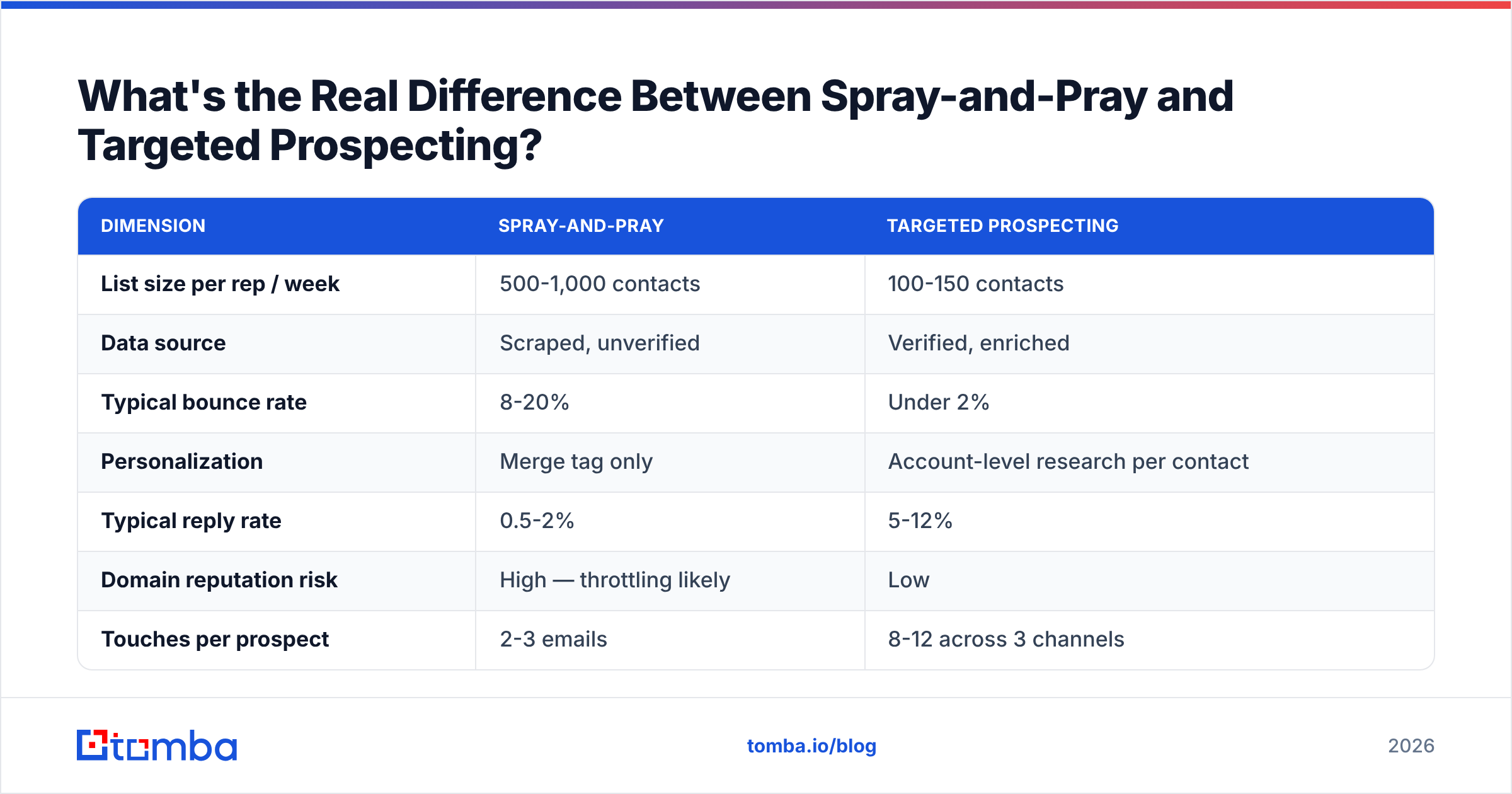
The numbers below reflect commonly reported outbound ranges rather than a single vendor study — treat them as directional, and measure your own.
| Dimension | Spray-and-pray | Targeted prospecting |
|---|---|---|
| List size per rep / week | 500-1,000 contacts | 100-150 contacts |
| Data source | Scraped, unverified | Verified, enriched |
| Typical bounce rate | 8-20% | Under 2% |
| Personalization | Merge tag only | Account-level research per contact |
| Typical reply rate | 0.5-2% | 5-12% |
| Domain reputation risk | High — throttling likely | Low |
| Touches per prospect | 2-3 emails | 8-12 across 3 channels |
| Rep time per contact | Under 1 minute | 4-8 minutes |
| Cost per meeting | High (volume masks waste) | Lower and predictable |
The counterintuitive part: targeted prospecting is cheaper per meeting even though it costs more per contact. Volume feels productive because activity metrics go up. Pipeline doesn't follow.
Which Prospecting Channels Should You Actually Use?#
Email is the backbone. It's asynchronous, cheap, and scales. But email alone is now a minority strategy — inbox competition is brutal and reply rates have compressed for years.
Email. Best for initial contact at scale and for anything requiring a link or attachment. Requires clean authentication (SPF, DKIM, DMARC), a warmed domain, and a verified list. Run a SPF checker before you send a single sequence.
Phone. Highest information density per minute and still the fastest path to a qualified "no." Cold calling connect rates are low, but a connect is worth 20 emails. Pair it with a phone finder so reps aren't hunting numbers on switchboards.
LinkedIn. Best for warming before an email lands and for reaching people whose inbox is a fortress. A profile view plus a thoughtful comment before your email arrives changes the open dynamic. See LinkedIn outreach for the mechanics.
Referrals and warm intros. Highest conversion of any channel, lowest volume. Mine your existing customers and investors monthly; don't treat it as a passive channel.
The sequencing rule that works: email opens the loop, LinkedIn creates familiarity, the phone closes the gap. Any single channel in isolation caps out fast.
How Many Touches Does a Prospecting Sequence Need?#
More than you're currently running. Most reps stop at three touches; most positive replies arrive after touch four.
A defensible default sequence over 21 days:
- Day 1 — Email 1: the specific trigger + one-sentence relevance + soft ask.
- Day 2 — LinkedIn profile view, no connect request yet.
- Day 4 — Call 1. Leave a voicemail referencing the email.
- Day 6 — Email 2: different angle, not a "just bumping this."
- Day 9 — LinkedIn connect request with a one-line note.
- Day 12 — Call 2, different time of day than call 1.
- Day 15 — Email 3: share a concrete resource, zero ask.
- Day 21 — Email 4: the polite close-out. These convert surprisingly well.
Two rules that matter more than the schedule. First, every touch must add new information — a follow-up that says "checking in" trains people to ignore you. Second, vary the time of day and the channel; identical timing reads as automation.
If you need a starting point for the copy, work from proven cold email templates and rewrite the first line per account. The first line is the only part most prospects read before deciding.
How Do You Keep Your Prospecting Data Clean at Scale?#
Contact data decays at roughly 25-30% per year. People change jobs, companies rebrand, domains migrate. A list built in January is meaningfully wrong by summer.
Build these four habits into the workflow rather than treating them as cleanup projects:
- Verify at the point of entry. Every contact gets checked before it's allowed into a sequence, not after a bounce report arrives. Use bulk verify for imported lists.
- Handle catch-all domains deliberately. Catch-all servers accept everything, so standard verification returns "unknown." A catch-all verifier resolves a chunk of those instead of forcing you to guess or discard.
- Re-verify quarterly. Any contact that hasn't been touched in 90 days gets re-checked before reuse.
- Suppress aggressively. Bounces, unsubscribes, and hard "no" replies go on a permanent suppression list that syncs to your CRM.
The teams that hit sub-1% bounce rates aren't lucky. They just refuse to send to anything unverified, which sounds obvious and is nonetheless rare.
Which Prospecting Tools Do You Actually Need?#
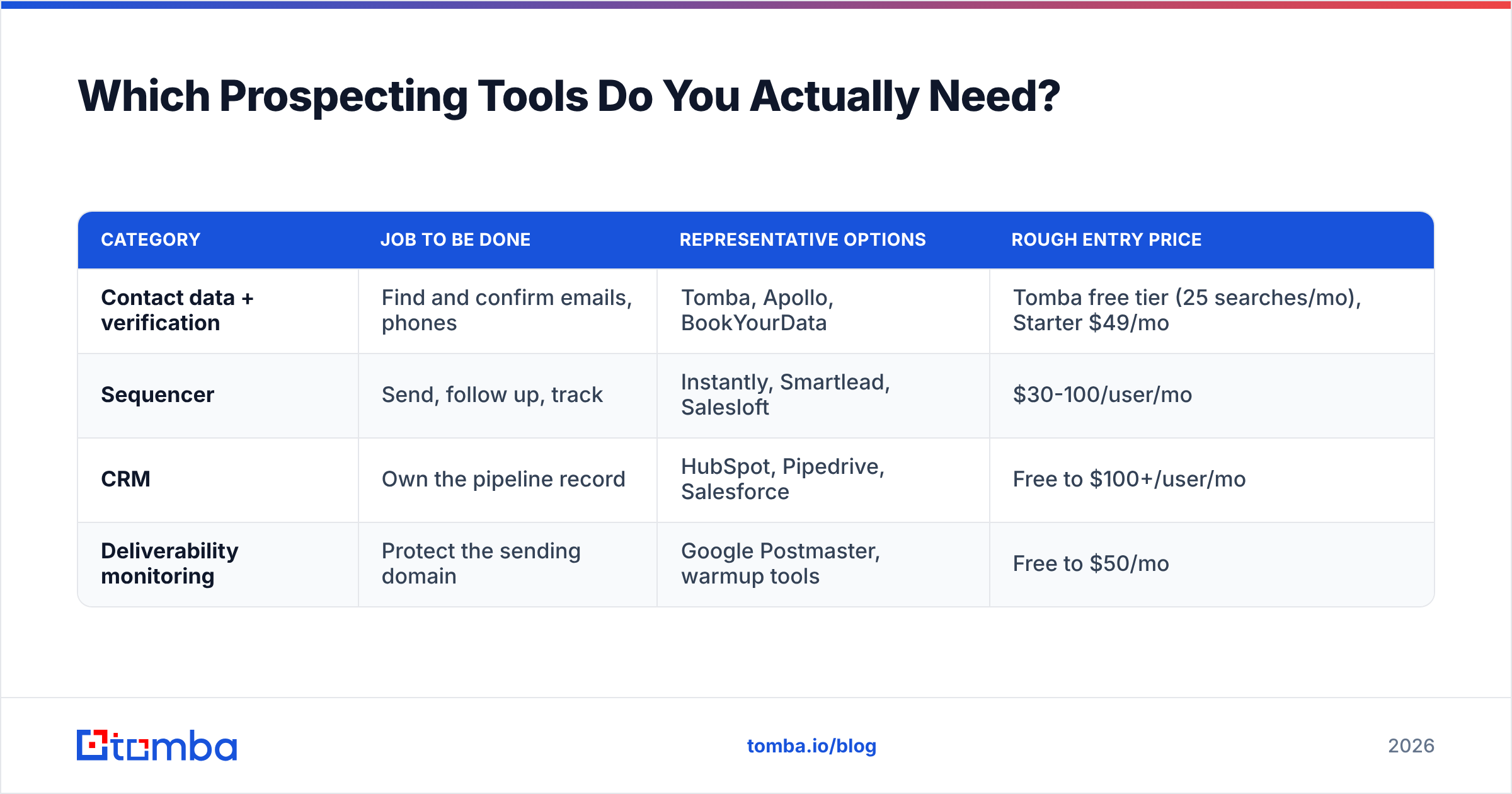
You need four categories, not fourteen. Most stacks are bloated because tools were bought to solve process problems.
| Category | Job to be done | Representative options | Rough entry price |
|---|---|---|---|
| Contact data + verification | Find and confirm emails, phones | Tomba, Apollo, BookYourData | Tomba free tier (25 searches/mo), Starter $49/mo |
| Sequencer | Send, follow up, track | Instantly, Smartlead, Salesloft | $30-100/user/mo |
| CRM | Own the pipeline record | HubSpot, Pipedrive, Salesforce | Free to $100+/user/mo |
| Deliverability monitoring | Protect the sending domain | Google Postmaster, warmup tools | Free to $50/mo |
On data specifically: for account-level bulk lists, a curated database like BookYourData is a solid fit when you want pre-built, filterable B2B records. For live, on-demand lookup — a name and a domain in, a verified address out, wired into your own workflow — a finder-and-verifier API is the better shape. Tomba runs free at 25 searches a month, then $49/mo Starter, $99/mo Growth, and $249/mo Pro; the full breakdown is on Tomba pricing. Many teams run both: a database for the bulk pass, an API for the precision work.
Whatever you pick, check independent reviews on G2 before committing to an annual contract. Vendor-reported accuracy figures are marketing; user reviews at least reflect real lists.
What Metrics Tell You Prospecting Is Working?#
Four numbers. Anything beyond these is a vanity metric that makes a dashboard look busy.
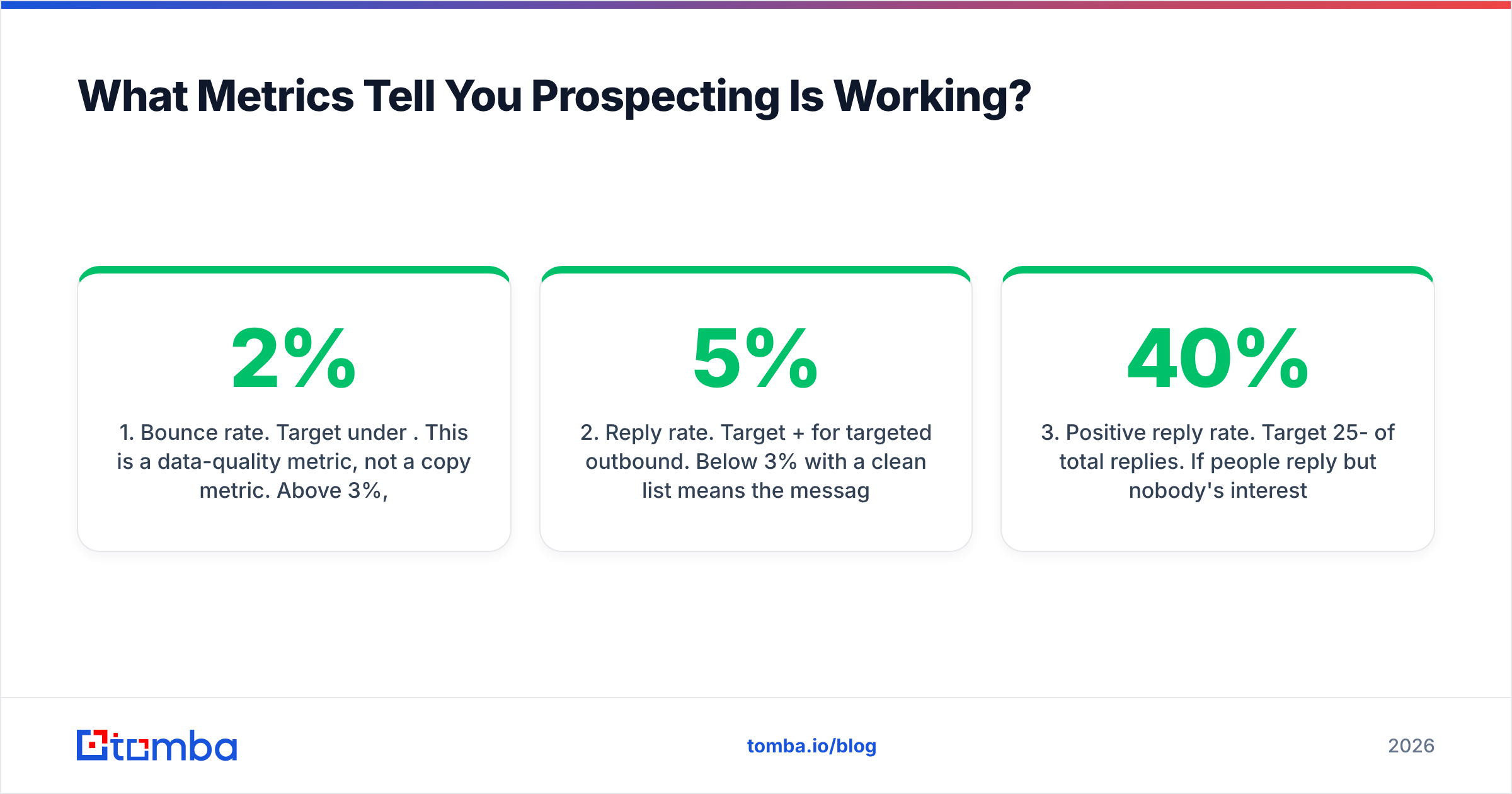
- Bounce rate. Target under 2%. This is a data-quality metric, not a copy metric. Above 3%, stop sending and fix the list.
- Reply rate. Target 5%+ for targeted outbound. Below 3% with a clean list means the message is wrong, not the data.
- Positive reply rate. Target 25-40% of total replies. If people reply but nobody's interested, your targeting is off — you're reaching real humans with the wrong problem.
- Meetings booked per 100 contacts. The only number that connects to revenue. Two to five is a working system.
Read them in order. Each one isolates a different layer: bounce rate tests the data, reply rate tests the message, positive reply rate tests the targeting, meetings-per-100 tests the whole machine. Diagnosing out of order is how teams rewrite perfectly good copy for a problem that was always in the list. Track the underlying definitions consistently — see response rate if your team disagrees on the denominator.
What Should You Do in Your First 30 Days?#
Week 1: write the ICP as a filter and build 100 target accounts. Week 2: map three contacts per account and source their details. Week 3: verify everything, set up authentication, and write two sequences. Week 4: send in batches of 25-50 per day per mailbox and read the four metrics above.
Do not skip to week 4. The temptation is always to start sending, because sending feels like progress. Sending to an unverified list is worse than not sending at all — you burn a domain that takes months to rehabilitate.
Start With the List#
Prospecting rewards precision far more than volume, and precision starts with knowing that the person and the address are both real. Build your account list, map the committee, and then let Tomba's Email Finder resolve the contact details — verified before they reach your sequencer, not after your bounce report tells you it's too late. The free tier gives you 25 searches a month to test it against a list you already trust; if the results match, scale it from there.
Get the data layer right and every downstream problem becomes a copy problem — which is a much better problem to have.
Related guides#
// get started
Find, verify and enrich your first contacts today
Start on the free plan with 25 searches a month, then scale when your team is ready.
Free plan · No credit card required · GDPR & CCPA
// about the author