How to Prospect in Sales: A 2026 Playbook That Books Meetings
Most prospecting advice stops at "send more emails." This playbook walks through the seven-step process reps actually use in 2026 — targeting, list building, verification, sequencing, and the metrics that tell you when to quit.
TL;DR
- Prospecting is not sending emails. It is deciding who deserves an email, and most pipeline problems trace back to that decision, not to the copy.
- The seven-step loop that works in 2026: define ICP → find trigger events → build the list → verify contact data → pick channels → sequence with a real reason to reply → measure and cut.
- Verify before you send. A list with a 12% bounce rate will torch your sending domain faster than any subject line can save it.
- Multichannel beats email-only by a wide margin, but only when the channels reference each other. Three disconnected touches are worse than two connected ones.
- Track reply rate and meetings-per-100-contacts, not emails sent. Volume metrics hide broken targeting for months.
What Does Prospecting Actually Mean in Sales?#
Prospecting is the work of identifying companies and people who plausibly have the problem you solve, then earning a first conversation with them. That is the whole job. Everything else — the sequences, the tools, the LinkedIn voice notes — is execution detail layered on top of that definition.
The confusion starts because "prospecting" gets used interchangeably with "outreach." They are not the same. Outreach is the sending. Prospecting includes the research, the list building, the qualification, and the decision to not contact 80% of the names you could have contacted. Reps who skip straight to outreach end up with impressive activity numbers and an empty calendar.
Here is the practical split most teams land on:
- Research and targeting — who fits, who does not, and why. Roughly 20% of prospecting time.
- List building — pulling the actual companies and people into a workable list. 25%.
- Data hygiene — verifying emails and phone numbers before they enter a sequence. 10%.
- Personalization — finding the one specific thing worth mentioning to each account. 25%.
- Sending and following up — the sequence itself. 20%.
If your split looks like 5/10/0/5/80, you have a volume habit, not a prospecting process.
How Do You Define an ICP That Actually Filters?#
Most ICP documents are useless because they describe a market, not a filter. "B2B SaaS companies, 50–500 employees, North America" describes about 40,000 companies. That is not a filter. That is a category.
A working ICP has three layers:
- Firmographic — industry, headcount, revenue band, geography. Cheap to query, weak as a signal on its own.
- Technographic — what they already run. If your product replaces or integrates with a specific stack, this is your highest-leverage filter. A company running a competitor's tool is qualified in a way a headcount range never proves.
- Behavioral — hiring for a role that implies your problem, opening a new office, a funding round, a leadership change, a compliance deadline. These are trigger events, and they determine when you reach out, not just whether.
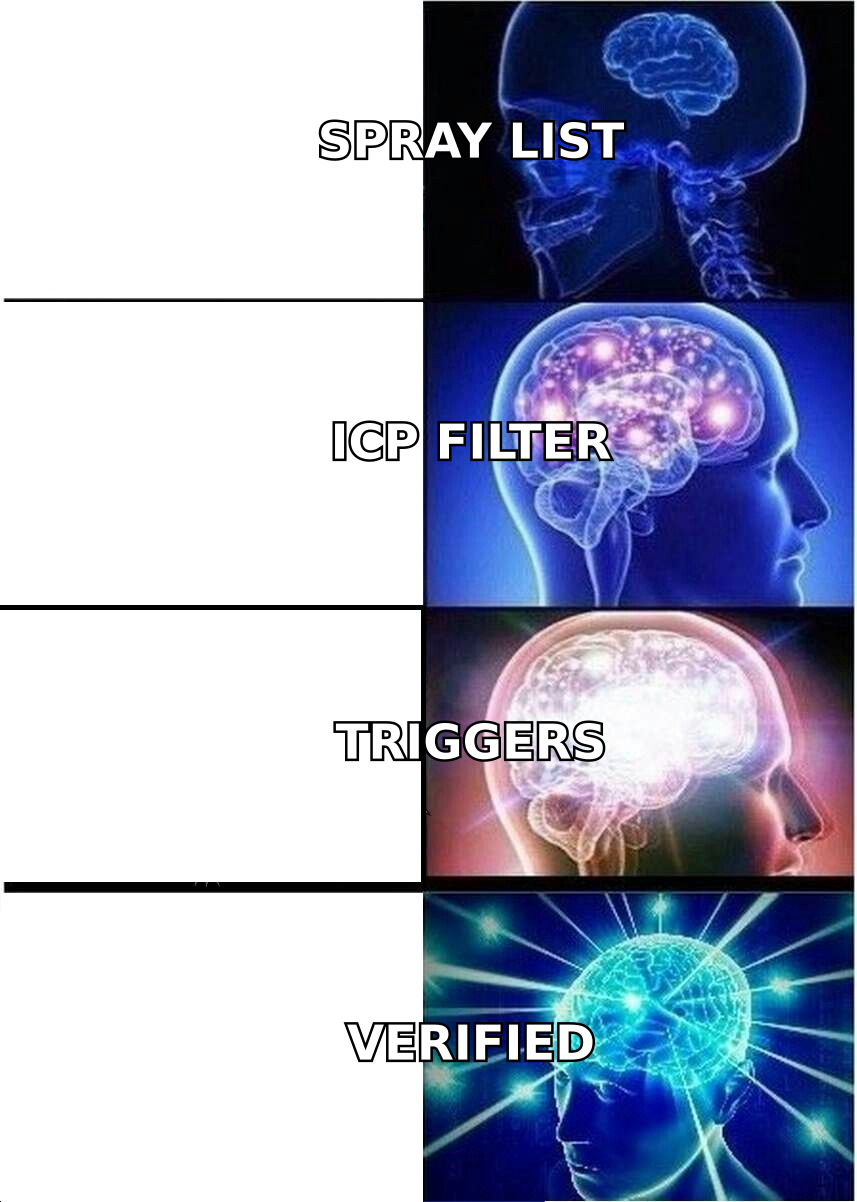
Run all three and 40,000 companies collapses to maybe 400. That collapse is the point. You now have a list you can research properly instead of a list you can only blast.
A quick sanity test: pull your last 20 closed-won deals and check what percentage would have passed your ICP filter before they became customers. If it is under 60%, your filter is describing your happy path rather than your actual market. If it is 100%, your filter is probably too loose to exclude anything.
Where Do You Find Prospects Without Buying a Bad List?#
Purchased lists are the fastest way to get a sending domain blacklisted. They are stale, they are shared across every buyer, and they usually contain a meaningful percentage of spam traps. The alternative is building the list yourself from sources that update themselves.
The reliable sources in 2026:
- LinkedIn Sales Navigator — still the best interface for behavioral filters (job changes, hiring, posting activity). Weak on contact data; strong on identifying the right human.
- Company websites and team pages — a domain search across a target's domain returns the people and email patterns that public scraping misses.
- Job boards — a posting for "Revenue Operations Manager" tells you the company has a RevOps problem and a budget line for it. Free trigger data.
- Funding and news databases — Crunchbase, press releases, SEC filings. Best used as a timing signal, not a targeting signal.
- Your own website traffic — visitor identification surfaces accounts already researching you. Highest intent, smallest volume.
- Communities and events — attendee lists, Slack groups, subreddits. Slow, but the reply rates are two to three times cold outbound.
The pattern across all of these: you are collecting companies with a reason, then finding the right person inside them. Reversing that order — starting with a person because their title matched — is how you end up emailing a VP of Sales at a company that has no possible use for your product.
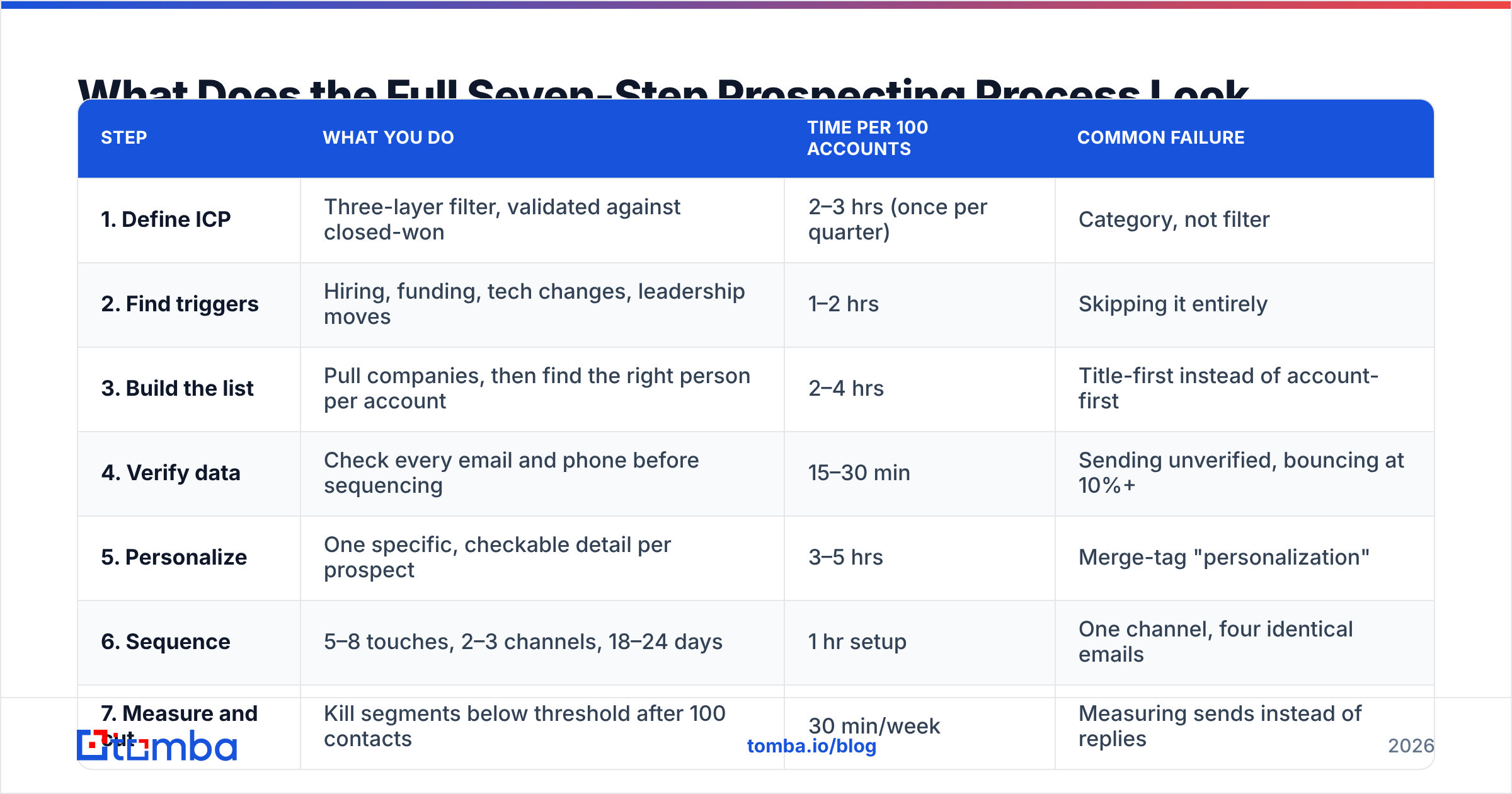
What Does the Full Seven-Step Prospecting Process Look Like?#
| Step | What you do | Time per 100 accounts | Common failure |
|---|---|---|---|
| 1. Define ICP | Three-layer filter, validated against closed-won | 2–3 hrs (once per quarter) | Category, not filter |
| 2. Find triggers | Hiring, funding, tech changes, leadership moves | 1–2 hrs | Skipping it entirely |
| 3. Build the list | Pull companies, then find the right person per account | 2–4 hrs | Title-first instead of account-first |
| 4. Verify data | Check every email and phone before sequencing | 15–30 min | Sending unverified, bouncing at 10%+ |
| 5. Personalize | One specific, checkable detail per prospect | 3–5 hrs | Merge-tag "personalization" |
| 6. Sequence | 5–8 touches, 2–3 channels, 18–24 days | 1 hr setup | One channel, four identical emails |
| 7. Measure and cut | Kill segments below threshold after 100 contacts | 30 min/week | Measuring sends instead of replies |
Step 4 is the one teams skip, and it is the cheapest step on the list. Thirty minutes of verification protects the deliverability that every other step depends on. Skip it and steps 1 through 3 stop mattering — your carefully built list lands in spam.
How Do You Verify Contact Data Before You Send?#
Email addresses decay at roughly 22–30% per year as people change jobs. A list you built six months ago and never re-verified is already meaningfully broken. Mailbox providers read high bounce rates as a spam signal, and the damage compounds: a domain that gets throttled in March is still underperforming in June.
The working thresholds:
- Under 2% bounce rate — healthy. Keep sending.
- 2–5% — warning. Re-verify the list and pause the worst-performing segment.
- Above 5% — stop. Your list source is bad, and continuing will cost you the domain.
Verification is a two-stage job. Syntax and MX checks catch the obvious garbage. SMTP-level checks catch the mailboxes that no longer exist. The hard cases are catch-all domains, which accept everything at the server level and tell you nothing — that is what a dedicated catch-all verifier is for, since a plain verifier will simply mark them "unknown" and leave you guessing.
Also worth doing before every send: run the list through a remove duplicates pass. Contacting the same person from two sequences is a faster way to lose a deal than never contacting them at all.
If you are working from LinkedIn profiles rather than domains, a LinkedIn email extractor closes the gap between "I found the right person" and "I can actually reach them" without exporting anything through a scraper that risks the account.
Which Channels Work Best, and How Do You Combine Them?#
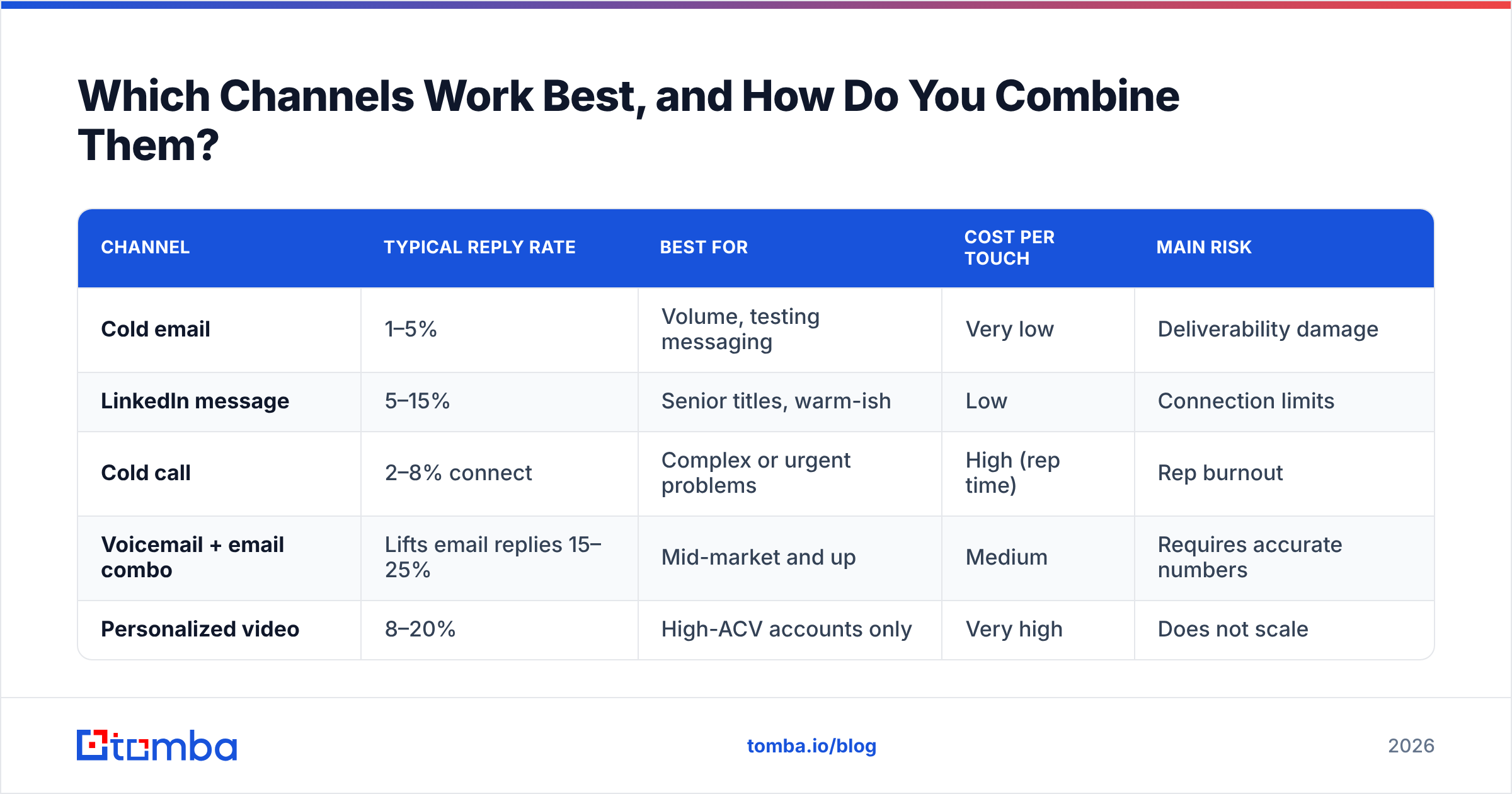
Single-channel prospecting is where reply rates go to die. Email alone gets you somewhere between 1% and 5% reply rate on a well-built list in 2026. Adding a second and third channel — used deliberately, not as noise — roughly doubles that.
| Channel | Typical reply rate | Best for | Cost per touch | Main risk |
|---|---|---|---|---|
| Cold email | 1–5% | Volume, testing messaging | Very low | Deliverability damage |
| LinkedIn message | 5–15% | Senior titles, warm-ish | Low | Connection limits |
| Cold call | 2–8% connect | Complex or urgent problems | High (rep time) | Rep burnout |
| Voicemail + email combo | Lifts email replies 15–25% | Mid-market and up | Medium | Requires accurate numbers |
| Personalized video | 8–20% | High-ACV accounts only | Very high | Does not scale |
The combination matters more than any single channel. A LinkedIn view followed by an email that references something the prospect posted, followed by a call that references the email — that sequence works because each touch makes the next one recognizable. Three touches on three channels that never acknowledge each other just look like three different vendors.
For calls, the constraint is usually data rather than skill. Direct dials beat switchboards by a wide margin, and a phone finder plus validation step keeps reps off dead numbers instead of burning their morning on voicemail trees. HubSpot's sales research has consistently found that multichannel outreach outperforms single-channel across every segment they measure, and nothing in the last two years has reversed that.

How Much Personalization Is Actually Worth It?#
Personalization has a ceiling, and most teams either stop far below it or blow past it into unprofitable territory.
The tiers, ranked by return on effort:
- Segment-level relevance — the email speaks to a specific role at a specific type of company with a specific problem. This is where most of the lift lives, and it costs nothing per prospect because you write it once per segment.
- One checkable detail — a recent hire, a product launch, a stack change, something they published. Thirty to ninety seconds of research. This is the sweet spot for most B2B outbound.
- Deep account research — reading their earnings call, mapping their org chart, building a custom point of view. Twenty to forty minutes per account. Only worth it above roughly $50K ACV.
- Custom assets — a tailored audit, a personalized video, a mock-up. Hours per account. Reserve for named enterprise targets.
The failure mode is confusing tier 2 with merge tags. Hi {{first_name}}, I saw {{company}} is doing great things is not personalization; it is a form letter with a hole in it, and prospects have been trained to spot it since roughly 2019. If the sentence would still make sense with a different company's name in it, delete the sentence.
A useful rule: your first email should contain exactly one claim the prospect can verify is about them specifically, and one question they can answer in under ten words. Everything else is decoration.
How Do You Know If Your Prospecting Is Working?#
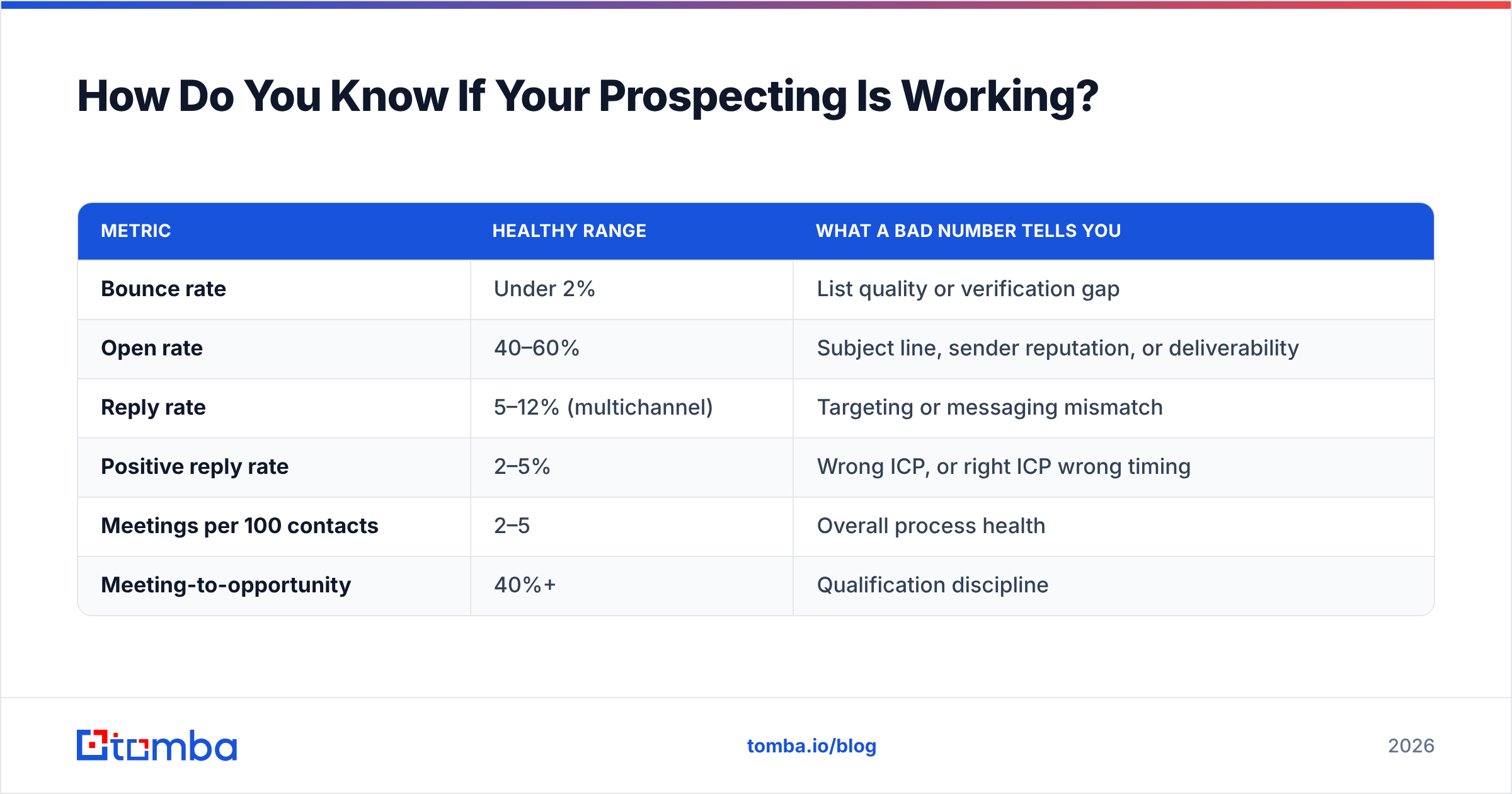
Activity metrics lie. A rep sending 400 emails a week looks productive right up until you notice they have booked two meetings in a month. The metrics that actually diagnose the problem:
| Metric | Healthy range | What a bad number tells you |
|---|---|---|
| Bounce rate | Under 2% | List quality or verification gap |
| Open rate | 40–60% | Subject line, sender reputation, or deliverability |
| Reply rate | 5–12% (multichannel) | Targeting or messaging mismatch |
| Positive reply rate | 2–5% | Wrong ICP, or right ICP wrong timing |
| Meetings per 100 contacts | 2–5 | Overall process health |
| Meeting-to-opportunity | 40%+ | Qualification discipline |
Read them in that order. A low reply rate with a healthy open rate is a messaging problem. A low open rate with a healthy bounce rate is a deliverability or subject-line problem. A high reply rate with a low positive-reply rate means you are reaching people who understand you and do not want you — an ICP problem, and the most expensive one to ignore.
Set a kill threshold before you launch: if a segment produces fewer than one positive reply per 100 contacts, it is dead after 100 contacts. Not 300. The temptation to give a bad segment "a bit more volume" is how quarters get wasted. G2's category reviews are a reasonable sanity check when you suspect the tooling rather than the segment is the constraint.
What Tools Do You Actually Need?#
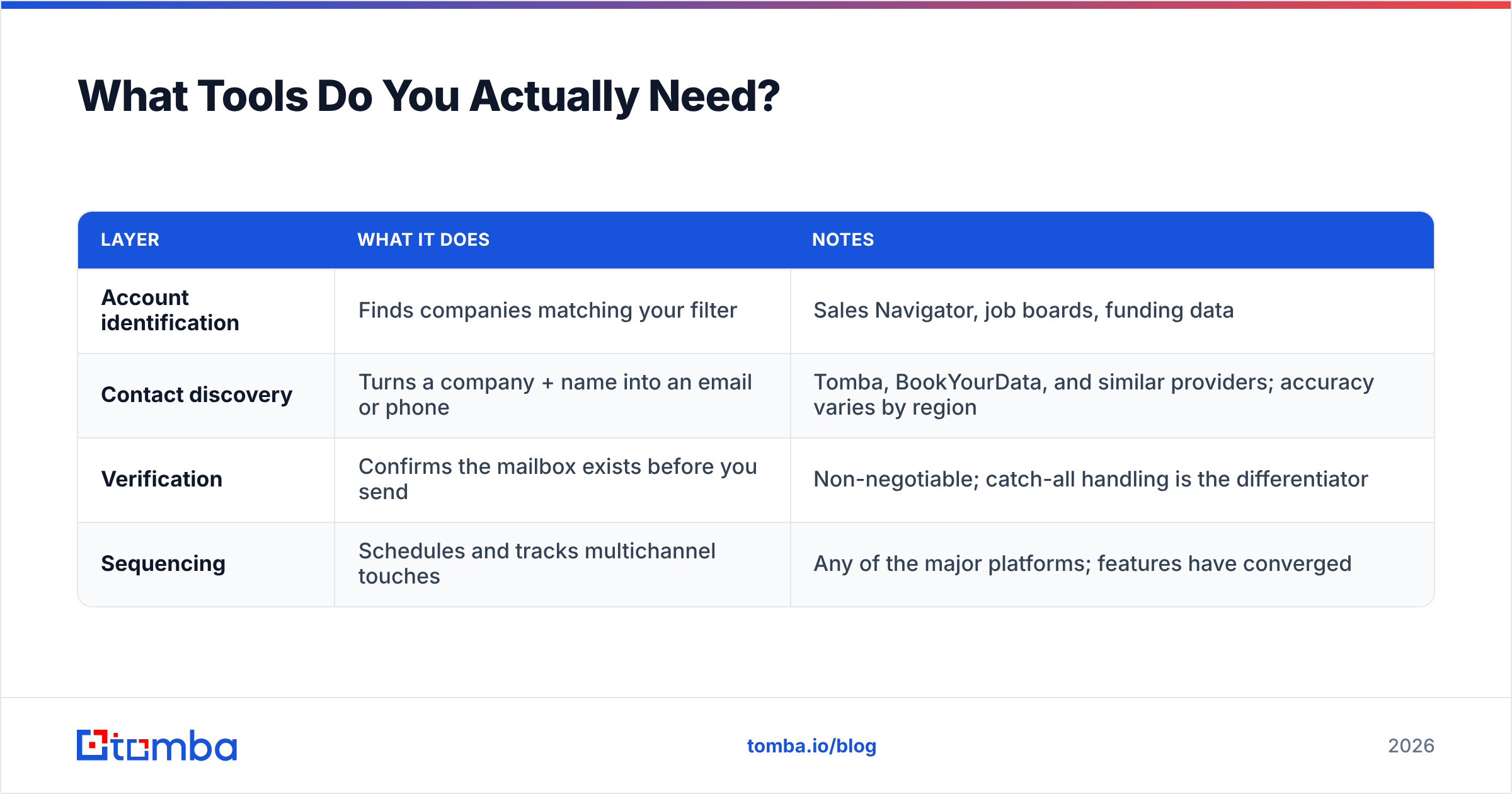
The stack is smaller than vendors would like you to believe. You need four things: a way to identify accounts, a way to find contact data for people at those accounts, a way to verify that data, and a way to sequence.
| Layer | What it does | Notes |
|---|---|---|
| Account identification | Finds companies matching your filter | Sales Navigator, job boards, funding data |
| Contact discovery | Turns a company + name into an email or phone | Tomba, BookYourData, and similar providers; accuracy varies by region |
| Verification | Confirms the mailbox exists before you send | Non-negotiable; catch-all handling is the differentiator |
| Sequencing | Schedules and tracks multichannel touches | Any of the major platforms; features have converged |
On contact discovery, the honest comparison is by coverage rather than by feature list. Providers with strong North American SMB coverage often thin out in EMEA; providers built on verified-at-purchase databases like BookYourData trade breadth for confidence at the point of download. Tomba sits on the discovery-plus-verification side, with a free tier at 25 searches per month and paid plans starting at $49/mo — see Tomba pricing for the full tier breakdown, or the data sources page if you want to understand where the records come from before you commit.
Whatever you pick, test it against a list of 50 contacts you already know the answers for. Vendor-published accuracy numbers are measured on the vendor's own sample. Yours is the only one that matters.
Where Should You Start This Week?#
Pick one segment. Not three. Define the three-layer filter for it, build a list of 100 accounts, find one person per account, verify every address, and run a five-touch sequence across email and LinkedIn over 18 days. Measure meetings per 100 contacts at the end.
That single loop will teach you more about your market than a quarter of unfocused volume. If it produces three or more meetings, scale it. If it produces zero, the filter was wrong, and you found that out for the cost of one week instead of one quarter.
When you are ready to build that list, the Tomba Email Finder handles the step most reps get stuck on — turning a company and a name into a verified, sendable address. Start on the free tier at 25 searches per month, run your first 100-account test, and only pay once the process has proven it books meetings.
Related guides#
// get started
Find, verify and enrich your first contacts today
Start on the free plan with 25 searches a month, then scale when your team is ready.
Free plan · No credit card required · GDPR & CCPA
// about the author