How to Re-Engage Prospects: A 7-Step Revival Playbook
Most closed-lost deals are not dead — they are stale. Here is the 7-step system for re-engaging cold prospects, from data hygiene to the break-up email that actually gets replies.
TL;DR
- Re-engagement fails on data before it fails on copy. Roughly a third of a two-year-old CRM segment has stale or invalid emails — clean the list before you write a single line.
- The best re-engagement trigger is a change: new job, funding round, new tech in the stack, a competitor switch. "Just checking in" is not a trigger.
- Closed-lost deals from 6–18 months ago convert better than net-new cold leads, because the discovery work is already done.
- Sequence structure that works: 1 trigger email, 1 value asset, 1 multi-thread to a new stakeholder, 1 break-up. Four touches, 21 days, then archive.
- Re-verify every dormant contact and re-enrich for job changes before sending, or your bounce rate will torch the domain you just warmed.
What does "re-engaging prospects" actually mean?#
Re-engaging prospects means restarting a sales conversation with someone who already knows who you are — a closed-lost deal, a demo no-show, a trial that expired, a lead that ghosted after three good calls. It is not cold outreach. The relationship exists; the momentum died.
That distinction matters because it changes everything about the play. With cold outreach you are buying attention. With re-engagement you are reclaiming it, and you have context a cold prospect never gives you: their budget cycle, their objections, the name of the person who blocked the deal.
The economics are hard to ignore. A dormant opportunity that reached the demo stage has already cleared qualification, discovery, and at least partial internal buy-in. Re-opening it skips the most expensive part of the funnel. Sales teams that run a structured revival motion typically see reply rates two to three times higher than their cold sequences on the same headcount.
The catch: dormant data decays fast. B2B contact records go stale at roughly 22–30% per year as people change jobs, companies rebrand, and mailboxes get deprovisioned. Your 2024 closed-lost list is not a list anymore. It is a hypothesis.

Why do most re-engagement campaigns fail?#
Four failure modes account for almost all of it.
- The "just checking in" email. No new information, no reason to reply, no cost to ignoring it. If your email could have been sent on any day of the last 400 days, it will be treated like it was.
- Stale data. You send to the contact who left 11 months ago. The mailbox is now a spam trap or a hard bounce. Two hundred of those and your sender reputation is a problem you will spend six weeks unwinding.
- Same person, same pitch. The champion who went quiet went quiet for a reason. Re-sending the original value prop to the original contact is a rerun.
- No exit rule. Reps bump the same thread nine times over five months. That is not persistence; that is a slow-motion unsubscribe.
The fix for all four is structural, not motivational. Build the trigger, clean the data, change the angle, cap the sequence.
How do you segment a dormant list before outreach?#
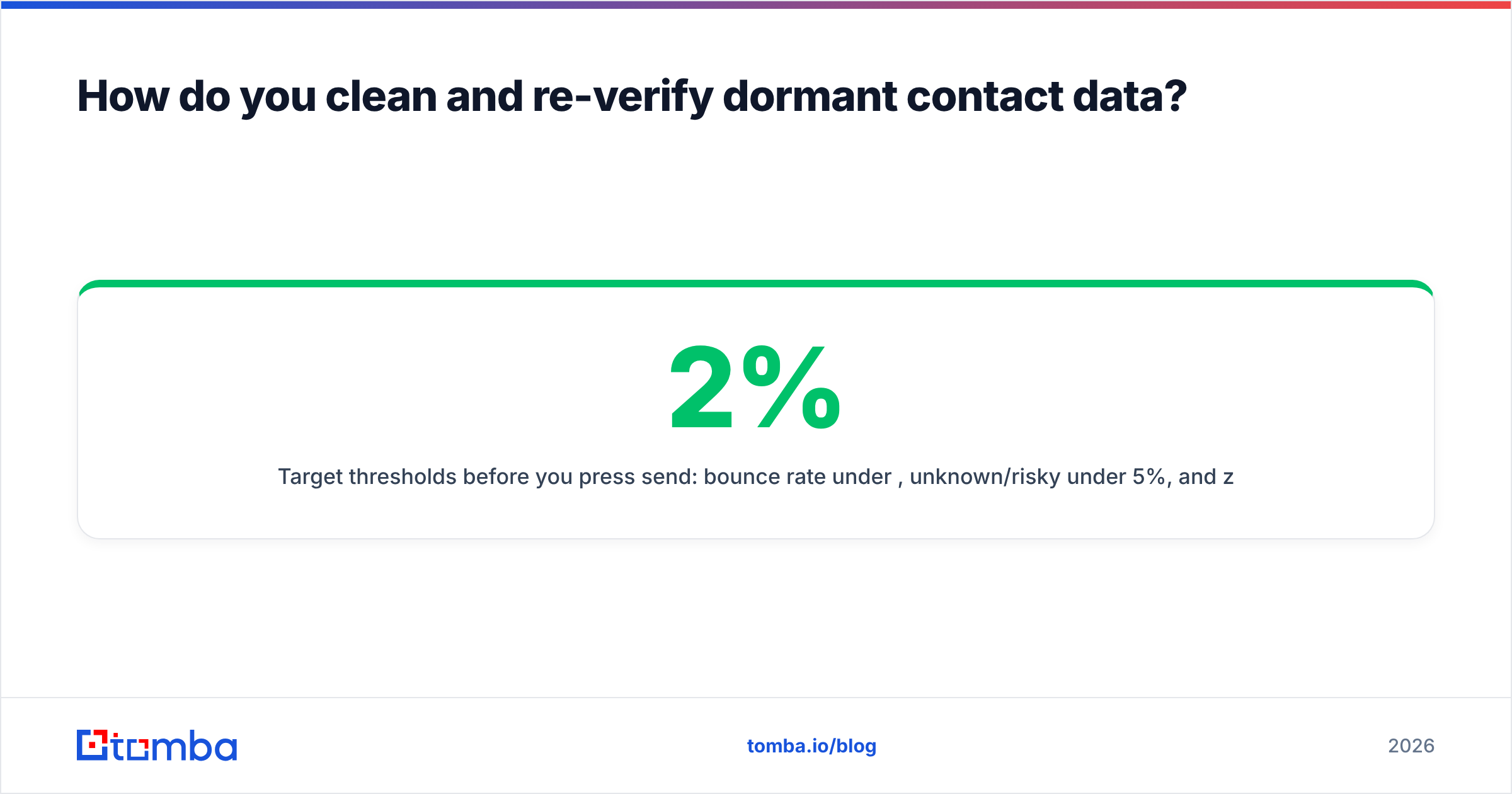
Never treat "everyone who went cold" as one audience. Split the list by why it went cold, because the reason dictates the message.
| Segment | Typical age | Why it stalled | Best re-entry angle | Realistic reply rate |
|---|---|---|---|---|
| Closed-lost to competitor | 9–18 months | Chose another vendor | Renewal-window timing + what changed in your product | 8–14% |
| No-decision / budget freeze | 6–12 months | Budget or priority shift | New fiscal year, new pricing tier, ROI proof | 10–16% |
| Champion left the company | 3–24 months | Contact churn | Multi-thread the successor, reference prior scope | 6–12% |
| Demo no-show / ghosted | 1–6 months | Low intent or bad timing | Short, low-friction, one-question re-ask | 4–9% |
| Expired trial / free tier | 2–12 months | Never activated | Feature they never used + usage-based offer | 12–20% |
| MQL that never converted | 6–18 months | Never qualified | New content trigger, treat as near-cold | 3–7% |
Reply rates here are directional benchmarks from typical mid-market B2B SaaS motions, not guarantees — your ICP fit and list hygiene move them more than any copy change will.
The two segments most teams under-work are expired trial and champion left. Expired trials have the highest intent signal in the entire dataset. And when a champion leaves, they usually land at a company with the same problem — which means one dead deal quietly became two live ones.
How do you clean and re-verify dormant contact data?#
Do this first. Always. Before the copy, before the sequence build.
The workflow is four passes:
- Deduplicate. Merge duplicate records so one human does not receive three copies of your revival email. A quick pass through a remove duplicates step catches most of it.
- Re-verify every address. Dormant lists carry accumulated decay. Run the whole segment through an email verifier and drop anything that is not deliverable. Do not "risk it" on unknowns.
- Handle catch-alls separately. Catch-all domains accept everything and tell you nothing. A dedicated catch-all verifier sorts real mailboxes from black holes so you can send to catch-alls without gambling.
- Re-find the movers. Where a contact bounced because they left, find the person now holding the seat. A domain search on the company gives you the current roster and email pattern in one call; from there the email finder resolves the specific new name.
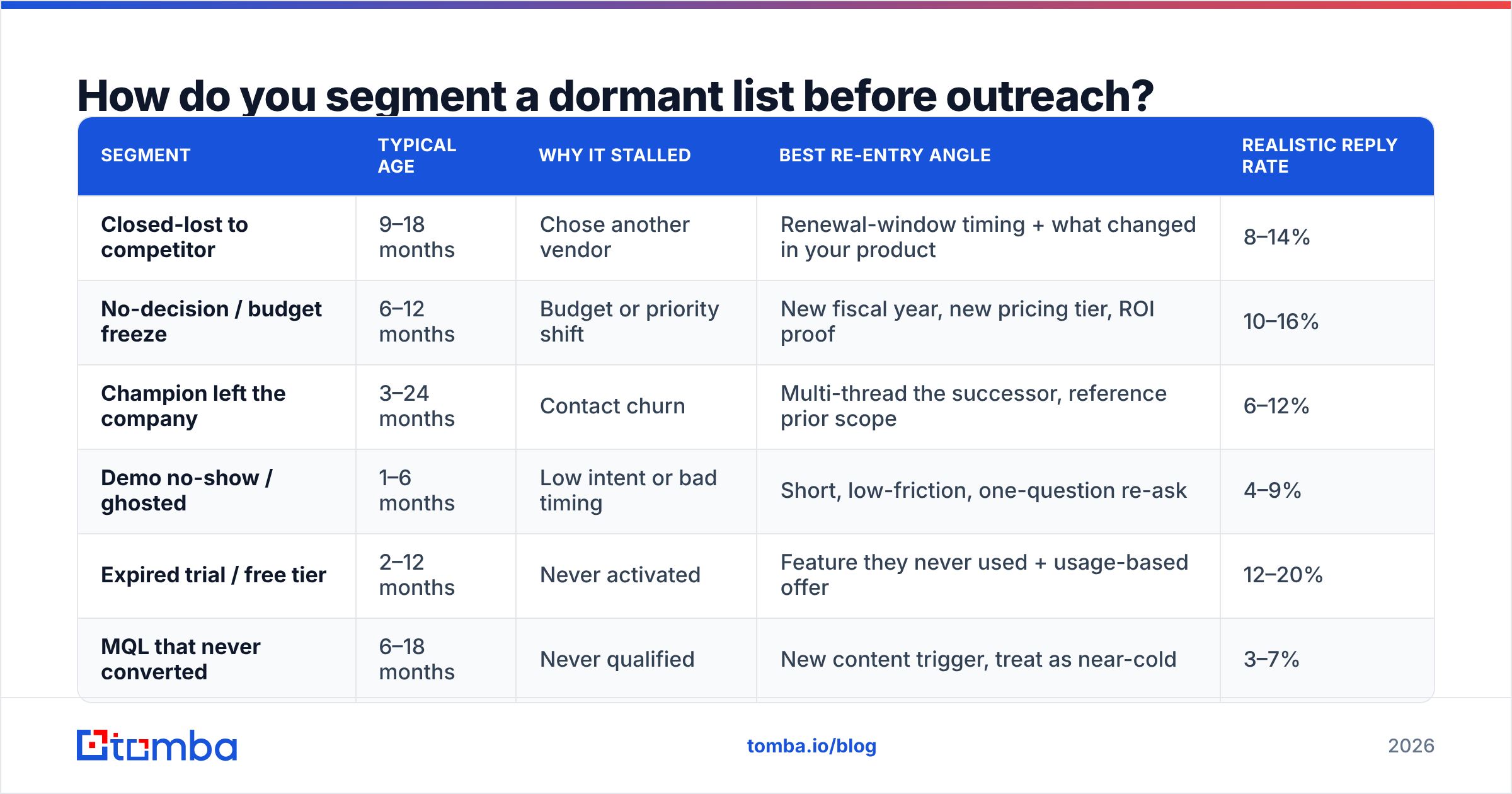
Target thresholds before you press send: bounce rate under 2%, unknown/risky under 5%, and zero role accounts (info@, sales@, support@) in a personalized sequence. Those numbers are not vanity — Google and Microsoft both throttle senders who exceed roughly a 0.3% spam-complaint rate, and a dirty dormant list is the fastest way to get there. Google's own Postmaster Tools guidance spells out the bulk-sender requirements worth reading before any large revival send.
If your dormant list is more than a few hundred rows, run the verify-and-refind step as a batch job rather than record by record — a bulk email finder pass on a 5,000-row export takes minutes and tells you exactly how much of your "pipeline" still exists.
What triggers actually justify reaching back out?#
A trigger is any verifiable change that makes this week a better week to talk than last week. Rank them by strength:
- Job change (strongest). Your old champion just started somewhere new. New leaders buy tools in their first 90 days — this is the single highest-converting re-engagement trigger in B2B.
- Funding or acquisition. Fresh capital reopens frozen budgets. A Series B announcement invalidates the "no budget this year" objection you got in Q3.
- Tech stack change. They ripped out the competitor you lost to, or adopted a platform you integrate with natively.
- Leadership hire. A new VP of Sales or CRO rebuilds the stack. The person who said no is no longer the person deciding.
- Your own product change. The exact gap that killed the deal now ships. This only works if you name the specific objection: "You needed SSO on the mid-tier plan. It shipped in March."
- Contract renewal window. If you lost to a competitor 11 months ago on an annual contract, month 10 is your window — not month 24.
Weak triggers to retire: a new blog post, a generic "thought of you," an industry report nobody asked for, and any variant of "circling back."
What does a re-engagement sequence look like, step by step?#
Four touches over 21 days. Then stop.
Step 1 — Day 0: The trigger email. Two to four sentences. Name the trigger, name the specific past context, ask one question. "Saw you joined Acme as VP RevOps. When we spoke at Beta Corp last year, routing latency was the blocker — is that on your list at Acme?" No attachments, no calendar link, no deck.
Step 2 — Day 4: The proof asset. Send one thing with standalone value: a benchmark, a teardown of their current setup, a customer story from their exact segment. Do not re-pitch. The goal is to be useful enough that a non-reply still costs them something.
Step 3 — Day 11: The multi-thread. Go sideways, not louder. Reach a peer or a level up — the person who inherits the problem. Reference the original conversation openly: "I worked with [name] on this last year; they've since moved on. Wanted to check whether it's still owned by your team." Use a LinkedIn finder to map the current org and pull the right address rather than guessing at a pattern.
Step 4 — Day 21: The break-up. The highest-reply email in almost every sequence. Be genuinely final: "Closing this out on my end — if the timing changes, my door's open." Do not fake-break-up and then re-add them to a nurture blast in six weeks. People notice, and it is the reason break-up emails have lost potency in some markets.
After Day 21: archive to a quarterly newsletter or a marketing nurture track. Do not re-enter the same contact into an SDR sequence for at least two quarters.

How does re-engagement compare to other pipeline sources?#
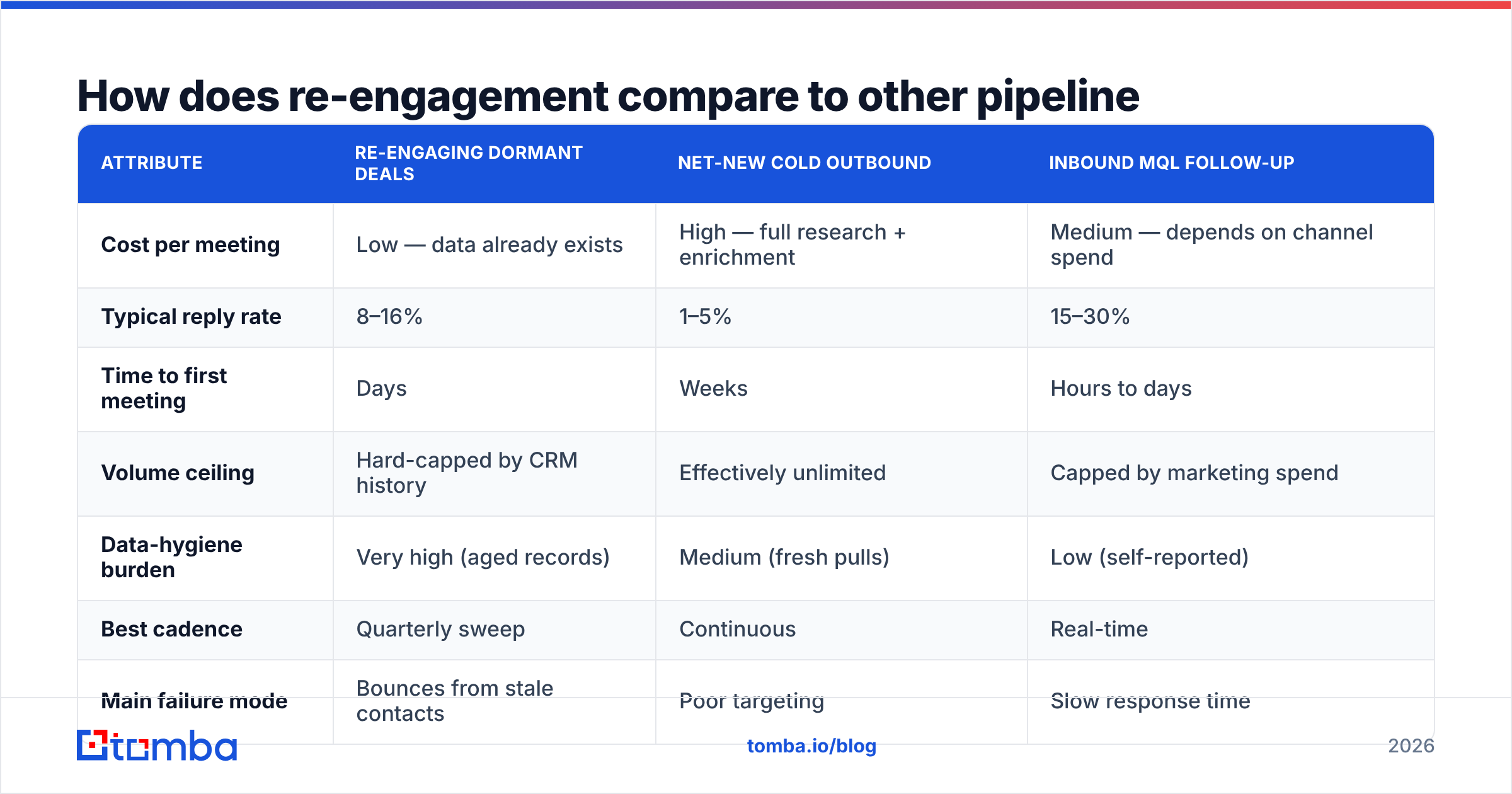
Worth knowing where this motion sits relative to your other options, because it is not a replacement for prospecting — it is a higher-yield supplement with a hard ceiling on volume.
| Attribute | Re-engaging dormant deals | Net-new cold outbound | Inbound MQL follow-up |
|---|---|---|---|
| Cost per meeting | Low — data already exists | High — full research + enrichment | Medium — depends on channel spend |
| Typical reply rate | 8–16% | 1–5% | 15–30% |
| Time to first meeting | Days | Weeks | Hours to days |
| Volume ceiling | Hard-capped by CRM history | Effectively unlimited | Capped by marketing spend |
| Data-hygiene burden | Very high (aged records) | Medium (fresh pulls) | Low (self-reported) |
| Best cadence | Quarterly sweep | Continuous | Real-time |
| Main failure mode | Bounces from stale contacts | Poor targeting | Slow response time |
The takeaway: run re-engagement as a scheduled quarterly sweep, not a continuous motion. You will exhaust a well-worked dormant list in one pass. Trying to squeeze it monthly produces the nine-bump behavior that annoys buyers and wrecks email deliverability.
What should you say when the prospect went dark mid-deal?#
Ghosting mid-cycle is its own category, and the standard advice — "assume they're busy" — is usually wrong. In most stalled B2B deals the silence means something internal changed: priorities moved, a competing project won budget, or your champion lost the argument and would rather not say so.
Three approaches that outperform the bump:
The permission close. "I haven't heard back, which usually means this dropped down the list. Totally fine — should I close the file, or is it worth a look in Q2?" It gives them a low-cost way to say the true thing.
The negative reverse. "I'm guessing the integration scope made this harder to justify than we mapped out. Fair?" Naming the likely objection invites correction, and people correct more readily than they volunteer.
The internal-change probe. "Has ownership of this shifted since we last spoke?" Roughly a quarter of the time the answer is yes, and that answer hands you the new contact for free.
What all three share: they make replying easier than ignoring. Research from HubSpot's sales benchmarks has consistently found that short, single-question emails outperform long re-pitches at this stage, and that pattern holds across most mid-market segments.
How do you build the dormant list operationally?#
A repeatable quarterly process, roughly a half-day of work for a team of five:
- Export. Pull every opportunity closed-lost 6–18 months ago, plus expired trials and demo no-shows older than 60 days.
- Enrich for change. Run data enrichment across the export to flag job changes, headcount growth, funding, and tech-stack shifts. Anything with a change flag jumps the queue.
- Verify and repair. Drop the undeliverables, re-find the movers, sort the catch-alls (see the hygiene section above).
- Score by trigger strength. Job change and funding at the top, generic aging at the bottom. Work top-down and stop when reply quality drops.
- Assign by relationship. Give each record to the rep who originally worked it where possible. Continuity is worth more than territory logic here.
- Cap the send. No more than 150–200 revival emails per mailbox per week, spread across days. A dormant list is exactly the kind of send that trips volume filters.
For teams running this in a spreadsheet, the Google Sheets add-on and the Tomba API both handle the verify-and-enrich step inline, so you are not exporting to a third tool and back. Peers in this space — including BookYourData, which offers verified prebuilt B2B lists — solve the adjacent problem of sourcing net-new contacts; re-engagement is about repairing contacts you already earned.
What metrics tell you the play is working?#
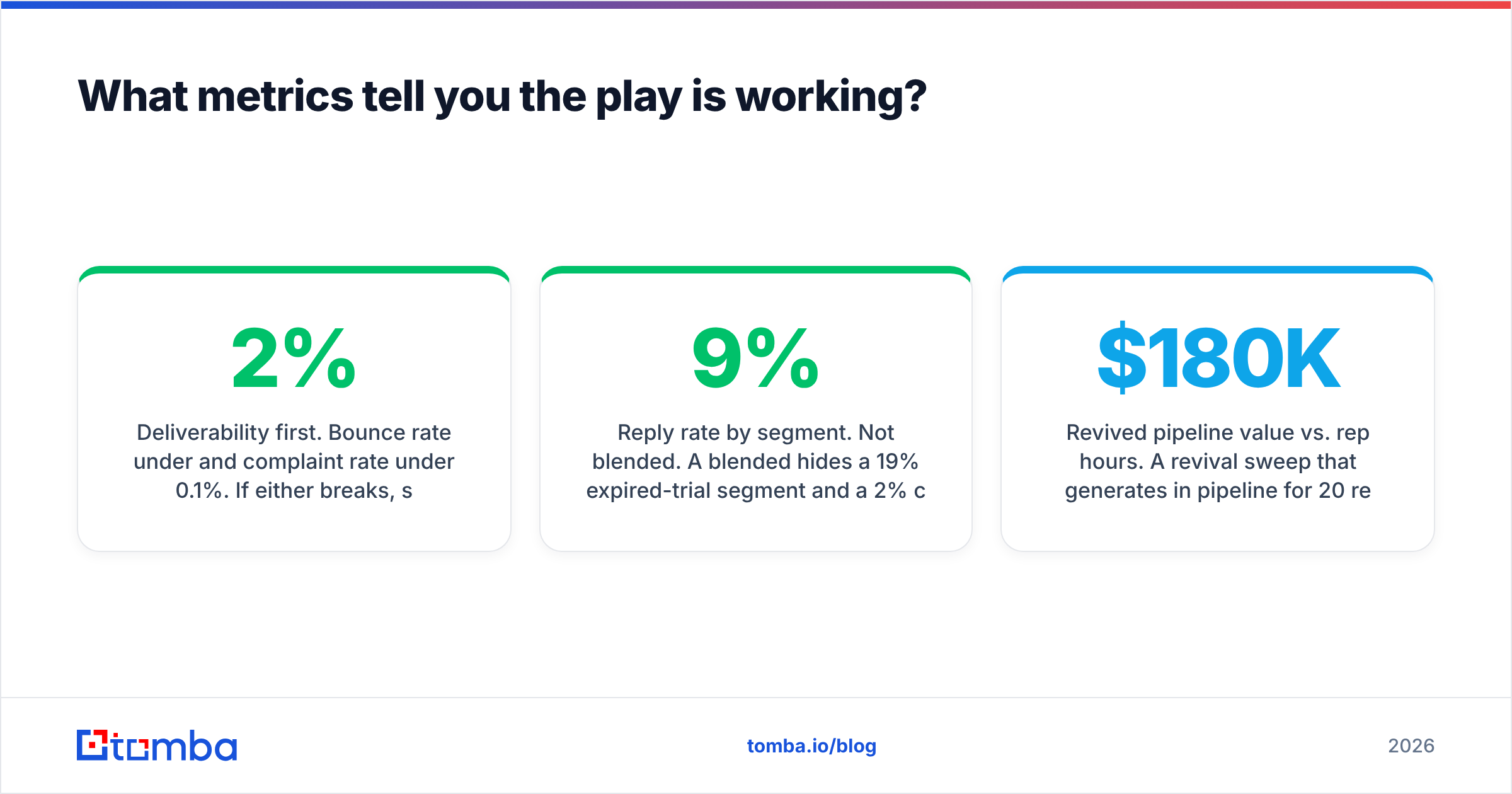
Track these four, and ignore open rates entirely — Apple Mail Privacy Protection has made them noise since 2021.
- Deliverability first. Bounce rate under 2% and complaint rate under 0.1%. If either breaks, stop the campaign and go back to data hygiene. Nothing else matters until this is clean.
- Reply rate by segment. Not blended. A blended 9% hides a 19% expired-trial segment and a 2% cold-MQL segment that you should have cut.
- Meetings per 100 verified contacts. Verified, not exported. This is the number that tells you whether re-engagement beats net-new for your team.
- Revived pipeline value vs. rep hours. A revival sweep that generates $180K in pipeline for 20 rep-hours is a better use of a quarter than almost anything else on the board. If it does not clear that bar, your list is too old or your triggers are too weak.
One more diagnostic worth watching: the ratio of positive to total replies. Re-engagement campaigns that get lots of "please remove me" responses are not suffering from bad copy — they are suffering from bad segmentation. Tighten the trigger criteria, cut the volume, and the ratio recovers.
Start with the data, not the copy#
The best re-engagement email in the world fails if it lands in a deprovisioned mailbox. Before you rewrite a single subject line, run your dormant list through verification, find the contacts who moved, and enrich for the triggers that make this week different from last week.
Tomba's Email Finder resolves the current address for every contact who changed jobs since your deal went cold, and pairs with the verifier so nothing risky reaches your sending domain. The free tier gives you 25 searches a month to test a slice of your list; paid plans start at $49/mo on Starter, $99/mo on Growth, and $249/mo on Pro — full Tomba pricing is public if you want to size a quarterly sweep before committing. Clean the list, pick the trigger, send four emails, and stop. That is the whole play.
Related guides#
// get started
Find, verify and enrich your first contacts today
Start on the free plan with 25 searches a month, then scale when your team is ready.
Free plan · No credit card required · GDPR & CCPA
// about the author