How To Reduce Bounce Rate: 9 Fixes for Cold Email in 2026
Bounce rate over 3% is the fastest way to burn a sending domain. Here are nine concrete fixes — list verification, catch-all handling, SMTP checks and sending hygiene — that pull most senders under 2% inside a month.
TL;DR
- A bounce rate above 3% is a deliverability emergency, not a rounding error. Google and Microsoft treat it as a spam signal, and the damage outlives the campaign that caused it.
- Roughly 70–80% of hard bounces trace back to one thing: sending to addresses that were never verified, or were verified months ago and have gone stale.
- The fastest fix stack is verify → segment catch-alls → warm the domain → throttle volume → suppress aggressively. In that order.
- Catch-all domains are where most "verified" lists quietly leak bounces. They need a separate process, not a binary valid/invalid flag.
- Most senders who follow the 30-day plan at the end of this post land between 0.5% and 1.8% bounce rate — well inside mailbox-provider tolerance.
What is a bounce rate, and what counts as "good" in 2026?#
Your bounce rate is the percentage of sent emails that a receiving mail server refuses to deliver. If you send 1,000 emails and 40 come back undelivered, you bounced at 4%.
Think of it like a postal carrier with a stack of letters. If one in twenty-five addresses doesn't exist, the carrier starts to wonder where you got the list — and eventually stops trusting anything with your return address on it. Mailbox providers work the same way, just faster and with less patience.
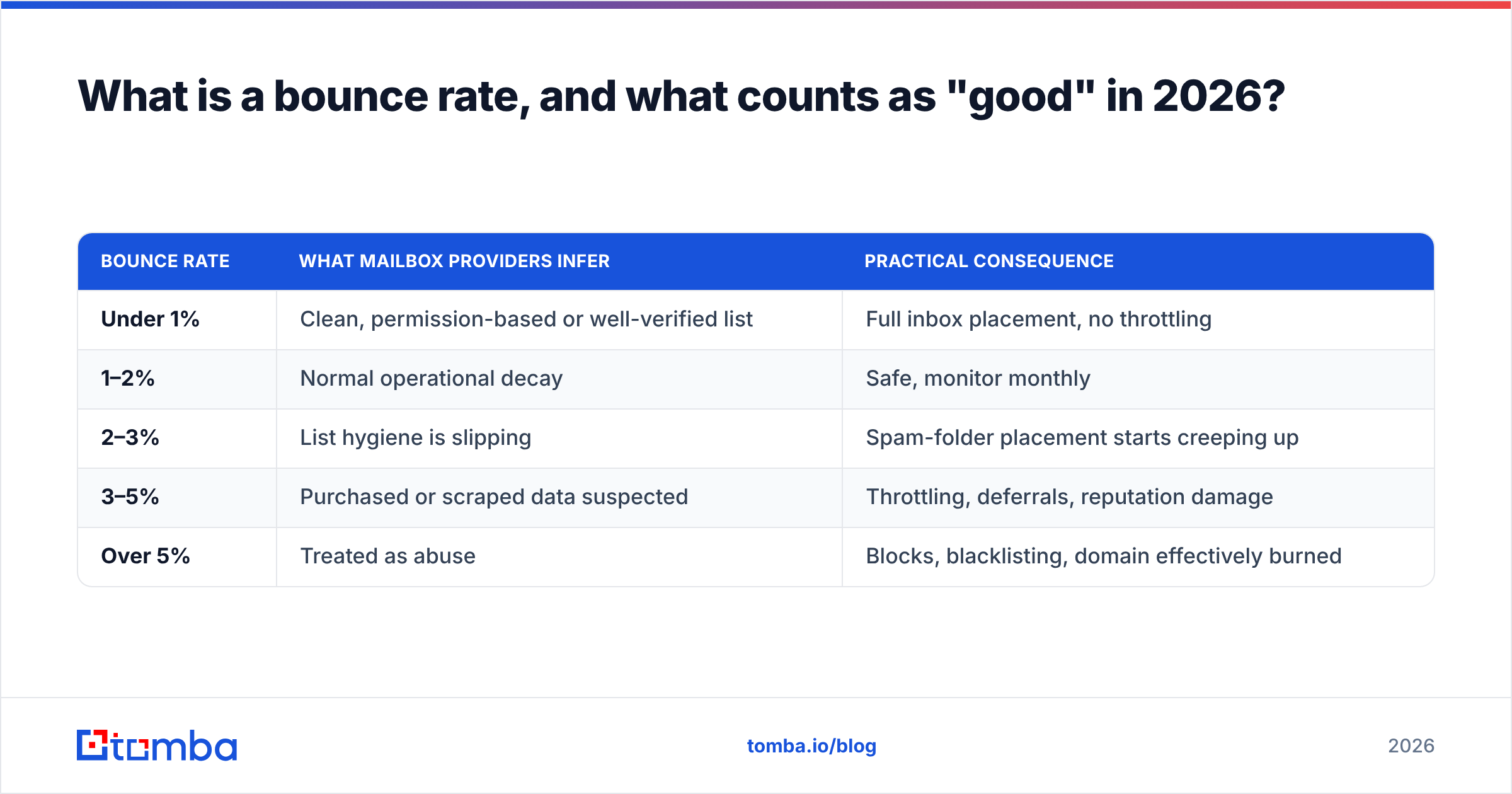
The thresholds that matter in 2026:
| Bounce rate | What mailbox providers infer | Practical consequence |
|---|---|---|
| Under 1% | Clean, permission-based or well-verified list | Full inbox placement, no throttling |
| 1–2% | Normal operational decay | Safe, monitor monthly |
| 2–3% | List hygiene is slipping | Spam-folder placement starts creeping up |
| 3–5% | Purchased or scraped data suspected | Throttling, deferrals, reputation damage |
| Over 5% | Treated as abuse | Blocks, blacklisting, domain effectively burned |
Google's sender guidelines don't publish a single magic number, but the enforcement behavior is consistent: repeated invalid-recipient attempts from the same domain get rate-limited within days. Microsoft is stricter and less forgiving on recovery.
The number that actually matters is your hard bounce rate. Soft bounces (full mailbox, temporary server issue, oversized message) are noise. Hard bounces (address does not exist, domain does not exist) are the ones that tell a receiving server you don't know who you're emailing.
Why does a high bounce rate hurt more than a few failed sends?#
Because bounces are a leading indicator, not a lagging one.
When you email 500 dead addresses, you lose 500 sends — that's the visible cost. The invisible cost is that your sender reputation drops for every subsequent send, including to people who genuinely want to hear from you. A domain that bounces at 6% for two weeks will see open rates on its good contacts fall by a third, and that decline persists for weeks after the list is cleaned.
Three compounding effects:
- Reputation is domain-level, not campaign-level. Your product announcement pays for your outbound team's dirty prospecting list.
- Spam traps hide inside stale data. Recycled traps are old real addresses that providers reactivate specifically to catch senders who never clean their lists. Hitting one is worse than a hundred bounces.
- Recovery is asymmetric. Reputation falls in days and rebuilds over four to eight weeks of consistent, low-bounce sending.

What actually causes a high bounce rate?#
Before fixing anything, diagnose. Pull your last 5,000 sends and bucket the SMTP response codes. Almost every bounce falls into one of these six categories:
- Unverified addresses — the address was guessed, permutated, or scraped and never checked against a live mail server. This is the single largest bucket for cold outbound, typically 50–70% of hard bounces.
- Data decay — the address was valid when you sourced it. B2B contact data decays at roughly 22–30% per year as people change jobs, so a list bought 18 months ago is already a third dead.
- Catch-all domains treated as valid — the domain accepts everything at SMTP time, so your verifier said "OK," but the specific mailbox doesn't exist and the server bounces it later or routes it to a black hole.
- Role and distribution addresses —
info@,sales@,support@,careers@. Some deliver, many are filtered, and they skew complaint rates even when they don't bounce. - Authentication and infrastructure failures — missing or broken SPF record, DKIM misalignment, no DMARC policy, or a brand-new domain with zero sending history. These generate rejections that look like bounces in your ESP dashboard.
- Volume shock — going from 20 sends a day to 800 on a domain with no warmup. Receiving servers defer or reject the surge outright.
Notice that only three of these are list problems. The other three are infrastructure problems that a verification tool cannot fix. Both halves need work.
How do you reduce bounce rate step by step?#
Here's the sequence that produces the fastest measurable drop. Do them in order — verification first, because it's the highest-leverage change and it makes every later measurement cleaner.
Step 1 — Verify every address before it enters a sequence. Run the full list through an email verifier and drop everything marked invalid. This alone usually cuts bounce rate by 60–80%. Use bulk verify for anything over a few hundred rows rather than checking addresses one at a time.
Step 2 — Handle catch-alls as their own segment. Don't lump them with valid addresses and don't discard them — many of your best accounts run catch-all domains. Push them through a catch-all verifier that uses pattern confidence and secondary signals rather than a single SMTP handshake, then send to them at lower volume on a separate subdomain.
Step 3 — Suppress role addresses in cold sequences.
Keep them for support and billing flows. Remove info@, admin@, noreply@, abuse@ and similar from prospecting.
Step 4 — Fix authentication before you scale.
SPF, DKIM and a DMARC policy at minimum p=none with reporting on. Check your records with a free SPF checker and confirm alignment. If you can't pass a DMARC alignment check, nothing else you do here matters.
Step 5 — Warm the sending domain properly. Two to four weeks, starting at 15–20 sends a day, increasing 20–30% every few days. New domains and freshly reactivated ones both need this.
Step 6 — Throttle per-inbox volume. Cap each mailbox at 40–50 cold sends per day. Add more mailboxes instead of pushing one harder. Randomize intervals.
Step 7 — Re-verify anything older than 90 days. Set it as a recurring job, not a one-off cleanup. A list verified in January is a different list by April.
Step 8 — Suppress on the first hard bounce, permanently. Never retry a hard bounce. Never let it re-enter a list through a re-import. Maintain a global suppression file across every tool you send from.
Step 9 — Monitor with provider-side data, not just your ESP. Google Postmaster Tools shows domain reputation, spam rate and authentication pass rates straight from Gmail. Your ESP only shows what it sees.

Hard bounce vs soft bounce: how should you treat each?#
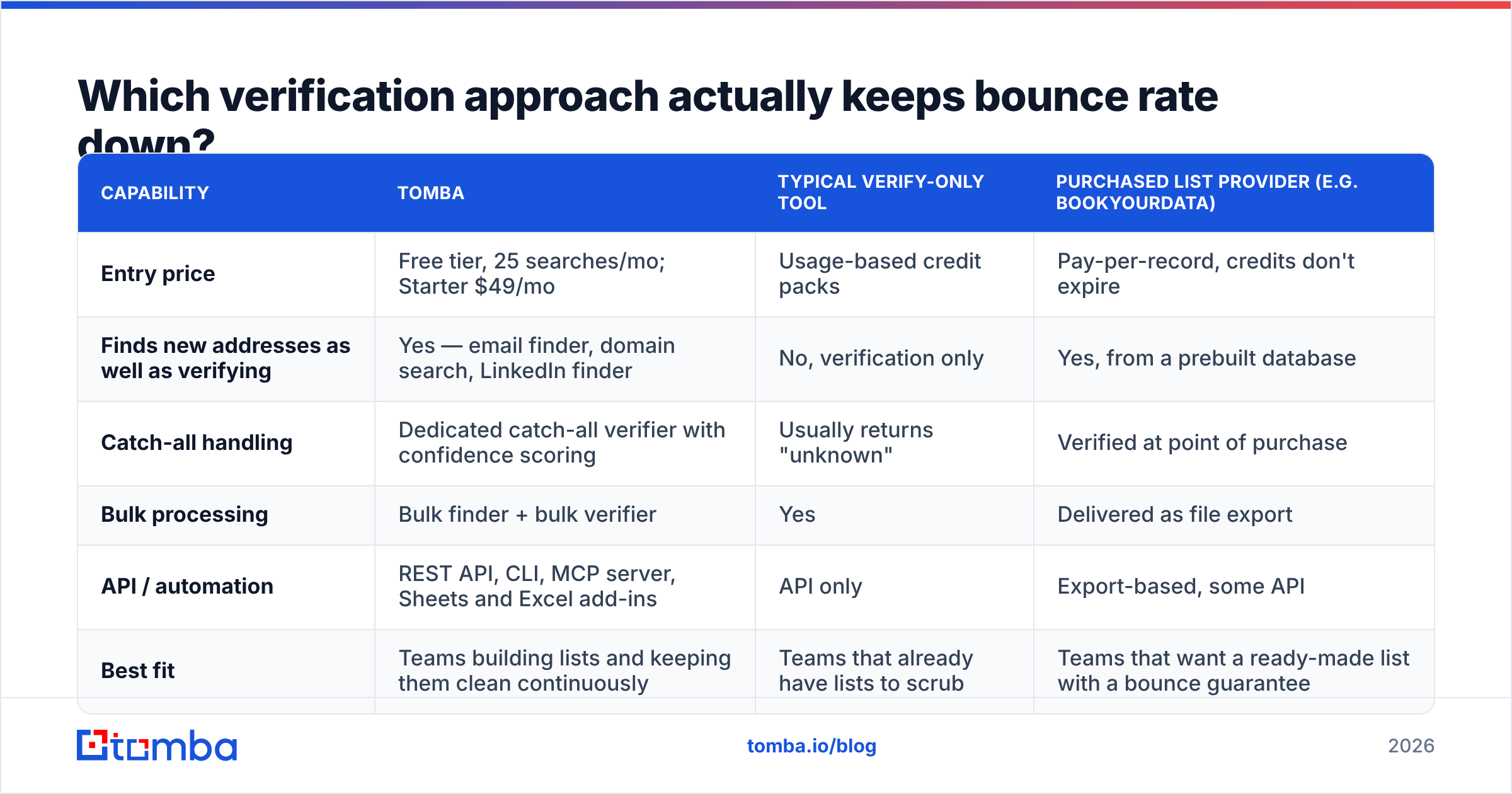
Treating both the same way is how good lists get destroyed. Here's the split:
| Attribute | Hard bounce | Soft bounce |
|---|---|---|
| Typical SMTP code | 550, 553 (permanent) | 421, 450, 452 (temporary) |
| Common cause | Address or domain does not exist | Mailbox full, server busy, message too large |
| Reputation impact | Severe and immediate | Minimal if it resolves |
| Correct action | Suppress permanently, never retry | Retry up to 3 times over 72 hours |
| Acceptable rate | Under 1% | Under 3% |
| Preventable by verification | Yes, almost entirely | Partially |
A bounce message always contains the reason code. If your sending tool doesn't surface it, that's a reason to change tools — you're flying blind on the one metric that decides whether your domain survives.
Which verification approach actually keeps bounce rate down?#
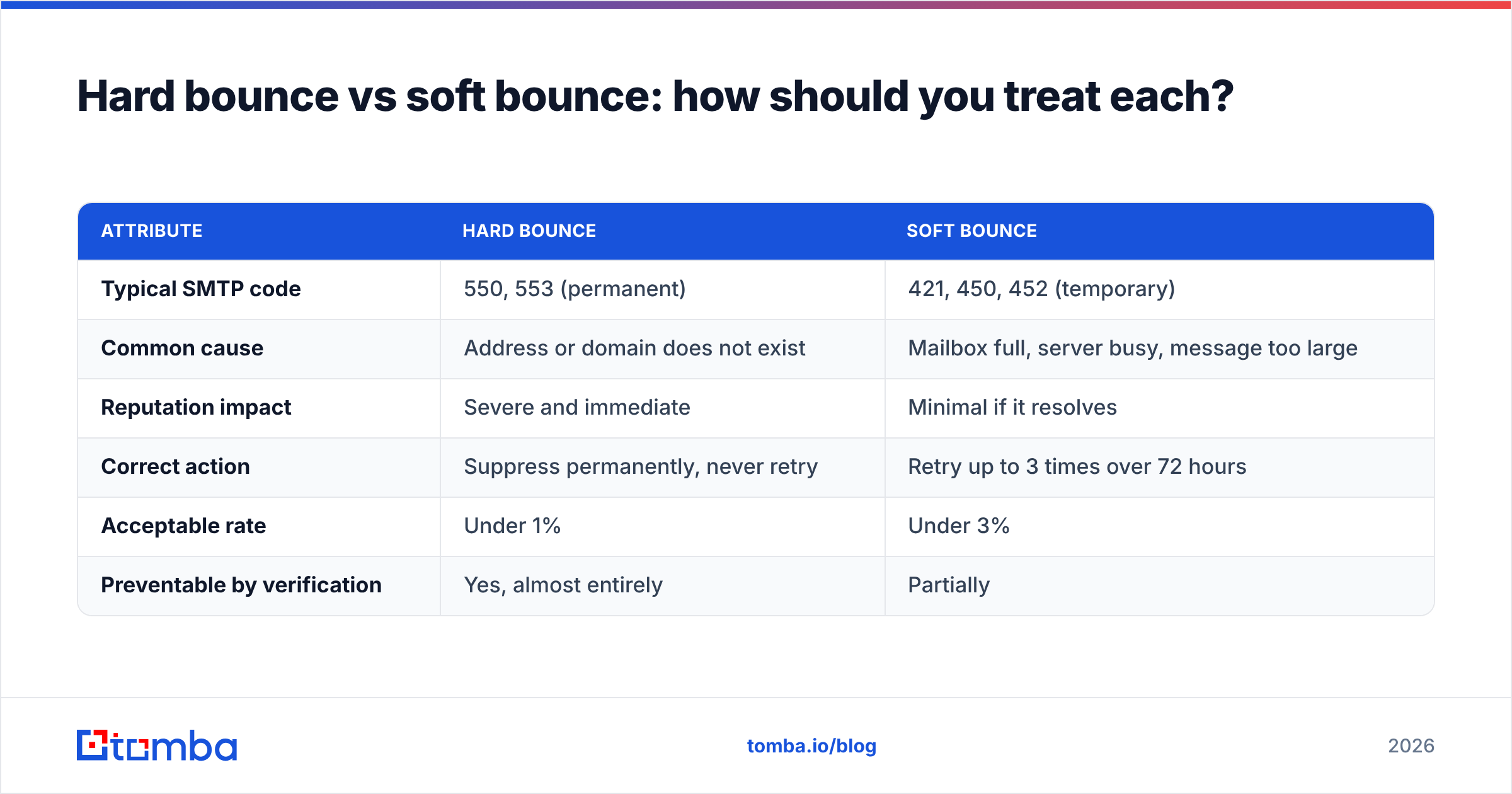
Verification tools differ less in whether they catch obvious invalids — everyone does that — and more in how they handle the ambiguous 15–25% of any B2B list: catch-alls, greylisted servers, and freshly changed roles.
| Capability | Tomba | Typical verify-only tool | Purchased list provider (e.g. BookYourData) |
|---|---|---|---|
| Entry price | Free tier, 25 searches/mo; Starter $49/mo | Usage-based credit packs | Pay-per-record, credits don't expire |
| Finds new addresses as well as verifying | Yes — email finder, domain search, LinkedIn finder | No, verification only | Yes, from a prebuilt database |
| Catch-all handling | Dedicated catch-all verifier with confidence scoring | Usually returns "unknown" | Verified at point of purchase |
| Bulk processing | Bulk finder + bulk verifier | Yes | Delivered as file export |
| API / automation | REST API, CLI, MCP server, Sheets and Excel add-ins | API only | Export-based, some API |
| Best fit | Teams building lists and keeping them clean continuously | Teams that already have lists to scrub | Teams that want a ready-made list with a bounce guarantee |
BookYourData's model — a pre-verified database with a delivery guarantee — is genuinely strong when you want a list handed to you and you're prospecting into well-covered segments. It's a different job than continuous verification. If your list is generated fresh each week from LinkedIn exports, event attendee lists, or website visitors, you need verification running as a pipeline step, not a one-time purchase.
The practical answer for most outbound teams is both: buy or build the list, then re-verify before every send cycle. Verification is cheap. A burned domain is not. Full Tomba pricing sits at Free (25 searches/mo), Starter $49/mo, Growth $99/mo, Pro $249/mo, and custom Enterprise.
How do you handle catch-all domains without guessing?#
Catch-all domains accept mail addressed to any local part, so a standard SMTP check can't distinguish jane.doe@acme.com from asdfgh@acme.com. Both return "accepted." Roughly 20–25% of B2B domains are configured this way, and they skew heavily toward mid-market and enterprise — exactly the accounts you want.
Three workable approaches, in order of reliability:
- Pattern confidence. If you know
firstname.lastname@is the confirmed format across 40 other contacts at that company, an address matching the pattern is far more likely to be real. This is what a good email finder gives you that a raw verifier doesn't. - Corroborating sources. An address that appears in a public signature, a conference speaker page, a GitHub commit, or a press release is confirmed by evidence, not inference.
- Controlled test sends. Send to a small catch-all cohort from a separate subdomain, at low volume, and measure. Promote the segment only if it holds under 2%.
What doesn't work: permutating five variations and emailing all of them. That guarantees four bounces per contact and is the single most common self-inflicted deliverability wound in cold outbound.
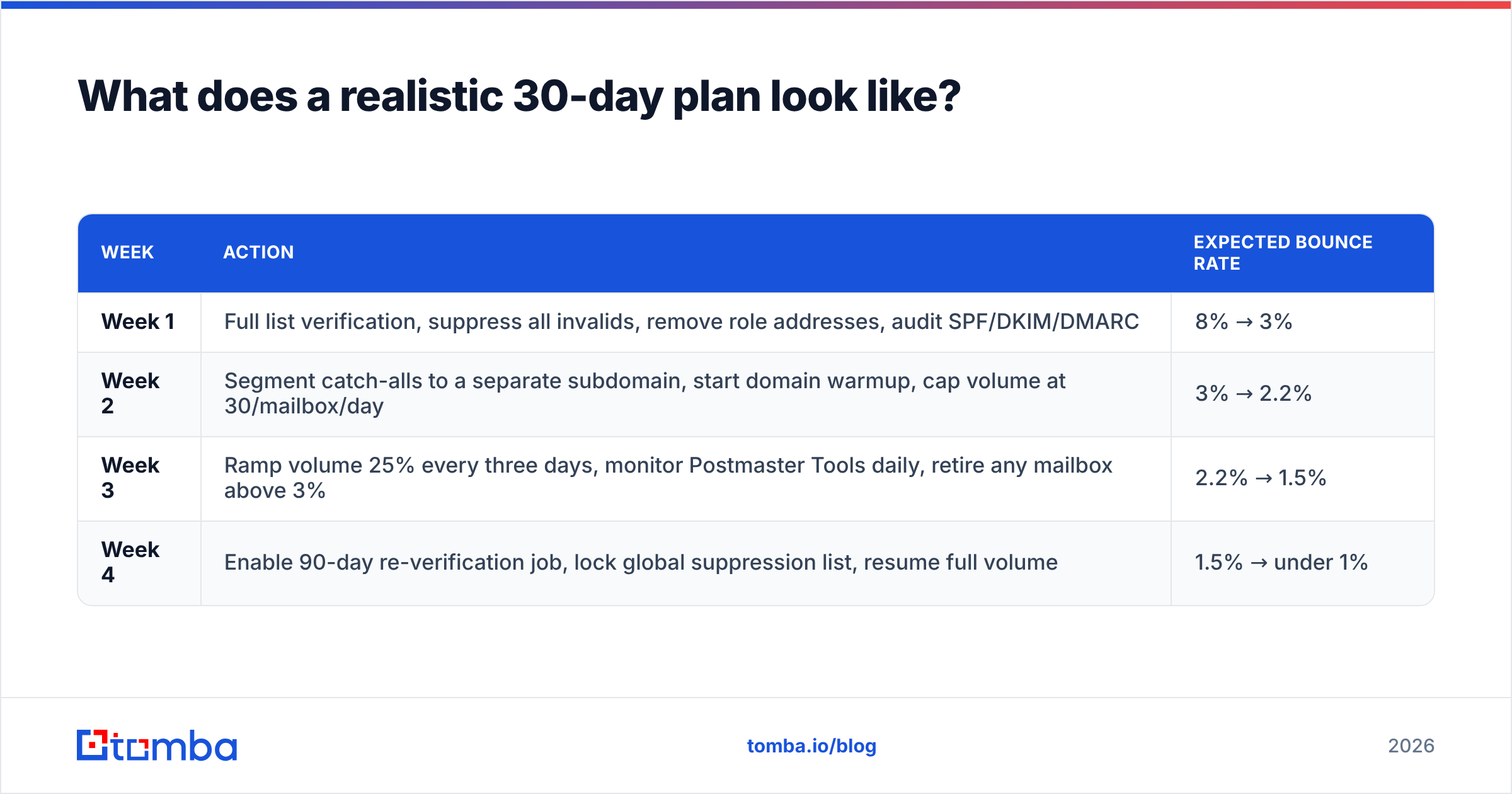
What does a realistic 30-day plan look like?#
| Week | Action | Expected bounce rate |
|---|---|---|
| Week 1 | Full list verification, suppress all invalids, remove role addresses, audit SPF/DKIM/DMARC | 8% → 3% |
| Week 2 | Segment catch-alls to a separate subdomain, start domain warmup, cap volume at 30/mailbox/day | 3% → 2.2% |
| Week 3 | Ramp volume 25% every three days, monitor Postmaster Tools daily, retire any mailbox above 3% | 2.2% → 1.5% |
| Week 4 | Enable 90-day re-verification job, lock global suppression list, resume full volume | 1.5% → under 1% |
Two rules that keep the gains: re-verify on a schedule, and never re-import a suppressed address. Most teams that regress do so because a "fresh" CSV quietly reintroduced contacts they already knew were dead.
What should you measure after the cleanup?#
Bounce rate alone isn't enough. Track these together, weekly:
- Hard bounce rate — target under 1%, alert above 2%.
- Spam complaint rate — target under 0.1%. Complaints hurt more than bounces.
- Domain reputation in Postmaster Tools — should read "High" or "Medium." "Low" or "Bad" means stop sending immediately.
- Authentication pass rate — should sit at 100%. Anything less is a config bug.
- Reply rate by segment — the real business metric. A clean list that nobody answers is a targeting problem, not a deliverability one. Benchmarks across email programs are collected in HubSpot's marketing statistics if you want external comparison points.
If bounce rate is under 1% and replies are still flat, stop optimizing deliverability and go fix your targeting and copy. The two problems look identical in a dashboard and have completely different solutions.
Start with a list that doesn't bounce#
The cheapest bounce is the one you never send. If you're generating prospect lists from company domains, LinkedIn exports, or account lists, the Tomba Email Finder returns addresses with source attribution and a confidence score, so you know why an address is believed valid before it enters a sequence — not after a mail server tells you it isn't.
Start on the free tier with 25 searches a month, run a sample of your current list through it, and compare the verdicts against your last campaign's bounce log. If the overlap surprises you, you've found where your bounce rate is coming from.
Related guides#
// get started
Find, verify and enrich your first contacts today
Start on the free plan with 25 searches a month, then scale when your team is ready.
Free plan · No credit card required · GDPR & CCPA
// about the author