How to Remind Someone About an Email Without Being Annoying
Most email reminders fail because they repeat the original ask. Here's the timing, structure, and wording that actually gets a reply — plus when to stop chasing entirely.
TL;DR
- Wait 3 business days after the original email before the first reminder. Sooner reads as anxious; later reads as forgotten.
- Never write "just following up." Replace the reminder with new information — a deadline, a resource, a shortened ask, or a graceful exit.
- Reply in the same thread for the first two reminders. Switch to a fresh subject line only on the third.
- Cap it at three reminders, then send a breakup email and move the contact to a 90-day nurture list.
- Half of "ignored" emails were never delivered. Verify the address before you assume silence means rejection.
Why do people ignore your first email?#
Silence is rarely a verdict. The average knowledge worker gets 120+ emails a day and triages the inbox in seconds. Your message competes with payroll, their boss, and a Slack notification that just stole their attention mid-scroll.
There are four realistic reasons you got no reply, and each one calls for a different reminder:
- They never saw it. It landed in spam, in Promotions, or bounced silently at a catch-all domain. No reminder wording fixes this — you fix it upstream with email verification and clean sending infrastructure.
- They saw it and deferred it. Read at 8:41am while walking into a meeting, mentally filed under "later," never resurfaced. This is the most common case and the one reminders solve best.
- They're interested but blocked. Waiting on budget, on a colleague, on a quarter to end. Your reminder should make it easy for them to say "not yet" instead of nothing.
- They're not interested. They don't want to say no out loud. A well-written reminder gives them permission to close the loop, which is worth more to you than an open thread.
Notice that only one of these four is a real rejection. That's why quitting after one unanswered email throws away most of your pipeline.
When should you send a reminder email?#
Timing beats wording. Send too fast and you signal that you have nothing better to do; send too slow and the context is gone.
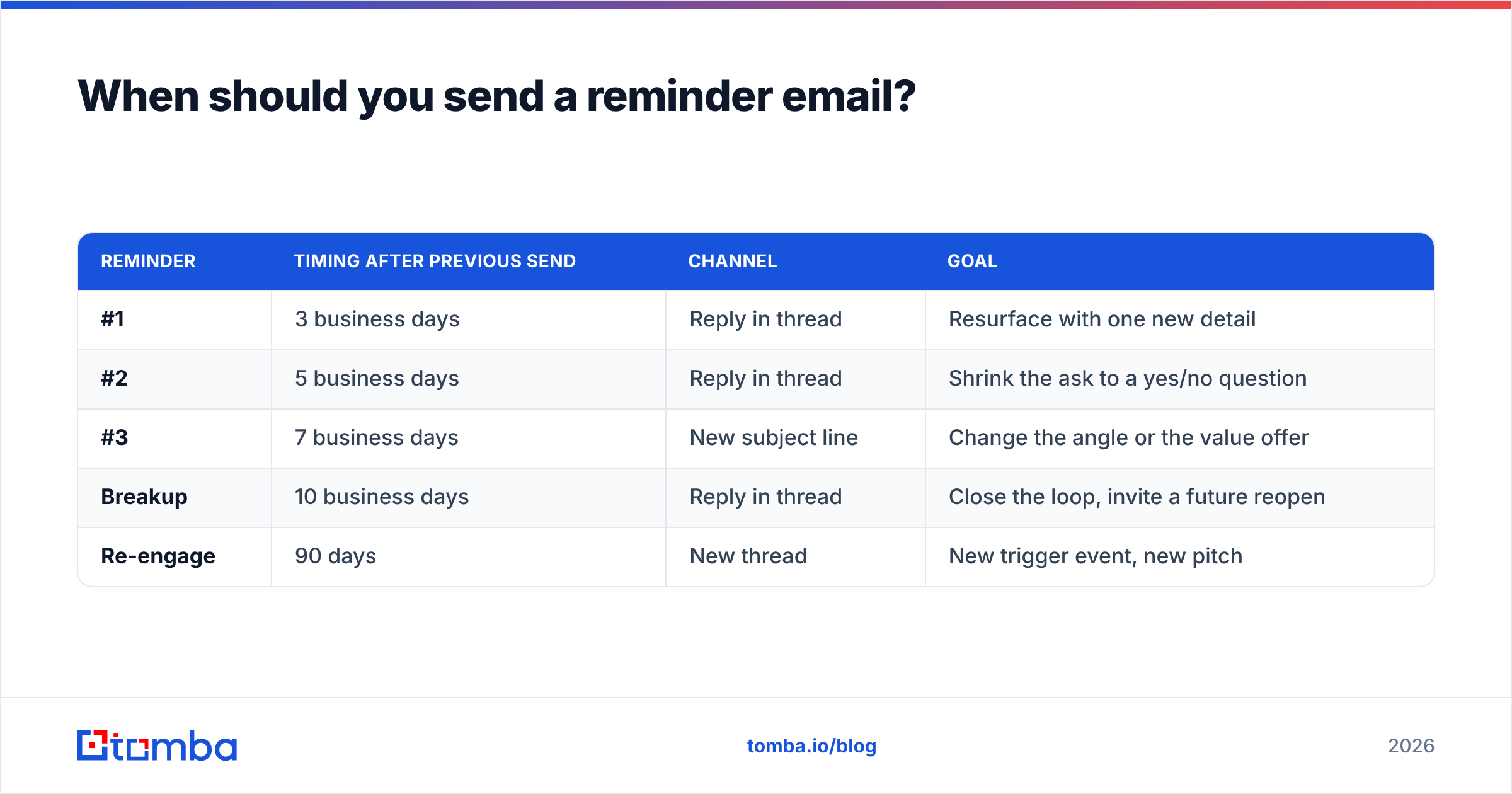
Here's the cadence that holds up across sales, recruiting, and internal requests:
| Reminder | Timing after previous send | Channel | Goal |
|---|---|---|---|
| #1 | 3 business days | Reply in thread | Resurface with one new detail |
| #2 | 5 business days | Reply in thread | Shrink the ask to a yes/no question |
| #3 | 7 business days | New subject line | Change the angle or the value offer |
| Breakup | 10 business days | Reply in thread | Close the loop, invite a future reopen |
| Re-engage | 90 days | New thread | New trigger event, new pitch |
Two adjustments to that grid:
- Deadline-driven emails compress it. If the invoice is due Friday or the interview slot expires Tuesday, remind at 24 and 48 hours. The deadline supplies the urgency, so you don't have to manufacture it.
- Executive contacts stretch it. VPs and C-level contacts reply on 7-14 day lags routinely. Sending a 48-hour bump to a CRO reads as junior.
Send between 7-9am in the recipient's timezone on Tuesday, Wednesday, or Thursday. Monday morning is triage day and your reminder gets archived with the weekend backlog. Friday afternoon is a black hole.
How do you write a reminder that doesn't annoy people?#
The rule: a reminder must add something the original email didn't have. If your follow-up only repeats the ask louder, you've taught the recipient that ignoring you has no cost and answering you has no benefit.
Four things you can add:
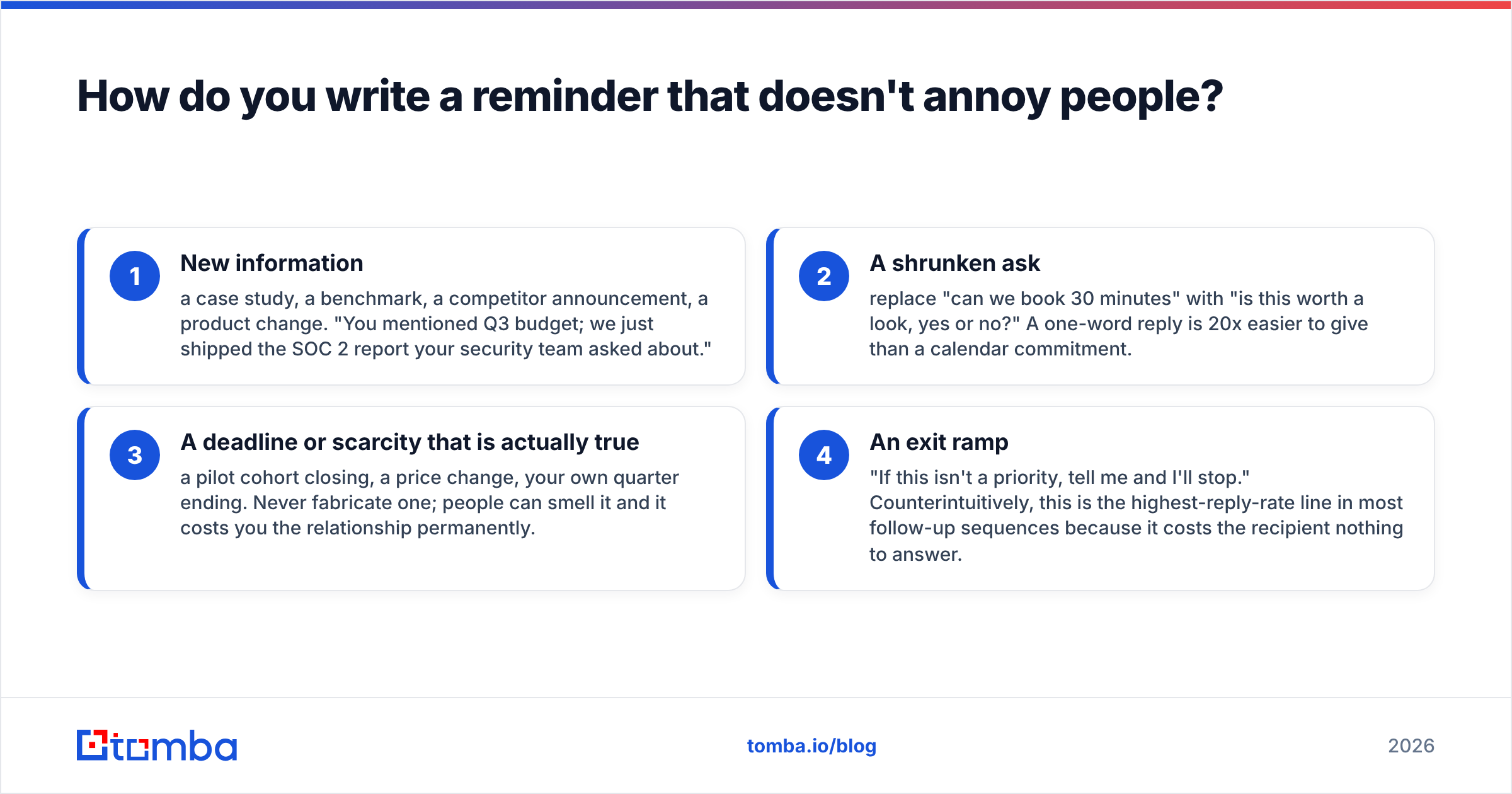
- New information — a case study, a benchmark, a competitor announcement, a product change. "You mentioned Q3 budget; we just shipped the SOC 2 report your security team asked about."
- A shrunken ask — replace "can we book 30 minutes" with "is this worth a look, yes or no?" A one-word reply is 20x easier to give than a calendar commitment.
- A deadline or scarcity that is actually true — a pilot cohort closing, a price change, your own quarter ending. Never fabricate one; people can smell it and it costs you the relationship permanently.
- An exit ramp — "If this isn't a priority, tell me and I'll stop." Counterintuitively, this is the highest-reply-rate line in most follow-up sequences because it costs the recipient nothing to answer.
Things to delete from every reminder you write: "just following up," "circling back," "bumping this to the top of your inbox," "I know you're busy," "did you get my last email?" These phrases carry zero information and signal that you're about to repeat yourself. HubSpot's sales follow-up research has been flagging the same filler for years, and it still shows up in most sequences.
Keep the reminder shorter than the original. Under 75 words, one question mark, one link maximum. If your first email was 200 words and your reminder is 250, you've inverted the effort ratio.
What are the best reminder email templates?#
Six templates, each mapped to a situation. Swap the brackets, delete anything that doesn't apply, and don't send more than one of these per week to the same person.
1. The soft resurface (reminder #1, in-thread)
Hi [Name] — adding one thing I left out: [specific detail relevant to their role]. Still worth a quick look?
2. The yes/no shrink (reminder #2)
Hi [Name] — simplest version of my ask: is [outcome] something your team is working on this quarter? Yes or no is a complete answer.
3. The deadline reminder (invoices, documents, scheduling)
Hi [Name] — quick reminder that [item] is due [date]. Here's the link again: [link]. Let me know if anything's blocking it on your end.
4. The angle change (reminder #3, new subject line)
Subject: [New topic they care about]
Hi [Name] — different angle. [Peer company] solved [problem] by [approach]. Two-minute writeup here if useful: [link]. Happy to leave it there if it's not relevant.
5. The breakup
Hi [Name] — I'll assume the timing isn't right and stop here. If [problem] moves up the list later this year, reply to this thread and I'll pick it back up.
6. The internal nudge (colleagues, not prospects)
Hi [Name] — [item] is waiting on your input before I can move it forward. Do you need anything from me to unblock it? Aiming to ship [date].
If you want more structure around subject lines specifically, run your line through a subject line tester before you send — reminder subject lines fail far more often than the body copy does.
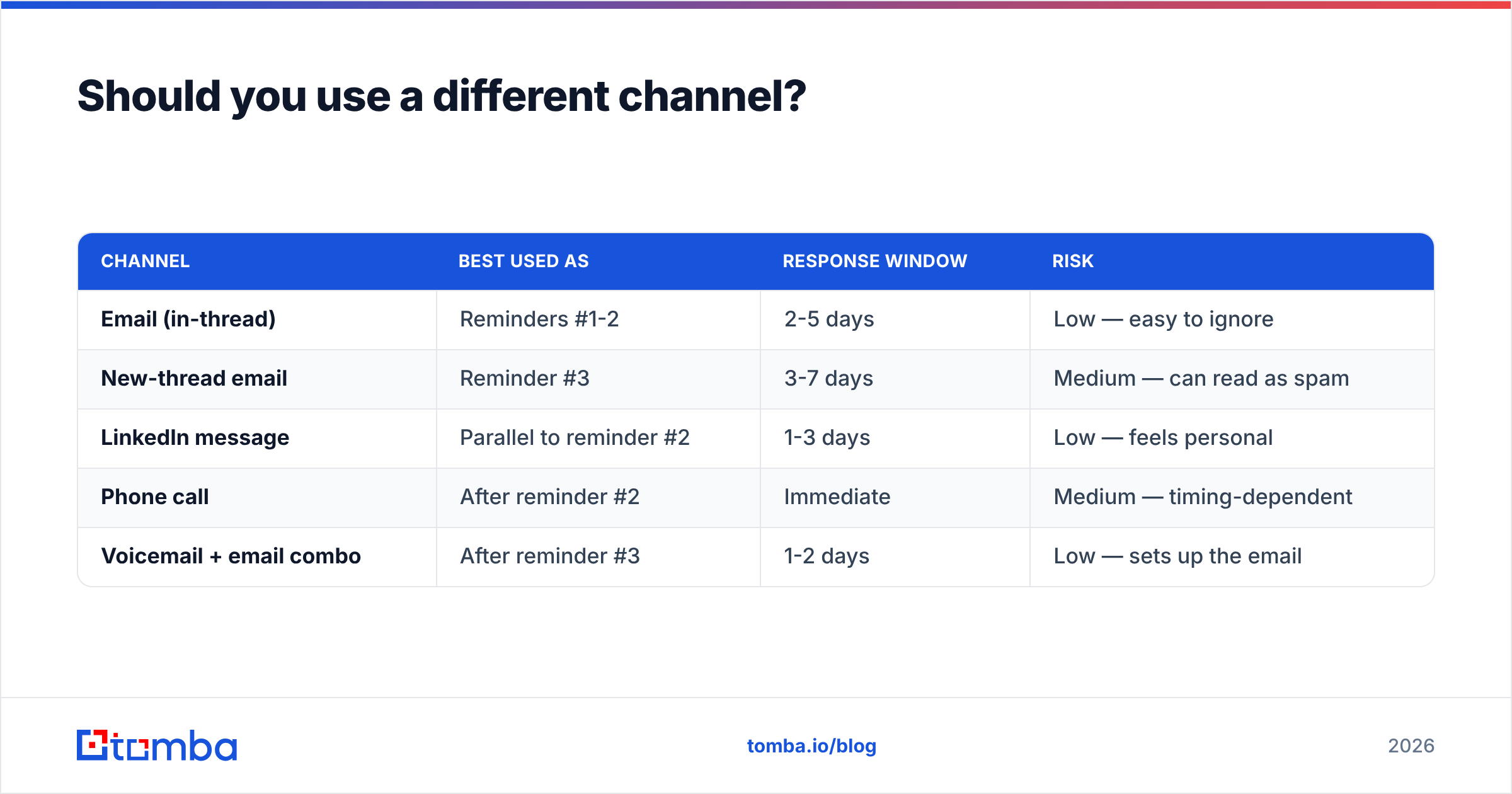
Should you use a different channel?#
Yes, after reminder #2. Multi-channel sequences consistently outperform email-only ones, and the reason is mundane: you're not competing for the same attention slot twice.
| Channel | Best used as | Response window | Risk |
|---|---|---|---|
| Email (in-thread) | Reminders #1-2 | 2-5 days | Low — easy to ignore |
| New-thread email | Reminder #3 | 3-7 days | Medium — can read as spam |
| LinkedIn message | Parallel to reminder #2 | 1-3 days | Low — feels personal |
| Phone call | After reminder #2 | Immediate | Medium — timing-dependent |
| Voicemail + email combo | After reminder #3 | 1-2 days | Low — sets up the email |
A short call paired with an email on the same day is the highest-converting combination in most outbound teams, provided you actually have a valid direct number. Pulling accurate mobile numbers is its own data problem — a phone finder that returns verified direct dials beats scraping a switchboard number that routes you to reception.
On LinkedIn, keep it to two sentences and reference the email explicitly: "Sent you a note about [topic] last week — probably buried. Worth a look or should I drop it?" Never send a connection request with a pitch attached to it.
How many times should you follow up before stopping?#
Three reminders, then a breakup. That's the ceiling for cold outreach, and the reasoning is arithmetic rather than etiquette.
Reply rates decay predictably across a sequence. The first reminder recovers a meaningful share of non-responders. The second recovers less. By the fourth or fifth, you're not gaining replies — you're generating spam complaints, and spam complaints damage the domain reputation that makes reminders one through three work in the first place. Google and Yahoo's bulk sender rules put the complaint threshold at 0.3%, which is roughly three complaints per thousand emails. It's easy to cross that line by over-chasing.
Exceptions where more than three is defensible:
- Warm inbound leads who requested contact — they explicitly asked, so five to six touches is fine.
- Existing customers with an open support or renewal thread.
- Transactional or contractual deadlines (unpaid invoice, expiring contract) where you have a legitimate business obligation to keep asking.
For everything else, stopping is a feature. The breakup email closes the thread cleanly, and a surprising percentage of replies to any sequence arrive on that final message — people respond to the removal of pressure.
Log the outcome in your CRM with a reason code, and set a 90-day re-engagement task. Contacts who ignored you in March often reply in June when a trigger event changes their priorities.
What breaks reminders before anyone reads them?#
Deliverability. You can write the best reminder in the world and still lose if the message never reaches an inbox.
Three failure points, in the order they cost you the most:
- Bad addresses. If you're emailing a stale or guessed address, every reminder compounds the damage — repeated hard bounces to the same domain train filters to treat your whole domain as low quality. Verify addresses before the first send, not after the third bounce. The same applies to catch-all domains, which accept everything and tell you nothing; a dedicated catch-all verifier is the only way to get a real signal there.
- No authentication. Missing SPF, DKIM, or DMARC records send your reminders to spam regardless of content. Check your SPF record before you blame your copy.
- Volume spikes. Firing 400 reminders in one batch from a domain that normally sends 40 a day is a classic filter trigger. Spread reminder sends across the week and throttle per-domain.
Before you decide someone is ignoring you, confirm they could have received you at all. Google's own sender guidelines spell out the technical baseline, and G2's category reviews for email deliverability tools are a decent map of the tooling landscape if you need to audit your setup.
There's also a boring but high-return step most teams skip: deduplicate your list. Sending two "reminders" to the same person from two different sequences because their address appears twice in different casing is a fast way to look careless. A quick pass to remove duplicates before a campaign prevents it.
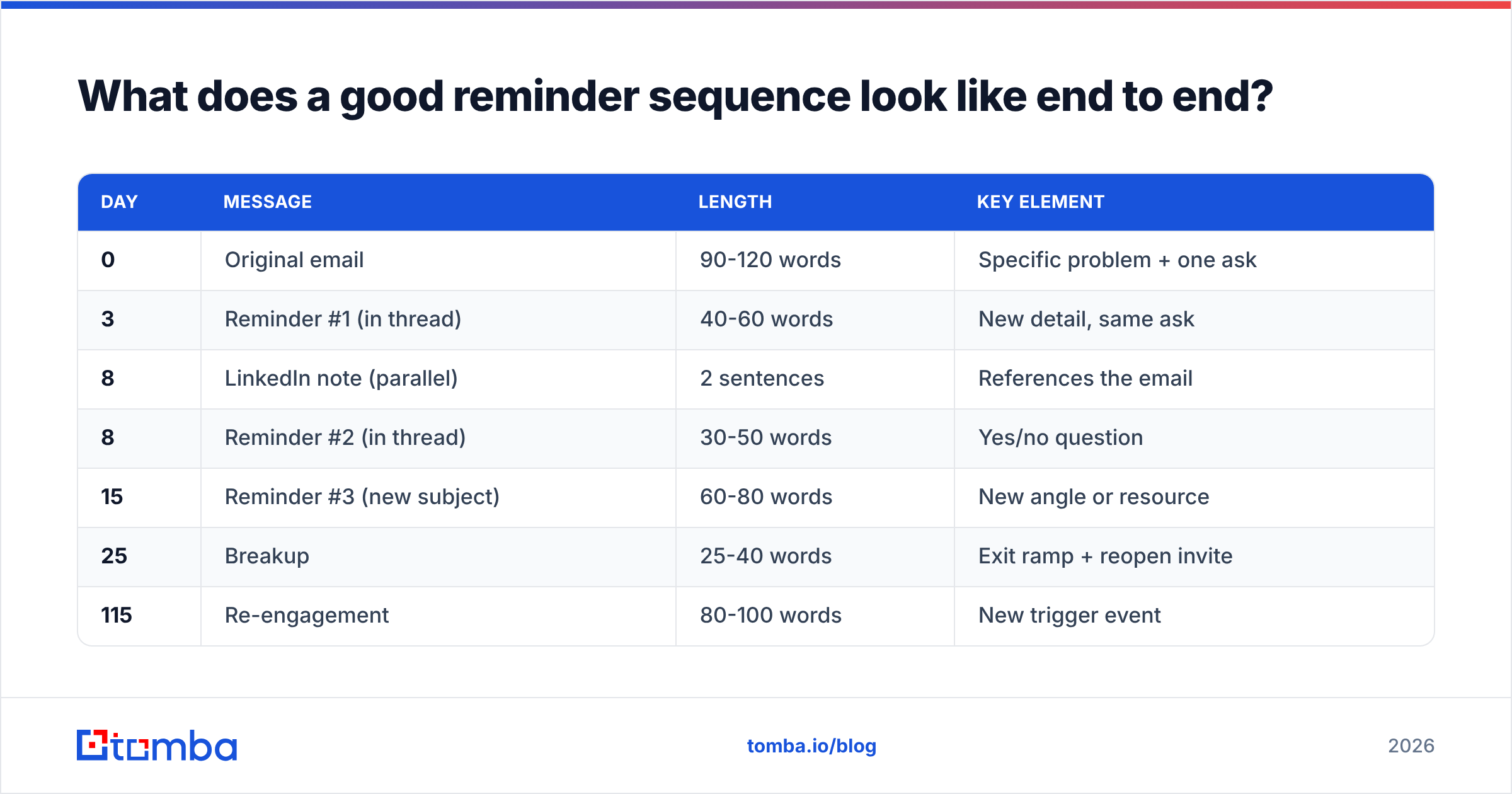
What does a good reminder sequence look like end to end?#
Putting the pieces together for a typical B2B outbound thread:
| Day | Message | Length | Key element |
|---|---|---|---|
| 0 | Original email | 90-120 words | Specific problem + one ask |
| 3 | Reminder #1 (in thread) | 40-60 words | New detail, same ask |
| 8 | LinkedIn note (parallel) | 2 sentences | References the email |
| 8 | Reminder #2 (in thread) | 30-50 words | Yes/no question |
| 15 | Reminder #3 (new subject) | 60-80 words | New angle or resource |
| 25 | Breakup | 25-40 words | Exit ramp + reopen invite |
| 115 | Re-engagement | 80-100 words | New trigger event |
Total: six touches over three and a half months, none of them repetitive, all of them exitable. Compare that to the common alternative — four "just checking in" emails in eight days — and the difference in reply rate is not subtle.
Track response rate per step, not just per campaign. If reminder #2 outperforms your original email consistently, your first email is the problem, not your follow-up discipline.
Get the address right before you get the reminder right#
The best reminder in the world can't outrun a wrong email address. If a meaningful slice of your non-responses are actually undeliverable, every timing tweak and template rewrite is optimizing the wrong variable.
Start by confirming the address exists and belongs to the person you think it does. Tomba's Email Finder returns verified professional addresses by name and domain, with confidence scores and the sources behind each result, so you know whether silence is a real signal or a plumbing problem. The free tier covers 25 searches a month, and paid plans start at $49/mo — see Tomba pricing for the full breakdown. Verify first, then follow up. In that order.
Related guides#
// get started
Find, verify and enrich your first contacts today
Start on the free plan with 25 searches a month, then scale when your team is ready.
Free plan · No credit card required · GDPR & CCPA
// about the author