How to Reverse Email Lookup: Find Anyone Behind an Address
You have an email address and no name. Here are five reverse email lookup methods ranked by accuracy, cost, and how fast they actually return a usable result in 2026.
TL;DR
- A reverse email lookup takes an email address you already have and returns the person behind it: name, job title, company, LinkedIn profile, sometimes phone.
- Free methods (Google search operators, Gmail profile hover, social-network search) work maybe 20-40% of the time and almost never return job title or company.
- API-based enrichment tools return structured data in under a second and hit 60-85% match rates on B2B corporate addresses — far lower on free-mail addresses like gmail.com.
- The single biggest accuracy variable is whether the address is a corporate domain.
sarah@acme.comis findable.sarahk1987@gmail.comusually is not. - Verify before you enrich. Running an email verifier first stops you from paying enrichment credits on dead addresses.
What is a reverse email lookup?#
A reverse email lookup is the inverse of an email finder. An email finder takes a name plus a domain and returns an address. A reverse lookup starts with the address and works backwards to the human.
Think of it like a license plate. The plate itself tells you nothing, but run it against the right registry and you get the make, model, and registered owner. An email address is the same: m.chen@stripe.com is just a string until you resolve it against a database that has seen that string attached to a name, a title, and a company record.
You end up needing this more often than you would expect:
- A form fill with no context. Someone signs up with a work email and skips every other field. You need to know if they are a VP of Engineering or an intern before routing the lead.
- An inbound reply from an unknown sender. A cold campaign gets a reply from an address that is not in your sequence. Who is this and what account are they at?
- CRM records with holes. You inherited 12,000 contacts where 40% have only an email. Enrichment fills in title, company, and seniority so segmentation actually works.
- Fraud and abuse checks. Before onboarding a trial user, you want to know whether the address maps to a real person at a real company or to a disposable inbox.
- Re-identifying churned contacts. A contact bounces because they left the company. A reverse lookup on the old address can surface where they went.
The legitimacy question comes up fast, so let's answer it: reverse lookups on business contact data are broadly lawful for B2B outreach in the US, and lawful under GDPR's legitimate-interest basis in the EU if you can document the interest, offer opt-out, and honor deletion requests. Consumer-address lookups for personal reasons sit in much murkier territory. If you are doing anything other than B2B commercial outreach, get legal input first.
How do you do a reverse email lookup for free?#
Start with the free methods because they cost nothing but a few minutes, and about a third of the time they answer the question outright.
Google the address in quotes. Search "m.chen@stripe.com" with the quotation marks. This surfaces conference speaker pages, GitHub commits, academic papers, press releases, and support-forum posts where the address was published. Add -site:pastebin.com to strip breach dumps out of the results.
Check the address against social networks. LinkedIn no longer allows direct email search for most accounts, but Facebook, X, and GitHub still resolve some addresses through their account-recovery or contact-import flows. GitHub is especially useful for technical contacts: https://api.github.com/search/users?q=m.chen@stripe.com+in:email returns a hit if that address was ever used on a public commit.
Hover the sender in Gmail. If the address has emailed you, Google's people-card sometimes shows a name, photo, and job title pulled from the sender's Workspace directory. Free, instant, and easy to forget.
Decode the email pattern. Corporate addresses follow templates. m.chen@stripe.com almost certainly means first-initial + last name. Feed the domain into a company email pattern checker, confirm the format, then reverse it: you now know the surname is Chen and the first name starts with M. Cross-reference that against the company's LinkedIn people page and you have a name in two minutes.
Use a free tier. Most enrichment vendors give away a small monthly allowance. Tomba's free plan includes 25 searches a month, which is enough to resolve the handful of addresses that actually matter rather than running a bulk job.

The honest limitation: free methods return a name far more often than they return a title, company, and phone number. If you need structured fields you can write into a CRM, you need a data provider.
Which reverse email lookup method should you use?#
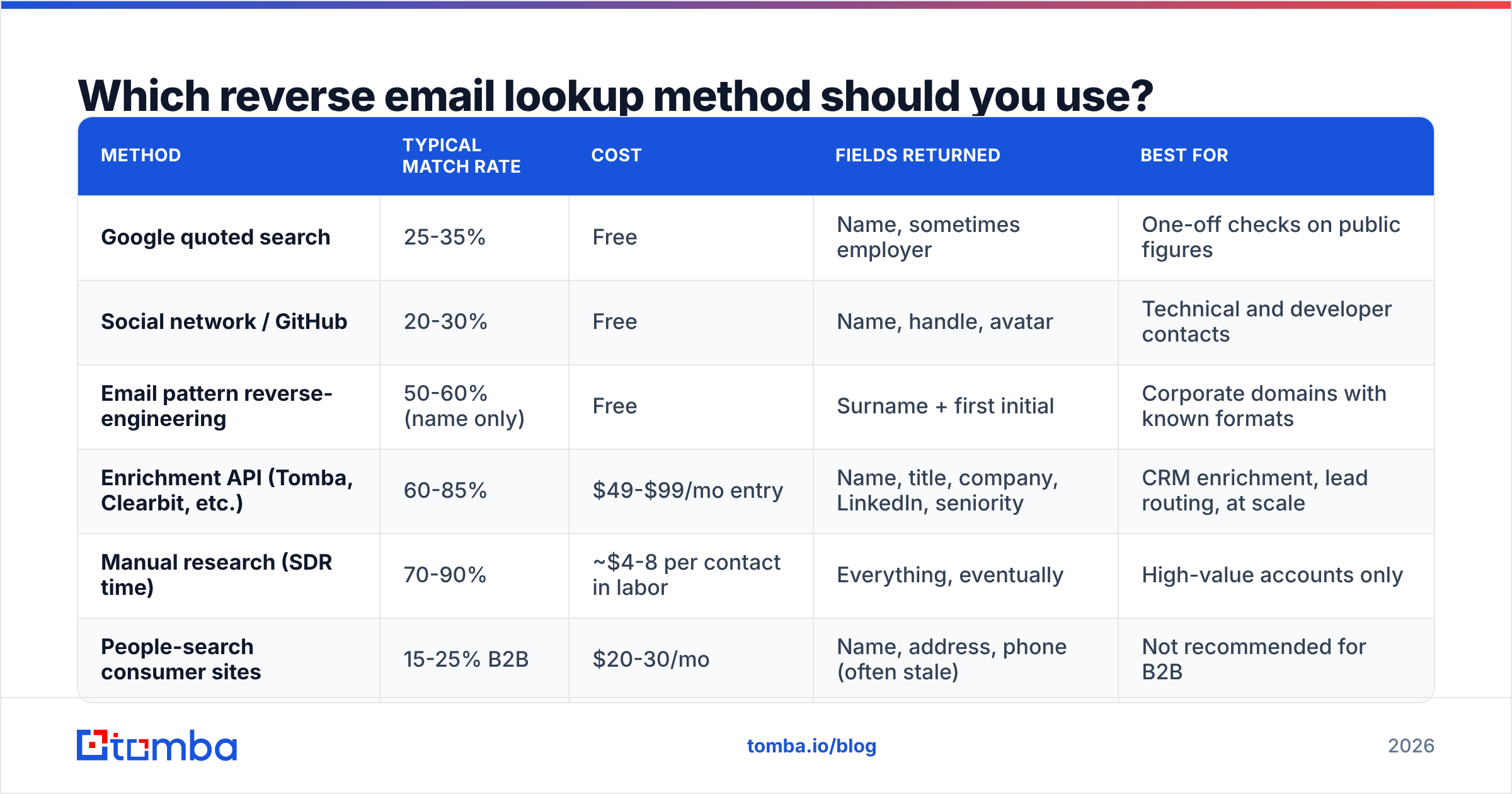
Here is the trade-off laid out. "Match rate" below refers to corporate B2B addresses; every method drops sharply on gmail/outlook/yahoo addresses.
| Method | Typical match rate | Cost | Fields returned | Best for |
|---|---|---|---|---|
| Google quoted search | 25-35% | Free | Name, sometimes employer | One-off checks on public figures |
| Social network / GitHub | 20-30% | Free | Name, handle, avatar | Technical and developer contacts |
| Email pattern reverse-engineering | 50-60% (name only) | Free | Surname + first initial | Corporate domains with known formats |
| Enrichment API (Tomba, Clearbit, etc.) | 60-85% | $49-$99/mo entry | Name, title, company, LinkedIn, seniority | CRM enrichment, lead routing, at scale |
| Manual research (SDR time) | 70-90% | ~$4-8 per contact in labor | Everything, eventually | High-value accounts only |
| People-search consumer sites | 15-25% B2B | $20-30/mo | Name, address, phone (often stale) | Not recommended for B2B |
Two things stand out in that table. First, manual research still beats every automated method on accuracy — it just costs 50-100x more per record. Second, the gap between free and paid is not really about whether you get an answer, it's about which fields come back and whether they arrive as structured JSON you can pipe into a system.
For a working comparison of how the automated tier stacks up, G2's data-enrichment category has current user-reported accuracy scores across vendors, which is more useful than any vendor's own marketing page.
How does an API-based reverse email lookup work?#
Under the hood, an enrichment provider is doing a join. It maintains a graph where email addresses are one node type and people-records are another, then resolves your query against it.
The sources that populate that graph vary by vendor, and the mix is why match rates differ so much:
- Public web crawls — company team pages, author bylines, press releases, conference agendas, job boards.
- Public code and document repositories — commit metadata, PDF properties, mailing-list archives.
- Pattern inference — if a provider has verified 400 addresses at
acme.comand all followfirst.last@, it can reverse an unseen address with high confidence. - Contributed and licensed datasets — partner data, opted-in contributions, licensed business directories.
- Live SMTP validation — confirming the mailbox still exists, which is what separates a stale record from a usable one.
Tomba publishes where its data comes from, which is worth reading before you commit to any vendor. A provider that will not explain its sourcing is a provider you cannot defend in a GDPR audit.
A real call looks like this. Against the Tomba API, a reverse lookup is a single GET:
GET https://api.tomba.io/v1/email-verifier/enrich/m.chen@stripe.com
X-Tomba-Key: ta_xxxx
X-Tomba-Secret: ts_xxxx
And the response gives you the structured fields:
{
  "data": {
    "email": "m.chen@stripe.com",
    "first_name": "Michael",
    "last_name": "Chen",
    "position": "Staff Product Manager",
    "company": "Stripe",
    "country": "US",
    "linkedin": "https://linkedin.com/in/...",
    "score": 96,
    "verification": { "status": "valid" }
  }
}
That score field matters more than most people realize. Anything under about 80 means the provider is inferring rather than confirming, and you should treat the name as a hypothesis rather than a fact. Full parameter details are in the Tomba API docs.
If you would rather not write code, the same lookup runs through the reverse email lookup web tool, a Google Sheets add-on, or the Tomba Chrome extension while you are sitting in a CRM record.
Why do reverse lookups fail on Gmail addresses?#
Because there is no domain to anchor to. This is the single most important thing to understand about reverse email lookup, and it explains almost every disappointing result.
When you look up m.chen@stripe.com, the provider knows the company before it knows anything else. The domain narrows the search space to a few thousand employees, and pattern inference does the rest. When you look up mchen1987@gmail.com, there is no company signal at all — the address could belong to any of a billion Gmail users, and the only way to resolve it is if that exact string appears verbatim somewhere in the provider's crawl.
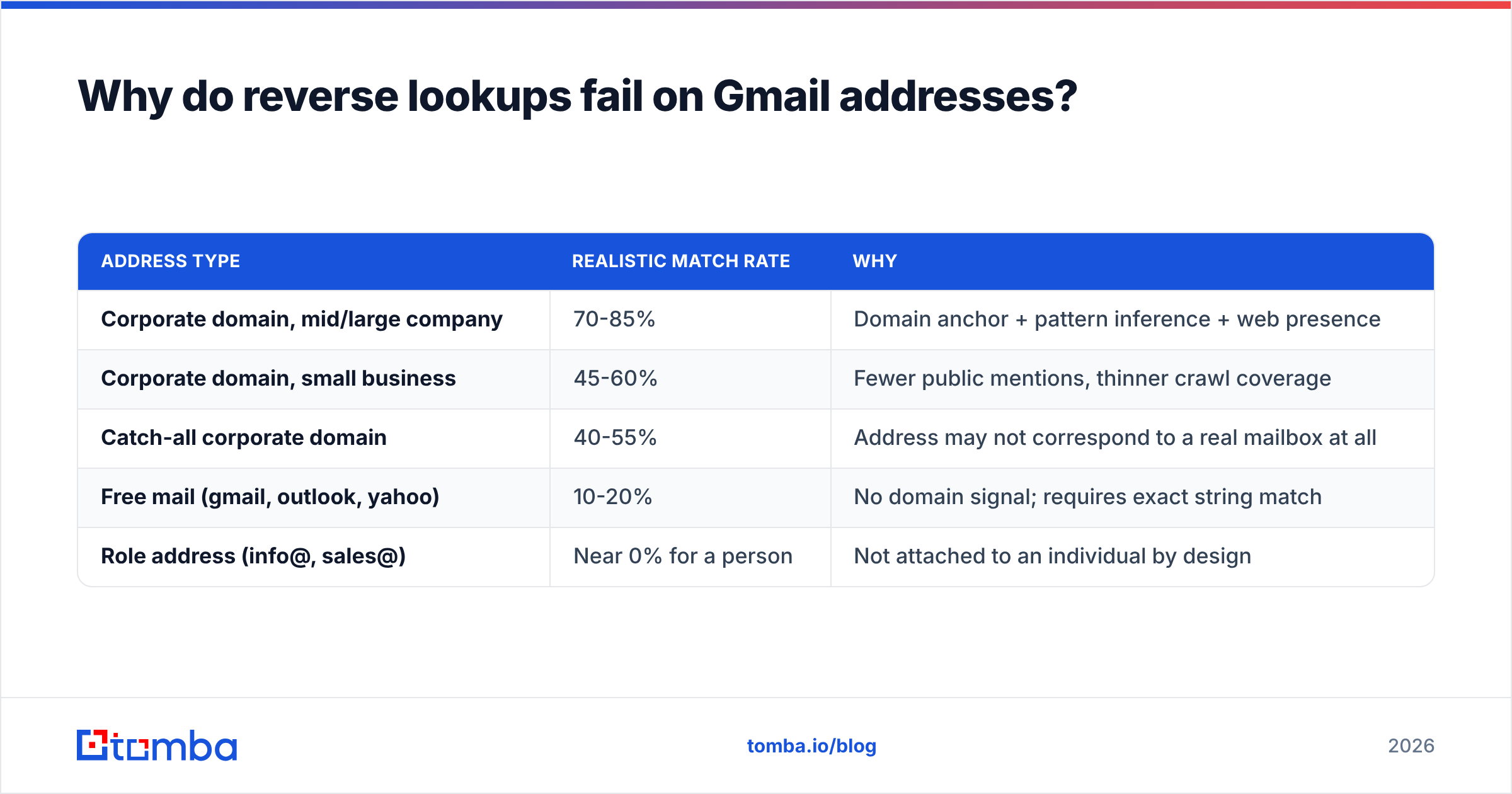
Expect roughly this spread:
| Address type | Realistic match rate | Why |
|---|---|---|
| Corporate domain, mid/large company | 70-85% | Domain anchor + pattern inference + web presence |
| Corporate domain, small business | 45-60% | Fewer public mentions, thinner crawl coverage |
| Catch-all corporate domain | 40-55% | Address may not correspond to a real mailbox at all |
| Free mail (gmail, outlook, yahoo) | 10-20% | No domain signal; requires exact string match |
| Role address (info@, sales@) | Near 0% for a person | Not attached to an individual by design |
Catch-all domains deserve their own note. A catch-all accepts mail to every address at the domain, valid or not, so standard verification returns "accept-all" instead of a clean yes or no. That makes both verification and enrichment unreliable. A dedicated catch-all verifier uses secondary signals to separate real mailboxes from the noise — without it, you will enrich a lot of addresses that do not exist.

What does a reverse email lookup cost in 2026?#
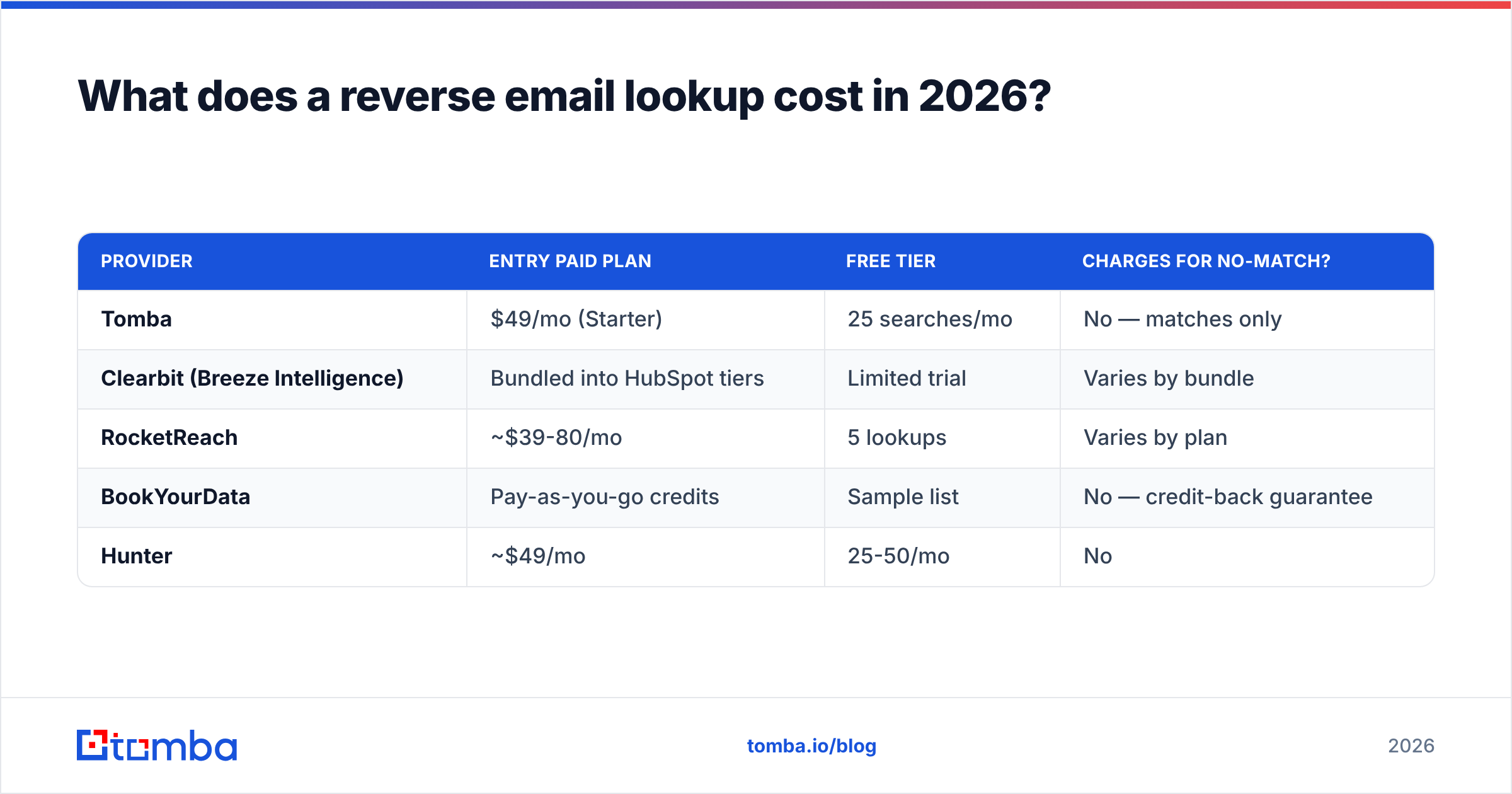
Entry pricing across the category clusters tightly, but the credit models differ enough to change the real cost per record.
| Provider | Entry paid plan | Free tier | Charges for no-match? |
|---|---|---|---|
| Tomba | $49/mo (Starter) | 25 searches/mo | No — matches only |
| Clearbit (Breeze Intelligence) | Bundled into HubSpot tiers | Limited trial | Varies by bundle |
| RocketReach | ~$39-80/mo | 5 lookups | Varies by plan |
| BookYourData | Pay-as-you-go credits | Sample list | No — credit-back guarantee |
| Hunter | ~$49/mo | 25-50/mo | No |
The "charges for no-match" column is the one to scrutinize. A vendor at $0.02 per credit that bills every attempt can easily cost more per usable record than a vendor at $0.05 per credit that only bills on a hit — especially if your list is heavy on free-mail addresses where two-thirds of lookups will miss.
Tomba's Growth plan runs $99/mo and Pro is $249/mo, with Enterprise negotiated; full breakdowns live on the Tomba pricing page. BookYourData takes a different approach with pay-as-you-go credits and a verification guarantee, which suits teams that enrich in occasional large batches rather than continuously — worth a look if your usage is spiky rather than steady.
Whatever you pick, model your cost as cost per matched record, not cost per credit. On a 10,000-row list that is 60% corporate and 40% free-mail, a realistic blended match rate is around 45-55%, which roughly doubles your effective per-record price versus the sticker number.
How do you run a reverse email lookup at scale?#
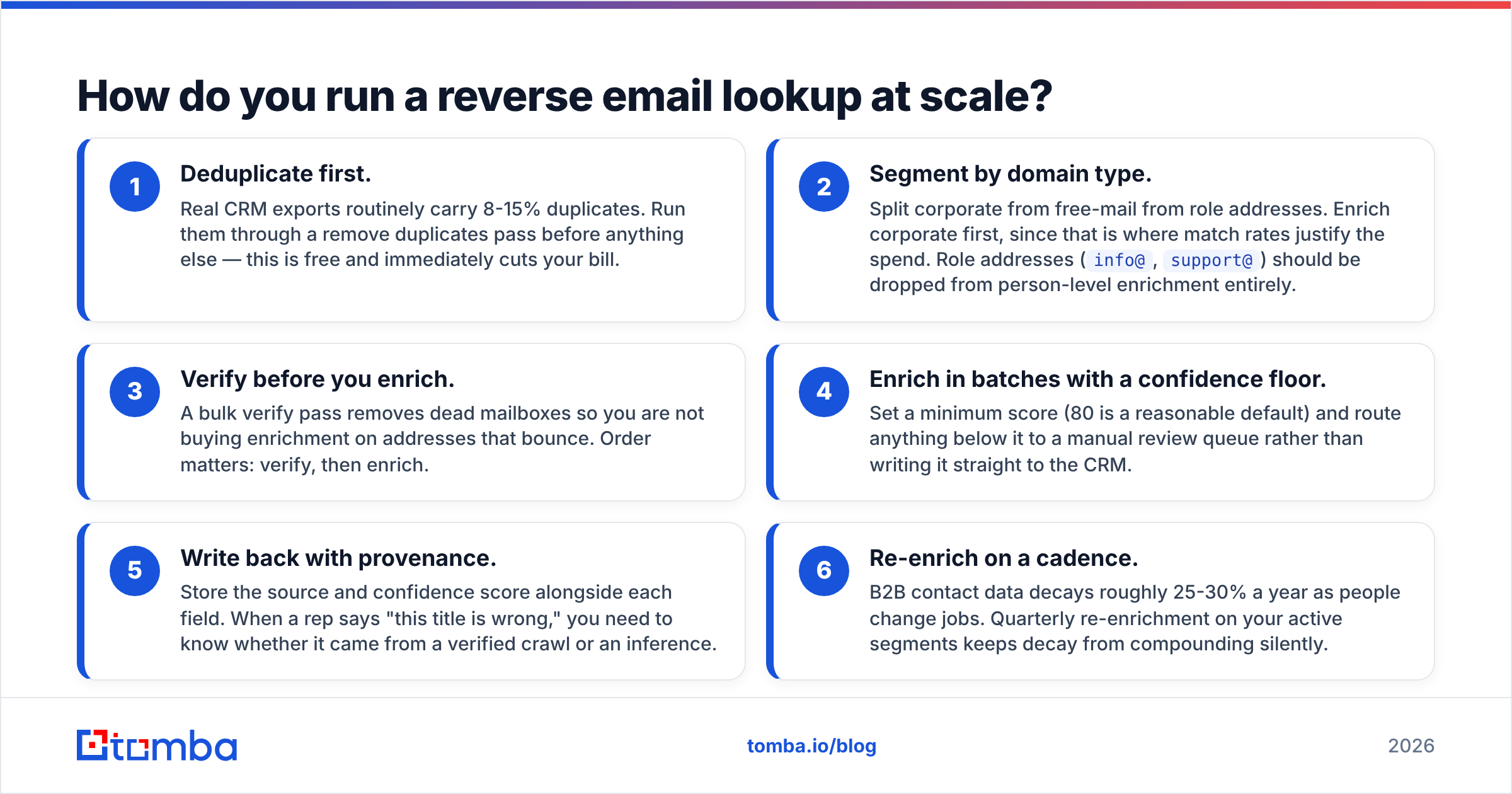
Single lookups are trivial. Ten thousand of them require a process. Here is the sequence that wastes the fewest credits:
- Deduplicate first. Real CRM exports routinely carry 8-15% duplicates. Run them through a remove duplicates pass before anything else — this is free and immediately cuts your bill.
- Segment by domain type. Split corporate from free-mail from role addresses. Enrich corporate first, since that is where match rates justify the spend. Role addresses (
info@,support@) should be dropped from person-level enrichment entirely. - Verify before you enrich. A bulk verify pass removes dead mailboxes so you are not buying enrichment on addresses that bounce. Order matters: verify, then enrich.
- Enrich in batches with a confidence floor. Set a minimum score (80 is a reasonable default) and route anything below it to a manual review queue rather than writing it straight to the CRM.
- Write back with provenance. Store the source and confidence score alongside each field. When a rep says "this title is wrong," you need to know whether it came from a verified crawl or an inference.
- Re-enrich on a cadence. B2B contact data decays roughly 25-30% a year as people change jobs. Quarterly re-enrichment on your active segments keeps decay from compounding silently.
That last point is the one teams skip. Enrichment is not a project you finish; it is a maintenance loop. Salesforce's own guidance on data quality makes the same argument from the CRM side — stale records cost more in wasted rep time than the enrichment credits ever cost in dollars.
If you are wiring this into an existing stack, Tomba's HubSpot integration and Zapier integration handle the write-back without custom code, and the Tomba MCP server exposes the same lookups to AI agents if you are building agentic workflows.
What are the compliance rules you actually need to follow?#
Short version: document your basis, honor deletion, and do not use B2B data for consumer purposes.
Under GDPR, business contact data processed for B2B outreach generally relies on legitimate interest (Article 6(1)(f)). That is a real legal basis, not a loophole, but it requires you to run and record a balancing test, disclose the source in your privacy notice, and process deletion requests within 30 days. Enriching a personal Gmail address for personal reasons does not survive that test.
Under CCPA/CPRA, California residents can request deletion and opt out of sale or sharing. If you enrich California contacts, you need an intake process for those requests that actually reaches your enrichment vendor, not just your own database.
Practically, three rules cover most of it. Only enrich addresses you have a documented business reason to contact. Keep an audit trail of which vendor supplied which field and when. Pick vendors that publish their sourcing and will process deletion requests on your behalf — the ICO's guidance on legitimate interests is the clearest free reference on how to run the balancing test.
Getting started#
Reverse email lookup is not one technique, it is a ladder. Start free: quote-search the address, check GitHub, reverse the company's email pattern. That resolves a meaningful share of one-off questions in under five minutes and costs nothing.
The moment you need structured fields, need them in volume, or need them written into a system, move up to an API. Verify first, segment by domain type, set a confidence floor, and measure your cost per matched record rather than per credit.
To try it on your own list, start with the Tomba Email Finder and its reverse lookup endpoint — the free tier gives you 25 searches a month, no card required, which is enough to test match rates on your actual data before committing to a plan. Run 25 addresses from your real CRM through it, count the hits, and let that number decide whether the paid tier is worth it for you.
Related guides#
// get started
Find, verify and enrich your first contacts today
Start on the free plan with 25 searches a month, then scale when your team is ready.
Free plan · No credit card required · GDPR & CCPA
// about the author