How to Scale Outbound Lead Generation Without Burning Domains
Scaling outbound is not sending more email — it is adding capacity across data, infrastructure, and process at the same rate. Here is the system, tier by tier.
TL;DR
- Scaling outbound means increasing qualified conversations, not sends. If your reply rate falls faster than your volume rises, you have not scaled — you have diluted.
- The four constraints that break first, in order: data accuracy, sending infrastructure, ICP definition, and follow-up capacity. Fix them in that order.
- A realistic ceiling is ~30-50 cold emails per mailbox per day. Volume growth comes from more mailboxes and better targeting, never from cranking one inbox.
- Bounce rate above 3% is the single fastest way to torch a domain. Verification is not optional at scale — it is the scaling mechanism.
- Budget roughly 60% of your outbound spend on data and infrastructure, 40% on tooling and sequencing. Most teams invert this and wonder why the sequences underperform.
What does "scaling outbound lead generation" actually mean?#
Scaling outbound means increasing the number of qualified conversations your team starts per week, while holding reply rate and deliverability flat or improving them. That last clause is where most programs fail.
Here is the analogy: outbound is a restaurant kitchen. Doubling the number of orders you accept does nothing if you have one stove, one prep cook, and a supplier who sends you spoiled produce half the time. You do not scale by shouting more orders at the pass. You scale by adding stoves, hiring prep, and firing the bad supplier — in that order, because each one bottlenecks the next.
Technically: outbound throughput is a function of (deliverable contacts) × (mailbox capacity) × (sequence steps) × (message relevance). Multiply any term by zero and the whole thing is zero. A team with 100,000 contacts, 2 mailboxes, and a generic pitch produces fewer meetings than a team with 3,000 verified contacts, 12 mailboxes, and a segmented message.
So when someone asks how to scale outbound lead generation, the honest answer is: you scale the constraint, not the send button.
Which constraint is actually blocking you?#
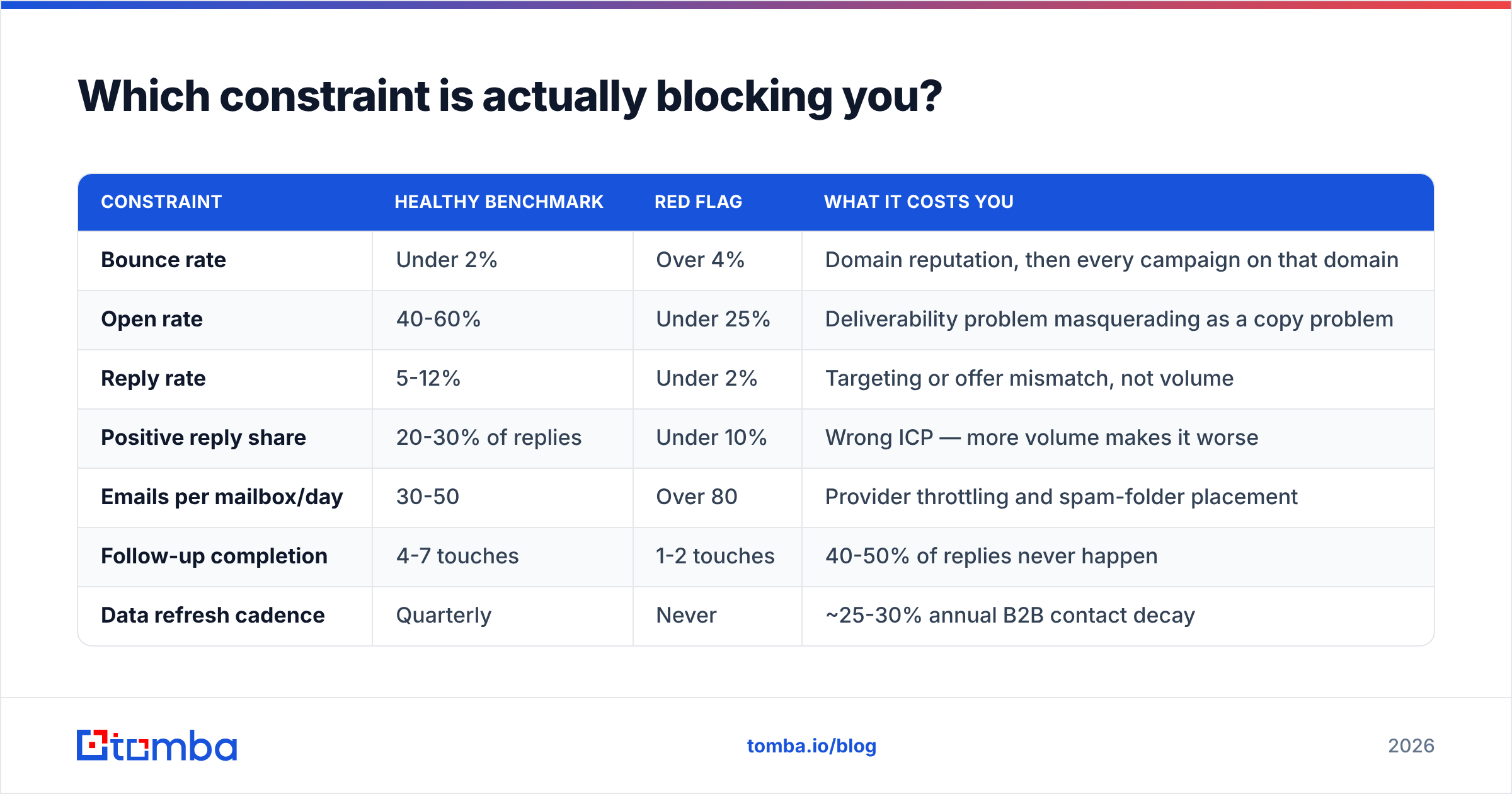
Diagnose before you spend. Run your last 90 days of outbound through this table and find the row where your number is red.
| Constraint | Healthy benchmark | Red flag | What it costs you |
|---|---|---|---|
| Bounce rate | Under 2% | Over 4% | Domain reputation, then every campaign on that domain |
| Open rate | 40-60% | Under 25% | Deliverability problem masquerading as a copy problem |
| Reply rate | 5-12% | Under 2% | Targeting or offer mismatch, not volume |
| Positive reply share | 20-30% of replies | Under 10% | Wrong ICP — more volume makes it worse |
| Emails per mailbox/day | 30-50 | Over 80 | Provider throttling and spam-folder placement |
| Follow-up completion | 4-7 touches | 1-2 touches | 40-50% of replies never happen |
| Data refresh cadence | Quarterly | Never | ~25-30% annual B2B contact decay |
Most teams read this table and discover the same thing: the bottleneck is upstream of the email tool they were about to buy. If your positive-reply share is under 10%, adding mailboxes just gets you rejected faster and louder.

How do you scale the data layer without buying garbage?#
Data is the first constraint because everything downstream inherits its errors. A 12% bounce list does not just waste 12% of your sends — it degrades the sender reputation that determines whether the other 88% land in a primary inbox.
There are four ways to source contacts at volume, and they are not equal:
- Static list purchase. Fast, cheap per record, and decays from the moment you buy it. Reputable providers like BookYourData sell pre-verified lists with bounce guarantees, which mitigates most of the risk — but any static file starts aging on day one. Budget for re-verification before every major send.
- Scraping plus permutation. You guess formats (
first.last@,flast@) and hope. Cheap, high volume, and catastrophic for bounce rates unless every guess is verified. A email permutator is a legitimate step in the pipeline, but it is a candidate generator, not an answer. - On-demand lookup by domain or name. You define the account list first, then resolve contacts as you need them. This keeps data fresh because you fetch at the moment of use. A domain search returns the people at an account plus the company's dominant email pattern, which is how you scale account-based motions without pre-buying 50,000 stale rows.
- API-driven enrichment inside your own workflow. The endgame for any team past ~5,000 contacts/month. Your CRM, your scraper, or your product signup flow calls an email finder API, gets a verified address plus a confidence score, and writes it back. No CSV round-trips, no stale exports.
The progression from 1 to 4 is the actual scaling path. Teams that stay on step 1 hit a wall around 10,000 contacts, where re-verification cost and list decay eat the savings.

Why does verification matter more as you scale?#
Because bounce damage is non-linear. At 500 sends/month a 6% bounce rate is 30 bad addresses — annoying. At 50,000 sends/month it is 3,000 hard bounces, and mailbox providers will classify your domain as a list-blaster within days. Google and Microsoft both weight bounce rate heavily in filtering decisions, and Google's bulk sender requirements put the spam-complaint ceiling at 0.3%.
Run every list through an email verifier before it enters a sequence, and re-run anything older than 90 days. For catch-all domains — which will be 15-25% of any B2B list — a standard SMTP check returns "unknown," not "valid." That is where a catch-all verifier earns its keep, because the alternative is either sending blind to a quarter of your list or discarding it entirely.
How do you scale sending infrastructure safely?#
The rule: more mailboxes, not more sends per mailbox.
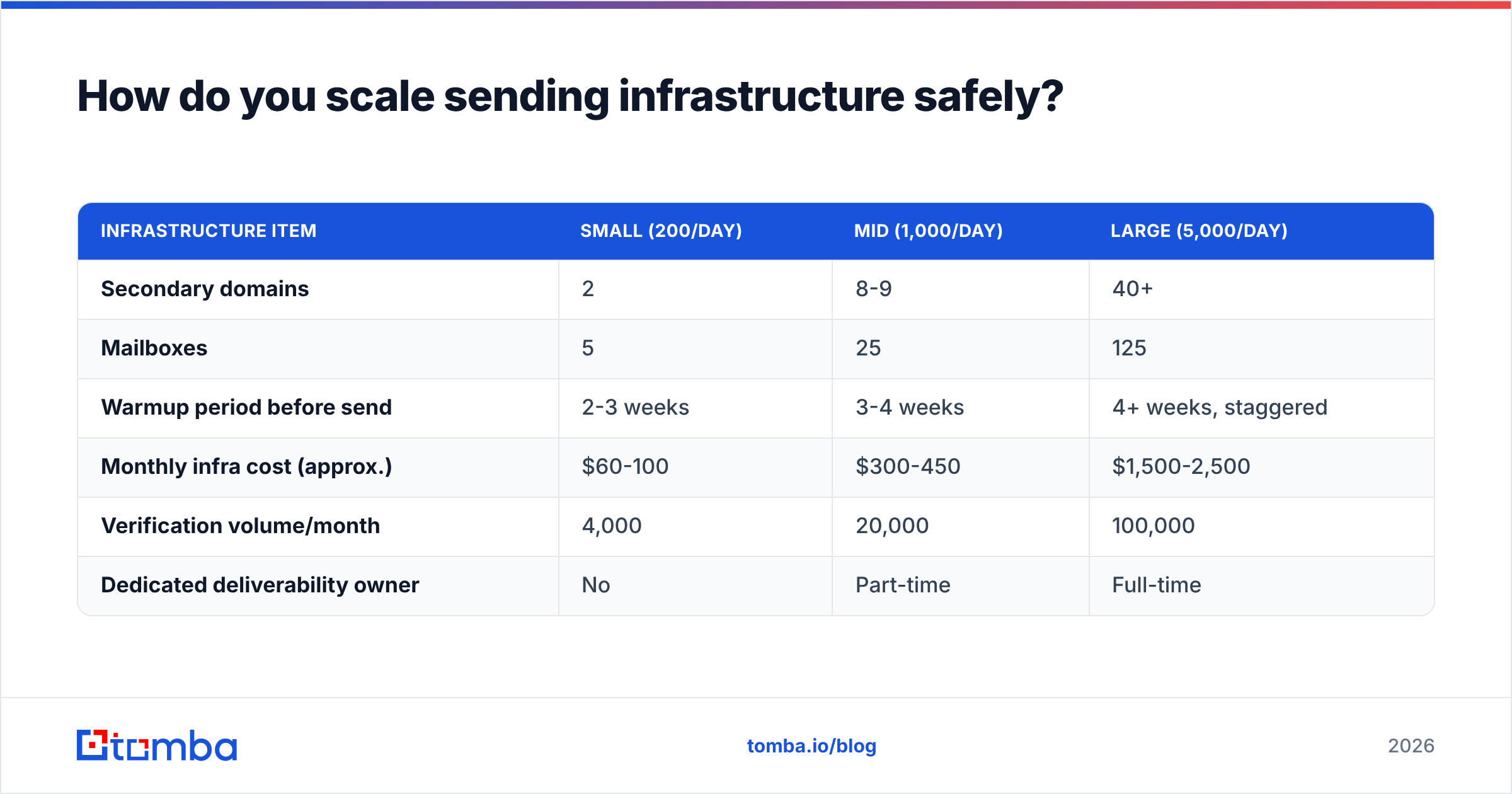
A single Google Workspace or Microsoft 365 mailbox tops out around 30-50 cold emails per day before deliverability degrades. That is not a policy limit you can pay to lift — it is a behavioral threshold in the filtering models. So your infrastructure math is straightforward:
- Target: 1,000 cold emails/day
- Ceiling per mailbox: 40/day
- Mailboxes needed: 25
- Mailboxes per domain (safe): 3
- Secondary domains needed: 8-9
| Infrastructure item | Small (200/day) | Mid (1,000/day) | Large (5,000/day) |
|---|---|---|---|
| Secondary domains | 2 | 8-9 | 40+ |
| Mailboxes | 5 | 25 | 125 |
| Warmup period before send | 2-3 weeks | 3-4 weeks | 4+ weeks, staggered |
| Monthly infra cost (approx.) | $60-100 | $300-450 | $1,500-2,500 |
| Verification volume/month | 4,000 | 20,000 | 100,000 |
| Dedicated deliverability owner | No | Part-time | Full-time |
Never send cold email from your primary domain. Register lookalike domains (get-yourbrand.com, yourbrand-hq.com), set up SPF, DKIM, and DMARC on each, and warm them for 3-4 weeks before the first real campaign. Check your records with an SPF checker before you trust them — a typo in a TXT record silently costs you 20% of your inbox placement.
Then monitor. Reputation is a lagging indicator, so you want daily visibility via Google Postmaster Tools and a blacklist checker on every sending IP and domain. By the time your reply rate visibly drops, you are usually two weeks into a reputation problem.
Should you scale volume or scale targeting first?#
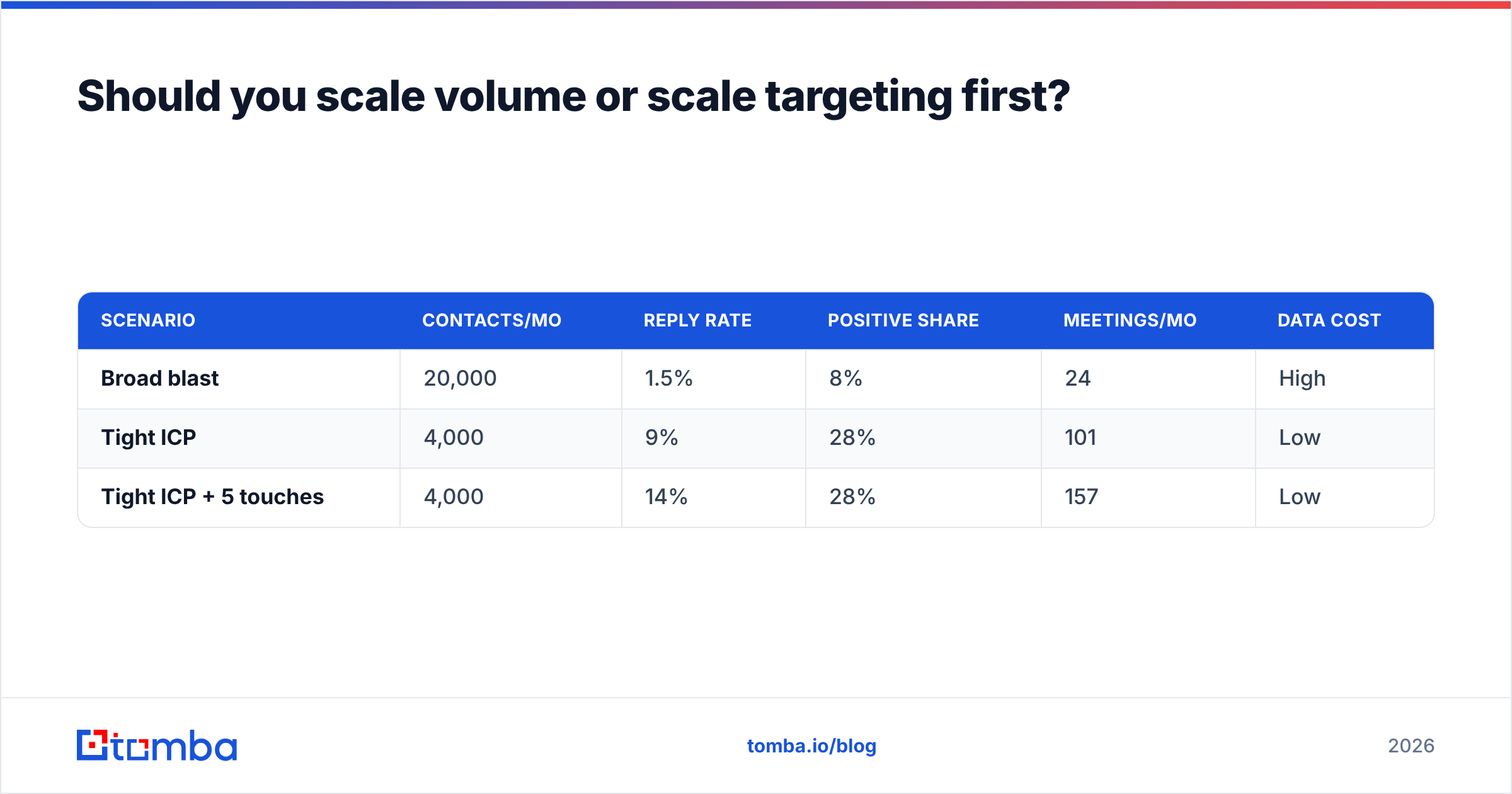
Targeting. Every time. Here is the arithmetic that settles the argument.
| Scenario | Contacts/mo | Reply rate | Positive share | Meetings/mo | Data cost |
|---|---|---|---|---|---|
| Broad blast | 20,000 | 1.5% | 8% | 24 | High |
| Tight ICP | 4,000 | 9% | 28% | 101 | Low |
| Tight ICP + 5 touches | 4,000 | 14% | 28% | 157 | Low |
The tight-ICP program sends 80% less mail and books 4-6x more meetings. It also protects the domain assets you will need next quarter. Broad blasting is not a faster path to the same destination — it is a different, worse destination that also burns the road behind you.
Practically, this means your scaling investment goes into segmentation, not send volume:
- Firmographic segments. Split by employee count, funding stage, and industry. A 40-person Series A and a 4,000-person enterprise do not share a pain statement.
- Technographic triggers. Companies running a specific stack are pre-qualified for integrations and rip-and-replace plays. A website tech stack check turns "everyone in SaaS" into "the 340 companies running the competitor you displace."
- Role-based messaging. Build separate sequences per persona. The VP cares about pipeline coverage; the manager cares about their team's calendar.
- Timing signals. New hires in the buying role, funding rounds, job posts for the function you serve. Signal-based lists convert 2-3x better than static ones.
- Channel layering. Email plus LinkedIn outreach plus a call on the same account raises connect rates substantially versus email alone.
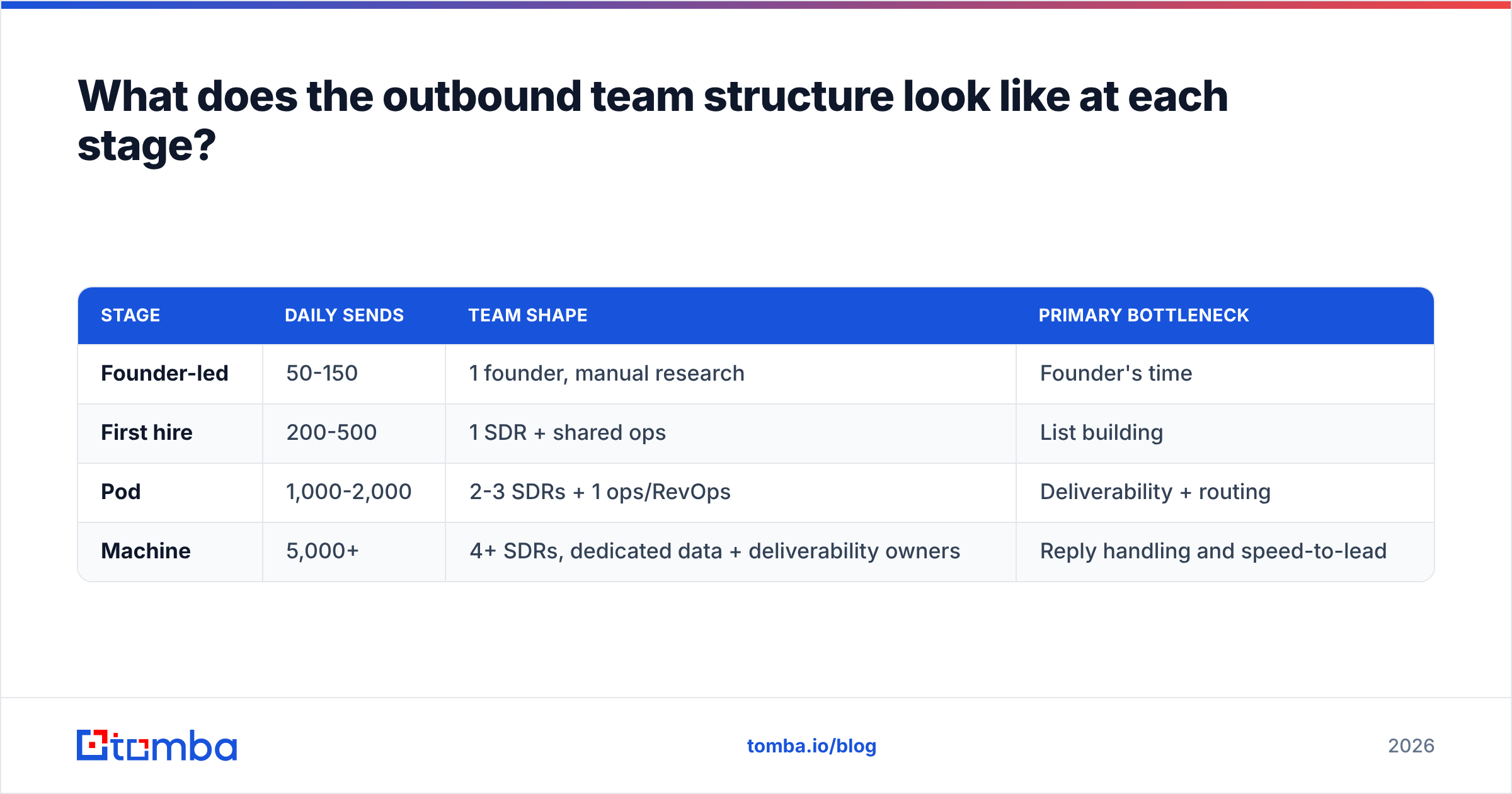
What does the outbound team structure look like at each stage?#
Process scales worse than tools do. One person can run 200 emails/day end to end. Nobody can run 5,000 that way.
| Stage | Daily sends | Team shape | Primary bottleneck |
|---|---|---|---|
| Founder-led | 50-150 | 1 founder, manual research | Founder's time |
| First hire | 200-500 | 1 SDR + shared ops | List building |
| Pod | 1,000-2,000 | 2-3 SDRs + 1 ops/RevOps | Deliverability + routing |
| Machine | 5,000+ | 4+ SDRs, dedicated data + deliverability owners | Reply handling and speed-to-lead |
The transition that catches everyone is Pod → Machine. At 5,000 sends/day you generate 150-300 replies a week. If nobody owns triage, your best leads sit for 48 hours and go cold. Speed-to-lead research from HubSpot and others consistently shows response time as one of the strongest predictors of conversion — responding within five minutes versus an hour changes qualification odds by an order of magnitude.
So the honest scaling checklist for headcount is: hire a data/ops owner before your third SDR, and a deliverability owner before your fifth. The SDRs are the visible cost; the invisible ones determine whether the SDRs have anything worth working.
How do you automate without making it obvious?#
Automation should remove clerical work, not judgment. The safe split:
Automate: contact resolution, verification, list deduplication, CRM sync, sequence scheduling, follow-up timing, no-reply cleanup, data refresh cycles.
Do not automate: the first line of the first email, objection handling, qualification calls, or anything the prospect would find embarrassing if they saw the merge tag fail.
A workable stack at 1,000 sends/day looks like this: contacts resolved via bulk email finder or API, verified in the same pass, pushed into the CRM through a HubSpot integration or Zapier, sequenced in your sending tool of choice, with replies routed to a shared inbox and triaged within an hour. Every step has an owner and a failure alarm.
The tell of over-automation is uniform copy. If your 5,000 daily emails are 98% identical, you have built a volume machine, not an outbound program — and recipients can tell within one sentence. Check your templates against a spam checker before launch, but check them against a human first.
What breaks when you scale — and how do you catch it early?#
Five failure modes account for most collapsed outbound programs:
- Silent deliverability decay. Open rates drift from 55% to 30% over six weeks. Nobody notices because reply counts stay flat while volume grows. Catch it by tracking reply rate per thousand sent, not total replies.
- List decay. B2B contact data goes stale at roughly 2.5% per month as people change jobs. A list you verified in January is meaningfully wrong by June. Schedule quarterly re-verification as a calendar event, not an intention.
- ICP drift. Under volume pressure, reps loosen filters. Positive reply share drops before total reply rate does — watch that metric specifically.
- Follow-up collapse. Sequences get built with 6 steps and abandoned at step 2 because reps are busy handling the volume. Automate the cadence so it does not depend on discipline.
- Single-domain concentration. All mailboxes on one secondary domain. One bad campaign and the entire program goes dark. Spread across domains from day one, even when you do not need to.
Instrument each of these with a weekly number. If a metric does not have an owner and a threshold, it is not monitored — it is just logged.
Where should your budget actually go?#
| Line item | Share of outbound budget | Why |
|---|---|---|
| Contact data + verification | 30-35% | The multiplier on everything else |
| Domains, mailboxes, warmup | 20-25% | Determines whether messages are seen |
| Sequencing / sending platform | 15-20% | Commoditized; do not overpay |
| Enrichment + signals | 10-15% | Drives segmentation quality |
| Copy, creative, testing | 10-15% | Compounds, but only on a working base |
Data plus infrastructure is roughly 55-60% of a healthy budget. Teams that spend 60% on a sequencing platform and 10% on data have optimized the least important variable, which is exactly why their reply rates stall no matter which sending tool they migrate to.
For reference on tooling costs at each tier, compare Tomba pricing — Free covers 25 searches/month for testing, Starter is $49/mo, Growth $99/mo, and Pro $249/mo for teams running verification and enrichment at Machine-stage volume. Cross-check any vendor's real-world accuracy claims on G2 before committing to an annual contract; vendor-published match rates and user-reported bounce rates rarely agree.
What is the 90-day plan to scale from here?#
Days 1-30 — Fix the base. Audit bounce rate, open rate, and positive-reply share. Verify your entire existing list. Register 3-5 secondary domains, configure SPF/DKIM/DMARC, start warmup. Rewrite your ICP definition as a filter you can actually query, not a paragraph.
Days 31-60 — Build the pipeline. Move from CSV imports to API-driven contact resolution. Segment into 3-4 persona-specific sequences with 5-7 touches each. Add a second channel to your top segment. Assign an owner to every metric in the diagnostic table above.
Days 61-90 — Add capacity. Scale mailboxes to hit your target volume, staggering warmup so nothing goes live cold. Add a data/ops owner if you are past 2,000 sends/day. Institute quarterly re-verification. Only now do you increase volume — because now the increase multiplies something that works.
Scaling outbound rewards patience at exactly the moment it feels like it should reward aggression. The teams that book 150 meetings a month are almost never the ones sending the most email; they are the ones whose data is clean, whose domains are healthy, and whose follow-up actually completes.
Start with the layer that multiplies everything else. Before you buy another mailbox or migrate sequencers, make sure the addresses you are sending to are real. The Tomba Email Finder resolves verified professional emails by domain, name, or company — with confidence scores, catch-all handling, and an API that drops straight into the pipeline you just designed. Start free with 25 searches a month, and scale the constraint that actually matters.
Related guides#
// get started
Find, verify and enrich your first contacts today
Start on the free plan with 25 searches a month, then scale when your team is ready.
Free plan · No credit card required · GDPR & CCPA
// about the author