How To Scrape Emails In 2026: Legal Methods That Work
Email scraping breaks more lists than it builds. Here are five methods that actually return deliverable B2B addresses in 2026 — plus the legal lines you cannot cross.
TL;DR
- "Scraping emails" covers five very different techniques, and only three of them survive contact with GDPR, CAN-SPAM, and a modern spam filter.
- Raw HTML scraping is the cheapest method and the worst one: public
mailto:addresses are dominated byinfo@,support@, and honeypots planted specifically to burn senders. - Pattern-guessing (
first.last@domain.com) works about 60-70% of the time on mid-market companies and near 0% on companies using randomized or aliased addresses. - API-based lookup against a maintained B2B index is slower to set up and costs money, but it is the only approach that gives you a confidence score before you send.
- Whatever you collect, verify it. An unverified scrape averages 15-40% invalid addresses; two bounces per hundred is where mailbox providers start throttling you.
What does "scraping emails" actually mean?#
The phrase gets used for five distinct jobs, and conflating them is why most guides are useless. Here is the honest taxonomy.
- HTML scraping — a crawler walks pages on a domain and regex-matches anything shaped like an email address. Zero cost, zero targeting, high junk ratio.
- Directory extraction — pulling contacts out of LinkedIn, Crunchbase, G2, conference attendee lists, or association member pages. High intent, but almost always against the platform's terms of service.
- Pattern generation — you know the person's name and their employer's domain, so you generate the eight likely permutations and test which one resolves. No source data required.
- API lookup — you query a provider that has already crawled, indexed, and verified addresses, and you get back a single result with a confidence score and source list.
- Enrichment — you already have partial records (name, company, LinkedIn URL) and you fill in the missing email field in bulk.
Most people asking how to scrape emails actually want #3, #4, or #5. They say "scrape" because that is the word that ranks. If you are building a cold outbound list for B2B sales, methods 3-5 will outperform method 1 by a factor of five on reply rate, because the address belongs to a human with a job title rather than a shared inbox nobody reads.
Is scraping emails legal in 2026?#
Short answer: collecting a business email address is usually legal. What you do with it afterwards is where the liability lives.
The rules split by jurisdiction and by data type:
- GDPR (EU/UK). A work email tied to a named individual is personal data. You may process it under legitimate interest for B2B outreach, but you owe a privacy notice on first contact, an easy opt-out, and you must honor deletion requests. Scraping a personal Gmail address for outreach has no clean legal basis.
- CAN-SPAM (US). Address collection is not restricted. The message is: you need a real physical address, a working unsubscribe, honest headers and subject lines. Harvesting from a website that posts a "no harvesting" notice carries aggravated penalties.
- CASL (Canada). The strictest of the three. You need express or implied consent before sending. A publicly published business address with no "no unsolicited email" disclaimer creates implied consent for messages relevant to that person's role — for 6 months.
- Platform terms. LinkedIn, Meta, and most directories forbid automated extraction outright. This is contract law, not privacy law, but the consequence is real: account bans and, in edge cases, CFAA-adjacent litigation.
The practical test used by most compliant outbound teams: is the address role-relevant, business-domain, and would the recipient reasonably expect vendor contact at that address? If yes on all three, you are in defensible territory. Read the ICO's guidance on direct marketing before you build anything at scale.
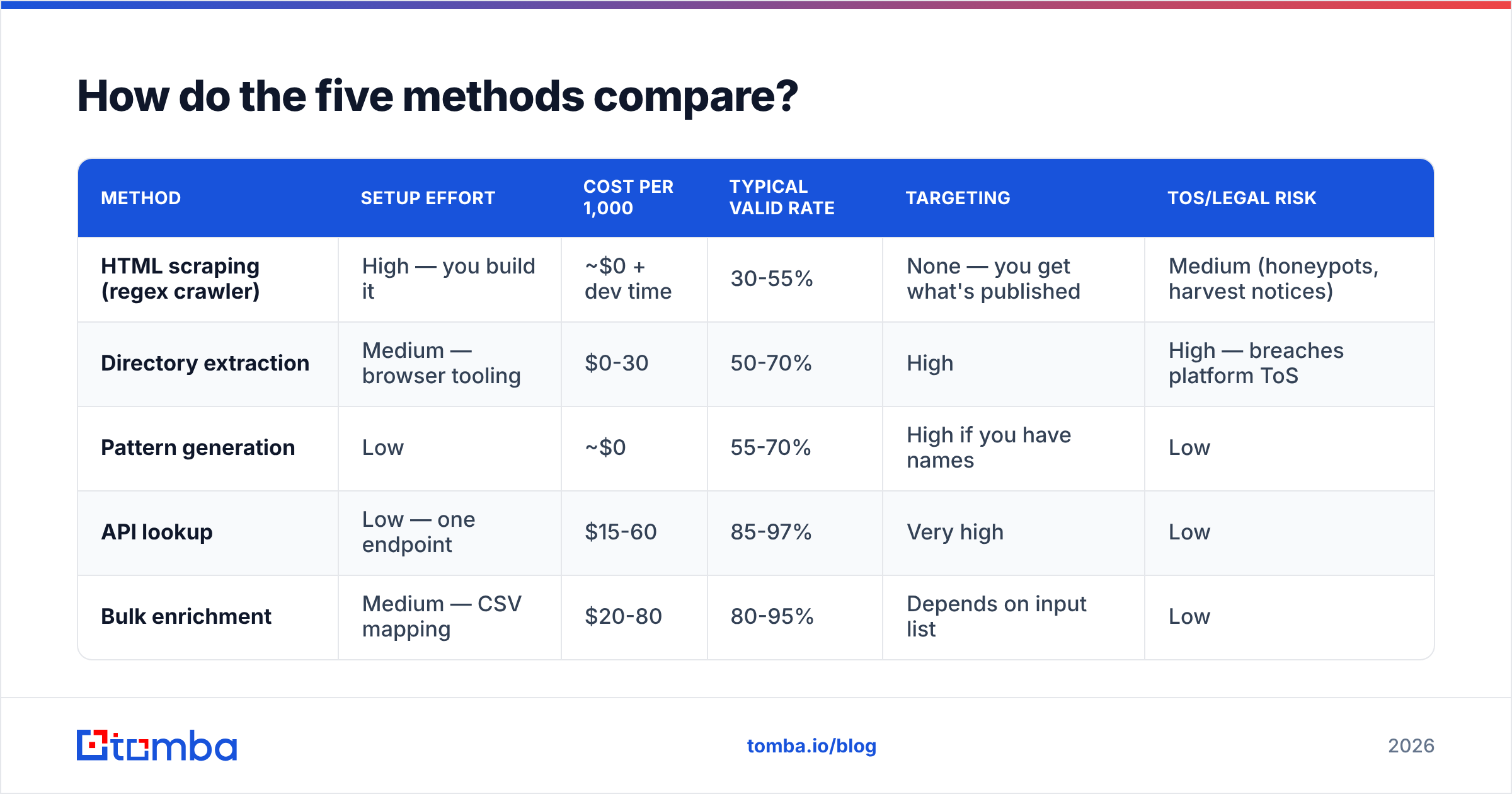
How do the five methods compare?#
| Method | Setup effort | Cost per 1,000 | Typical valid rate | Targeting | ToS/legal risk |
|---|---|---|---|---|---|
| HTML scraping (regex crawler) | High — you build it | ~$0 + dev time | 30-55% | None — you get what's published | Medium (honeypots, harvest notices) |
| Directory extraction | Medium — browser tooling | $0-30 | 50-70% | High | High — breaches platform ToS |
| Pattern generation | Low | ~$0 | 55-70% | High if you have names | Low |
| API lookup | Low — one endpoint | $15-60 | 85-97% | Very high | Low |
| Bulk enrichment | Medium — CSV mapping | $20-80 | 80-95% | Depends on input list | Low |
The column that decides the argument is "typical valid rate." At a 45% valid rate, sending 1,000 messages means 550 bounces, which will get your sending domain flagged inside a single campaign. At 90%, you are at 100 bounces — still too many to send blind, but recoverable after a verification pass.
How do you scrape emails from a website?#
If you genuinely want method #1, do it properly rather than with a naive regex.
Step 1 — target the right pages. Team pages, /about, /contact, press releases, and author bylines carry named-person addresses. Footers and support pages carry generic aliases. Crawl the former, skip the latter.
Step 2 — respect robots.txt and rate limits. One request per two seconds per domain. Identify your crawler in the user agent. This is not just etiquette; aggressive crawlers get IP-banned and poison the run.
Step 3 — decode obfuscation. A lot of addresses are published as name [at] company [dot] com, as JavaScript-assembled strings, or as Cloudflare's data-cfemail hex blob. Your extractor needs to handle all three or you will miss the majority of named contacts.
Step 4 — filter aggressively. Drop info@, noreply@, postmaster@, abuse@, anything on a free mail domain, and anything matching known spamtrap patterns. Then remove duplicates before you do anything else — duplicate sends to the same person are the fastest route to a manual spam complaint.
Step 5 — verify everything. Non-negotiable. See the verification section below.
If you only need addresses from a single company rather than a whole crawl, skip the crawler entirely. A domain search returns every indexed address on a company domain along with names, roles, and the source pages the address was found on — which is the crawl you were about to build, already done and already deduplicated.
How does pattern generation work, and when does it fail?#
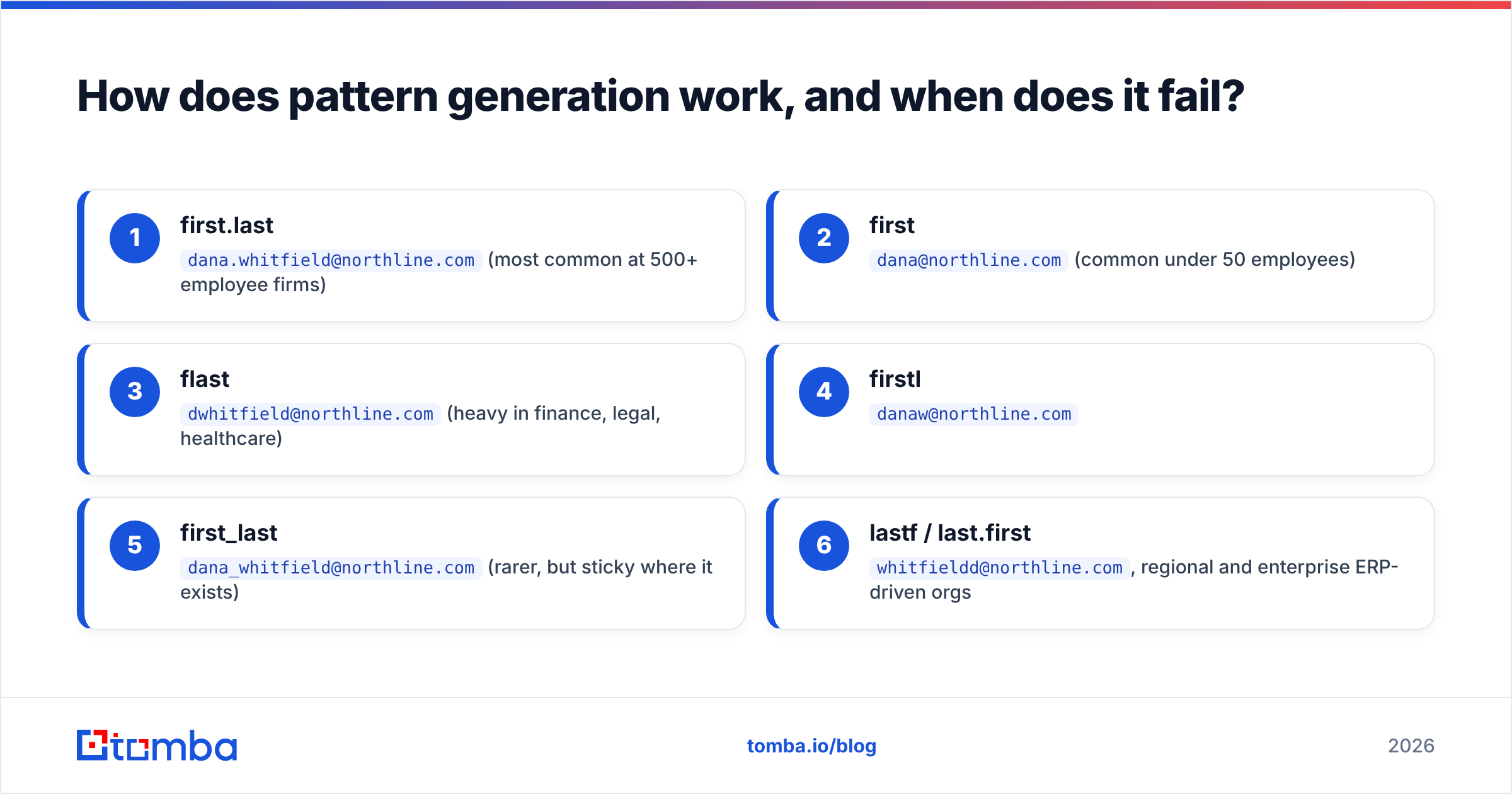
Roughly 80% of companies use one of eight email formats. Given "Dana Whitfield" at northline.com, the candidate set is:
- first.last —
dana.whitfield@northline.com(most common at 500+ employee firms) - first —
dana@northline.com(common under 50 employees) - flast —
dwhitfield@northline.com(heavy in finance, legal, healthcare) - firstl —
danaw@northline.com - first_last —
dana_whitfield@northline.com(rarer, but sticky where it exists) - lastf / last.first —
whitfieldd@northline.com, regional and enterprise ERP-driven orgs
An email permutator will generate the full set in one shot. The failure modes are what matter:
- Catch-all domains accept every address at the SMTP layer, so testing tells you nothing. You need a catch-all verifier that uses signals beyond SMTP acceptance.
- Duplicate names — two Dana Whitfields at a 5,000-person company means the pattern generates one address for two people, and you will email the wrong one.
- Non-Latin names, hyphenation, and accents get transliterated inconsistently.
josé.garcía-lópezmight bejose.garcia@,jgarcialopez@, orjose.garcialopez@. - Aliased and randomized schemes — some security-conscious orgs issue
dw4471@. Pattern generation returns nothing usable.
Check the company's format first rather than guessing eight times: a company email pattern lookup tells you which of the eight a domain actually uses, which collapses eight guesses into one.
Why does verification matter more than collection?#
Because mailbox providers judge you on bounce rate, not on how clever your acquisition was.
Google and Microsoft both treat sustained hard-bounce rates above 2% as a strong negative reputation signal, and the 2024 bulk-sender requirements formalized a 0.3% spam complaint threshold on top of it. A scraped list at 40% invalid does not just waste 40% of your sends — it drags the deliverability of the other 60% down with it, and it damages the domain for months after you stop.
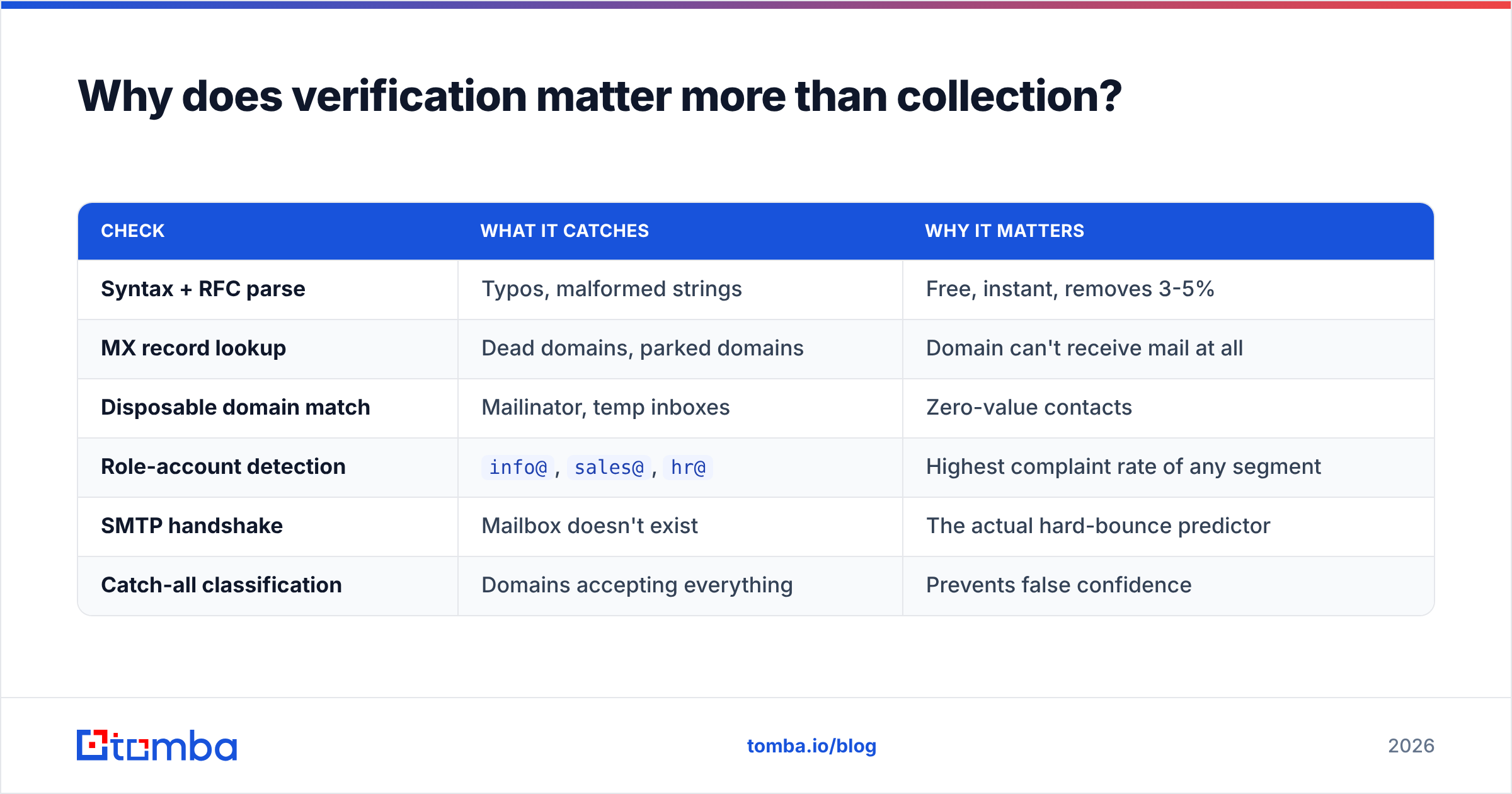
The verification chain that actually works:
| Check | What it catches | Why it matters |
|---|---|---|
| Syntax + RFC parse | Typos, malformed strings | Free, instant, removes 3-5% |
| MX record lookup | Dead domains, parked domains | Domain can't receive mail at all |
| Disposable domain match | Mailinator, temp inboxes | Zero-value contacts |
| Role-account detection | info@, sales@, hr@ |
Highest complaint rate of any segment |
| SMTP handshake | Mailbox doesn't exist | The actual hard-bounce predictor |
| Catch-all classification | Domains accepting everything | Prevents false confidence |
Run a list through an email verifier before the first send, and re-run anything older than 90 days — B2B data decays at roughly 2-2.5% per month through job changes alone, which is a quarter of your list gone every year.
Which tools should you use for each method?#
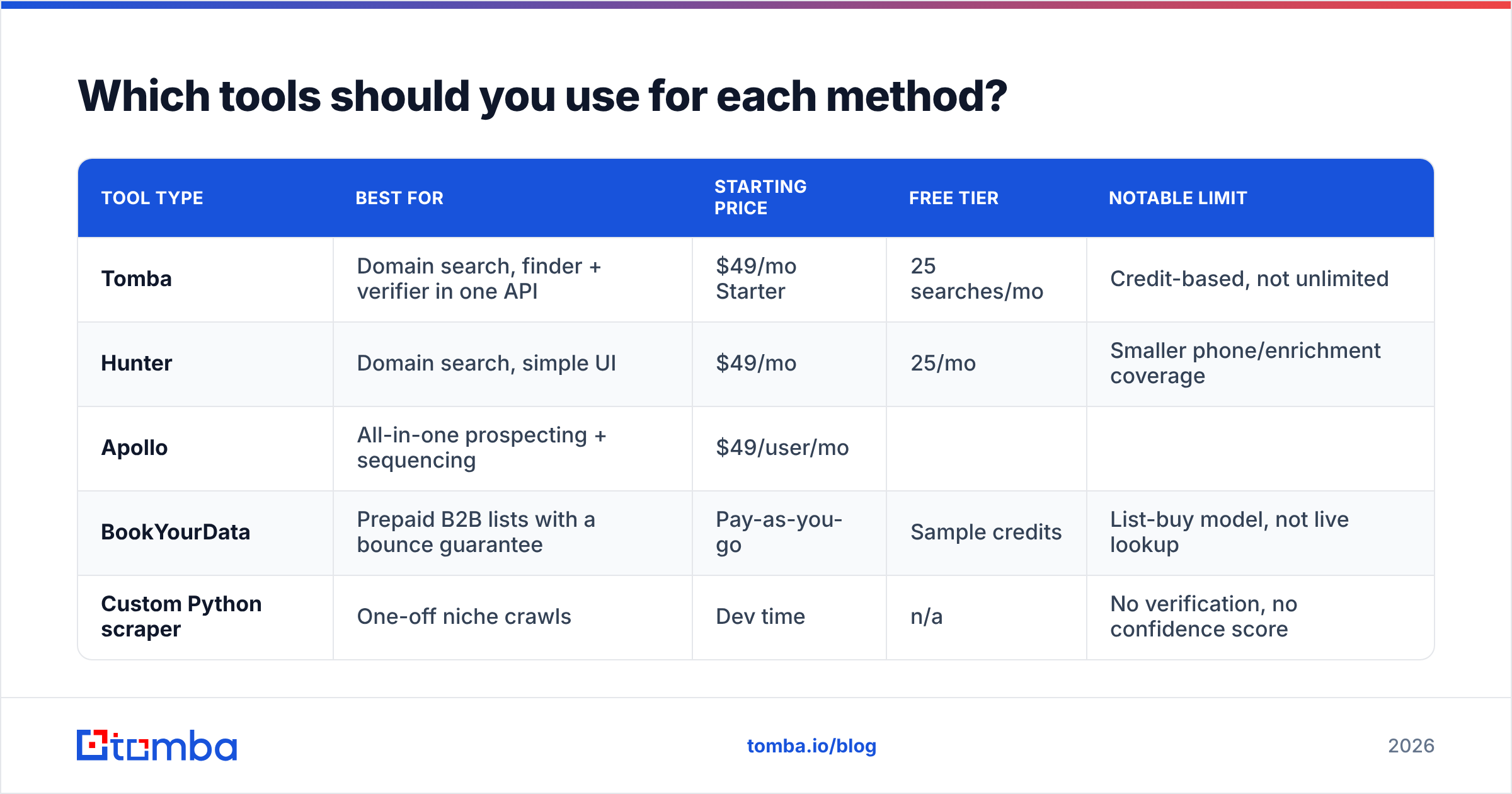
| Tool type | Best for | Starting price | Free tier | Notable limit |
|---|---|---|---|---|
| Tomba | Domain search, finder + verifier in one API | $49/mo Starter | 25 searches/mo | Credit-based, not unlimited |
| Hunter | Domain search, simple UI | $49/mo | 25/mo | Smaller phone/enrichment coverage |
| Apollo | All-in-one prospecting + sequencing | $49/user/mo | ||
| Limited | Data accuracy varies by region | |||
| BookYourData | Prepaid B2B lists with a bounce guarantee | Pay-as-you-go | Sample credits | List-buy model, not live lookup |
| --- | --- | --- | --- | --- |
| Custom Python scraper | One-off niche crawls | Dev time | n/a | No verification, no confidence score |
A few honest notes on that table. Apollo is genuinely strong if you want prospecting and sequencing under one login, and its database size is hard to beat — but you are paying per seat and its European coverage is thinner than its US coverage. BookYourData suits teams who want a fixed-cost list with a stated bounce guarantee rather than a metered API, and its verification-before-delivery model means you skip a step. A custom scraper is defensible only when the data is somewhere no vendor has indexed — a niche trade association directory, a regional registry — and even then you should pipe the output through a verifier.
Tomba sits in the middle: Tomba pricing runs Free (25 searches/mo), Starter at $49/mo, Growth at $99/mo, and Pro at $249/mo, and the finder, verifier, catch-all check, and enrichment all sit behind the same Tomba API. For a technical team, that matters more than raw record count — one auth token, one rate limit, one billing line. Cross-check any vendor's claims against user reviews on G2 before committing to an annual plan.
What does a production email-collection pipeline look like?#
Here is the sequence that survives a compliance review and a deliverability audit.
- Define the ICP first. Firmographic filters (industry, headcount, tech stack, geography) applied before collection are worth more than any volume of post-hoc filtering. A 400-contact list that matches your ICP outperforms 40,000 scraped addresses.
- Source names, not emails. Get the person and the company from your ICP research. The email is a derived field, not the starting point.
- Resolve the address via lookup. Run names + domains through an email finder or a bulk email finder job. Keep the confidence score attached to each record.
- Verify and segment by confidence. Send to high-confidence records first. Hold catch-all and low-confidence records for a separate, slower-ramped campaign — or drop them.
- Log provenance. Store where each address came from and when. GDPR requires you to answer "where did you get this?" and you will be asked.
- Re-verify on a 90-day cycle. Suppress anything that bounces, complains, or unsubscribes, permanently and across every tool you use.
Step 6 is where most teams leak. A suppression list that lives in one sending tool but not in your CRM will re-import a complainer within a quarter. Centralize it.
What should you do next?#
Stop thinking of this as scraping and start thinking of it as resolution: you know who you want to reach, and you need their address with a confidence score attached. Regex crawlers cannot give you that; a maintained index can.
If you want to test the difference on your own list, Tomba's Email Finder gives you 25 free searches a month with no card — enough to run twenty or thirty of your existing scraped contacts through it and compare what comes back against what you collected. Feed it a name and a domain, get a verified address and its sources, and see how much of your current list survives. If the numbers hold up, the Starter plan at $49/mo covers most solo founders and small outbound teams; the API and bulk endpoints handle it at volume when you outgrow the dashboard.
Related guides#
// get started
Find, verify and enrich your first contacts today
Start on the free plan with 25 searches a month, then scale when your team is ready.
Free plan · No credit card required · GDPR & CCPA
// about the author