How to Segment Email List: 7 Methods That Lift Replies
Most cold email lists are one undifferentiated blob. Here are seven segmentation methods — firmographic, behavioral, intent, lifecycle — with the exact fields to collect, when each one pays off, and how to keep segments clean as data decays.
TL;DR
- Segmentation is not folders. It is a set of rules that change what you say, and if a segment does not change the message, it is not a segment.
- Start with three axes only: who they are (firmographic), what they did (behavioral), and how fresh the record is (data hygiene). Everything else is refinement.
- The highest-ROI first cut for cold outbound is company size × role seniority. It is cheap to build and it changes the pitch immediately.
- Segments rot. B2B contact data decays roughly 22–30% a year, so re-verify before every send or your "high-intent" segment quietly becomes a bounce cluster.
- Fewer, sharper segments beat many thin ones. Under ~50 contacts, a segment rarely produces statistically readable results.
What does it actually mean to segment an email list?#
Segmenting an email list means splitting contacts into groups where every member of a group should receive a materially different message. That last part is the whole test. If your "SaaS" segment and your "Fintech" segment get the same email with one word swapped, you have not segmented — you have created filing cabinets.
Think of it like a restaurant kitchen. You do not run one pot and hope everybody likes it. You separate by dietary need, because the constraint changes the dish. Same logic here: the constraint (company size, tech stack, last action taken) changes what a useful email says.
Three practical layers, in the order most teams should build them:
- Firmographic — company size, industry, revenue band, geography, tech stack. Static-ish, easy to source, changes the value proposition.
- Persona / role — seniority and function. Changes the pain you lead with. A VP Eng and a CFO care about opposite halves of the same product.
- Behavioral — opened, clicked, replied, visited pricing, downloaded, went cold 90 days. Changes the ask and the timing.
- Lifecycle stage — never-contacted, in-sequence, replied-not-booked, churned. Changes the tone and whether you can reference prior contact.
- Data quality tier — verified, catch-all, risky, unknown. Changes whether you send at all.
That fifth layer is the one people skip and the one that decides whether the other four matter. A perfectly segmented campaign sent to a 28% invalid list will underperform a lazy blast to a clean one.

Which segmentation method should you start with?#
Start with firmographic × role. It requires no engagement history, which means it works on day one with a cold list — and cold lists are where most segmentation questions actually come from.
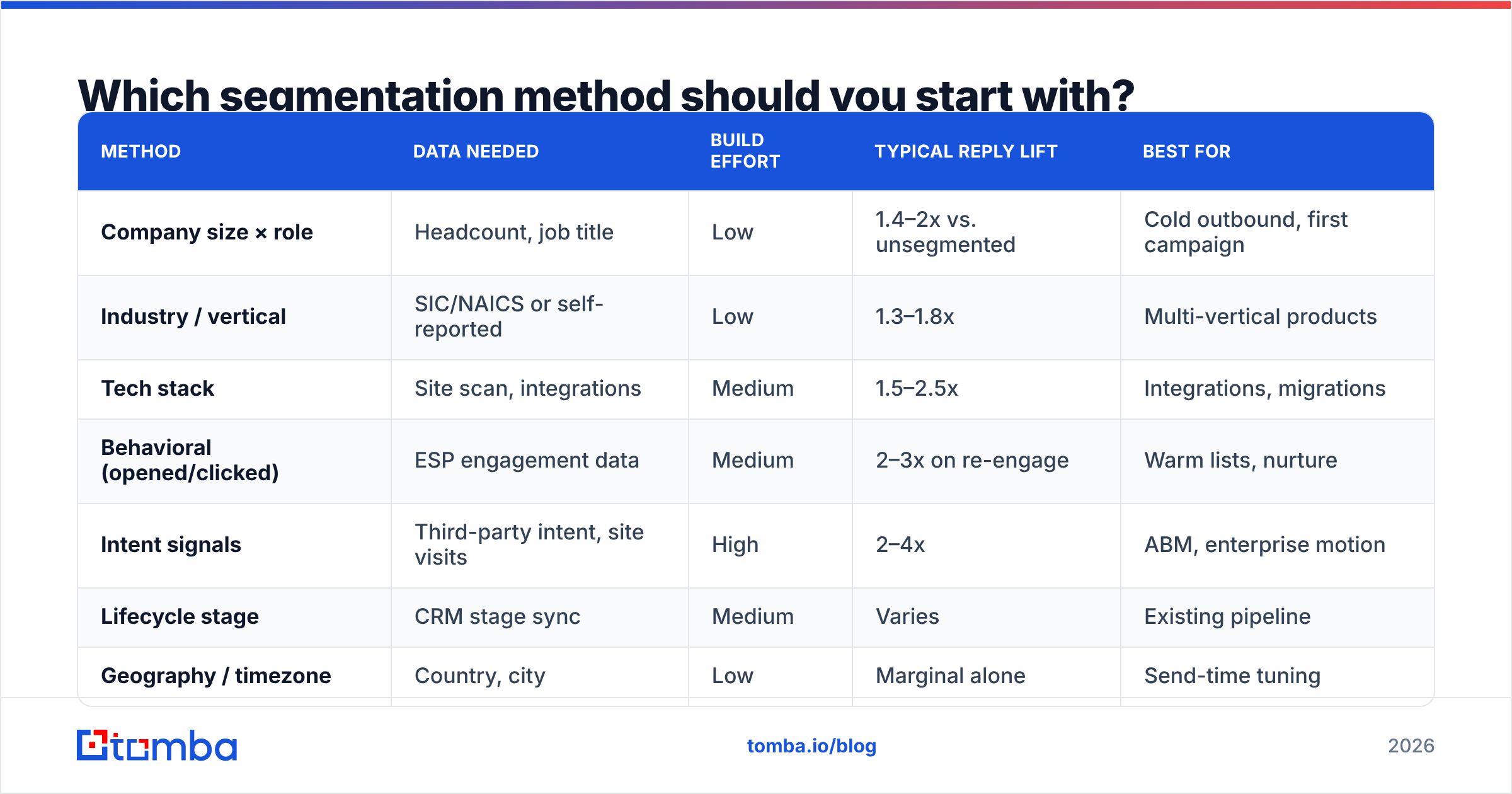
Here is how the common methods compare on effort versus payoff:
| Method | Data needed | Build effort | Typical reply lift | Best for |
|---|---|---|---|---|
| Company size × role | Headcount, job title | Low | 1.4–2x vs. unsegmented | Cold outbound, first campaign |
| Industry / vertical | SIC/NAICS or self-reported | Low | 1.3–1.8x | Multi-vertical products |
| Tech stack | Site scan, integrations | Medium | 1.5–2.5x | Integrations, migrations |
| Behavioral (opened/clicked) | ESP engagement data | Medium | 2–3x on re-engage | Warm lists, nurture |
| Intent signals | Third-party intent, site visits | High | 2–4x | ABM, enterprise motion |
| Lifecycle stage | CRM stage sync | Medium | Varies | Existing pipeline |
| Geography / timezone | Country, city | Low | Marginal alone | Send-time tuning |
Reply-lift figures are directional ranges observed across published vendor benchmarks and practitioner reports, not a guarantee — your baseline, offer, and list quality dominate. Treat them as a priority ordering, not a forecast.
The pattern to notice: the cheapest segments to build (size, role, industry) already capture most of the available lift. Intent data is powerful but expensive, and it is wasted if your firmographic layer is still mush.
How do you build the segments step by step?#
Step 1 — Define the segment before you collect data. Write the message first. "We help 50–200 person agencies stop losing hours to manual reporting" tells you exactly which fields you need: headcount band and industry. Working backwards from the message prevents you from enriching 40 fields you will never use.
Step 2 — Collect only the fields that change copy. For most B2B teams the minimum viable schema is: company domain, headcount band, industry, contact first name, job title, seniority, country, and email status. Eight fields. You can add more later; you cannot un-waste credits.
Step 3 — Source and enrich. Pull contacts from your existing CRM export, then fill gaps. A domain search gets you every public address at a target company, and data enrichment backfills the firmographic and role fields you need for the split. If you are working from LinkedIn exports, the LinkedIn finder resolves profile URLs to work addresses.
Step 4 — Normalize before you split. This is where most segmentation projects die. "VP of Engineering", "V.P. Engineering", "VP, Eng" and "Vice President Engineering" are four strings and one person type. Build a normalization pass: lowercase, strip punctuation, map to a seniority enum (IC / Manager / Director / VP / C-level) and a function enum (Eng / Sales / Marketing / Finance / Ops / Other). Do the same for headcount — bucket into 1–10, 11–50, 51–200, 201–1000, 1000+ rather than storing raw integers you will never query cleanly.
Step 5 — Verify, then tier by risk. Run the whole list through an email verifier and split into four tiers: valid, catch-all, risky, invalid. Send freely to valid. Send carefully to catch-all — those domains accept everything at the gateway and reveal nothing, which is why a dedicated catch-all verifier matters if a large share of your target accounts run Microsoft 365 with catch-all enabled. Drop invalid entirely.
Step 6 — Set a minimum segment size. Below roughly 50 contacts you cannot tell a good segment from a lucky one. If a split leaves you with 12 people, merge it upward. You are optimizing for readable signal, not for a tidy taxonomy.
Step 7 — Name segments so future-you understands them. us_saas_51-200_vp-eng_verified beats Segment 3 (final v2). Encode the axes in the name, in a fixed order.
Which segments actually change the message?#
A segment earns its existence when it changes at least one of: the opening line, the pain claimed, the proof offered, or the call to action. Here is the mapping most teams end up with:
- Headcount band → changes the proof. Under 50 people, cite time saved. Over 500, cite compliance, SSO, and rollout support. The same feature list, framed at the wrong altitude, reads as irrelevant.
- Seniority → changes the ask. ICs can be asked for a 15-minute walkthrough. VPs should be asked whether it is worth routing to whoever owns the problem. Asking a C-level for a demo is the most common cold-email misfire.
- Tech stack → changes the opening line. "Saw you're running HubSpot" is a legitimate observation that survives a spam filter's scrutiny and a human's.
- Behavioral recency → changes the tone. Someone who clicked pricing 4 days ago gets a direct email. Someone who has ignored six sends gets a breakup email or gets suppressed.
- Geography → changes send time and compliance posture, not usually copy. EU contacts pull GDPR obligations along with them; treat that as a hard segment boundary, not a nice-to-have.
Notice what is missing: "engaged vs. unengaged" as a standalone segment on a cold list. You cannot behaviorally segment people who have never heard from you. That axis only unlocks after your first campaign.
How do you keep segments from rotting?#
Segments decay on two clocks at once, and they run at different speeds.
The data clock is the fast one. People change jobs, companies get acquired, mailboxes get deactivated. Industry estimates put B2B contact data decay somewhere between 22% and 30% annually — HubSpot's research has long cited roughly 22.5% per year, and the number climbs in high-churn sectors like tech and agencies. A segment you built in January is measurably worse in July.
The relevance clock is slower but nastier. A company that was 40 people when you enriched it is 90 people now, which moves it into a different band and a different pitch. You will not notice this from bounce rates — the email still delivers, it just lands wrong.
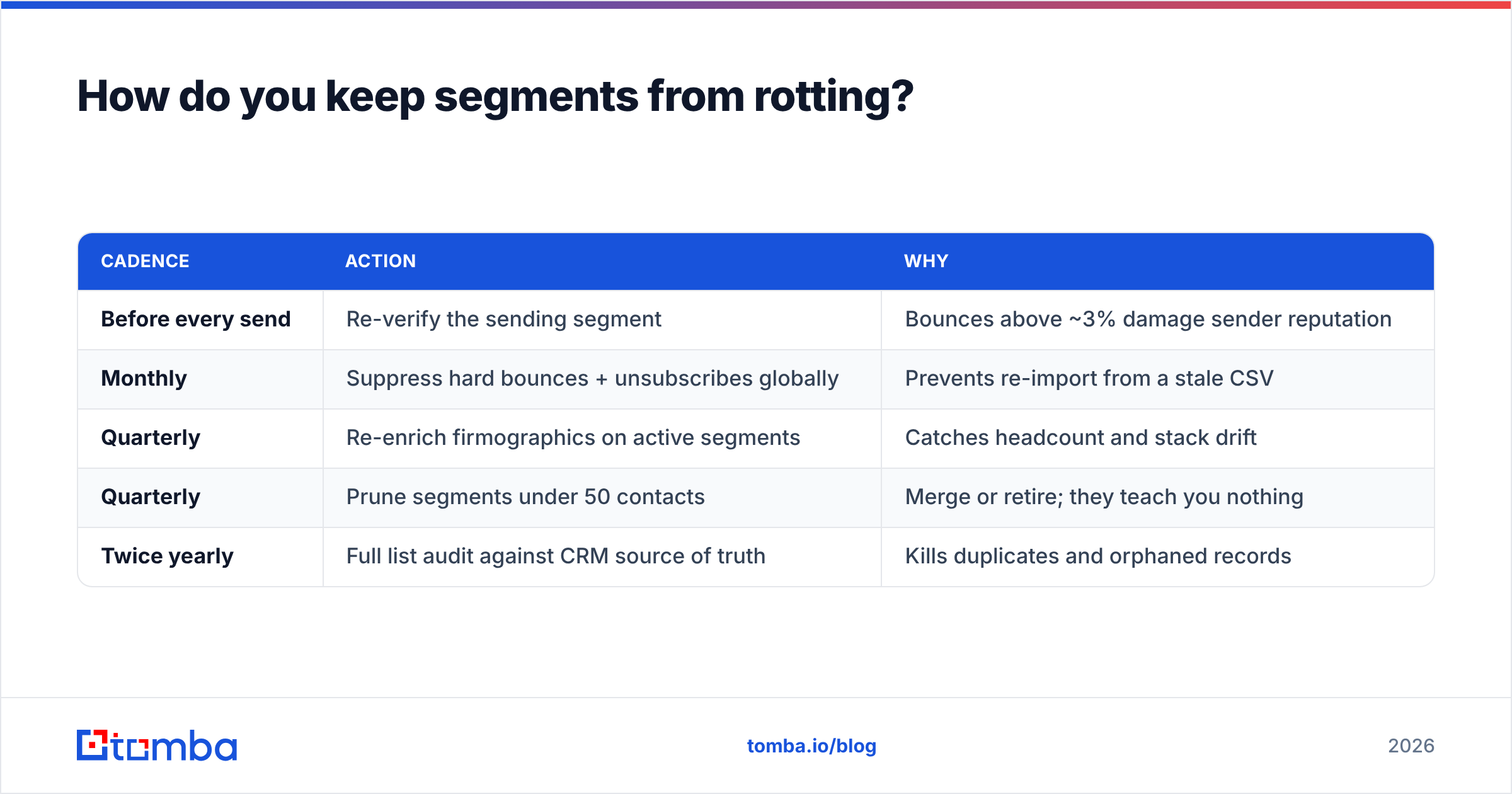
Practical hygiene routine:
| Cadence | Action | Why |
|---|---|---|
| Before every send | Re-verify the sending segment | Bounces above ~3% damage sender reputation |
| Monthly | Suppress hard bounces + unsubscribes globally | Prevents re-import from a stale CSV |
| Quarterly | Re-enrich firmographics on active segments | Catches headcount and stack drift |
| Quarterly | Prune segments under 50 contacts | Merge or retire; they teach you nothing |
| Twice yearly | Full list audit against CRM source of truth | Kills duplicates and orphaned records |
Deduplication deserves a specific note. Merged lists produce the same person under first.last@, flast@, and a personal Gmail. Sending three variants of one email to one human is the fastest way to get marked as spam. Run a remove duplicates pass keyed on normalized email and on person+domain, because the two catch different failure modes.

Which tools do you need for each segmentation layer?#
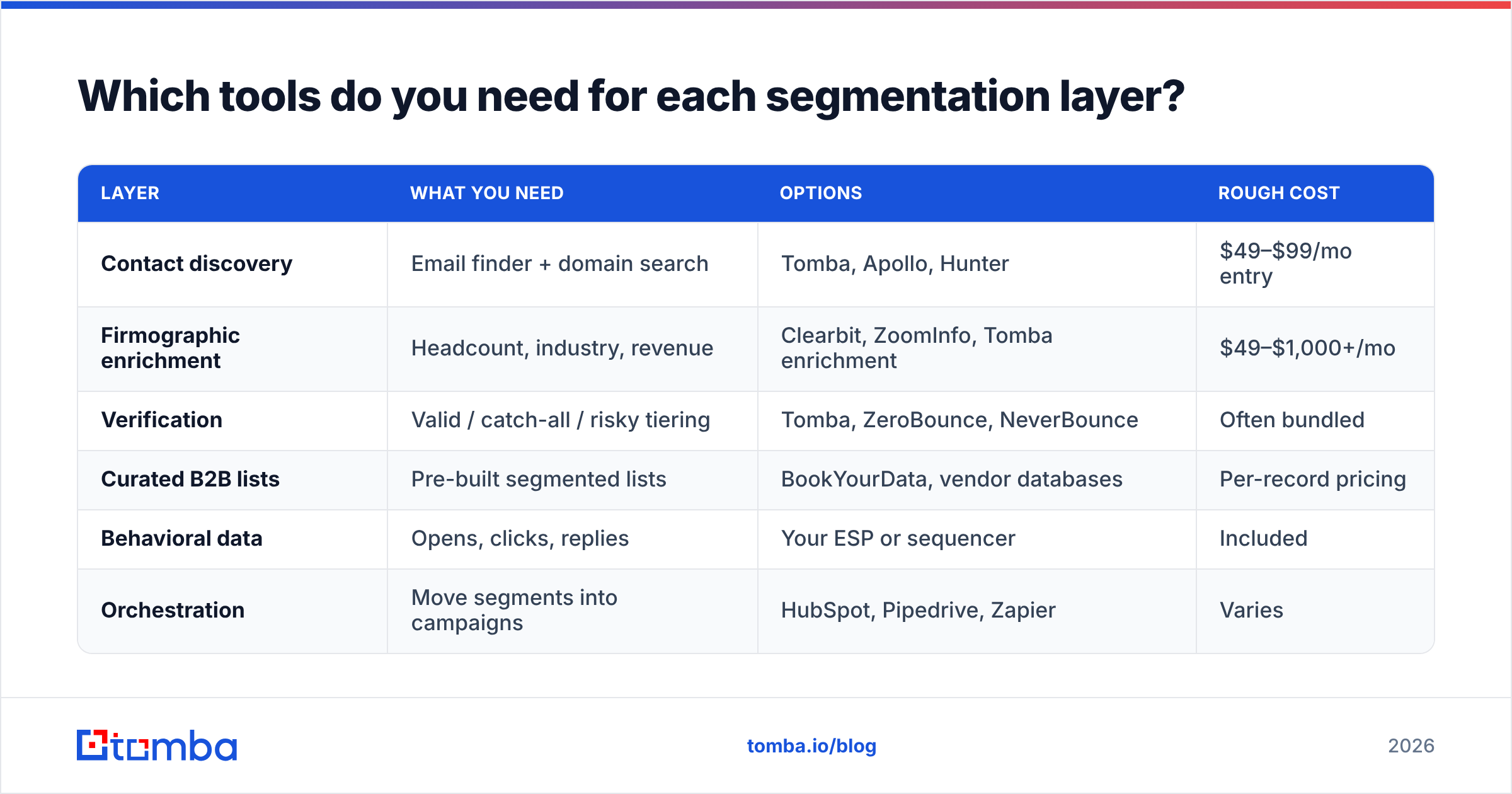
You do not need a monolithic platform. You need one reliable source for each layer, and the ability to move records between them without manual CSV surgery.
| Layer | What you need | Options | Rough cost |
|---|---|---|---|
| Contact discovery | Email finder + domain search | Tomba, Apollo, Hunter | $49–$99/mo entry |
| Firmographic enrichment | Headcount, industry, revenue | Clearbit, ZoomInfo, Tomba enrichment | $49–$1,000+/mo |
| Verification | Valid / catch-all / risky tiering | Tomba, ZeroBounce, NeverBounce | Often bundled |
| Curated B2B lists | Pre-built segmented lists | BookYourData, vendor databases | Per-record pricing |
| Behavioral data | Opens, clicks, replies | Your ESP or sequencer | Included |
| Orchestration | Move segments into campaigns | HubSpot, Pipedrive, Zapier | Varies |
On the list-purchase question: buying a pre-segmented list is a legitimate shortcut when you are entering a vertical cold and have no CRM history to segment from. BookYourData sells filtered B2B lists on a pay-per-record basis, which suits one-off vertical tests where a monthly seat makes no sense. The tradeoff is the same as with any purchased data: you still verify before sending, and you still normalize titles yourself, because no vendor's title taxonomy will match your enums.
For teams building segments continuously rather than buying them, cost predictability matters more than per-record price. Tomba pricing runs a free tier at 25 searches a month, Starter at $49/mo, Growth at $99/mo, and Pro at $249/mo, with finding and verification in the same credit pool — which avoids the common trap of paying one vendor to find an address and a second to confirm it exists.
If your segmentation lives in a spreadsheet, keep it there and automate around it. A Google Sheets add-on or the Tomba API will enrich and verify rows in place, so your segment definitions stay in one file rather than fragmenting across four dashboards. For CRM-native teams, push through the HubSpot integration and let segment membership be a computed CRM property rather than a static list.
How do you measure whether segmentation worked?#
Compare segments against each other, not against your historical average. Your historical average includes every bad list you ever sent to, so it flatters any new work.
Track four numbers per segment:
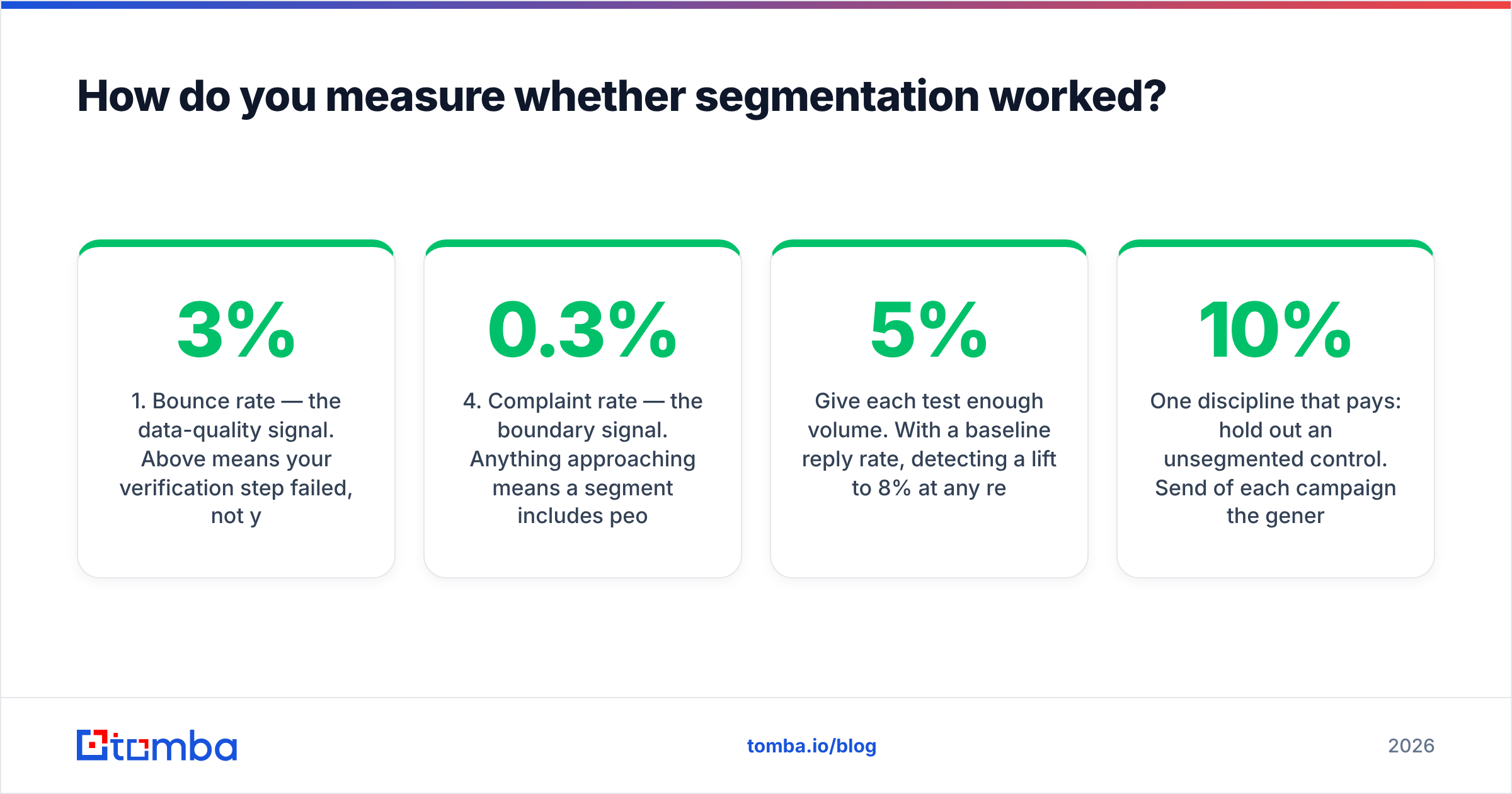
- Bounce rate — the data-quality signal. Above 3% means your verification step failed, not your targeting. Fix this before reading anything else. Both Google and Microsoft publish sender requirements that treat sustained bounces and complaints as reputation events.
- Reply rate — the relevance signal. This is the number segmentation is supposed to move. A segment that does not out-reply your control by a meaningful margin is not pulling its weight.
- Positive reply rate — the targeting signal. High replies with low positives usually means you are reaching the right company and the wrong person. That is a persona-layer problem, not a copy problem.
- Complaint rate — the boundary signal. Anything approaching 0.3% means a segment includes people who never should have been contacted. Suppress it and audit the source.
Give each test enough volume. With a 5% baseline reply rate, detecting a lift to 8% at any reasonable confidence takes several hundred sends per arm. Calling a winner at 40 sends is coin-flipping with extra steps.
One discipline that pays: hold out an unsegmented control. Send 10% of each campaign the generic version. It is the only way to know whether the segmentation is doing work or whether your offer simply got better that quarter.
What are the common segmentation mistakes?#
Over-segmenting into unreadable slices. Twelve segments of 30 contacts each generate twelve inconclusive results. Three segments of 120 generate three answers.
Segmenting on fields you cannot reliably source. Revenue band sounds great and is wrong for most private companies. Headcount is imperfect but sourceable. Prefer the field you can actually fill over the field you wish you had.
Treating segmentation as a substitute for offer quality. Perfect targeting on a weak offer produces well-targeted silence. Segmentation multiplies the offer; it does not replace it.
Letting segments drift out of sync with the CRM. If your sequencer holds one version of a segment and your CRM holds another, reps will contact people who already replied. Make one system authoritative and sync the other from it.
Skipping the verification tier. Every other layer is downstream of deliverability. A beautifully segmented campaign that lands in spam is an unsegmented campaign with more work in it.
Where should you start this week?#
Pick your single largest list. Normalize titles into five seniority buckets and headcount into five bands. Verify the whole thing and drop the invalids. Split into the four largest cells that result, write four different first lines, and hold back 10% as an unsegmented control. That is a week of work and it will tell you more than a quarter of theorizing about taxonomy.
Then let the data tell you which axis to add next. If the seniority split moved replies more than the size split, invest in better title data. If it was the reverse, invest in firmographics. Segmentation is iterative — build the two cheap layers, measure, and only buy intent data once the cheap layers are exhausted.
Ready to build segments on data that actually delivers? Start with the Tomba Email Finder to source verified contacts by company and role, then tier them by verification status before your first send. The free tier gives you 25 searches a month to test your segmentation schema on a real list before you commit to a plan — enough to prove the approach works on your ICP, not just in a blog post.
Related guides#
// get started
Find, verify and enrich your first contacts today
Start on the free plan with 25 searches a month, then scale when your team is ready.
Free plan · No credit card required · GDPR & CCPA
// about the author