How To Send 1000 Emails Per Day Without Getting Blocked
Sending 1,000 cold emails a day is an infrastructure problem, not a volume problem. Here is the exact domain, mailbox, warmup, and list-hygiene math that keeps 1,000 daily sends landing in the inbox.
TL;DR
- You cannot send 1,000 emails per day from one mailbox. Google and Microsoft cap free/business mailboxes long before that, and reputation systems throttle you even sooner.
- The working model is 1,000 sends ÷ 30 emails per mailbox = ~34 mailboxes, spread across 8–12 secondary domains, each warmed for 3–4 weeks before it carries production volume.
- Your bounce rate matters more than your volume. Above 3% hard bounces, Google Postmaster starts treating the whole sending domain as suspect — list verification is the cheapest insurance you can buy.
- Realistic monthly cost for a compliant 1,000/day cold outbound setup: $250–$600 across domains, mailboxes, a sending platform, and verification credits.
- Transactional and newsletter sending at 1,000/day is a completely different problem — use a dedicated ESP with authenticated subdomains, not a cold-email stack.
Why can't you just send 1,000 emails per day from one account?#
Because mailbox providers price sending in reputation, not in seats.
Think of your sending domain like a driver's licence. Volume is how fast you drive. A brand-new licence holder doing 120mph gets pulled over immediately; a 20-year clean record doing the same speed still gets pulled over, just with more warning. Providers don't care that you paid for the seat — they care whether the pattern looks like a human.
Two separate ceilings apply:
1. The hard provider cap. Google Workspace limits external recipients to 2,000 per day for paid accounts, but that number is a policy ceiling, not a safe operating limit — and it applies to Gmail's own interface. Third-party SMTP sending through the same account triggers much tighter throttles. Microsoft 365 caps recipient rate at 10,000 per day but enforces a 30-message-per-minute limit and aggressive throttling on new tenants.
2. The soft reputation cap. This is the one that actually kills campaigns. Filters model velocity: a domain that sent 20 emails on Monday and 900 on Tuesday is a spam signature regardless of content. Google's bulk sender rules (in force since February 2024) require SPF, DKIM, DMARC, one-click unsubscribe on marketing mail, and a spam complaint rate below 0.30% for anyone sending 5,000+ per day to Gmail addresses.
So the honest answer to "how to send 1000 emails per day" is: you distribute the load until no individual mailbox looks abnormal.

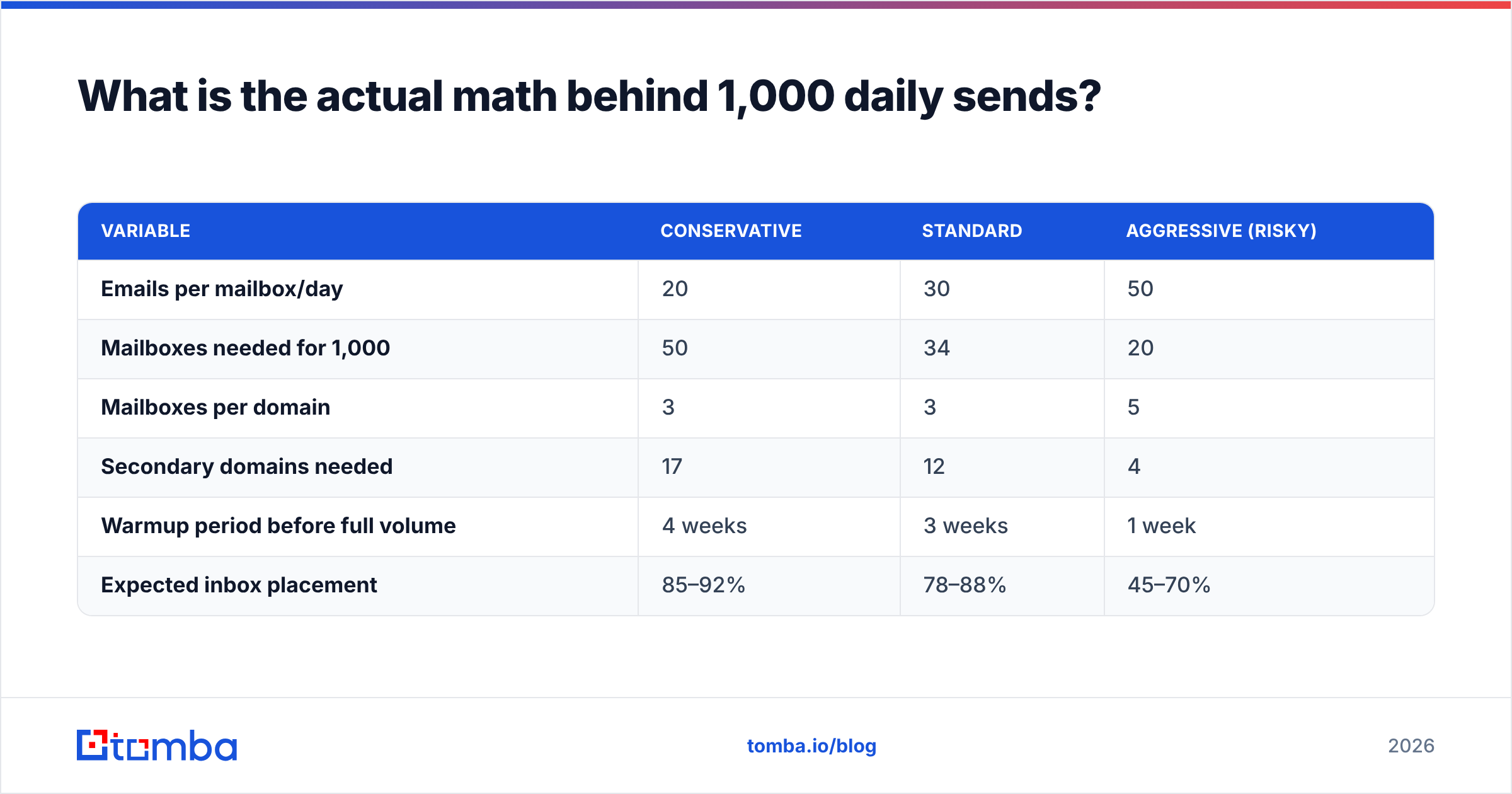
What is the actual math behind 1,000 daily sends?#
Here is the distribution model every serious outbound team runs.
| Variable | Conservative | Standard | Aggressive (risky) |
|---|---|---|---|
| Emails per mailbox/day | 20 | 30 | 50 |
| Mailboxes needed for 1,000 | 50 | 34 | 20 |
| Mailboxes per domain | 3 | 3 | 5 |
| Secondary domains needed | 17 | 12 | 4 |
| Warmup period before full volume | 4 weeks | 3 weeks | 1 week |
| Expected inbox placement | 85–92% | 78–88% | 45–70% |
The "aggressive" column is what burns domains. Four domains carrying 250 sends each per day is a pattern filters recognize within two weeks.
Work through the standard column concretely:
- Buy 12 secondary domains. Never send cold outbound from your primary company domain. Use close variants —
getacme.com,acme-hq.com,tryacme.io— and redirect all of them to your main site with a 301. - Create 3 mailboxes per domain. Real names of real people on your team. Not
sales@, notinfo@, nothello@— role addresses attract complaints and carry no personal reputation. - Authenticate every domain. SPF, DKIM, and a DMARC record at minimum
p=nonewith a reporting address, moving top=quarantineonce you've read 30 days of reports. - Warm each mailbox for 3 weeks. Start at 5 sends/day, add 3–5 per day, and keep automated warmup running permanently at ~20% of production volume.
- Cap production at 30/day/mailbox. 34 mailboxes × 30 = 1,020 sends. That's your ceiling, and you should treat it as one.
- Rotate. Most sending platforms distribute a single campaign across all connected mailboxes automatically. Never point a 1,000-lead campaign at one inbox and hope.
Run the numbers yourself with the email warmup calculator before you commit to a domain purchase — the ramp schedule changes significantly depending on whether you're on Google or Microsoft.
How do you set up the sending infrastructure step by step?#
Step 1: Separate the sending domains from the money domain#
Your primary domain carries invoices, password resets, and contract PDFs. If cold outbound tanks its sender reputation, your billing emails start landing in spam. That's an existential problem, not a marketing one. Secondary domains are cheap ($10–$15/year); losing transactional deliverability is not.
Step 2: Get authentication right on day one#
Run every domain through an SPF checker before you send a single message. The three records:
- SPF — authorizes which servers may send as your domain. One record only; more than one is a fail, not a merge.
- DKIM — cryptographically signs outbound mail. Enable it in your mailbox provider's admin console; it's off by default in some Microsoft tenants.
- DMARC — tells receivers what to do when SPF/DKIM fail, and sends you reports. Start at
p=none, read the aggregate reports, then tighten.
Step 3: Warm up before you scale up#
Warmup is not optional theatre. It builds the engagement history filters need to see. A mailbox with zero reply history sending 30 cold emails looks identical to a compromised account sending 30 phishing emails.
Use a warmup network (Instantly, Mailreach, Warmy, or whatever your sending platform bundles) and let it run for at least three weeks. Then keep it on. Teams that switch warmup off after launch see placement drop within 30 days.
Step 4: Monitor from the receiver's side#
Register every sending domain in Google Postmaster Tools and Microsoft SNDS. These show you what Gmail and Outlook actually think of you — spam rate, domain reputation, authentication pass rate — rather than what your sending tool claims. Domain reputation dropping from "High" to "Medium" is your 48-hour warning before placement collapses.
Step 5: Throttle and randomize#
Send in a human window (8am–5pm recipient time), randomize intervals between 60 and 180 seconds, and skip weekends. A perfectly even 90-second cadence across 30 sends is a bot signature.
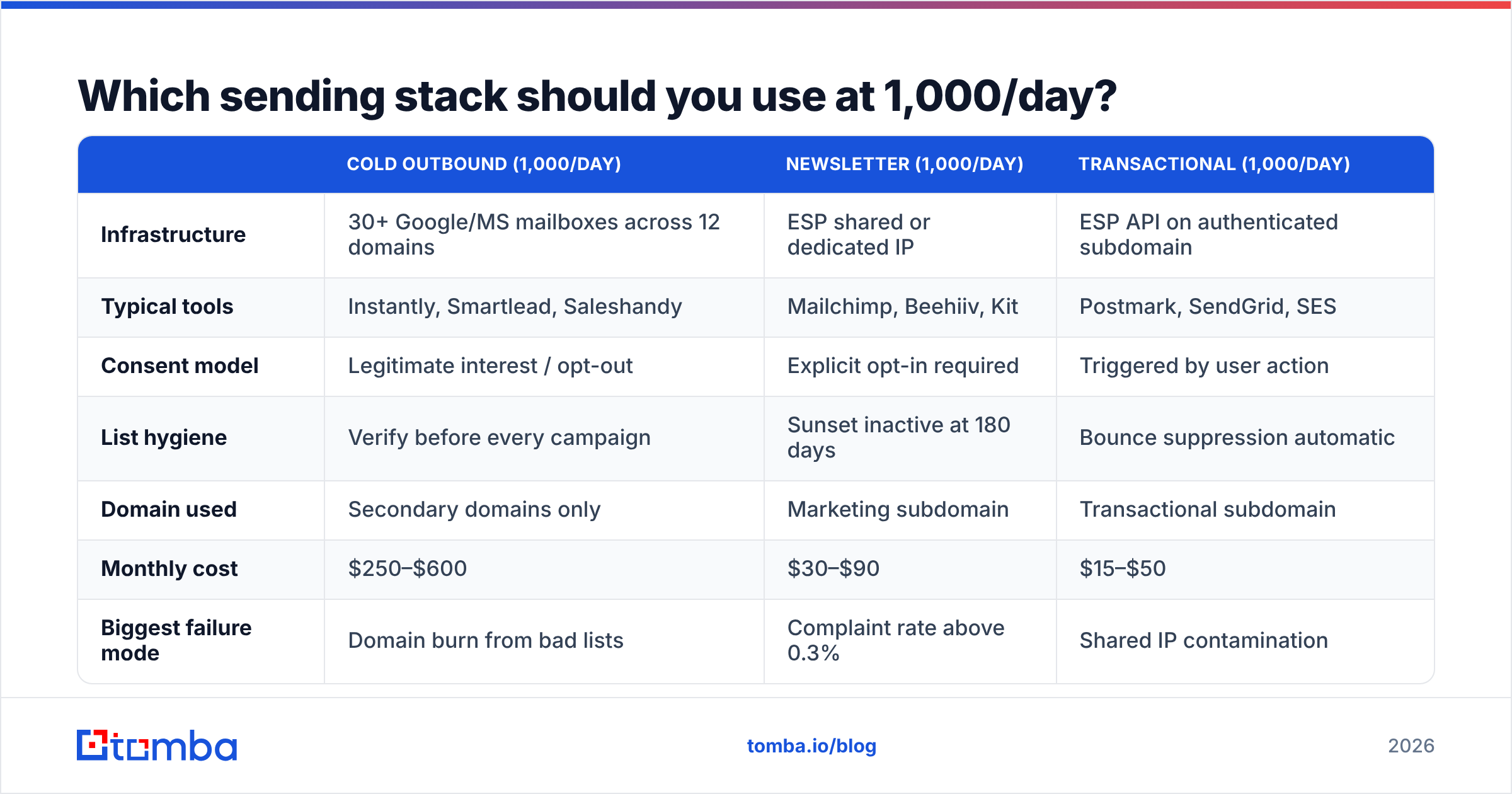
Which sending stack should you use at 1,000/day?#
The right stack depends entirely on what kind of mail you're sending. Cold outbound, newsletters, and transactional mail have incompatible requirements — mixing them on one infrastructure is the most common self-inflicted deliverability wound.
| Cold outbound (1,000/day) | Newsletter (1,000/day) | Transactional (1,000/day) | |
|---|---|---|---|
| Infrastructure | 30+ Google/MS mailboxes across 12 domains | ESP shared or dedicated IP | ESP API on authenticated subdomain |
| Typical tools | Instantly, Smartlead, Saleshandy | Mailchimp, Beehiiv, Kit | Postmark, SendGrid, SES |
| Consent model | Legitimate interest / opt-out | Explicit opt-in required | Triggered by user action |
| List hygiene | Verify before every campaign | Sunset inactive at 180 days | Bounce suppression automatic |
| Domain used | Secondary domains only | Marketing subdomain | Transactional subdomain |
| Monthly cost | $250–$600 | $30–$90 | $15–$50 |
| Biggest failure mode | Domain burn from bad lists | Complaint rate above 0.3% | Shared IP contamination |
The single most expensive mistake is running cold outbound through an ESP built for opt-in mail. SendGrid, Mailchimp, and Klaviyo will suspend your account for it — their terms prohibit purchased or scraped lists, and shared-IP contamination gets caught fast.
Why does list quality matter more than send volume?#
Because bounces are the fastest way to lose everything you built in warmup.
Do the math at 1,000 sends/day. A 3% hard bounce rate is 30 bounces daily, 900 per month. Google Postmaster treats sustained bounce rates above roughly 2–3% as a signal that you're sending to a harvested list — and the penalty applies to the domain, which means every mailbox on it, not just the one that bounced.
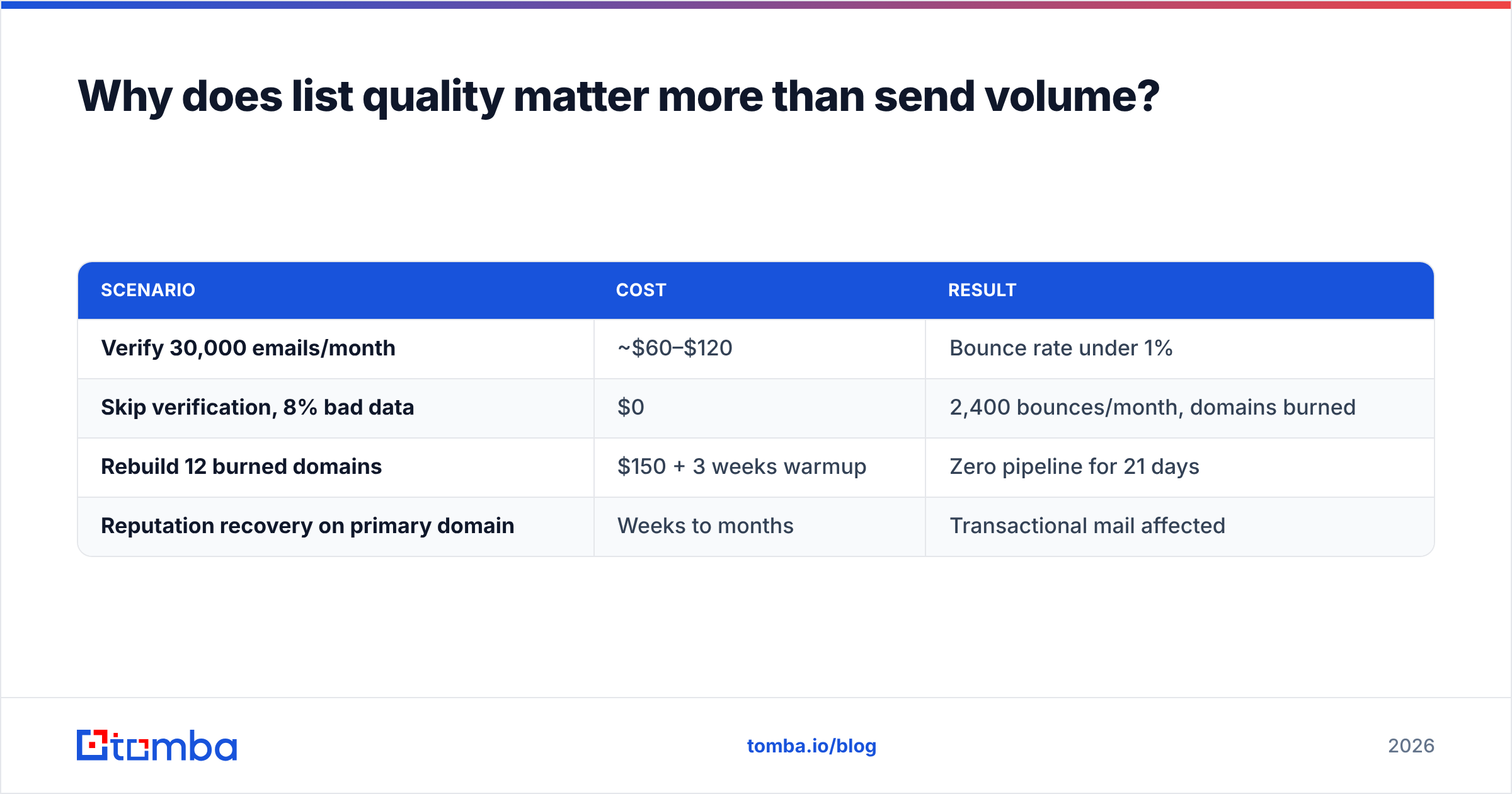
The cost comparison is not close:
| Scenario | Cost | Result |
|---|---|---|
| Verify 30,000 emails/month | ~$60–$120 | Bounce rate under 1% |
| Skip verification, 8% bad data | $0 | 2,400 bounces/month, domains burned |
| Rebuild 12 burned domains | $150 + 3 weeks warmup | Zero pipeline for 21 days |
| Reputation recovery on primary domain | Weeks to months | Transactional mail affected |
Verification is the cheapest line item in the entire stack and the one people cut first. Run every list through an email verifier before it enters a sequence, and use a bulk email finder when you're building lists at the scale 1,000/day demands — 1,000 sends a day means roughly 22,000 fresh, verified contacts per month if you're not re-emailing the same people.

Three list-hygiene rules that matter at this volume:
- Verify at build time and again at send time. Data decays at roughly 2–3% per month as people change jobs. A list verified in January is measurably worse in April.
- Suppress catch-all domains you can't confirm. Catch-all servers accept everything, so a "valid" result means nothing. Use a catch-all verifier to separate genuinely deliverable catch-alls from black holes.
- Deduplicate across campaigns. Hitting the same person from three different sending domains in one week is the fastest route to a spam complaint.
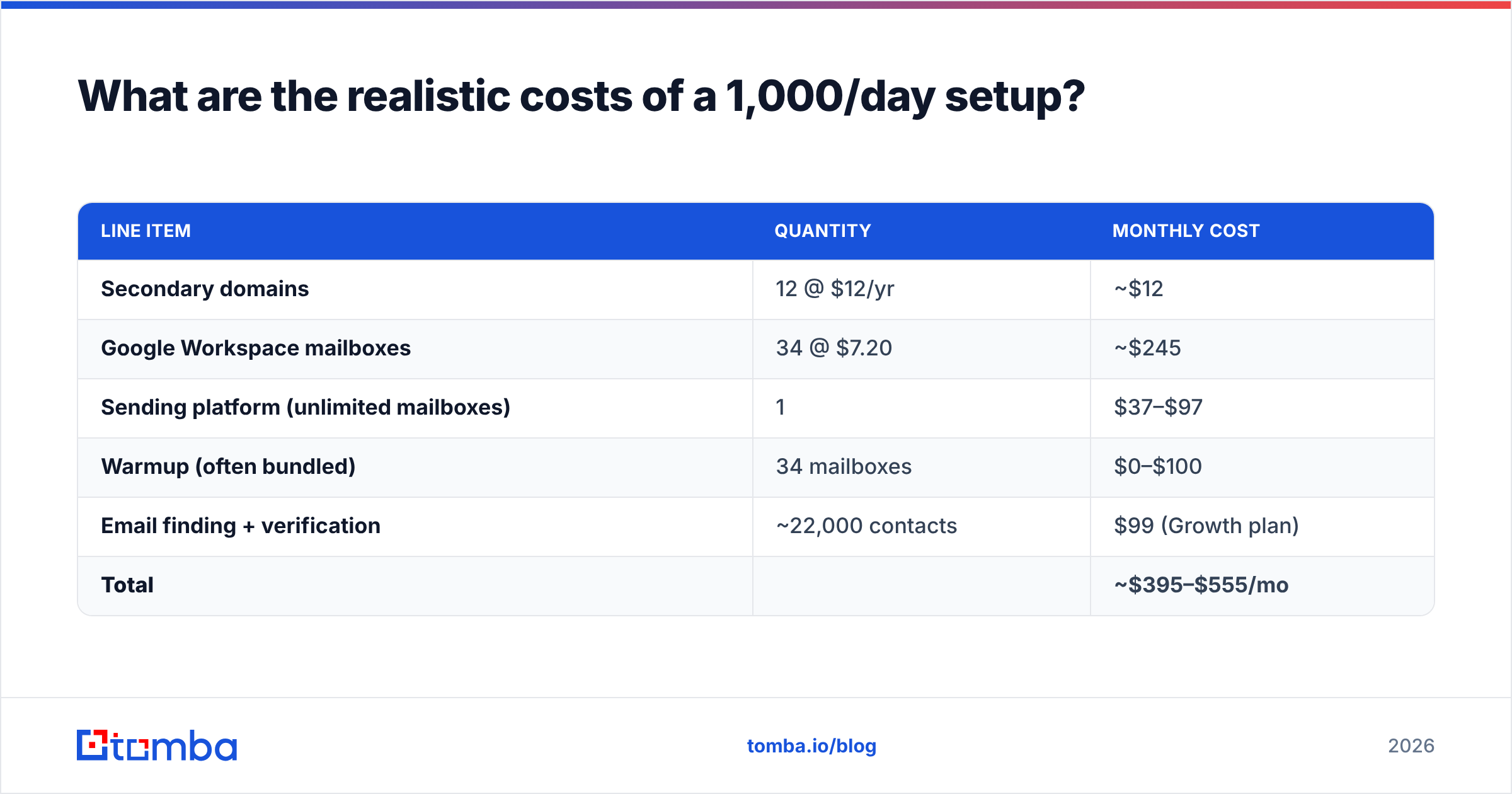
What are the realistic costs of a 1,000/day setup?#
| Line item | Quantity | Monthly cost |
|---|---|---|
| Secondary domains | 12 @ $12/yr | ~$12 |
| Google Workspace mailboxes | 34 @ $7.20 | ~$245 |
| Sending platform (unlimited mailboxes) | 1 | $37–$97 |
| Warmup (often bundled) | 34 mailboxes | $0–$100 |
| Email finding + verification | ~22,000 contacts | $99 (Growth plan) |
| Total | ~$395–$555/mo |
Two ways to cut that: use Microsoft 365 Business Basic ($6/mailbox) instead of Google, or use alias mailboxes where your provider permits them. Do not cut verification — it's 20% of the bill and prevents 100% of the failure modes.
At $450/month for 1,000 daily sends, you're paying about $0.015 per email. If your average contract value is $5,000 and you close 1 in 400 sequenced leads, that infrastructure pays for itself in the first week of a month.
How do you know if it's actually working?#
Volume is a vanity metric. These four numbers tell you whether 1,000/day is real or theatre:
- Inbox placement rate — run a seed test weekly (GlockApps, Mailreach, or your platform's built-in test). Below 80%, stop scaling and fix.
- Bounce rate — under 2% sustained. A spike on a single domain usually means one bad list segment, not a systemic problem.
- Spam complaint rate — under 0.10% is safe, 0.30% is Google's stated ceiling, above that is a countdown clock.
- Reply rate — under 1% across 1,000/day means your targeting is wrong, and low engagement itself degrades reputation over time. Volume never fixes a positioning problem.
Check your subject lines and body copy against a spam checker before launch too. At 1,000 sends a day, a single spam-triggering phrase repeated across every message compounds fast.
The uncomfortable truth: most teams asking how to send 1,000 emails per day should be asking how to get better replies from 200. The infrastructure above works, but it amplifies whatever your response rate already is. Ten times the volume of a message nobody answers is ten times the complaint risk with the same pipeline.
Frequently asked questions#
Can I send 1,000 emails per day from Gmail? Not through third-party SMTP. Google Workspace's 2,000-recipient daily cap applies to the Gmail interface; external SMTP relay through a cold-email tool hits throttling well below that, typically in the 300–500 range before deferrals start.
How many domains do I need for 1,000 emails per day? Eight to twelve secondary domains with three mailboxes each. Fewer domains means higher per-domain volume, which is exactly the pattern reputation systems flag.
How long before I can hit 1,000/day? Three to four weeks of warmup from a cold start, assuming you buy domains and provision mailboxes on day one. Domains should also age 2–4 weeks before sending at all — freshly registered domains get extra scrutiny.
Is 1,000 emails per day legal? Volume itself isn't regulated. CAN-SPAM (US) requires accurate headers, a physical address, and a working opt-out. GDPR (EU) requires a lawful basis — legitimate interest can cover B2B outreach but demands relevance and easy opt-out. Check the FTC's CAN-SPAM guidance before you scale.
Where to start#
Build the list before you build the infrastructure. Thirty-four warmed mailboxes pointed at stale, unverified data is 34 domains you'll be replacing in six weeks — the sending stack is the easy half of this problem, and the contact data is the half that decides whether it survives.
Start with Tomba Email Finder to build verified contact lists at the volume 1,000 daily sends actually requires, with verification built into the same workflow so bad addresses never reach your sequences. The free tier gives you 25 searches to test accuracy against a domain you already know, and the Growth plan at $99/mo covers the roughly 22,000 monthly contacts a 1,000/day program consumes. Get the data right, and the deliverability math above starts working in your favour instead of against it.
Related guides#
// get started
Find, verify and enrich your first contacts today
Start on the free plan with 25 searches a month, then scale when your team is ready.
Free plan · No credit card required · GDPR & CCPA
// about the author